Solved Printer no longer working on my wirless network

tinabina22

New member
Local time
7:18 PM
Messages
22
Location
St. Albans, VT
I have been using my Acer aspire 5532 laptop with windows 7 and printing from my hp photosmart all in one c5180 printer via my netgear WGR 614v9 wireless router connected to my desktop with windows xp installed on it just fine for well over a year now.
I recently built and replaced my old desktop with a new desktop and installed windows 7 home premium 64bit but I am now unable to print to my printer! I can install it on the laptop but can not print to it. It states that it can not locate the printer? Gives an error code of 31?
Help!
 
Last edited:

My Computer My Computer

Computer Manufacturer/Model Number
Microsoft 64-bit 1-Pack for System Builders - OEM
OS
Windows 7 Home Premium
CPU
Intel core i7-950 Bloomfield 3.06GHz LGA 1366 130W Quad-C
Motherboard
ASUS Sabertooth X58 LGA 1366 Intel X5 SATA 6Gb/s USB 3.0
Memory
PNY SLR8 6GB 240 -Pin DDR3 SDRAM DDR3 1600
Graphics Card(s)
EVGA 01G-P3-1373-TR GeForce GTX 460 Suerclocked EE 1GB 256 b
Sound Card
Intergrated
Monitor(s) Displays
ASUS VW226TL-P Black 22" 5ms Widescreen
Screen Resolution
1680x1050
Hard Drives
Western Digital Caviar Black WD6401A
Optiacl drive: Lite-ON 24X DVD Writer Black SATA Model iHAS424-98 LightScribe Support
Floppy drive: BYTECC Black 1.44-1.25 MB 3.5" External USB Floppy Drive
PSU
CORSAIR Enthusiast Series CMPSU-650TX 650W ATX12V / EP
Case
Cooler Master RC-692-KKN2 CM690 II Advanced Black Steel ATX
Cooling
See CPU
Keyboard
QUMAX Gemini U26 Back USB RF wireless slim Keyboard
Mouse
Mouse combined with Keyboard
Internet Speed
2MbPs
Other Info
I built this computer myself to my own specs.
I have been using my Acer aspire 5532 laptop with windows 7 and printing from my hp photosmart all in one c5180 printer via my netgear WGR 614v9 wireless router connected to my desktop with windows xp installed on it just fine for well over a year now.
I recently built and replaced my old desktop with a new desktop and installed windows 7 home premium 64bit but I am now unable to print to my printer! I can install it on the laptop but can not print to it. It states that it can not locate the printer? Gives an error code of 31?
Help!
Is your Acer laptop 32-bit Win7 or 64-bit Win7? I'm going to guess it is 32-bit Win7.

If it was 64-bit Win7 you'd have no problem right now. My guess is that since your old desktop had WinXP (32-bit no doubt), your Acer laptop was also a 32-bit version of Win7.

I'm assuming that your printer is now installed on your new 64-bit Win7 desktop, and will go from there. You now want to "share" that printer, which is hosted by the 64-bit Win7, so that your other network machine (your 32-bit Win7 laptop) can print to it.

You simply need to install the 32-bit (x86) printer driver on your 64-bit Win7 system, as an "additional driver". The hosting 64-bit Win7 system will thus actually have TWO drivers installed for this printer which you've marked as "shared"... one for its own 64-bit local/USB printing needs as well as for 64-bit client machines (say if you had a 3rd 64-bit laptop wanting to print to the "shared" printer) and a second for 32-bit client machines (say a 32-bit WinXP laptop/desktop, or a 32-bit Win7 laptop/desktop, wanting to print to the "shared" printer).

You need to download the 32-bit Win7 version of your C5180 printer driver from the HP site, and "expand it" so that you can access the INF files for it from the "add additional printer driver' dialog on your 64-bit Win7 desktop system that is "hosting" the "shared" C5180 to the rest of your network's machines. Note that I'm not asking you to "install" it on your 64-bit system. It's meant for a 32-bit system, not a 64-bit system. But the imbedded 32-bit printer driver (INF) file CAN be installed as a second 32-bit "additional printer driver" on a 64-bit hosting system, thus allowing the printer to be "shared" with all network client systems, be they 32-bit or 64-bit WinXP or Win7 systems.


On your 64-bit Win7 system where you currently have the x64 64-bit version of your C5180 printer driver installed:

Start -> Devices and printers -> right-click on the printer, and select "Printer properties" from the popup menu.

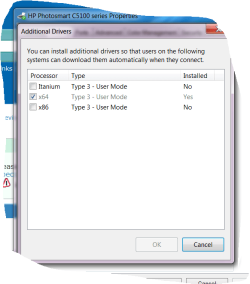
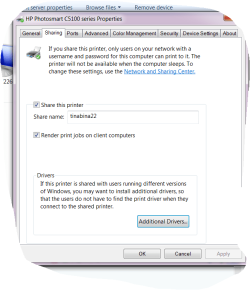
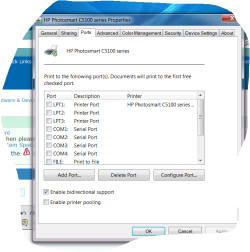
Select the "Sharing" tab, and then push the "additional drivers" button. You should then see the x64 radio button checked for the currently installed driver. You should obviously have the "share this printer" button checked, and the name you enter as the "share name" is what will be presented on your 32-bit laptop in order to "connect", which will facilitate printing on the 64-bit Win7 host machine for print requests made from the 32-bit laptop.

Now check the x86 button and then push the OK button (which will light up, to allow you to enter the wizard) to proceed to the next steps.

You'll then get an "install print drivers" dialog window which will allow you to navigate to the folder in which you expanded the 32-bit driver for the C5180 that you downloaded from the HP support site. You need to point to the folder where the "INF" file lives for the printer. Then push OK, and follow the remaining instructions for the "additional drivers" wizard.

When this second driver installation process completes successfully you will then see BOTH the x64 and x86 radio buttons checked. You're now ready to "share" this printer from the 64-bit host machine to any 32-bit or 64-bit client machines also on your network.


Now, back on the 32-bit laptop, you need to get into the "add printer" dialog, and follow the wizard steps to the "shared" printer name which should now be visible from the 64-bit host machine.

Right-click on that "shared printer" object and select the "connect" option and the rest should happen automatically. This "connect" process is actually a request from the 32-bit/64-bit client to have the 64-bit "host" system ship over either the 32-bit or 64-bit printer driver that's appropriate for the client system. And since the 64-bit system now has BOTH x64 and x86 drivers installed and available (now that you've successfully added the SECOND 32-bit printer driver using the "additional drivers" process), the 64-bit hosting system can now support printing requests from any Windows client machine on your network... whether WinXP or Win7, and whether 32-bit of 64-bit client environments.

You're now home free. That "shared" printer (hosted by the 64-bit Win7 machine) is now in your list of available printers on the 32-bit laptop, and you can specify the usual printing preferences and defaults, etc. The 64-bit hosting system will of course use the x64 version of the driver for its own local/USB printing needs. And the proper x64 or x86 version of the driver will be shipped at "connect" time (which is a one-time activity) from the host system to the client system, for use thereafter... in support of all print requests from the client machine to the "shared" printer on the host machine.


If you have questions or problems, please ask.

But the key is to install a SECOND PRINTER DRIVER for 32-bit clients on the 64-bit system. Then the 64-bit host Win7 system will be able to support both 32-bit and 64-bit client machines, for this "shared" printer, facilitated through the one-time "connect" action from the client machine that completes the "add printer" dialog on the client machine.


NOTE: if you have an existing installed 32-bit Win7 system (as you likely do on your Acer laptop), and if the C5180 printer was natively supported by Win7 and you didn't need to retrieve even the 64-bit driver from the HP site but rather Win7 just recognized it and supported it immediately, then you do NOT need to download the 32-bit printer driver for the C5180 from the HP site. The INF file you already need is on your 32-bit laptop in a special system folder that holds INF files for EVERY DEVICE SUPPORTED BY WIN7 OUT-OF-THE-BOX.

All of these "supported device" drivers are in C:\Windows\System32\DriverStore\FileRepository.

However I've looked at my own FileRepository and don't find an INF file that mentions the "C5180" by that name inside of it. So I suspect you need to get it from the HP site. I've looked further and it does not appear that the C5180 was supported by Win7's installation DVDs. The drivers for Win7 came out late in 2009, and were distributed by HP itself on their support site.

If you had a software CD with the C5180 I would guess it might be in something like a \Drivers folder on some software CD you got with the printer, but again I doubt that the Win7 version of the driver would be on the CD you have ... but who knows?

I've found it on the HP site, and it's a 290MB download (clearly lots more software, outside of the drivers). I would suggest using WinRAR or WinZIP to "expand/unpack" it (unless it's a self-expanding zip file which you can run to expand, and then cancel the offer to run the SETUP program) into the underlying folders. Again, we're looking just for the INF driver files (which would be in a single folder I'm sure) and do not need any of the other supporting software.

 
Last edited:

My Computer My Computer

Computer type
PC/Desktop
Computer Manufacturer/Model Number
Home-built, two systems (1) and (2)
OS
Windows 7 Pro x64 (1), Win7 Pro X64 (2)
CPU
i5-3350p 3.1Ghz/6MB-cache (1); E8400 3.0Ghz/6MB-cache (2)
Motherboard
ASUS P8Z77-V Pro (1); ASUS P5Q3 (2)
Memory
8GB PC3-12800 DDR3 (1); 4GB PC3-10600 DDR3 (2)
Graphics Card(s)
ATI HD7750 (1), (see TV cards); ATI R7 250 (2)
Sound Card
Realtek ALC892 HD Audio (1); Realtek ALC1200 HD Audio (2)
Monitor(s) Displays
Eizo HD2441W LCD, Eizo S2433W (1); Eizo 24" S2433W (2)
Screen Resolution
1920x1200, 1920x1200 (1); 1920x1200 (2)
Hard Drives
(1) 1TB SATA-II (7200RPM), 2x2TB SATA-III (7200RPM), 250GB SATA-III (10000RPM) for OS; 2x2TB external USB 3.0

(2) 320GB SATA-II (7200RPM), 750GB SATA-II (7200RPM), 150GB SATA-II (10000RPM) for OS; 2TB external USB 3.0
PSU
Nesteq ECS-6001 600W (1); Nesteq ECS-5001 500W (2)
Case
Acousti-Case 360 (1) and (2)
Cooling
Noctua NH-U12P SE2 for CPU, 2x120mm case fans (1) and (2)
Keyboard
IBM PS/2 (1) and (2)
Mouse
Logitech MX Revolution wireless (1); Microsoft wired (2)
Internet Speed
100mbps down / 10mbps up
Antivirus
Microsoft Security Essentials; Malwarebyte Anti-Malware Pro
Browser
Firefox
Other Info
Ceton InfiniTV 4-tuner cablecard-enabled TV card as well as Hauppauge HVR-2250 OTA/ATSC 2-tuner TV card in (1), running under Win7 WMC
Well, now I realize I probably should have read your original post a bit closer...

It's not quite clear exactly how you had this working originally, but you tell me which of the following two arrangements you were using:

(a) C5180 connected to the router via Ethernet cable, and then accessed from both your 32-bit WinXP desktop as well as (32/64-bit Win7) Acer laptop as a true "network printer" accessed from BOTH of your machines via TCP/IP port, or

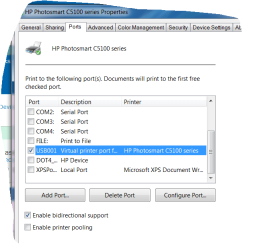
(b) C5180 connected to your 32-bit WinXP desktop via USB cable, and "shared" on this hosting 32-bit WinXP thus making it available to other client 32-bit machines on your network, including your guaranteed 32-bit win7 Acer laptop, which has "connected" to the "shared" printer hosted by the 32-bit WinXP machine, thus showing up on both machines as port "USB001" for "virtual USB printer".

Apparently the C5180 can be accessed either way... Ethernet cable as a network printer, or USB cable hosted off of one machine and "shared" to all other client machines on the network.


My earlier how-to post assumed you were using (b). This is absolutely the correct solution, if (b) is your setup and your printer is connected to the "hosting" computer and then "shared" for access to other "client" computers" on the network.

Now if your arrangement was (a), I can't see how changing your 32-bit WinXP desktop for a 64-bit Win7 desktop can have any possible impact of still being accessible to your other 32/64-bit Win7 Acer laptop, since the Ethernet-connected printer is as independent an IP node in your network as it was before, and has zero to to with swapping one of your two computers.
 

My Computer My Computer

Computer type
PC/Desktop
Computer Manufacturer/Model Number
Home-built, two systems (1) and (2)
OS
Windows 7 Pro x64 (1), Win7 Pro X64 (2)
CPU
i5-3350p 3.1Ghz/6MB-cache (1); E8400 3.0Ghz/6MB-cache (2)
Motherboard
ASUS P8Z77-V Pro (1); ASUS P5Q3 (2)
Memory
8GB PC3-12800 DDR3 (1); 4GB PC3-10600 DDR3 (2)
Graphics Card(s)
ATI HD7750 (1), (see TV cards); ATI R7 250 (2)
Sound Card
Realtek ALC892 HD Audio (1); Realtek ALC1200 HD Audio (2)
Monitor(s) Displays
Eizo HD2441W LCD, Eizo S2433W (1); Eizo 24" S2433W (2)
Screen Resolution
1920x1200, 1920x1200 (1); 1920x1200 (2)
Hard Drives
(1) 1TB SATA-II (7200RPM), 2x2TB SATA-III (7200RPM), 250GB SATA-III (10000RPM) for OS; 2x2TB external USB 3.0

(2) 320GB SATA-II (7200RPM), 750GB SATA-II (7200RPM), 150GB SATA-II (10000RPM) for OS; 2TB external USB 3.0
PSU
Nesteq ECS-6001 600W (1); Nesteq ECS-5001 500W (2)
Case
Acousti-Case 360 (1) and (2)
Cooling
Noctua NH-U12P SE2 for CPU, 2x120mm case fans (1) and (2)
Keyboard
IBM PS/2 (1) and (2)
Mouse
Logitech MX Revolution wireless (1); Microsoft wired (2)
Internet Speed
100mbps down / 10mbps up
Antivirus
Microsoft Security Essentials; Malwarebyte Anti-Malware Pro
Browser
Firefox
Other Info
Ceton InfiniTV 4-tuner cablecard-enabled TV card as well as Hauppauge HVR-2250 OTA/ATSC 2-tuner TV card in (1), running under Win7 WMC
One more point... that 290MB driver/software download from HP for Win7, well you probably have already previously downloaded it. And I suspect you may have already installed it onto your 32-bit Win7 Acer laptop (as part of your attempt to resolve your current problem).

Well, if it's already installed (even though you still can't seem to print), then that means the 32-bit driver files (which you need on your 64-bit desktop to which the C5180 is USB-connected, assuming it is USB-connected) have already been incorporated into the C:\Windows\System32\DriverStore\FileRepository on the laptop.

So in the "additional drivers" step I described previously, you can navigate to the proper folder on your laptop which contains the incorporated driver folder for the C5180 that was put there when you installed the HP software/driver onto the laptop hoping it would solve your problem.

Note that this 290MB sofware/driver file from HP supports Win7 in both 32-bit and 64-bit flavors, according to the HP web site description:


Compatibility:
s.gif
Microsoft Windows 7 (32-bit), Microsoft Windows 7 Home Basic (32-bit), Microsoft Windows 7 Home Premium (32-bit), Microsoft Windows 7 Professional (32-bit), Microsoft Windows 7 Enterprise (32-bit), Microsoft Windows 7 Ultimate (32-bit), Microsoft Windows 7 Home Basic (64-bit), Microsoft Windows 7 Home Premium (64-bit), Microsoft Windows 7 Professional (64-bit), Microsoft Windows 7 Enterprise (64-bit), Microsoft Windows 7 Ultimate (64-bit), Microsoft Windows 7 (64-bit)
 

My Computer My Computer

Computer type
PC/Desktop
Computer Manufacturer/Model Number
Home-built, two systems (1) and (2)
OS
Windows 7 Pro x64 (1), Win7 Pro X64 (2)
CPU
i5-3350p 3.1Ghz/6MB-cache (1); E8400 3.0Ghz/6MB-cache (2)
Motherboard
ASUS P8Z77-V Pro (1); ASUS P5Q3 (2)
Memory
8GB PC3-12800 DDR3 (1); 4GB PC3-10600 DDR3 (2)
Graphics Card(s)
ATI HD7750 (1), (see TV cards); ATI R7 250 (2)
Sound Card
Realtek ALC892 HD Audio (1); Realtek ALC1200 HD Audio (2)
Monitor(s) Displays
Eizo HD2441W LCD, Eizo S2433W (1); Eizo 24" S2433W (2)
Screen Resolution
1920x1200, 1920x1200 (1); 1920x1200 (2)
Hard Drives
(1) 1TB SATA-II (7200RPM), 2x2TB SATA-III (7200RPM), 250GB SATA-III (10000RPM) for OS; 2x2TB external USB 3.0

(2) 320GB SATA-II (7200RPM), 750GB SATA-II (7200RPM), 150GB SATA-II (10000RPM) for OS; 2TB external USB 3.0
PSU
Nesteq ECS-6001 600W (1); Nesteq ECS-5001 500W (2)
Case
Acousti-Case 360 (1) and (2)
Cooling
Noctua NH-U12P SE2 for CPU, 2x120mm case fans (1) and (2)
Keyboard
IBM PS/2 (1) and (2)
Mouse
Logitech MX Revolution wireless (1); Microsoft wired (2)
Internet Speed
100mbps down / 10mbps up
Antivirus
Microsoft Security Essentials; Malwarebyte Anti-Malware Pro
Browser
Firefox
Other Info
Ceton InfiniTV 4-tuner cablecard-enabled TV card as well as Hauppauge HVR-2250 OTA/ATSC 2-tuner TV card in (1), running under Win7 WMC
Just one more followup...

Still no response yet from you, but I've decided it is (b) which you're using. The C5180 must be USB-connected now to your new 64-bit Win7 desktop machine, just as it was previously USB-connected to the old 32-bit WinXP desktop machine you've now replaced. And that means my "solution" (i.e. to add the 32-bit printer driver as "additional drivers" from Printer Properties -> Sharing on the 64-bit Win7 system) and also marking the printer as "shared" in the 64-bit Win7 system, is 100% going to solve your problem.

You will then be able to "see it" as a network shareable printer from your 32-bit Win7 desktop, and you will then be able to right-click on it and select "connect", and the now-installed 32-bit version of the printer driver will get shipped from your 64-bit desktop system over to the 32-bit laptop, the printer will get installed there, and you'll now be able to print from the 32-bit laptop through the 64-bit host to the C5180 which is USB-connected to the 64-bit Win7 host desktop machine.

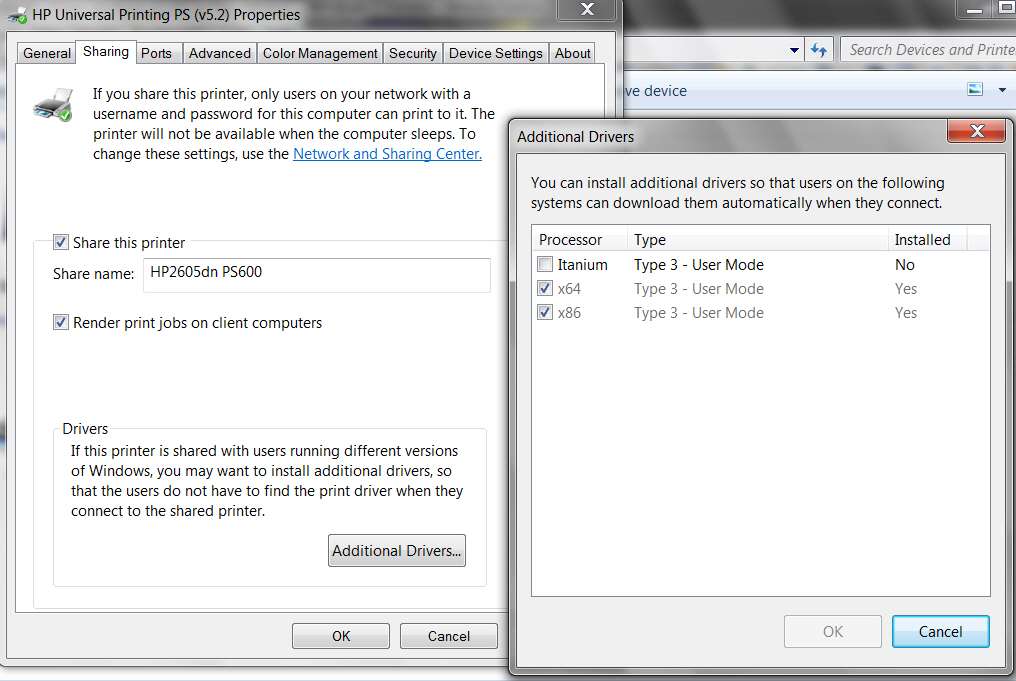
Should be a 100% successful solution. For example, in my own very similar situation where I have an HP 2605dn printer USB-connected to my 64-bit Win7 system and I want to support printing to it from my network-connected 32-Bit WinXP system:

sharedprinters.jpg


Also, I've downloaded that 290MB software/driver file for 32/64-bit Win7 from the HP site, and unpacked/expanded it using WinRAR. Looks like it could then be just burned to a DVD (not a CD, as it appears exceed the 700MB capacity of a CD in its expanded form) since it has an AUTORUN.INF file in its root as well as a SETUP.EXE you can manually run directly if you don't burn this to a CD.

Or, you could just expand it on your hard drive and then run its SETUP.EXE on your 64-bit Win7 system if you really wanted to install all of the software + 64-bit driver on your 64-bit Win7 system (if you haven't already done just that). And you could then also point to the root folder from the expansion when navigating to the driver INF file for the "additional drivers" dialog, to add the 32-bit flavor driver required to support printing from your 32-bit laptop to the "shared" printer USB-connected to the 64-bit Win7 desktop.

It is in the root of the unpacked/expanded folder where I see HPOSCU01.INF, which inside of it does seem to be the correct INF for the entire C5100 family of printers (along with many other printers apparently supported by this same 32/64-bit Win7 software/driver file).

So to reinforce what I specified in my earlier "solution recipe", you would download and expand (if you haven't already done it) that 290MB software/driver file I provided the link to earlier, expand it with WinRAR (or similar), and then point to the root of where you expanded it when asked to point to the INF driver file in the "additional drivers" dialog step in my recipe. It is that HPOSCU01.INF file in that root folder out of the 290MB file expansion which will be used in its 32-bit flavor, since you're trying to install the x86 driver as your SECOND driver for this printer.

Good luck.

Please report back if you have further questions, problems, or success.
 

My Computer My Computer

Computer type
PC/Desktop
Computer Manufacturer/Model Number
Home-built, two systems (1) and (2)
OS
Windows 7 Pro x64 (1), Win7 Pro X64 (2)
CPU
i5-3350p 3.1Ghz/6MB-cache (1); E8400 3.0Ghz/6MB-cache (2)
Motherboard
ASUS P8Z77-V Pro (1); ASUS P5Q3 (2)
Memory
8GB PC3-12800 DDR3 (1); 4GB PC3-10600 DDR3 (2)
Graphics Card(s)
ATI HD7750 (1), (see TV cards); ATI R7 250 (2)
Sound Card
Realtek ALC892 HD Audio (1); Realtek ALC1200 HD Audio (2)
Monitor(s) Displays
Eizo HD2441W LCD, Eizo S2433W (1); Eizo 24" S2433W (2)
Screen Resolution
1920x1200, 1920x1200 (1); 1920x1200 (2)
Hard Drives
(1) 1TB SATA-II (7200RPM), 2x2TB SATA-III (7200RPM), 250GB SATA-III (10000RPM) for OS; 2x2TB external USB 3.0

(2) 320GB SATA-II (7200RPM), 750GB SATA-II (7200RPM), 150GB SATA-II (10000RPM) for OS; 2TB external USB 3.0
PSU
Nesteq ECS-6001 600W (1); Nesteq ECS-5001 500W (2)
Case
Acousti-Case 360 (1) and (2)
Cooling
Noctua NH-U12P SE2 for CPU, 2x120mm case fans (1) and (2)
Keyboard
IBM PS/2 (1) and (2)
Mouse
Logitech MX Revolution wireless (1); Microsoft wired (2)
Internet Speed
100mbps down / 10mbps up
Antivirus
Microsoft Security Essentials; Malwarebyte Anti-Malware Pro
Browser
Firefox
Other Info
Ceton InfiniTV 4-tuner cablecard-enabled TV card as well as Hauppauge HVR-2250 OTA/ATSC 2-tuner TV card in (1), running under Win7 WMC
i kinda thought he had it connected via ethernet to his router.
 

My Computer My Computer

Computer Manufacturer/Model Number
.
OS
.
CPU
.
Motherboard
.
Memory
.
Graphics Card(s)
.
Monitor(s) Displays
.
Screen Resolution
.
Hard Drives
.
PSU
.
Case
.
Cooling
.
Keyboard
.
Mouse
.
Internet Speed
.
Other Info
.
i kinda thought he had it connected via ethernet to his router.
I agree... his wording was vague. Actually, each time I re-read what he said I am more confused. I just re-read it again and now don't know if his problem is that he can't print to it from the new 64-bit Win7 desktop, or from the Win7 Acer laptop (which I've concluded must be a 32-bit Win7).

Wish OP would come back and clarify.

But replacing the WinXP desktop would have zero effect on the laptop getting to the printer, if the printer was network available directly via Ethernet to the router.

The only possibility for a new problem to have arisen from the desktop swap would be if the printer had been previously USB-connected to the 32-bit WinXP host system, and is now USB-connected to the replacement 64-bit Win7 system.

This new setup absolutely requires a second 32-bit printer driver to be installed, in order to support the "shared" printer with 32-bit and 64-bit client systems on the network. There would of course be 64-bit printer support installed directly onto the new 64-bit Win7 desktop (using the same 290MB software/driver download file from HP, which supports 32/64-bit systems) for the local USB-connected printer, and in support of 32-bit network client print requests a second 32-bit driver would also be needed, using the "additional drivers" dialog for Printing Properties -> Sharing tab.

Also, I think his reference to the "wireless router" was from the laptop to the home network, wireless to the wireless router... but accessing the USB-connected printer hosted by the desktop machine on the network, also accessed through the router obviously (really to the desktop host, which has the "shared" USB-connected printer attached to it).


I agree... this is all somewhat ambiguous, but because it had to be a USB-connected printer in order for the swap of WinXP desktop to Win7 desktop to have had any impact and cause any new problem since the old printer host was 32-bit and the new printer host is 64-bit, I feel that's what he was trying to describe.

I have been using my Acer aspire 5532 laptop with windows 7 and printing from my hp photosmart all in one c5180 printer via my netgear WGR 614v9 wireless router connected to my desktop with windows xp installed on it just fine for well over a year now.
I recently built and replaced my old desktop with a new desktop and installed windows 7 home premium 64bit but I am now unable to print to my printer! I can install it on the laptop but can not print to it. It states that it can not locate the printer? Gives an error code of 31?
Help!
 

My Computer My Computer

Computer type
PC/Desktop
Computer Manufacturer/Model Number
Home-built, two systems (1) and (2)
OS
Windows 7 Pro x64 (1), Win7 Pro X64 (2)
CPU
i5-3350p 3.1Ghz/6MB-cache (1); E8400 3.0Ghz/6MB-cache (2)
Motherboard
ASUS P8Z77-V Pro (1); ASUS P5Q3 (2)
Memory
8GB PC3-12800 DDR3 (1); 4GB PC3-10600 DDR3 (2)
Graphics Card(s)
ATI HD7750 (1), (see TV cards); ATI R7 250 (2)
Sound Card
Realtek ALC892 HD Audio (1); Realtek ALC1200 HD Audio (2)
Monitor(s) Displays
Eizo HD2441W LCD, Eizo S2433W (1); Eizo 24" S2433W (2)
Screen Resolution
1920x1200, 1920x1200 (1); 1920x1200 (2)
Hard Drives
(1) 1TB SATA-II (7200RPM), 2x2TB SATA-III (7200RPM), 250GB SATA-III (10000RPM) for OS; 2x2TB external USB 3.0

(2) 320GB SATA-II (7200RPM), 750GB SATA-II (7200RPM), 150GB SATA-II (10000RPM) for OS; 2TB external USB 3.0
PSU
Nesteq ECS-6001 600W (1); Nesteq ECS-5001 500W (2)
Case
Acousti-Case 360 (1) and (2)
Cooling
Noctua NH-U12P SE2 for CPU, 2x120mm case fans (1) and (2)
Keyboard
IBM PS/2 (1) and (2)
Mouse
Logitech MX Revolution wireless (1); Microsoft wired (2)
Internet Speed
100mbps down / 10mbps up
Antivirus
Microsoft Security Essentials; Malwarebyte Anti-Malware Pro
Browser
Firefox
Other Info
Ceton InfiniTV 4-tuner cablecard-enabled TV card as well as Hauppauge HVR-2250 OTA/ATSC 2-tuner TV card in (1), running under Win7 WMC
Response

Sorry it has taken me so long to get back to you, this is the first chance I've had to get on the computer.
I checked my laptop system and it too is win7 64 bit. I've already tried some of your recommendations but I will give a few more a try. It's getting really frustrating though.
The set up is/was b. The printer is now hooked up to my new pc with win7 64 bit but was hooked up to win xp 32 bit. It's hooked to the new one via a wire attached to a USB port. I have tried many things included but not limited to down loading drivers, updates etc...
To sum up: New pc is win7 64bit, old laptop is win7 64 bit also, hp photosmart all in one c5180 printer connected via USB port to new pc.

Thanks for your help
Tina
 

My Computer My Computer

Computer Manufacturer/Model Number
Microsoft 64-bit 1-Pack for System Builders - OEM
OS
Windows 7 Home Premium
CPU
Intel core i7-950 Bloomfield 3.06GHz LGA 1366 130W Quad-C
Motherboard
ASUS Sabertooth X58 LGA 1366 Intel X5 SATA 6Gb/s USB 3.0
Memory
PNY SLR8 6GB 240 -Pin DDR3 SDRAM DDR3 1600
Graphics Card(s)
EVGA 01G-P3-1373-TR GeForce GTX 460 Suerclocked EE 1GB 256 b
Sound Card
Intergrated
Monitor(s) Displays
ASUS VW226TL-P Black 22" 5ms Widescreen
Screen Resolution
1680x1050
Hard Drives
Western Digital Caviar Black WD6401A
Optiacl drive: Lite-ON 24X DVD Writer Black SATA Model iHAS424-98 LightScribe Support
Floppy drive: BYTECC Black 1.44-1.25 MB 3.5" External USB Floppy Drive
PSU
CORSAIR Enthusiast Series CMPSU-650TX 650W ATX12V / EP
Case
Cooler Master RC-692-KKN2 CM690 II Advanced Black Steel ATX
Cooling
See CPU
Keyboard
QUMAX Gemini U26 Back USB RF wireless slim Keyboard
Mouse
Mouse combined with Keyboard
Internet Speed
2MbPs
Other Info
I built this computer myself to my own specs.
The set up is/was b. The printer is now hooked up to my new pc with win7 64 bit but was hooked up to win xp 32 bit. It's hooked to the new one via a wire attached to a USB port. I have tried many things included but not limited to down loading drivers, updates etc...

To sum up: New pc is win7 64bit, old laptop is win7 64 bit also, hp photosmart all in one c5180 printer connected via USB port to new pc.
Ok. This really clarifies things. Thanks.

However... now I'm actually puzzled how you could have been printing from your 64-bit Acer laptop through the previous 32-bit WinXP which was hosting the USB-connected printer, presumably as a "shared" printer under WinXP.

Normally, in this type of setup you do NOT install any printer software/driver directly on the "client" system (in this case your 64-bit Win7 laptop). You only install the software/driver on the "host/server" system (in this case your old 32-bit WinXP desktop). Theoretically, WinXP can also support multiple drivers for client printing on a "shared" printer, but you should have remembered doing something on your WinXP desktop along these lines. Just like I was describing you needed to do today, adding a 32-bit driver on your existing 64-bit system, to support printing requests from 32-bit clients.

Well now you say that your "client" is actually a 64-bit Win7 client, not a 32-bit client as I'd guessed. So, if the C5180 is currently installed on your new 64-bit Win7 desktop system... and if YOU HAVE CHECKED THE "SHARE THIS PRINTER" box on Printing Properties -> Sharing tab (see my screenshot above), then you should have ZERO problem doing a "connect" from your 64-bit Win7 laptop to the "shared" printer on the 64-bit Win7 desktop.

There now is no need for a second 32-bit print driver to be added, since you have no 32-bit client systems as I thought you did.

Do you have "share this printer" checked on your new 64-bit Win7 desktop, for this printer??

How did you install the software/driver for the printer on the new 64-bit Win7 desktop? Using that 290MB download file from HP that I pointed you to?

Have you installed anything on your laptop relative to this printer???


You should NOT have needed to install any printer software/driver on your "client" laptop in order to facilitate printing through the router to the 64-bit Win7 desktop to the USB-connected printer on the desktop machine. This is 100% standard network printing functionality to a "shared" USB-connected printer, from network client systems. The fact that both host and client are 64-bit Win7 makes this all a piece of cake, and you should be having no problem... if the printer was installed on the desktop system and marked as "share this printer" in Printing Properties -> Sharing tab.

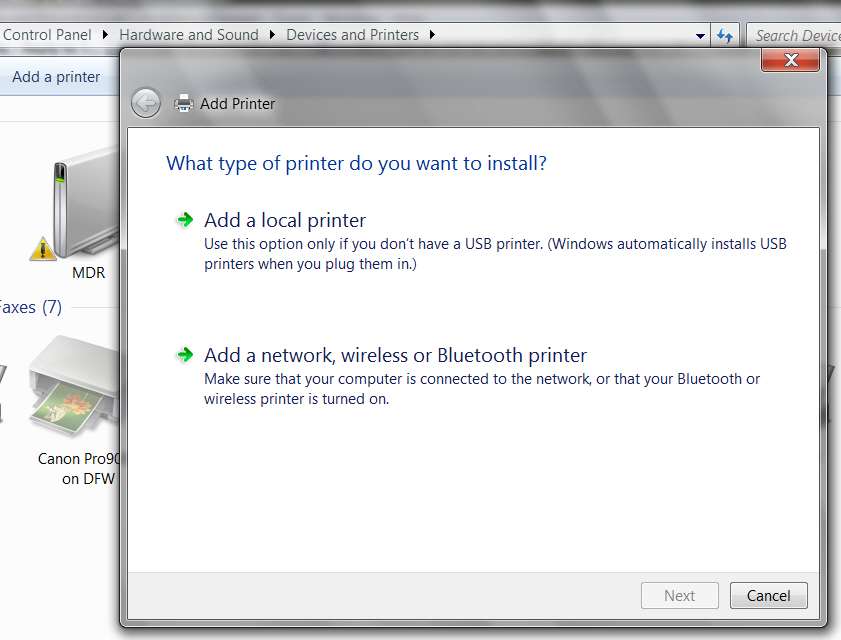
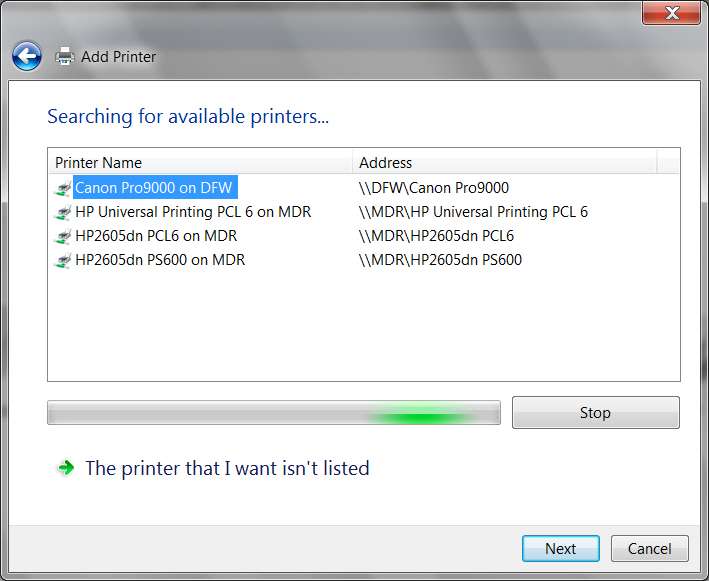
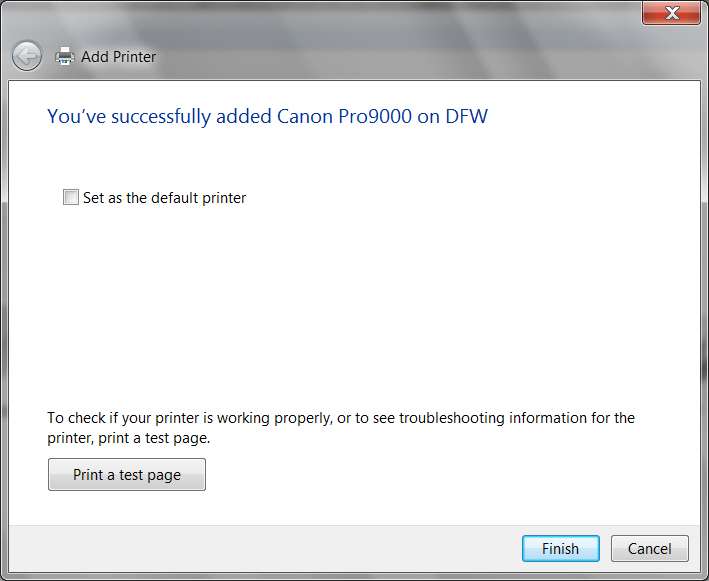
he software/driver is installed on your "host" desktop. You simply need to go through the "add printer" dialog on your client 64-bit Win7 laptop, select "network printer", choose the C5180 that is hosted by your 64-bit Win7 desktop (which should be visible in the network picture from the "add printer" wizard), and finish. You don't even need to "connect", since both client and host are 64-bit.

For example, I just added a printer to my system #1, which is USB-connected to my system #2. It's marked as "share this printer" on system #2, and thus is visible to the "add network printer" dialog wizard back on system #1.

addprinter1.jpg


addprinter2.jpg


addprinter3.jpg


addprinter4.jpg


addprinter5.jpg


Again, it is critical that the printer USB-connected to your new 64-bit Win7 desktop system be checked as "share this printer" in Printing Properties -> Sharing tab. This is what makes it visible to your client laptop system when you go through the "add printer" dialog and "add a network printer".
 

My Computer My Computer

Computer type
PC/Desktop
Computer Manufacturer/Model Number
Home-built, two systems (1) and (2)
OS
Windows 7 Pro x64 (1), Win7 Pro X64 (2)
CPU
i5-3350p 3.1Ghz/6MB-cache (1); E8400 3.0Ghz/6MB-cache (2)
Motherboard
ASUS P8Z77-V Pro (1); ASUS P5Q3 (2)
Memory
8GB PC3-12800 DDR3 (1); 4GB PC3-10600 DDR3 (2)
Graphics Card(s)
ATI HD7750 (1), (see TV cards); ATI R7 250 (2)
Sound Card
Realtek ALC892 HD Audio (1); Realtek ALC1200 HD Audio (2)
Monitor(s) Displays
Eizo HD2441W LCD, Eizo S2433W (1); Eizo 24" S2433W (2)
Screen Resolution
1920x1200, 1920x1200 (1); 1920x1200 (2)
Hard Drives
(1) 1TB SATA-II (7200RPM), 2x2TB SATA-III (7200RPM), 250GB SATA-III (10000RPM) for OS; 2x2TB external USB 3.0

(2) 320GB SATA-II (7200RPM), 750GB SATA-II (7200RPM), 150GB SATA-II (10000RPM) for OS; 2TB external USB 3.0
PSU
Nesteq ECS-6001 600W (1); Nesteq ECS-5001 500W (2)
Case
Acousti-Case 360 (1) and (2)
Cooling
Noctua NH-U12P SE2 for CPU, 2x120mm case fans (1) and (2)
Keyboard
IBM PS/2 (1) and (2)
Mouse
Logitech MX Revolution wireless (1); Microsoft wired (2)
Internet Speed
100mbps down / 10mbps up
Antivirus
Microsoft Security Essentials; Malwarebyte Anti-Malware Pro
Browser
Firefox
Other Info
Ceton InfiniTV 4-tuner cablecard-enabled TV card as well as Hauppauge HVR-2250 OTA/ATSC 2-tuner TV card in (1), running under Win7 WMC
delete printer?

Ok, I have done so many things to my computers in frustration I'm not even sure where I'm at with them. I do know that both computers are set to share each other, I transfered the information to each other thru windows easy transfer. Should I delete the printer from the laptop and start over? The laptop shows the printer as default printer but it's transparent and unable to print.
 

My Computer My Computer

Computer Manufacturer/Model Number
Microsoft 64-bit 1-Pack for System Builders - OEM
OS
Windows 7 Home Premium
CPU
Intel core i7-950 Bloomfield 3.06GHz LGA 1366 130W Quad-C
Motherboard
ASUS Sabertooth X58 LGA 1366 Intel X5 SATA 6Gb/s USB 3.0
Memory
PNY SLR8 6GB 240 -Pin DDR3 SDRAM DDR3 1600
Graphics Card(s)
EVGA 01G-P3-1373-TR GeForce GTX 460 Suerclocked EE 1GB 256 b
Sound Card
Intergrated
Monitor(s) Displays
ASUS VW226TL-P Black 22" 5ms Widescreen
Screen Resolution
1680x1050
Hard Drives
Western Digital Caviar Black WD6401A
Optiacl drive: Lite-ON 24X DVD Writer Black SATA Model iHAS424-98 LightScribe Support
Floppy drive: BYTECC Black 1.44-1.25 MB 3.5" External USB Floppy Drive
PSU
CORSAIR Enthusiast Series CMPSU-650TX 650W ATX12V / EP
Case
Cooler Master RC-692-KKN2 CM690 II Advanced Black Steel ATX
Cooling
See CPU
Keyboard
QUMAX Gemini U26 Back USB RF wireless slim Keyboard
Mouse
Mouse combined with Keyboard
Internet Speed
2MbPs
Other Info
I built this computer myself to my own specs.
Should I delete the printer from the laptop and start over?
Yes.

I realize it's all a bit fuzzy in your memory at the moment, but you still haven't said what you actually RAN to "install" the printer on the laptop? Was it that 290MB download file from HP? I would have thought so, since that is the Win7 installer for software/drivers for this printer.

But if the printer is USB-connected physically to the other Win7 desktop machine, why would you run the installer on the laptop??? There is no printer connected to it.

Anyway, on your laptop I would UNINSTALL everything you installed, by going to Control Panel -> uninstall a program, and find anything in the list that appears related to the HP C5180 printer and all related HP application software dealing with the printer. You may have to re-boot.

Then look in Control Panel -> Devices and printers, to see if the C5180 is still there. If it is, right-click on it and select "remove device", and follow the wizard steps. You may have to re-boot.

I'm a bit confused because what you may be seeing could be left over from when you had the whole setup working, when the printer was USB-hosted and "shared" by your 32-bit WinXP desktop. You seem to have simply changed desktop machines, but apparently didn't do everything you needed to do on the laptop side to get rid of the old printer connection arrangement so that you could start fresh, given that the printer was now newly hosted by your new 64-bit Win7 desktop.

Anyway, you want to uninstall and remove EVERYTHING YOU USED TO HAVE... whether it was the old printer definition from the WinXP desktop setup, or whether it is current from your attempts at getting things to work. Everything must go.

Your laptop is a "client" in your arrangement, and the desktop machine is the "server/host" of the shared printer which is USB-connected to the desktop machine.

That's the architecture, and that's the basis for what you will do to get it all working.


The laptop shows the printer as default printer but it's transparent and unable to print.
Well you don't have the printer connected to the laptop, you have it connected to the desktop. So I'm not surprised something looks strange, and that you of course cannot print.

Uninstall all software, and delete/remove/uninstall that printer object.

And please answer the question about what you did to get the C5180 installed and usable from the new 64-bit Win7 desktop machine to which it is USB-connected. Did you run that 290MB installer file from the HP site on that machine? Did your fresh install of Win7 simply support the printer "out of the box" with nothing extra needed from HP? (I doubt this was the story, based on what I can tell from my research).

It may be advisable to also uninstall/remove/delete the printer as currently installed on your 64-bit Win7 desktop machine, in order to "start over" there as well. I believe that 290MB installer file from HP is what you SHOULD have run, if you didn't. I would like to start over there as well.

But please "fill in the blanks". Is your C5180 currently installed and usable from the desktop machine?

And in Printing Properties -> Sharing tab, DOES IT SHOW "SHARE THIS PRINTER"??? And what is the NAME you have specified for that shared printer on that same tab?
 

My Computer My Computer

Computer type
PC/Desktop
Computer Manufacturer/Model Number
Home-built, two systems (1) and (2)
OS
Windows 7 Pro x64 (1), Win7 Pro X64 (2)
CPU
i5-3350p 3.1Ghz/6MB-cache (1); E8400 3.0Ghz/6MB-cache (2)
Motherboard
ASUS P8Z77-V Pro (1); ASUS P5Q3 (2)
Memory
8GB PC3-12800 DDR3 (1); 4GB PC3-10600 DDR3 (2)
Graphics Card(s)
ATI HD7750 (1), (see TV cards); ATI R7 250 (2)
Sound Card
Realtek ALC892 HD Audio (1); Realtek ALC1200 HD Audio (2)
Monitor(s) Displays
Eizo HD2441W LCD, Eizo S2433W (1); Eizo 24" S2433W (2)
Screen Resolution
1920x1200, 1920x1200 (1); 1920x1200 (2)
Hard Drives
(1) 1TB SATA-II (7200RPM), 2x2TB SATA-III (7200RPM), 250GB SATA-III (10000RPM) for OS; 2x2TB external USB 3.0

(2) 320GB SATA-II (7200RPM), 750GB SATA-II (7200RPM), 150GB SATA-II (10000RPM) for OS; 2TB external USB 3.0
PSU
Nesteq ECS-6001 600W (1); Nesteq ECS-5001 500W (2)
Case
Acousti-Case 360 (1) and (2)
Cooling
Noctua NH-U12P SE2 for CPU, 2x120mm case fans (1) and (2)
Keyboard
IBM PS/2 (1) and (2)
Mouse
Logitech MX Revolution wireless (1); Microsoft wired (2)
Internet Speed
100mbps down / 10mbps up
Antivirus
Microsoft Security Essentials; Malwarebyte Anti-Malware Pro
Browser
Firefox
Other Info
Ceton InfiniTV 4-tuner cablecard-enabled TV card as well as Hauppauge HVR-2250 OTA/ATSC 2-tuner TV card in (1), running under Win7 WMC

My Computer My Computer

Computer type
PC/Desktop
Computer Manufacturer/Model Number
Custom built, several laptops HP/ASUS
OS
Linux CENTOS 7 / various Windows OS'es and servers
CPU
Intel i7 Intel i5
Memory
8GB, 16GB
Graphics Card(s)
On Motherboard
Sound Card
Realtek HD audio
Monitor(s) Displays
Apple Cinema display, Samsung LCD
Screen Resolution
1920 X 1080
Hard Drives
4 X 1TB SATA
Mouse
Toshiba wireless laser
Internet Speed
> 20MB up
Hi there
try my solution -- read it in this post -- about post nr 3 or 4 in the thread

http://www.sevenforums.com/network-sharing/163763-trouble-printer-sharing.html

Cheers
jimbo
We're both talking about the same issue, the same problems of replacing parts of the network and the consequences (especially when the "host" machine to which the USB-connected "shared" printer is connected), the same solutions, and the same basic approach.

It's really a piece of cake, and a "recipe" of steps, from A to Z, on both "host" and "client" systems. It's not difficult at all, and all versions of Windows (XP, Vista, Win7) support this functionality of "shared printer" hosted by one machine and made available to all other machines on the network.

The complications come in when (a) you have 32-bit/64-bit host/client considerations, in which case TWO versions of the printer driver must be installed on the "host" system, in order to feed 32-bit or 64-bit "clients", and (b) you simply replace a component node machine in the overall network architechture and don't realize you perhaps have just temporarily impacted your "shared printer" capability in some way.

Not that there aren't 100% perfect and correct solutions to any of these complications or minor temporary "bumps in the road", but it just takes 10 minutes of sitting down and doing the right things, in proper sequence A-B. Depending on what network node has been changed, the repair steps could take 30 seconds, or it might take 2 minutes. But it requires doing the right things.

If inappropriate steps have already been taken (in "panic", to try and "get it to work because I really do need to print right now"), depending on what these inappropriate steps were they may or may not need to be uninstalled or backed out or whatever is needed to UNDO those inappropriate steps.


Basically, it's a simple 3-part process: (1) fully install the driver/software for the printer on the "host" system to which it is USB-connected, (2) "share" the printer appropriately on the "host" system, and then (3) "add printer" on each of the "client" systems that want to print on the "shared" printer through the "host" system.

Step (2) may involve adding a second version of the print driver on the "host" system for that printer, if there are 32-bit/64-bit host/client considerations.

Total job: 10 minutes at the outside, more like 5 minutes average. Could take 2 minutes. If you have to download the 32-bit version of the print driver it could take longer, but in this case he now has both host/client machines as 64-bit Win7, with zero 32-bit/64-bit considerations any more. Couldn't possibly be any simpler.


OP... where are you???
 

My Computer My Computer

Computer type
PC/Desktop
Computer Manufacturer/Model Number
Home-built, two systems (1) and (2)
OS
Windows 7 Pro x64 (1), Win7 Pro X64 (2)
CPU
i5-3350p 3.1Ghz/6MB-cache (1); E8400 3.0Ghz/6MB-cache (2)
Motherboard
ASUS P8Z77-V Pro (1); ASUS P5Q3 (2)
Memory
8GB PC3-12800 DDR3 (1); 4GB PC3-10600 DDR3 (2)
Graphics Card(s)
ATI HD7750 (1), (see TV cards); ATI R7 250 (2)
Sound Card
Realtek ALC892 HD Audio (1); Realtek ALC1200 HD Audio (2)
Monitor(s) Displays
Eizo HD2441W LCD, Eizo S2433W (1); Eizo 24" S2433W (2)
Screen Resolution
1920x1200, 1920x1200 (1); 1920x1200 (2)
Hard Drives
(1) 1TB SATA-II (7200RPM), 2x2TB SATA-III (7200RPM), 250GB SATA-III (10000RPM) for OS; 2x2TB external USB 3.0

(2) 320GB SATA-II (7200RPM), 750GB SATA-II (7200RPM), 150GB SATA-II (10000RPM) for OS; 2TB external USB 3.0
PSU
Nesteq ECS-6001 600W (1); Nesteq ECS-5001 500W (2)
Case
Acousti-Case 360 (1) and (2)
Cooling
Noctua NH-U12P SE2 for CPU, 2x120mm case fans (1) and (2)
Keyboard
IBM PS/2 (1) and (2)
Mouse
Logitech MX Revolution wireless (1); Microsoft wired (2)
Internet Speed
100mbps down / 10mbps up
Antivirus
Microsoft Security Essentials; Malwarebyte Anti-Malware Pro
Browser
Firefox
Other Info
Ceton InfiniTV 4-tuner cablecard-enabled TV card as well as Hauppauge HVR-2250 OTA/ATSC 2-tuner TV card in (1), running under Win7 WMC
frustration

I ran so many things out of frustration I really don't remember what I did but let me try to answer some of your questions. I'm really not sure if I ran the 290MB from HP before yesterday or not but I did run it after reading your earlier post yesterday. The printer was transparent last night when I wrote back to you but it has since disappeared completely. I went into my add/remove programs and looked up what I have downloaded from hp since my problem started and here they are: HP all in one driver software 13.0 Rel.A
HP product detection version 1.90MB 10.7.9.0
HP Solution Center 13.0
HP update 3.72MB 4.000.011.006
One other thing I apparently downloaded was InstallIQ updater W3i.LLC 1.23MB 1.4.1.0
Should I delete all these things?
Some other error messages I was receiving (but forgot about but just came across) were Micorsoft Virtual WiFi miniport adapter driver not found code 31.
I have a few ofther numbers and such writen down on the same paper but I think they are more like my os #'s, SDG... LAN... OEM... etc...
I have a few other devices listed under my printers section:
Epson stylus photo 1400 series (set as default since my HP disappeared) and tried to work but I got an erroro message that it was out of ink, which it is.
Fax?
Microsoft XPS document writer
Microsoft XPS document writer on USER-2G16......
PDFC creator.

This is all on my laptop. Both my laptop and desktop are Windows 7 home premium 64bit machines.

When I set up my new desktop all I did was plug my printer into a usb port and it went from there itself, I just hit next when it asked me to. Everything is shared on my new desk top with my home network listed on it.

I think I have answered all your questions but because of what I have done I will await your response before I do anything else to either pc.

Thanks again
Tina
 

My Computer My Computer

Computer Manufacturer/Model Number
Microsoft 64-bit 1-Pack for System Builders - OEM
OS
Windows 7 Home Premium
CPU
Intel core i7-950 Bloomfield 3.06GHz LGA 1366 130W Quad-C
Motherboard
ASUS Sabertooth X58 LGA 1366 Intel X5 SATA 6Gb/s USB 3.0
Memory
PNY SLR8 6GB 240 -Pin DDR3 SDRAM DDR3 1600
Graphics Card(s)
EVGA 01G-P3-1373-TR GeForce GTX 460 Suerclocked EE 1GB 256 b
Sound Card
Intergrated
Monitor(s) Displays
ASUS VW226TL-P Black 22" 5ms Widescreen
Screen Resolution
1680x1050
Hard Drives
Western Digital Caviar Black WD6401A
Optiacl drive: Lite-ON 24X DVD Writer Black SATA Model iHAS424-98 LightScribe Support
Floppy drive: BYTECC Black 1.44-1.25 MB 3.5" External USB Floppy Drive
PSU
CORSAIR Enthusiast Series CMPSU-650TX 650W ATX12V / EP
Case
Cooler Master RC-692-KKN2 CM690 II Advanced Black Steel ATX
Cooling
See CPU
Keyboard
QUMAX Gemini U26 Back USB RF wireless slim Keyboard
Mouse
Mouse combined with Keyboard
Internet Speed
2MbPs
Other Info
I built this computer myself to my own specs.
I ran so many things out of frustration I really don't remember what I did
No problem. I understand, and I'm sympathetic.

We'll get it all sorted out.


I'm really not sure if I ran the 290MB from HP before yesterday or not but I did run it after reading your earlier post yesterday.
Yesterday, when I thought we had a 32-bit/64-bit issue to address I didn't really want you to RUN it on the laptop. I only wanted you to EXPAND it (using WinRAR or WinZIP or similar program), so that we could point to the 32-bit INF driver in the expanded folders. I had thought we needed to add a second 32-bit driver for the printer on your 64-bit desktop system.

Turns out, you've now explained that both laptop and desktop are 64-bit. So the 32-bit/64-bit dilemma (solved by adding the second 32-bit driver on you 64-bit desktop Printing Properties -> Sharing tab) is NOT NEEDED.

But I do believe the 290MB file from HP could/should certainly have been RUN on your 64-bit desktop system that is actually hosting the USB-connected printer, if you wanted all of the HP software support for the printer.


The printer was transparent last night when I wrote back to you but it has since disappeared completely.
Well if the printer isn't plugged into the laptop, but is plugged into the desktop, I'm not entirely surprised.

Anyway, I'm actually glad it is GONE from your laptop's "printer" objects. We'll also get rid of the software you installed yesterday as well.


I went into my add/remove programs and looked up what I have downloaded from hp since my problem started and here they are: HP all in one driver software 13.0 Rel.A
HP product detection version 1.90MB 10.7.9.0
This absolutely is one item that SHOULD be "uninstalled". It may be sufficient to undo everything you added yesterday when you RAN the 290MB installer file, or maybe not quite. But it certainly should be uninstalled.


HP Solution Center 13.0
HP update 3.72MB 4.000.011.006
This too is normally part of an HP printer support full install, and if you look at the installed date (on the right side) it should be yesterday. That, too, should be "uninstalled" if it didn't already disappear when you uninstalled the driver.

If you have no other HP hardware connected to your laptop, I'm certain that "HP Solution Center" was placed on the laptop yesterday when you ran the 290MB installer, and so I have no problem uninstalling it now.


One other thing I apparently downloaded was InstallIQ updater W3i.LLC 1.23MB 1.4.1.0
Should I delete all these things?
No idea what these are, and it doesn't sound like it's HP printer related.

If you know what this is, make your own decision as to whether you want to keep it or not. It certainly has nothing to with the current printer issue in my opinion, and don't want to let it distract us.


Some other error messages I was receiving (but forgot about but just came across) were Micorsoft Virtual WiFi miniport adapter driver not found code 31.
I have a few ofther numbers and such writen down on the same paper but I think they are more like my os #'s, SDG... LAN... OEM... etc...
Don't be distracted.

I just want you to uninstall what you installed yesterday, relating to the HP printer issue.


I have a few other devices listed under my printers section:
Epson stylus photo 1400 series (set as default since my HP disappeared) and tried to work but I got an erroro message that it was out of ink, which it is.
You didn't mention that you had an Epson printer connected to your laptop, not that it matters. Do you? Do you sometimes plug it and and turn it on?

Again, this is not related to your HP printer issue. The fact that it got set as your "default printer" is actually a good thing, suggesting that the now-disappeared HP printer object (which really was probably from your OLD configuration, when you had the WinXP desktop) is a VERY GOOD THING.

We will simply re-set your default printer for the laptop to the C5180 over on the new 64-bit Win7 desktop machine when we get everything squared away and installed and configured properly. For the moment, don't worry about the fact that the Epson printer currently shows as the "default".


This may have been the result of yesterday's 290MB install, for your ALL-IN-ONE C5180. It will probably disappear on its own when you uninstall the driver (from earlier). If not, don't worry about it at the moment, although we may want to look closer at it later after we get the "shared" printer set up correctly. Then we'll look at the fax part of the setup.

Microsoft XPS document writer
Microsoft XPS document writer on USER-2G16......
PDFC creator.
All perfectly normal, and unrelated to your current printer issue.


This is all on my laptop.
Right.


Both my laptop and desktop are Windows 7 home premium 64bit machines.
Makes everything actually EASIER AND SIMPLER. You no longer have any 32-bit/64-bit issues to deal with.


When I set up my new desktop all I did was plug my printer into a usb port and it went from there itself, I just hit next when it asked me to. Everything is shared on my new desk top with my home network listed on it.
I suspect you got just the basic printer driver installed (for 64-bit operation on the desktop, to which the printer is USB-connected), and none of the other supporting software which would be available from the full 290MB software/driver install package from HP. And this 64-bit auto-installed printer driver is perfectly acceptable to support the "shared" printer providing access to print requests on your laptop.

The question is whether the other parts of the all-in-one printer were also auto-installed when you just plugged it into the new Win7 desktop, or if the other features would only be installed from the 290MB software installer from HP. We'll find out.


I think we're just about ready to go. I'd actually prefer guiding you on the phone rather than "chatting" this way, but the one thing left to answer is exactly what your 64-bit Win7 desktop shows for your currently installed. Can you provide a screenshot, like this:


addprinter5.jpg
 

My Computer My Computer

Computer type
PC/Desktop
Computer Manufacturer/Model Number
Home-built, two systems (1) and (2)
OS
Windows 7 Pro x64 (1), Win7 Pro X64 (2)
CPU
i5-3350p 3.1Ghz/6MB-cache (1); E8400 3.0Ghz/6MB-cache (2)
Motherboard
ASUS P8Z77-V Pro (1); ASUS P5Q3 (2)
Memory
8GB PC3-12800 DDR3 (1); 4GB PC3-10600 DDR3 (2)
Graphics Card(s)
ATI HD7750 (1), (see TV cards); ATI R7 250 (2)
Sound Card
Realtek ALC892 HD Audio (1); Realtek ALC1200 HD Audio (2)
Monitor(s) Displays
Eizo HD2441W LCD, Eizo S2433W (1); Eizo 24" S2433W (2)
Screen Resolution
1920x1200, 1920x1200 (1); 1920x1200 (2)
Hard Drives
(1) 1TB SATA-II (7200RPM), 2x2TB SATA-III (7200RPM), 250GB SATA-III (10000RPM) for OS; 2x2TB external USB 3.0

(2) 320GB SATA-II (7200RPM), 750GB SATA-II (7200RPM), 150GB SATA-II (10000RPM) for OS; 2TB external USB 3.0
PSU
Nesteq ECS-6001 600W (1); Nesteq ECS-5001 500W (2)
Case
Acousti-Case 360 (1) and (2)
Cooling
Noctua NH-U12P SE2 for CPU, 2x120mm case fans (1) and (2)
Keyboard
IBM PS/2 (1) and (2)
Mouse
Logitech MX Revolution wireless (1); Microsoft wired (2)
Internet Speed
100mbps down / 10mbps up
Antivirus
Microsoft Security Essentials; Malwarebyte Anti-Malware Pro
Browser
Firefox
Other Info
Ceton InfiniTV 4-tuner cablecard-enabled TV card as well as Hauppauge HVR-2250 OTA/ATSC 2-tuner TV card in (1), running under Win7 WMC
hope this worked

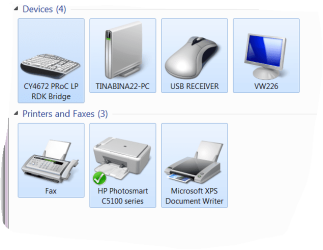
I think I've attached a screen shot of my new desk top printers. I have also uninstalled the HP items you listed too. I'll wait from here.
 

Attachments

  • Capture.PNG
    Capture.PNG
    32.4 KB · Views: 2
Last edited:

My Computer My Computer

Computer Manufacturer/Model Number
Microsoft 64-bit 1-Pack for System Builders - OEM
OS
Windows 7 Home Premium
CPU
Intel core i7-950 Bloomfield 3.06GHz LGA 1366 130W Quad-C
Motherboard
ASUS Sabertooth X58 LGA 1366 Intel X5 SATA 6Gb/s USB 3.0
Memory
PNY SLR8 6GB 240 -Pin DDR3 SDRAM DDR3 1600
Graphics Card(s)
EVGA 01G-P3-1373-TR GeForce GTX 460 Suerclocked EE 1GB 256 b
Sound Card
Intergrated
Monitor(s) Displays
ASUS VW226TL-P Black 22" 5ms Widescreen
Screen Resolution
1680x1050
Hard Drives
Western Digital Caviar Black WD6401A
Optiacl drive: Lite-ON 24X DVD Writer Black SATA Model iHAS424-98 LightScribe Support
Floppy drive: BYTECC Black 1.44-1.25 MB 3.5" External USB Floppy Drive
PSU
CORSAIR Enthusiast Series CMPSU-650TX 650W ATX12V / EP
Case
Cooler Master RC-692-KKN2 CM690 II Advanced Black Steel ATX
Cooling
See CPU
Keyboard
QUMAX Gemini U26 Back USB RF wireless slim Keyboard
Mouse
Mouse combined with Keyboard
Internet Speed
2MbPs
Other Info
I built this computer myself to my own specs.
I think I've attached a screen shot of my new desk top printers.
Thank you.

Actually, I now think the FAX item may just be there as a default, both on the desktop as well as on your laptop. I have the same FAX object on my own desktop system and I don't even have a modem installed! I've certainly never even tried or bothered to configure the FAX functionality in Win7. So I don't think it's tied to your all-in-one printer, but I may be wrong. Anyway, we'll worry about that later.


Ok... still on your desktop...

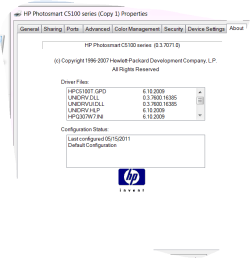
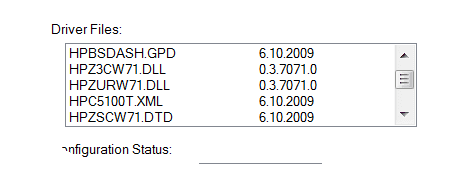
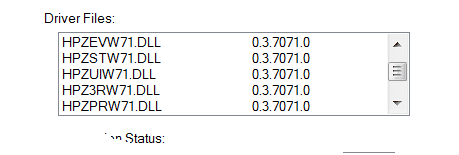
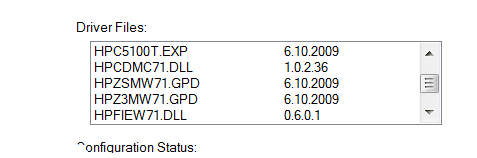
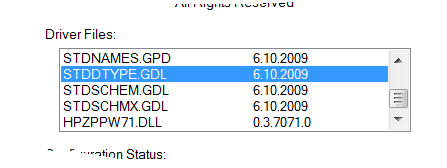
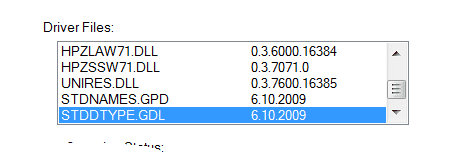
(1) Please right-click on that C5100 series printer object, and then Printer Properties -> About tab. What does it show for the installed driver? Screenshot would be perfect.

(2) Also, Printer Properties -> Sharing tab. Screenshot please.


And just to clarify... you did NOT run the 290MB HP software/driver installer file (as you did yesterday on the laptop). You simply plugged the C5180 printer in, and Win7 detected it, recognized it, and installed the software/drivers for it... and you ended up with this printer object. Right?

In other words, you do NOT have any HP software (e.g. HP Solution Center) installed on your desktop. If you go to Control Panel -> uninstall a program, you do NOT show any items related to HP and this printer. Right?
 

My Computer My Computer

Computer type
PC/Desktop
Computer Manufacturer/Model Number
Home-built, two systems (1) and (2)
OS
Windows 7 Pro x64 (1), Win7 Pro X64 (2)
CPU
i5-3350p 3.1Ghz/6MB-cache (1); E8400 3.0Ghz/6MB-cache (2)
Motherboard
ASUS P8Z77-V Pro (1); ASUS P5Q3 (2)
Memory
8GB PC3-12800 DDR3 (1); 4GB PC3-10600 DDR3 (2)
Graphics Card(s)
ATI HD7750 (1), (see TV cards); ATI R7 250 (2)
Sound Card
Realtek ALC892 HD Audio (1); Realtek ALC1200 HD Audio (2)
Monitor(s) Displays
Eizo HD2441W LCD, Eizo S2433W (1); Eizo 24" S2433W (2)
Screen Resolution
1920x1200, 1920x1200 (1); 1920x1200 (2)
Hard Drives
(1) 1TB SATA-II (7200RPM), 2x2TB SATA-III (7200RPM), 250GB SATA-III (10000RPM) for OS; 2x2TB external USB 3.0

(2) 320GB SATA-II (7200RPM), 750GB SATA-II (7200RPM), 150GB SATA-II (10000RPM) for OS; 2TB external USB 3.0
PSU
Nesteq ECS-6001 600W (1); Nesteq ECS-5001 500W (2)
Case
Acousti-Case 360 (1) and (2)
Cooling
Noctua NH-U12P SE2 for CPU, 2x120mm case fans (1) and (2)
Keyboard
IBM PS/2 (1) and (2)
Mouse
Logitech MX Revolution wireless (1); Microsoft wired (2)
Internet Speed
100mbps down / 10mbps up
Antivirus
Microsoft Security Essentials; Malwarebyte Anti-Malware Pro
Browser
Firefox
Other Info
Ceton InfiniTV 4-tuner cablecard-enabled TV card as well as Hauppauge HVR-2250 OTA/ATSC 2-tuner TV card in (1), running under Win7 WMC
Yes all I did was plug it in, hey what about if I plug it into my laptop? Would this install what I need? Then unplug it? The HP programs in my add/remove are the ones that were in my laptops.
I have a few screen shots for you, probably to many and to many to put into one post so it may take a couple but here they come. I was able to put them all in one.
 

Attachments

  • Capture.PNG
    Capture.PNG
    11.3 KB · Views: 2
  • Capture1.PNG
    Capture1.PNG
    2.8 KB · Views: 2
  • Capture2.PNG
    Capture2.PNG
    2.1 KB · Views: 1
  • Capture3.PNG
    Capture3.PNG
    2.8 KB · Views: 1
  • Capture4.PNG
    Capture4.PNG
    2.2 KB · Views: 1
  • Capture9.PNG
    Capture9.PNG
    19.9 KB · Views: 3
  • Capture8.PNG
    Capture8.PNG
    21.2 KB · Views: 3
  • Capture7.PNG
    Capture7.PNG
    23.7 KB · Views: 4
  • Capture6.PNG
    Capture6.PNG
    3.3 KB · Views: 1
  • Capture5.PNG
    Capture5.PNG
    3.1 KB · Views: 1
  • Capture10.PNG
    Capture10.PNG
    33 KB · Views: 2

My Computer My Computer

Computer Manufacturer/Model Number
Microsoft 64-bit 1-Pack for System Builders - OEM
OS
Windows 7 Home Premium
CPU
Intel core i7-950 Bloomfield 3.06GHz LGA 1366 130W Quad-C
Motherboard
ASUS Sabertooth X58 LGA 1366 Intel X5 SATA 6Gb/s USB 3.0
Memory
PNY SLR8 6GB 240 -Pin DDR3 SDRAM DDR3 1600
Graphics Card(s)
EVGA 01G-P3-1373-TR GeForce GTX 460 Suerclocked EE 1GB 256 b
Sound Card
Intergrated
Monitor(s) Displays
ASUS VW226TL-P Black 22" 5ms Widescreen
Screen Resolution
1680x1050
Hard Drives
Western Digital Caviar Black WD6401A
Optiacl drive: Lite-ON 24X DVD Writer Black SATA Model iHAS424-98 LightScribe Support
Floppy drive: BYTECC Black 1.44-1.25 MB 3.5" External USB Floppy Drive
PSU
CORSAIR Enthusiast Series CMPSU-650TX 650W ATX12V / EP
Case
Cooler Master RC-692-KKN2 CM690 II Advanced Black Steel ATX
Cooling
See CPU
Keyboard
QUMAX Gemini U26 Back USB RF wireless slim Keyboard
Mouse
Mouse combined with Keyboard
Internet Speed
2MbPs
Other Info
I built this computer myself to my own specs.
Screenshots were perfect. Thanks. Not too many... more is probably always better. Anyway, these were exactly what I was looking for.

Looks like your desktop is perfectly set up... at least on the printer side. I'm actually surprised that any "application software" from HP got installed (i.e. HP Solution Center) but that may just be how it works. Great.

So in my opinion there's nothing for you to do on the desktop.


For complete information going forward, can you please post two more network-related screenshots, again from your desktop:

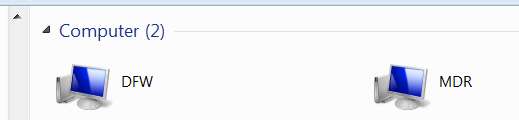
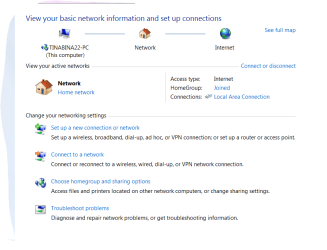
(1) Control panel -> network

networkcomputers.jpg


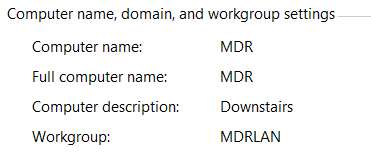
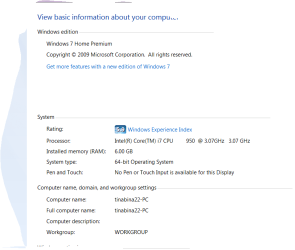
(2) Control panel, right-click on Computer, select Properties, and then show the portion dealing with computer name and workgroup name

networkinfo.jpg


While we're here, can you also post the same two network-related screenshots from your laptop.
 

My Computer My Computer

Computer type
PC/Desktop
Computer Manufacturer/Model Number
Home-built, two systems (1) and (2)
OS
Windows 7 Pro x64 (1), Win7 Pro X64 (2)
CPU
i5-3350p 3.1Ghz/6MB-cache (1); E8400 3.0Ghz/6MB-cache (2)
Motherboard
ASUS P8Z77-V Pro (1); ASUS P5Q3 (2)
Memory
8GB PC3-12800 DDR3 (1); 4GB PC3-10600 DDR3 (2)
Graphics Card(s)
ATI HD7750 (1), (see TV cards); ATI R7 250 (2)
Sound Card
Realtek ALC892 HD Audio (1); Realtek ALC1200 HD Audio (2)
Monitor(s) Displays
Eizo HD2441W LCD, Eizo S2433W (1); Eizo 24" S2433W (2)
Screen Resolution
1920x1200, 1920x1200 (1); 1920x1200 (2)
Hard Drives
(1) 1TB SATA-II (7200RPM), 2x2TB SATA-III (7200RPM), 250GB SATA-III (10000RPM) for OS; 2x2TB external USB 3.0

(2) 320GB SATA-II (7200RPM), 750GB SATA-II (7200RPM), 150GB SATA-II (10000RPM) for OS; 2TB external USB 3.0
PSU
Nesteq ECS-6001 600W (1); Nesteq ECS-5001 500W (2)
Case
Acousti-Case 360 (1) and (2)
Cooling
Noctua NH-U12P SE2 for CPU, 2x120mm case fans (1) and (2)
Keyboard
IBM PS/2 (1) and (2)
Mouse
Logitech MX Revolution wireless (1); Microsoft wired (2)
Internet Speed
100mbps down / 10mbps up
Antivirus
Microsoft Security Essentials; Malwarebyte Anti-Malware Pro
Browser
Firefox
Other Info
Ceton InfiniTV 4-tuner cablecard-enabled TV card as well as Hauppauge HVR-2250 OTA/ATSC 2-tuner TV card in (1), running under Win7 WMC
ok here come a few more
 

Attachments

  • Capture11.PNG
    Capture11.PNG
    16.1 KB · Views: 2
  • Capture12.PNG
    Capture12.PNG
    23.2 KB · Views: 3
  • Capture13.PNG
    Capture13.PNG
    17.2 KB · Views: 2

My Computer My Computer

Computer Manufacturer/Model Number
Microsoft 64-bit 1-Pack for System Builders - OEM
OS
Windows 7 Home Premium
CPU
Intel core i7-950 Bloomfield 3.06GHz LGA 1366 130W Quad-C
Motherboard
ASUS Sabertooth X58 LGA 1366 Intel X5 SATA 6Gb/s USB 3.0
Memory
PNY SLR8 6GB 240 -Pin DDR3 SDRAM DDR3 1600
Graphics Card(s)
EVGA 01G-P3-1373-TR GeForce GTX 460 Suerclocked EE 1GB 256 b
Sound Card
Intergrated
Monitor(s) Displays
ASUS VW226TL-P Black 22" 5ms Widescreen
Screen Resolution
1680x1050
Hard Drives
Western Digital Caviar Black WD6401A
Optiacl drive: Lite-ON 24X DVD Writer Black SATA Model iHAS424-98 LightScribe Support
Floppy drive: BYTECC Black 1.44-1.25 MB 3.5" External USB Floppy Drive
PSU
CORSAIR Enthusiast Series CMPSU-650TX 650W ATX12V / EP
Case
Cooler Master RC-692-KKN2 CM690 II Advanced Black Steel ATX
Cooling
See CPU
Keyboard
QUMAX Gemini U26 Back USB RF wireless slim Keyboard
Mouse
Mouse combined with Keyboard
Internet Speed
2MbPs
Other Info
I built this computer myself to my own specs.
Back
Top