My sound is working, but there is no sound

Dragulan

New member
Local time
6:57 PM
Messages
9
I had my computer fixed about a month ago, and it is working great, the only thing is that the sound isn't working. This is what I cancelled out so far:

I tried plugging in different speakers or headphones

My drivers are up-to-date

Nothing is muted when I check my Playback Devices

When I click on the sound while something is being played, like a video or song, it indicates that there is volume activity going on, but nothing comes out.

Here is what I have as far as sound: Digital Audio (S/PDIF) that is what is checked and that's the only one available. But when I go to Control Panel/System/Device Manager this is what I have listed.

Sound, video and game controllers-
- High Definition Audio Device
- NVIDIA High Definition Audio ( x 4 ) there are four of those listed.

When I right click sound, video and game controllers and select scan for hardware changes my computer starts to say installing driver updates, and then it fails, this is what comes up and I have no idea if it relates to my problem.

There is a yellow button "!" next to Coprocessor under Other Devices, and it says "Device driver software was not successfully installed" No driver found for coprocessor.

Then under Coprocessor Properties it says "The drivers for this device are not installed. (Code 28)"

A little background on my computer- it was broken with a nasty blue screen and my friend fixed it for me, I had to have the motherboard replaced. He threw in some other stuff too but may have messed with the sound I'm not sure. Here is my system:

Rating: 3.9 Windows Experience Index
Processor: Intel(R) Pentium(R) Dual CPU E2220 @ 2.40 GHz
RAM: 4.00 GB
System Type: 64-bit Operating System

Sorry if all the information isn't there, I'm not that much of a computer guy but I've been at this for a while trying to fix it. Any help would be greatly appreciated thank you in advanced!
 

My Computer My Computer

At a glance

64-bit operating system
OS
64-bit operating system
Dragulan, welcome to the Seven Forums.

Actually you don't have the drivers for the onboard sound installed. A couple of things you said give it away,

Sound, video and game controllers-
- High Definition Audio Device
- NVIDIA High Definition Audio ( x 4 ) there are four of those listed.

Here is what I have as far as sound: Digital Audio (S/PDIF) that is what is checked and that's the only one available.

The first is the onboard sound and is using the default Windows driver, and needs the corerect driver The Nvidia audio (all 4 of them, and still no idea how or why that happens) is likely from a Nvidia video card that has its own built in audio for passing audio over HDMI.

That the digital audio/spdif is the only option in the Windows playback properties is the second give away. Once the proper driver is install for the onboard it will show up with the proper name and connection options.

Can't tell you what driver you need as you didn't list the make and model of your motherboard, probably Realtek but there are a couple of others.

As for the coprocessor driver, that sounds like you have a Nvidia chipset based motherboard, which if that is what it is you need to install the Nvidia chipset drivers to fix it. If you could post up the make and model of your motherboard we can point you in the right direction for both the chipset and audio drivers.
 

My Computer My Computer

At a glance

Win 7 Ultimate x64FX-8350 @ 4.6 GHz so farADATA XPG V1 Series Black 8GB DDR3 1600Sapphire R9 270x Dual-X
Computer type
PC/Desktop
Computer Manufacturer/Model Number
Me
OS
Win 7 Ultimate x64
CPU
FX-8350 @ 4.6 GHz so far
Motherboard
Asus M5A97 EVO
Memory
ADATA XPG V1 Series Black 8GB DDR3 1600
Graphics Card(s)
Sapphire R9 270x Dual-X
Sound Card
Xonar DGX w/ Corsair Vengence 1300
Monitor(s) Displays
Acer S232HL Abid
Screen Resolution
1920x1080
Hard Drives
120 GB OCZ Vertex 3
500 GB Seagate 7200.12
PSU
Antec Earthwatts 650W Green
Case
Antec Three Hundred
Cooling
Cooler Master 212 EVO
Keyboard
Logitech G510
Mouse
Logitech G500s
Internet Speed
35000/3000
Okay the guy who fixed my motherboard is on an internship I haven't talked with him in a while, but I downloaded CPU-Z and under the Motherboard tab here's what it says...

Manufacturer - Unknow
Model - MCP73
Chipset - NVIDIA - GeForce 7050 (rev. A2)
Southbridge - NVIDIA - nForce 610i
LPICO - Winbond - W8327DHG

Bios -

Brand - Phoenix Technologies, LTD
Versio 6.00 PG

Graphic Interface

Version - PCI-Express

If the "Unknow" = Uknown, and the above information I gave you isn't enough, what is a way I can find out the motherboard?
 

My Computer My Computer

At a glance

64-bit operating system
OS
64-bit operating system
You can find the latest chipset driver for it here,

NVIDIA DRIVERS 15.56 WHQL

make sure to do a custom install and do not install the following bolded parts (not needed and a couple of them have been known to be problematic),

  • Ethernet Driver (v73.30) WHQL
  • Network Management Tools (v73.25)
  • SATAIDE Driver (v11.1.0.43) WHQL
  • SATARAID Driver (v11.1.0.43) WHQL
  • RAIDTOOL Application (v11.1.0.43) WHQL- you can install this one if running RAID
  • SMBUS Driver (v4.79) WHQL
  • SMU Driver (v2.08) WHQL
  • GPU Driver (v197.13) WHQL
  • PhysX (v9.10.0129)
  • Away Mode Driver (v6.0.6000.115) WHQL
  • Installer (v8.36)
That will fix the coprocessor driver, and hopefully then also allow CPU-z to see the make and model of the motherboard. If that doesn't work the only way to find out is to open the case and look for it printed on the motherboard (still need that for the audio driver).

Before going that far let's see if it can't be found a little easier. Open Device manager and double click on the "High Definition Audio Device" and then click on the Details tab. From the dropdown list select Hardware IDs and post back what it shows.
 

My Computer My Computer

At a glance

Win 7 Ultimate x64FX-8350 @ 4.6 GHz so farADATA XPG V1 Series Black 8GB DDR3 1600Sapphire R9 270x Dual-X
Computer type
PC/Desktop
Computer Manufacturer/Model Number
Me
OS
Win 7 Ultimate x64
CPU
FX-8350 @ 4.6 GHz so far
Motherboard
Asus M5A97 EVO
Memory
ADATA XPG V1 Series Black 8GB DDR3 1600
Graphics Card(s)
Sapphire R9 270x Dual-X
Sound Card
Xonar DGX w/ Corsair Vengence 1300
Monitor(s) Displays
Acer S232HL Abid
Screen Resolution
1920x1080
Hard Drives
120 GB OCZ Vertex 3
500 GB Seagate 7200.12
PSU
Antec Earthwatts 650W Green
Case
Antec Three Hundred
Cooling
Cooler Master 212 EVO
Keyboard
Logitech G510
Mouse
Logitech G500s
Internet Speed
35000/3000
Before going that far let's see if it can't be found a little easier. Open Device manager and double click on the "High Definition Audio Device" and then click on the Details tab. From the dropdown list select Hardware IDs and post back what it shows.

Okay, under Details tab all it says is

"High Definition Audio Device"

under that it says

Property -
Device Description (there is a pull-down menu here)

Under that all it says is High Definition Audio Device

That's all.
 

My Computer My Computer

At a glance

64-bit operating system
OS
64-bit operating system
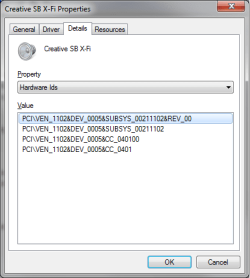
Open Device manager and double click on the "High Definition Audio Device" and then click on the Details tab. From the dropdown list select Hardware IDs

so that it shows you this,

hwid.png
 

My Computer My Computer

At a glance

Win 7 Ultimate x64FX-8350 @ 4.6 GHz so farADATA XPG V1 Series Black 8GB DDR3 1600Sapphire R9 270x Dual-X
Computer type
PC/Desktop
Computer Manufacturer/Model Number
Me
OS
Win 7 Ultimate x64
CPU
FX-8350 @ 4.6 GHz so far
Motherboard
Asus M5A97 EVO
Memory
ADATA XPG V1 Series Black 8GB DDR3 1600
Graphics Card(s)
Sapphire R9 270x Dual-X
Sound Card
Xonar DGX w/ Corsair Vengence 1300
Monitor(s) Displays
Acer S232HL Abid
Screen Resolution
1920x1080
Hard Drives
120 GB OCZ Vertex 3
500 GB Seagate 7200.12
PSU
Antec Earthwatts 650W Green
Case
Antec Three Hundred
Cooling
Cooler Master 212 EVO
Keyboard
Logitech G510
Mouse
Logitech G500s
Internet Speed
35000/3000
Open Device manager and double click on the "High Definition Audio Device" and then click on the Details tab. From the dropdown list select Hardware IDs
so that it shows you this,

View attachment 156181


Okay here's what it says under Hardware Ids,


If you can't tell, all of it didn't fit within the screenshot, the rest was EV_1001 on the first one. I have no idea what this stuff means by the way, lol.
 

My Computer My Computer

At a glance

64-bit operating system
OS
64-bit operating system

My Computer My Computer

At a glance

Win 7 Ultimate x64FX-8350 @ 4.6 GHz so farADATA XPG V1 Series Black 8GB DDR3 1600Sapphire R9 270x Dual-X
Computer type
PC/Desktop
Computer Manufacturer/Model Number
Me
OS
Win 7 Ultimate x64
CPU
FX-8350 @ 4.6 GHz so far
Motherboard
Asus M5A97 EVO
Memory
ADATA XPG V1 Series Black 8GB DDR3 1600
Graphics Card(s)
Sapphire R9 270x Dual-X
Sound Card
Xonar DGX w/ Corsair Vengence 1300
Monitor(s) Displays
Acer S232HL Abid
Screen Resolution
1920x1080
Hard Drives
120 GB OCZ Vertex 3
500 GB Seagate 7200.12
PSU
Antec Earthwatts 650W Green
Case
Antec Three Hundred
Cooling
Cooler Master 212 EVO
Keyboard
Logitech G510
Mouse
Logitech G500s
Internet Speed
35000/3000

My Computer My Computer

At a glance

Win 7 Ultimate x64FX-8350 @ 4.6 GHz so farADATA XPG V1 Series Black 8GB DDR3 1600Sapphire R9 270x Dual-X
Computer type
PC/Desktop
Computer Manufacturer/Model Number
Me
OS
Win 7 Ultimate x64
CPU
FX-8350 @ 4.6 GHz so far
Motherboard
Asus M5A97 EVO
Memory
ADATA XPG V1 Series Black 8GB DDR3 1600
Graphics Card(s)
Sapphire R9 270x Dual-X
Sound Card
Xonar DGX w/ Corsair Vengence 1300
Monitor(s) Displays
Acer S232HL Abid
Screen Resolution
1920x1080
Hard Drives
120 GB OCZ Vertex 3
500 GB Seagate 7200.12
PSU
Antec Earthwatts 650W Green
Case
Antec Three Hundred
Cooling
Cooler Master 212 EVO
Keyboard
Logitech G510
Mouse
Logitech G500s
Internet Speed
35000/3000
Is it showing up as Realtek HD Audio in the Windows playback properties? If so did you set speakers as the default playback device?
 

My Computer My Computer

At a glance

Win 7 Ultimate x64FX-8350 @ 4.6 GHz so farADATA XPG V1 Series Black 8GB DDR3 1600Sapphire R9 270x Dual-X
Computer type
PC/Desktop
Computer Manufacturer/Model Number
Me
OS
Win 7 Ultimate x64
CPU
FX-8350 @ 4.6 GHz so far
Motherboard
Asus M5A97 EVO
Memory
ADATA XPG V1 Series Black 8GB DDR3 1600
Graphics Card(s)
Sapphire R9 270x Dual-X
Sound Card
Xonar DGX w/ Corsair Vengence 1300
Monitor(s) Displays
Acer S232HL Abid
Screen Resolution
1920x1080
Hard Drives
120 GB OCZ Vertex 3
500 GB Seagate 7200.12
PSU
Antec Earthwatts 650W Green
Case
Antec Three Hundred
Cooling
Cooler Master 212 EVO
Keyboard
Logitech G510
Mouse
Logitech G500s
Internet Speed
35000/3000
Is it showing up as Realtek HD Audio in the Windows playback properties? If so did you set speakers as the default playback device?

There's something called "Speakers" (Realtek High Definition Audio)

and "Realtek Digital Output" (Realtek High Definition Audio Ready)

I tried using them both as default devices and nothing has worked yet :\
 

My Computer My Computer

At a glance

64-bit operating system
OS
64-bit operating system
Sorry for double post, I still have 4 NVIDIA High Definition Audio options as well. When I right click them it is stating that they are all enabled, as well as my Realtek High Definition Audio, I'll try disabling them to see if that works. I also tried disabling and re-enabling Realtek HD Audio but that didn't work.

Edit * That didn't work.
 

My Computer My Computer

At a glance

64-bit operating system
OS
64-bit operating system
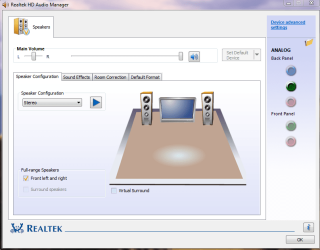
Are sure you have speakers pluged in to the Green Port?

Speakers.PNG


If using the Front Panel ports, are there plug on to the MOBO?
 

My Computer My Computer

At a glance

ME/XP/Vista/Win7
OS
ME/XP/Vista/Win7
I got it working, thank you so much stormy13 I appreciate the time you took out of your day to assist me! Theog, thank you too! Neither the front port or rear port for audio worked on my PC before, then I downloaded that driver, the front port still didn't work but I just plugged it into the rear (giggity) and now it works. Thank you so much guys! If you ever want some artwork or a signature that's just about all I can do haha, I'm not very techy, but anyways thank you.


Anthony
 

My Computer My Computer

At a glance

64-bit operating system
OS
64-bit operating system
I have to ask as well. My problem remain unresolved.

I downloaded the drivers.

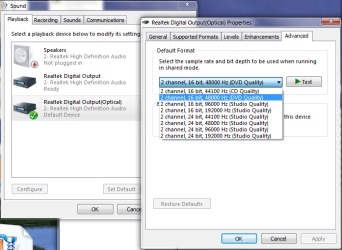
I just recently upgraded motherboard + CPU + RAM and just moved all my drives to it, not reinstalling windows but just booting up on new hardware and installing all the drivers. I have a Logitech z-5500 and with the old hardware it registered as 5.1 DTS and I'm using this with Optical Out.

New hardware:
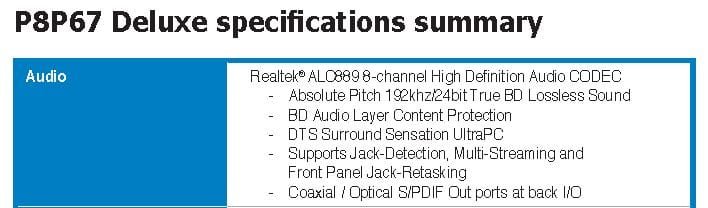
Asus P8P67 DELUXE REV B3
Intel Core i7 2600K 3,4GHzhttp://www.inet.se/artikel/5315063/corsair-16gb-4x4096mb-1600mhz-vengeance

Old hardware:
Gigabyte ga-x48-ds5
Intel Core 2 Quad 2.4ghz
 

Attachments

  • sound.png
    sound.png
    33.8 KB · Views: 25
  • stereo sound.JPG
    stereo sound.JPG
    31.3 KB · Views: 9

My Computer My Computer

At a glance

Windows 7 RTM x64Core 2 Quad 2.6GHz4GB RamAsus nvidia 260
Computer Manufacturer/Model Number
White Box
OS
Windows 7 RTM x64
CPU
Core 2 Quad 2.6GHz
Motherboard
Gigabyte Ga-x48-ds5
Memory
4GB Ram
Graphics Card(s)
Asus nvidia 260
Sound Card
Built in, Using Optical Out with Logitech Z-5500 5.1
Monitor(s) Displays
Acer T230H & Samsung LCD TV FULL HD "LE46B530"
Screen Resolution
1920x1080 + 1920x1080
Hard Drives
8 of them, about 6.5TB
PSU
750 watt
Case
Antec P180
Cooling
Default Intel stock
Keyboard
Logitech Dinovo edge
Mouse
wireless laser mouse
Internet Speed
15mbit Cable
Other Info
Primary monitor is multitouch (yay)
I have to ask as well. My problem remain unresolved.

I downloaded the drivers.

I just recently upgraded motherboard + CPU + RAM and just moved all my drives to it, not reinstalling windows but just booting up on new hardware and installing all the drivers. I have a Logitech z-5500 and with the old hardware it registered as 5.1 DTS and I'm using this with Optical Out.

New hardware:
Asus P8P67 DELUXE REV B3
Intel Core i7 2600K 3,4GHz

Old hardware:
Gigabyte ga-x48-ds5
Intel Core 2 Quad 2.4ghz

Did you do this first:
http://www.sevenforums.com/tutorials/135077-windows-7-installation-transfer-new-computer.html

Try uninstalling the Realtek software, Reboot, & reinstall.
 

My Computer My Computer

At a glance

ME/XP/Vista/Win7
OS
ME/XP/Vista/Win7
shit, i missed that part. I just moved all the drives over to the new pc and it seems to have worked out fine. except for this realtek issue.

I did uninstall and then reinstall i just can't windows to recognize that it has surround.
 

My Computer My Computer

At a glance

Windows 7 RTM x64Core 2 Quad 2.6GHz4GB RamAsus nvidia 260
Computer Manufacturer/Model Number
White Box
OS
Windows 7 RTM x64
CPU
Core 2 Quad 2.6GHz
Motherboard
Gigabyte Ga-x48-ds5
Memory
4GB Ram
Graphics Card(s)
Asus nvidia 260
Sound Card
Built in, Using Optical Out with Logitech Z-5500 5.1
Monitor(s) Displays
Acer T230H & Samsung LCD TV FULL HD "LE46B530"
Screen Resolution
1920x1080 + 1920x1080
Hard Drives
8 of them, about 6.5TB
PSU
750 watt
Case
Antec P180
Cooling
Default Intel stock
Keyboard
Logitech Dinovo edge
Mouse
wireless laser mouse
Internet Speed
15mbit Cable
Other Info
Primary monitor is multitouch (yay)
i have same problem sound is there but no sound

keeps showing up optical i dont use optical but i have 5.1 shows sound but there is no sound i removed sound card but wanna use onboard as im selling and keeping sound card
 

My Computer My Computer

At a glance

windows 7 64bitquad 3.3 i5 intelgeforce gts 250
Computer type
PC/Desktop
Computer Manufacturer/Model Number
asus p8h61-m
OS
windows 7 64bit
CPU
quad 3.3 i5 intel
Motherboard
asus p8h61-m
Graphics Card(s)
geforce gts 250
Back
Top