fan speed control for ati card

xcluded

New member
Local time
3:32 AM
Messages
33
hi , in a few days time i will getting an ati card. it is been awhile since i used an ati card. So my question is , can i adjust the fan speed of the ati card ? Like before i can use rivatuner to set the nvidia card. So do i adjust from CCC or some other software ?

Thanks.
 

My Computer My Computer

OS
Windows 7 Ultimate 64Bit
CPU
i7 860
Motherboard
P55A-UD6
Memory
Team Xtreem 1600Mhz DDR3 4GB
Graphics Card(s)
Sapphire 5870 VaporX 1GB
Sound Card
Asus Xonar STX
Monitor(s) Displays
Dell U2410
Hard Drives
WD 500GB
WD 1.5TB
PSU
Seasonic M12D-750W
Case
Lian li PC-7FNWX
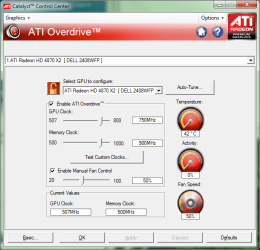
You can use the CCC directly. ;)
 

Attachments

  • CCC.png
    CCC.png
    33.7 KB · Views: 2,619

My Computer My Computer

Computer type
PC/Desktop
Computer Manufacturer/Model Number
Custom Build/Mod
OS
Windows 7 Home Premium x64
CPU
Intel QX9650 Extreme 4.0 GHz
Motherboard
ASUS Rampage Extreme Rev2
Memory
8GB (4x2) Corsair Dominator DDR3
Graphics Card(s)
2x Radeon R390X [8GB]
Sound Card
SupremeFX X-Fi
Monitor(s) Displays
Dell 2408WFP 26" Panel
Screen Resolution
1920x1200
Hard Drives
4x WD 2TB (8TB+ Total)
2x Crucial SSD 128GB (RAID-0)
1x LG Blu-ray read/write
1x Phillips LightScribe DVD read/write
PSU
Corsair HX1000
Case
CoolerMaster - Cosmos S
Cooling
Custom Liquid - 320mm rad w/ 3x 80mm fans, CPU/NB/SB Blocks
Keyboard
Logitech Illuminater Pro
Mouse
Logitech
Internet Speed
Fractional T1 - 125Mbps
Antivirus
ESET Security Suite / Microsoft Security Essentials
Browser
Cyberfox Intel x64
Other Info
OC'd to 5.0GHz @ 44c under full load
You can control the fan speed as long as your card has a 4-wire PWM fan. A lot of cards do not. Check before you order.
 

My Computer My Computer

OS
Windows 7 x64
CPU
Intel Q9400 @ 3.4GHz
Motherboard
Asus P5Q Deluxe (Bios P5QD1406)
Memory
2x2GB Mushkin Redline PC2-8000
Graphics Card(s)
MSI RX3650 512MB CF
Sound Card
Sound Blaster Audigy SE
Monitor(s) Displays
Dell 3007WFP & Dell 2001FP
Screen Resolution
2560 x 1600 & 1600 x 1200
Hard Drives
Intel X25-M 80GB SSD
PSU
Zalman ZM-850 HP
Case
Antec P182
Keyboard
Logitech MX 3200 Cordless
Mouse
Logitech Laser
if you are the technical tweaking type, check out ati tray tools (latest beta works fine with me)- it's infinitely better than the standard ati catalyst control center, including more fine control over the fans - for instance i have my fans set to zero (so things are nice and quiet) until a certain temp, then have the fan smoothly ramping up when things get hotter...

the software is good for lots of other features too, but i won't go into them here...
 

My Computer My Computer

Computer Manufacturer/Model Number
mickey megabyte 1234
OS
ultimate 64 sp1
CPU
i5 2500K [email protected]
Motherboard
MSI P67A-GD53
Memory
8 gigs GSkill Ripjaws 1600
Graphics Card(s)
amd hd6950
Sound Card
creative x-fi gamer
Monitor(s) Displays
samsung 24"
Screen Resolution
1920x1080
Hard Drives
ocz vertex 2e 60 gig, samsung f3 1tb, buffalo 2tb ext
PSU
antec 550
Case
antec three hundred
Cooling
i'm a cooling fan
Keyboard
saitek eclipse ii
Mouse
logitech g3
Internet Speed
about 4 Mbps
Other Info
i love win7
if you are the technical tweaking type, check out ati tray tools (latest beta works fine with me)- it's infinitely better than the standard ati catalyst control center, including more fine control over the fans - for instance i have my fans set to zero (so things are nice and quiet) until a certain temp, then have the fan smoothly ramping up when things get hotter...

the software is good for lots of other features too, but i won't go into them here...

How did you install ATI Tray Tools. What about the driver signature issue?

Thanks
 

My Computer My Computer

OS
Windows 7 x64
CPU
Intel Q9400 @ 3.4GHz
Motherboard
Asus P5Q Deluxe (Bios P5QD1406)
Memory
2x2GB Mushkin Redline PC2-8000
Graphics Card(s)
MSI RX3650 512MB CF
Sound Card
Sound Blaster Audigy SE
Monitor(s) Displays
Dell 3007WFP & Dell 2001FP
Screen Resolution
2560 x 1600 & 1600 x 1200
Hard Drives
Intel X25-M 80GB SSD
PSU
Zalman ZM-850 HP
Case
Antec P182
Keyboard
Logitech MX 3200 Cordless
Mouse
Logitech Laser
you can either install driver signature enforcement overrider to allow you to run unsigned drivers,

OR i found that i didn't need to bother. safely ignore any message you get. ati tray tools installs a low level driver that is apparently needed for hardware monitoring. i found out that i can have this installed, but not running, and everything still seems to work fine with my hd4890 - i can over/under-clock, i can have on screen display of gpu temps, fan speeds etc.

so, personally i have no issues nor complications ignoring the unsigned driver - it seems to work wihtout it.

oh, and i'm using the latest beta 1.6.9.1691, again with zero problems, with my rtm x64.

a link to the beta can be found here, a forum page frequently visited by the software author.

i love this software, i really do :), although it can be confusing to begin with. it's the first thing i install after my drivers - you can kiss goodbye to ccc forever!

if you need any more help with the software, just ask.
 

My Computer My Computer

Computer Manufacturer/Model Number
mickey megabyte 1234
OS
ultimate 64 sp1
CPU
i5 2500K [email protected]
Motherboard
MSI P67A-GD53
Memory
8 gigs GSkill Ripjaws 1600
Graphics Card(s)
amd hd6950
Sound Card
creative x-fi gamer
Monitor(s) Displays
samsung 24"
Screen Resolution
1920x1080
Hard Drives
ocz vertex 2e 60 gig, samsung f3 1tb, buffalo 2tb ext
PSU
antec 550
Case
antec three hundred
Cooling
i'm a cooling fan
Keyboard
saitek eclipse ii
Mouse
logitech g3
Internet Speed
about 4 Mbps
Other Info
i love win7
It installed and loaded without a problem. Looks like very nice comprehensive software.
 

My Computer My Computer

OS
Windows 7 x64
CPU
Intel Q9400 @ 3.4GHz
Motherboard
Asus P5Q Deluxe (Bios P5QD1406)
Memory
2x2GB Mushkin Redline PC2-8000
Graphics Card(s)
MSI RX3650 512MB CF
Sound Card
Sound Blaster Audigy SE
Monitor(s) Displays
Dell 3007WFP & Dell 2001FP
Screen Resolution
2560 x 1600 & 1600 x 1200
Hard Drives
Intel X25-M 80GB SSD
PSU
Zalman ZM-850 HP
Case
Antec P182
Keyboard
Logitech MX 3200 Cordless
Mouse
Logitech Laser
if you are the technical tweaking type, check out ati tray tools (latest beta works fine with me)- it's infinitely better than the standard ati catalyst control center, including more fine control over the fans - for instance i have my fans set to zero (so things are nice and quiet) until a certain temp, then have the fan smoothly ramping up when things get hotter...


I just installed it without problem. What values should I put in the temperature and fan speed columns to get the fine control you have? Also, what values are safe to overclock my ATI radeon HD 4350?

Thanks
 

My Computer My Computer

Computer Manufacturer/Model Number
Dell / Studio xps
OS
Windows7 x64 7600 16385
CPU
Intel I7 920
Motherboard
Dell
Memory
6GB DDR3
Graphics Card(s)
ATI Radeon HD4350
Sound Card
Integrated 7.1 channel
Hard Drives
Hitachi HDT721064SLA360 (596 GB)
Keyboard
Logitech EX110
Mouse
Logitech LX8
i'm glad that people have tried and liked this software - if only amd/ati would take notice and replace ccc with something like this!

@subsonic: what i have is two (no three, but that's another story) overclocking profiles, one called 'slow', the other 'normal'.

i use 'auto overclocking' to switch between the two depending if i'm gaming or just 2d desktopping.

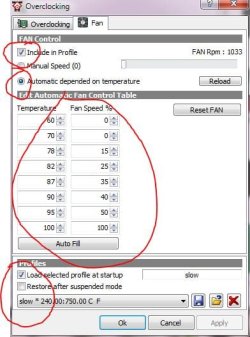
here are my fan settings for slow profile. as you can see, zero fan speed until 70C, then it slowly ramps up. this is my slow profile and my card is never going to get hot at this clock speed, especially as i've undervolted it too, on the previous tab.

my fan settings are more aggresive for my 'normal' gaming profile, as i know my card is going to get hot under these cirumstances. i can't tell you what settings you should use, as your card is not going to get as hot as mine, i have a different card to you, with a different fan, in a different case, with different case cooling/ventilation to you. i also have my case fans set up to spin faster at high temps which helps at the top end. so you will need to play with these settings to get your own results.

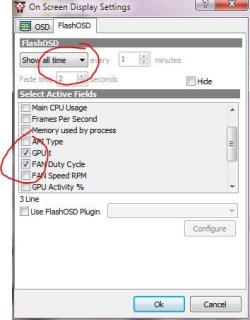
you can monitor the gpu temp and fan speeds on the screen as you play. go to tools and options >> on screen display >> flash osd >> show all the time and tick the boxes you want...

you also asked about safe values to overclock your card - i don't know i'm afraid. each card comes out of the factory different to its neighbour - one card can be clocked like a beast, the other will fall over at an increase of 5Hz. you've got to play with your card, running your meanest games (crysis is always good for this) to test for stability.

first of all - BE CAREFUL! only make small increases, and test, test, test! keep an eye on the temps, increase the fan speed with the overclocked profile, and BE CAREFUL! generally i've found the core speed can be raised much higher than the memory. use the 3d renderer in att, scanning for artifacts to test your overclock, oh and have i told you to BE CAREFUL?

there's more that you can do with att, but that's a start.

 

Attachments

  • fan.JPG
    fan.JPG
    43 KB · Views: 890
  • osd.JPG
    osd.JPG
    29.8 KB · Views: 405

My Computer My Computer

Computer Manufacturer/Model Number
mickey megabyte 1234
OS
ultimate 64 sp1
CPU
i5 2500K [email protected]
Motherboard
MSI P67A-GD53
Memory
8 gigs GSkill Ripjaws 1600
Graphics Card(s)
amd hd6950
Sound Card
creative x-fi gamer
Monitor(s) Displays
samsung 24"
Screen Resolution
1920x1080
Hard Drives
ocz vertex 2e 60 gig, samsung f3 1tb, buffalo 2tb ext
PSU
antec 550
Case
antec three hundred
Cooling
i'm a cooling fan
Keyboard
saitek eclipse ii
Mouse
logitech g3
Internet Speed
about 4 Mbps
Other Info
i love win7
I use Ati Tray Tools to control my fan speed and i think its great.

But i have a question about the overclocking feature. When i change core speed and memory speed, the calculate button is grey and i cant apply the new settings. I somehow managed to make a second gaming profile where i have higher settings but i seriously don't want to make new profiles for every +5 step.
Do u need CCC for overclocking? Cause i don't have it atm.
 

My Computer My Computer

OS
Windows 7 Ultimate x64
CPU
AMD Athlon 64 X2 4200+ @2,2 GHz
Motherboard
Asus A8V-E SE
Memory
2x1 GB
Graphics Card(s)
Ati x1950 xt 512MB
Sound Card
Soundblaster Live! 5.1
Monitor(s) Displays
LG Flatron W2252TQ
Screen Resolution
1680x1050
Hard Drives
WD 360 GB extern
WD 360 GB
WD 80 GB
Keyboard
Cherry
Mouse
ROCCAT Kone USB Mouse (awesome>expensive)
Internet Speed
12mpbt down / 1mbp up
you can overclock fine with att. i can see the calculate button, and mine is greyed out too - i've never really noticed it tbh, and don't know what it calculates.

to overclock, slide your slider, then hit the 'apply button' at the bottom right - then save your overclocked profile, making sure you have the 'include clocks...' button checked. your saved profile name should now include some numbers relating to your tweaked speeds.

i've not had ccc for years, and whilst i haven't had to overclock my new card yet, i have used att to clock all previous ati cards with no problems.
 

My Computer My Computer

Computer Manufacturer/Model Number
mickey megabyte 1234
OS
ultimate 64 sp1
CPU
i5 2500K [email protected]
Motherboard
MSI P67A-GD53
Memory
8 gigs GSkill Ripjaws 1600
Graphics Card(s)
amd hd6950
Sound Card
creative x-fi gamer
Monitor(s) Displays
samsung 24"
Screen Resolution
1920x1080
Hard Drives
ocz vertex 2e 60 gig, samsung f3 1tb, buffalo 2tb ext
PSU
antec 550
Case
antec three hundred
Cooling
i'm a cooling fan
Keyboard
saitek eclipse ii
Mouse
logitech g3
Internet Speed
about 4 Mbps
Other Info
i love win7
I've never used ATT before. Prior to this beta, it was too much messing about to get it work. Now that it works easily with x64, all I can say is 'awesome' - there are heaps of extra options to play with :D

I never had any real problems with CCC, apart from multiple installation issues and the fact that 95% of games ignore CCC settings :p
 

My Computer My Computer

Computer type
PC/Desktop
Computer Manufacturer/Model Number
Systems by SmartEyeball
OS
8 Pro x64
CPU
i7 3770K 4.6GHz
Motherboard
ASUS P8Z77 WS
Memory
16GB G.Skill Trident X 2666mhz
Graphics Card(s)
x2 EVGA 780 Ti Superclocked SLI
Sound Card
SB X-FI Surround 5.1 PRO USB / ATH-AD900 Headphones
Monitor(s) Displays
x3 Dell U2410 / 58" Samsung
Screen Resolution
5760*1200/ 1920*1200
Hard Drives
2x Intel 520 240GB (RAID 0) * 2x WD Caviar Blacks 2TB (RAID 0) * 2TB WD Caviar Black * Sony Optirac DVD
PSU
Silverstone Strider Evolution 1200W
Case
Thermaltake Level 10 GT Snow Edition
Cooling
Noctua NH-D14
Keyboard
Topre Realforce // Ducky Shine MX Black // Filco Ninja TKL
Mouse
Thermaltake Theron (Highly Recommended) + Razer Imperator
Antivirus
MSE
Browser
IE, FF, WaterFox
Other Info
GT Extreme V2 Sim Racing Cockpit + 40" LCD and K/B Mouse stand ▼
Fanatec CSR Elite Wheel + Clubsport V1 Pedals + CSR shifter/7G-H ▼Saitek X52 Pro ▼ TrackIR 5 Pro
Buttkicker v2 Seat Rumbler with Dedicated 5.1 and Sub Woofer attached to frame ▼
=
Bloody Big Grin
if you are the technical tweaking type, check out ati tray tools (latest beta works fine with me)- it's infinitely better than the standard ati catalyst control center, including more fine control over the fans - for instance i have my fans set to zero (so things are nice and quiet) until a certain temp, then have the fan smoothly ramping up when things get hotter...

the software is good for lots of other features too, but i won't go into them here...

mickey megabyte

So do you just download and install the 'driver only' portion or do you download the entire version and just disable CCC from starting?
 

My Computer My Computer

OS
Windows 7 x64
CPU
Intel Q9400 @ 3.4GHz
Motherboard
Asus P5Q Deluxe (Bios P5QD1406)
Memory
2x2GB Mushkin Redline PC2-8000
Graphics Card(s)
MSI RX3650 512MB CF
Sound Card
Sound Blaster Audigy SE
Monitor(s) Displays
Dell 3007WFP & Dell 2001FP
Screen Resolution
2560 x 1600 & 1600 x 1200
Hard Drives
Intel X25-M 80GB SSD
PSU
Zalman ZM-850 HP
Case
Antec P182
Keyboard
Logitech MX 3200 Cordless
Mouse
Logitech Laser
i just download the driver myself.

i decided years ago that i didn't need ccc at all.

i ain't changed my mind yet!
 

My Computer My Computer

Computer Manufacturer/Model Number
mickey megabyte 1234
OS
ultimate 64 sp1
CPU
i5 2500K [email protected]
Motherboard
MSI P67A-GD53
Memory
8 gigs GSkill Ripjaws 1600
Graphics Card(s)
amd hd6950
Sound Card
creative x-fi gamer
Monitor(s) Displays
samsung 24"
Screen Resolution
1920x1080
Hard Drives
ocz vertex 2e 60 gig, samsung f3 1tb, buffalo 2tb ext
PSU
antec 550
Case
antec three hundred
Cooling
i'm a cooling fan
Keyboard
saitek eclipse ii
Mouse
logitech g3
Internet Speed
about 4 Mbps
Other Info
i love win7
I am trying to install the ATT now :b I don't understand anything about overclock, so can you tell me what are the main advantages and all I need to know about it? :b
 

My Computer My Computer

Computer Manufacturer/Model Number
HP
OS
Windows 7 Ultimate x64
CPU
Intel Core i7-720QM 1,60 GHz
Motherboard
Hewlett-Packard 1448 65.35
Memory
6 GB DDR3 (1 x 2.048 MB + 1 x 4.096 MB)
Graphics Card(s)
ATI Mobility Radeon HD 5650
Sound Card
Altec Lansing
Monitor(s) Displays
Monitor LED HP BrightView HD
Screen Resolution
1.366 x 768
I'm having problems trying to install ATT :x
 

My Computer My Computer

Computer Manufacturer/Model Number
HP
OS
Windows 7 Ultimate x64
CPU
Intel Core i7-720QM 1,60 GHz
Motherboard
Hewlett-Packard 1448 65.35
Memory
6 GB DDR3 (1 x 2.048 MB + 1 x 4.096 MB)
Graphics Card(s)
ATI Mobility Radeon HD 5650
Sound Card
Altec Lansing
Monitor(s) Displays
Monitor LED HP BrightView HD
Screen Resolution
1.366 x 768
I am trying to install the ATT now :b I don't understand anything about overclock, so can you tell me what are the main advantages and all I need to know about it? :b

well i can't tell you all about it - i can only give a very quick and simple start:

overclocking a graphics card is making it run at a higher speed than it was designed for.

the advantage is that you get better performance in games, but the disadvantages include more heat and less stability.

you really need to do some more research before you start overclocking - there is some more information here.

you have a mobility graphics card? is that a laptop?

you may not have much success overclocking that card - laptops do get hot quickly, and your games may crash.
 

My Computer My Computer

Computer Manufacturer/Model Number
mickey megabyte 1234
OS
ultimate 64 sp1
CPU
i5 2500K [email protected]
Motherboard
MSI P67A-GD53
Memory
8 gigs GSkill Ripjaws 1600
Graphics Card(s)
amd hd6950
Sound Card
creative x-fi gamer
Monitor(s) Displays
samsung 24"
Screen Resolution
1920x1080
Hard Drives
ocz vertex 2e 60 gig, samsung f3 1tb, buffalo 2tb ext
PSU
antec 550
Case
antec three hundred
Cooling
i'm a cooling fan
Keyboard
saitek eclipse ii
Mouse
logitech g3
Internet Speed
about 4 Mbps
Other Info
i love win7
lol, Loving the fact you all use software, I have a 4870 and it changed the speed of the fan itself. I used a Tweek tool and changed the Bios and set the fans how i felt it needed. And I must say my card is silent and sits at 49 deg.

I used steps like every 5 deg it got 10% faster. Till it gets too like 80 deg then its Full blast. But it never gets there.....
 

My Computer My Computer

Computer Manufacturer/Model Number
Home Build.
OS
Windows 7 Home Pre
CPU
Q8200 Intell 2.333
Motherboard
Asus P5Q3 Delux
Memory
DDR3 1333 4gig
Graphics Card(s)
Ati HD4870
Sound Card
Onboard Soundmax. 7.1
Monitor(s) Displays
1, 20" Samsung
Screen Resolution
1600/900
PSU
Good enough
Case
Le Shark
Cooling
FAN FAN FAN FAN, Thermaltake Minitype 90 with speed fan 4.
Keyboard
Standard, Gaming Wolfking
Mouse
Cm-storm-inferno-wired-gaming-mouse
Internet Speed
Sky Crappy upto 20meg I get a whapping 5.8mbs.

My Computer My Computer

Computer Manufacturer/Model Number
mickey megabyte 1234
OS
ultimate 64 sp1
CPU
i5 2500K [email protected]
Motherboard
MSI P67A-GD53
Memory
8 gigs GSkill Ripjaws 1600
Graphics Card(s)
amd hd6950
Sound Card
creative x-fi gamer
Monitor(s) Displays
samsung 24"
Screen Resolution
1920x1080
Hard Drives
ocz vertex 2e 60 gig, samsung f3 1tb, buffalo 2tb ext
PSU
antec 550
Case
antec three hundred
Cooling
i'm a cooling fan
Keyboard
saitek eclipse ii
Mouse
logitech g3
Internet Speed
about 4 Mbps
Other Info
i love win7
I'm having problems trying to install ATT :x

sorry i was writing my post above while you posted.

i don't think att won't run on your laptop - it's really designed for desktop graphics cards.

have a look at this thead on the att forums. the software author says "ATT has very limited support for mibility chips."

LOLz, I installed another one, and I got blue screen of death, had to start safe mode and uninstall it. Now my laptop is good again :)

My laptop gets hot too quickley, if I make a render or something like that, it gets to 75ºC ~ 80ºC... I wanted to speed my fan and set up a profile for it to run better and for it to cool my computer.. it gets really hot.. can you help?
 

My Computer My Computer

Computer Manufacturer/Model Number
HP
OS
Windows 7 Ultimate x64
CPU
Intel Core i7-720QM 1,60 GHz
Motherboard
Hewlett-Packard 1448 65.35
Memory
6 GB DDR3 (1 x 2.048 MB + 1 x 4.096 MB)
Graphics Card(s)
ATI Mobility Radeon HD 5650
Sound Card
Altec Lansing
Monitor(s) Displays
Monitor LED HP BrightView HD
Screen Resolution
1.366 x 768
Back
Top