Breaking News: Free BD/DVD player software

Ponmayilal

Banned
Local time
1:31 PM
Messages
441
Hmmm.................for those folks looking for a free Bluray Disc/DVD player here is Digiarty's DA player.

"DAPlayer is a Powerful, Simple to use and All-in-one video/audio player software for windows that plays most audio/video multimedias easily and smoothly. It is designed to give users a complete free solution for playing High-definition videos, which include Bluray, AVCHD, TS, MKV, MPEG4, H264 video formats as well as DVD video and music CD.
It comes with more than 320 video codecs and 130 audio codecs, builds in numerous customizable controls, fully supports Multi-track video/audio and subtitles, TrueColor System, compatible with almost all multimedia formats and owns fast launch speed. DAPlayer is guaranteed to deliver the highest quality viewing and listening experience on Windows PC."

Download from here .

( Since I do not have any BDs here, I have not tried it. Others may try it and post their comments here. It may be useful for those looking for a free BD player. Thanks.)
 

My Computer My Computer

Computer Manufacturer/Model Number
self-assembled
OS
Windows 7 Ultimate 32bit
CPU
AMD Phenom II X3 720 Processor
Motherboard
Gigabyte GA-MA78GM-S2H Revision 1.0
Memory
Transcend DDR2 (PC2 6400) 4 X 1GB
Graphics Card(s)
Integrated + ATI Radeon 4550
Sound Card
Integrated Realtek ALC 889A
Monitor(s) Displays
DELL 1704 FPT
Screen Resolution
1280 x 1024
Hard Drives
Western Digital Caviar SE16 250 GB x2 in RAID 0
PSU
Coolermaster 400 W
Case
Zebronics Cube
Cooling
stock
Keyboard
Microsoft - wired
Mouse
Microsoft - wired
Internet Speed
ADSL 256-512Kbps
Well, it works pretty good. i'll be using this on my PC since PowerDVD and Total Media Theater are giving me grief.
 

My Computer My Computer

Computer Manufacturer/Model Number
HAL-9000
OS
Windows 7 Ultimate 64bit
CPU
Intel i7 3770K
Motherboard
Asus Sabertooth Z77
Memory
16GB DDR3 1333 Corsair XMS3
Graphics Card(s)
XFX HD6950 2GB EyeFinity
Sound Card
Logitech G35 & Sennheiser PC135 & VIA HD
Monitor(s) Displays
23" HP 2310e, 23" Samsung B2230, 21.5" Viewsonic
Screen Resolution
5760x1080
Hard Drives
16TB of Storage
128GB & 256GB Crucial M4 SSD's, 2X 1TB WD Black, 3x 2TB WD, 3x 2TB Samsung F4, 1.5TB Seagate, WD 500GB,
PSU
Antec True Power New 650watt
Case
Cooler Master HAF-932
Cooling
Corsair H60 Hydro Cooler, 3x 230mm Fans, 2x120mm Fan
Keyboard
Logitech G15 and G13
Mouse
Logitech G700 Gaming Mouse
Internet Speed
50/10 Mbit
Other Info
Speakers : Alesis M1 Active Mk2 Studio Monitors , APC RS 1200 UPS, HP 4500DN Color Laser, HP P1006 mono Laser, Kodak 8500 Dye-Sub, Epson 1280 inkjet, Epson Worforce 610 MFC
as their forums are down for maintenance, any clue if/how their software handles HDCP? I'm currently using ArcSoft with AnyDVD, but, would be nice to simply have just the one app to play my legally purchased BluRay discs :|
 

My Computer My Computer

Computer type
PC/Desktop
Computer Manufacturer/Model Number
HP Pavillion Elite HPE-590t
OS
Win7 Home Premium x64
CPU
Intel Core i7 Extreme 990X @ 3.47GHz x6
Motherboard
PEGATRON CORPORATION 2A86
Memory
16GB DDR3
Graphics Card(s)
NVidia GeForce GTX460
Monitor(s) Displays
Samsung SyncMaster 2443ewx
Screen Resolution
1920x1200
Hard Drives
160 GB SSD @ 2 TB 7200 Internal
750 GB HP, 2 TB WD, 2 TB Samsung External & 3 TB G-Tech firewire external
windows 7 has full support to play these media types, you don't need any extra codecs installed...
 

My Computer My Computer

Computer type
PC/Desktop
Computer Manufacturer/Model Number
Custom Build
OS
Windows 7 Ultimate x64 SP1
CPU
Intel Q6600 @ 2.6Ghz
Motherboard
Evga NF78-CK-132-A 3-Way SLI
Memory
4Gb DDR2 Corsair Dominator @ 800Mhz 5-5-5-15
Graphics Card(s)
EVGA 560 GTX SC FTW 1GB
Sound Card
Realtek HD 7.1 Audio, Plantronics GameCom780 7.1 Headset
Monitor(s) Displays
Dell S2409W
Screen Resolution
1920 x 1080
Hard Drives
SanDisk SDSSDHII-120G-G25 120GB SSD
Samsung 7200RPM 750Gb SATA
Samsung 850 EVO 120GB SSD
Western Digital Green 1TB 7200RPM
PSU
Xigmatek 750W Quad sli quad core 80% eff
Case
Antec 900 Gaming Case
Cooling
Zalman CNPS9700-NT NVIDIA Tritium
Keyboard
Logitech generic keyboard, MS wireless keyboard
Mouse
Razor Lachesis Banshee V2 Blue, 4000DPI, MS wireless mouse
Internet Speed
152Mb Virgin Media Fibre Optic
Antivirus
Microsoft Security Essentials
Browser
Google Chrome
Other Info
Wireless Gaming Receiver for Windows, Wireless Xbox 360 Pad
as their forums are down for maintenance, any clue if/how their software handles HDCP? I'm currently using ArcSoft with AnyDVD, but, would be nice to simply have just the one app to play my legally purchased BluRay discs :|

I am not sure whether the player software itself can defeat the HDCP factor. Most probably not, if one goes by the other BD player software like Power DVD, Total Media Theater, Nero etc.
 

My Computer My Computer

Computer Manufacturer/Model Number
self-assembled
OS
Windows 7 Ultimate 32bit
CPU
AMD Phenom II X3 720 Processor
Motherboard
Gigabyte GA-MA78GM-S2H Revision 1.0
Memory
Transcend DDR2 (PC2 6400) 4 X 1GB
Graphics Card(s)
Integrated + ATI Radeon 4550
Sound Card
Integrated Realtek ALC 889A
Monitor(s) Displays
DELL 1704 FPT
Screen Resolution
1280 x 1024
Hard Drives
Western Digital Caviar SE16 250 GB x2 in RAID 0
PSU
Coolermaster 400 W
Case
Zebronics Cube
Cooling
stock
Keyboard
Microsoft - wired
Mouse
Microsoft - wired
Internet Speed
ADSL 256-512Kbps
as their forums are down for maintenance, any clue if/how their software handles HDCP? I'm currently using ArcSoft with AnyDVD, but, would be nice to simply have just the one app to play my legally purchased BluRay discs :|

I am not sure whether the player software itself can defeat the HDCP factor. Most probably not, if one goes by the other BD player software like Power DVD, Total Media Theater, Nero etc.

It played fine on my my PC.
Only thing is is that I can't find a way to play any of the extras on the disc. All it plays is the main movie file.
 

My Computer My Computer

Computer Manufacturer/Model Number
HAL-9000
OS
Windows 7 Ultimate 64bit
CPU
Intel i7 3770K
Motherboard
Asus Sabertooth Z77
Memory
16GB DDR3 1333 Corsair XMS3
Graphics Card(s)
XFX HD6950 2GB EyeFinity
Sound Card
Logitech G35 & Sennheiser PC135 & VIA HD
Monitor(s) Displays
23" HP 2310e, 23" Samsung B2230, 21.5" Viewsonic
Screen Resolution
5760x1080
Hard Drives
16TB of Storage
128GB & 256GB Crucial M4 SSD's, 2X 1TB WD Black, 3x 2TB WD, 3x 2TB Samsung F4, 1.5TB Seagate, WD 500GB,
PSU
Antec True Power New 650watt
Case
Cooler Master HAF-932
Cooling
Corsair H60 Hydro Cooler, 3x 230mm Fans, 2x120mm Fan
Keyboard
Logitech G15 and G13
Mouse
Logitech G700 Gaming Mouse
Internet Speed
50/10 Mbit
Other Info
Speakers : Alesis M1 Active Mk2 Studio Monitors , APC RS 1200 UPS, HP 4500DN Color Laser, HP P1006 mono Laser, Kodak 8500 Dye-Sub, Epson 1280 inkjet, Epson Worforce 610 MFC
The trial

Since I do not have any BD movie, I decided to try the Digiarty DA player with a home movie BD.

This trial will check out the BD conversion capability of the Freemake Video Converter as also the DA player's capability to play the Home movie on BD.

So the story goes on with the twists and turns of any such trial.

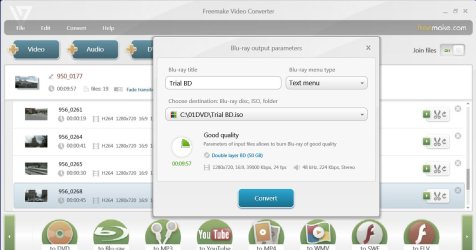
Added 19 short 720p .mov video clips (total duration 10 minutes) shot with my Kodak Zi8 Pocket HD Camcorder to Freemake Video Converter, joined them, clicked on "to Blu-ray" button at the bottom ribbon and then on "Convert". Within about 20 minutes the BD ISO was ready to drive the DA Player.

Trial BD.jpg


Mounted the ISO on Elby's Virtual Clone Drive and played on with DA Player.

What a disappointment ! While the BD opened, I was only greeted with a still picture. As the navigation bar button moved in steps every 4 or so seconds, the still picture changed to another still picture every 2 or so minutes. The playback was a total failure.

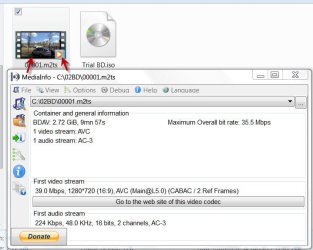
Is something wrong with the BD ISO created by the Freemake Converter? My task is now getting extended. I extracted the .m2ts file from the BD ISO and then played the video file with the DA Player. Results ditto. Only changing still images. No movie!

Trial BD2.jpg

The .m2ts file played true on WMP12 and also on MPC-Home Cinema. So nothing wrong with the conversion or the BD ISO too most probably - but let me confirm it more precisely.

So out came my ASUS SBW-06C1S-U External Slim Blu-ray writer (a $129 purchase from newegg ) and my only Verbatim 50GB BD-RE DL disk ( a $17 buy from Amazon). These will also be on trial now.:)

After some initial hiccups - due to some mix-up on my part -
Windows Disc Image burner successfully burnt the BD ISO on to the disk. ( Even Freemake Converter would have directly wriiten to the BD but at that point of time I did not want to tax my new ASUS BD writer and 50GB Verbatim BD-RE DL for a 3GB 10' movie. :))

Now back to the DA Player and it failed to play the BD. The same slide show.

WMP12 will not play BDs - even with Shark 007 codecs. A known fact.

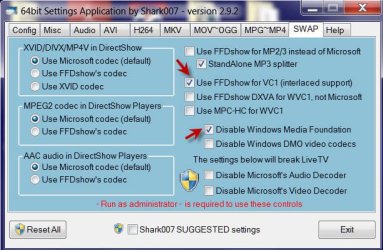
Opened the BD on MPC-Home Cinema and it failed to open. But I knew why. Shark 007 had written in an earlier post on the how-to. For the first time I am gonna try it. ( And so this trial has many firsts - for me atleast :))

Sharkswap1.jpg

In the Settings application "SWAP" tab check "Use FFDshow for VC1" (Disable Windows Media Foundation will automatically get checked)

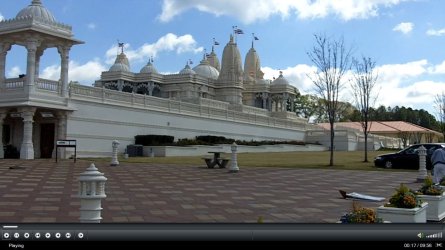
Now MPC - Home Cinema opened the BD effortlessly and played the movie grand.

MPC Home Cinema.jpg

So the Freemake Video converter did a good job, the Windows Disc Image Burner did a good job, the ASUS BD writer and Verbatim did a good job and the BD played true on MPC-Home Cinema + Shark 007 codecs. DA Player failed miserably.

Even a .mov file did not play satisfactorily on DA Player. Digiarty now has its task cut - to improve and bring it upto the mark.

Note: Industry-mastered BD is a different beast altogether when compared to the dye-based consumer BDs. Mate Zepher has reported that he has no problems playing the BD movies. So the DA Player can still be a viable option provided the ever evolving new protection algorithms are taken care of by timely updates.

But as a total media player, it has miles to go.

Signing off.
 
Last edited:

My Computer My Computer

Computer Manufacturer/Model Number
self-assembled
OS
Windows 7 Ultimate 32bit
CPU
AMD Phenom II X3 720 Processor
Motherboard
Gigabyte GA-MA78GM-S2H Revision 1.0
Memory
Transcend DDR2 (PC2 6400) 4 X 1GB
Graphics Card(s)
Integrated + ATI Radeon 4550
Sound Card
Integrated Realtek ALC 889A
Monitor(s) Displays
DELL 1704 FPT
Screen Resolution
1280 x 1024
Hard Drives
Western Digital Caviar SE16 250 GB x2 in RAID 0
PSU
Coolermaster 400 W
Case
Zebronics Cube
Cooling
stock
Keyboard
Microsoft - wired
Mouse
Microsoft - wired
Internet Speed
ADSL 256-512Kbps
It's free, so figured I'd give it a go. Sadly, doesn't have any effect on HDCP, have to run AnyDVD in the background just like I do with ArcSoft. As ArcSoft has served me faithfully for a while now, I'll just stick with that.
 

My Computer My Computer

Computer type
PC/Desktop
Computer Manufacturer/Model Number
HP Pavillion Elite HPE-590t
OS
Win7 Home Premium x64
CPU
Intel Core i7 Extreme 990X @ 3.47GHz x6
Motherboard
PEGATRON CORPORATION 2A86
Memory
16GB DDR3
Graphics Card(s)
NVidia GeForce GTX460
Monitor(s) Displays
Samsung SyncMaster 2443ewx
Screen Resolution
1920x1200
Hard Drives
160 GB SSD @ 2 TB 7200 Internal
750 GB HP, 2 TB WD, 2 TB Samsung External & 3 TB G-Tech firewire external
It's free, so figured I'd give it a go. Sadly, doesn't have any effect on HDCP, have to run AnyDVD in the background just like I do with ArcSoft. As ArcSoft has served me faithfully for a while now, I'll just stick with that.

Why do you need to run AnyDVD? what happens when you try and play a disc and it's not running?
 

My Computer My Computer

Computer Manufacturer/Model Number
HAL-9000
OS
Windows 7 Ultimate 64bit
CPU
Intel i7 3770K
Motherboard
Asus Sabertooth Z77
Memory
16GB DDR3 1333 Corsair XMS3
Graphics Card(s)
XFX HD6950 2GB EyeFinity
Sound Card
Logitech G35 & Sennheiser PC135 & VIA HD
Monitor(s) Displays
23" HP 2310e, 23" Samsung B2230, 21.5" Viewsonic
Screen Resolution
5760x1080
Hard Drives
16TB of Storage
128GB & 256GB Crucial M4 SSD's, 2X 1TB WD Black, 3x 2TB WD, 3x 2TB Samsung F4, 1.5TB Seagate, WD 500GB,
PSU
Antec True Power New 650watt
Case
Cooler Master HAF-932
Cooling
Corsair H60 Hydro Cooler, 3x 230mm Fans, 2x120mm Fan
Keyboard
Logitech G15 and G13
Mouse
Logitech G700 Gaming Mouse
Internet Speed
50/10 Mbit
Other Info
Speakers : Alesis M1 Active Mk2 Studio Monitors , APC RS 1200 UPS, HP 4500DN Color Laser, HP P1006 mono Laser, Kodak 8500 Dye-Sub, Epson 1280 inkjet, Epson Worforce 610 MFC
Some sort of copy protection, HDCP kicks in, preventing the disc from playing. I guess it's meant to prevent piracy, by preventing people from playing (their legally purchased?!?) BluRays on a computer (which is my only television. I can't recall the specific error, Windows Media Center, ArcSoft and DaPlayer all give a different dialog, but it all boils down to the damn copy protection.

High-bandwidth Digital Content Protection - Wikipedia, the free encyclopedia
 

My Computer My Computer

Computer type
PC/Desktop
Computer Manufacturer/Model Number
HP Pavillion Elite HPE-590t
OS
Win7 Home Premium x64
CPU
Intel Core i7 Extreme 990X @ 3.47GHz x6
Motherboard
PEGATRON CORPORATION 2A86
Memory
16GB DDR3
Graphics Card(s)
NVidia GeForce GTX460
Monitor(s) Displays
Samsung SyncMaster 2443ewx
Screen Resolution
1920x1200
Hard Drives
160 GB SSD @ 2 TB 7200 Internal
750 GB HP, 2 TB WD, 2 TB Samsung External & 3 TB G-Tech firewire external
That is strange. Both of my PC's play BD's without the need of AnyDVD.
I do have Total Media Theater and PowerDVD installed on both and tried the DA Player on my main rig the other night.
I guess all of my connections are HDCP enabled.
 

My Computer My Computer

Computer Manufacturer/Model Number
HAL-9000
OS
Windows 7 Ultimate 64bit
CPU
Intel i7 3770K
Motherboard
Asus Sabertooth Z77
Memory
16GB DDR3 1333 Corsair XMS3
Graphics Card(s)
XFX HD6950 2GB EyeFinity
Sound Card
Logitech G35 & Sennheiser PC135 & VIA HD
Monitor(s) Displays
23" HP 2310e, 23" Samsung B2230, 21.5" Viewsonic
Screen Resolution
5760x1080
Hard Drives
16TB of Storage
128GB & 256GB Crucial M4 SSD's, 2X 1TB WD Black, 3x 2TB WD, 3x 2TB Samsung F4, 1.5TB Seagate, WD 500GB,
PSU
Antec True Power New 650watt
Case
Cooler Master HAF-932
Cooling
Corsair H60 Hydro Cooler, 3x 230mm Fans, 2x120mm Fan
Keyboard
Logitech G15 and G13
Mouse
Logitech G700 Gaming Mouse
Internet Speed
50/10 Mbit
Other Info
Speakers : Alesis M1 Active Mk2 Studio Monitors , APC RS 1200 UPS, HP 4500DN Color Laser, HP P1006 mono Laser, Kodak 8500 Dye-Sub, Epson 1280 inkjet, Epson Worforce 610 MFC
Yeah TMT did not like my VGA connection (though it didn't give ANY error), but it plays fine over HDMI.

Too bad my TV automatically overscans over HDMI. who the hell does that in this day and age???
 

My Computer My Computer

Computer type
PC/Desktop
Computer Manufacturer/Model Number
Apple 17" iMac MA199LL (Early 2006)
OS
Windows 8 Pro (32-bit)
CPU
1.83GHz Intel Core Duo
Memory
2GB 667MHz DDR2 SDRAM (PC2-5300) (upgrade)
Graphics Card(s)
ATI Radeon X1600 with 128MB GDDR3 memory
Monitor(s) Displays
17-inch TFT active-matrix LCD, millions of colors
Screen Resolution
1440 x 900
Hard Drives
Hitachi 320GB HDT721032SLA360 7200RPM SATA II (upgrade)
Keyboard
Microsoft Wired Keyboard 600
Mouse
Microsoft Basic Optical Mouse v2.0
Internet Speed
4 Mbps
Antivirus
Microsoft Security Essentials
Browser
Google Chrome
Other Info
WEI:
Base Score: 3.9 Processor: 4.4 Memory 4.7
Graphics: 3.9 Gaming Graphics: 4.1 Primary HD: 5.9
Back
Top