"Upgrade" from Vista 32 bit to 7 64 bit?

aeronauticsrock

New member
Local time
10:49 PM
Messages
33
So Im planning on preordering a copy of 7 tomorrow.

My laptop is running 7127 x64.

Im planning on going back to my original vista disk so I can purchase an "upgrade".

My question is can a buy a x64 upgrade? Or would I have to buy x86? Thanks!
 

My Computer My Computer

At a glance

Windows 7 7127
OS
Windows 7 7127
You can't use the upgrade function to transfer from x86 to x64, mainly because the setup.exe is a 64bit file, and can't be run in the 32bit environment that you'll be running (in vista). You can clean install x64 over x86, but nothing else.

Sorry.

Now you can contact MS to see if they have a way to still purchase an upgrade, but the actual upgrade function through the installer, will not work.
 

My Computer My Computer

At a glance

Windows 7 Build 7600.16834 x64
OS
Windows 7 Build 7600.16834 x64
So when you buy the upgrade copy, it only has that upgrade function? Is there no way to do a fresh install with an "upgrade" disk?
 

My Computer My Computer

At a glance

Windows 7 7127
OS
Windows 7 7127
upgrade or clean

So when you buy the upgrade copy, it only has that upgrade function? Is there no way to do a fresh install with an "upgrade" disk?

Nope upgrade only

And since clean install are preferable thats the way I would want to go if I were you.

Ken
 

My Computer My Computer

At a glance

Win 8 Release candidate 8400[email protected]4 gigsNvidia 9600M
Computer Manufacturer/Model Number
HP Pavillion dv-7 1005 Tx
OS
Win 8 Release candidate 8400
CPU
[email protected]
Memory
4 gigs
Graphics Card(s)
Nvidia 9600M
Sound Card
HD built-in
Monitor(s) Displays
17" Wxga
Screen Resolution
1440x900
Cooling
none
Internet Speed
45Mb down 5Mb up

My Computer My Computer

At a glance

Win7 x64i5-3570K2x4GB Rip Jaws 8-9-9-24Asus R9 280X
Computer type
PC/Desktop
Computer Manufacturer/Model Number
Black Shadow IV
OS
Win7 x64
CPU
i5-3570K
Motherboard
Asrock Z77 Extreme4
Memory
2x4GB Rip Jaws 8-9-9-24
Graphics Card(s)
Asus R9 280X
Sound Card
X-Fi Extreme Music
Monitor(s) Displays
Dell U2412M
Screen Resolution
1920x1200
Hard Drives
Samsung Evo 250GB /
OCZ Vertex 4 128GB
PSU
Seasonic 660XP2
Case
Fractal Design R4
Cooling
Noctua NH-U12S
Upgrade vs clean

Would you think this would work?

Would it be any less "clean" than a true clean install, if I did the upgrade immediately after installi
http://www.winsupersite.com/showcase/winvista_upgrade_clean.asp

I think its the key (serial number that makes the "upgrade only" thing. Not sure but if you have to install one version then upgrade its not truely clean cause in the initial install any anomaly would be upgraded

Hope this helps and again welcome

Clean Install From Upgrade Vista - Vista Forums

Ken
 
Last edited by a moderator:

My Computer My Computer

At a glance

Win 8 Release candidate 8400[email protected]4 gigsNvidia 9600M
Computer Manufacturer/Model Number
HP Pavillion dv-7 1005 Tx
OS
Win 8 Release candidate 8400
CPU
[email protected]
Memory
4 gigs
Graphics Card(s)
Nvidia 9600M
Sound Card
HD built-in
Monitor(s) Displays
17" Wxga
Screen Resolution
1440x900
Cooling
none
Internet Speed
45Mb down 5Mb up
Yeah, so that process will work.

So that is essentially a clean install from an upgrade disk- I should have no problem buying an x64 disk.... right?
 

My Computer My Computer

At a glance

Windows 7 7127
OS
Windows 7 7127
Yeah, so that process will work.

So that is essentially a clean install from an upgrade disk- I should have no problem buying an x64 disk.... right?

Upgrade media may need a vista system installed to upgrade from. Not sure you wan to do that.

Hope this helps a bit

Ken
 

My Computer My Computer

At a glance

Win 8 Release candidate 8400[email protected]4 gigsNvidia 9600M
Computer Manufacturer/Model Number
HP Pavillion dv-7 1005 Tx
OS
Win 8 Release candidate 8400
CPU
[email protected]
Memory
4 gigs
Graphics Card(s)
Nvidia 9600M
Sound Card
HD built-in
Monitor(s) Displays
17" Wxga
Screen Resolution
1440x900
Cooling
none
Internet Speed
45Mb down 5Mb up
Upgrade media may need a vista system installed to upgrade from. Not sure you wan to do that.

Hope this helps a bit

Ken

No but it doesnt. Thats the tutorial in the link you posted.
 

My Computer My Computer

At a glance

Windows 7 7127
OS
Windows 7 7127
You should be able to use the upgrade media for Seven to perform a clean install from Vista. The reason being that Microsoft allows for clean installs from XP because it does not support direct upgrades from XP to Seven, although XP users still qualify for the upgrade media of Seven.

Also to note, there was a hack that could be used to perform a clean install with the upgrade media of Vista. I guess we really won't know for sure until the media for 7 becomes available. Or if Microsoft tells us, which is doubtful.

Edit: Read this, you can apparently perform a clean install from Vista to Seven just like with Vista media.
 

My Computer My Computer

At a glance

Windows 7 7600 (x86 & x64)Intel Core 2 Duo T7300 @ 2.1Ghz / Pentium D 8...2 GB DDR2 RAM @ 667Mhz / 3 GB DDR2 RAM @ 533MhzIntel GMA 965 / nVidia GeForce G210 512MB
Computer Manufacturer/Model Number
Lenovo ThinkPad T61 / Dell XPS 400
OS
Windows 7 7600 (x86 & x64)
CPU
Intel Core 2 Duo T7300 @ 2.1Ghz / Pentium D 820 @ 2.8Ghz
Memory
2 GB DDR2 RAM @ 667Mhz / 3 GB DDR2 RAM @ 533Mhz
Graphics Card(s)
Intel GMA 965 / nVidia GeForce G210 512MB
Monitor(s) Displays
LG Flatron 19" (XPS 400)
Hard Drives
250GB (XPS 400)
160GB (ThinkPad T61)
Keyboard
Microsoft Wireless Keyboard 1000
Mouse
Microsoft Wireless Optical Mouse 2000
I need some advice.....

I have two machines. Both have the latest Win 7 RC on them.

One used to have Vista Business, the other had Vista Ultimate.

1. Can I upgrade them to Win 7 Pro?

2. Do I need to reinstall their original Vista O/S on them to do the upgrades, or can I upgrade the Win 7 RC?

Sorry if my questions sound dumb, but I only know enough to get me in trouble in this arena. What questions didn't I know enough to ask?
 

My Computer My Computer

At a glance

Win 7 Ultimate
Computer Manufacturer/Model Number
Toshina Tecra R10
OS
Win 7 Ultimate
I have two machines. Both have the latest Win 7 RC on them.

One used to have Vista Business, the other had Vista Ultimate.

1. Can I upgrade them to Win 7 Pro?

2. Do I need to reinstall their original Vista O/S on them to do the upgrades, or can I upgrade the Win 7 RC?

Sorry if my questions sound dumb, but I only know enough to get me in trouble in this arena. What questions didn't I know enough to ask?

You can upgrade Business to Professional, but I believe you must upgrade from Ultimate to Ultimate. You can always buy the upgrade media and then perform a clean install on the Ultimate machine.

If you want to do an in-place upgrade (I don't recommend this) then yes, you need to have Vista already installed. You can also do a clean install of Seven which then you should just have to provide some type of installation DVD (meaning you shouldn't have to have Vista pre-installed). Or by simply doing the following (it's more complicated than this but this is it in a nutshell):

1. Install Windows 7 without a license key.
2. Once installed insert the upgrade DVD and "Upgrade" your Windows 7 to Windows 7. You will provide your upgrade license key here.
3. You now have a clean install of Windows 7.

This was a hack that worked with Windows Vista and should work the same with Windows 7.

Hope that helps!
 

My Computer My Computer

At a glance

Windows 7 7600 (x86 & x64)Intel Core 2 Duo T7300 @ 2.1Ghz / Pentium D 8...2 GB DDR2 RAM @ 667Mhz / 3 GB DDR2 RAM @ 533MhzIntel GMA 965 / nVidia GeForce G210 512MB
Computer Manufacturer/Model Number
Lenovo ThinkPad T61 / Dell XPS 400
OS
Windows 7 7600 (x86 & x64)
CPU
Intel Core 2 Duo T7300 @ 2.1Ghz / Pentium D 820 @ 2.8Ghz
Memory
2 GB DDR2 RAM @ 667Mhz / 3 GB DDR2 RAM @ 533Mhz
Graphics Card(s)
Intel GMA 965 / nVidia GeForce G210 512MB
Monitor(s) Displays
LG Flatron 19" (XPS 400)
Hard Drives
250GB (XPS 400)
160GB (ThinkPad T61)
Keyboard
Microsoft Wireless Keyboard 1000
Mouse
Microsoft Wireless Optical Mouse 2000
You should be able to use the upgrade media for Seven to perform a clean install from Vista. The reason being that Microsoft allows for clean installs from XP because it does not support direct upgrades from XP to Seven, although XP users still qualify for the upgrade media of Seven.

Also to note, there was a hack that could be used to perform a clean install with the upgrade media of Vista. I guess we really won't know for sure until the media for 7 becomes available. Or if Microsoft tells us, which is doubtful.

Edit: Read this, you can apparently perform a clean install from Vista to Seven just like with Vista media.
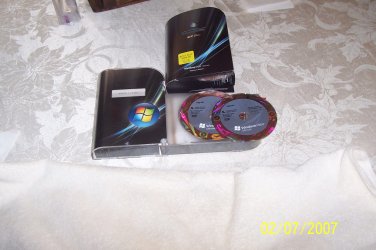
That is not a HACK. it is written very plainly in the manual sent with every UPGRADE Copy of Vista. It also was available with XP only you did it differently. Therefore it is 100% LEGIT not a HACK. Plz note the DISKs say UPGRADE
 

Attachments

  • 42.JPG
    42.JPG
    293.8 KB · Views: 91
I have two machines. Both have the latest Win 7 RC on them.

One used to have Vista Business, the other had Vista Ultimate.

1. Can I upgrade them to Win 7 Pro? (NO, RC is Ultimate)

2. Do I need to reinstall their original Vista O/S on them to do the upgrades, (NO) or can I upgrade the Win 7 RC? (YES to Ultimate)

Sorry if my questions sound dumb, but I only know enough to get me in trouble in this arena. What questions didn't I know enough to ask?
The upgrade problem is set by MS on what will upgrade.
suggest you visit the MS Upgrade site to see what Versions they allow.
Im sure it will be similar to Vista and XP.
 
I never said that it wasn't legit, so I guess Hack wouldn't be the right word choice.
However, as far as I can tell, and I've just looked through the Windows Vista product documentation I cannot find any reference to a clean install. I can find reference to Windows backing up your data and settings and then wiping the drive, thereby doing a somewhat clean install, but you still have your old settings. If I'm wrong feel free to point me in the right direction as I'm always open to learning new things.

Quote: Using an undocumented workaround which I first revealed in WinInfo Daily UPDATE earlier this week, you can fool any Upgrade version of Windows Vista into installing itself on a PC without upgrading a previous OS install.
 

My Computer My Computer

At a glance

Windows 7 7600 (x86 & x64)Intel Core 2 Duo T7300 @ 2.1Ghz / Pentium D 8...2 GB DDR2 RAM @ 667Mhz / 3 GB DDR2 RAM @ 533MhzIntel GMA 965 / nVidia GeForce G210 512MB
Computer Manufacturer/Model Number
Lenovo ThinkPad T61 / Dell XPS 400
OS
Windows 7 7600 (x86 & x64)
CPU
Intel Core 2 Duo T7300 @ 2.1Ghz / Pentium D 820 @ 2.8Ghz
Memory
2 GB DDR2 RAM @ 667Mhz / 3 GB DDR2 RAM @ 533Mhz
Graphics Card(s)
Intel GMA 965 / nVidia GeForce G210 512MB
Monitor(s) Displays
LG Flatron 19" (XPS 400)
Hard Drives
250GB (XPS 400)
160GB (ThinkPad T61)
Keyboard
Microsoft Wireless Keyboard 1000
Mouse
Microsoft Wireless Optical Mouse 2000
See if I got this right....

So I have my two 64 bit Win 7 RC latest version machines. One was formerly Vista Ultimate, one Vista Business.

My best bet if a version such as Win 7 Pro would work for me would be to buy the $99 Win 7 Pro upgrade promotion while it is available and go through the "clean install' process with an upgrade disc" documented here and via other links in this thread? Will that work for me? It sounds like the "clean install with an upgrade" process should work like it did under Vista, or is there some remote chance it won't work and I might be stuck with two Win 7 Pro discs that won't work for me to do clean installs. Also keep in mind even if I wanted to go all the way back to Vista, it is my understanding I could not Win 7 Pro to upgrade my one Ultimate machine.

The ugrade promotion price is so nice, but is there any risk for me in it not working?

And thanks for all the patient help from you all. This website and the folks on it are an awesome resource.
 

My Computer My Computer

At a glance

Win 7 Ultimate
Computer Manufacturer/Model Number
Toshina Tecra R10
OS
Win 7 Ultimate
It should def. work. Microsoft has said you will be able to do clean installs from the upgrade disks. It lists it right on the product webpage. This is because XP users are allowed to buy upgrade disks, but they cannot use the upgrade function (must do a clean install).

Really, the full version is almost only if you are building a computer from scratch.
 

My Computer My Computer

At a glance

Windows 7 7127
OS
Windows 7 7127
Yeah, so that process will work.

So that is essentially a clean install from an upgrade disk- I should have no problem buying an x64 disk.... right?

Yup, that's right.
 

My Computer My Computer

At a glance

Windows 7 7100 x64
OS
Windows 7 7100 x64
upgrade or clean

I have two machines. Both have the latest Win 7 RC on them.

One used to have Vista Business, the other had Vista Ultimate.

1. Can I upgrade them to Win 7 Pro?

2. Do I need to reinstall their original Vista O/S on them to do the upgrades, or can I upgrade the Win 7 RC?

Sorry if my questions sound dumb, but I only know enough to get me in trouble in this arena. What questions didn't I know enough to ask?

One thing we should probably mention. By upgrading do we mean an upgrade install (not clean install) or do we mean upgrading from RC to retail via clean install

Anybody really want to not clean install to the retail version?

Ken
 

My Computer My Computer

At a glance

Win 8 Release candidate 8400[email protected]4 gigsNvidia 9600M
Computer Manufacturer/Model Number
HP Pavillion dv-7 1005 Tx
OS
Win 8 Release candidate 8400
CPU
[email protected]
Memory
4 gigs
Graphics Card(s)
Nvidia 9600M
Sound Card
HD built-in
Monitor(s) Displays
17" Wxga
Screen Resolution
1440x900
Cooling
none
Internet Speed
45Mb down 5Mb up
Back
Top