Solved Training Comodo's firewall, what are best practices?

RoloDman

HWIC
Pro User
Local time
12:08 PM
Messages
634
Location
New York City, New York
I have just installed Comodo's free firewall with all recommended settings. I read an article a while back that said firewalls like these and HIPS in general are not very effective for noob users because they just end up allowing everything through the firewall instead of reading all those little alerts.

I would like to know how I can go about properly training my firewall. Thank you for your time :geek:
 
Last edited:

My Computer My Computer

Computer Manufacturer/Model Number
Sager NP2096
OS
7 Ultimate 64 bit Service Pack 1
CPU
Intel Core 2 Duo P9500 @ 2.53GHz (lower wattage chip)
Motherboard
JHL 90 (U2E1)
Memory
4.0GB Dual-Channel DDR 2 @ 398MHz (5-5-5-18)
Graphics Card(s)
512MB GeForce 9600M GT
Sound Card
Realtek High Definition Audio
Monitor(s) Displays
Generic PnP Monitor
Screen Resolution
1680x1050
Hard Drives
Hitachi 244GB @ 7200rpm (IDE)
Cooling
nature
Keyboard
generic
Mouse
Microsoft Wireless Mobile Mouse 3500
Internet Speed
30 megabits down, 5 megabits up
Other Info
1.)Staples 4-Port USB 2.0 Mobile Hub
2.)WNDR3700 - NETGEAR RangeMax Dual Band Wireless-N Gigabit Router
3.)Logitech Webcam C250
4.)Logitech M570

My Computer My Computer

Computer Manufacturer/Model Number
SALEON model 2.2b
OS
win7 ultimate 32bit
CPU
core2 Extreme QX6850-OCd to 3.15 GHz
Motherboard
ASUS P5G41-M LE
Memory
4 GB
Graphics Card(s)
NVidia 8600 GT
Monitor(s) Displays
23" acer
Hard Drives
one SATA 250GB partitioned equally in half
one SATA 160GB-internal storage
PSU
500W Thermaltake
Case
mini tower
thank you, tman, solved :)
 

My Computer My Computer

Computer Manufacturer/Model Number
Sager NP2096
OS
7 Ultimate 64 bit Service Pack 1
CPU
Intel Core 2 Duo P9500 @ 2.53GHz (lower wattage chip)
Motherboard
JHL 90 (U2E1)
Memory
4.0GB Dual-Channel DDR 2 @ 398MHz (5-5-5-18)
Graphics Card(s)
512MB GeForce 9600M GT
Sound Card
Realtek High Definition Audio
Monitor(s) Displays
Generic PnP Monitor
Screen Resolution
1680x1050
Hard Drives
Hitachi 244GB @ 7200rpm (IDE)
Cooling
nature
Keyboard
generic
Mouse
Microsoft Wireless Mobile Mouse 3500
Internet Speed
30 megabits down, 5 megabits up
Other Info
1.)Staples 4-Port USB 2.0 Mobile Hub
2.)WNDR3700 - NETGEAR RangeMax Dual Band Wireless-N Gigabit Router
3.)Logitech Webcam C250
4.)Logitech M570
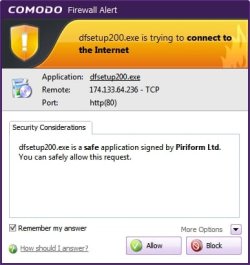
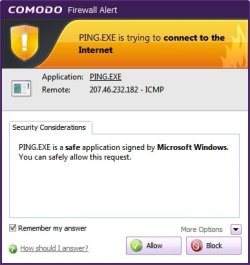
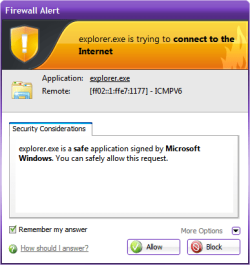
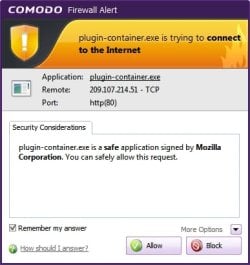
The simplest way to train the Comodo Firewall is to set it to Custom Policy Mode and it will notify you every time a program that does not have tries to access the internet and it will carry out your wishes concerning each program. It was shocking to me just how many programs try to access the internet and phone home...

~Maxx~

ComodoFirewallLogo.png
 

Attachments

  • CCleaner Call Up.jpg
    CCleaner Call Up.jpg
    23.3 KB · Views: 10
  • Defraggler Call Up.jpg
    Defraggler Call Up.jpg
    23.4 KB · Views: 9
  • Callup Ping.exe.jpg
    Callup Ping.exe.jpg
    22.4 KB · Views: 9
  • Explorer IPV6.png
    Explorer IPV6.png
    12.9 KB · Views: 2
  • Plugin Container Calls Up.jpg
    Plugin Container Calls Up.jpg
    24 KB · Views: 8

My Computer My Computer

Computer Manufacturer/Model Number
HP HPE 270f
OS
Windows 7 x64 Home Premium
CPU
Intel Core i7 930 @ 2.8 Ghz Socket 1366 LGA
Motherboard
Pegatron Truckee v1.04E41
Memory
8 GB 1366 Mhz DDR3 (PC3-10700) RAM
Graphics Card(s)
ATI Radeon 5770 1 GB DDR5 RAM
Sound Card
Realtech High Definition
Monitor(s) Displays
32" Sony Bravia
Screen Resolution
1366 X 768
Hard Drives
Intel 25nm 120 GB Series 320 SSD HD Tune- 265 MBps Read/ 130 MBps Write

LaCie 1TB + 1TB RAID 0 eSATA Drive HD Tune- 160 MBps Read/ 90 MBps Write
Keyboard
Logitech Illuminated
Mouse
Logitech MX Revolution
Internet Speed
36.4 Mbps Maximum on a 37 Mbps Motorola SB501 Modem
thank you as well, Maxxwire, custom policy mode is working out great :)
 

My Computer My Computer

Computer Manufacturer/Model Number
Sager NP2096
OS
7 Ultimate 64 bit Service Pack 1
CPU
Intel Core 2 Duo P9500 @ 2.53GHz (lower wattage chip)
Motherboard
JHL 90 (U2E1)
Memory
4.0GB Dual-Channel DDR 2 @ 398MHz (5-5-5-18)
Graphics Card(s)
512MB GeForce 9600M GT
Sound Card
Realtek High Definition Audio
Monitor(s) Displays
Generic PnP Monitor
Screen Resolution
1680x1050
Hard Drives
Hitachi 244GB @ 7200rpm (IDE)
Cooling
nature
Keyboard
generic
Mouse
Microsoft Wireless Mobile Mouse 3500
Internet Speed
30 megabits down, 5 megabits up
Other Info
1.)Staples 4-Port USB 2.0 Mobile Hub
2.)WNDR3700 - NETGEAR RangeMax Dual Band Wireless-N Gigabit Router
3.)Logitech Webcam C250
4.)Logitech M570
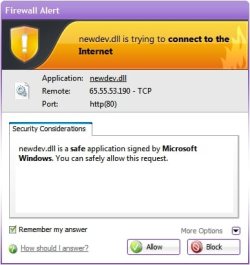
I'm glad that Custom Policy Mode is working out for you. The Comodo Firewall has taught me a lot about how my Win 7 x64 computer works. For example I never knew that newdev.dll called Redmond when I plugged in a USB device, but now I have the Comodo Firewall set to block and log the attempt because I just don't see why MS needs to know about it every time I plug a thumb drive into my computer.

~Maxx~

Shieldgif.gif
 

Attachments

  • newdev.dll callup.jpg
    newdev.dll callup.jpg
    23.7 KB · Views: 9

My Computer My Computer

Computer Manufacturer/Model Number
HP HPE 270f
OS
Windows 7 x64 Home Premium
CPU
Intel Core i7 930 @ 2.8 Ghz Socket 1366 LGA
Motherboard
Pegatron Truckee v1.04E41
Memory
8 GB 1366 Mhz DDR3 (PC3-10700) RAM
Graphics Card(s)
ATI Radeon 5770 1 GB DDR5 RAM
Sound Card
Realtech High Definition
Monitor(s) Displays
32" Sony Bravia
Screen Resolution
1366 X 768
Hard Drives
Intel 25nm 120 GB Series 320 SSD HD Tune- 265 MBps Read/ 130 MBps Write

LaCie 1TB + 1TB RAID 0 eSATA Drive HD Tune- 160 MBps Read/ 90 MBps Write
Keyboard
Logitech Illuminated
Mouse
Logitech MX Revolution
Internet Speed
36.4 Mbps Maximum on a 37 Mbps Motorola SB501 Modem
On a new computer or fresh install i used clean mode. On a not so new computer i used learning mode with D+ sandbox on block:D
 

My Computer My Computer

OS
Win 7 64 premium
Other Info
7 fw, LUA, UAC on high, IE-9 w/ smartscreen on, SANDBOXIE
On a new computer or fresh install i used clean mode. On a not so new computer i used learning mode with D+ sandbox on block:D

ty for the advice, but i don't use the Defense+ HIPS, i just use the firewall
 

My Computer My Computer

Computer Manufacturer/Model Number
Sager NP2096
OS
7 Ultimate 64 bit Service Pack 1
CPU
Intel Core 2 Duo P9500 @ 2.53GHz (lower wattage chip)
Motherboard
JHL 90 (U2E1)
Memory
4.0GB Dual-Channel DDR 2 @ 398MHz (5-5-5-18)
Graphics Card(s)
512MB GeForce 9600M GT
Sound Card
Realtek High Definition Audio
Monitor(s) Displays
Generic PnP Monitor
Screen Resolution
1680x1050
Hard Drives
Hitachi 244GB @ 7200rpm (IDE)
Cooling
nature
Keyboard
generic
Mouse
Microsoft Wireless Mobile Mouse 3500
Internet Speed
30 megabits down, 5 megabits up
Other Info
1.)Staples 4-Port USB 2.0 Mobile Hub
2.)WNDR3700 - NETGEAR RangeMax Dual Band Wireless-N Gigabit Router
3.)Logitech Webcam C250
4.)Logitech M570
On a new computer or fresh install i used clean mode. On a not so new computer i used learning mode with D+ sandbox on block:D

Good advice for setting up Comodo Proactive Defense+. I like to follow up by setting the Firewall in Custom Policy Mode so that it will stop any program attempting to access the internet which does not have permission.

~Maxx~

ComodoFirewallLogo.png
WMC_F_Small.png
 
Last edited:

My Computer My Computer

Computer Manufacturer/Model Number
HP HPE 270f
OS
Windows 7 x64 Home Premium
CPU
Intel Core i7 930 @ 2.8 Ghz Socket 1366 LGA
Motherboard
Pegatron Truckee v1.04E41
Memory
8 GB 1366 Mhz DDR3 (PC3-10700) RAM
Graphics Card(s)
ATI Radeon 5770 1 GB DDR5 RAM
Sound Card
Realtech High Definition
Monitor(s) Displays
32" Sony Bravia
Screen Resolution
1366 X 768
Hard Drives
Intel 25nm 120 GB Series 320 SSD HD Tune- 265 MBps Read/ 130 MBps Write

LaCie 1TB + 1TB RAID 0 eSATA Drive HD Tune- 160 MBps Read/ 90 MBps Write
Keyboard
Logitech Illuminated
Mouse
Logitech MX Revolution
Internet Speed
36.4 Mbps Maximum on a 37 Mbps Motorola SB501 Modem
Back
Top