Solved how to edit 971 stream image on vista style builder!!!!

Gundam890

Banned
Local time
6:33 AM
Messages
13
How do i edit 971 stream image???!!!!!

i already finish edit all the imag at : -

"Windows & Caption Buttons > Aero > DWM Window > Frames > Normal > Bottom , Left , Right and Top"
& " Windows & Caption Buttons > Aero > DWM Window > Restore /Maximize Button , Minimize/Help Button and Close Button"

but all the image that i edit is a single image : -

- bottom image
DWMWindow_FrameBottom_ActiveImage 2.png

- left image
DWMWindow_FrameSideLeftImage.png

- right image
DWMWindow_FrameSideRightImage 1.png

- top image
DWMWindow_FrameTop_ActiveImage 1.png

so how do i combine / save/put all of the image that i edit to become just like this one:-

9713.png

PLEASE HELP ME!!!!! SOMEBODY!!! I ALREADY FINISH EDIT AND SAVE ALL THE IMAGE BUT BECAUSE OF THIS " STREAM" THING I HAVE TO STOP MAKING A THEME!!! :mad:
 

My Computer My Computer

At a glance

Windows 7 Home Premium 32bit.
OS
Windows 7 Home Premium 32bit.
You cannot edit 971 steam image with Windows Style Builder. I am just curious why you want to edit it?

I am not sure what you are talking about when you say
but all the image that i edit is a single image
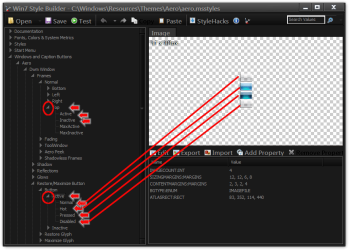
if you expand the locations you will see active and inactive images. Does that help any?
Win7 Style Builder - CWindowsResourcesThemesAeroaero.msstyles.png
Jerry
 

My Computer My Computer

At a glance

Win 7 Pro x64 / Win 10 ProIntel(R) Core(TM) i7-3630QM CPU @ 2.40GHz12 GB(1) Intel(R) HD Graphics 4000 (2) NVIDIA GeFo...
Computer type
Laptop
Computer Manufacturer/Model Number
Sager NP9170
OS
Win 7 Pro x64 / Win 10 Pro
CPU
Intel(R) Core(TM) i7-3630QM CPU @ 2.40GHz
Motherboard
CLEVO P170EM
Memory
12 GB
Graphics Card(s)
(1) Intel(R) HD Graphics 4000 (2) NVIDIA GeForce GTX 675M
Sound Card
(1) Realtek High Definition Audio (2) Intel(R) Display Aud
Monitor(s) Displays
17.3
Screen Resolution
1920x1080
Hard Drives
(1) Samsung 860 EVO 500GB(OS) (1) Samsung 860 EVO 500GB(Data)
Keyboard
Backlite
Antivirus
MSE, Malwarebytes Pro
Browser
Firefox
Other Info
DESKTOP: Custom-built.
OS: Win 10 Pro x64.
CASE: Rosewill R5.
CPU: Intel I5 4670K CPU @ 3.40GHz.
CPU COOLER: Cool Master Hyper 212 EVO.
MOTHERBOARD: Asus Z87-A.
MEMORY: Kingston HyperX 2x4 GB.
GPU: Nvidia Geforce 650 TI.
PSU: Corsair TX750.
DRIVES: (1) Samsung 840 120 GB SSD (2) Western Digital blue 500 GB 7200 RPM.
I just did some checking and it looks like 971 steam image must update itself I just looked at theme I made in that image has changed and I did not do it.
Jerry
971.png
 

My Computer My Computer

At a glance

Win 7 Pro x64 / Win 10 ProIntel(R) Core(TM) i7-3630QM CPU @ 2.40GHz12 GB(1) Intel(R) HD Graphics 4000 (2) NVIDIA GeFo...
Computer type
Laptop
Computer Manufacturer/Model Number
Sager NP9170
OS
Win 7 Pro x64 / Win 10 Pro
CPU
Intel(R) Core(TM) i7-3630QM CPU @ 2.40GHz
Motherboard
CLEVO P170EM
Memory
12 GB
Graphics Card(s)
(1) Intel(R) HD Graphics 4000 (2) NVIDIA GeForce GTX 675M
Sound Card
(1) Realtek High Definition Audio (2) Intel(R) Display Aud
Monitor(s) Displays
17.3
Screen Resolution
1920x1080
Hard Drives
(1) Samsung 860 EVO 500GB(OS) (1) Samsung 860 EVO 500GB(Data)
Keyboard
Backlite
Antivirus
MSE, Malwarebytes Pro
Browser
Firefox
Other Info
DESKTOP: Custom-built.
OS: Win 10 Pro x64.
CASE: Rosewill R5.
CPU: Intel I5 4670K CPU @ 3.40GHz.
CPU COOLER: Cool Master Hyper 212 EVO.
MOTHERBOARD: Asus Z87-A.
MEMORY: Kingston HyperX 2x4 GB.
GPU: Nvidia Geforce 650 TI.
PSU: Corsair TX750.
DRIVES: (1) Samsung 840 120 GB SSD (2) Western Digital blue 500 GB 7200 RPM.
You cannot edit 971 steam image with Windows Style Builder. I am just curious why you want to edit it?

I am not sure what you are talking about when you say
but all the image that i edit is a single image
if you expand the locations you will see active and inactive images. Does that help any?
View attachment 160911
Jerry

i already EDIT all the image at "Windows & Caption Buttons > Aero > DWM Window > Frames > Normal > Bottom , Left , Right and Top"
& " Windows & Caption Buttons > Aero > DWM Window > Restore /Maximize Button , Minimize/Help Button and Close Button" BUT HOW DO I SAVE THE IMAGE OR CHANGE THE IMAGE TO THE STREAM FOLDER [ IMAGE #971]?????

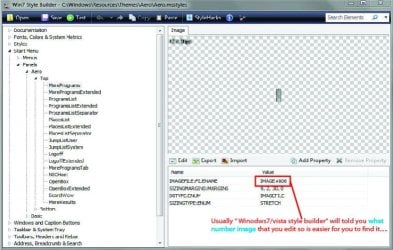
Usually " Winodws7/vista style builder" will told you what number image that you edit so is easier for you to find it AND REPLACE IT.....
p1.jpg
[PLEASE ENLARGE THE IMAGE IF YOU CANT SEE WHAT I WROTE ON THE IMAGE]

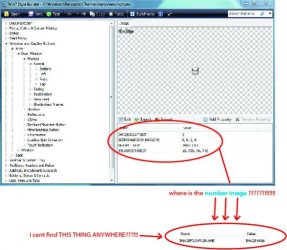
but in " Windows & Caption Buttons > Aero > DWM Window > Frames > Normal > Bottom , Left , Right and Top"
& " Windows & Caption Buttons > Aero > DWM Window > Restore /Maximize Button , Minimize/Help Button and Close Button" column there is no image number for it......SO I DONT KNOW WHERE TO PUT THE NEW IMAGE [ IMAGE THAT I ALREADY EDIT]
p2.jpg
[PLEASE ENLARGE THE IMAGE IF YOU CANT SEE WHAT I WROTE ON THE IMAGE]

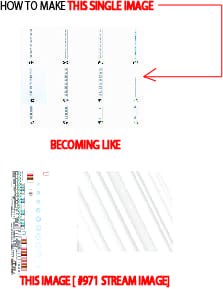
So my question is " how do i save my png file that i already edit into "# 971 stream" image???!!!! MEANING COMBINE ALL SINGLE MY IMAGE BECOMING 1 IMAGE JUST LIKE "# 971 stream" image???!!!

QDDC.jpg
[PLEASE ENLARGE THE IMAGE IF YOU CANT SEE WHAT I WROTE ON THE IMAGE]
 

My Computer My Computer

At a glance

Windows 7 Home Premium 32bit.
OS
Windows 7 Home Premium 32bit.
Usually " Winodws7/vista style builder" will told you what number image that you edit so is easier for you to find it AND REPLACE IT.....
but in " Windows & Caption Buttons > Aero > DWM Window > Frames > Normal > Bottom , Left , Right and Top"
& " Windows & Caption Buttons > Aero > DWM Window > Restore /Maximize Button , Minimize/Help Button and Close Button" column there is no image number for it
So my question is " how do i save my png file that i already edit into "# 971 stream" image???!!!! MEANING COMBINE ALL SINGLE MY IMAGE BECOMING 1 IMAGE JUST LIKE "# 971 stream" image???!!!

I learned something from you there are not number there, I am guessing the .msstyles uses the 971 steam image for that. Sorry I do not know how to edit the 971 steam image, I use Windows Style Builder and it must update/edit it itself.
Jerry
 

My Computer My Computer

At a glance

Win 7 Pro x64 / Win 10 ProIntel(R) Core(TM) i7-3630QM CPU @ 2.40GHz12 GB(1) Intel(R) HD Graphics 4000 (2) NVIDIA GeFo...
Computer type
Laptop
Computer Manufacturer/Model Number
Sager NP9170
OS
Win 7 Pro x64 / Win 10 Pro
CPU
Intel(R) Core(TM) i7-3630QM CPU @ 2.40GHz
Motherboard
CLEVO P170EM
Memory
12 GB
Graphics Card(s)
(1) Intel(R) HD Graphics 4000 (2) NVIDIA GeForce GTX 675M
Sound Card
(1) Realtek High Definition Audio (2) Intel(R) Display Aud
Monitor(s) Displays
17.3
Screen Resolution
1920x1080
Hard Drives
(1) Samsung 860 EVO 500GB(OS) (1) Samsung 860 EVO 500GB(Data)
Keyboard
Backlite
Antivirus
MSE, Malwarebytes Pro
Browser
Firefox
Other Info
DESKTOP: Custom-built.
OS: Win 10 Pro x64.
CASE: Rosewill R5.
CPU: Intel I5 4670K CPU @ 3.40GHz.
CPU COOLER: Cool Master Hyper 212 EVO.
MOTHERBOARD: Asus Z87-A.
MEMORY: Kingston HyperX 2x4 GB.
GPU: Nvidia Geforce 650 TI.
PSU: Corsair TX750.
DRIVES: (1) Samsung 840 120 GB SSD (2) Western Digital blue 500 GB 7200 RPM.
Lol!!! I just figure it out last night [ spen abour 7 hour lol] how to edit/save the 971 image now and i'm so happy!!!:d and now my theme already finish 100%, thanks for your help :).
 

My Computer My Computer

At a glance

Windows 7 Home Premium 32bit.
OS
Windows 7 Home Premium 32bit.
Lol!!! I just figure it out last night [ spen abour 7 hour lol] how to edit/save the 971 image now and i'm so happy!!!:d and now my theme already finish 100%, thanks for your help :).
You're Welcome
What did you do to edit/save it?
Jerry
 

My Computer My Computer

At a glance

Win 7 Pro x64 / Win 10 ProIntel(R) Core(TM) i7-3630QM CPU @ 2.40GHz12 GB(1) Intel(R) HD Graphics 4000 (2) NVIDIA GeFo...
Computer type
Laptop
Computer Manufacturer/Model Number
Sager NP9170
OS
Win 7 Pro x64 / Win 10 Pro
CPU
Intel(R) Core(TM) i7-3630QM CPU @ 2.40GHz
Motherboard
CLEVO P170EM
Memory
12 GB
Graphics Card(s)
(1) Intel(R) HD Graphics 4000 (2) NVIDIA GeForce GTX 675M
Sound Card
(1) Realtek High Definition Audio (2) Intel(R) Display Aud
Monitor(s) Displays
17.3
Screen Resolution
1920x1080
Hard Drives
(1) Samsung 860 EVO 500GB(OS) (1) Samsung 860 EVO 500GB(Data)
Keyboard
Backlite
Antivirus
MSE, Malwarebytes Pro
Browser
Firefox
Other Info
DESKTOP: Custom-built.
OS: Win 10 Pro x64.
CASE: Rosewill R5.
CPU: Intel I5 4670K CPU @ 3.40GHz.
CPU COOLER: Cool Master Hyper 212 EVO.
MOTHERBOARD: Asus Z87-A.
MEMORY: Kingston HyperX 2x4 GB.
GPU: Nvidia Geforce 650 TI.
PSU: Corsair TX750.
DRIVES: (1) Samsung 840 120 GB SSD (2) Western Digital blue 500 GB 7200 RPM.
Back
Top