Radeon 9500/9600 drivers

CasperH

New member
Local time
1:13 PM
Messages
10
Hi,
I have just upgraded (clean install) my computer from Windows XP to Windows 7.
Now I can't seem to install the graphics card drivers.

I have downloaded the ATI catalyst software, which seems to install correctly but afterwards the application complaims that there is no driver installed or that something is wrong with it.

Vista and XP both worked fine under the same software and hardware.

Do you guys have any idea what I can do? I already searched and this problem seems to be affecting a lot of people but none of them can give a concrete answer of how (and if) they solved it.

Thanks in advance!

Best regards,
Casper
 

My Computer My Computer

OS
Windowx 7 Premium
I really need your help guys!
 

My Computer My Computer

OS
Windowx 7 Premium
You can't use the latest Catalyst suite as there is no support in it for those old cards. the only driver available for them is the last Vista driver as AMD has dropped for support for all pre-DirectX 10 cards. You don't specify 32 bit or 64 bit so,

64 bit - ATI Catalyst

32 bit - ATI Catalyst
 

My Computer My Computer

Computer type
PC/Desktop
Computer Manufacturer/Model Number
Me
OS
Win 7 Ultimate x64
CPU
FX-8350 @ 4.6 GHz so far
Motherboard
Asus M5A97 EVO
Memory
ADATA XPG V1 Series Black 8GB DDR3 1600
Graphics Card(s)
Sapphire R9 270x Dual-X
Sound Card
Xonar DGX w/ Corsair Vengence 1300
Monitor(s) Displays
Acer S232HL Abid
Screen Resolution
1920x1080
Hard Drives
120 GB OCZ Vertex 3
500 GB Seagate 7200.12
PSU
Antec Earthwatts 650W Green
Case
Antec Three Hundred
Cooling
Cooler Master 212 EVO
Keyboard
Logitech G510
Mouse
Logitech G500s
Internet Speed
35000/3000
You can't use the latest Catalyst suite as there is no support in it for those old cards. the only driver available for them is the last Vista driver as AMD has dropped for support for all pre-DirectX 10 cards. You don't specify 32 bit or 64 bit so,

64 bit - ATI Catalyst

32 bit - ATI Catalyst
Thanks for your post!
Unfortunately I already tried that Cataclyst install with the results posted in the first post.
Aorry if I wasn't more clear about that! :)
 

My Computer My Computer

OS
Windowx 7 Premium
AGP card (not likely but possible that it is PCI)? If so what is the make and model of the motherboard? If AGP in addition to the video card driver you also need a working chipset driver, primarily the AGP/GART driver, without that the video card driver will not install.
 

My Computer My Computer

Computer type
PC/Desktop
Computer Manufacturer/Model Number
Me
OS
Win 7 Ultimate x64
CPU
FX-8350 @ 4.6 GHz so far
Motherboard
Asus M5A97 EVO
Memory
ADATA XPG V1 Series Black 8GB DDR3 1600
Graphics Card(s)
Sapphire R9 270x Dual-X
Sound Card
Xonar DGX w/ Corsair Vengence 1300
Monitor(s) Displays
Acer S232HL Abid
Screen Resolution
1920x1080
Hard Drives
120 GB OCZ Vertex 3
500 GB Seagate 7200.12
PSU
Antec Earthwatts 650W Green
Case
Antec Three Hundred
Cooling
Cooler Master 212 EVO
Keyboard
Logitech G510
Mouse
Logitech G500s
Internet Speed
35000/3000
AGP card (not likely but possible that it is PCI)? If so what is the make and model of the motherboard? If AGP in addition to the video card driver you also need a working chipset driver, primarily the AGP/GART driver, without that the video card driver will not install.

Yes, it's a AGP card.
Motherboards model is MICRO-STAR INTERNATIONAL CO., LTD MS-6701
 

My Computer My Computer

OS
Windowx 7 Premium
SiS 648/963 chipset. If it is anything like my old socket A motherboard with a similar SiS chipset on it, it will work with a little effort. Start with uninstalling anything from ATI showing in Programs and Features. Next go here,

SiS - Welcom to Silicon Integrated Systems Corporation.

and download the SiS AGP(GART) Driver (v1.21) and install it. Then if it does like mine did run Windows Update after installing and there should now be an optional update for the AGP driver, if there is allow it to install. Once that is done then go back to the ATI driver and now it should install properly.
 

My Computer My Computer

Computer type
PC/Desktop
Computer Manufacturer/Model Number
Me
OS
Win 7 Ultimate x64
CPU
FX-8350 @ 4.6 GHz so far
Motherboard
Asus M5A97 EVO
Memory
ADATA XPG V1 Series Black 8GB DDR3 1600
Graphics Card(s)
Sapphire R9 270x Dual-X
Sound Card
Xonar DGX w/ Corsair Vengence 1300
Monitor(s) Displays
Acer S232HL Abid
Screen Resolution
1920x1080
Hard Drives
120 GB OCZ Vertex 3
500 GB Seagate 7200.12
PSU
Antec Earthwatts 650W Green
Case
Antec Three Hundred
Cooling
Cooler Master 212 EVO
Keyboard
Logitech G510
Mouse
Logitech G500s
Internet Speed
35000/3000
SiS 648/963 chipset. If it is anything like my old socket A motherboard with a similar SiS chipset on it, it will work with a little effort. Start with uninstalling anything from ATI showing in Programs and Features. Next go here,

SiS - Welcom to Silicon Integrated Systems Corporation.

and download the SiS AGP(GART) Driver (v1.21) and install it. Then if it does like mine did run Windows Update after installing and there should now be an optional update for the AGP driver, if there is allow it to install. Once that is done then go back to the ATI driver and now it should install properly.
Unfortunately that didn't work (although that may be because I didn't get an update via Windows Update).
Have any other tips?

I really appreciate your time and help!
 

My Computer My Computer

OS
Windowx 7 Premium
Aw come on, anybody?
 

My Computer My Computer

OS
Windowx 7 Premium
Wow! Realy? Just download the 10.2 legacy ati ccc package. Works great. It is a vista driver but it will work. I have used it with the card discribed and the driver wil work. I have a 9550 and a 9600 both AGP and it works. Go into safe mode and uninstall the gpu under device manager then restart your computer. Unpack the ati driver (DO NOT INSTALL). Next go back into device manager and install the driver using device manager. Then restart. That it. If that does not work then you do not have the card you think you do. Could you post a pic of the gpu along with a pic of the part number. I will do my best to help.

x32

ATI Catalyst

x64

ATI Catalyst
 

My Computer My Computer

Computer Manufacturer/Model Number
Asus
OS
Windows 7 Pro x64 SP1 and Mac OS X 10.8.3
CPU
Intel Core i7-3820 Sandy Bridge-E at 4.75 GHz
Motherboard
ASUS Rampage IV Extreme
Memory
8 x Corsair 8GB DDR3 64 GB Kit @1866 Overclocked @2000
Graphics Card(s)
GTX 580 and MSI R6870
Sound Card
HDMI on GPU and ACL898
Monitor(s) Displays
32" Sony EX-500 120Hz
Screen Resolution
1920x1080P
Hard Drives
1 x Corsair Force Series GT CSSD-F60GBGT-BK (OS)
2 x Western Digital Caviar Black Sata III 750GB (Raid 0)
1 x Western Digital Caviar Black Sata III 1TB (Media)
2 x Western Digital Caviar Black Sata II 640GB (Raid 0)
PSU
Corsair Professional Series Gold AX850
Case
Corsair 800D
Cooling
Corsair H80 High Performance Liquid CPU Cooler
Keyboard
HP Wireless Elite Keyboard
Mouse
HP Wireless Elite Mouse
Internet Speed
Cable, VisionTek Bigfoot Killer 2100 Gaming Network Card
Other Info
4 x GELID Solutions FN-TX12-15 120mm Case Fan with Superior Temperature Control
1 x Corsair 140mm Case Fan
1 x SilverStone FP55B Aluminum front panel 5.25" to a 3.5" bay converter
1 x Ultra Card Reader
1 x Sony Blu-ray Burner BD-5300S-0B
Wow! Realy? Just download the 10.2 legacy ati ccc package. Works great. It is a vista driver but it will work. I have used it with the card discribed and the driver wil work. I have a 9550 and a 9600 both AGP and it works. Go into safe mode and uninstall the gpu under device manager then restart your computer. Unpack the ati driver (DO NOT INSTALL). Next go back into device manager and install the driver using device manager. Then restart. That it. If that does not work then you do not have the card you think you do. Could you post a pic of the gpu along with a pic of the part number. I will do my best to help.

x32

ATI Catalyst

x64

ATI Catalyst
Thanks for responding!

I followed your instructions multiple times but unfortunately they did not work.
I did forget to mention that I have a Medion 9600 TX (it's been reported that it is a overclocked 9500 with 2 output ports). But I know for 100% sure that this is the one :)

I really hope we can solve this together!

Did this really go that easy for you and your card?
 

My Computer My Computer

OS
Windowx 7 Premium
Sometime it works no problem, other times it works with some effort to get everything working, and other times it just won't work no matter what you do. You have to remember that you are trying to run a modern OS on hardware that hasn't seen an update of any kind in a lot of cases for years, which makes ti hit or miss.

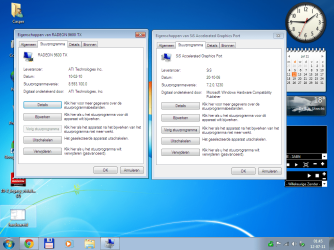
In my case with an old AMD system with similar SiS based chipset it worked as I described previously,

sis9800.PNG

That is with the same SiS AGP driver and ATI legacy driver I linked too.

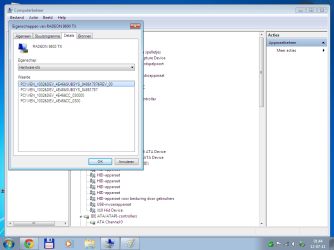
Have a quick look in Device Manager and see what it shows for the AGP driver on yours. Also while you're there locate the video card and click on the Details tab, then from the dropdown select Hardware IDs. Want to see if that card even has support in the driver (it should, but you never know), seeing as you mentioned it is a Medion branded card.
 

My Computer My Computer

Computer type
PC/Desktop
Computer Manufacturer/Model Number
Me
OS
Win 7 Ultimate x64
CPU
FX-8350 @ 4.6 GHz so far
Motherboard
Asus M5A97 EVO
Memory
ADATA XPG V1 Series Black 8GB DDR3 1600
Graphics Card(s)
Sapphire R9 270x Dual-X
Sound Card
Xonar DGX w/ Corsair Vengence 1300
Monitor(s) Displays
Acer S232HL Abid
Screen Resolution
1920x1080
Hard Drives
120 GB OCZ Vertex 3
500 GB Seagate 7200.12
PSU
Antec Earthwatts 650W Green
Case
Antec Three Hundred
Cooling
Cooler Master 212 EVO
Keyboard
Logitech G510
Mouse
Logitech G500s
Internet Speed
35000/3000
If this way doesnt work then do it the long way,

Remove your GFX Card and PLug the monitor into the Motherboard, Boot up and remove all ATI from the Programs List, Then Do a Search For ATI and delete the Install Folder, Then Delete the Driver Paths in the Computer Hardware Management Section.

Once you have Removed All of this, Download and install the Drivers for the Card (Legacy im Guessing)

Turn You Pc OFF and Put the GFX Card Back in.

PLug the Monitor into the GFX, And Boot the PC Back up.

BTW THIS SHOULD BE A LAST DITCH EFFORT IF SOFTWARE INSTALLATIONS FAIL...

Cheers :P
 

My Computer My Computer

Computer type
PC/Desktop
Computer Manufacturer/Model Number
Custom Build
OS
Windows 8.1
CPU
Intel i5 3750k OC'd 4.0Ghz
Motherboard
P8Z77-V LX3
Memory
16GB Vengence Corsair
Graphics Card(s)
GTX 770 OC 2GB Windforce
Sound Card
C-Media 7.1 Surround Card
Monitor(s) Displays
Asus 3D 23" & BenQ 24" & LG 19"
Screen Resolution
1920*1080, 1920*1080, 1440*900
Hard Drives
Crucial 512GB SSD
WD 1.5 TB
WD 500Gb
PSU
850MW Silverstone
Case
inWin DragonRider
Cooling
4 * 140mm LED Akasa, One 140mm Fan Akasa
Keyboard
Corsair k95
Mouse
R.A.T 7 Contagion
Internet Speed
152 Mb Fiber Optic
Antivirus
ESET Nod32
Browser
Waterfox x64 / Chrome x64
Other Info
Freenas / Plex Media server
Q6600
6Gb DDR3
6TB ZFS Raid
500W PSu
2 x Intel NIC's
Sometime it works no problem, other times it works with some effort to get everything working, and other times it just won't work no matter what you do. You have to remember that you are trying to run a modern OS on hardware that hasn't seen an update of any kind in a lot of cases for years, which makes ti hit or miss.

In my case with an old AMD system with similar SiS based chipset it worked as I described previously,


That is with the same SiS AGP driver and ATI legacy driver I linked too.

Have a quick look in Device Manager and see what it shows for the AGP driver on yours. Also while you're there locate the video card and click on the Details tab, then from the dropdown select Hardware IDs. Want to see if that card even has support in the driver (it should, but you never know), seeing as you mentioned it is a Medion branded card.

Good news, after seeing that you had a more recent firmware version for the motherboard I let Windows search again (not using Windows Update) so I updated it to 7.2.0.1230

Below is the picture you asked for (plus the version numbers)
versions.png

View attachment 164520
 

Attachments

  • hardwareid.png
    hardwareid.png
    33.6 KB · Views: 30

My Computer My Computer

OS
Windowx 7 Premium
If this way doesnt work then do it the long way,

Remove your GFX Card and PLug the monitor into the Motherboard, Boot up and remove all ATI from the Programs List, Then Do a Search For ATI and delete the Install Folder, Then Delete the Driver Paths in the Computer Hardware Management Section.

Once you have Removed All of this, Download and install the Drivers for the Card (Legacy im Guessing)

Turn You Pc OFF and Put the GFX Card Back in.

PLug the Monitor into the GFX, And Boot the PC Back up.

BTW THIS SHOULD BE A LAST DITCH EFFORT IF SOFTWARE INSTALLATIONS FAIL...

Cheers :P
That sound awfully dangerous, and I'm not that much of a technician.
Thanks for the tip tho:)
 

My Computer My Computer

OS
Windowx 7 Premium
If this way doesnt work then do it the long way,

Remove your GFX Card and PLug the monitor into the Motherboard, Boot up and remove all ATI from the Programs List, Then Do a Search For ATI and delete the Install Folder, Then Delete the Driver Paths in the Computer Hardware Management Section.

Once you have Removed All of this, Download and install the Drivers for the Card (Legacy im Guessing)

Turn You Pc OFF and Put the GFX Card Back in.

PLug the Monitor into the GFX, And Boot the PC Back up.

BTW THIS SHOULD BE A LAST DITCH EFFORT IF SOFTWARE INSTALLATIONS FAIL...

Cheers :P
That sound awfully dangerous, and I'm not that much of a technician.
Thanks for the tip tho:)

Its not really Dangerous its more a Last attempt for it to work, otherwise all hell breaks loose, especially if you install different drivers over each other.

I've Had to do it Before and it worked a Charm, just shame i had to do it
 

My Computer My Computer

Computer type
PC/Desktop
Computer Manufacturer/Model Number
Custom Build
OS
Windows 8.1
CPU
Intel i5 3750k OC'd 4.0Ghz
Motherboard
P8Z77-V LX3
Memory
16GB Vengence Corsair
Graphics Card(s)
GTX 770 OC 2GB Windforce
Sound Card
C-Media 7.1 Surround Card
Monitor(s) Displays
Asus 3D 23" & BenQ 24" & LG 19"
Screen Resolution
1920*1080, 1920*1080, 1440*900
Hard Drives
Crucial 512GB SSD
WD 1.5 TB
WD 500Gb
PSU
850MW Silverstone
Case
inWin DragonRider
Cooling
4 * 140mm LED Akasa, One 140mm Fan Akasa
Keyboard
Corsair k95
Mouse
R.A.T 7 Contagion
Internet Speed
152 Mb Fiber Optic
Antivirus
ESET Nod32
Browser
Waterfox x64 / Chrome x64
Other Info
Freenas / Plex Media server
Q6600
6Gb DDR3
6TB ZFS Raid
500W PSu
2 x Intel NIC's

My Computer My Computer

Computer type
PC/Desktop
Computer Manufacturer/Model Number
Me
OS
Win 7 Ultimate x64
CPU
FX-8350 @ 4.6 GHz so far
Motherboard
Asus M5A97 EVO
Memory
ADATA XPG V1 Series Black 8GB DDR3 1600
Graphics Card(s)
Sapphire R9 270x Dual-X
Sound Card
Xonar DGX w/ Corsair Vengence 1300
Monitor(s) Displays
Acer S232HL Abid
Screen Resolution
1920x1080
Hard Drives
120 GB OCZ Vertex 3
500 GB Seagate 7200.12
PSU
Antec Earthwatts 650W Green
Case
Antec Three Hundred
Cooling
Cooler Master 212 EVO
Keyboard
Logitech G510
Mouse
Logitech G500s
Internet Speed
35000/3000
i came across a similar issue when i upgraded my motherboard but i simple little free microsoft gold certified program helped in the biggest way download slimdriver from slimware utilities
 

My Computer My Computer

OS
Windows 7 Ultimate x64 SP1
CPU
AMD Phenom X4 9850 Black Edition
Motherboard
Gigabyte Technology Co., Ltd. GA-MA785GM-US2H (Socket M2)
Memory
6.0GB Dual-Channel DDR2 @ 208MHz
Graphics Card(s)
nvidia geforce 8600gt
Sound Card
High Definition Audio Device
Monitor(s) Displays
DELL SE198WFP, '42 PHILIPS flat screen lcd tv
Screen Resolution
1440x900, 1024x768
Hard Drives
244GB Hitachi HDT722525DLA380, 117GB Seagate ST3120213AS, 156GB Seagate ST3160815A, 625GB Western Digital WDC WD6400AAKS-65A7B2
Case
NZXT LEXA S LEXS - 001BK Black Steel ATX Mid Tower Computer
Keyboard
Logitech Access Keyboard 600
Mouse
rocketfish 2.4 ghz ergo
The 10.2 legacy drivers don't do ANYTHING on Windows 7 x64 but install their ATI Catalyst Installer and VC 2008 redistributable. Manually navigating to the drivers' location at C:\ATI\Support\10-02_legacy_vista32-64_dd_ccc\Packages\Drivers\Display in "Update Driver" under Device Manager doesn't yield any fruit. Running the drivers' installers in that directory doesn't work - it says it doesn't support this version of Windows. All the while, the card is appearing as a "Standard VGA" card. I'm taking this piece of garbage ATI card back to the store and will try an Nvidia-based AGP 4x/8x 1.5v card instead. So I'm guessing all of you had the 32-bit version.

I have read around and saw that the ATI HD 2xxx, HD 3xxx, HD 4xxx and Nvideo Geforce 6xxx and 7xxx have full Win7 support. But tbh, it looks like Nvidia has made more efforts to support Windows 7 with legacy cards so for me, the decision is easy. Bye-bye ATI.
 
Last edited:

My Computer My Computer

OS
Windows 7
Back
Top