Sticky drag & drop, Find box from the corner & taskbar thumbnail

Hans L

New member
Member
VIP
Local time
11:28 AM
Messages
175
Sticky drag & drop, Find box from the corner & taskbar thumbnail

Hello:

There are three things that I dislike a lot but don't know how to change.

- when I drag and drip windows between my monitors, the windows stick to my cursor, and are difficult to shake off. This happened about 3 month ago. Is there any way to get rid of the stickiness?

- when I click "Ctrl-F", for instance, in my Word program, the Find box seems to originate in the rightmost bottom corner of the rightmost monitor, and then slowly moves and increases in size to the monitor where the Ctrl+F originated. Any way to avoid this slomo behavior.

- when I rest the cursor over a taskbar icon, a bigger thumbnail window is shown with the content of the icon program in question. Ay way to stop this?

Thank you in advance!

Hans L
 

My Computer My Computer

At a glance

Windows 7 UltimateIntel Core Duo E6600 @ 2.40 GHz3 GBNvidia eVGA GeForce 8600 GTS & 7600 GT
Computer Manufacturer/Model Number
BIOS American MegaTrend 1238
OS
Windows 7 Ultimate
CPU
Intel Core Duo E6600 @ 2.40 GHz
Motherboard
ASUS P5B-Deluxe
Memory
3 GB
Graphics Card(s)
Nvidia eVGA GeForce 8600 GTS & 7600 GT
Monitor(s) Displays
Iiyama PLE431S/PLH431S
Hello when I rest the cursor over a taskbar icon, a bigger thumbnail window is shown with the content of the icon program in question. Ay way to stop this?

Thank you in advance!

Hans L
This is the only thing I have a partial fix for Hans L. Use a non-Aero theme and you won't see a thumb previrew, but a smaller descriptive info box.
 

My Computer My Computer

At a glance

Windows 7 Ultimate X64 SP1Intel i5-2550K, Differing ~4.4-4.8GHz No buil...16GB G.Skill Sniper 1866MHz @ 2133MHz 2x8GBASUS GTX650TIB-DC2OC-2GD5, (650TI Boost)
Computer type
PC/Desktop
Computer Manufacturer/Model Number
Home Built Desktop By DataTech
OS
Windows 7 Ultimate X64 SP1
CPU
Intel i5-2550K, Differing ~4.4-4.8GHz No built in GPU
Motherboard
ASUS P8Z68-V PRO/GEN3
Memory
16GB G.Skill Sniper 1866MHz @ 2133MHz 2x8GB
Graphics Card(s)
ASUS GTX650TIB-DC2OC-2GD5, (650TI Boost)
Sound Card
Onboard Realtek 5-1
Monitor(s) Displays
Samsung P2570HD
Screen Resolution
1920x1080
Hard Drives
Samsung 840 Pro 256GB SSD for OS, 500GB Seagate Constellation (Enterprise drive) for Data
PSU
Corsair HX650W
Case
Inwin Dragon Rider
Cooling
Hyper 212 EVO w/two Noctua fans, push-pull, @1300 RPM
Keyboard
E-Z Eyes, bright yellow keys with large characters
Mouse
steelseries SENSEI Laser Pro Gaming
Internet Speed
48-51Mbs Mbs down, 11 Mbs up Xfinity Cable
Antivirus
Norton Internet Security 2013
Browser
IE 10, Opera, Pale Moon if needed
Other Info
4 case fans, LG BluRay-RE, ASUS DVD-RW, Mr. Fusion power supply, 1.21 gigawatts.
Hello when I rest the cursor over a taskbar icon, a bigger thumbnail window is shown with the content of the icon program in question. Ay way to stop this?

Thank you in advance!

Hans L
This is the only thing I have a partial fix for Hans L. Use a non-Aero theme and you won't see a thumb previrew, but a smaller descriptive info box.

Well, not bad :-) Now, I am UltraMon, and one of its functions is to put wallpapers on the monitors. What I use for wallpapers are jpg files from [FONT=&quot]C:\Windows\Globalization\MCT.Have I, by that, used Aero themes?
In addition, I have set the Window Color to "lavender" (looks better than it sounds :-). Does that affect whether I have Aero or not.

As you can see, this is not easy for me to sort out. Would appreciate your sorting this out for me.

Regards,

Hans L
[/FONT]
 

My Computer My Computer

At a glance

Windows 7 UltimateIntel Core Duo E6600 @ 2.40 GHz3 GBNvidia eVGA GeForce 8600 GTS & 7600 GT
Computer Manufacturer/Model Number
BIOS American MegaTrend 1238
OS
Windows 7 Ultimate
CPU
Intel Core Duo E6600 @ 2.40 GHz
Motherboard
ASUS P5B-Deluxe
Memory
3 GB
Graphics Card(s)
Nvidia eVGA GeForce 8600 GTS & 7600 GT
Monitor(s) Displays
Iiyama PLE431S/PLH431S
Let me say first, I have no experience with multiple monitors.
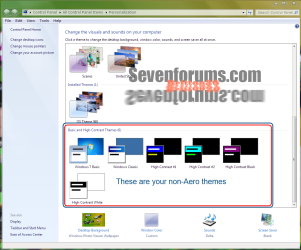
If you right click your desktop in an empty space, click Personalization. Ther window below will appear. The non-Aero themes are in a red box. Choose one of those and you will still be able to pick pictures for walls and change your windows colors.
pers.PNG
 

My Computer My Computer

At a glance

Windows 7 Ultimate X64 SP1Intel i5-2550K, Differing ~4.4-4.8GHz No buil...16GB G.Skill Sniper 1866MHz @ 2133MHz 2x8GBASUS GTX650TIB-DC2OC-2GD5, (650TI Boost)
Computer type
PC/Desktop
Computer Manufacturer/Model Number
Home Built Desktop By DataTech
OS
Windows 7 Ultimate X64 SP1
CPU
Intel i5-2550K, Differing ~4.4-4.8GHz No built in GPU
Motherboard
ASUS P8Z68-V PRO/GEN3
Memory
16GB G.Skill Sniper 1866MHz @ 2133MHz 2x8GB
Graphics Card(s)
ASUS GTX650TIB-DC2OC-2GD5, (650TI Boost)
Sound Card
Onboard Realtek 5-1
Monitor(s) Displays
Samsung P2570HD
Screen Resolution
1920x1080
Hard Drives
Samsung 840 Pro 256GB SSD for OS, 500GB Seagate Constellation (Enterprise drive) for Data
PSU
Corsair HX650W
Case
Inwin Dragon Rider
Cooling
Hyper 212 EVO w/two Noctua fans, push-pull, @1300 RPM
Keyboard
E-Z Eyes, bright yellow keys with large characters
Mouse
steelseries SENSEI Laser Pro Gaming
Internet Speed
48-51Mbs Mbs down, 11 Mbs up Xfinity Cable
Antivirus
Norton Internet Security 2013
Browser
IE 10, Opera, Pale Moon if needed
Other Info
4 case fans, LG BluRay-RE, ASUS DVD-RW, Mr. Fusion power supply, 1.21 gigawatts.
Let me say first, I have no experience with multiple monitors.
If you right click your desktop in an empty space, click Personalization. Ther window below will appear. The non-Aero themes are in a red box. Choose one of those and you will still be able to pick pictures for walls and change your windows colors.
Cool and thanks. But how do I know what theme I have now?

Hans L
 

My Computer My Computer

At a glance

Windows 7 UltimateIntel Core Duo E6600 @ 2.40 GHz3 GBNvidia eVGA GeForce 8600 GTS & 7600 GT
Computer Manufacturer/Model Number
BIOS American MegaTrend 1238
OS
Windows 7 Ultimate
CPU
Intel Core Duo E6600 @ 2.40 GHz
Motherboard
ASUS P5B-Deluxe
Memory
3 GB
Graphics Card(s)
Nvidia eVGA GeForce 8600 GTS & 7600 GT
Monitor(s) Displays
Iiyama PLE431S/PLH431S

My Computer My Computer

At a glance

Win 7 Pro x64 / Win 10 ProIntel(R) Core(TM) i7-3630QM CPU @ 2.40GHz12 GB(1) Intel(R) HD Graphics 4000 (2) NVIDIA GeFo...
Computer type
Laptop
Computer Manufacturer/Model Number
Sager NP9170
OS
Win 7 Pro x64 / Win 10 Pro
CPU
Intel(R) Core(TM) i7-3630QM CPU @ 2.40GHz
Motherboard
CLEVO P170EM
Memory
12 GB
Graphics Card(s)
(1) Intel(R) HD Graphics 4000 (2) NVIDIA GeForce GTX 675M
Sound Card
(1) Realtek High Definition Audio (2) Intel(R) Display Aud
Monitor(s) Displays
17.3
Screen Resolution
1920x1080
Hard Drives
(1) Samsung 860 EVO 500GB(OS) (1) Samsung 860 EVO 500GB(Data)
Keyboard
Backlite
Antivirus
MSE, Malwarebytes Pro
Browser
Firefox
Other Info
DESKTOP: Custom-built.
OS: Win 10 Pro x64.
CASE: Rosewill R5.
CPU: Intel I5 4670K CPU @ 3.40GHz.
CPU COOLER: Cool Master Hyper 212 EVO.
MOTHERBOARD: Asus Z87-A.
MEMORY: Kingston HyperX 2x4 GB.
GPU: Nvidia Geforce 650 TI.
PSU: Corsair TX750.
DRIVES: (1) Samsung 840 120 GB SSD (2) Western Digital blue 500 GB 7200 RPM.
Open the Personalization window, your current theme is highlighted. If you have transparent window title bars, you have Aero.
 

My Computer My Computer

At a glance

Windows 7 Ultimate X64 SP1Intel i5-2550K, Differing ~4.4-4.8GHz No buil...16GB G.Skill Sniper 1866MHz @ 2133MHz 2x8GBASUS GTX650TIB-DC2OC-2GD5, (650TI Boost)
Computer type
PC/Desktop
Computer Manufacturer/Model Number
Home Built Desktop By DataTech
OS
Windows 7 Ultimate X64 SP1
CPU
Intel i5-2550K, Differing ~4.4-4.8GHz No built in GPU
Motherboard
ASUS P8Z68-V PRO/GEN3
Memory
16GB G.Skill Sniper 1866MHz @ 2133MHz 2x8GB
Graphics Card(s)
ASUS GTX650TIB-DC2OC-2GD5, (650TI Boost)
Sound Card
Onboard Realtek 5-1
Monitor(s) Displays
Samsung P2570HD
Screen Resolution
1920x1080
Hard Drives
Samsung 840 Pro 256GB SSD for OS, 500GB Seagate Constellation (Enterprise drive) for Data
PSU
Corsair HX650W
Case
Inwin Dragon Rider
Cooling
Hyper 212 EVO w/two Noctua fans, push-pull, @1300 RPM
Keyboard
E-Z Eyes, bright yellow keys with large characters
Mouse
steelseries SENSEI Laser Pro Gaming
Internet Speed
48-51Mbs Mbs down, 11 Mbs up Xfinity Cable
Antivirus
Norton Internet Security 2013
Browser
IE 10, Opera, Pale Moon if needed
Other Info
4 case fans, LG BluRay-RE, ASUS DVD-RW, Mr. Fusion power supply, 1.21 gigawatts.
Open the Personalization window, your current theme is highlighted. If you have transparent window title bars, you have Aero.

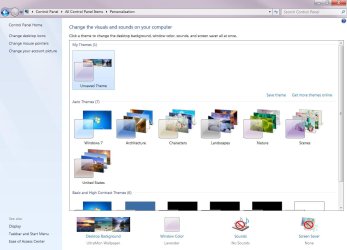
Which theme is highligthed here (I can't figure it out)?

Regards,

Hans L
 

Attachments

  • Themes.jpg
    Themes.jpg
    83.1 KB · Views: 8

My Computer My Computer

At a glance

Windows 7 UltimateIntel Core Duo E6600 @ 2.40 GHz3 GBNvidia eVGA GeForce 8600 GTS & 7600 GT
Computer Manufacturer/Model Number
BIOS American MegaTrend 1238
OS
Windows 7 Ultimate
CPU
Intel Core Duo E6600 @ 2.40 GHz
Motherboard
ASUS P5B-Deluxe
Memory
3 GB
Graphics Card(s)
Nvidia eVGA GeForce 8600 GTS & 7600 GT
Monitor(s) Displays
Iiyama PLE431S/PLH431S

My Computer My Computer

At a glance

Windows 7 UltimateIntel Core Duo E6600 @ 2.40 GHz3 GBNvidia eVGA GeForce 8600 GTS & 7600 GT
Computer Manufacturer/Model Number
BIOS American MegaTrend 1238
OS
Windows 7 Ultimate
CPU
Intel Core Duo E6600 @ 2.40 GHz
Motherboard
ASUS P5B-Deluxe
Memory
3 GB
Graphics Card(s)
Nvidia eVGA GeForce 8600 GTS & 7600 GT
Monitor(s) Displays
Iiyama PLE431S/PLH431S
when I drag and drip windows between my monitors, the windows stick to my cursor
That sounds like Mouse "ClickLock" might be turned on - check in Mouse settings > Buttons tab. Or simply a failing mouse - buttons sticking from accumulated dust or something...

Which theme is highligthed here
Hans L
Top row, under heaing "My Themes" - your current theme is aero, because it has that tranparent pane next to it as Britton said, and is called "Unsaved Theme". Windows will keep loading it even though it is unsaved, but it is a good idea to save a theme you have worked on so you can go back to it if you later make changes you don't want. Also good to save a backup of the theme in your own data folders just in case...
 

My Computer My Computer

At a glance

Windows 7
OS
Windows 7
when I drag and drip windows between my monitors, the windows stick to my cursor
That sounds like Mouse "ClickLock" might be turned on - check in Mouse settings > Buttons tab. Or simply a failing mouse - buttons sticking from accumulated dust or something...

Which theme is highligthed here
Hans L
Top row, under heaing "My Themes" - your current theme is aero, because it has that tranparent pane next to it as Britton said, and is called "Unsaved Theme". Windows will keep loading it even though it is unsaved, but it is a good idea to save a theme you have worked on so you can go back to it if you later make changes you don't want. Also good to save a backup of the theme in your own data folders just in case...
ClickLock was not activated. I activated and then deactivated. We'll see.

Okay, will save "My theme"! Thank you,

Hans L
 

My Computer My Computer

At a glance

Windows 7 UltimateIntel Core Duo E6600 @ 2.40 GHz3 GBNvidia eVGA GeForce 8600 GTS & 7600 GT
Computer Manufacturer/Model Number
BIOS American MegaTrend 1238
OS
Windows 7 Ultimate
CPU
Intel Core Duo E6600 @ 2.40 GHz
Motherboard
ASUS P5B-Deluxe
Memory
3 GB
Graphics Card(s)
Nvidia eVGA GeForce 8600 GTS & 7600 GT
Monitor(s) Displays
Iiyama PLE431S/PLH431S
Back
Top