Japanese Windows displays strange dates

whitebloodcell

New member
Member
Local time
11:59 AM
Messages
57
I downloaded and did a fresh install of the Japanese Language Version of Windows 7 RC when it was released. I live in Japan and speak/read/write reasonable Japanese, but using computers in Japanese was always a slow process so installed on my personal computer for practice.

The problem(s) I am having is that dates are not displayed correctly - in anything. A screenshot explains better (please see attachment)

The entire operating system is in Japanese (i.e. I did not just download the language pack - not sure if there would be a difference). I have installed UK keyboard settings which are loaded by default.

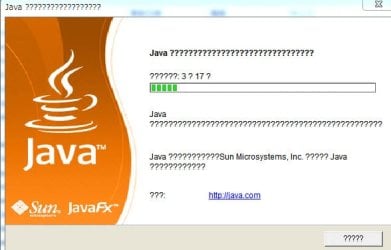
The second problem is that many applications seem to have trouble displaying dialog boxes correctly. Installation wizards of programs are paticularly suceptable to this one. The text within them is replaced by a string of question marks or random combinations of italic f...Again a screenshot explains better.

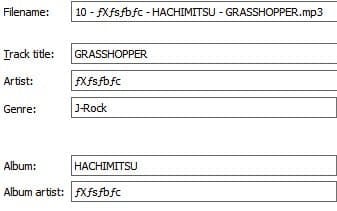
The final screenshot shows the f problem. Shot was taken from mediamonkey since after installing Windows decided to destroy the perfect tagging for me entire music collection...weeks later and I still have files like this floating around.

Any help would be much appreciated other than suggesting I reinstall the English version of Windows.
 

Attachments

  • date1.jpg
    date1.jpg
    12.7 KB · Views: 13
  • display1.jpg
    display1.jpg
    4.4 KB · Views: 6
  • display2.jpg
    display2.jpg
    26 KB · Views: 465
  • disaply3.jpg
    disaply3.jpg
    9.7 KB · Views: 11

My Computer My Computer

At a glance

Windows 7
OS
Windows 7
japanese display prob

I downloaded and did a fresh install of the Japanese Language Version of Windows 7 RC when it was released. I live in Japan and speak/read/write reasonable Japanese, but using computers in Japanese was always a slow process so installed on my personal computer for practice.

The problem(s) I am having is that dates are not displayed correctly - in anything. A screenshot explains better (please see attachment)

The entire operating system is in Japanese (i.e. I did not just download the language pack - not sure if there would be a difference). I have installed UK keyboard settings which are loaded by default.

The second problem is that many applications seem to have trouble displaying dialog boxes correctly. Installation wizards of programs are paticularly suceptable to this one. The text within them is replaced by a string of question marks or random combinations of italic f...Again a screenshot explains better.

The final screenshot shows the f problem. Shot was taken from mediamonkey since after installing Windows decided to destroy the perfect tagging for me entire music collection...weeks later and I still have files like this floating around.

Any help would be much appreciated other than suggesting I reinstall the English version of Windows.

Hi and welcome to sevenforums

Having nothing but gut feelings to guide me I have a feeling that since you have UK keyboard and Japanese Win 7, its loosind something when trying to translate. The language pack might help as might a diff keyboard layout.

Haven't a clue maybe someone with more experiience will kick in

Ken
 

My Computer My Computer

At a glance

Win 8 Release candidate 8400[email protected]4 gigsNvidia 9600M
Computer Manufacturer/Model Number
HP Pavillion dv-7 1005 Tx
OS
Win 8 Release candidate 8400
CPU
[email protected]
Memory
4 gigs
Graphics Card(s)
Nvidia 9600M
Sound Card
HD built-in
Monitor(s) Displays
17" Wxga
Screen Resolution
1440x900
Cooling
none
Internet Speed
45Mb down 5Mb up
Thanks for welcome and quick reply:-) I also suspect it may be the keyboard settings or (exact naming I can't recall) default regional settings. (i.e. when I Installed it asked me what region for correct display of currency, times etc - to which (since I go to University in the UK) I responded UK.

And last time I checked 'Tuesday' is not a Japanese word...so its getting confused somewhere.
 

My Computer My Computer

At a glance

Windows 7
OS
Windows 7
Any more thoughts on my problem, I haven't had any joy yet.
 

My Computer My Computer

At a glance

Windows 7
OS
Windows 7
I think you should put Time And Date (when asked) to Japan and Yen for money. I don't know what is the actual difference from a Japanese computer and UK computer :\

If it's not a problem, I would re-install only to see if the problem would go away.

Also, I would try to download the English Version and download the Japanese Language Pack to see if it will fix it.

Myself, I have the 7 RC in French. I could try to install the Japanese language to see if the problems occurs on my side... ...when I'll reboot on my Win7
 

My Computer My Computer

At a glance

Windows 10 Professional 64-bitRyzen 9 5900XG.Skill 3600Mhz CL16 16GB × 4EVGA GeForce RTX 3070 Ti FTW3 Ultra Gaming
Computer type
PC/Desktop
Computer Manufacturer/Model Number
Custom build
OS
Windows 10 Professional 64-bit
CPU
Ryzen 9 5900X
Motherboard
Gigabyte X570 Aorus Master
Memory
G.Skill 3600Mhz CL16 16GB × 4
Graphics Card(s)
EVGA GeForce RTX 3070 Ti FTW3 Ultra Gaming
Sound Card
On-board
Monitor(s) Displays
Dell Alienware AW3418DW
Screen Resolution
3440x1440
Hard Drives
1×Sabrent Rocket 4 Plus 2TB nvme SSD (System, internal)
2x4TB Western Digital Blue (Internal)
1x4TB HDST 7200RPM (Internal)
PSU
Seasonic Focus Plus 850W Platinum
Case
Corsair 680X
Cooling
Stock fans + 3× Corsair QL120, Corsair H100i Platinum
Keyboard
Logitech K350
Mouse
Logitech M510
Internet Speed
120Mbits dl - 20Mbits up
Antivirus
ESET NOD32 Antivirus
Browser
Firefox (latest version)
Other Info
Headphones : Audio-Technica ATH-M50x
Scanner : Canon Canoscan LiDE 220 + Plustek OptiBook 4800
Once I changed and restarted the original weird looking date format dissapeared (as an option) completely, a couple of programs are complaining about wrong dateformats but at least it looks normal now!

The question marks still have me stumped however.
 

My Computer My Computer

At a glance

Windows 7
OS
Windows 7
The question marks are there because the installer isn't unicode for some reasons.
 

My Computer My Computer

At a glance

Windows 10 Professional 64-bitRyzen 9 5900XG.Skill 3600Mhz CL16 16GB × 4EVGA GeForce RTX 3070 Ti FTW3 Ultra Gaming
Computer type
PC/Desktop
Computer Manufacturer/Model Number
Custom build
OS
Windows 10 Professional 64-bit
CPU
Ryzen 9 5900X
Motherboard
Gigabyte X570 Aorus Master
Memory
G.Skill 3600Mhz CL16 16GB × 4
Graphics Card(s)
EVGA GeForce RTX 3070 Ti FTW3 Ultra Gaming
Sound Card
On-board
Monitor(s) Displays
Dell Alienware AW3418DW
Screen Resolution
3440x1440
Hard Drives
1×Sabrent Rocket 4 Plus 2TB nvme SSD (System, internal)
2x4TB Western Digital Blue (Internal)
1x4TB HDST 7200RPM (Internal)
PSU
Seasonic Focus Plus 850W Platinum
Case
Corsair 680X
Cooling
Stock fans + 3× Corsair QL120, Corsair H100i Platinum
Keyboard
Logitech K350
Mouse
Logitech M510
Internet Speed
120Mbits dl - 20Mbits up
Antivirus
ESET NOD32 Antivirus
Browser
Firefox (latest version)
Other Info
Headphones : Audio-Technica ATH-M50x
Scanner : Canon Canoscan LiDE 220 + Plustek OptiBook 4800
Thanks for welcome and quick reply:-) I also suspect it may be the keyboard settings or (exact naming I can't recall) default regional settings. (i.e. when I Installed it asked me what region for correct display of currency, times etc - to which (since I go to University in the UK) I responded UK.

And last time I checked 'Tuesday' is not a Japanese word...so its getting confused somewhere.
Hi. I think you answered your own question here. To explain what I mean, I have to tell my situation:

I am a native Finnish speaking person, living in Germany with a German wife, working using English and Swedish. I´ve installed English W7 plus additional language packs for Finnish, Swedish and German.

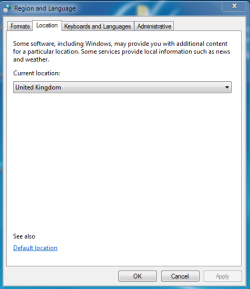
To get date and time right, to correspond with operating system language, you have to set location to a country using same language than your operating system, in this case W7. Because I´m using W7 in English, I chose UK for location even I´m located in Germany. In my case it is UK and not USA because it also affects what kind of ads you get on web-pages and I´d rather watch European ads and additional information than American, living here in Europe. (Image 1)

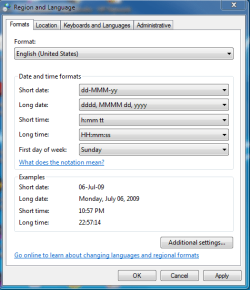
For date and time format I have to choose a format from an English speaking country as well to get it right. I use US-format for date and time, modifying only the clock to use 24-hour system. (Image 2)

Same thing with my computers Finnish and Swedish Guest-accounts, and my wifes German user-account. Location on Finnish account Finland and format Finnish, on German account Germany and German, and on Swedish account Sweden and Swedish. Only this way every user account shows time and date right, corresponding with chosen operating system language.

Additional bonus is that IE8 looks always the location of the current user account, and different users of this computer get i.e. Hotmail and msn.com in their chosen language.

Worth to try?

Image 1:
Location.PNG

Image 2:
Formats.PNG
 
Last edited:

My Computer My Computer

At a glance

Windows 10 Pro x64 EN-GB1.6 GHz Intel Core i7-720QM Processor6 GBATI Mobility Radeon HD 5850 Graphics
Computer type
Laptop
Computer Manufacturer/Model Number
HP ENVY 17-1150eg
OS
Windows 10 Pro x64 EN-GB
CPU
1.6 GHz Intel Core i7-720QM Processor
Memory
6 GB
Graphics Card(s)
ATI Mobility Radeon HD 5850 Graphics
Sound Card
Beats sound system with integrated subwoofer
Monitor(s) Displays
17" laptop display, 22" LED and 32" Full HD TV through HDMI
Screen Resolution
1600*900 (1), 1920*1080 (2&3)
Hard Drives
Internal: 2 x 500 GB SATA Hard Disk Drive 7200 rpm
External: 2TB for backups, 3TB USB3 network drive for media
Cooling
As Envy runs a bit warm, I have it on a Cooler Master pad
Keyboard
Logitech diNovo Media Desktop Laser (bluetooth)
Mouse
Logitech Performance Mouse MX
Internet Speed
50/10 Mbps VDSL
Antivirus
Windows Defender 4.3.9431.0
Browser
Maxthon 3.5.2., IE11
That seems to have done the trick!
 

My Computer My Computer

At a glance

Windows 7
OS
Windows 7
I have successfully realized W7 system with Japanese UI on a machine with English keyboard. I installed English version of W7 and added(installed) Japanese language pack. I did this with three different machines(one desktop and two notebooks).
 

My Computer My Computer

At a glance

W7 Ult x64, W8 Pro x64 and W10 Pro x64Phenom FX630016GB DDR3 1866 G.Skill F3-1866C9D-16GWM x2Radeon R7 360
Computer type
PC/Desktop
OS
W7 Ult x64, W8 Pro x64 and W10 Pro x64
CPU
Phenom FX6300
Motherboard
Gigabyte GA-970A-UD3 rev. 1.2
Memory
16GB DDR3 1866 G.Skill F3-1866C9D-16GWM x2
Graphics Card(s)
Radeon R7 360
Sound Card
Asus Xonar DS
Monitor(s) Displays
27" x2, Dell P2715Q
Screen Resolution
3840 x 2160
Hard Drives
Samsung 850Pro 1TB SSD - system
Samsung 4TB SSD - Data
PSU
Corsair CX450M
Case
Corsair 200R
Cooling
Zalman CNPS5X Performa
Internet Speed
400Mbps/12Mbps
Other Info
2nd machine: Same as above
3rd machine: Apple MacAir with W7 Ult installed
I have successfully realized W7 system with Japanese UI on a machine with English keyboard. I installed English version of W7 and added(installed) Japanese language pack. I did this with three different machines(one desktop and two notebooks).
What Location and Date/Time-format did you use? I´ve been testing and playing with language packs since it´s been possible (early days of Vista Ultimate). My experience is you don´t get the date and time right, if Location, Format and OS language don´t match.

I´m myself using a Finnish keyboard layout on my English w7 because I need my Scandinavian letters Åå, Ää and Öö in my correspondence. Keyboard layout has nothing to do with how the date and time are shown.

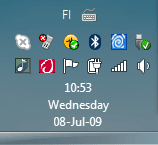
Here´s an example with a Finnish keyboard layout with Location and Format set to United Kingdom / English (only modification is the use of 24-hour clock):
Date1.PNG

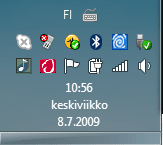
So you can see it keyboard layout have no effect to the way date and time are shown.

Here´s the same computer, this time Finnish keyboard layout combined with Finland as location and Finnish date/time-format:
Date2.PNG
 

My Computer My Computer

At a glance

Windows 10 Pro x64 EN-GB1.6 GHz Intel Core i7-720QM Processor6 GBATI Mobility Radeon HD 5850 Graphics
Computer type
Laptop
Computer Manufacturer/Model Number
HP ENVY 17-1150eg
OS
Windows 10 Pro x64 EN-GB
CPU
1.6 GHz Intel Core i7-720QM Processor
Memory
6 GB
Graphics Card(s)
ATI Mobility Radeon HD 5850 Graphics
Sound Card
Beats sound system with integrated subwoofer
Monitor(s) Displays
17" laptop display, 22" LED and 32" Full HD TV through HDMI
Screen Resolution
1600*900 (1), 1920*1080 (2&3)
Hard Drives
Internal: 2 x 500 GB SATA Hard Disk Drive 7200 rpm
External: 2TB for backups, 3TB USB3 network drive for media
Cooling
As Envy runs a bit warm, I have it on a Cooler Master pad
Keyboard
Logitech diNovo Media Desktop Laser (bluetooth)
Mouse
Logitech Performance Mouse MX
Internet Speed
50/10 Mbps VDSL
Antivirus
Windows Defender 4.3.9431.0
Browser
Maxthon 3.5.2., IE11
Thanks for your help, I think when I get time I will do it that way around.
 

My Computer My Computer

At a glance

Windows 7
OS
Windows 7
What Location and Date/Time-format did you use?
I set the Location and the Formats/Format as U.S or Japan and the Number/Currency/Time/Date as I want.
 

My Computer My Computer

At a glance

W7 Ult x64, W8 Pro x64 and W10 Pro x64Phenom FX630016GB DDR3 1866 G.Skill F3-1866C9D-16GWM x2Radeon R7 360
Computer type
PC/Desktop
OS
W7 Ult x64, W8 Pro x64 and W10 Pro x64
CPU
Phenom FX6300
Motherboard
Gigabyte GA-970A-UD3 rev. 1.2
Memory
16GB DDR3 1866 G.Skill F3-1866C9D-16GWM x2
Graphics Card(s)
Radeon R7 360
Sound Card
Asus Xonar DS
Monitor(s) Displays
27" x2, Dell P2715Q
Screen Resolution
3840 x 2160
Hard Drives
Samsung 850Pro 1TB SSD - system
Samsung 4TB SSD - Data
PSU
Corsair CX450M
Case
Corsair 200R
Cooling
Zalman CNPS5X Performa
Internet Speed
400Mbps/12Mbps
Other Info
2nd machine: Same as above
3rd machine: Apple MacAir with W7 Ult installed
I set the Location and the Formats/Format as U.S or Japan and the Number/Currency/Time/Date as I want.
OK, Churin. But I´m still saying if you use Windows in Japanese, but your date/time format is English, you get your date and time in English, not in Japanese. I´ve been trying to explain what you have to do to get your date in same language than your operating system, because I think that´s what "whitebloodcell" asked.

I am pretty sure that if you use a Japanese language pack with date/time and location set to "U.S.", you don´t get your date in taskbar in Japanese. Whatever you say. Sorry.
 

My Computer My Computer

At a glance

Windows 10 Pro x64 EN-GB1.6 GHz Intel Core i7-720QM Processor6 GBATI Mobility Radeon HD 5850 Graphics
Computer type
Laptop
Computer Manufacturer/Model Number
HP ENVY 17-1150eg
OS
Windows 10 Pro x64 EN-GB
CPU
1.6 GHz Intel Core i7-720QM Processor
Memory
6 GB
Graphics Card(s)
ATI Mobility Radeon HD 5850 Graphics
Sound Card
Beats sound system with integrated subwoofer
Monitor(s) Displays
17" laptop display, 22" LED and 32" Full HD TV through HDMI
Screen Resolution
1600*900 (1), 1920*1080 (2&3)
Hard Drives
Internal: 2 x 500 GB SATA Hard Disk Drive 7200 rpm
External: 2TB for backups, 3TB USB3 network drive for media
Cooling
As Envy runs a bit warm, I have it on a Cooler Master pad
Keyboard
Logitech diNovo Media Desktop Laser (bluetooth)
Mouse
Logitech Performance Mouse MX
Internet Speed
50/10 Mbps VDSL
Antivirus
Windows Defender 4.3.9431.0
Browser
Maxthon 3.5.2., IE11
I am pretty sure that if you use a Japanese language pack with date/time and location set to "U.S.", you don´t get your date in Japanese.
That is correct but please note that my post stated that I set the Formats/Format as U.S. *OR* Japan. I simply answered your question. My apology if it was misleading.

The purpose of my post was that a solution of the original poster's problem can be using English version of W7 + Japanese language pack rather than the localized Japanese language version of W7.
 

My Computer My Computer

At a glance

W7 Ult x64, W8 Pro x64 and W10 Pro x64Phenom FX630016GB DDR3 1866 G.Skill F3-1866C9D-16GWM x2Radeon R7 360
Computer type
PC/Desktop
OS
W7 Ult x64, W8 Pro x64 and W10 Pro x64
CPU
Phenom FX6300
Motherboard
Gigabyte GA-970A-UD3 rev. 1.2
Memory
16GB DDR3 1866 G.Skill F3-1866C9D-16GWM x2
Graphics Card(s)
Radeon R7 360
Sound Card
Asus Xonar DS
Monitor(s) Displays
27" x2, Dell P2715Q
Screen Resolution
3840 x 2160
Hard Drives
Samsung 850Pro 1TB SSD - system
Samsung 4TB SSD - Data
PSU
Corsair CX450M
Case
Corsair 200R
Cooling
Zalman CNPS5X Performa
Internet Speed
400Mbps/12Mbps
Other Info
2nd machine: Same as above
3rd machine: Apple MacAir with W7 Ult installed
The purpose of my post was that a solution of the original poster's problem can be using English version of W7 + Japanese language pack rather than the localized Japanese language version of W7.
I agree. Installing English W7, downloading Japanese language pack and then using two user accounts, one in English with location set to UK & date/time format English, and one in Japanese with location Japan & date/time Japanese. That should work just fine.
 

My Computer My Computer

At a glance

Windows 10 Pro x64 EN-GB1.6 GHz Intel Core i7-720QM Processor6 GBATI Mobility Radeon HD 5850 Graphics
Computer type
Laptop
Computer Manufacturer/Model Number
HP ENVY 17-1150eg
OS
Windows 10 Pro x64 EN-GB
CPU
1.6 GHz Intel Core i7-720QM Processor
Memory
6 GB
Graphics Card(s)
ATI Mobility Radeon HD 5850 Graphics
Sound Card
Beats sound system with integrated subwoofer
Monitor(s) Displays
17" laptop display, 22" LED and 32" Full HD TV through HDMI
Screen Resolution
1600*900 (1), 1920*1080 (2&3)
Hard Drives
Internal: 2 x 500 GB SATA Hard Disk Drive 7200 rpm
External: 2TB for backups, 3TB USB3 network drive for media
Cooling
As Envy runs a bit warm, I have it on a Cooler Master pad
Keyboard
Logitech diNovo Media Desktop Laser (bluetooth)
Mouse
Logitech Performance Mouse MX
Internet Speed
50/10 Mbps VDSL
Antivirus
Windows Defender 4.3.9431.0
Browser
Maxthon 3.5.2., IE11
@Kari: You are correct in loading two profiles, as it makes life much easier.

There is only one sticky point on running Asian languages. Since Japanese isn't a standard unicode, in order to install and read text files you'll need to changes the system locale under the Administrative tab.

boku o ute yo...
 

My Computer My Computer

At a glance

Windows 7 Build 71002.4 GHz4GnVidia 9400M
Computer Manufacturer/Model Number
Apple MacBook Unibody
OS
Windows 7 Build 7100
CPU
2.4 GHz
Motherboard
Apple
Memory
4G
Graphics Card(s)
nVidia 9400M
Sound Card
Built in
@Kari: You are correct in loading two profiles, as it makes life much easier.

There is only one sticky point on running Asian languages. Since Japanese isn't a standard unicode, in order to install and read text files you'll need to changes the system locale under the Administrative tab.

boku o ute yo...
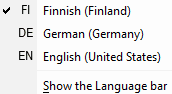
Yes, I know. I'm lucky, all four languages I need in my rig are standard unicode. Still, I need to have several keyboard layouts installed; I'm constantly swapping between German, English and Finnish keyboard (no need for Swedish, it's the same than Finnish).

langbar.PNG

IMO, this possibility to use different OS languages and be able to swap between them is worth every extra penny I have to pay to get Ultimate.

Kari
 

My Computer My Computer

At a glance

Windows 10 Pro x64 EN-GB1.6 GHz Intel Core i7-720QM Processor6 GBATI Mobility Radeon HD 5850 Graphics
Computer type
Laptop
Computer Manufacturer/Model Number
HP ENVY 17-1150eg
OS
Windows 10 Pro x64 EN-GB
CPU
1.6 GHz Intel Core i7-720QM Processor
Memory
6 GB
Graphics Card(s)
ATI Mobility Radeon HD 5850 Graphics
Sound Card
Beats sound system with integrated subwoofer
Monitor(s) Displays
17" laptop display, 22" LED and 32" Full HD TV through HDMI
Screen Resolution
1600*900 (1), 1920*1080 (2&3)
Hard Drives
Internal: 2 x 500 GB SATA Hard Disk Drive 7200 rpm
External: 2TB for backups, 3TB USB3 network drive for media
Cooling
As Envy runs a bit warm, I have it on a Cooler Master pad
Keyboard
Logitech diNovo Media Desktop Laser (bluetooth)
Mouse
Logitech Performance Mouse MX
Internet Speed
50/10 Mbps VDSL
Antivirus
Windows Defender 4.3.9431.0
Browser
Maxthon 3.5.2., IE11
Back
Top