Solved How to Create a Win95 Virtual Machine in Windows Virtual PC

newtoallthis

New member
Local time
4:08 AM
Messages
14
Hi, first post here.
I have Win XP mode running in Win virtual pc on my Win 7 Pro tower. I have been given an original and unopened Win95 pack containing a Win95 v4.0.950B Nov96 CD with USB support and an IE4 CD. I think I understand from Brinks "How to create a virtual machine in windows virtual pc" when you have an iso of the OS to refer to. But I am not sure about how to proceed with a non bootable Win95 CD?
I am OK upto step 12 but then how do I get a bootable iso of my Win95 CD? And then how to install it into my virtual machine?
Is there a step by step "Here's How" please?
I never had a Win95 machine and just wonder what exactly it looks like running and how slow it is compared to Win 7?
Tks.
 

My Computer My Computer

Computer Manufacturer/Model Number
home build
OS
Windows 7 Professional 32 bit
CPU
Intel Core 2 Duo E6550 @ 2.33GHz
Motherboard
Foxconn 45CMX/GMX/CMX-K
Memory
2GB DDR2
Graphics Card(s)
Nvidia GeForce 8600GTS
Sound Card
C-Media Electronics CMI8738/C3DX PCI Audio Device
Monitor(s) Displays
CIBOX Vw19B
Hard Drives
Western Digital 500GB
PSU
Hiper 530W
Case
NZXT Hush Classic silver
Cooling
fans
For Win95 you'll need to boot from a Win95 setup floppy or a mounted img, then use fdisk to create a partition. You'll need to format with the /s option to make the partition bootable. Once you get your VM booting to DOS you can then run setup from the CD.

MS doesn't support Win 95 as a guest OS in Virtual PC. That doesn't mean it won't work it means you'll get no help from them to get it going.

I personally prefer the free VMWare Player which openly does support installing Win95 as a guest OS and has the documentation on how to install it here: http://www.vmware.com/pdf/GuestOS_guide.pdf
 

My Computer My Computer

Computer type
PC/Desktop
Computer Manufacturer/Model Number
Home Built desktop, Dell G15 5511 Gaming laptop,MS Surface Pro 7 tablet
OS
W10 Pro desktop, W11 laptop, W11 Pro tablet (all 64-bit)
CPU
3.7Ghz 8700K i7, i7-11800H, i7-1065G7
Motherboard
ASUS TUF Z370-Pro Gaming in desktop
Memory
16G desktop, 16G laptop, 4G tablet
Graphics Card(s)
AMD Radeon RX580, RTX 3060, Intel Iris Plus
Sound Card
High Definition Audio (Built-in to mobo)
Monitor(s) Displays
Samsung U32J59 32" (2x), 15.6", 12"
Screen Resolution
3840x2160, 3840x2160, 1920x1080, 2160x1440
Hard Drives
500G SSD for OS; 2T, 10T & 15T HDDs for Data on Desktop, 1TB SSD laptop, 128G SSD tablet.
PSU
Corsair CX 750M
Case
Antec 100
Cooling
CM 212+
Keyboard
IBM Model M - used continuously since 1986
Mouse
Microsoft Pro IntelliMouse
Internet Speed
400M down 8M up
Antivirus
Windows Defender
Browser
FireFox
Other Info
Built my first computer (8Mhz 8088cpu, 640K RAM, 20MB HDD, 2 360K floppy drives) in 1985 and have been building them for myself, relatives and friends ever since.
I hope I don't get in trouble for posting this, but here is a download for the windows 95 vhd. Just extract it, put it in your documents\my virtual machines folder, and you're good to go.

Download

Edit: tested, link is safe. If you encounter any issues, let me know and I'll remove the link immediately.
 

My Computer My Computer

Computer type
PC/Desktop
Computer Manufacturer/Model Number
Custom
OS
Windows 7 Pro x64
CPU
Intel Core i7-5820k
Motherboard
ASUS X99-PRO
Memory
32GB Kingston HyperX FURY DDR4-2400
Graphics Card(s)
EVGA Geforce GTX970
Monitor(s) Displays
ASUS VC239h
Screen Resolution
1920x1080
Hard Drives
Samsung 850 EVO SSD 250GB x2
750 GB HDD
3TB HDD
PSU
Corsair RM750
Case
Fractal Design Define R5
Cooling
Noctua NH-D15
Keyboard
Corsair Strafe RGB
Mouse
Logitech G502
@kbronski, thanks will try and let you know result.
@strollin, thanks also, might just need to install VMWare instead.
Will post results.
 

My Computer My Computer

Computer Manufacturer/Model Number
home build
OS
Windows 7 Professional 32 bit
CPU
Intel Core 2 Duo E6550 @ 2.33GHz
Motherboard
Foxconn 45CMX/GMX/CMX-K
Memory
2GB DDR2
Graphics Card(s)
Nvidia GeForce 8600GTS
Sound Card
C-Media Electronics CMI8738/C3DX PCI Audio Device
Monitor(s) Displays
CIBOX Vw19B
Hard Drives
Western Digital 500GB
PSU
Hiper 530W
Case
NZXT Hush Classic silver
Cooling
fans
I hope I don't get in trouble for posting this, but here is a download for the windows 95 vhd. Just extract it, put it in your documents\my virtual machines folder, and you're good to go.

Download

Edit: tested, link is safe. If you encounter any issues, let me know and I'll remove the link immediately.
Aw, that's no fun! Newtoallthis won't get to experience the thrill of setting up his own Win95 environment.

@newtoallthis, in case you don't know, you will need to create a new VM and point it to to the vhd instead of creating a virtual disk. When you create the VM, set 64M as the RAM, not the default of 512.
 

My Computer My Computer

Computer type
PC/Desktop
Computer Manufacturer/Model Number
Home Built desktop, Dell G15 5511 Gaming laptop,MS Surface Pro 7 tablet
OS
W10 Pro desktop, W11 laptop, W11 Pro tablet (all 64-bit)
CPU
3.7Ghz 8700K i7, i7-11800H, i7-1065G7
Motherboard
ASUS TUF Z370-Pro Gaming in desktop
Memory
16G desktop, 16G laptop, 4G tablet
Graphics Card(s)
AMD Radeon RX580, RTX 3060, Intel Iris Plus
Sound Card
High Definition Audio (Built-in to mobo)
Monitor(s) Displays
Samsung U32J59 32" (2x), 15.6", 12"
Screen Resolution
3840x2160, 3840x2160, 1920x1080, 2160x1440
Hard Drives
500G SSD for OS; 2T, 10T & 15T HDDs for Data on Desktop, 1TB SSD laptop, 128G SSD tablet.
PSU
Corsair CX 750M
Case
Antec 100
Cooling
CM 212+
Keyboard
IBM Model M - used continuously since 1986
Mouse
Microsoft Pro IntelliMouse
Internet Speed
400M down 8M up
Antivirus
Windows Defender
Browser
FireFox
Other Info
Built my first computer (8Mhz 8088cpu, 640K RAM, 20MB HDD, 2 360K floppy drives) in 1985 and have been building them for myself, relatives and friends ever since.
Sorry for not posting before this. I wonder if I should have called myself tooldforallthis.
@kbronski, thanks link was safe, no issues, downloaded ok.
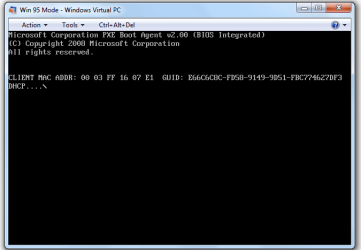
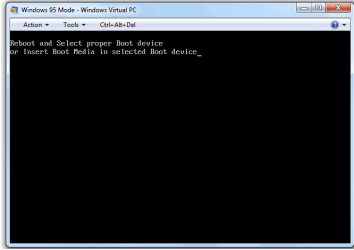
@strollin, need more help please. I have created a new VM, pointed it to the .vhd and set RAM at 64Mb.
When the VM starts all I get is attachment 1 then 2.
I thought that this would be simple for my old grey cells, but obviously not?
Have I much more to do? One thing more, when I look my machine is running, but in settings, integration features are not available and if I try to enable them they are greyed out?
 

Attachments

  • screenprint01.png
    screenprint01.png
    9.6 KB · Views: 134
  • screenprint02.png
    screenprint02.png
    8.2 KB · Views: 119

My Computer My Computer

Computer Manufacturer/Model Number
home build
OS
Windows 7 Professional 32 bit
CPU
Intel Core 2 Duo E6550 @ 2.33GHz
Motherboard
Foxconn 45CMX/GMX/CMX-K
Memory
2GB DDR2
Graphics Card(s)
Nvidia GeForce 8600GTS
Sound Card
C-Media Electronics CMI8738/C3DX PCI Audio Device
Monitor(s) Displays
CIBOX Vw19B
Hard Drives
Western Digital 500GB
PSU
Hiper 530W
Case
NZXT Hush Classic silver
Cooling
fans
As I mentioned earlier, I prefer VMWare Player over Virtual PC and this is one reason why. I looked into this for you and apparently MS decided to remove support for floppy drives from Virtual PC, apparently you can only install OSes that can boot from CD. Makes sense since on their website they say they only support Win XP, Win Vista and Win 7 as guest OSes. My guess is that the Win95 vhd that kbronski linked to was created with an earlier version of Virtual PC.

If you are really set on creating your own Win95 VM, you could do it with VMWare Player (they can both (VMWP & VPC) be installed on your machine, no problem) or you could try to find an earlier version of Virtual PC. I'm not certain that you can have 2 different versions of VPC installed on the same machine but I think it will work as long as you make sure the 2 versions are installed in different folders.
 

My Computer My Computer

Computer type
PC/Desktop
Computer Manufacturer/Model Number
Home Built desktop, Dell G15 5511 Gaming laptop,MS Surface Pro 7 tablet
OS
W10 Pro desktop, W11 laptop, W11 Pro tablet (all 64-bit)
CPU
3.7Ghz 8700K i7, i7-11800H, i7-1065G7
Motherboard
ASUS TUF Z370-Pro Gaming in desktop
Memory
16G desktop, 16G laptop, 4G tablet
Graphics Card(s)
AMD Radeon RX580, RTX 3060, Intel Iris Plus
Sound Card
High Definition Audio (Built-in to mobo)
Monitor(s) Displays
Samsung U32J59 32" (2x), 15.6", 12"
Screen Resolution
3840x2160, 3840x2160, 1920x1080, 2160x1440
Hard Drives
500G SSD for OS; 2T, 10T & 15T HDDs for Data on Desktop, 1TB SSD laptop, 128G SSD tablet.
PSU
Corsair CX 750M
Case
Antec 100
Cooling
CM 212+
Keyboard
IBM Model M - used continuously since 1986
Mouse
Microsoft Pro IntelliMouse
Internet Speed
400M down 8M up
Antivirus
Windows Defender
Browser
FireFox
Other Info
Built my first computer (8Mhz 8088cpu, 640K RAM, 20MB HDD, 2 360K floppy drives) in 1985 and have been building them for myself, relatives and friends ever since.
Thanks for your help. I'm not set on installing Win95 into a virtual machine. I just wondered what it looked like as I had an installation disk. Yes I think it was VM2007. I will have a look at VMWare Player to see if I can manage that. Thanks again for your time.
 

My Computer My Computer

Computer Manufacturer/Model Number
home build
OS
Windows 7 Professional 32 bit
CPU
Intel Core 2 Duo E6550 @ 2.33GHz
Motherboard
Foxconn 45CMX/GMX/CMX-K
Memory
2GB DDR2
Graphics Card(s)
Nvidia GeForce 8600GTS
Sound Card
C-Media Electronics CMI8738/C3DX PCI Audio Device
Monitor(s) Displays
CIBOX Vw19B
Hard Drives
Western Digital 500GB
PSU
Hiper 530W
Case
NZXT Hush Classic silver
Cooling
fans
Just an endnote to this thread. Uninstalled the Windows VM and installed VMwares machine. Wow what a difference! It's not slow and clunky; it's fast smooth and easy to install bootable OS CD's. I do have the same problem with how to install a boot disk and Win95 tho'?
 

My Computer My Computer

Computer Manufacturer/Model Number
home build
OS
Windows 7 Professional 32 bit
CPU
Intel Core 2 Duo E6550 @ 2.33GHz
Motherboard
Foxconn 45CMX/GMX/CMX-K
Memory
2GB DDR2
Graphics Card(s)
Nvidia GeForce 8600GTS
Sound Card
C-Media Electronics CMI8738/C3DX PCI Audio Device
Monitor(s) Displays
CIBOX Vw19B
Hard Drives
Western Digital 500GB
PSU
Hiper 530W
Case
NZXT Hush Classic silver
Cooling
fans
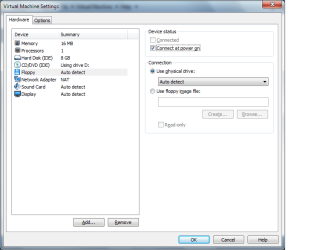
In the VM settings make sure you have the floppy enabled and check the box that says "Connect at power on".

I believe the default is for the boot order to have the floppy first but if you want to check it you need to access the VM's BIOS. You can do that by pressing F2 while the VM is booting. The trick is that you need to click on the VM to direct keystrokes there before it will receive the F2 keystroke so you have to be pretty quick.
 

Attachments

  • vm_flp.png
    vm_flp.png
    18.1 KB · Views: 153

My Computer My Computer

Computer type
PC/Desktop
Computer Manufacturer/Model Number
Home Built desktop, Dell G15 5511 Gaming laptop,MS Surface Pro 7 tablet
OS
W10 Pro desktop, W11 laptop, W11 Pro tablet (all 64-bit)
CPU
3.7Ghz 8700K i7, i7-11800H, i7-1065G7
Motherboard
ASUS TUF Z370-Pro Gaming in desktop
Memory
16G desktop, 16G laptop, 4G tablet
Graphics Card(s)
AMD Radeon RX580, RTX 3060, Intel Iris Plus
Sound Card
High Definition Audio (Built-in to mobo)
Monitor(s) Displays
Samsung U32J59 32" (2x), 15.6", 12"
Screen Resolution
3840x2160, 3840x2160, 1920x1080, 2160x1440
Hard Drives
500G SSD for OS; 2T, 10T & 15T HDDs for Data on Desktop, 1TB SSD laptop, 128G SSD tablet.
PSU
Corsair CX 750M
Case
Antec 100
Cooling
CM 212+
Keyboard
IBM Model M - used continuously since 1986
Mouse
Microsoft Pro IntelliMouse
Internet Speed
400M down 8M up
Antivirus
Windows Defender
Browser
FireFox
Other Info
Built my first computer (8Mhz 8088cpu, 640K RAM, 20MB HDD, 2 360K floppy drives) in 1985 and have been building them for myself, relatives and friends ever since.
I found a way to bypass needing the floppy setup disk to install it if you have the windows 95 cd

here ya go

installing windows 95 and CD driver manually without the floppy setup disk

what you need:
.DOS on a floppy or on an image (.flp .img)
.Windows 95 cd
.VMWARE player (it's free) or virtualpc (I recommend VMWARE)
.Magiciso (the free trial version will do)
.a copy of MSCDEX.EXE and oakcdrom.sys (both can be found online)

step 1

create a new virtual machine (make sure to add a floppy image drive if you are using vmware)


step 2

put your dos floppy/image in or mount it and install dos


step 3

download and install the free version of magiciso
open magic iso
go to new - floppy - 1.44

find a copy of mscdex.exe
find a copy of oakcdrom.sys (generic cd rom driver that works with dos.. might have to try another if it doesn't work)
RENAME the oakcdrom.sys to cdrom.sys

drag both these files into magic iso on the floppy disk we just created

save the file

close magic iso

find the file we just saved in your explorer

change the extension from .ima to .flp (if you are using vmware) or .img (if you are using virtualpc)

(if you can't see the extensions you're going to need to change your folder options to show extensions)
google it. it's easy to do


step 4

go back to your virtual machine
mount the floppy image we just created

a:\
copy mscdex.exe c:\
copy cdrom.sys c:\

(don't forget to rename oakcdrom.sys to cdrom.sys in step 3)


step 5

find config.sys in your c drive

type:

edit config.sys


now add a line that says this

device=c:\cdrom.sys /d:mscd001

exit and save


step 6

find autoexec.bat in your c drive

type:

edit autoexec.bat

now add a line that says this

c:\mscdex.exe /d:mscd001

exit and save


step 7

restart the computer or virtual machine


step 8

we're still not done yet

now move to your c drive and type

mscdex.exe: /d:mscd001 /M:5 /V /L:d /S /K

(this part /M:x refers to the amount of buffers your drive has.. it's either 4 or 5. usually 5)


step 9

create a blank floppy image either in vmware or magic iso then mount that new one

put your windows 95 cd in the cd drive

type:

d:\
setup.exe


step 10

it should be booting windows 95 now

now you might run into troubles when it tries to install the other drivers
it might ask you for windows floppies even if you're using the cd version
which I never understood


but anyways, you can find all of these drivers on the windows 95b cd if you have it
they're all in cab files

so you'd need to extract them 1 by 1 and put them on floppy images to use them.
(huge pain)

but I actually just got it to load the drivers off the win95 cd by just trying it over and over again until
it worked. it might have been because I either did or didn't restart after putting in the windows 95 cd
can't remember, but I'd try both if you're having trouble


all in all windows 95 is incredible wonky to install in a virtual machine. I highly recommend using VMWARE
and not virtual pc for this one.
If you didn't have a hard time installing this.. you got incredible lucky

make sure you check to make sure windows95 is seeing your cd drive
if not go to the add new hardware wizard in the control panel and see if that detects it

Michael MacDonald
State of Psychosis
State of Psychosis
State of Psychosis's Spotlight page on SoundCloud - Hear the world?s sounds
 

My Computer My Computer

Computer type
Laptop
Computer Manufacturer/Model Number
fujitsu
OS
windows 7 pro 32bit, windows xp pro 32bit, windows 95, windows 3.1, windows 98
Memory
4gb
Graphics Card(s)
ati x1600
Back
Top