Why does my hard disk appear in "Safely Remove Hardware" ?

ardisugianto

New member
Local time
6:34 PM
Messages
5
hi guys... after installing windows 7, i notice there is something wrong with my safely remove program, my harrdrive (internal, not external) is appear in that list, how to fix this, because i think this is very anoying for me

thanx...
 

My Computer My Computer

OS
Windows 7 Ultimate 32 Bit
Does your board support hot swapping?
I have seen that happen before with controllers that support hot swap.
 

My Computer My Computer

Computer Manufacturer/Model Number
Insane hobo technologies. ;-)
OS
Windows 7 x64
CPU
Intel i7 2600k
Motherboard
Asrock z68 extreme 4 gen 3
Memory
G.skill Ripjaw 16gigs @ 1866
Graphics Card(s)
Nvidia gtx580 (evga)
Sound Card
Integrated HD audio + hdmi
Monitor(s) Displays
24" ASUS widescreen + 42" insignia
Screen Resolution
1080p (1920x1080)
Hard Drives
128 Samsung 830
256 Samsung 840
3 x 1tb storage drive (various)
1 western digital 1tb (eSATA)
1 Seagate 1tb (eSATA)
PSU
1 kilowatt SLI/Crossfire rated Silverstone modular
Case
NZXT Phantom + additional 220 fan
Cooling
Zalmann
Keyboard
Microsoft wireless 3000 (v2)
Mouse
MS - wireless 5000 (bluetrack)
Internet Speed
depends on if you ask me or my provider.
Other Info
The above information is provided as is, and the author assumes no responsibility for issues it may cause with your sanity or fanboyism.
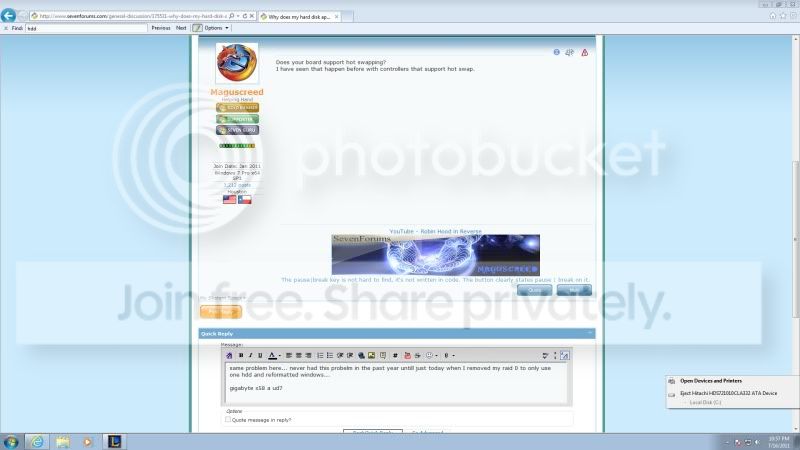
same problem here... never had this probelm in the past year untill just today when I removed my raid 0 to only use one hdd and reformatted windows...

gigabyte x58 a ud7

ggg-1.jpg
 

My Computer My Computer

OS
Win 7 ultimate 64bit
perhaps its because I am using ahci and not IDE???
 

My Computer My Computer

OS
Win 7 ultimate 64bit
Does your board support hot swapping?
I have seen that happen before with controllers that support hot swap.

i'm sorry but i really don't know about this hot swap feature, can you explain to me, how to solve this ??
 

My Computer My Computer

OS
Windows 7 Ultimate 32 Bit
If that's the case it's simply how the board presents it's drives to windows.
It would probably mean disabling the feature altogether which is not something I would really reccomend doing.
 

My Computer My Computer

Computer Manufacturer/Model Number
Insane hobo technologies. ;-)
OS
Windows 7 x64
CPU
Intel i7 2600k
Motherboard
Asrock z68 extreme 4 gen 3
Memory
G.skill Ripjaw 16gigs @ 1866
Graphics Card(s)
Nvidia gtx580 (evga)
Sound Card
Integrated HD audio + hdmi
Monitor(s) Displays
24" ASUS widescreen + 42" insignia
Screen Resolution
1080p (1920x1080)
Hard Drives
128 Samsung 830
256 Samsung 840
3 x 1tb storage drive (various)
1 western digital 1tb (eSATA)
1 Seagate 1tb (eSATA)
PSU
1 kilowatt SLI/Crossfire rated Silverstone modular
Case
NZXT Phantom + additional 220 fan
Cooling
Zalmann
Keyboard
Microsoft wireless 3000 (v2)
Mouse
MS - wireless 5000 (bluetrack)
Internet Speed
depends on if you ask me or my provider.
Other Info
The above information is provided as is, and the author assumes no responsibility for issues it may cause with your sanity or fanboyism.

My Computer My Computer

OS
Win 7 ultimate 64bit
In your motherboard bios if you change your sata controller to IDE instead of ACHI it will fix the problem because it's ACHI that is making your drive hot swap capable.

If you want to change from ACHI to ide without reformatting you will want to read this
[Solved] Can I switch from AHCI to IDE without re-format/re-install? - General-Storage - Storage

But ask yourself is it really worth all the effort to remove an icon? It's up 2 u

OK so in your opinion what should i choose? which best for my laptop, IDE or AHCI ?:D
 

My Computer My Computer

OS
Windows 7 Ultimate 32 Bit
As you have found out the safely remove icon for the HDD is to show it is capable of hot swapping, this is perfectly normal and I recommend leavig the system on AHCI as it has other advantages over IDE
 

My Computer My Computer

Computer Manufacturer/Model Number
Something I threw together
OS
Windows 7 Ultimate x64
CPU
Intel Core i7-2600K
Motherboard
Asus P8P67
Memory
16 GB G Skill F3-10666 CL9D-4GBRL
Graphics Card(s)
ATI Radeon HD 6870
Sound Card
ATI Radeon HDMI / Realtek ALC892
Monitor(s) Displays
2 x 22" standard monitors / LG32LC56v TV to watch films
Screen Resolution
1920 x1080
Hard Drives
2 x OCZ Vertex2 111.79GB
3 x Samsung103SJ
1 x Samsung103UJ
1 x WD3200BEVT
1 x Hitachi5K320-160
PSU
Thermaltake Toughpower Cable Management 750W
Case
Antec 300
Cooling
Noctua NH-U12P SE2 and 5 120mm Case fans
Keyboard
Microsoft Comfort Curve Keyboard 2000
Mouse
Hama M3110 / Logitech M305
Internet Speed
16000
Other Info
I have also used Fedora, Suse, Ubuntu Linux
And all other Windows from 95 to date except ME
hi guys... after installing windows 7, i notice there is something wrong with my safely remove program, my harrdrive (internal, not external) is appear in that list, how to fix this, because i think this is very anoying for me

thanx...

This is a common problem when running on the generic AHCI driver supplied in Windows 7.
The solution is to install the correct AHCI driver for your computer.

First - find the AHCI driver. These usually come in the motherboard CD if this were a custom build. For a laptop you would need to see if there is one in the manufacturer's downloads section, contact the manufacturer, or find out the brand of motherboard, check the specs, and see if you can find a suitable driver. The generic Intel driver works for many boards based on Intel chipsets and can be found on Intel's website.

Once you have the correct AHCI driver you install it thus:

  • Open Device Manager
  • Navigate to IDE/ATA/ATAPI Controller > ***AHCI Serial ATA Controller
  • Right click > Properties
  • Choose: Update Driver
  • Browse to the folder that contains the AHCI driver you downloaded > Select > OK
  • “Successful” Message > Close
  • “Must Restart > Restart
  • Drivers Install > Another Restart necessary > Restart
  • Drivers successfully Installed. Remove Hardware Icon no longer showing.
*** : the name of the AHCI device is different for different systems, but it should be the only one with AHCI in it's name.

See if that will help.
 

My Computer My Computer

Computer type
PC/Desktop
Computer Manufacturer/Model Number
Home Built - Jan 2013
OS
Windows 7 64 Bit Home Premium SP1
CPU
i7-3820
Motherboard
Asus P9X79-PRO - Bios 4608
Memory
GSkill F3-14900CL9Q - 16GB
Graphics Card(s)
EVGA GeForce GTX660 - Driver 352.86
Sound Card
On board Realtek ALC898
Monitor(s) Displays
Acer S271HL
Screen Resolution
1920 x 1080
Hard Drives
#1- Samsung 840 Pro Series
#2- Western Digital WD1002FAEX Sata3 Black
#3- Western Digital WD1002FAEX Sata3 Black
PSU
Corsair CMPSU-850TX-V2 - 850 watt (by Seasonic)
Case
Corsair Obsidian 550D
Cooling
Standard 3 120mm case fans, Cooler Master Hyper 212 EVO
Keyboard
MS KC-0405
Mouse
Intellimouse 5-button
Internet Speed
56 Mbits/Sec (on a good day)
Antivirus
Avast & Malwarebytes
Browser
Firefox
Other Info
Asus DVD - DRW-24B1ST 24X
  • Like
Reactions: whs

My Computer My Computer

Computer type
PC/Desktop
Computer Manufacturer/Model Number
Home built (GeneO industries)/Model 4
OS
Windows 10 Pro. EFI boot partition, full EFI boot
CPU
i7 4770k 4.4GHz (44-44-43-43 turbo) @ 1.248V
Motherboard
ASUS Maximus VI Hero
Memory
16GB (8GBx2) @2200 MHz G.skill Sniper 10-11-10-30-1, 1.6V
Graphics Card(s)
MSI GTX 970 Gaming 4G
Sound Card
Onboard SupremeFX Audio
Monitor(s) Displays
NEC Spectraview 2490WUXi-SV
Screen Resolution
1920 x 1200
Hard Drives
Samsung 850 Pro 256GB (OS), Samsung 2x 128GB 840 Pro SSD in RAID0, 3x WD Blue 6Gb/s 1TB RAID0, WD 2TB Black external USB 3.0, 2TB WD20EARS Green external USB 3.0, 2x 500GB Seagate and 1 750 GB external USB, 1x 350GB external USB3
PSU
Seasonic X-850 (2012 KM3 model)
Case
Fractal Design Define R4
Cooling
NH-D14, NF-F12, NF-A15; NF-P14, NF-P12,NF-A14, S12A PWM
Keyboard
Cooler Master Storm Quickfire Rapid - Brown
Mouse
Logitech G602
Internet Speed
126.4 Mb/s down, 24.3 Mb/s up
Other Info
USB 3.0 x8 , SATA III x8, eSATA, USB 2.0 x6. Samsung DVD R/W drive.

WEI: CPU 7.8, Memory 7.9, Graphics 7.9, Disk 7.9
I solved this problem by going into the Bios and disabling the "Hot Plug Capability" on the serial port that the Hard drive was connected to.
 

My Computer My Computer

OS
Windows Home Premium 64 bit
Back
Top