Why does 'Safely Remove Hardware' show my internal drives?

I Am User

New member
Local time
4:23 PM
Messages
32
Location
Current: Ljubljana, Slovenia
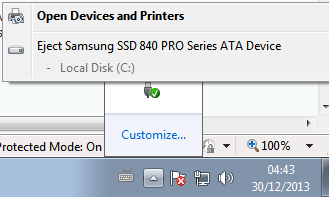
Currently only my SSD is inside, but I will put the HDD too, and when I do the 'Safely Remove Hardware and Eject Media' thing in the dock also shows the HDD. Why does it do that? can I make it show me only the external stuff (such as a USB)?

0Vwo95a.png


I already accidentaly clicked on my HDD when it was inside, but luckily it didnt do anything and just showed a message that it cannot eject it because it because it is in use.
But still, I wish not to see those.

Thanks in advance for replies :)
 
Last edited:

My Computer My Computer

Computer type
PC/Desktop
Computer Manufacturer/Model Number
Custom build
OS
Windows 7 Home Premium 64bit
CPU
Intel i7 3770k
Motherboard
Gigabyte GA-Z77X-UD5H
Memory
G.Skill RipjawsX 16GB (8GB x2) @1600MHz
Graphics Card(s)
Nvidia GeForce GTX 670 (EVGA)
Sound Card
Realtek ALC898 [onboard]
Monitor(s) Displays
Philips 273E-LH
Screen Resolution
1080p
Hard Drives
WD Black - 2TB
Samsung 840 Pro - 256GB
PSU
Corsair HX850
Case
Cooler Master Storm Trooper
Cooling
Noctua NH-U9B SE2
Keyboard
Corsair K70 RGB
Mouse
Roccat Kone XTD
Internet Speed
DL: ~120Mbps; UL: ~4Mbps
Antivirus
Bitdefender
Browser
Mozilla Firefox
Wow, never seen that before, mine only shows either USB's or external drives.
 

My Computer My Computer

Computer type
PC/Desktop
Computer Manufacturer/Model Number
Home Build
OS
Windows 8.1 Pro
CPU
i5 3550 Ivy Bridge
Motherboard
Gigabyte Z77MX-D3H
Memory
8gb 1600 GSkill 9-9-9-24 xmp
Graphics Card(s)
Gigabyte GTX 760 OC
Sound Card
VIA VT2021 onboard
Monitor(s) Displays
BenQ GL2760H 27inch hdmi; LG Flatron E2351 23inch dvi
Screen Resolution
1920x1080
Hard Drives
1x Samsung 850 Evo 120GB
1x 4TB WD Green HDD
1x 3TB WD Green HDD
2x 2TB Seagate HDD
1x 1TB Seagate External HDD
PSU
Cooler Master V750
Case
Coolermaster HAF 912 Advanced
Cooling
Standard
Keyboard
Logitech K120 USB
Mouse
Razor Abyssus USB
Internet Speed
Broadband
Antivirus
MSE + Malwarebytes
Browser
Palemoon
Other Info
It's been the worst day since yesterday (thanks Flogging Molly) so apt!
Your snip shows the SSD, not HDD.
Try connecting to different SATA ports. Sometime a Marvell port will trigger the Safely Remove notification.
 

My Computer My Computer

Computer type
PC/Desktop
Computer Manufacturer/Model Number
Home Built Desktop By DataTech
OS
Windows 7 Ultimate X64 SP1
CPU
Intel i5-2550K, Differing ~4.4-4.8GHz No built in GPU
Motherboard
ASUS P8Z68-V PRO/GEN3
Memory
16GB G.Skill Sniper 1866MHz @ 2133MHz 2x8GB
Graphics Card(s)
ASUS GTX650TIB-DC2OC-2GD5, (650TI Boost)
Sound Card
Onboard Realtek 5-1
Monitor(s) Displays
Samsung P2570HD
Screen Resolution
1920x1080
Hard Drives
Samsung 840 Pro 256GB SSD for OS, 500GB Seagate Constellation (Enterprise drive) for Data
PSU
Corsair HX650W
Case
Inwin Dragon Rider
Cooling
Hyper 212 EVO w/two Noctua fans, push-pull, @1300 RPM
Keyboard
E-Z Eyes, bright yellow keys with large characters
Mouse
steelseries SENSEI Laser Pro Gaming
Internet Speed
48-51Mbs Mbs down, 11 Mbs up Xfinity Cable
Antivirus
Norton Internet Security 2013
Browser
IE 10, Opera, Pale Moon if needed
Other Info
4 case fans, LG BluRay-RE, ASUS DVD-RW, Mr. Fusion power supply, 1.21 gigawatts.

Drivers?
 

My Computer My Computer

Computer Manufacturer/Model Number
Put together
OS
Win7 Pro-64 Bit
CPU
i7-2600-3.4GHz
Motherboard
ASRock Z68M
Memory
8 GIG DDR3
Graphics Card(s)
onboard
Sound Card
onboard
Hard Drives
Seagate 1TB 7200RPM
PSU
680 W
Case
black
Cooling
stock fans
Keyboard
Microsoft
Mouse
Microsoft optical
Try connecting to different SATA ports. Sometime a Marvell port will trigger the Safely Remove notification.

This is another port, the SSD was already in a different one, but it was shown in both.
How do I know which port to connect to? and what is a Marvell port/is there other type? How to tell the difference?
 

My Computer My Computer

Computer type
PC/Desktop
Computer Manufacturer/Model Number
Custom build
OS
Windows 7 Home Premium 64bit
CPU
Intel i7 3770k
Motherboard
Gigabyte GA-Z77X-UD5H
Memory
G.Skill RipjawsX 16GB (8GB x2) @1600MHz
Graphics Card(s)
Nvidia GeForce GTX 670 (EVGA)
Sound Card
Realtek ALC898 [onboard]
Monitor(s) Displays
Philips 273E-LH
Screen Resolution
1080p
Hard Drives
WD Black - 2TB
Samsung 840 Pro - 256GB
PSU
Corsair HX850
Case
Cooler Master Storm Trooper
Cooling
Noctua NH-U9B SE2
Keyboard
Corsair K70 RGB
Mouse
Roccat Kone XTD
Internet Speed
DL: ~120Mbps; UL: ~4Mbps
Antivirus
Bitdefender
Browser
Mozilla Firefox
Check you board's manual, the Z77 chipset will have two SATA III ports, they should be what the OS drive is running from. More the those two will be driven by Marvell or JMicron.
 

My Computer My Computer

Computer type
PC/Desktop
Computer Manufacturer/Model Number
Home Built Desktop By DataTech
OS
Windows 7 Ultimate X64 SP1
CPU
Intel i5-2550K, Differing ~4.4-4.8GHz No built in GPU
Motherboard
ASUS P8Z68-V PRO/GEN3
Memory
16GB G.Skill Sniper 1866MHz @ 2133MHz 2x8GB
Graphics Card(s)
ASUS GTX650TIB-DC2OC-2GD5, (650TI Boost)
Sound Card
Onboard Realtek 5-1
Monitor(s) Displays
Samsung P2570HD
Screen Resolution
1920x1080
Hard Drives
Samsung 840 Pro 256GB SSD for OS, 500GB Seagate Constellation (Enterprise drive) for Data
PSU
Corsair HX650W
Case
Inwin Dragon Rider
Cooling
Hyper 212 EVO w/two Noctua fans, push-pull, @1300 RPM
Keyboard
E-Z Eyes, bright yellow keys with large characters
Mouse
steelseries SENSEI Laser Pro Gaming
Internet Speed
48-51Mbs Mbs down, 11 Mbs up Xfinity Cable
Antivirus
Norton Internet Security 2013
Browser
IE 10, Opera, Pale Moon if needed
Other Info
4 case fans, LG BluRay-RE, ASUS DVD-RW, Mr. Fusion power supply, 1.21 gigawatts.
Back
Top