"Windows Live Mail has stopped working" - Files describe event; Fix?

sassofalco

What bad, bad,habit?
Pro User
VIP
Local time
12:51 AM
Messages
237
Location
Barnes, LONDON
"Windows Live Mail has stopped working" - Files describe event; Fix?

Three times in the last 24 hours this warning has opened on my Desktop, after I have just closed Windows Live Mail [WLM] . After the warning disappears from the Desktop, WLM opens yet again.
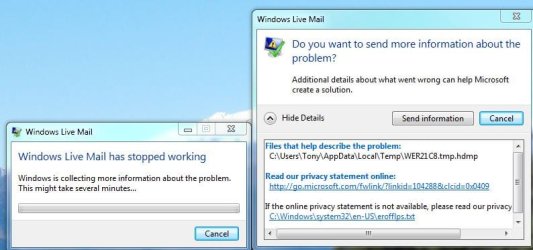
WLM has stopped working - 20110604-0127.JPG

Naturally I've allowed the issue to be reported to MS and sent the information, but I note that there is also a File that describes the event, in this case:

C:\Users\Tony\AppData\Local\Temp\WER21C8.tmp.hdmp

Is there any way that I may attempt to either fix or resolve this issue myself? For starters, I haven't a clue about how I access the quoted File, and if I did, I don't know what to do with it anyway.

Or is this yet another of those situations where you just grin and bear it until MS come up with something to resolve the issue? Hope not 'cos it's mildly annoying...
 

My Computer My Computer

At a glance

Windows 7 Home Premium x64 - SP1Intel Core i5 @ 2.67GHz Arrandale 32nm Techno...8 GB RAM [2 x 4 GB DDR3]AMD Radeon HD 6650M, Intel (R) HD Graphics
Computer Manufacturer/Model Number
Acer Aspire Timeline X Laptop - Model 5820TG - V1.23
OS
Windows 7 Home Premium x64 - SP1
CPU
Intel Core i5 @ 2.67GHz Arrandale 32nm Technology
Motherboard
Acer JM51_CP (CPU) Base Board Version
Memory
8 GB RAM [2 x 4 GB DDR3]
Graphics Card(s)
AMD Radeon HD 6650M, Intel (R) HD Graphics
Sound Card
Realtek HD Audio, ATI HD Audio Device
Monitor(s) Displays
Acer Aspire Notebook - 15.7"; Acer LCD Monitor X223Wsd - 22"
Screen Resolution
1366 x 768 x 60Hertz
Hard Drives
Notebook - 733GB Western Digital WDC WD7500BPVT- 22HXZT1 Sata.
External HDs [4];Maxtor One Touch4 - 500GB External HD [Drive M:\].Western Digital WDXMS1200TA - 120GB External HD. WD My Book 'Elite' 1TB External HD [Windows 7 dedicated - Partitioned
Mouse
Logitech Wireless V320 for Notebooks
Other Info
Brother MFC-465CN; PC to Fax/Scan/Copy/Photo Multi Function Centre. Epson Perfection V300 Photo Scanner.
Siemens Speedstream 6520 Router.
Wacom 'Bamboo Fun' CTE-650 PC Tablet, Stylus and Mouse. Logitech X-230 Notebook Stereo Speakers and Sub-woofer.
UAC - On. Internet - FireFox v13.0.1 & IE8.
Hon.RSM to the 4th [Assault Pioneer] Troop Pune Sepoys , and 3rd Troop Jodhpur Bengali Lancers
1) Ignore error message.
2) Do a "repair" of Windows Live Essentials via Programs and Features
3) Use the Disk Cleanup utility
3) Use sfc /scannow via the command prompt window.
 

My Computer My Computer

At a glance

Windows 8 Pro w/MC 32-bitIntel Atom 1.86 GHz2 GBIntel GMA 500
Computer type
PC/Desktop
Computer Manufacturer/Model Number
OQO 2+
OS
Windows 8 Pro w/MC 32-bit
CPU
Intel Atom 1.86 GHz
Motherboard
OQO 2+
Memory
2 GB
Graphics Card(s)
Intel GMA 500
Sound Card
IDT
Monitor(s) Displays
LCD
Screen Resolution
800 x 480 (portable) 1280 x 1024 (docked)
Hard Drives
64 GB SSD
PSU
9 Ah Battery (portable) or OQO Brick (docked)
Case
Shirt Pocket Sized
Cooling
Tiny Fan
Keyboard
Slide out (portable) DiNovo Edge (docked)
Mouse
Eraser head (portable) Logitech Bluetooth (docked)
Internet Speed
WWAN or 802.11G (portable) T1 (docked)
Browser
IE 10
Other Info
DVD-RW OQO Docking Station
My Soultion for my random Windows Live Mail Stopped Working....!

Three times in the last 24 hours this warning has opened on my Desktop, after I have just closed Windows Live Mail [WLM] . After the warning disappears from the Desktop, WLM opens yet again.

View attachment 157869

Naturally I've allowed the issue to be reported to MS and sent the information, but I note that there is also a File that describes the event, in this case:

C:\Users\Tony\AppData\Local\Temp\WER21C8.tmp.hdmp

Is there any way that I may attempt to either fix or resolve this issue myself? For starters, I haven't a clue about how I access the quoted File, and if I did, I don't know what to do with it anyway.

Or is this yet another of those situations where you just grin and bear it until MS come up with something to resolve the issue? Hope not 'cos it's mildly annoying...

I prefer WLM 2009's User Friendly GUI (filehippo.com), but it would randomly stop working (same with WLM 2011's bloatware)- Usually After a Send/Fw:!? :confused:

No amount of full re-installs/Repairs..., would make it go away?
Well after Googling Many forums, I Finally found the Easy Solution!- :D

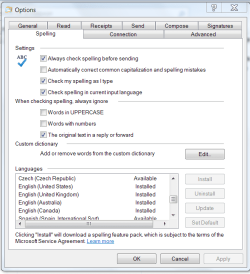
Go to Tools/Spelling, scroll down & select your Language Editor, and make it Default...

ENJOY! :geek:
 

My Computer My Computer

At a glance

Windows 7 Pro (32)i7/26004gb512mg (add on card was less buggy than Intel ...
Computer Manufacturer/Model Number
ZT Desktop
OS
Windows 7 Pro (32)
CPU
i7/2600
Motherboard
Intel
Memory
4gb
Graphics Card(s)
512mg (add on card was less buggy than Intel direct driver)
Sound Card
Internal
Monitor(s) Displays
19" DELL Ultra Sharp
Hard Drives
C:= WD Raptor Sata6 10k rpm
D:/E:= WD Black Sata 3.0
Case
ZT Full
Cooling
ZT
Internet Speed
8000kbps cable
Other Info
Free Outpost Pro Internet Security, and no other active anti-malware.
Free On-Demand- SpyWareBlaster, MBAM, Emsisoft-Kit, and Kaspersky Anti-rootkit utility TDSSKiller.
Three times in the last 24 hours this warning has opened on my Desktop, after I have just closed Windows Live Mail [WLM] . After the warning disappears from the Desktop, WLM opens yet again.

View attachment 157869

Naturally I've allowed the issue to be reported to MS and sent the information, but I note that there is also a File that describes the event, in this case:

C:\Users\Tony\AppData\Local\Temp\WER21C8.tmp.hdmp

Is there any way that I may attempt to either fix or resolve this issue myself? For starters, I haven't a clue about how I access the quoted File, and if I did, I don't know what to do with it anyway.

Or is this yet another of those situations where you just grin and bear it until MS come up with something to resolve the issue? Hope not 'cos it's mildly annoying...

I prefer WLM 2009's User Friendly GUI (filehippo.com), but it would randomly stop working (same with WLM 2011's bloatware)- Usually After a Send/Fw:!? :confused:

No amount of full re-installs/Repairs..., would make it go away?
Well after Googling Many forums, I Finally found the Easy Solution!- :D

Go to Tools/Spelling, scroll down & select your Language Editor, and make it Default...

ENJOY! :geek:
Don't make sense........Tools/Spelling> Language Editor > where????
 

My Computer My Computer

At a glance

Windows 7 Home Premium x64 - SP1Intel Core i5 @ 2.67GHz Arrandale 32nm Techno...8 GB RAM [2 x 4 GB DDR3]AMD Radeon HD 6650M, Intel (R) HD Graphics
Computer Manufacturer/Model Number
Acer Aspire Timeline X Laptop - Model 5820TG - V1.23
OS
Windows 7 Home Premium x64 - SP1
CPU
Intel Core i5 @ 2.67GHz Arrandale 32nm Technology
Motherboard
Acer JM51_CP (CPU) Base Board Version
Memory
8 GB RAM [2 x 4 GB DDR3]
Graphics Card(s)
AMD Radeon HD 6650M, Intel (R) HD Graphics
Sound Card
Realtek HD Audio, ATI HD Audio Device
Monitor(s) Displays
Acer Aspire Notebook - 15.7"; Acer LCD Monitor X223Wsd - 22"
Screen Resolution
1366 x 768 x 60Hertz
Hard Drives
Notebook - 733GB Western Digital WDC WD7500BPVT- 22HXZT1 Sata.
External HDs [4];Maxtor One Touch4 - 500GB External HD [Drive M:\].Western Digital WDXMS1200TA - 120GB External HD. WD My Book 'Elite' 1TB External HD [Windows 7 dedicated - Partitioned
Mouse
Logitech Wireless V320 for Notebooks
Other Info
Brother MFC-465CN; PC to Fax/Scan/Copy/Photo Multi Function Centre. Epson Perfection V300 Photo Scanner.
Siemens Speedstream 6520 Router.
Wacom 'Bamboo Fun' CTE-650 PC Tablet, Stylus and Mouse. Logitech X-230 Notebook Stereo Speakers and Sub-woofer.
UAC - On. Internet - FireFox v13.0.1 & IE8.
Hon.RSM to the 4th [Assault Pioneer] Troop Pune Sepoys , and 3rd Troop Jodhpur Bengali Lancers
...Don't make sense........Tools/Spelling> Language Editor > where????
It's Tools/Options/Spelling...At the bottom of the Spelling tab is a "Language" area.
 

My Computer My Computer

At a glance

Windows 8 Pro w/MC 32-bitIntel Atom 1.86 GHz2 GBIntel GMA 500
Computer type
PC/Desktop
Computer Manufacturer/Model Number
OQO 2+
OS
Windows 8 Pro w/MC 32-bit
CPU
Intel Atom 1.86 GHz
Motherboard
OQO 2+
Memory
2 GB
Graphics Card(s)
Intel GMA 500
Sound Card
IDT
Monitor(s) Displays
LCD
Screen Resolution
800 x 480 (portable) 1280 x 1024 (docked)
Hard Drives
64 GB SSD
PSU
9 Ah Battery (portable) or OQO Brick (docked)
Case
Shirt Pocket Sized
Cooling
Tiny Fan
Keyboard
Slide out (portable) DiNovo Edge (docked)
Mouse
Eraser head (portable) Logitech Bluetooth (docked)
Internet Speed
WWAN or 802.11G (portable) T1 (docked)
Browser
IE 10
Other Info
DVD-RW OQO Docking Station
...Don't make sense........Tools/Spelling> Language Editor > where????
It's Tools/Options/Spelling...At the bottom of the Spelling tab is a "Language" area.

Mate! I must be thicker than 10 bricks in lentil soup!!

Can you please post a snip of exactly where you are referring to. Or a search stream.. eg;

here > to here > select here > to here > etc.

By the way, an attempt to repair in Live Essentials [as advised above] repeatedly failed through 'loss' of Internet connection...using Wifi - very frustrating that a connection to repair could not be made, as that would seem to be the optimum method of repair.

Cheers
 
Last edited:

My Computer My Computer

At a glance

Windows 7 Home Premium x64 - SP1Intel Core i5 @ 2.67GHz Arrandale 32nm Techno...8 GB RAM [2 x 4 GB DDR3]AMD Radeon HD 6650M, Intel (R) HD Graphics
Computer Manufacturer/Model Number
Acer Aspire Timeline X Laptop - Model 5820TG - V1.23
OS
Windows 7 Home Premium x64 - SP1
CPU
Intel Core i5 @ 2.67GHz Arrandale 32nm Technology
Motherboard
Acer JM51_CP (CPU) Base Board Version
Memory
8 GB RAM [2 x 4 GB DDR3]
Graphics Card(s)
AMD Radeon HD 6650M, Intel (R) HD Graphics
Sound Card
Realtek HD Audio, ATI HD Audio Device
Monitor(s) Displays
Acer Aspire Notebook - 15.7"; Acer LCD Monitor X223Wsd - 22"
Screen Resolution
1366 x 768 x 60Hertz
Hard Drives
Notebook - 733GB Western Digital WDC WD7500BPVT- 22HXZT1 Sata.
External HDs [4];Maxtor One Touch4 - 500GB External HD [Drive M:\].Western Digital WDXMS1200TA - 120GB External HD. WD My Book 'Elite' 1TB External HD [Windows 7 dedicated - Partitioned
Mouse
Logitech Wireless V320 for Notebooks
Other Info
Brother MFC-465CN; PC to Fax/Scan/Copy/Photo Multi Function Centre. Epson Perfection V300 Photo Scanner.
Siemens Speedstream 6520 Router.
Wacom 'Bamboo Fun' CTE-650 PC Tablet, Stylus and Mouse. Logitech X-230 Notebook Stereo Speakers and Sub-woofer.
UAC - On. Internet - FireFox v13.0.1 & IE8.
Hon.RSM to the 4th [Assault Pioneer] Troop Pune Sepoys , and 3rd Troop Jodhpur Bengali Lancers
  • Like
Reactions: JMH
...I must be thicker than 10 bricks in lentil soup!!...
Either that or you are using WLM 2011! The instructions I gave are for 2009 where there is a simple menu bar with a "Tools" item. However I'm sure the 2011 ribbon interface has an icon that will provide the Tools or Options window. Good luck finding it.
 

My Computer My Computer

At a glance

Windows 8 Pro w/MC 32-bitIntel Atom 1.86 GHz2 GBIntel GMA 500
Computer type
PC/Desktop
Computer Manufacturer/Model Number
OQO 2+
OS
Windows 8 Pro w/MC 32-bit
CPU
Intel Atom 1.86 GHz
Motherboard
OQO 2+
Memory
2 GB
Graphics Card(s)
Intel GMA 500
Sound Card
IDT
Monitor(s) Displays
LCD
Screen Resolution
800 x 480 (portable) 1280 x 1024 (docked)
Hard Drives
64 GB SSD
PSU
9 Ah Battery (portable) or OQO Brick (docked)
Case
Shirt Pocket Sized
Cooling
Tiny Fan
Keyboard
Slide out (portable) DiNovo Edge (docked)
Mouse
Eraser head (portable) Logitech Bluetooth (docked)
Internet Speed
WWAN or 802.11G (portable) T1 (docked)
Browser
IE 10
Other Info
DVD-RW OQO Docking Station
Its under Options/Mail

Spelling.PNG

Jim :geek:
 

My Computer My Computer

At a glance

Windows 8.1 Pro w/Media Center 64bit, Windows...Phenom II X6 1100TCrucial Balistic 8gb DDR3-1866 CL9MSI R6850 Cyclone IGD5 PE
Computer type
PC/Desktop
Computer Manufacturer/Model Number
Home Built
OS
Windows 8.1 Pro w/Media Center 64bit, Windows 7 HP 64bit
CPU
Phenom II X6 1100T
Motherboard
ASUS M5A99X EVO
Memory
Crucial Balistic 8gb DDR3-1866 CL9
Graphics Card(s)
MSI R6850 Cyclone IGD5 PE
Sound Card
On Board
Monitor(s) Displays
ASUS VE258Q 25" LED with DVI-HDMI-DisplayPort
Screen Resolution
1920 x 1080
Hard Drives
Two WD Cavier Black 2TB Sata III, WD My Book Essential 2TB USB 3.0
PSU
Seasonic X650 80 Plus GOLD Modular
Case
Corsair 400R
Cooling
Antec Kuhler H2O 620, Two 120mm and four 140mm
Keyboard
Logitech K120
Mouse
Logitech Marble Mouse USB, Logitech Precision Game Pad
Internet Speed
15MB
Antivirus
Norton IS 2013, Malwarebytes Pro Beta 2
Browser
IE-11, FF-27
Other Info
APC UPS ES 750, Netgear WNR3500L Gigabit & Wireless N Router with SamKnows Test Program, Motorola SB6120 Gigabit Cable Modem. Brother HL-2170W Laser Printer, Epson V300 Scanner
Back
Top