Solved Switching HDD for OS by keeping the configuration

speedgamer01

concert? use earplugs
Guru
Local time
11:26 AM
Messages
917
Hi, I am buying a new HDD for my system, and my question is how can I copy the OS from the old HD to the new one by keeping the boot configuration/don't ruin the OS?
I believe that is possible, becuase I've heard of it years ago. I have a clean install of win7, on another internal HD which I will be using to do this trick.
So if the MBR damages I can rebuild it easily, though I don't know about all the other stuff that may be stored on the system drive. Can you suggest me any softwares, that will make any exact copy of the HD? (I'd appreciate hearing from any personal experience) Maybe I can just copy the whole disk with explorer, then rebuild the MBR, but I'm unsure (eg. what will happen to fragmented files, will they be written like on the old disk, or they will be defragged during the copying and be copied 1 by 1)
Thanks :) SG
 

My Computer My Computer

At a glance

Windows 7 Ultimate 64 bit SP1Intel(R) Core(TM) i5-2500K12GB Kingston Hyperx 1600MHzAsus GTS 450
Computer type
PC/Desktop
Computer Manufacturer/Model Number
Custom Built PC
OS
Windows 7 Ultimate 64 bit SP1
CPU
Intel(R) Core(TM) i5-2500K
Motherboard
Gigabyte Technology Co., Ltd. Z68X-UD3-B3
Memory
12GB Kingston Hyperx 1600MHz
Graphics Card(s)
Asus GTS 450
PSU
500W Coolink
Other Info
Genius G-Pen F610 (PenPad)
You can apply a Win7 backup image to a new HD.
Backup Complete Computer - Create an Image Backup
System Image Recovery
If it fails try free Macrium Reflect or Paragon 11.

If either HD is WD or Seagate you can use their free Acronis cloning apps to clone over the old to the new HD.
Seagate Acronis cloning free util
WD Acronis free cloning app

Be sure to select to copy/clone the MBR and Track 1.

If Win doesn't start once the source HD is removed, make sure it's marked Active and boot the Win7 DVD Repair console or Repair CD to Startup Repair - Run 3 Separate Times
 
Thank you, yes the new one is a caviar black so i will use the WD migration software.
Can I run it from the OS that I want to copy, or do i need to install it on my seconds win7 os which is on a 3rd drive?
 

My Computer My Computer

At a glance

Windows 7 Ultimate 64 bit SP1Intel(R) Core(TM) i5-2500K12GB Kingston Hyperx 1600MHzAsus GTS 450
Computer type
PC/Desktop
Computer Manufacturer/Model Number
Custom Built PC
OS
Windows 7 Ultimate 64 bit SP1
CPU
Intel(R) Core(TM) i5-2500K
Motherboard
Gigabyte Technology Co., Ltd. Z68X-UD3-B3
Memory
12GB Kingston Hyperx 1600MHz
Graphics Card(s)
Asus GTS 450
PSU
500W Coolink
Other Info
Genius G-Pen F610 (PenPad)
I would burn the WD Acronis boot disk to use to clone with only the source and target HD's plugged in.

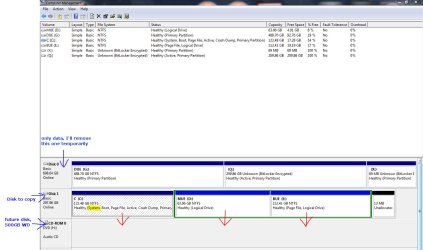
Post back a screenshot of your maximized Disk Management drive map with listings so we can look over it to see potential problems. Tell us which drive will be cloned, and which you want to remain after cloning.

Use the Snipping Tool in Start Menu.
 
I hope I incuded everything
disk snip01.jpg
 

My Computer My Computer

At a glance

Windows 7 Ultimate 64 bit SP1Intel(R) Core(TM) i5-2500K12GB Kingston Hyperx 1600MHzAsus GTS 450
Computer type
PC/Desktop
Computer Manufacturer/Model Number
Custom Built PC
OS
Windows 7 Ultimate 64 bit SP1
CPU
Intel(R) Core(TM) i5-2500K
Motherboard
Gigabyte Technology Co., Ltd. Z68X-UD3-B3
Memory
12GB Kingston Hyperx 1600MHz
Graphics Card(s)
Asus GTS 450
PSU
500W Coolink
Other Info
Genius G-Pen F610 (PenPad)
Been a while since I used it, but I seem to remember that Acronis True Image (the old name for Acronis Backup and Recovery) had a "clone disk" feature -- which is what you would want to use.

Just connect the second drive (the target) to your PC, boot from the Acronis CD, and clone your existing disk to the new one. When you swap disks, everything should then just work.

You might have to reactivate your new install since the disk serial numbers changed, or it might just reactivate for you.
 

My Computer My Computer

At a glance

Win7 Pro 32-bit, Win8 Pro 32-bitAMD Phenom II X6 1090T4GB ddr3 1300AMD HD 4290 onboard
Computer type
PC/Desktop
Computer Manufacturer/Model Number
Custom
OS
Win7 Pro 32-bit, Win8 Pro 32-bit
CPU
AMD Phenom II X6 1090T
Motherboard
Gigabyte
Memory
4GB ddr3 1300
Graphics Card(s)
AMD HD 4290 onboard
Sound Card
Builtin Realtek HD Audio
Monitor(s) Displays
Samsung 24" widescreen, LG 23" widescreen
Screen Resolution
1920x1200/1920x1080
Hard Drives
Kingston 256GB SSD
Keyboard
Logitech Illuminated Keyboard
Mouse
Logitech M705 wireless mouse
Antivirus
Norton Av 2013
Browser
IE v10
I would plug the target HD for cloning into DISK0. Afterwards remove the source HD and plug Data into it's cable. Set the target HD as first HD to boot in BIOS setup, after DVD drive.

If Win7 will not boot on its own after specifying cloning of MBR and Track1, make sure it is marked Active and boot Win7 DVD Repair console or Repair CD to Startup Repair - Run 3 Separate Times
 
Hi, thank you all,
I have created bootable media with the Acronis software, and booted into it, but it doesn't see my HDDs, only the disk that it is running on.
I have done the same with EaseUs Disk Copy, boot, bang, nothing is visible at the HD section!?!?
I have resetted the BIOS, and I have the latest one, it can see the drives, windows can see the drives, what the hell is happening?

Any help would be greatly appreciated, this problem is extremely annoying. :mad:
 

My Computer My Computer

At a glance

Windows 7 Ultimate 64 bit SP1Intel(R) Core(TM) i5-2500K12GB Kingston Hyperx 1600MHzAsus GTS 450
Computer type
PC/Desktop
Computer Manufacturer/Model Number
Custom Built PC
OS
Windows 7 Ultimate 64 bit SP1
CPU
Intel(R) Core(TM) i5-2500K
Motherboard
Gigabyte Technology Co., Ltd. Z68X-UD3-B3
Memory
12GB Kingston Hyperx 1600MHz
Graphics Card(s)
Asus GTS 450
PSU
500W Coolink
Other Info
Genius G-Pen F610 (PenPad)
I do not use Acronis or EaseUs.
Is there a option to load Sata Controller drivers?
 

My Computer My Computer

At a glance

ME/XP/Vista/Win7
OS
ME/XP/Vista/Win7
Um, I've seen that in windows recovery but not here..
These two are pretty stragith forward, you can't do anything else than they are for.
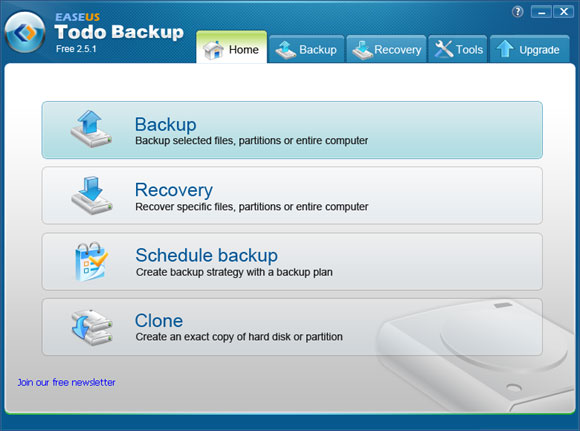
I see only this screen with less options:
EaseUS-Todo-Backup-Free.jpg
 

My Computer My Computer

At a glance

Windows 7 Ultimate 64 bit SP1Intel(R) Core(TM) i5-2500K12GB Kingston Hyperx 1600MHzAsus GTS 450
Computer type
PC/Desktop
Computer Manufacturer/Model Number
Custom Built PC
OS
Windows 7 Ultimate 64 bit SP1
CPU
Intel(R) Core(TM) i5-2500K
Motherboard
Gigabyte Technology Co., Ltd. Z68X-UD3-B3
Memory
12GB Kingston Hyperx 1600MHz
Graphics Card(s)
Asus GTS 450
PSU
500W Coolink
Other Info
Genius G-Pen F610 (PenPad)
Try looking in tools.
 

My Computer My Computer

At a glance

ME/XP/Vista/Win7
OS
ME/XP/Vista/Win7
Try looking in tools.
I can see that tab but it is disabled in the 40MB bootable little app :D
Sorry I couldnt find a screenshot of that exact situation.
Meanwhile I've read that these things don't support "dynamic disk".
I guess I have a dynamic partition,(see above) now I will convert it to basic disk somehow.
 

My Computer My Computer

At a glance

Windows 7 Ultimate 64 bit SP1Intel(R) Core(TM) i5-2500K12GB Kingston Hyperx 1600MHzAsus GTS 450
Computer type
PC/Desktop
Computer Manufacturer/Model Number
Custom Built PC
OS
Windows 7 Ultimate 64 bit SP1
CPU
Intel(R) Core(TM) i5-2500K
Motherboard
Gigabyte Technology Co., Ltd. Z68X-UD3-B3
Memory
12GB Kingston Hyperx 1600MHz
Graphics Card(s)
Asus GTS 450
PSU
500W Coolink
Other Info
Genius G-Pen F610 (PenPad)
To get back to Basic disk and to go with the information in the tutorials linked above, after you have copied out or made back-ups of the data you need to save to external media over-write the MBR with the diskpart clean command or wipe the entire HDD with the clean all command.


   Information

To start fresh with a clean installation or a clean install with an upgrade version of Windows 7, it may be best to over-write the Master Boot Record of any possible corruption and then use the Windows installer to create and format the partition(s) for installation, have a look at the "#6 clean" option of Method One in this first tutorial linked below.
If you want to completely over-write the entire Hard Disk Drive of any possible malware infection and / or to get the best possible space to do the install to or just for security purposes, have a look at these tutorials.
 
Last edited:

My Computer My Computer

At a glance

W 7 64-bit UltimateIntel Q9550 Yorkfield8GB Dominator 8500C5DATI : XFX 5870
Computer Manufacturer/Model Number
* BFK Customs *
OS
W 7 64-bit Ultimate
CPU
Intel Q9550 Yorkfield
Motherboard
ASUS P5Q Pro
Memory
8GB Dominator 8500C5D
Graphics Card(s)
ATI : XFX 5870
Sound Card
Realtek HD Audio 7-1
Monitor(s) Displays
1x 47" LCD HDMI & 3x 26" LCD HDMI
Screen Resolution
1920x1080P & 1920x1200
Hard Drives
1x 80GB Intel X25-M G2 SSD : 1x 500GB & 1x 640GB WD Caviar Black(s)
PSU
Corsair 620HX
Case
Cooler Master RC-690
Cooling
Tuniq Tower 120, 2x 140mm and 3x 120mm case fans
Keyboard
Microsoft 500
Mouse
Razer Diamondback 3G
Internet Speed
14 Mb/s
Other Info
1x Koutech 3Gb/s SATA HDD Hot Swap Rack
Thanks guys I got it finished today morning, I purchased Easeus todo backup and it worked fine from windows.
It took 1 and a half hour to copy the full disk on the fly, then I unplugged the old hd and booted fine from the new 1!
I still can't see the disks from the bootable utilities, but i dont care now... that screen was from another website, and it was not mine.
Thanks again !! :D :cool:
 

My Computer My Computer

At a glance

Windows 7 Ultimate 64 bit SP1Intel(R) Core(TM) i5-2500K12GB Kingston Hyperx 1600MHzAsus GTS 450
Computer type
PC/Desktop
Computer Manufacturer/Model Number
Custom Built PC
OS
Windows 7 Ultimate 64 bit SP1
CPU
Intel(R) Core(TM) i5-2500K
Motherboard
Gigabyte Technology Co., Ltd. Z68X-UD3-B3
Memory
12GB Kingston Hyperx 1600MHz
Graphics Card(s)
Asus GTS 450
PSU
500W Coolink
Other Info
Genius G-Pen F610 (PenPad)
Well done. :thumbsup:

I personally, use Norton Ghost v15.
 

My Computer My Computer

At a glance

ME/XP/Vista/Win7
OS
ME/XP/Vista/Win7
Good to see you found a solution and thanks for the update.
 

My Computer My Computer

At a glance

W 7 64-bit UltimateIntel Q9550 Yorkfield8GB Dominator 8500C5DATI : XFX 5870
Computer Manufacturer/Model Number
* BFK Customs *
OS
W 7 64-bit Ultimate
CPU
Intel Q9550 Yorkfield
Motherboard
ASUS P5Q Pro
Memory
8GB Dominator 8500C5D
Graphics Card(s)
ATI : XFX 5870
Sound Card
Realtek HD Audio 7-1
Monitor(s) Displays
1x 47" LCD HDMI & 3x 26" LCD HDMI
Screen Resolution
1920x1080P & 1920x1200
Hard Drives
1x 80GB Intel X25-M G2 SSD : 1x 500GB & 1x 640GB WD Caviar Black(s)
PSU
Corsair 620HX
Case
Cooler Master RC-690
Cooling
Tuniq Tower 120, 2x 140mm and 3x 120mm case fans
Keyboard
Microsoft 500
Mouse
Razer Diamondback 3G
Internet Speed
14 Mb/s
Other Info
1x Koutech 3Gb/s SATA HDD Hot Swap Rack
Back
Top