

Having lost his internet, a neighbor brought his laptop (Vista SP2, Atheros Wireless) to me last night. His Connection tooltip weirdly stated: Unidentified (Smith wireless).
Network Center showed Unidentified network.
There are 2 other laptops (XP and Win7 HP32bit) in his household that have no problems and can connect to the internet just fine. I first checked for viruses, of which I found several, including a rootkit. I cleaned the system up with malwarebytes, but still not connection, so I decided to restore an Acronis system drive image I made for him about a month ago. The results: Same network issues.
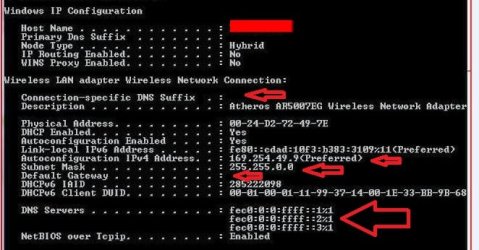
His TCP IPV6 & IPV4 properties were what one would expect...Obtain Auto on both counts, however, his IPconfig info for IPV4 were a bit odd. As can be noted from the screenshot, the Autoconfig IPV4 address and subnet mask weren't what I expected to see, nor were the DNS servers. And the Primary DNS suffix was blank.
I was able to correct the problem and get him back on line by manually entering the IPV4 address, Default Gateway, and DNS servers.
But I really wonder what caused this. Again, his was the only machine (out of 3 laptops) that was affected. Why would his auto settings suddenly turn on him?
Thanks for any insights.
Network Center showed Unidentified network.
There are 2 other laptops (XP and Win7 HP32bit) in his household that have no problems and can connect to the internet just fine. I first checked for viruses, of which I found several, including a rootkit. I cleaned the system up with malwarebytes, but still not connection, so I decided to restore an Acronis system drive image I made for him about a month ago. The results: Same network issues.
His TCP IPV6 & IPV4 properties were what one would expect...Obtain Auto on both counts, however, his IPconfig info for IPV4 were a bit odd. As can be noted from the screenshot, the Autoconfig IPV4 address and subnet mask weren't what I expected to see, nor were the DNS servers. And the Primary DNS suffix was blank.
I was able to correct the problem and get him back on line by manually entering the IPV4 address, Default Gateway, and DNS servers.
But I really wonder what caused this. Again, his was the only machine (out of 3 laptops) that was affected. Why would his auto settings suddenly turn on him?
Thanks for any insights.
My Computer
- OS
- Win7U 64 RTM
- CPU
- Q9550
- Motherboard
- GA-EP45-UD3R
- Memory
- 8GB Gskill
- Graphics Card(s)
- ASUS|EAH4850/HTDI/1GD3/A
- Sound Card
- xfi Plat
- Monitor(s) Displays
- Dell 2405fpw
- Screen Resolution
- 1920x1200
- Hard Drives
- Seagate & WD sata Drives
- PSU
- Antec
- Case
- Antec
- Keyboard
- MS Natural Ergonomic 4000
- Mouse
- Logitech MX610 USB Cordless


