
Laptop 'suddenly' lost network, IPconfig...

James Colbert

New member
Guru
Local time
5:00 AM
Messages
1,127
Location
Ellesmere Island
Having lost his internet, a neighbor brought his laptop (Vista SP2, Atheros Wireless) to me last night. His Connection tooltip weirdly stated: Unidentified (Smith wireless).

Network Center showed Unidentified network.

There are 2 other laptops (XP and Win7 HP32bit) in his household that have no problems and can connect to the internet just fine. I first checked for viruses, of which I found several, including a rootkit. I cleaned the system up with malwarebytes, but still not connection, so I decided to restore an Acronis system drive image I made for him about a month ago. The results: Same network issues.

His TCP IPV6 & IPV4 properties were what one would expect...Obtain Auto on both counts, however, his IPconfig info for IPV4 were a bit odd. As can be noted from the screenshot, the Autoconfig IPV4 address and subnet mask weren't what I expected to see, nor were the DNS servers. And the Primary DNS suffix was blank.

I was able to correct the problem and get him back on line by manually entering the IPV4 address, Default Gateway, and DNS servers.

But I really wonder what caused this. Again, his was the only machine (out of 3 laptops) that was affected. Why would his auto settings suddenly turn on him?

Thanks for any insights.
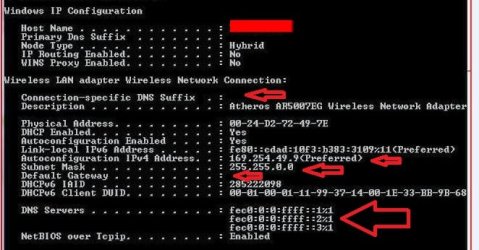
Ipconfig_2.JPG
 

My Computer My Computer

OS
Win7U 64 RTM
CPU
Q9550
Motherboard
GA-EP45-UD3R
Memory
8GB Gskill
Graphics Card(s)
ASUS|EAH4850/HTDI/1GD3/A
Sound Card
xfi Plat
Monitor(s) Displays
Dell 2405fpw
Screen Resolution
1920x1200
Hard Drives
Seagate & WD sata Drives
PSU
Antec
Case
Antec
Keyboard
MS Natural Ergonomic 4000
Mouse
Logitech MX610 USB Cordless
he's running APIPA, he's not getting DHCP from the router or modem. Check for broken router or modem.
 

My Computer My Computer

OS
7 Pro
Hi Brady. Thanks for your comments. Why would this affect only his laptop and not the other two?
 

My Computer My Computer

OS
Win7U 64 RTM
CPU
Q9550
Motherboard
GA-EP45-UD3R
Memory
8GB Gskill
Graphics Card(s)
ASUS|EAH4850/HTDI/1GD3/A
Sound Card
xfi Plat
Monitor(s) Displays
Dell 2405fpw
Screen Resolution
1920x1200
Hard Drives
Seagate & WD sata Drives
PSU
Antec
Case
Antec
Keyboard
MS Natural Ergonomic 4000
Mouse
Logitech MX610 USB Cordless
Could be that the laptop has the problem, what I have done to correct these things if it's fixable is simply go into device manager and uninstall the networking controller and reboot. Letting windows reinstall it. If that doesn't work it may very well be a bad network controller. Or try this when all else fails:


reset tcp/ip


  1. To open a command prompt, click Start and then click Run. Copy and paste (or type) the following command in the Open box and then press ENTER:cmd
  2. At the command prompt, copy and paste (or type) the following command and then press ENTER:netsh int ip reset c:\resetlog.txt
    Note If you do not want to specify a directory path for the log file, use the following command:netsh int ip reset resetlog.txt
  3. Reboot the computer.
When you run the reset command, it rewrites two registry keys that are used by TCP/IP. This has the same result as removing and reinstalling the protocol. The reset command rewrites the following two registry keys:
HKLM\SYSTEM\CurrentControlSet\Services\Tcpip\Parameters\

HKLM\SYSTEM\CurrentControlSet\Services\DHCP\Parameters\

To run the manual command successfully, you must specify a file name for the log, in which the actions that netsh takes will be recorded. When you run the manual command, TCP/IP is reset and the actions that were taken are recorded in the log file, known as resetlog.txt in this article.

The first example, c:\resetlog.txt, creates a path where the log will reside. The second example, resetlog.txt, creates the log file in the current directory. In either case, if the specified log file already exists, the new log will be appended to the end of the existing file.
 
Last edited:

My Computer My Computer

Computer Manufacturer/Model Number
Alienware
OS
Windows 7 Ultimate x64
CPU
I7
Motherboard
GA-X58-USB3
Memory
6 x 1.5V DDR3 DIMM sockets supporting up to 24 GB of system
Graphics Card(s)
GeForce GTX 580
Sound Card
Realtek ALC892 codec 2/4/5.1/7.1-channel
Monitor(s) Displays
NEC Display Solutions E321 Black 32"
Screen Resolution
1366 x 768
Hard Drives
OCZ Colossus LT Series OCZSSD2-1CLSLT1T 3.5" 1TB SATA II MLC Internal Solid State Drive
PSU
XFX Black Edition XPS-850W-BES 850W ATX12V
Case
Antec
Cooling
Zalman
Keyboard
Microsoft
Mouse
Microsoft
and if that reset doesn't work, attempt pinging" 127.0.0.1 - if that fails, your NIC died.
 

My Computer My Computer

OS
7 Pro
I'm not in possession of the laptop at the moment...once I got it online, he needed it to finish some work. I can get it back this evening if necessary.

But:

Seth: Wouldn't restoring the Acronis image from a month ago when I know the internet connection was fine have accomplished the registry, configuration changes?

brady: Given that the manual entries allows internet connectivity, wouldn't that eliminate the possibility of a faulty NIC?

Thanks again!
 

My Computer My Computer

OS
Win7U 64 RTM
CPU
Q9550
Motherboard
GA-EP45-UD3R
Memory
8GB Gskill
Graphics Card(s)
ASUS|EAH4850/HTDI/1GD3/A
Sound Card
xfi Plat
Monitor(s) Displays
Dell 2405fpw
Screen Resolution
1920x1200
Hard Drives
Seagate & WD sata Drives
PSU
Antec
Case
Antec
Keyboard
MS Natural Ergonomic 4000
Mouse
Logitech MX610 USB Cordless
I'm not in possession of the laptop at the moment...once I got it online, he needed it to finish some work. I can get it back this evening if necessary.

But:

Seth: Wouldn't restoring the Acronis image from a month ago when I know the internet connection was fine have accomplished the registry, configuration changes?

brady: Given that the manual entries allows internet connectivity, wouldn't that eliminate the possibility of a faulty NIC?

Thanks again!

Was the image restored in dos mode? It would have restored those settings, but if your still having the problem it could be one of 3 things or all 3 a faulty NIC, a virus that is migrating or renaming itself corrupting the tcp/ip stack settings, or a bad router/modem. If your using your router that would eliminate that. I would try like brady said and do a ping and hopefully you get a 0% loss return. If you don't then that NIC would be bad even though you can still type in the settings.

I guess another way of testing is to bypass the main nic and use a usb nic to connect wireless to the internet and see if the system sets it up automatically in a correct fashion. I know everybody doesn't just have those laying around but just a thought.
 

My Computer My Computer

Computer Manufacturer/Model Number
Alienware
OS
Windows 7 Ultimate x64
CPU
I7
Motherboard
GA-X58-USB3
Memory
6 x 1.5V DDR3 DIMM sockets supporting up to 24 GB of system
Graphics Card(s)
GeForce GTX 580
Sound Card
Realtek ALC892 codec 2/4/5.1/7.1-channel
Monitor(s) Displays
NEC Display Solutions E321 Black 32"
Screen Resolution
1366 x 768
Hard Drives
OCZ Colossus LT Series OCZSSD2-1CLSLT1T 3.5" 1TB SATA II MLC Internal Solid State Drive
PSU
XFX Black Edition XPS-850W-BES 850W ATX12V
Case
Antec
Cooling
Zalman
Keyboard
Microsoft
Mouse
Microsoft
Fix for lost internet connectivity, "Unidentified Network"

I have wasted four hours today after one of my computers suddenly stopped being able to get internet connectivity, even though it was connected to my home network. I started seeing that I was connected to an "Unidentified" public network, instead of my home network. After trying to self-solve this issue, I spent several hours browsing on various sites and reading dozens of suggested fixes, many of them having to do with Bonjour, which is not installed on my affected computer, or my router settings, which are working fine for every other computer in my network.

Here is what finally worked for me:

Click on Start
Click on All Programs
Click on Accessories
RIGHT click on Command Prompt
Click Run as admininstrator
You'll probably get a prompt window verifying this - click the Yes box
When the command prompt window pops up, type in:
netsh winsock reset catalog
and hit ENTER

You should receive a response telling you to restart your computer.
When Windows reboots you should be all set.

Good luck!
 

My Computer My Computer

OS
Windows 7 Home Ultimate
Back
Top