Solved Use 2nd sli pci-e slot for other type card conflicts with win7?

janhec

New member
Local time
4:41 PM
Messages
10
Trying to use the x8 slot on M2N-SLI for Asus U3S6 (USB 3.0 and SATA 600).
It works fine with a 2 monitor setup under XP, but not under win 7.
My guess/deduction is that win7 tries to determine what monitor(s) are attached to the U3S6. When booting win7, the monitor will show bios, the U3S6 is recognized, but the login screen will fail to appear. If I attach the second monitor, the login screen will appear on that monitor and the first (primary) will stop working, and can't be revivied during the session using either NVidia control panel or windows screen resolution.
I can still use two monitors on win7 by effectively disabling the U3S6 in bios, selecting for SLI config: single graphics card.
Under XP I can use the combination of dual monitor and effective USB3 (HD rates > 100 MB/s). Under win7 I have to choose between dual monitor and USB3 (SATA 600 not yet in use).
Thanks for any ideas / help / comments.

CPU: AMD phenom II X4 945
GPU: NVidia 275 GTX
win 7 64 ultimate
 

My Computer My Computer

At a glance

Windows 7 Ultimate x64AMD phenom II X4 9454 GB DDR2Nvidia GTX 275
Computer Manufacturer/Model Number
self built
OS
Windows 7 Ultimate x64
CPU
AMD phenom II X4 945
Motherboard
Asus M2N-SLI
Memory
4 GB DDR2
Graphics Card(s)
Nvidia GTX 275
Sound Card
SB audigy
Monitor(s) Displays
Samsung 2443BW and Samsung 204B
Screen Resolution
1920 x 1200, 1600x1200
Hard Drives
RAID 0: Nvidia stripe 931.52G, Samsung HD103UJ (all on SATA 300)
PSU
Nexus NX-5000 R3 530W
Case
tower
Cooling
air
Keyboard
logitech K340
Mouse
logitech performance MX
Internet Speed
40 mbit/s
Not sure what that's about but you should certainly be able to use other cards in those slots and Windows will pick it up if a driver is supplied.

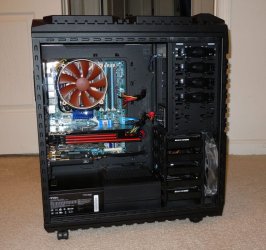
As you see in my system I have a Creative X-FI soundcard plugged into the PCIE slot at the bottom. I have an Intel board. Maybe AMD boards work differently? Don't think so, but....

DSCN0627.jpg

Anyway you need to read the owner's manual for your motherboard to see what it says about using those slots.
 

My Computer My Computer

At a glance

Windows 10 ProIntel Core i7-4770K (3.5Ghz)32 gig Corsair Dominator Platinum (4x8Gig)Sapphire Tri-X R9 Fury
Computer type
PC/Desktop
Computer Manufacturer/Model Number
Custom built by me.
OS
Windows 10 Pro
CPU
Intel Core i7-4770K (3.5Ghz)
Motherboard
Gigabyte G1 Sniper 5 (F10 Bios)
Memory
32 gig Corsair Dominator Platinum (4x8Gig)
Graphics Card(s)
Sapphire Tri-X R9 Fury
Sound Card
Soundblaster ZXR
Monitor(s) Displays
NEC PA242W 24" LCD Monitor
Screen Resolution
1920 x 1200
Hard Drives
Primary - Samsung 850 Pro (512gig), Samsung 840 Pro (256gig), 2TB WD Caviar Black.
PSU
EVGA Supernova 1000 G2
Case
Cooler Master HAF X
Cooling
Corsair H100i with Corsair Air Series SP120 Quiet Fans
Keyboard
Logitech Wireless Wave
Mouse
Logitech Performance MX
Internet Speed
High Speed Cable
Antivirus
Norton Security
Browser
IE11
Other Info
Memory Timings - 1866MHz @ 9-9-9-27-1T @ 1.5 volts
Not sure what that's about but you should certainly be able to use other cards in those slots and Windows will pick it up if a driver is supplied.

As you see in my system I have a Creative X-FI soundcard plugged into the PCIE slot at the bottom. I have an Intel board. Maybe AMD boards work differently? Don't think so, but....

Anyway you need to read the owner's manual for your motherboard to see what it says about using those slots.

Thanks for the advice.
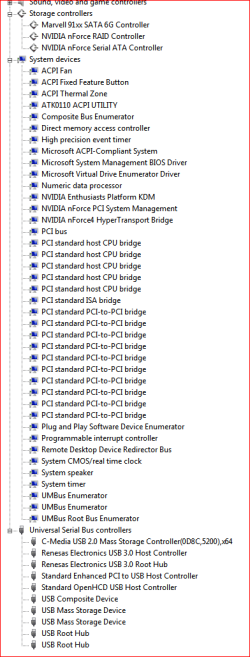
1) the system does recognize the card and has a driver for both Marvel 91xx SATA 6G controller and for USB (see attached devices.png)
2) The mobo manual list "Other PCIe devices (X8, x4, x1)" under non-SLI mode
3) The problem is that I cannot use my second monitor in this configuration (i.e. under win7 64 ultimate SP1; the same setup will work under XP 32bits):cry:
4) have to admit that my old mobo is not on the U3S6 compatiblity list (see e.g. Asus U3S6 USB3.0 weird quirks - Other-Components - CPU-Components however, it evidently is compatible enough to work...
So, I'm not prepared to give up yet and still believe it is a win7/driver issue. I don't suspect the nvidia driver terribly, since a similar driver will work under xp. But I did post on Nvidia as well, no luck so far.
 

Attachments

  • devices.PNG
    devices.PNG
    14.7 KB · Views: 40

My Computer My Computer

At a glance

Windows 7 Ultimate x64AMD phenom II X4 9454 GB DDR2Nvidia GTX 275
Computer Manufacturer/Model Number
self built
OS
Windows 7 Ultimate x64
CPU
AMD phenom II X4 945
Motherboard
Asus M2N-SLI
Memory
4 GB DDR2
Graphics Card(s)
Nvidia GTX 275
Sound Card
SB audigy
Monitor(s) Displays
Samsung 2443BW and Samsung 204B
Screen Resolution
1920 x 1200, 1600x1200
Hard Drives
RAID 0: Nvidia stripe 931.52G, Samsung HD103UJ (all on SATA 300)
PSU
Nexus NX-5000 R3 530W
Case
tower
Cooling
air
Keyboard
logitech K340
Mouse
logitech performance MX
Internet Speed
40 mbit/s
3) The problem is that I cannot use my second monitor in this configuration (i.e. under win7 64 ultimate SP1; the same setup will work under XP 32bits):cry:

Sorry but I'm still a little confused here. You'll have to provide a little more information on the setup that allowed dual monitor under XP, but not under 7.

So, I'm not prepared to give up yet and still believe it is a win7/driver issue. I don't suspect the nvidia driver terribly, since a similar driver will work under xp. But I did post on Nvidia as well, no luck so far.

Windows 7 is not XP. And XP drivers won't work under a Windows 7 OS.
 

My Computer My Computer

At a glance

Windows 10 ProIntel Core i7-4770K (3.5Ghz)32 gig Corsair Dominator Platinum (4x8Gig)Sapphire Tri-X R9 Fury
Computer type
PC/Desktop
Computer Manufacturer/Model Number
Custom built by me.
OS
Windows 10 Pro
CPU
Intel Core i7-4770K (3.5Ghz)
Motherboard
Gigabyte G1 Sniper 5 (F10 Bios)
Memory
32 gig Corsair Dominator Platinum (4x8Gig)
Graphics Card(s)
Sapphire Tri-X R9 Fury
Sound Card
Soundblaster ZXR
Monitor(s) Displays
NEC PA242W 24" LCD Monitor
Screen Resolution
1920 x 1200
Hard Drives
Primary - Samsung 850 Pro (512gig), Samsung 840 Pro (256gig), 2TB WD Caviar Black.
PSU
EVGA Supernova 1000 G2
Case
Cooler Master HAF X
Cooling
Corsair H100i with Corsair Air Series SP120 Quiet Fans
Keyboard
Logitech Wireless Wave
Mouse
Logitech Performance MX
Internet Speed
High Speed Cable
Antivirus
Norton Security
Browser
IE11
Other Info
Memory Timings - 1866MHz @ 9-9-9-27-1T @ 1.5 volts
Very Confusing indeed.

OP says: "Trying to use the x8 slot on M2N-SLI for Asus U3S6 (USB 3.0 and SATA 600)."
The U3S6 is a PCI-e add on card to add 2 USB ports that run at USB 3.0 Speeds.
ASUSTeK Computer Inc. - Motherboards- ASUS U3S6
Does he have a monitor plugged into the U3S6 by USB connection?

It sounds like he has a single GTX275 installed. The 275 has 2 DVI connections.
GeForce GTX 275
I have to assume that he has 2 monitors plugged into the 2 connections on the Video card. Is this correct?

janhec: you definitely need to acurately describe how you have everything connected in order for anyone to make sense of your issue.
 

My Computer My Computer

At a glance

Windows 7 64 Bit Home Premium SP1i7-3820GSkill F3-14900CL9Q - 16GBEVGA GeForce GTX660 - Driver 352.86
Computer type
PC/Desktop
Computer Manufacturer/Model Number
Home Built - Jan 2013
OS
Windows 7 64 Bit Home Premium SP1
CPU
i7-3820
Motherboard
Asus P9X79-PRO - Bios 4608
Memory
GSkill F3-14900CL9Q - 16GB
Graphics Card(s)
EVGA GeForce GTX660 - Driver 352.86
Sound Card
On board Realtek ALC898
Monitor(s) Displays
Acer S271HL
Screen Resolution
1920 x 1080
Hard Drives
#1- Samsung 840 Pro Series
#2- Western Digital WD1002FAEX Sata3 Black
#3- Western Digital WD1002FAEX Sata3 Black
PSU
Corsair CMPSU-850TX-V2 - 850 watt (by Seasonic)
Case
Corsair Obsidian 550D
Cooling
Standard 3 120mm case fans, Cooler Master Hyper 212 EVO
Keyboard
MS KC-0405
Mouse
Intellimouse 5-button
Internet Speed
56 Mbits/Sec (on a good day)
Antivirus
Avast & Malwarebytes
Browser
Firefox
Other Info
Asus DVD - DRW-24B1ST 24X
Thanks. Glad to know I'm not the only one confused. Hopefully the OP can clear things up.
 

My Computer My Computer

At a glance

Windows 10 ProIntel Core i7-4770K (3.5Ghz)32 gig Corsair Dominator Platinum (4x8Gig)Sapphire Tri-X R9 Fury
Computer type
PC/Desktop
Computer Manufacturer/Model Number
Custom built by me.
OS
Windows 10 Pro
CPU
Intel Core i7-4770K (3.5Ghz)
Motherboard
Gigabyte G1 Sniper 5 (F10 Bios)
Memory
32 gig Corsair Dominator Platinum (4x8Gig)
Graphics Card(s)
Sapphire Tri-X R9 Fury
Sound Card
Soundblaster ZXR
Monitor(s) Displays
NEC PA242W 24" LCD Monitor
Screen Resolution
1920 x 1200
Hard Drives
Primary - Samsung 850 Pro (512gig), Samsung 840 Pro (256gig), 2TB WD Caviar Black.
PSU
EVGA Supernova 1000 G2
Case
Cooler Master HAF X
Cooling
Corsair H100i with Corsair Air Series SP120 Quiet Fans
Keyboard
Logitech Wireless Wave
Mouse
Logitech Performance MX
Internet Speed
High Speed Cable
Antivirus
Norton Security
Browser
IE11
Other Info
Memory Timings - 1866MHz @ 9-9-9-27-1T @ 1.5 volts
I'm not so sure,... The OP might just mean that he has a USB to VGA conversion cable, and with the right drivers this could work. Seen it before and mayor brands like Intel have promoted this in the past as a ways to add an external monitor to a LT with only free USB ports.

OP: since we're guessing here because of incomplete info, could you please describe the setup in more detail? Do you use a USB to VGA (or hdmi) conversion cable? If so, what softwaredrivers have you used to push USB to graphics output?
 

My Computer My Computer

At a glance

Windows 7 64b UltimateI7-2600 3.40GHz - testing various OC levels..2x 4Gb DDR3/1333GTX570 - testing OC levels
Computer Manufacturer/Model Number
custom build
OS
Windows 7 64b Ultimate
CPU
I7-2600 3.40GHz - testing various OC levels..
Motherboard
ASUS Sabretooth
Memory
2x 4Gb DDR3/1333
Graphics Card(s)
GTX570 - testing OC levels
Sound Card
motherboard 7.1 DIG.
Monitor(s) Displays
2x Ilyama 24" E2409HDS-B1 2ms/DVI
Screen Resolution
1920 x 1080
Hard Drives
120 GB Intel Elmcrest SSD
1 TB SATAII 7200RPM/32MB
External 2TB USB3
PSU
Corsair Pro HX850W
Cooling
Coolermaster Hyper V8
Keyboard
Logitech G110
Mouse
Logitech G700
Internet Speed
25Mb
Other Info
CPU: 7,7 RAM: 7,7 GTX: 7,9 GTX 3D : 7,9 SSD 7,6
Overall 7,6 ...... now to speed up the SSD... ;)

Also use a Dell XPS M1710 on Vista 32b
Asus LT on Vista 32
3 older machines still doing fine on Linux/ubuntu but not used much anymore...
Please, please fill in your System Specs to help us. It seems you have one GTX275 in the PCIe x8 slot? Try using the x16 slot.
Are you working with two computers?
 

My Computer My Computer

At a glance

Windows 7 Ultimate X64 SP1Intel i5-2550K, Differing ~4.4-4.8GHz No buil...16GB G.Skill Sniper 1866MHz @ 2133MHz 2x8GBASUS GTX650TIB-DC2OC-2GD5, (650TI Boost)
Computer type
PC/Desktop
Computer Manufacturer/Model Number
Home Built Desktop By DataTech
OS
Windows 7 Ultimate X64 SP1
CPU
Intel i5-2550K, Differing ~4.4-4.8GHz No built in GPU
Motherboard
ASUS P8Z68-V PRO/GEN3
Memory
16GB G.Skill Sniper 1866MHz @ 2133MHz 2x8GB
Graphics Card(s)
ASUS GTX650TIB-DC2OC-2GD5, (650TI Boost)
Sound Card
Onboard Realtek 5-1
Monitor(s) Displays
Samsung P2570HD
Screen Resolution
1920x1080
Hard Drives
Samsung 840 Pro 256GB SSD for OS, 500GB Seagate Constellation (Enterprise drive) for Data
PSU
Corsair HX650W
Case
Inwin Dragon Rider
Cooling
Hyper 212 EVO w/two Noctua fans, push-pull, @1300 RPM
Keyboard
E-Z Eyes, bright yellow keys with large characters
Mouse
steelseries SENSEI Laser Pro Gaming
Internet Speed
48-51Mbs Mbs down, 11 Mbs up Xfinity Cable
Antivirus
Norton Internet Security 2013
Browser
IE 10, Opera, Pale Moon if needed
Other Info
4 case fans, LG BluRay-RE, ASUS DVD-RW, Mr. Fusion power supply, 1.21 gigawatts.
Hey guys,
The monitors are both connected to the GTX 275. I hope suggestions like I would connect a monitor to USB 3 are not serious. One is connected through a DVI-VGA adaptor (you know, DVI has both analogue and digital in the spec). This does not matter in my view.
So
Mobo: M2N-SLI
CPU: AMD phenom II X4 945
GPU: Nvidia GTX 275 with two monitors attached
Monitors: Samsung 2443BW and 204B
Memory: 4 GB DDR2
OS: Win 7 64 ultimate SP1
HD's 3 disks on SATA 300, 2 in RAID 0 and a single disk, nothing on SATA 600 of U3S6.
U3S6: USB 3.0 is used for connecting Samsung 2TB hd (has USB 3.0 interface).
Audio: SB audigy

There are no errors shown in device manager.
It looks as if under win 7 the recognition of the main monitor is blocked by the U3S6. Bios etc. is shown on the monitor, but the login screen is not. If the U3S6 is disabled, the monitors function correctly.
 

My Computer My Computer

At a glance

Windows 7 Ultimate x64AMD phenom II X4 9454 GB DDR2Nvidia GTX 275
Computer Manufacturer/Model Number
self built
OS
Windows 7 Ultimate x64
CPU
AMD phenom II X4 945
Motherboard
Asus M2N-SLI
Memory
4 GB DDR2
Graphics Card(s)
Nvidia GTX 275
Sound Card
SB audigy
Monitor(s) Displays
Samsung 2443BW and Samsung 204B
Screen Resolution
1920 x 1200, 1600x1200
Hard Drives
RAID 0: Nvidia stripe 931.52G, Samsung HD103UJ (all on SATA 300)
PSU
Nexus NX-5000 R3 530W
Case
tower
Cooling
air
Keyboard
logitech K340
Mouse
logitech performance MX
Internet Speed
40 mbit/s
Sounds like an IRQ conflict or something similar.

You could try this: Uninstall the U3S6 from Device Manager, shut down, remove it from the computer. Then reboot and go into Windows. Check that the monitors are working and everything is cool in Device Manager.

Then shut down and install the U3S6 in a different x4 slot if you have one (or a x8 or x16). Restart Windows, install the driver, and test.

The reason for this is that some cards attempt to use certain system resources depending on where in the PCI bus they are installed on some systems. There are of course ways to change the IRQs and resources from the BIOS or even the OS, but this test will tell you if this is the cause or if it is something more to do with the card itself or it's driver.
 

My Computer My Computer

At a glance

Windows 7 64 Bit Home Premium SP1i7-3820GSkill F3-14900CL9Q - 16GBEVGA GeForce GTX660 - Driver 352.86
Computer type
PC/Desktop
Computer Manufacturer/Model Number
Home Built - Jan 2013
OS
Windows 7 64 Bit Home Premium SP1
CPU
i7-3820
Motherboard
Asus P9X79-PRO - Bios 4608
Memory
GSkill F3-14900CL9Q - 16GB
Graphics Card(s)
EVGA GeForce GTX660 - Driver 352.86
Sound Card
On board Realtek ALC898
Monitor(s) Displays
Acer S271HL
Screen Resolution
1920 x 1080
Hard Drives
#1- Samsung 840 Pro Series
#2- Western Digital WD1002FAEX Sata3 Black
#3- Western Digital WD1002FAEX Sata3 Black
PSU
Corsair CMPSU-850TX-V2 - 850 watt (by Seasonic)
Case
Corsair Obsidian 550D
Cooling
Standard 3 120mm case fans, Cooler Master Hyper 212 EVO
Keyboard
MS KC-0405
Mouse
Intellimouse 5-button
Internet Speed
56 Mbits/Sec (on a good day)
Antivirus
Avast & Malwarebytes
Browser
Firefox
Other Info
Asus DVD - DRW-24B1ST 24X
Excellent advice. +1
 

My Computer My Computer

At a glance

Windows 10 ProIntel Core i7-4770K (3.5Ghz)32 gig Corsair Dominator Platinum (4x8Gig)Sapphire Tri-X R9 Fury
Computer type
PC/Desktop
Computer Manufacturer/Model Number
Custom built by me.
OS
Windows 10 Pro
CPU
Intel Core i7-4770K (3.5Ghz)
Motherboard
Gigabyte G1 Sniper 5 (F10 Bios)
Memory
32 gig Corsair Dominator Platinum (4x8Gig)
Graphics Card(s)
Sapphire Tri-X R9 Fury
Sound Card
Soundblaster ZXR
Monitor(s) Displays
NEC PA242W 24" LCD Monitor
Screen Resolution
1920 x 1200
Hard Drives
Primary - Samsung 850 Pro (512gig), Samsung 840 Pro (256gig), 2TB WD Caviar Black.
PSU
EVGA Supernova 1000 G2
Case
Cooler Master HAF X
Cooling
Corsair H100i with Corsair Air Series SP120 Quiet Fans
Keyboard
Logitech Wireless Wave
Mouse
Logitech Performance MX
Internet Speed
High Speed Cable
Antivirus
Norton Security
Browser
IE11
Other Info
Memory Timings - 1866MHz @ 9-9-9-27-1T @ 1.5 volts
Sounds like an IRQ conflict or something similar.

You could try this: Uninstall the U3S6 from Device Manager, shut down, remove it from the computer. Then reboot and go into Windows. Check that the monitors are working and everything is cool in Device Manager.

Then shut down and install the U3S6 in a different x4 slot if you have one (or a x8 or x16). Restart Windows, install the driver, and test.

The reason for this is that some cards attempt to use certain system resources depending on where in the PCI bus they are installed on some systems. There are of course ways to change the IRQs and resources from the BIOS or even the OS, but this test will tell you if this is the cause or if it is something more to do with the card itself or it's driver.
Hey man,
Thanks for the answer.
Everything is definitely cool without the U3S6, whether out of the compu or disabled in bios.
Unfortunately I don't have another x4 slot, or anything which could handle the U3S6.
I can use the U3S6, only the primary monitor then does not function. In that setup, no error/conflict shows up in device manager, haven't compared IRQ's for everything, though. You think I should?
Jan
 

My Computer My Computer

At a glance

Windows 7 Ultimate x64AMD phenom II X4 9454 GB DDR2Nvidia GTX 275
Computer Manufacturer/Model Number
self built
OS
Windows 7 Ultimate x64
CPU
AMD phenom II X4 945
Motherboard
Asus M2N-SLI
Memory
4 GB DDR2
Graphics Card(s)
Nvidia GTX 275
Sound Card
SB audigy
Monitor(s) Displays
Samsung 2443BW and Samsung 204B
Screen Resolution
1920 x 1200, 1600x1200
Hard Drives
RAID 0: Nvidia stripe 931.52G, Samsung HD103UJ (all on SATA 300)
PSU
Nexus NX-5000 R3 530W
Case
tower
Cooling
air
Keyboard
logitech K340
Mouse
logitech performance MX
Internet Speed
40 mbit/s
Yes, it's the only thing I can think of that would explain your symptoms.

You should take some time to read up on "changing IRQs" before actually changing settings. If you have a modern motherboard it will use "Advanced PIC" or APIC for IRQ's.
 

My Computer My Computer

At a glance

Windows 7 64 Bit Home Premium SP1i7-3820GSkill F3-14900CL9Q - 16GBEVGA GeForce GTX660 - Driver 352.86
Computer type
PC/Desktop
Computer Manufacturer/Model Number
Home Built - Jan 2013
OS
Windows 7 64 Bit Home Premium SP1
CPU
i7-3820
Motherboard
Asus P9X79-PRO - Bios 4608
Memory
GSkill F3-14900CL9Q - 16GB
Graphics Card(s)
EVGA GeForce GTX660 - Driver 352.86
Sound Card
On board Realtek ALC898
Monitor(s) Displays
Acer S271HL
Screen Resolution
1920 x 1080
Hard Drives
#1- Samsung 840 Pro Series
#2- Western Digital WD1002FAEX Sata3 Black
#3- Western Digital WD1002FAEX Sata3 Black
PSU
Corsair CMPSU-850TX-V2 - 850 watt (by Seasonic)
Case
Corsair Obsidian 550D
Cooling
Standard 3 120mm case fans, Cooler Master Hyper 212 EVO
Keyboard
MS KC-0405
Mouse
Intellimouse 5-button
Internet Speed
56 Mbits/Sec (on a good day)
Antivirus
Avast & Malwarebytes
Browser
Firefox
Other Info
Asus DVD - DRW-24B1ST 24X
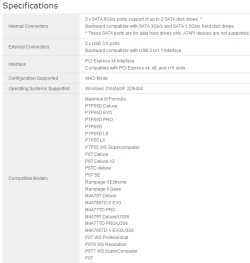
Jan, is the XP install on a different PC or are you dual booting it with Win7? The ASUS page TVeblen referred to does not have your listed mother board in the compatible U3S6 list.
U3S6.PNG
 

My Computer My Computer

At a glance

Windows 7 Ultimate X64 SP1Intel i5-2550K, Differing ~4.4-4.8GHz No buil...16GB G.Skill Sniper 1866MHz @ 2133MHz 2x8GBASUS GTX650TIB-DC2OC-2GD5, (650TI Boost)
Computer type
PC/Desktop
Computer Manufacturer/Model Number
Home Built Desktop By DataTech
OS
Windows 7 Ultimate X64 SP1
CPU
Intel i5-2550K, Differing ~4.4-4.8GHz No built in GPU
Motherboard
ASUS P8Z68-V PRO/GEN3
Memory
16GB G.Skill Sniper 1866MHz @ 2133MHz 2x8GB
Graphics Card(s)
ASUS GTX650TIB-DC2OC-2GD5, (650TI Boost)
Sound Card
Onboard Realtek 5-1
Monitor(s) Displays
Samsung P2570HD
Screen Resolution
1920x1080
Hard Drives
Samsung 840 Pro 256GB SSD for OS, 500GB Seagate Constellation (Enterprise drive) for Data
PSU
Corsair HX650W
Case
Inwin Dragon Rider
Cooling
Hyper 212 EVO w/two Noctua fans, push-pull, @1300 RPM
Keyboard
E-Z Eyes, bright yellow keys with large characters
Mouse
steelseries SENSEI Laser Pro Gaming
Internet Speed
48-51Mbs Mbs down, 11 Mbs up Xfinity Cable
Antivirus
Norton Internet Security 2013
Browser
IE 10, Opera, Pale Moon if needed
Other Info
4 case fans, LG BluRay-RE, ASUS DVD-RW, Mr. Fusion power supply, 1.21 gigawatts.
Jan, is the XP install on a different PC or are you dual booting it with Win7? The ASUS page TVeblen referred to does not have your listed mother board in the compatible U3S6 list.
View attachment 169250

It's precisely the same machine (dual booting). For compatibility listing, you're right. My mobo is not on the c list for U3S6. Haven't found out what the incompatibility would consist of, though...

So my best guess is either an obscure IRQ / other resource conflict (does not show up in device manager) or, more likely, a dual / sli gpu connected phenomenon which did not (yet) exist in XP, but does exist in win 7.

The logic would be: there's a card/device in sli position, let's find out if it does graphics and ask whether the primary monitor is attached, query goes wrong, primary monitor no longer available, secondary used for login, everything works except one monitor.
On XP, no questions asked, ok, everything works.

Not too advanced thinking on my part, but still, sounds logical to me.
Jan
 

My Computer My Computer

At a glance

Windows 7 Ultimate x64AMD phenom II X4 9454 GB DDR2Nvidia GTX 275
Computer Manufacturer/Model Number
self built
OS
Windows 7 Ultimate x64
CPU
AMD phenom II X4 945
Motherboard
Asus M2N-SLI
Memory
4 GB DDR2
Graphics Card(s)
Nvidia GTX 275
Sound Card
SB audigy
Monitor(s) Displays
Samsung 2443BW and Samsung 204B
Screen Resolution
1920 x 1200, 1600x1200
Hard Drives
RAID 0: Nvidia stripe 931.52G, Samsung HD103UJ (all on SATA 300)
PSU
Nexus NX-5000 R3 530W
Case
tower
Cooling
air
Keyboard
logitech K340
Mouse
logitech performance MX
Internet Speed
40 mbit/s
A strange test perhaps.... You state that your main monitor does not function correctly in W7 with that card in. It wont go past BIOS. Have you tried booting in Safe mode with th card in? I know your second monitor won't show... But it would be interesting to see if basic Safe mode W7 drivers do let the monitor and card combine....
 

My Computer My Computer

At a glance

Windows 7 64b UltimateI7-2600 3.40GHz - testing various OC levels..2x 4Gb DDR3/1333GTX570 - testing OC levels
Computer Manufacturer/Model Number
custom build
OS
Windows 7 64b Ultimate
CPU
I7-2600 3.40GHz - testing various OC levels..
Motherboard
ASUS Sabretooth
Memory
2x 4Gb DDR3/1333
Graphics Card(s)
GTX570 - testing OC levels
Sound Card
motherboard 7.1 DIG.
Monitor(s) Displays
2x Ilyama 24" E2409HDS-B1 2ms/DVI
Screen Resolution
1920 x 1080
Hard Drives
120 GB Intel Elmcrest SSD
1 TB SATAII 7200RPM/32MB
External 2TB USB3
PSU
Corsair Pro HX850W
Cooling
Coolermaster Hyper V8
Keyboard
Logitech G110
Mouse
Logitech G700
Internet Speed
25Mb
Other Info
CPU: 7,7 RAM: 7,7 GTX: 7,9 GTX 3D : 7,9 SSD 7,6
Overall 7,6 ...... now to speed up the SSD... ;)

Also use a Dell XPS M1710 on Vista 32b
Asus LT on Vista 32
3 older machines still doing fine on Linux/ubuntu but not used much anymore...
It's a good thing to test - didn't yet try.
I'll try that tomorrow (getting late here anyway) when the calculations I'm running right now are finished.
thanks,
Jan
 

My Computer My Computer

At a glance

Windows 7 Ultimate x64AMD phenom II X4 9454 GB DDR2Nvidia GTX 275
Computer Manufacturer/Model Number
self built
OS
Windows 7 Ultimate x64
CPU
AMD phenom II X4 945
Motherboard
Asus M2N-SLI
Memory
4 GB DDR2
Graphics Card(s)
Nvidia GTX 275
Sound Card
SB audigy
Monitor(s) Displays
Samsung 2443BW and Samsung 204B
Screen Resolution
1920 x 1200, 1600x1200
Hard Drives
RAID 0: Nvidia stripe 931.52G, Samsung HD103UJ (all on SATA 300)
PSU
Nexus NX-5000 R3 530W
Case
tower
Cooling
air
Keyboard
logitech K340
Mouse
logitech performance MX
Internet Speed
40 mbit/s
It's a good thing to test - didn't yet try.
I'll try that tomorrow (getting late here anyway) when the calculations I'm running right now are finished.
thanks,
Jan


Yep... Probably just as late as it is here :D
Hope the test tells us something tomorrow!
 

My Computer My Computer

At a glance

Windows 7 64b UltimateI7-2600 3.40GHz - testing various OC levels..2x 4Gb DDR3/1333GTX570 - testing OC levels
Computer Manufacturer/Model Number
custom build
OS
Windows 7 64b Ultimate
CPU
I7-2600 3.40GHz - testing various OC levels..
Motherboard
ASUS Sabretooth
Memory
2x 4Gb DDR3/1333
Graphics Card(s)
GTX570 - testing OC levels
Sound Card
motherboard 7.1 DIG.
Monitor(s) Displays
2x Ilyama 24" E2409HDS-B1 2ms/DVI
Screen Resolution
1920 x 1080
Hard Drives
120 GB Intel Elmcrest SSD
1 TB SATAII 7200RPM/32MB
External 2TB USB3
PSU
Corsair Pro HX850W
Cooling
Coolermaster Hyper V8
Keyboard
Logitech G110
Mouse
Logitech G700
Internet Speed
25Mb
Other Info
CPU: 7,7 RAM: 7,7 GTX: 7,9 GTX 3D : 7,9 SSD 7,6
Overall 7,6 ...... now to speed up the SSD... ;)

Also use a Dell XPS M1710 on Vista 32b
Asus LT on Vista 32
3 older machines still doing fine on Linux/ubuntu but not used much anymore...
The pics for ASUS shows the U3S6 needs to be in the 3rd X8/X16 slot, that may be the issue, since your board has but two PCIeX8 slots? Doesn't explain why all is well in XP though. :sarc:

You might evaluate the Different BIOSES. they mostly refer to adding CPU support, which may have something to do with the way Win 7 handles the U3S6 card. Just be aware flashing your BIOS can render your Pc unuseable if you don't know what you're doing. Proceed carefully, you seem techie enough to handle this though.
 
Last edited:

My Computer My Computer

At a glance

Windows 7 Ultimate X64 SP1Intel i5-2550K, Differing ~4.4-4.8GHz No buil...16GB G.Skill Sniper 1866MHz @ 2133MHz 2x8GBASUS GTX650TIB-DC2OC-2GD5, (650TI Boost)
Computer type
PC/Desktop
Computer Manufacturer/Model Number
Home Built Desktop By DataTech
OS
Windows 7 Ultimate X64 SP1
CPU
Intel i5-2550K, Differing ~4.4-4.8GHz No built in GPU
Motherboard
ASUS P8Z68-V PRO/GEN3
Memory
16GB G.Skill Sniper 1866MHz @ 2133MHz 2x8GB
Graphics Card(s)
ASUS GTX650TIB-DC2OC-2GD5, (650TI Boost)
Sound Card
Onboard Realtek 5-1
Monitor(s) Displays
Samsung P2570HD
Screen Resolution
1920x1080
Hard Drives
Samsung 840 Pro 256GB SSD for OS, 500GB Seagate Constellation (Enterprise drive) for Data
PSU
Corsair HX650W
Case
Inwin Dragon Rider
Cooling
Hyper 212 EVO w/two Noctua fans, push-pull, @1300 RPM
Keyboard
E-Z Eyes, bright yellow keys with large characters
Mouse
steelseries SENSEI Laser Pro Gaming
Internet Speed
48-51Mbs Mbs down, 11 Mbs up Xfinity Cable
Antivirus
Norton Internet Security 2013
Browser
IE 10, Opera, Pale Moon if needed
Other Info
4 case fans, LG BluRay-RE, ASUS DVD-RW, Mr. Fusion power supply, 1.21 gigawatts.
A strange test perhaps.... You state that your main monitor does not function correctly in W7 with that card in. It wont go past BIOS. Have you tried booting in Safe mode with th card in? I know your second monitor won't show... But it would be interesting to see if basic Safe mode W7 drivers do let the monitor and card combine....

Tried it, they do combine in safe mode. The USB 3.0 Host Controller utility recognises the card and the primary monitor keeps working.

Flashed the bios to the very latest, too (was asus 5001, a bêta, now 1103).

After normal boot, no change though.

I'll check again for the latest Nvidia gpu driver, did the last one like a month ago.

Still a puzzle to me..
Jan
 

My Computer My Computer

At a glance

Windows 7 Ultimate x64AMD phenom II X4 9454 GB DDR2Nvidia GTX 275
Computer Manufacturer/Model Number
self built
OS
Windows 7 Ultimate x64
CPU
AMD phenom II X4 945
Motherboard
Asus M2N-SLI
Memory
4 GB DDR2
Graphics Card(s)
Nvidia GTX 275
Sound Card
SB audigy
Monitor(s) Displays
Samsung 2443BW and Samsung 204B
Screen Resolution
1920 x 1200, 1600x1200
Hard Drives
RAID 0: Nvidia stripe 931.52G, Samsung HD103UJ (all on SATA 300)
PSU
Nexus NX-5000 R3 530W
Case
tower
Cooling
air
Keyboard
logitech K340
Mouse
logitech performance MX
Internet Speed
40 mbit/s
Back
Top