
Xonar DX & Sennheiser PC 350 Not Cooperating

GimpInChair

New member
Local time
4:05 PM
Messages
8
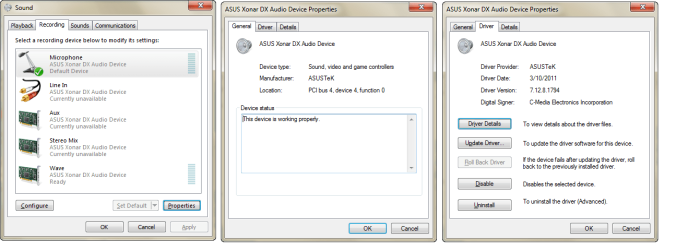
I've been having intermittent luck getting the mic to work on my Sennheiser PC350. It worked at one time or another with DragonNaturally, Skype, and gmails phone service. Now it doesn't seem to want to work at all. Even though, as you can see in the attached image, Windows shows that the 'device' is working. Also attached, but not shown, is my Logitech Quick Cam Pro 9000. This has a mic built in and it functions properly.

Any ideas where I should look to solve this mystery?
 

Attachments
  • XonarDX-PC350.png
    XonarDX-PC350.png
    43.2 KB · Views: 58

My Computer My Computer

At a glance

Windows 7Intel Q9550G.Skill F2-6400CL5D-4GBPQ x2EVGA 8800 GTS
Computer Manufacturer/Model Number
Custom
OS
Windows 7
CPU
Intel Q9550
Motherboard
Asus P5Q-E
Memory
G.Skill F2-6400CL5D-4GBPQ x2
Graphics Card(s)
EVGA 8800 GTS
Sound Card
Asus Xonar DX
Monitor(s) Displays
Samsung 213T
Screen Resolution
1600x1200
Hard Drives
WD Velociraptor 300GB
WD 500GB RE3 x2
PSU
OCZ ModXStream Pro 700
Case
Lian Li PC-65
Cooling
Arctic Cooling Freezer 7 Pro
Keyboard
MS Internet PS/2
Mouse
Kensington Trackball USB
Internet Speed
Highspeed Cable
I'm not certain that it will fix it, but select the Properties button on the Sound Properties and make sure that "Use this Device" is selected in the dropdown window. Then on the Listen tab, make sure that "Listen to this device" is not checked. On the Custom tab, make sure that "Microphone Boost" is selected. On the Levels tab, make sure that the volume slider is at 100% and that the mike is not muted. Then go to the Asus Audio Center and try enabling AEC and check that the volume is 100% there also. If none of these help, then I would suspect that the mike has a problem, and may have to go RMA, if under warranty.
 

My Computer My Computer

At a glance

W7x64 Pro, SuSe 12.1/** W7 x64 Pro, XP MCEPhenom II 1090T w/Noctua NH-D14 /**4400+ X2 w...2 x 2GB Patriot PGS34g1600LLKA/**4x1GB Corsai...EVGA GTX460 SC/**EVGA 8800GTS
Computer Manufacturer/Model Number
DIY
OS
W7x64 Pro, SuSe 12.1/** W7 x64 Pro, XP MCE
CPU
Phenom II 1090T w/Noctua NH-D14 /**4400+ X2 w/CM Hyper TX 3
Motherboard
ASRock 890FX Deluxe 4/**A8N-SLI
Memory
2 x 2GB Patriot PGS34g1600LLKA/**4x1GB Corsair VS
Graphics Card(s)
EVGA GTX460 SC/**EVGA 8800GTS
Sound Card
Asus Xonar D2X/**Xonar D1
Monitor(s) Displays
Acer X233H, Dell E152FPc /**LG M237-WD
Screen Resolution
1920x1080 & 1024x768/**1980x1080
Hard Drives
WDC 2TB, 1.5TB, 1TB, 500GB,Seagate 500GB , Maxtor 80GB /**500GB Seagate & WDC 1TB Black
PSU
CM RS600 w/ APC BX1000G/**Antec 500 TP w/ APC BX1000
Case
HAF922/**Antec 1040IIB
Cooling
3x200mm, 1x140 and 1x120mm/**5x80mm fans
Keyboard
Logitech Media USB/**Saitek Eclipse
Mouse
Cordless Trackman Wheel/**Ditto
Internet Speed
3.3Mbps
Other Info
SB 560 5.1 w/ Sennheiser RS140/**Creative T20 speakers, Dvico FusionHDTV7 Gold RT, Cisco E3000, HP 5510V AIO, Linksys E3000, Belkin F5U237 hub and **F5D8055 adapter
(** = 2nd rig)
I'm not certain that it will fix it, but select the Properties button on the Sound Properties and make sure that "Use this Device" is selected in the dropdown window. Then on the Listen tab, make sure that "Listen to this device" is not checked. On the Custom tab, make sure that "Microphone Boost" is selected. On the Levels tab, make sure that the volume slider is at 100% and that the mike is not muted. Then go to the Asus Audio Center and try enabling AEC and check that the volume is 100% there also. If none of these help, then I would suspect that the mike has a problem, and may have to go RMA, if under warranty.

Except for the AEC, everything is in order. I'd hate to think it's a repair issue, they're not that old and I'm very gentle in handling them. I guess I''ll try them on another computer.
 

My Computer My Computer

At a glance

Windows 7Intel Q9550G.Skill F2-6400CL5D-4GBPQ x2EVGA 8800 GTS
Computer Manufacturer/Model Number
Custom
OS
Windows 7
CPU
Intel Q9550
Motherboard
Asus P5Q-E
Memory
G.Skill F2-6400CL5D-4GBPQ x2
Graphics Card(s)
EVGA 8800 GTS
Sound Card
Asus Xonar DX
Monitor(s) Displays
Samsung 213T
Screen Resolution
1600x1200
Hard Drives
WD Velociraptor 300GB
WD 500GB RE3 x2
PSU
OCZ ModXStream Pro 700
Case
Lian Li PC-65
Cooling
Arctic Cooling Freezer 7 Pro
Keyboard
MS Internet PS/2
Mouse
Kensington Trackball USB
Internet Speed
Highspeed Cable
I've been having intermittent luck getting the mic to work on my Sennheiser PC350. It worked at one time or another with DragonNaturally, Skype, and gmails phone service. Now it doesn't seem to want to work at all. Even though, as you can see in the attached image, Windows shows that the 'device' is working. Also attached, but not shown, is my Logitech Quick Cam Pro 9000. This has a mic built in and it functions properly.

Any ideas where I should look to solve this mystery?

I cant get my mic to work either(Desktop Mic)with Xonar DS,have the exact same as you have in your pics,no stereo mix etc,was thinking maybe my sound card was faulty!!
 

My Computer My Computer

At a glance

Windows 7 Professional x64 SP1Q9550 2.83GHZ8GB Crucial DDR3-PC12800Sapphire HD6870 1GB
Computer Manufacturer/Model Number
Custom Build
OS
Windows 7 Professional x64 SP1
CPU
Q9550 2.83GHZ
Motherboard
Gigabyte GA-G41MT-S2P
Memory
8GB Crucial DDR3-PC12800
Graphics Card(s)
Sapphire HD6870 1GB
Sound Card
Asus Xonar DS
Monitor(s) Displays
28" Hanns-G HZ281
Screen Resolution
1920x1200
Hard Drives
Samsung 320GB
WD 320GB
Seagate External 2.5 500GB
PSU
Corsair TX 650
Case
Coolermaster CM690
Cooling
Corsair H50
Keyboard
Logitech K120
Mouse
Logitech Wireless M305
Internet Speed
20MB Sky,getting 15mb
Other Info
Logitech z523 2.1 speakers
Back
Top