Realtek, Installed but no sound

2sense

New member
Local time
9:59 AM
Messages
11
Alright, I have followed these forums and made a little head way but no sound. I have a p4dual, intel915 mobo, with onboard realtek ac97. I have windows 7 32, and have the realtek 603's installed.

The drivers say they are loaded properly, my front panel is disabled, my headphones are plugged into the right plug (trust me). However, even though everything seems to be installed correctly (even when i open pandora or something under sound in the control panel it shows music playing with the sound level) but i get no sound.

If i need to snip something or if anyone needs any info to help me out, please let me know. I have been working on this for a day and a half now. I dumped 2 sound cards (creative) and went with my onboard cause those are the only drivers i can get to work, kinda.
 

My Computer My Computer

OS
windows 7
sound problem

Alright, I have followed these forums and made a little head way but no sound. I have a p4dual, intel915 mobo, with onboard realtek ac97. I have windows 7 32, and have the realtek 603's installed.

The drivers say they are loaded properly, my front panel is disabled, my headphones are plugged into the right plug (trust me). However, even though everything seems to be installed correctly (even when i open pandora or something under sound in the control panel it shows music playing with the sound level) but i get no sound.

If i need to snip something or if anyone needs any info to help me out, please let me know. I have been working on this for a day and a half now. I dumped 2 sound cards (creative) and went with my onboard cause those are the only drivers i can get to work, kinda.

Hi and welcome to sevenforums

This is going to be dumb but i have to ask. have you gone into sound cpl and checked that speakers were checked as the output? are there an errors in event viewer relating to the sound? any other symptoms?

Ken
 

My Computer My Computer

Computer Manufacturer/Model Number
HP Pavillion dv-7 1005 Tx
OS
Win 8 Release candidate 8400
CPU
[email protected]
Memory
4 gigs
Graphics Card(s)
Nvidia 9600M
Sound Card
HD built-in
Monitor(s) Displays
17" Wxga
Screen Resolution
1440x900
Cooling
none
Internet Speed
45Mb down 5Mb up
Thanks ken,

You may need to be more specific, as far as I can tell there is no place in the sound cpl to set a default or change my output settings. I have all the hidden options displayed and nothing else even comes up.

Nothing in the event viewer, no other symptoms. As far as i can tell everything should work. I know the headphones work and that the onboard sound works, it was yesterday before I installed 7.

(Edit: There is an app error coming from VSS) No idea what that is. Im savy, but not that savy.
 

My Computer My Computer

OS
windows 7
Ok, I realized I have the ac605 chip which is not supported by the newest drivers and won't even install. I need to find 605 drivers that have the gui with a speaker fill option. I'd to resolve this so I can post the resolution. Seems to be fairly common.
 

My Computer My Computer

OS
windows 7
Ok, here is another one of those silly question, have you checked the Bios/Cmos to determine if there is a problem with the on board AC97 (for instant is it not turned on or may be there is an IRQ conflict. If everything fine then attempt a Google/Bing seach for a new driver indicating specially that you are working with Win 7. Just did a Google check and noticed there are several sites indicating updated drivers. Here is one that I checked asking: AC97 drivers for win 7: this is one of the hits - Realtek AC'97 Drivers 4.06 download free - Realtek sound driver ... Hope this will help. :)
 

My Computer My Computer

Computer Manufacturer/Model Number
HP Pavilion a4302f
OS
Win 7 Pro x64, VM Win XP, Win7 Pro Sandbox, Kubuntu 11
CPU
AMD Athlon(tm) II X4 640 @ 3.0 Gbz
Memory
12GB 1066MHz DDR3 SDRAM - 2x4GB, 2x2GB
Graphics Card(s)
ATI Radeon HD 4350 HD Graphics/Audio with 512MB
Sound Card
Realtek High Definition Audio
Monitor(s) Displays
1. Dell 23" SP2307, 2. Mitsublishi 40" HDTV, Hannspree 25"
Screen Resolution
1. 2048x1152, 2. 1920-1080, 3. 1920x1200
Hard Drives
Int: 1 120 Gig SSD i
1 - 2.5" 500 USB External HDD
1 -1 Tb USB External HDD
Case
Mid Tower
Cooling
Standard Fans - 5 fans (very quiet)
Keyboard
Microsoft Wireless 2000
Mouse
Microsoft Wireless Mouse 5000
Internet Speed
10 Mbit (realistically 500 Kbit - 1.2 Mbit)
Other Info
Speakers - Bose Desktop (Excellent Sound)
1 external CD|DVD\Blue-ray Recorders/Players (Sony)
its definitely turned on. Lol. No conflicts. I have been running this mobo for a couple years, I'm very familiar with. Quite frankly I'm thinking it has to do w the speaker fill. Something tells me if I had surround sound I would be hearing rear speakers only.
 

My Computer My Computer

OS
windows 7
no sound

Thanks ken,

You may need to be more specific, as far as I can tell there is no place in the sound cpl to set a default or change my output settings. I have all the hidden options displayed and nothing else even comes up.

Nothing in the event viewer, no other symptoms. As far as i can tell everything should work. I know the headphones work and that the onboard sound works, it was yesterday before I installed 7.

(Edit: There is an app error coming from VSS) No idea what that is. Im savy, but not that savy.

like I said this is probably not the problem but too many times I dont ask if its plugged in.

Are there any errors listed in event viewer? and in device manager you have a driver installed and working properly

Ken
 
Last edited:

My Computer My Computer

Computer Manufacturer/Model Number
HP Pavillion dv-7 1005 Tx
OS
Win 8 Release candidate 8400
CPU
[email protected]
Memory
4 gigs
Graphics Card(s)
Nvidia 9600M
Sound Card
HD built-in
Monitor(s) Displays
17" Wxga
Screen Resolution
1440x900
Cooling
none
Internet Speed
45Mb down 5Mb up
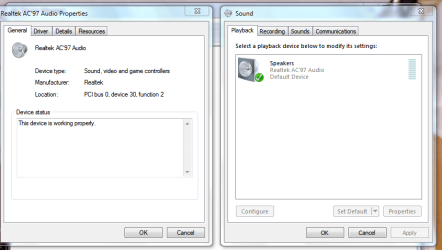
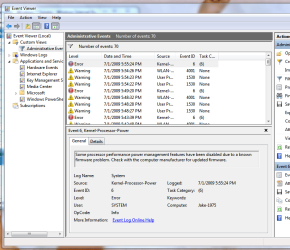
Attached is both my working drivers and speakers that are "on", and the event viewer which does seem to show an error. However, the error shows a time stamp at which I was playing with about 5 sets of drivers.

This help?
 

Attachments

  • sound1.PNG
    sound1.PNG
    26.9 KB · Views: 193
  • sound2.PNG
    sound2.PNG
    42.6 KB · Views: 224

My Computer My Computer

OS
windows 7
Attached is both my working drivers and speakers that are "on", and the event viewer which does seem to show an error. However, the error shows a time stamp at which I was playing with about 5 sets of drivers.

This help?

From the snips I see that your firmware (i dont know which a(its on the other tab)) needs to be updated but that doesn't help with t his problem.

Let me do some searching

Ken
 

My Computer My Computer

Computer Manufacturer/Model Number
HP Pavillion dv-7 1005 Tx
OS
Win 8 Release candidate 8400
CPU
[email protected]
Memory
4 gigs
Graphics Card(s)
Nvidia 9600M
Sound Card
HD built-in
Monitor(s) Displays
17" Wxga
Screen Resolution
1440x900
Cooling
none
Internet Speed
45Mb down 5Mb up
Actually, what I have installed now is the vista 603 drivers. Newer ones are not compatible with my alc 605 chip. the r2.12 and above only work with the alc 680's and above. However, I got my sblive! Working. But, I would still like to resolve this.
 

My Computer My Computer

OS
windows 7
2sense, did you get it fixed in the meantime ? I'm having the exact same problem.
 

My Computer My Computer

OS
Windows Vista Home Premium
Nope, i gave up on the realtek. As far as I can tell there are no compatible drivers for old AC '97 chips. Im just using my old SBlive! It works fine.
 

My Computer My Computer

OS
windows 7
Install drivermax, and it will find the driver for you
http://files.getdropbox.com/u/976813/drivermax.exe they will send you a free reg key once you create an account. Once installed, go to the driver downloads and info, and then click on check online for driver updates, then it will do a scan of your system, tell you what version you have, and what is the latest version available. It will then give the file to download. let me know if you need more help with the app.
 

My Computer My Computer

Computer Manufacturer/Model Number
Gigabyte
OS
Windows 7 Ultimate
CPU
Intel Core(TM)2 Quad- Q9550, 2.83GHz
Motherboard
G31M-ES2L
Memory
4GB
Graphics Card(s)
ATI Radeon HD4600
Sound Card
On Board:
Monitor(s) Displays
Acer AL2223W, Acer AL1916
Screen Resolution
1680 x 1050, 1280 x 1024
Hard Drives
160GB
350GB
250GB
250GB
PSU
600W
Case
Cooler Master
Keyboard
Microsoft Laser 6000
Mouse
Logitech Optical Trackman
Internet Speed
1.5MB
Other Info
I am also running a quasar gamatron flux capacitor with twin pulse tronic phasers......jk, I have no such stuff.
What about the "AC'97 Audio Codecs (Software)"?

Realtek

;)
 

My Computer My Computer

Computer Manufacturer/Model Number
Compaq Desktop
OS
Windows 7 Ultimate x64
CPU
AMD Sempron Dual Core
Memory
3GB
Graphics Card(s)
NVIDIA GeForce 6150SE nForce 430
Screen Resolution
1024x768
Hard Drives
150GB Sata
I tried driver max. Every driver it suggested did not work. Realtek drivers from the site definintely dont work either. I literally installed every version for every OS in several compatability modes. As far as i can tell there are arent any drivers that will work for W7 with their old chipsets.
 

My Computer My Computer

OS
windows 7
This might be a lot of work, but you could go back to the version of w7 that the driver worked on, and use driver max to back it up, then reinstall the current version of w7, then use driver max to put the driver back in. My tv tuner did work on my current version of w7, but luckily as a rule, I ALWAYS back up my drivers, I was able to use the same driver that driver max backed up. I know it is not a task you might looking forward to, but it seems like your best option right now other than learing to read lips or waiting till a driver becomes available.
 

My Computer My Computer

Computer Manufacturer/Model Number
Gigabyte
OS
Windows 7 Ultimate
CPU
Intel Core(TM)2 Quad- Q9550, 2.83GHz
Motherboard
G31M-ES2L
Memory
4GB
Graphics Card(s)
ATI Radeon HD4600
Sound Card
On Board:
Monitor(s) Displays
Acer AL2223W, Acer AL1916
Screen Resolution
1680 x 1050, 1280 x 1024
Hard Drives
160GB
350GB
250GB
250GB
PSU
600W
Case
Cooler Master
Keyboard
Microsoft Laser 6000
Mouse
Logitech Optical Trackman
Internet Speed
1.5MB
Other Info
I am also running a quasar gamatron flux capacitor with twin pulse tronic phasers......jk, I have no such stuff.
Back
Top