Solved How do I change clock color and remove the "Show Desktop" button?

DDjusD

New member
Member
Local time
3:42 PM
Messages
25
Location
Chickamauga, Georgia, USA
How do I change clock color and remove the "Show Desktop" button?

Okay, so I recently moved to try and get a more simple look on one of my laptops. I have found that I like using the Soft7 2.0 theme with Token icons. But what I have noticed is that my clock no long matches. I'm wanting to know how do I change my clock color to something that matches and is a little more easy to read. Like black.

Also, I would like to get rid of that awful "Show Desktop" button in the bottom right. I have tried the tool from Kishan but it doesn't stay. When I click on anything involving the notification tray, it just pops back up. Does anyone have a fix for this?
 

My Computer My Computer

At a glance

Windows 7 Ultimate x64
OS
Windows 7 Ultimate x64

My Computer My Computer

At a glance

Windows 7 Ultimate 64 bit SP1Intel(R) Core(TM) i5-2500K12GB Kingston Hyperx 1600MHzAsus GTS 450
Computer type
PC/Desktop
Computer Manufacturer/Model Number
Custom Built PC
OS
Windows 7 Ultimate 64 bit SP1
CPU
Intel(R) Core(TM) i5-2500K
Motherboard
Gigabyte Technology Co., Ltd. Z68X-UD3-B3
Memory
12GB Kingston Hyperx 1600MHz
Graphics Card(s)
Asus GTS 450
PSU
500W Coolink
Other Info
Genius G-Pen F610 (PenPad)

My Computer My Computer

At a glance

Windows 7 Ultimate x64/Windows 8 Consumer Pre...Intel Pentium Dual Core E6700 3.2GHzStrontium 8192MB DDR3 1333Mhzmsi GeForce N560GTX-M2D1GD5 1GB
Computer Manufacturer/Model Number
Custom Build
OS
Windows 7 Ultimate x64/Windows 8 Consumer Preview x64/Ubuntu 11.04
CPU
Intel Pentium Dual Core E6700 3.2GHz
Motherboard
ASUS P5G41T-M LX
Memory
Strontium 8192MB DDR3 1333Mhz
Graphics Card(s)
msi GeForce N560GTX-M2D1GD5 1GB
Sound Card
Realtek HD Audio
Monitor(s) Displays
CHIMEI CMV 221D 22"
Screen Resolution
1680x1050
Hard Drives
Seagate Barracuda LP Green 3.5'' 2TB Internal HDD 5900RPM + WD Elements Desktop 1TB External HDD 7200RPM
PSU
SHAW Viper-1500w Gaming PSU
Case
Black eMaxx ATX Mini Tower Case
Keyboard
Microsoft Wireless Keyboard 1000
Mouse
Microsoft Wireless Optical Mouse 2000
Internet Speed
100GB @ 4.76Mbps
Like I said, that tool doesn't work for me. It comes back after clicking on anything in the Notifications area. Also, for some reason, I can't load up the social.answers.microsoft.com site.

Yes.
 

My Computer My Computer

At a glance

Windows 7 Ultimate x64
OS
Windows 7 Ultimate x64

My Computer My Computer

At a glance

Windows 7 Ultimate 64 bit SP1Intel(R) Core(TM) i5-2500K12GB Kingston Hyperx 1600MHzAsus GTS 450
Computer type
PC/Desktop
Computer Manufacturer/Model Number
Custom Built PC
OS
Windows 7 Ultimate 64 bit SP1
CPU
Intel(R) Core(TM) i5-2500K
Motherboard
Gigabyte Technology Co., Ltd. Z68X-UD3-B3
Memory
12GB Kingston Hyperx 1600MHz
Graphics Card(s)
Asus GTS 450
PSU
500W Coolink
Other Info
Genius G-Pen F610 (PenPad)
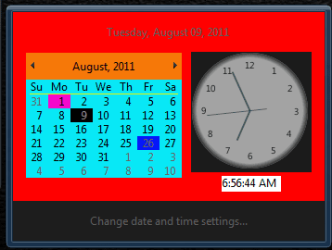
First I can give you some directions on the clock looking at the screenshot I provided shows what can be changed by editing images in the theme .msstyles except the red, the white box around the time it is a fill color in the theme .msstyles, the clock face with the gray square can the change but they are in timedate.cpl in C:\Windows\System32 and if 64 bit it's in both C:\Windows\System32 and C:\Windows\SysWOW64. the text colors are also in the theme .msstyles but in less you have Windows Style Builder you won't be able to change the text color easily. –
I can give you the image numbers if you provide a link to the theme.
Knowing you are using a custom theme you will need to ask the theme maker to make the changes for you or you can do yourself with a resource hacker of some kind. I have Windows Style Builder and can give you directions if needed.
I have never disabled the show desktop button so I cannot help you there.
Jerry
clock2.PNG
 

My Computer My Computer

At a glance

Win 7 Pro x64 / Win 10 ProIntel(R) Core(TM) i7-3630QM CPU @ 2.40GHz12 GB(1) Intel(R) HD Graphics 4000 (2) NVIDIA GeFo...
Computer type
Laptop
Computer Manufacturer/Model Number
Sager NP9170
OS
Win 7 Pro x64 / Win 10 Pro
CPU
Intel(R) Core(TM) i7-3630QM CPU @ 2.40GHz
Motherboard
CLEVO P170EM
Memory
12 GB
Graphics Card(s)
(1) Intel(R) HD Graphics 4000 (2) NVIDIA GeForce GTX 675M
Sound Card
(1) Realtek High Definition Audio (2) Intel(R) Display Aud
Monitor(s) Displays
17.3
Screen Resolution
1920x1080
Hard Drives
(1) Samsung 860 EVO 500GB(OS) (1) Samsung 860 EVO 500GB(Data)
Keyboard
Backlite
Antivirus
MSE, Malwarebytes Pro
Browser
Firefox
Other Info
DESKTOP: Custom-built.
OS: Win 10 Pro x64.
CASE: Rosewill R5.
CPU: Intel I5 4670K CPU @ 3.40GHz.
CPU COOLER: Cool Master Hyper 212 EVO.
MOTHERBOARD: Asus Z87-A.
MEMORY: Kingston HyperX 2x4 GB.
GPU: Nvidia Geforce 650 TI.
PSU: Corsair TX750.
DRIVES: (1) Samsung 840 120 GB SSD (2) Western Digital blue 500 GB 7200 RPM.
First I can give you some directions on the clock looking at the screenshot I provided shows what can be changed by editing images in the theme .msstyles except the red, the white box around the time it is a fill color in the theme .msstyles, the clock face with the gray square can the change but they are in timedate.cpl in C:\Windows\System32 and if 64 bit it's in both C:\Windows\System32 and C:\Windows\SysWOW64. the text colors are also in the theme .msstyles but in less you have Windows Style Builder you won't be able to change the text color easily. –
I can give you the image numbers if you provide a link to the theme.
Knowing you are using a custom theme you will need to ask the theme maker to make the changes for you or you can do yourself with a resource hacker of some kind. I have Windows Style Builder and can give you directions if needed.
I have never disabled the show desktop button so I cannot help you there.
Jerry
View attachment 169352
So a with a Windows Style Builder I can edit the theme to change the clock text color?
 

My Computer My Computer

At a glance

Windows 7 Ultimate x64
OS
Windows 7 Ultimate x64
So a with a Windows Style Builder I can edit the theme to change the clock text color?
Yes - and a lot more.
Jerry
 

My Computer My Computer

At a glance

Win 7 Pro x64 / Win 10 ProIntel(R) Core(TM) i7-3630QM CPU @ 2.40GHz12 GB(1) Intel(R) HD Graphics 4000 (2) NVIDIA GeFo...
Computer type
Laptop
Computer Manufacturer/Model Number
Sager NP9170
OS
Win 7 Pro x64 / Win 10 Pro
CPU
Intel(R) Core(TM) i7-3630QM CPU @ 2.40GHz
Motherboard
CLEVO P170EM
Memory
12 GB
Graphics Card(s)
(1) Intel(R) HD Graphics 4000 (2) NVIDIA GeForce GTX 675M
Sound Card
(1) Realtek High Definition Audio (2) Intel(R) Display Aud
Monitor(s) Displays
17.3
Screen Resolution
1920x1080
Hard Drives
(1) Samsung 860 EVO 500GB(OS) (1) Samsung 860 EVO 500GB(Data)
Keyboard
Backlite
Antivirus
MSE, Malwarebytes Pro
Browser
Firefox
Other Info
DESKTOP: Custom-built.
OS: Win 10 Pro x64.
CASE: Rosewill R5.
CPU: Intel I5 4670K CPU @ 3.40GHz.
CPU COOLER: Cool Master Hyper 212 EVO.
MOTHERBOARD: Asus Z87-A.
MEMORY: Kingston HyperX 2x4 GB.
GPU: Nvidia Geforce 650 TI.
PSU: Corsair TX750.
DRIVES: (1) Samsung 840 120 GB SSD (2) Western Digital blue 500 GB 7200 RPM.
So a with a Windows Style Builder I can edit the theme to change the clock text color?
Yes - and a lot more.
Jerry
So if I was to send you my .msstyle would you be able to change the taskbar clock color for me?
If you are using a custom theme you will need to ask the theme maker to make the changes for you not cool to change someones work.
If not yes I can use a default aero.msstlyes I have and rename it.
Jerry
 

My Computer My Computer

At a glance

Win 7 Pro x64 / Win 10 ProIntel(R) Core(TM) i7-3630QM CPU @ 2.40GHz12 GB(1) Intel(R) HD Graphics 4000 (2) NVIDIA GeFo...
Computer type
Laptop
Computer Manufacturer/Model Number
Sager NP9170
OS
Win 7 Pro x64 / Win 10 Pro
CPU
Intel(R) Core(TM) i7-3630QM CPU @ 2.40GHz
Motherboard
CLEVO P170EM
Memory
12 GB
Graphics Card(s)
(1) Intel(R) HD Graphics 4000 (2) NVIDIA GeForce GTX 675M
Sound Card
(1) Realtek High Definition Audio (2) Intel(R) Display Aud
Monitor(s) Displays
17.3
Screen Resolution
1920x1080
Hard Drives
(1) Samsung 860 EVO 500GB(OS) (1) Samsung 860 EVO 500GB(Data)
Keyboard
Backlite
Antivirus
MSE, Malwarebytes Pro
Browser
Firefox
Other Info
DESKTOP: Custom-built.
OS: Win 10 Pro x64.
CASE: Rosewill R5.
CPU: Intel I5 4670K CPU @ 3.40GHz.
CPU COOLER: Cool Master Hyper 212 EVO.
MOTHERBOARD: Asus Z87-A.
MEMORY: Kingston HyperX 2x4 GB.
GPU: Nvidia Geforce 650 TI.
PSU: Corsair TX750.
DRIVES: (1) Samsung 840 120 GB SSD (2) Western Digital blue 500 GB 7200 RPM.
Yes - and a lot more.
Jerry
So if I was to send you my .msstyle would you be able to change the taskbar clock color for me?
If you are using a custom theme you will need to ask the theme maker to make the changes for you not cool to change someones work.
If not yes I can use a default aero.msstlyes I have and rename it.
Jerry
Okay, I sent him a message asking if it would be okay. He'll probably say yes as long as it's not made public for everyone. Will post a screenshot of his response if he responds.

EDIT: He said I can as long as it's for personal use. Screenshot of not attached
 

Attachments

  • Allowal Note.png
    Allowal Note.png
    26.9 KB · Views: 76
Last edited:

My Computer My Computer

At a glance

Windows 7 Ultimate x64
OS
Windows 7 Ultimate x64
For your clock this is what I use: TClock Light
You can make your clock any color, size, format or font you want.
 

My Computer My Computer

At a glance

Windows 7 Ultimateintel Core 2 Duo t52504gb PC2-5300 DDR2 SDRAMMobile Intel® Graphics Media Accelerator X310...
Computer Manufacturer/Model Number
Toshiba p205-s7469
OS
Windows 7 Ultimate
CPU
intel Core 2 Duo t5250
Motherboard
Mobile Intel® GM965 Express Chipset
Memory
4gb PC2-5300 DDR2 SDRAM
Graphics Card(s)
Mobile Intel® Graphics Media Accelerator X3100 with 64MB-251
Sound Card
Toshiba w/Realtek Audio & Harmon Kardon Speakers(2)+ subwoof
Monitor(s) Displays
17.0” widescreen TruBrite TFT LCD 1440x900
Hard Drives
toshiba 500gb sata (primary) Toshiba 200gb (secondary)
I PM you
 

My Computer My Computer

At a glance

Win 7 Pro x64 / Win 10 ProIntel(R) Core(TM) i7-3630QM CPU @ 2.40GHz12 GB(1) Intel(R) HD Graphics 4000 (2) NVIDIA GeFo...
Computer type
Laptop
Computer Manufacturer/Model Number
Sager NP9170
OS
Win 7 Pro x64 / Win 10 Pro
CPU
Intel(R) Core(TM) i7-3630QM CPU @ 2.40GHz
Motherboard
CLEVO P170EM
Memory
12 GB
Graphics Card(s)
(1) Intel(R) HD Graphics 4000 (2) NVIDIA GeForce GTX 675M
Sound Card
(1) Realtek High Definition Audio (2) Intel(R) Display Aud
Monitor(s) Displays
17.3
Screen Resolution
1920x1080
Hard Drives
(1) Samsung 860 EVO 500GB(OS) (1) Samsung 860 EVO 500GB(Data)
Keyboard
Backlite
Antivirus
MSE, Malwarebytes Pro
Browser
Firefox
Other Info
DESKTOP: Custom-built.
OS: Win 10 Pro x64.
CASE: Rosewill R5.
CPU: Intel I5 4670K CPU @ 3.40GHz.
CPU COOLER: Cool Master Hyper 212 EVO.
MOTHERBOARD: Asus Z87-A.
MEMORY: Kingston HyperX 2x4 GB.
GPU: Nvidia Geforce 650 TI.
PSU: Corsair TX750.
DRIVES: (1) Samsung 840 120 GB SSD (2) Western Digital blue 500 GB 7200 RPM.

My Computer My Computer

At a glance

Windows 7 Ultimateintel Core 2 Duo t52504gb PC2-5300 DDR2 SDRAMMobile Intel® Graphics Media Accelerator X310...
Computer Manufacturer/Model Number
Toshiba p205-s7469
OS
Windows 7 Ultimate
CPU
intel Core 2 Duo t5250
Motherboard
Mobile Intel® GM965 Express Chipset
Memory
4gb PC2-5300 DDR2 SDRAM
Graphics Card(s)
Mobile Intel® Graphics Media Accelerator X3100 with 64MB-251
Sound Card
Toshiba w/Realtek Audio & Harmon Kardon Speakers(2)+ subwoof
Monitor(s) Displays
17.0” widescreen TruBrite TFT LCD 1440x900
Hard Drives
toshiba 500gb sata (primary) Toshiba 200gb (secondary)
Back
Top