Solved QuickTime plays my MP3s but only sometimes...

SkylineUK

New member
Member
Local time
10:54 AM
Messages
27
Location
Warwickshire, UK
If I click on a web site forum where someone has posted a link to their song which is an MP3, QuickTime takes over and plays it instead of my default player Windows Media Player. But if I say, double click on an MP3 in a directory on my PC, Media Player opens and all is ok. In 'Default Programs/File Associations' the MP3 box is ticked for MP3 for Media Player and not ticked for QuickTime. So how is QuickTime managing to hijack MP3 sometimes? :mad:
 

My Computer My Computer

Computer Manufacturer/Model Number
DARC (DirectResolutions, UK)
OS
Windows 7 64 bit Home SP1
CPU
Intel Sandy-bridge i7 3.4GHz, 4 cores, 8 threads
Motherboard
Gigabyte P67
Memory
14GB
Graphics Card(s)
HD5450 ATI dual output silent cooling
Sound Card
Focusrite Saffire Pro 14
Monitor(s) Displays
Samsung 27"
Screen Resolution
1920 x 1200
Hard Drives
1TB OS drive
1TB Audio drive
1TB Audio drive
PSU
Zalman ZM600
Case
DARC Custom
Cooling
Fans front and back
Keyboard
Logitech
Mouse
MS Optical
Internet Speed
ADSL
Quicktime and other Apple $%& isn't allowed on my computers so I can't check it myself.
This is, what I found:
Load Windows Media Player and set it as the default MP3 player(put a check mark beside MP3 in File Types, under Tools >Options)
If you find that the MP3 file type is *already* checked, uncheck it, apply, re-check it and apply

Hope that works for you

-DG
 

My Computer My Computer

Computer Manufacturer/Model Number
HP m8000n
OS
Windows 7 Ultimate x86
CPU
DualCore AMD Athlon 64 X2, 2600 MHz 5200+
Motherboard
Asus M2N68-LA (Narra)
Memory
Samsung 2GB DDR2
Graphics Card(s)
Onboard NVIDIA GeForce 6150SE nForce 430
Sound Card
Onboard nVIDIA nForce 6100-430 (MCP61P)
Monitor(s) Displays
Westinghouse 19" LED
Screen Resolution
1280x1024
Hard Drives
SATA II Seagate Barracuda 500GB
USB II WD Elements 500GB
USB II WD My Book 1TB
USB II WD My Book 2TB
PSU
Stock (HP)
Case
Stock (HP)
Cooling
Stock
Keyboard
Logitech Classic KB 200
Mouse
Standard HP opticle USB mouse
Unfortunately I need QuickTime for a couple of applications (plugins to Sonar music program) otherwise I'd delete the bloody thing.

I can't find anything under Tools/Options??

If I go into Control Panel/Programs/Default Programs (or Windows button/Default Programs), under 'Associate a file type or protocol with a specific program' MP3 is already correctly designated to WMP, and under 'Set associations for a program' MP3 is not ticked for QuickTime. So all seems correct. But there must be something I'm missing...
 

My Computer My Computer

Computer Manufacturer/Model Number
DARC (DirectResolutions, UK)
OS
Windows 7 64 bit Home SP1
CPU
Intel Sandy-bridge i7 3.4GHz, 4 cores, 8 threads
Motherboard
Gigabyte P67
Memory
14GB
Graphics Card(s)
HD5450 ATI dual output silent cooling
Sound Card
Focusrite Saffire Pro 14
Monitor(s) Displays
Samsung 27"
Screen Resolution
1920 x 1200
Hard Drives
1TB OS drive
1TB Audio drive
1TB Audio drive
PSU
Zalman ZM600
Case
DARC Custom
Cooling
Fans front and back
Keyboard
Logitech
Mouse
MS Optical
Internet Speed
ADSL
Ah well...to each his own....no "hostile take-over" fruits POS on my computer, that's for sure.

Try this, then:

If this is happening when you open links in web pages, we need to adjust MIME type settings rather than File type settings.
In QuickTime, go "Edit > Preferences > QuickTime preferences". Go into the Browser tab, and click the MIME settings button.

Expand the entries in the list, and uncheck all types of files that you don't want the QuickTime plugin to open. Click OK.

-DG
 

My Computer My Computer

Computer Manufacturer/Model Number
HP m8000n
OS
Windows 7 Ultimate x86
CPU
DualCore AMD Athlon 64 X2, 2600 MHz 5200+
Motherboard
Asus M2N68-LA (Narra)
Memory
Samsung 2GB DDR2
Graphics Card(s)
Onboard NVIDIA GeForce 6150SE nForce 430
Sound Card
Onboard nVIDIA nForce 6100-430 (MCP61P)
Monitor(s) Displays
Westinghouse 19" LED
Screen Resolution
1280x1024
Hard Drives
SATA II Seagate Barracuda 500GB
USB II WD Elements 500GB
USB II WD My Book 1TB
USB II WD My Book 2TB
PSU
Stock (HP)
Case
Stock (HP)
Cooling
Stock
Keyboard
Logitech Classic KB 200
Mouse
Standard HP opticle USB mouse
Thanks DG, actually I'd already found and looked at that - MP3 is already unticked... :confused:
 

My Computer My Computer

Computer Manufacturer/Model Number
DARC (DirectResolutions, UK)
OS
Windows 7 64 bit Home SP1
CPU
Intel Sandy-bridge i7 3.4GHz, 4 cores, 8 threads
Motherboard
Gigabyte P67
Memory
14GB
Graphics Card(s)
HD5450 ATI dual output silent cooling
Sound Card
Focusrite Saffire Pro 14
Monitor(s) Displays
Samsung 27"
Screen Resolution
1920 x 1200
Hard Drives
1TB OS drive
1TB Audio drive
1TB Audio drive
PSU
Zalman ZM600
Case
DARC Custom
Cooling
Fans front and back
Keyboard
Logitech
Mouse
MS Optical
Internet Speed
ADSL
This is still happening, despite all Quck Time preferences clearly showing that MP3s are NOT associated with QT but with Windows Media Player.

Has anyone any idea of a solution for this stubborn behaviur? (Aside from deleting stupid Quick Time - it is needed by another application).
:mad:

Thanks.
 

My Computer My Computer

Computer Manufacturer/Model Number
DARC (DirectResolutions, UK)
OS
Windows 7 64 bit Home SP1
CPU
Intel Sandy-bridge i7 3.4GHz, 4 cores, 8 threads
Motherboard
Gigabyte P67
Memory
14GB
Graphics Card(s)
HD5450 ATI dual output silent cooling
Sound Card
Focusrite Saffire Pro 14
Monitor(s) Displays
Samsung 27"
Screen Resolution
1920 x 1200
Hard Drives
1TB OS drive
1TB Audio drive
1TB Audio drive
PSU
Zalman ZM600
Case
DARC Custom
Cooling
Fans front and back
Keyboard
Logitech
Mouse
MS Optical
Internet Speed
ADSL
Bump.
Is this in fact a bug/'feature' in IE9? I don't recall getting this with IE8.

ALL settings in QT and WMP are set for the LATTER to play MP3s and not the former, but when it comes to playing an MP3 in a music forum for example, Quicktime always plays it!!! What the dickens can be causing this?
:mad::cry:
 

My Computer My Computer

Computer Manufacturer/Model Number
DARC (DirectResolutions, UK)
OS
Windows 7 64 bit Home SP1
CPU
Intel Sandy-bridge i7 3.4GHz, 4 cores, 8 threads
Motherboard
Gigabyte P67
Memory
14GB
Graphics Card(s)
HD5450 ATI dual output silent cooling
Sound Card
Focusrite Saffire Pro 14
Monitor(s) Displays
Samsung 27"
Screen Resolution
1920 x 1200
Hard Drives
1TB OS drive
1TB Audio drive
1TB Audio drive
PSU
Zalman ZM600
Case
DARC Custom
Cooling
Fans front and back
Keyboard
Logitech
Mouse
MS Optical
Internet Speed
ADSL
If this is happening in a browser you need to disable the quicktime plugin.
 

My Computer My Computer

Computer type
Laptop
Computer Manufacturer/Model Number
Hewlett-Packard/G62-107SA Notebook
OS
Microsoft Windows 7 Home Premium 64-bit Service Pack 1
CPU
Intel(R) Core(TM) i3 CPU M 330 @ 2.13GHz
Motherboard
Hewlett-Packard 1425
Memory
8 GB DDR3
Graphics Card(s)
Intel(R) HD Graphics
Sound Card
Realtek High Definition Audio
Monitor(s) Displays
Builtin
Screen Resolution
1366 x 768 x 32 bits (4294967296 colors) @ 60 Hz
Hard Drives
250 GB SATA Hard Disk Drive 7200 rpm
2TB Seagate GoFlex USB 2 Drive
1TB Iomega Prestige USB 2 Drive
1.5TB Iomega Prestige USB 2 Drive (Samsung)
2TB WD MyBook Live NAS.
Mouse
Logitech Anywhere MX
Internet Speed
152 Mbs download 10 Mbs upload
Antivirus
Norton 360
Browser
Chrome
disregard, does not work with W7
 
Last edited:

My Computers My Computers

System One System Two

  • Computer type
    Laptop
    Computer Manufacturer/Model Number
    Dell Precision 7510
    OS
    W7PRO
    CPU
    Intel i7-6820HQ @ 2.7GHz
    Memory
    16GB
  • Computer type
    Laptop
    OS
    W7Pro
If this is happening in a browser you need to disable the quicktime plugin.

I can't find a plugin tab or anything in IE9. :(
 

My Computer My Computer

Computer Manufacturer/Model Number
DARC (DirectResolutions, UK)
OS
Windows 7 64 bit Home SP1
CPU
Intel Sandy-bridge i7 3.4GHz, 4 cores, 8 threads
Motherboard
Gigabyte P67
Memory
14GB
Graphics Card(s)
HD5450 ATI dual output silent cooling
Sound Card
Focusrite Saffire Pro 14
Monitor(s) Displays
Samsung 27"
Screen Resolution
1920 x 1200
Hard Drives
1TB OS drive
1TB Audio drive
1TB Audio drive
PSU
Zalman ZM600
Case
DARC Custom
Cooling
Fans front and back
Keyboard
Logitech
Mouse
MS Optical
Internet Speed
ADSL
If this is happening in a browser you need to disable the quicktime plugin.

I can't find a plugin tab or anything in IE9. :(

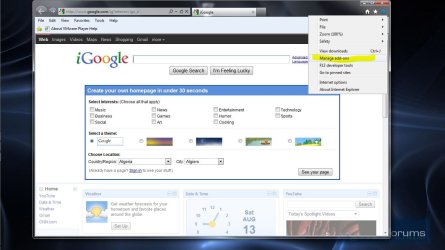
Press the cog and from the dropdown select manage add-ons.
Capture1.JPG

In the dialog select toolbars and extensions and make sure that the all add-ons is selected from the drop down.

Capture.JPG

Then disable any QickTime entries in the list.
 

My Computer My Computer

Computer type
Laptop
Computer Manufacturer/Model Number
Hewlett-Packard/G62-107SA Notebook
OS
Microsoft Windows 7 Home Premium 64-bit Service Pack 1
CPU
Intel(R) Core(TM) i3 CPU M 330 @ 2.13GHz
Motherboard
Hewlett-Packard 1425
Memory
8 GB DDR3
Graphics Card(s)
Intel(R) HD Graphics
Sound Card
Realtek High Definition Audio
Monitor(s) Displays
Builtin
Screen Resolution
1366 x 768 x 32 bits (4294967296 colors) @ 60 Hz
Hard Drives
250 GB SATA Hard Disk Drive 7200 rpm
2TB Seagate GoFlex USB 2 Drive
1TB Iomega Prestige USB 2 Drive
1.5TB Iomega Prestige USB 2 Drive (Samsung)
2TB WD MyBook Live NAS.
Mouse
Logitech Anywhere MX
Internet Speed
152 Mbs download 10 Mbs upload
Antivirus
Norton 360
Browser
Chrome
That doesn't work - it disables any playback, including Media Player. I found a site discussing this and they say the only sure-fire way to cure it is to do a registry amendment of:

reg export "HKLM\SOFTWARE\Classes\Wow6432Node\CLSID\{4063BE15-3B08-470D-A0D5-B37161CFFD69}" D:\qt_plugin\qt1.reg
reg delete "HKLM\SOFTWARE\Classes\Wow6432Node\CLSID\{4063BE15-3B08-470D-A0D5-B37161CFFD69}" /f


The site is here:
Solution to disable Quicktime plugin for IE (this one works)

The trouble is I'm still trying to figure out how to make this amendment. How do I get into the registry and find this?

Thanks!
John
 

My Computer My Computer

Computer Manufacturer/Model Number
DARC (DirectResolutions, UK)
OS
Windows 7 64 bit Home SP1
CPU
Intel Sandy-bridge i7 3.4GHz, 4 cores, 8 threads
Motherboard
Gigabyte P67
Memory
14GB
Graphics Card(s)
HD5450 ATI dual output silent cooling
Sound Card
Focusrite Saffire Pro 14
Monitor(s) Displays
Samsung 27"
Screen Resolution
1920 x 1200
Hard Drives
1TB OS drive
1TB Audio drive
1TB Audio drive
PSU
Zalman ZM600
Case
DARC Custom
Cooling
Fans front and back
Keyboard
Logitech
Mouse
MS Optical
Internet Speed
ADSL
I'm no expert on the registry and if I were you I would leave it alone if you are not experienced. You can destroy windows by getting it wrong.
 

My Computer My Computer

Computer type
Laptop
Computer Manufacturer/Model Number
Hewlett-Packard/G62-107SA Notebook
OS
Microsoft Windows 7 Home Premium 64-bit Service Pack 1
CPU
Intel(R) Core(TM) i3 CPU M 330 @ 2.13GHz
Motherboard
Hewlett-Packard 1425
Memory
8 GB DDR3
Graphics Card(s)
Intel(R) HD Graphics
Sound Card
Realtek High Definition Audio
Monitor(s) Displays
Builtin
Screen Resolution
1366 x 768 x 32 bits (4294967296 colors) @ 60 Hz
Hard Drives
250 GB SATA Hard Disk Drive 7200 rpm
2TB Seagate GoFlex USB 2 Drive
1TB Iomega Prestige USB 2 Drive
1.5TB Iomega Prestige USB 2 Drive (Samsung)
2TB WD MyBook Live NAS.
Mouse
Logitech Anywhere MX
Internet Speed
152 Mbs download 10 Mbs upload
Antivirus
Norton 360
Browser
Chrome
Agreed.
In fact the guy with the solution says to run the two statements above to avoid editing the registry. The first statement backups up that single entry (the QT secret hijacker...) to a place on D: and the second statement deletes the registry entry.
But I don't know though if I just copy and paste them into a 'Run' box or not. I guess I could try the backup one.
 

My Computer My Computer

Computer Manufacturer/Model Number
DARC (DirectResolutions, UK)
OS
Windows 7 64 bit Home SP1
CPU
Intel Sandy-bridge i7 3.4GHz, 4 cores, 8 threads
Motherboard
Gigabyte P67
Memory
14GB
Graphics Card(s)
HD5450 ATI dual output silent cooling
Sound Card
Focusrite Saffire Pro 14
Monitor(s) Displays
Samsung 27"
Screen Resolution
1920 x 1200
Hard Drives
1TB OS drive
1TB Audio drive
1TB Audio drive
PSU
Zalman ZM600
Case
DARC Custom
Cooling
Fans front and back
Keyboard
Logitech
Mouse
MS Optical
Internet Speed
ADSL
You could do that. But I can't advise you about something I don't know about myself. Perhaps someone with greater knowledge in this are will come along. I strongly urge you not to do it without further advice.
 

My Computer My Computer

Computer type
Laptop
Computer Manufacturer/Model Number
Hewlett-Packard/G62-107SA Notebook
OS
Microsoft Windows 7 Home Premium 64-bit Service Pack 1
CPU
Intel(R) Core(TM) i3 CPU M 330 @ 2.13GHz
Motherboard
Hewlett-Packard 1425
Memory
8 GB DDR3
Graphics Card(s)
Intel(R) HD Graphics
Sound Card
Realtek High Definition Audio
Monitor(s) Displays
Builtin
Screen Resolution
1366 x 768 x 32 bits (4294967296 colors) @ 60 Hz
Hard Drives
250 GB SATA Hard Disk Drive 7200 rpm
2TB Seagate GoFlex USB 2 Drive
1TB Iomega Prestige USB 2 Drive
1.5TB Iomega Prestige USB 2 Drive (Samsung)
2TB WD MyBook Live NAS.
Mouse
Logitech Anywhere MX
Internet Speed
152 Mbs download 10 Mbs upload
Antivirus
Norton 360
Browser
Chrome
Before we do something drastic like registry editing... could you please look at these QT settings (sorry the example is partly Dutch.... but you'll get the drift)

In you rQT properties/preferences, under Browser choose filetypes. You've probably already done that because of SledgeDG's quote, but then for MIME...
However, it is a bit more complicated than that depending on the websites file associations.
Could you post a copy of your snips like below for both filetypes AND MIME?

quicktime.JPG


Could you also post a link to an example website, if possible, where you have this problem?
 

My Computer My Computer

Computer Manufacturer/Model Number
custom build
OS
Windows 7 64b Ultimate
CPU
I7-2600 3.40GHz - testing various OC levels..
Motherboard
ASUS Sabretooth
Memory
2x 4Gb DDR3/1333
Graphics Card(s)
GTX570 - testing OC levels
Sound Card
motherboard 7.1 DIG.
Monitor(s) Displays
2x Ilyama 24" E2409HDS-B1 2ms/DVI
Screen Resolution
1920 x 1080
Hard Drives
120 GB Intel Elmcrest SSD
1 TB SATAII 7200RPM/32MB
External 2TB USB3
PSU
Corsair Pro HX850W
Cooling
Coolermaster Hyper V8
Keyboard
Logitech G110
Mouse
Logitech G700
Internet Speed
25Mb
Other Info
CPU: 7,7 RAM: 7,7 GTX: 7,9 GTX 3D : 7,9 SSD 7,6
Overall 7,6 ...... now to speed up the SSD... ;)

Also use a Dell XPS M1710 on Vista 32b
Asus LT on Vista 32
3 older machines still doing fine on Linux/ubuntu but not used much anymore...
My first post included something I used with XP and did not work. I deleted my post.

I tried the registry export/import with the link given by the OP http://social.technet.microsoft.com...r/thread/66332a54-17f1-4233-a5d5-a183a14c7a63 and it does work with IE9. I only needed to do the first export and import.

Run an elevated Command Prompt to do the registry tweaks. You have to create a folder "qt_plugin"; the author used a "D" partition, but you can change that to whatever partition you want. If you do not have a "D" partition, then use "C" and create a folder "qt_plugin". Then run the Command Prompt and copy/paste the export reg into the window and press enter. If you created the folder where you saving the reg info, then it will complete with success. After that, just do the reg delete, doing a copy/paste into the Command Prompt and pressing enter. It will tell you it is successful if done properly. (If you change the "D" to "C" or whatever letter, you need to change the registry info you are copy/pasting into the Command Prompt.)

I did not have to do a reboot. If successful, then MP3s should open up with your default media player.

To reverse your work, to restore to normal, just merge the reg file that was exported. Like I said, I just had to do the first export and import and it worked for me. I tried the other exports/imports but did not need it.

It's pretty simplistic, but if you are not comfortable around the registry, then I would not muck with it. ALWAYS MAKE A BACKUP OF THE REGISTRY OR REGISTRY KEYS BEFORE WORKING WITH THE REGISTRY.

To simply look at the registry, go to the Start Menu, search, type regedit. It opens up. The keys given are abbreviated: the first 4 letters responsed to the main keys: HKCU=HKEY_CURRENT_USER and so on.
 

My Computers My Computers

System One System Two

  • Computer type
    Laptop
    Computer Manufacturer/Model Number
    Dell Precision 7510
    OS
    W7PRO
    CPU
    Intel i7-6820HQ @ 2.7GHz
    Memory
    16GB
  • Computer type
    Laptop
    OS
    W7Pro
Please be very careful. This thread (I think) has given us no clue as to what understanding the OP has of registry editing whatsoever. In such cases we hesitate to give such advise. Even with your correct warning in it...

It's pretty simplistic, but if you are not comfortable around the registry, then I would not muck with it. ALWAYS MAKE A BACKUP OF THE REGISTRY OR REGISTRY KEYS BEFORE WORKING WITH THE REGISTRY.
 

My Computer My Computer

Computer Manufacturer/Model Number
custom build
OS
Windows 7 64b Ultimate
CPU
I7-2600 3.40GHz - testing various OC levels..
Motherboard
ASUS Sabretooth
Memory
2x 4Gb DDR3/1333
Graphics Card(s)
GTX570 - testing OC levels
Sound Card
motherboard 7.1 DIG.
Monitor(s) Displays
2x Ilyama 24" E2409HDS-B1 2ms/DVI
Screen Resolution
1920 x 1080
Hard Drives
120 GB Intel Elmcrest SSD
1 TB SATAII 7200RPM/32MB
External 2TB USB3
PSU
Corsair Pro HX850W
Cooling
Coolermaster Hyper V8
Keyboard
Logitech G110
Mouse
Logitech G700
Internet Speed
25Mb
Other Info
CPU: 7,7 RAM: 7,7 GTX: 7,9 GTX 3D : 7,9 SSD 7,6
Overall 7,6 ...... now to speed up the SSD... ;)

Also use a Dell XPS M1710 on Vista 32b
Asus LT on Vista 32
3 older machines still doing fine on Linux/ubuntu but not used much anymore...
I took my courage into both hands, did the backup line first, all ok, so went for it.
And it worked! Media Player fires up now instead of QuckTime. :party:

Is it Quicktime that are responsible for doing such a sly registry entry that means that no amount of file association corrections will unpick it? How irresponsible.:devil:

Thanks everyone.

John
 

My Computer My Computer

Computer Manufacturer/Model Number
DARC (DirectResolutions, UK)
OS
Windows 7 64 bit Home SP1
CPU
Intel Sandy-bridge i7 3.4GHz, 4 cores, 8 threads
Motherboard
Gigabyte P67
Memory
14GB
Graphics Card(s)
HD5450 ATI dual output silent cooling
Sound Card
Focusrite Saffire Pro 14
Monitor(s) Displays
Samsung 27"
Screen Resolution
1920 x 1200
Hard Drives
1TB OS drive
1TB Audio drive
1TB Audio drive
PSU
Zalman ZM600
Case
DARC Custom
Cooling
Fans front and back
Keyboard
Logitech
Mouse
MS Optical
Internet Speed
ADSL
I took my courage into both hands, did the backup line first, all ok, so went for it.
And it worked! Media Player fires up now instead of QuckTime. :party:

Is it Quicktime that are responsible for doing such a sly registry entry that means that no amount of file association corrections will unpick it? How irresponsible.:devil:

Thanks everyone.

John

Yeah, QT is pretty bad at taking over file assocations. That's it's major problem. That's why I don't like it. With XP, it was easier to control. The problem is worse with Windows 7.

Glad it worked for you. Perhaps I might take the plunge and use QT again.

:banghead:
 

My Computers My Computers

System One System Two

  • Computer type
    Laptop
    Computer Manufacturer/Model Number
    Dell Precision 7510
    OS
    W7PRO
    CPU
    Intel i7-6820HQ @ 2.7GHz
    Memory
    16GB
  • Computer type
    Laptop
    OS
    W7Pro
Back
Top