Which is the best free backup program?

I use Paragon Drive Backup 9.0 works great in Windows 7 RC1
 

Attachments

  • 2312071b.jpg
    2312071b.jpg
    140.2 KB · Views: 107
  • 29905f0d.jpg
    29905f0d.jpg
    26.7 KB · Views: 40

My Computer

Computer Manufacturer/Model Number
Home Build
OS
Windows 7 Ultimate RC1 / XP Black 2009
CPU
Core2Duo E8400
Motherboard
MSI
Memory
3GB
Graphics Card(s)
ATI Radeon HD 3850
Hard Drives
W/D 250GB x2
Case
Thermaltake Tsunami Dream
Keyboard
Logitech G15
Mouse
Razer Death Adder
Internet Speed
6.5 - 7 MB
x

Paragon Drive Backup in not free and the demo does nothing for free:(
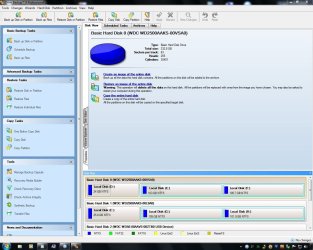
I found only a 30day trial edition of Macrium Reflect for free:(
The GFI Easy-to-use... what sup3rsprt and Barman58 posted is working great for me!:D
SyncBack is my favourite now! (posted by usasma) :D
I didn't have enogh time to try the others.
Thank you all for the replys!
 

My Computer

Computer Manufacturer/Model Number
home made
OS
Windows 7 RTM x64
CPU
AMD X2 5000+
Motherboard
Asrock
Memory
4GB
Graphics Card(s)
Nvidia 9400GT
Sound Card
onboard 6Ch
Monitor(s) Displays
Medion 22" + HannSpree 22"
Screen Resolution
1680X1050 + 1920X1080
Hard Drives
Intel SSD 80GB
WD 1.5 TB
WD 1 TB
Samsung 1TB X 3
PSU
noname
Case
noname
Cooling
Zalman
Keyboard
DeLUX multimedia keyboard
Mouse
Microsoft
Internet Speed
25MB/s

My Computer

Computer Manufacturer/Model Number
AMD Athlon 64 3200+, Lenovo G560 i3
OS
Windows 7 Ultimate, Ubuntu
Motherboard
Gigabyte K8T8000
Memory
DDR 2Gb (!)
Graphics Card(s)
6600GT
Monitor(s) Displays
MultiMonitor (2) LCD
Hard Drives
Old Seagate 75
Big Western Digital
Samsung 500Gb pulled out of an external drive and installed
Ext: Maxtor (Firewire), 1Gb Lacie (Samsung)
Mouse
Logitech MX620 Cordless

My Computer

Computer Manufacturer/Model Number
home made
OS
Windows 7 RTM x64
CPU
AMD X2 5000+
Motherboard
Asrock
Memory
4GB
Graphics Card(s)
Nvidia 9400GT
Sound Card
onboard 6Ch
Monitor(s) Displays
Medion 22" + HannSpree 22"
Screen Resolution
1680X1050 + 1920X1080
Hard Drives
Intel SSD 80GB
WD 1.5 TB
WD 1 TB
Samsung 1TB X 3
PSU
noname
Case
noname
Cooling
Zalman
Keyboard
DeLUX multimedia keyboard
Mouse
Microsoft
Internet Speed
25MB/s
One thing I will mention with regards to the Paragon software range.
The company often provide different "offers" in different regions of the world.

Here in the UK we have been particularly well served with fully operational versions of their full products available as magazine giveaways for personal use.

I have used the full suite program for a few years, over several revisions - always available here free of charge, and fully operational :)

They normally do however provide free "express" versions of software which are available on their site although not always well advertised ;)

For our Admin Brink (as a belated birthday present ;) ) or any other Microsoft MVP's reading this - this page may be of interest ...

PARAGON Software Group - Special offer for MVPs
 

My Computers

System One System Two

  • Computer type
    PC/Desktop
    Computer Manufacturer/Model Number
    ChillBlast - Custom to my design
    OS
    Windows 11 Pro x64 [Latest Release and Release Preview]
    CPU
    Ryzen 9 5950X, 3.8 - 5.2 MHz
    Motherboard
    Asus Prime X570-Pro
    Memory
    64GB [2 x 32GB] DDR4 3200MHz
    Graphics Card(s)
    4GB NVIDIA GEFORCE GTX 1650 Ti
    Sound Card
    On-board SPDIF to 5.1 System + HDMI [5.1 system]
    Monitor(s) Displays
    32" UHD 32 Bit HDR Monitor + 43" UHD 4K 32Bit HDR TV
    Screen Resolution
    2 x 3840 x 2160 @60Hz
    Hard Drives
    1TB M2 SSD OS, 500GB Fast Access SSD, 2 x 8TB Data + Various Externals from 1TB to 4TB, 10TB NAS
    PSU
    NZXT C750 80 PLUS Gold 750W Modular PSU
    Case
    Workstation Case [Matt Black]
    Cooling
    NZXT Kraken X63 280mm CPU Cooler +2x Quiet Case fans
    Keyboard
    Logitech Wireless MX Keys & K400 + others
    Mouse
    Logitech Wireless MX Master 3S
    Internet Speed
    920 MB Down 50 MB Up
    Antivirus
    BitDefender Total Security Pro
    Browser
    Chrome (always run latest Non-Beta)
    Other Info
    Also run ...
    Laptop - Quad 8GB - Windows 10 Pro x64
    Nexus 7 Android tablet x2
    Samsung 10.2" tablet
    Blackview TAB 8 4G Android Tablet c/w Keyboard
    Wacom Intuos Pro Medium Pen Pad
    Wacom Intuos Pro Small Pen Pad
    Wacom Expresskeys Remote
    Loopdeck+ Graphics Controller
    Shuttle Pro v2 Control
  • Computer type
    Laptop
    System Manufacturer/Model Number
    Dell XPS 17 10750H
    OS
    Windows 11 Pro x64 Latest RP
    CPU
    Intel I7 10750H 5.0GHz
    Motherboard
    Dell XPS
    Memory
    32GB [2x16GB] DDR4 2933 MHz
    Graphics Card(s)
    nVidia GTX1650Ti 4 GB GDDR6
    Sound Card
    Stock [Realtek] 4 Speaker
    Monitor(s) Displays
    17" IPS UHD+ Infinity Edge Touchscreen
    Screen Resolution
    3840 x 2400
    Hard Drives
    2TB M2 NVMe, 4TB External + various 500GB & 1TB External NVMe (also have access to spinner HDD from
    PSU
    Stock
    Case
    Stock XPS Aluminium & Carbon Fibre
    Cooling
    Stock - Active Fan Control
    Keyboard
    Backlit + Various Logitech
    Mouse
    Stock Track Pad + Logitech MX Trackball
    Internet Speed
    72 MB Down 18MB Up
    Browser
    Chrome
    Other Info
    Also run ...
    Laptop - Quad 8GB - Windows 10 Pro x64
    Nexus 7 Android tablet x2
    10.2" tablet
    Sony Z3 Android Smartphone
    Wacom Intuos Pro Medium Pen Pad
    Wacom Intuos Pro Small Pen Pad
    Wacom Expresskeys Remote
    Loopdeck+ Graphics Controller
    Shuttle Pro v2 Control Pad
    10TB NAS
Macrium Reflect Free edition is Here

(Google is a wonderful thing)

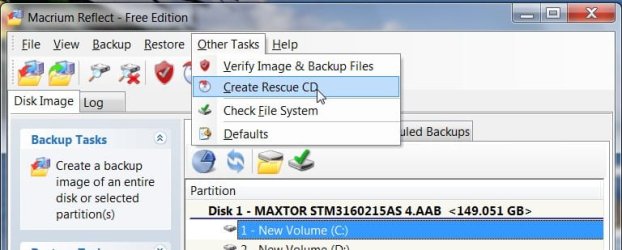
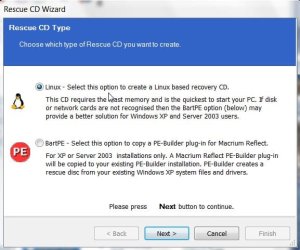
I suggested to my brother that he try Macrium Reflect Free. He checked into it and reported that the free version does NOT allow creation of an emergency boot disk in Vista. What is the "Linux Boot CD"?

Did not want to debate with home, just glad he is getting some backup software.

So he bought a copy of Acronis.
 

My Computer

OS
XP Pro & Vista Home Premium (x86); Windows Ultimate 7600 x64 Retail
Hi,

I think your brother in law may have misunderstood.

The Linux based recovery cd is the one you use for Vista/ 7 /XP.

The free version also allows you to create a Bartpe disc ( for XP users if they prefer) .

The Acronis boot disc will also be linux based, of course - and the Paragon boot cd is Linux/Dos.

What may have confused him is that ( uniquely ) the Paid version of Macrium also provides a PE2 bootdisc - Vista users can use that if they prefer.

MACRIUMRECDISC-1-2009-07-13_015551.jpg

MACRIUMRECDISC-2-2009-07-13_015647.jpg
 

My Computers

System One System Two

  • Computer type
    PC/Desktop
    OS
    7 X64
    CPU
    i5 8400
    Motherboard
    gigabyte b365m ds3h
    Memory
    2x8gb 3200mhz
    Hard Drives
    various
    PSU
    pure power 11 400w cm
    Case
    Coolermaster
    Cooling
    cryorig m9i
  • Computer type
    PC/Desktop
    OS
    7x64
    CPU
    g5400
    Motherboard
    ga b365m ds3h
    Memory
    8gb ddr4 2400
    PSU
    xfx pro 450w
My backups generally are 2 types
1). With Windows 7 and Vista (business, ultimate and enterprise), I set the box up and get the drivers installed and then use the built-in backup tool to create a "system image". I have used this numerous times to restore a box and it works great

2). My data files I backup to a couple of external hard drives...one of which I keep out of the house/offsite. I just use robocopy (comes with Vista and Windows 7)with the /mirror switch to ensure that my portable drive is a replica of my hard drive. And with robocopy, it only backs up the files that have changed...so the backup times are extremely fast. If you want a GUI style interface, I would suggest Karen's File Replicator (Karen's Replicator)

I just find with my home machines that I don't need multiple point in time backups. So, most of the commercial backup apps don't offer benefits for me.
 

My Computer

Computer Manufacturer/Model Number
Self-Built in July 2009
OS
Windows 7 Ultimate x64
CPU
Intel Q9550 2.83Ghz OC'd to 3.40Ghz
Motherboard
Gigabyte GA-EP45-UD3R rev. 1.1, F12 BIOS
Memory
8GB G.Skill PI DDR2-800, 4-4-4-12 timings
Graphics Card(s)
EVGA 1280MB Nvidia GeForce GTX570
Sound Card
Realtek ALC899A 8 channel onboard audio
Monitor(s) Displays
23" Acer x233H
Screen Resolution
1920x1080
Hard Drives
Intel X25-M 80GB Gen 2 SSD
Western Digital 1TB Caviar Black, 32MB cache. WD1001FALS
PSU
Corsair 620HX modular
Case
Antec P182
Cooling
stock
Keyboard
ABS M1 Mechanical
Mouse
Logitech G9 Laser Mouse
Internet Speed
15/2 cable modem
Other Info
Windows and Linux enthusiast. Logitech G35 Headset.
Hi,

I think your brother in law may have misunderstood.

The Linux based recovery cd is the one you use for Vista/ 7 /XP.

The free version also allows you to create a Bartpe disc ( for XP users if they prefer) .

The Acronis boot disc will also be linux based, of course - and the Paragon boot cd is Linux/Dos.

What may have confused him is that ( uniquely ) the Paid version of Macrium also provides a PE2 bootdisc - Vista users can use that if they prefer.

I suspected as much but was far too happy to see him getting ANY kind of image backup to discourage his efforts and progress. :D His last system had a fatal HDD crash and he was totally unprepared. So it goes....
 

My Computer

OS
XP Pro & Vista Home Premium (x86); Windows Ultimate 7600 x64 Retail
I've gone back and tried a few of these other applications and have experienced some problems with them. Keep in mind, my setup is a triple boot with Windows XP 32-bit, Windows 7-64bit, and Ubuntu 9.04 (32-bit on EXT4).

#1). Macrium Reflect Free: Looks great, backs up fast, very good compression. Booting from Linux based rescue disk and I have no keyboard...although mouse works (both are USB). So, when I get to screen to select partitions to restore, I cannot click the shift key to click on multiples. I tried compatibility mode for the rescue disk, I checked Legacy USB in BIOS and made sure that PNP for the OS was disabled in BIOS.

#2). I tried Paragon Drive Backup Express 9.0 Free. Backup was pretty quick, interface was intuitive. Tried Rescue disk on USB media as well as CD ROM. While I got into recscue mode ok, it could NOT find my internal SATA hard drive to select as the destination. The only option shown as a destination was my portable USB drive that I was using as the source.

#3) I tried EaseUS ToDO Backup. It installed fine, but when I selected the entire drive to image and it started the process...it got through the check on the first two partitions and then hung the Windows 7 box.

I'm trying to backup a machine with an Asus P5QL-Pro mobo, a standard single SATA disk in IDE mode. Western Digital Caviar Blue 500GB. It's running Windows XP 32-bit, Windows 7 64-bit and Ubuntu 9.04 32-bit as a triple boot.

I'd like to get an image of all 3 onto an external USB drive so that I could easily restore this triple boot in the event of a complete disaster. It doesn't seem that the Windows provided system image will do anything but my C and D drive...which are my Windows partitions.

 
Last edited:

My Computer

Computer Manufacturer/Model Number
Self-Built in July 2009
OS
Windows 7 Ultimate x64
CPU
Intel Q9550 2.83Ghz OC'd to 3.40Ghz
Motherboard
Gigabyte GA-EP45-UD3R rev. 1.1, F12 BIOS
Memory
8GB G.Skill PI DDR2-800, 4-4-4-12 timings
Graphics Card(s)
EVGA 1280MB Nvidia GeForce GTX570
Sound Card
Realtek ALC899A 8 channel onboard audio
Monitor(s) Displays
23" Acer x233H
Screen Resolution
1920x1080
Hard Drives
Intel X25-M 80GB Gen 2 SSD
Western Digital 1TB Caviar Black, 32MB cache. WD1001FALS
PSU
Corsair 620HX modular
Case
Antec P182
Cooling
stock
Keyboard
ABS M1 Mechanical
Mouse
Logitech G9 Laser Mouse
Internet Speed
15/2 cable modem
Other Info
Windows and Linux enthusiast. Logitech G35 Headset.
Hi pp,

That's really bad luck.

Not sure why, because I don't have a fancy pc - but I never had a problem with any kind of boot disc.

I am using a USB mouse, but just a standard ps2 keyboard.

Did you try the Todo ? - best to try the boot disc first -in case you have the same problem.

You could try the Seagate AT11 freebie - that has quite a big boot disc - probabaly more drivers.

http://www.seagate.com/support/discwizard/DiscWizardSetup.en.exe

It's abig d/l just to check if the boot disc works - but I guess it's the only way.

You are supposed to have at least one Seagate/Maxtor drive, or it will complain.
 

My Computers

System One System Two

  • Computer type
    PC/Desktop
    OS
    7 X64
    CPU
    i5 8400
    Motherboard
    gigabyte b365m ds3h
    Memory
    2x8gb 3200mhz
    Hard Drives
    various
    PSU
    pure power 11 400w cm
    Case
    Coolermaster
    Cooling
    cryorig m9i
  • Computer type
    PC/Desktop
    OS
    7x64
    CPU
    g5400
    Motherboard
    ga b365m ds3h
    Memory
    8gb ddr4 2400
    PSU
    xfx pro 450w
SIW2,

Yeah, it is bad luck. I updated my earlier post and I just got done trying EaseUS todo and it completely hung.

I think some of these apps are having trouble with the fact that I used EXT4 for / in Ubuntu 9.04. Also, the fact that I have Ubuntu on the box at all is causing some of the apps to have trouble...unfortuantely so many things are designed and tested with just Windows in mind.

With regards to keyboard, my mobo has a PS2 adapter...but alas we have 0 PS2 keyboards at work...so I cannot try that. I can obviously boot into other linux distros and use my keyboard and mouse......so nothing out of the ordinary there.

Edit: I don't have a Seagate or Maxtor drive...so I don't think that the AT11 freebie is going to do the trick for me. My drives at home and at work are all Western Digitals at the moment. My bad luck just keeps continuing.
 

My Computer

Computer Manufacturer/Model Number
Self-Built in July 2009
OS
Windows 7 Ultimate x64
CPU
Intel Q9550 2.83Ghz OC'd to 3.40Ghz
Motherboard
Gigabyte GA-EP45-UD3R rev. 1.1, F12 BIOS
Memory
8GB G.Skill PI DDR2-800, 4-4-4-12 timings
Graphics Card(s)
EVGA 1280MB Nvidia GeForce GTX570
Sound Card
Realtek ALC899A 8 channel onboard audio
Monitor(s) Displays
23" Acer x233H
Screen Resolution
1920x1080
Hard Drives
Intel X25-M 80GB Gen 2 SSD
Western Digital 1TB Caviar Black, 32MB cache. WD1001FALS
PSU
Corsair 620HX modular
Case
Antec P182
Cooling
stock
Keyboard
ABS M1 Mechanical
Mouse
Logitech G9 Laser Mouse
Internet Speed
15/2 cable modem
Other Info
Windows and Linux enthusiast. Logitech G35 Headset.
I like robocopy
 

My Computer

Computer type
PC/Desktop
Computer Manufacturer/Model Number
DELL VOSTRO 3650
OS
Windows 8.1 PRO
CPU
3rd Generation Intel Core i7‐3612QM CPU @ 2.10GHZ
Memory
8GB DDR3
Graphics Card(s)
NVIDIA GeForce GT 525M (128 bit), 1GB Grpahics
Screen Resolution
1920X1080
Hard Drives
750GB 5400RPM
I'll try to bring in a PS2 keyboard from home and give the restore another go with the Macrium Rescue application. It will be interesting to see if it chokes anyway with the fact that I have Ubuntu and EXT4 on the hard drive. At this point, I'm about ready to rebuild the box anyway. I'll likely just put XP and Win7 in a dual boot and then image with the Win7 backup at that point. This is just a screw around lab machine at work...so I'd like to get to a point where I can get multiple versions of Windows back on there pretty quick. And be able to use it for other purposes and easily restore back when i want it for a test workstation again.
 

My Computer

Computer Manufacturer/Model Number
Self-Built in July 2009
OS
Windows 7 Ultimate x64
CPU
Intel Q9550 2.83Ghz OC'd to 3.40Ghz
Motherboard
Gigabyte GA-EP45-UD3R rev. 1.1, F12 BIOS
Memory
8GB G.Skill PI DDR2-800, 4-4-4-12 timings
Graphics Card(s)
EVGA 1280MB Nvidia GeForce GTX570
Sound Card
Realtek ALC899A 8 channel onboard audio
Monitor(s) Displays
23" Acer x233H
Screen Resolution
1920x1080
Hard Drives
Intel X25-M 80GB Gen 2 SSD
Western Digital 1TB Caviar Black, 32MB cache. WD1001FALS
PSU
Corsair 620HX modular
Case
Antec P182
Cooling
stock
Keyboard
ABS M1 Mechanical
Mouse
Logitech G9 Laser Mouse
Internet Speed
15/2 cable modem
Other Info
Windows and Linux enthusiast. Logitech G35 Headset.
Well, I did bring in a PS2 keyboard from work today and it didn't change anything whatsoever.

However, I did remember that I had previously downloaded Clonezilla and I fired that up. This worked properly and I was able to backup and restore. While it wasn't quite as fast as Macrium, it was a smaller output size which is nice for storage purposes.

Clonezilla successfully backed up and restore my triple boot environment and was able to handle ext4 on my Linux partition with no trouble whatsoever. It may not have the slickest user interface, but it's got the necessary functionality.
 

My Computer

Computer Manufacturer/Model Number
Self-Built in July 2009
OS
Windows 7 Ultimate x64
CPU
Intel Q9550 2.83Ghz OC'd to 3.40Ghz
Motherboard
Gigabyte GA-EP45-UD3R rev. 1.1, F12 BIOS
Memory
8GB G.Skill PI DDR2-800, 4-4-4-12 timings
Graphics Card(s)
EVGA 1280MB Nvidia GeForce GTX570
Sound Card
Realtek ALC899A 8 channel onboard audio
Monitor(s) Displays
23" Acer x233H
Screen Resolution
1920x1080
Hard Drives
Intel X25-M 80GB Gen 2 SSD
Western Digital 1TB Caviar Black, 32MB cache. WD1001FALS
PSU
Corsair 620HX modular
Case
Antec P182
Cooling
stock
Keyboard
ABS M1 Mechanical
Mouse
Logitech G9 Laser Mouse
Internet Speed
15/2 cable modem
Other Info
Windows and Linux enthusiast. Logitech G35 Headset.
macrium is good. i still use windows built in backup feature.
 

My Computer

Computer Manufacturer/Model Number
Samsung NP530U4B-S02IN
OS
Windows® 8 Pro (64-bit)
CPU
Intel® Core™ i5 Processor 2467M (1.60GHz, 3MB L3 Cache)
Motherboard
Samsung Electronics
Memory
6GB DDR3 System Memory at 1,333MHz (on BD 4GB + 2GB x 1)
Graphics Card(s)
AMD Radeon™ HD7550M 1GB DDR3 (Ext. Graphic)
Sound Card
Realtek High Definition Audio
Monitor(s) Displays
35.56cm (14.0) SuperBright 300nit HD LED Display
Screen Resolution
1366x768
Hard Drives
1TB S-ATA II Hard Drive (5400RPM) with ExpressCache 16GB SSD
Internet Speed
sucks
Antivirus
Microsoft Security Essentials
Browser
Google Chrome (Sync enabled)
macrium is good. i still use windows built in backup feature.
I liked macrium...but it didn't care for any of my keyboards.

As far as the MS backup utility...it works just fine and I've used it at home. However, in many places I dual boot with Linux and the MS system image utility doesn't handle the Linux partitions at all. Thus not suitable for me in these environments.
 

My Computer

Computer Manufacturer/Model Number
Self-Built in July 2009
OS
Windows 7 Ultimate x64
CPU
Intel Q9550 2.83Ghz OC'd to 3.40Ghz
Motherboard
Gigabyte GA-EP45-UD3R rev. 1.1, F12 BIOS
Memory
8GB G.Skill PI DDR2-800, 4-4-4-12 timings
Graphics Card(s)
EVGA 1280MB Nvidia GeForce GTX570
Sound Card
Realtek ALC899A 8 channel onboard audio
Monitor(s) Displays
23" Acer x233H
Screen Resolution
1920x1080
Hard Drives
Intel X25-M 80GB Gen 2 SSD
Western Digital 1TB Caviar Black, 32MB cache. WD1001FALS
PSU
Corsair 620HX modular
Case
Antec P182
Cooling
stock
Keyboard
ABS M1 Mechanical
Mouse
Logitech G9 Laser Mouse
Internet Speed
15/2 cable modem
Other Info
Windows and Linux enthusiast. Logitech G35 Headset.
I liked macrium...but it didn't care for any of my keyboards.

As far as the MS backup utility...it works just fine and I've used it at home. However, in many places I dual boot with Linux and the MS system image utility doesn't handle the Linux partitions at all. Thus not suitable for me in these environments.

Yep you are right. Whoever is going for a dual boot of windows with linux, let grub bootloader handle the things. It'll make life easier.
 

My Computer

Computer Manufacturer/Model Number
Samsung NP530U4B-S02IN
OS
Windows® 8 Pro (64-bit)
CPU
Intel® Core™ i5 Processor 2467M (1.60GHz, 3MB L3 Cache)
Motherboard
Samsung Electronics
Memory
6GB DDR3 System Memory at 1,333MHz (on BD 4GB + 2GB x 1)
Graphics Card(s)
AMD Radeon™ HD7550M 1GB DDR3 (Ext. Graphic)
Sound Card
Realtek High Definition Audio
Monitor(s) Displays
35.56cm (14.0) SuperBright 300nit HD LED Display
Screen Resolution
1366x768
Hard Drives
1TB S-ATA II Hard Drive (5400RPM) with ExpressCache 16GB SSD
Internet Speed
sucks
Antivirus
Microsoft Security Essentials
Browser
Google Chrome (Sync enabled)
Glad you found something that works for your setup.
 

My Computers

System One System Two

  • Computer type
    PC/Desktop
    OS
    7 X64
    CPU
    i5 8400
    Motherboard
    gigabyte b365m ds3h
    Memory
    2x8gb 3200mhz
    Hard Drives
    various
    PSU
    pure power 11 400w cm
    Case
    Coolermaster
    Cooling
    cryorig m9i
  • Computer type
    PC/Desktop
    OS
    7x64
    CPU
    g5400
    Motherboard
    ga b365m ds3h
    Memory
    8gb ddr4 2400
    PSU
    xfx pro 450w
Glad you found something that works for your setup.

I'm not sure why I didn't try it sooner...I already had it downloaded and have used it in the past. Guess I got so tied up reading about these new fandangled applications that I felt it necessary to give them a shot. Oh well, stick with what works.

Thanks for taking the time to post about these other applications. I'm sure they are very helpful and work for most other members.
 

My Computer

Computer Manufacturer/Model Number
Self-Built in July 2009
OS
Windows 7 Ultimate x64
CPU
Intel Q9550 2.83Ghz OC'd to 3.40Ghz
Motherboard
Gigabyte GA-EP45-UD3R rev. 1.1, F12 BIOS
Memory
8GB G.Skill PI DDR2-800, 4-4-4-12 timings
Graphics Card(s)
EVGA 1280MB Nvidia GeForce GTX570
Sound Card
Realtek ALC899A 8 channel onboard audio
Monitor(s) Displays
23" Acer x233H
Screen Resolution
1920x1080
Hard Drives
Intel X25-M 80GB Gen 2 SSD
Western Digital 1TB Caviar Black, 32MB cache. WD1001FALS
PSU
Corsair 620HX modular
Case
Antec P182
Cooling
stock
Keyboard
ABS M1 Mechanical
Mouse
Logitech G9 Laser Mouse
Internet Speed
15/2 cable modem
Other Info
Windows and Linux enthusiast. Logitech G35 Headset.
Back
Top