windows 7 ultimate 32 bit has gone slow

agirlatwindows

New member
Local time
4:08 AM
Messages
9
Hi guys,

Here you have a girl stuck with windows 7.

I have a toshiba settlite core 2 duo with 2Gb ram and 300 GB hdd. I installed a windows 7 ultimate 32 bit from scratch on it. It was working like a charm, then suddenly one day it got slower. For example, when I open a folder in GUI/Explorer or try to play some media file or open images, it takes very long (3 to 5 minutes) to proceed. sometimes it simply hangs for long. My firefox stucks and takes lots of time to open new tabs. I have AVG and I tried trendmicro too. No viruses found, I use laptop for only movies and facebook or gmail etc so don't go to any harmful sites as well.

I checked many times that task manager to see what is consuming my CPU or Physical Memory. Even sometimes CPU is used 1 percent but my laptop is dead slow.

I have no idea what to do . I tried to use IE and Opera too. I increased the Virtual Memory size too.

I even cut-paste almost 200 gb data to my external hdd and defragmented the hdd too. But no effect. I am very frustrated with this slow computer. Can anybody please help me to solve this? I do not want to reinstall windows again :( sob sob

please help...
 

My Computer My Computer

OS
windows 7 ultimate 32 bit
I wouldn't recommend those software you have used to scan, try using "Malwarebytes" and do a full scan of the system.

There are infections which tend to severely cut performance.
 

My Computer My Computer

Computer Manufacturer/Model Number
Custom
OS
Windows 8 Professional 64-bit
CPU
Intel Core i3-2100
Motherboard
ASRock Intel Z68M/USB3
Memory
4GB
Graphics Card(s)
GeForece GTX 550 Ti
Screen Resolution
1680 x 1050
PSU
750w
Perhaps your are just out of Physical RAM. I know people say this a lot but are you running 50 programs and services in the background?

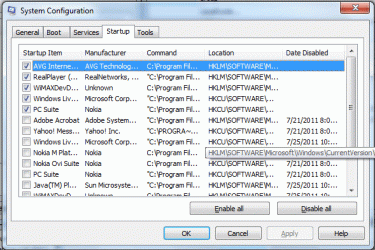
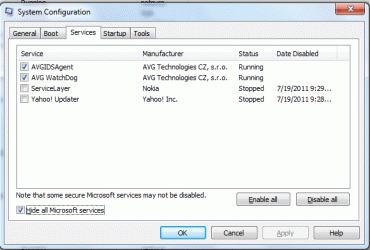
Start Run "msconfig" Click Services "Hide All Microsoft Services" Click Startup. Count the checked boxes in both of these locations to see how many applications and services you are running. Look for ones that use a lot of memory in your task manager.
 

My Computer My Computer

OS
Windows 7
Perhaps your are just out of Physical RAM. I know people say this a lot but are you running 50 programs and services in the background?

Start Run "msconfig" Click Services "Hide All Microsoft Services" Click Startup. Count the checked boxes in both of these locations to see how many applications and services you are running. Look for ones that use a lot of memory in your task manager.
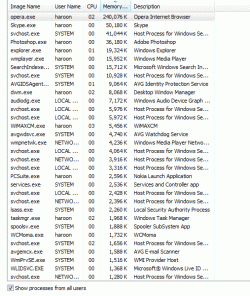
I agree with this, can you post us a screenshot of your running programs in the task manager?
 

My Computer My Computer

Computer Manufacturer/Model Number
Custom
OS
Windows 8 Professional 64-bit
CPU
Intel Core i3-2100
Motherboard
ASRock Intel Z68M/USB3
Memory
4GB
Graphics Card(s)
GeForece GTX 550 Ti
Screen Resolution
1680 x 1050
PSU
750w
Hi

I am a little scared to use that maleware programmer, because the last time I tried one, it was itself a virus/maleware/spyware kinda thingy.

However, if you guys are sure about the reliability of this programme then I can use it.

I am posting few screen shots to explain things further.

I already stopped unnecessary services in msconfig you would see that in the screenshot.
 

Attachments

  • startup.gif
    startup.gif
    40 KB · Views: 21
  • processes.gif
    processes.gif
    34 KB · Views: 21
  • msconfig_services.gif
    msconfig_services.gif
    25 KB · Views: 11

My Computer My Computer

OS
windows 7 ultimate 32 bit
Hi

I am a little scared to use that maleware programmer, because the last time I tried one, it was itself a virus/maleware/spyware kinda thingy.

However, if you guys are sure about the reliability of this programme then I can use it.

I am posting few screen shots to explain things further.

I already stopped unnecessary services in msconfig you would see that in the screenshot.
It's not anything suspicious, it's a well known and trusted scanner.
 

My Computer My Computer

Computer Manufacturer/Model Number
Custom
OS
Windows 8 Professional 64-bit
CPU
Intel Core i3-2100
Motherboard
ASRock Intel Z68M/USB3
Memory
4GB
Graphics Card(s)
GeForece GTX 550 Ti
Screen Resolution
1680 x 1050
PSU
750w
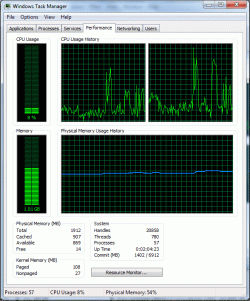
here is one other screen shot of memory cpu usage. at this time my lap is working normal. it works normal but it has some mood swings problem :P suddenly it starts working slow and hangs up.
 

Attachments

  • memory.gif
    memory.gif
    44.3 KB · Views: 15

My Computer My Computer

OS
windows 7 ultimate 32 bit
Have you installed SP1 recently?

I did and have had to get rid of it because after it was installed, boot and shutdown times increased dramatically, my printer driver vanished of the face of the earth and the computer became very sluggish.

A quick look non Google revealed that a lot of people are experiencing SP1-related problems.
 

My Computer My Computer

Computer Manufacturer/Model Number
HP Pavilion Elite 495UK
OS
Windows 7 Ultimate SP1 64-Bit
CPU
Intel Core i7 870 @ 2.93GHz
Motherboard
MSI 2A9C (CPU1)
Memory
8Gb Dual-Channel DDR3 @ 664MHz
Graphics Card(s)
nVidia GeForce GTX 460 1024MB dedicated RAM
Sound Card
Realtek HD Audio
Monitor(s) Displays
HP2310i
Screen Resolution
1920 x 1080
Hard Drives
1x1954GB Hitachi HDS22020ALA 330 (RAID), 1x1954GB Hitachi External for backup and storage
PSU
460W
Case
HP Elite
Cooling
Air cooled
Keyboard
Logitech K750 solar-powered keyboard
Mouse
Logitech Wireless M180 mouse
Internet Speed
2Mb
Other Info
Pure Avanti Flow Internet Radio with iPod Dock, 64Gb iPod, HP USB Speakers, Sony MDR-V500 Headphones, Sony Vaio F-Series Laptop
@skul: ok I want to try it, however its downloading options are very complicated for a person like me :( ... I am taken to the majorgeek site for download option, i cannot see any FREE link :) ... is it free anyway? can you please get me the link of the version I should download as on majorgeek website there are many different versions links. I dont know which I should download.. :-s
 

My Computer My Computer

OS
windows 7 ultimate 32 bit
no I did not installed SP1 ... secondly, you drew my attention to another problem- I think my video driver is not good, because when I youtube the video quality is not as sharp as it used to be. I checked my video driver in device manager etc options and it was showing fine, I downloaded and installed a video driver from toshiba official website for my lap model but it did not make any difference.
 

My Computer My Computer

OS
windows 7 ultimate 32 bit
@skul: sorry for my ignorance- i had clicked on an advert. I got it and now installing it... will be back with results soon.
 

My Computer My Computer

OS
windows 7 ultimate 32 bit
That's good news, but clicking on an advert? Strange, you should just be able to download the program without any problems. It's a free program, but it offers a "Pro" option which we won't need.

I await your scan results, I'm unsure whether your computer is infected, but making sure never hurts.
 

My Computer My Computer

Computer Manufacturer/Model Number
Custom
OS
Windows 8 Professional 64-bit
CPU
Intel Core i3-2100
Motherboard
ASRock Intel Z68M/USB3
Memory
4GB
Graphics Card(s)
GeForece GTX 550 Ti
Screen Resolution
1680 x 1050
PSU
750w
yay!! my lap is clean. no infected files found. Did a quick and a full scan. now what?
 

My Computer My Computer

OS
windows 7 ultimate 32 bit
When a HDD gets near full capacity, it tends to get drastically slower, performance wise. I'd check that out.

Try to remove any programs you don't use to free up needed space.

Recently, there has been a scam going around social sites. (facebook) Where a false message prompts you to download a file to watch a video. My cousin received an infection that was very difficult to remove, no software was able to remove the infection.
 

My Computer My Computer

Computer Manufacturer/Model Number
Custom
OS
Windows 8 Professional 64-bit
CPU
Intel Core i3-2100
Motherboard
ASRock Intel Z68M/USB3
Memory
4GB
Graphics Card(s)
GeForece GTX 550 Ti
Screen Resolution
1680 x 1050
PSU
750w
my HDD was getting full, so I thought the same and I bought a 500GB external HDD and shifted almost 200GB to 300GB data to it. So now I have over 200 GB free space in my HDD. It did not solve the problem, I thought it might need defragmentation because of huge changes to data addressing so I defragmented the HDD. But it is still the same.

my lap works fine, however, suddenly, specially when i start some song file or image etc, it hangs up and then starts behaving strange for a while like needs lots of time to move even between two programme windows.
 

My Computer My Computer

OS
windows 7 ultimate 32 bit
... Let me get this right, you just "Cut" and "Pasted" your entire system to a different hard drive which is external?

Then, you connected your external drive to your laptop and run files from there? Because if so, then that may be the problem.
 

My Computer My Computer

Computer Manufacturer/Model Number
Custom
OS
Windows 8 Professional 64-bit
CPU
Intel Core i3-2100
Motherboard
ASRock Intel Z68M/USB3
Memory
4GB
Graphics Card(s)
GeForece GTX 550 Ti
Screen Resolution
1680 x 1050
PSU
750w
I don't want to hijack this thread but just a reminder...

CAUTION!


When you go to download Malwarebytes you NEED to make sure you go to MALWAREBYTES.ORG

not .com!!!!!!!!


Using the Correct address you download DIRECTLY from the legitimate vendor of Malwarebytes not a third party site!

There needs to be a "sticky" about this!
 

My Computer My Computer

Computer Manufacturer/Model Number
hp pavilion 6680t
OS
win 7 home premium 64 bit
CPU
core i5 760
Motherboard
iona (from MSI)
Memory
6 gb
Graphics Card(s)
ati 5450
Sound Card
real tek 888
I am using files from my lap hdd and not external hdd. i used external one to remove the overhead of my lap hdd.
 

My Computer My Computer

OS
windows 7 ultimate 32 bit
I don't want to hijack this thread but just a reminder...

CAUTION!


When you go to download Malwarebytes you NEED to make sure you go to MALWAREBYTES.ORG

not .com!!!!!!!!


Using the Correct address you download DIRECTLY from the legitimate vendor of Malwarebytes not a third party site!

There needs to be a "sticky" about this!
Yes, I know, I have something to counter that.
 

My Computer My Computer

Computer Manufacturer/Model Number
Custom
OS
Windows 8 Professional 64-bit
CPU
Intel Core i3-2100
Motherboard
ASRock Intel Z68M/USB3
Memory
4GB
Graphics Card(s)
GeForece GTX 550 Ti
Screen Resolution
1680 x 1050
PSU
750w
Back
Top