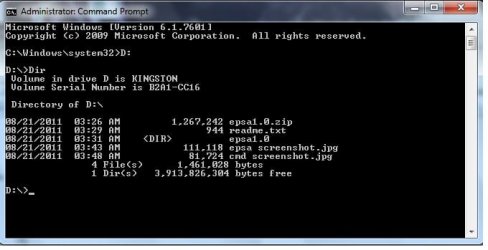
I was tasked this weekend to create a working flash drive to be used on clients computers. There is a new Dell Diag out and there training says to use cmd to move the program to the flash drive once I have downloaded and unzipped it. Program is saved to the C: drive. Flash drive would be D: drive.
Any help, I don't understand Dell's training site. Attachment is what they show me for help.
Attachments
ePSA screen shot.jpg
35.7 KB
· Views: 97
My Computer
At a glance
Windows 7 pro x643rd gen Intel Core i5-3340M8 GBIntel HD Graphics 4000
Here are the instructions without the pictures (thought this would be eaiser then pasting and clipping like 10 differant screen shots)
1. Download and unzip the zip file to your c: drive. We recommend that you unzip to a root directory to speed up directory navigation in the next steps. 2. Once you have saved and unzipped the files, run CMD prompt as administrator by right clicking “Command Prompt” under Accessories. 3. You must know the letter of your USB thumb drive. 4. Change to the directory of unzipped files. 5. Now run create_key.bat (then drive letter). For example: “Create_key_f” 6. It will take 1-3 minutes to build the key. Type “Exit” to close cmd prompt. 7. Use Windows explorer to go back to the Unzipped directory and doubleclick Bootice. Bootice.exe is also on the key now. You can run it from either location. 8. When UAC window pops up click “Yes”. 9. When Bootice opens, confirm USB key is listed in Destionation Disk. Select “Parts Manage”. 10. Click on :Change ID” 11. Now choose “OC:FAT32 LBA” and click “OK” 12. Key construction is COMPLETE
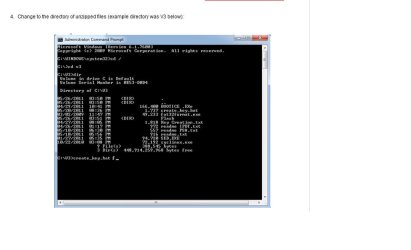
Stuck on Step 4. Once cmd is open and I see "C:\Windows\system32>, What do I do next.
My Computer
At a glance
Windows 7 pro x643rd gen Intel Core i5-3340M8 GBIntel HD Graphics 4000
Start> In search box type cmd> Right click on cmd.exe in results above and choose Run as administrator
Insert the larger than 2GB flash drive
Determine the drive letter of the inserted flash drive. This is a must, as whatever drive letter you choose will be overwritten.
In command prompt type
cd \
Press enter
Type dir
Press enter
The command prompt you posted says type
create_key.bat D
Press enter
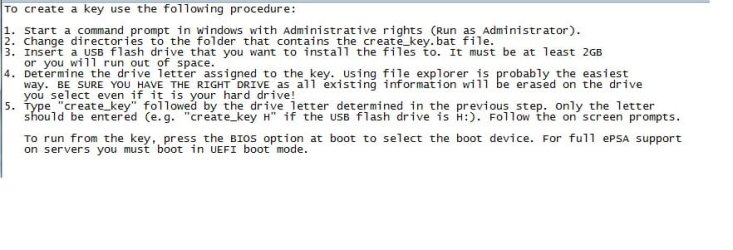
But the read me says type
create_key D
I would try the 1st choice, as that is what the screenshot shows. Since the USB is empty, it either will work or not. If not, try the 2nd choice. This is assuming you have extracted the files directly to the root of C:\ and not into a folder (directory)
A Guy
My Computer
At a glance
Windows 10 Home x64INTEL Core i5-750 Quad-Core 3.37GHzHyperX Fury Black Series 8GB (2 x 4GB) 1866MhzEVGA GeForce GTX 750 Superclocked 1GB 128-Bit...
I would look through the .bat file and see if there are any dangerous commands such as Format or FDisk before I'd run it. You could end up hosing your system disk instead of formatting the key drive.