Using CMD to create flash drive

garaboldi

New member
Local time
11:52 PM
Messages
27
Location
Berks County, PA
I was tasked this weekend to create a working flash drive to be used on clients computers. There is a new Dell Diag out and there training says to use cmd to move the program to the flash drive once I have downloaded and unzipped it. Program is saved to the C: drive. Flash drive would be D: drive.

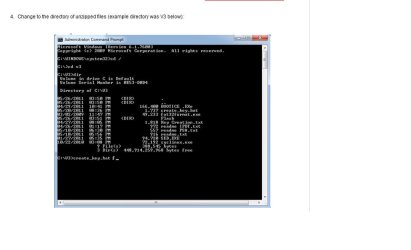
Any help, I don't understand Dell's training site. Attachment is what they show me for help.
 

Attachments
  • ePSA screen shot.jpg
    ePSA screen shot.jpg
    35.7 KB · Views: 97

My Computer

Computer Manufacturer/Model Number
Dell Latitude e6530
OS
Windows 7 pro x64
CPU
3rd gen Intel Core i5-3340M
Memory
8 GB
Graphics Card(s)
Intel HD Graphics 4000
Screen Resolution
15.6" HD+ (1600x900) Wide View Anti-Glare WLED-backlit
Hard Drives
2.5 inch 500GB Solid State Hybrid Drive
Keyboard
USA
Internet Speed
15 MB Down/ 5 MB Up
Antivirus
norton internet security
Browser
Firefox
I can't read what's in the directory listing. Try doing this command:
Dir >listing.txt

Then post the listing.txt file.

I don't understand the task. If the programs run as is without install then you should just have to copy the exe files to the USB. Like copy *.exe D:

unless there are included support files. But I can't see with that dim dir image.
 

My Computer

Computer Manufacturer/Model Number
HP Media Center
OS
Windows 7 32 bit
CPU
AMD 5200+ dual core
Memory
2 GB
Graphics Card(s)
NVidia GeForce 6150SE 128 MB
Monitor(s) Displays
CRT
Screen Resolution
1280x1024
Hard Drives
500 GB Sata internal :

SIIG USB 3.0 docking stations w/WD Caviar Black 6 Gb/s drives
Keyboard
PS/2
Mouse
PS/2 Wheel Mouse
Other Info
SIIG USB 3.0 PCIexpress card.
The faster method would be just unzip directly to the flash drive. Depends on the apps. If they all include "readme.txt" then there will be clashes. :)
 

My Computer

Computer Manufacturer/Model Number
HP Media Center
OS
Windows 7 32 bit
CPU
AMD 5200+ dual core
Memory
2 GB
Graphics Card(s)
NVidia GeForce 6150SE 128 MB
Monitor(s) Displays
CRT
Screen Resolution
1280x1024
Hard Drives
500 GB Sata internal :

SIIG USB 3.0 docking stations w/WD Caviar Black 6 Gb/s drives
Keyboard
PS/2
Mouse
PS/2 Wheel Mouse
Other Info
SIIG USB 3.0 PCIexpress card.
The faster method would be just unzip directly to the flash drive. Depends on the apps. If they all include "readme.txt" then there will be clashes. :)

Tired this, Once unzipped on the Flash drive (D drive) Went to open and run, cmd box opens and closes in about 1 sec. and nothing launches.

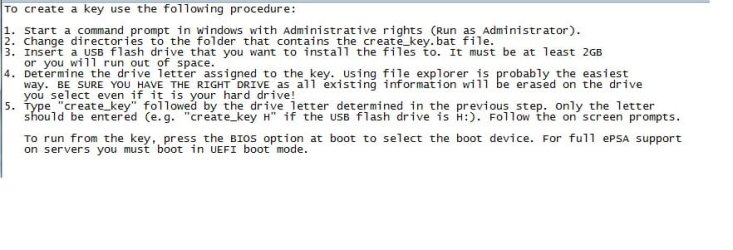
"Readme.txt" file is as follows.
 

Attachments

  • epsa screenshot.jpg
    epsa screenshot.jpg
    45.8 KB · Views: 26

My Computer

Computer Manufacturer/Model Number
Dell Latitude e6530
OS
Windows 7 pro x64
CPU
3rd gen Intel Core i5-3340M
Memory
8 GB
Graphics Card(s)
Intel HD Graphics 4000
Screen Resolution
15.6" HD+ (1600x900) Wide View Anti-Glare WLED-backlit
Hard Drives
2.5 inch 500GB Solid State Hybrid Drive
Keyboard
USA
Internet Speed
15 MB Down/ 5 MB Up
Antivirus
norton internet security
Browser
Firefox
I can't read what's in the directory listing. Try doing this command:
Dir >listing.txt

Then post the listing.txt file.

I don't understand the task. If the programs run as is without install then you should just have to copy the exe files to the USB. Like copy *.exe D:

unless there are included support files. But I can't see with that dim dir image.

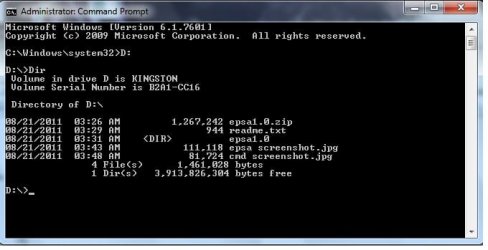
Tried this, "Dir >listing.txt" I got invalid entry. Tried just "Dir" and got the following:
 

Attachments

  • cmd screenshot.jpg
    cmd screenshot.jpg
    38.3 KB · Views: 23
  • cmd D drive screenshot.jpg
    cmd D drive screenshot.jpg
    27.8 KB · Views: 16

My Computer

Computer Manufacturer/Model Number
Dell Latitude e6530
OS
Windows 7 pro x64
CPU
3rd gen Intel Core i5-3340M
Memory
8 GB
Graphics Card(s)
Intel HD Graphics 4000
Screen Resolution
15.6" HD+ (1600x900) Wide View Anti-Glare WLED-backlit
Hard Drives
2.5 inch 500GB Solid State Hybrid Drive
Keyboard
USA
Internet Speed
15 MB Down/ 5 MB Up
Antivirus
norton internet security
Browser
Firefox
Here are the instructions without the pictures (thought this would be eaiser then pasting and clipping like 10 differant screen shots)

1. Download and unzip the zip file to your c: drive. We recommend that you unzip to a root directory to speed up directory navigation in the next steps.
2. Once you have saved and unzipped the files, run CMD prompt as administrator by right clicking “Command Prompt” under Accessories.
3. You must know the letter of your USB thumb drive.
4. Change to the directory of unzipped files.
5. Now run create_key.bat (then drive letter). For example: “Create_key_f”
6. It will take 1-3 minutes to build the key. Type “Exit” to close cmd prompt.
7. Use Windows explorer to go back to the Unzipped directory and doubleclick Bootice. Bootice.exe is also on the key now. You can run it from either location.
8. When UAC window pops up click “Yes”.
9. When Bootice opens, confirm USB key is listed in Destionation Disk. Select “Parts Manage”.
10. Click on :Change ID”
11. Now choose “OC:FAT32 LBA” and click “OK”
12. Key construction is COMPLETE


Stuck on Step 4. Once cmd is open and I see "C:\Windows\system32>, What do I do next.
 

My Computer

Computer Manufacturer/Model Number
Dell Latitude e6530
OS
Windows 7 pro x64
CPU
3rd gen Intel Core i5-3340M
Memory
8 GB
Graphics Card(s)
Intel HD Graphics 4000
Screen Resolution
15.6" HD+ (1600x900) Wide View Anti-Glare WLED-backlit
Hard Drives
2.5 inch 500GB Solid State Hybrid Drive
Keyboard
USA
Internet Speed
15 MB Down/ 5 MB Up
Antivirus
norton internet security
Browser
Firefox
Based on the read me file:

Open an elevated command prompt

Start> In search box type cmd> Right click on cmd.exe in results above and choose Run as administrator

Insert the larger than 2GB flash drive

Determine the drive letter of the inserted flash drive. This is a must, as whatever drive letter you choose will be overwritten.

In command prompt type

cd \

Press enter

Type dir

Press enter

The command prompt you posted says type

create_key.bat D

Press enter

But the read me says type

create_key D

I would try the 1st choice, as that is what the screenshot shows. Since the USB is empty, it either will work or not. If not, try the 2nd choice. This is assuming you have extracted the files directly to the root of C:\ and not into a folder (directory)

2u5uvqs.jpg


A Guy
 

My Computer

Computer type
PC/Desktop
OS
Windows 10 Home x64
CPU
INTEL Core i5-750 Quad-Core 3.37GHz
Motherboard
ASUS P7P55D
Memory
HyperX Fury Black Series 8GB (2 x 4GB) 1866Mhz
Graphics Card(s)
EVGA GeForce GTX 750 Superclocked 1GB 128-Bit GDDR5
Monitor(s) Displays
LG 32MA68HY 32" IPS
Screen Resolution
1920 x 1080
Hard Drives
Samsung 840 Evo 120GB, SEAGATE 500GB Barracuda® 7200.12, SATA 3 Gb/s, 7200 RPM, 16MB cache
PSU
ANTEC TruePower New TP-550, 80 PLUS, 550W
Case
ANTEC Three Hundred Illusion
Cooling
COOLER MASTER Hyper 212 Plus, 4 x 120mm 1 x 140mm Noctua's
Internet Speed
85 + Mbps
Antivirus
Avast
Browser
Vivaldi
create_key.bat is a batch file. A series of commands that will be run in the prompt.

Microsoft Corporation


I would look through the .bat file and see if there are any dangerous commands such as Format or FDisk before I'd run it. You could end up hosing your system disk instead of formatting the key drive.
 

My Computer

Computer Manufacturer/Model Number
HP Media Center
OS
Windows 7 32 bit
CPU
AMD 5200+ dual core
Memory
2 GB
Graphics Card(s)
NVidia GeForce 6150SE 128 MB
Monitor(s) Displays
CRT
Screen Resolution
1280x1024
Hard Drives
500 GB Sata internal :

SIIG USB 3.0 docking stations w/WD Caviar Black 6 Gb/s drives
Keyboard
PS/2
Mouse
PS/2 Wheel Mouse
Other Info
SIIG USB 3.0 PCIexpress card.
Stuck on Step 4. Once cmd is open and I see "C:\Windows\system32>, What do I do next.

When you type cd \ in the cmd prompt, you will change to the correct directory C:\

based on your new typed instructions, you then type

create_key D

Press enter

igkshz.jpg


A Guy
 

My Computer

Computer type
PC/Desktop
OS
Windows 10 Home x64
CPU
INTEL Core i5-750 Quad-Core 3.37GHz
Motherboard
ASUS P7P55D
Memory
HyperX Fury Black Series 8GB (2 x 4GB) 1866Mhz
Graphics Card(s)
EVGA GeForce GTX 750 Superclocked 1GB 128-Bit GDDR5
Monitor(s) Displays
LG 32MA68HY 32" IPS
Screen Resolution
1920 x 1080
Hard Drives
Samsung 840 Evo 120GB, SEAGATE 500GB Barracuda® 7200.12, SATA 3 Gb/s, 7200 RPM, 16MB cache
PSU
ANTEC TruePower New TP-550, 80 PLUS, 550W
Case
ANTEC Three Hundred Illusion
Cooling
COOLER MASTER Hyper 212 Plus, 4 x 120mm 1 x 140mm Noctua's
Internet Speed
85 + Mbps
Antivirus
Avast
Browser
Vivaldi
Back
Top