Solved Strange Window is appearing on Startup

pan

New member
Local time
10:46 PM
Messages
16
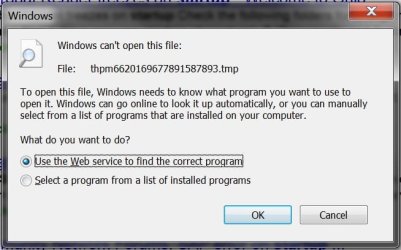
On start up of my computer I am receiving the following message (see attached picture). I have Windows 7 Home Premium 64 bit.

This all happened when I was on the internet and I ran into a malicious site and a pop up box appeared and it wouldn't go away when I clicked the X box, it would just keep reappearing every time. I then just shut off my computer and when I turned it back on now this message appears every time and I just click X every time and it goes away. I ran AVG free virus software and there appears to be no virus, but I have no idea how to get rid of this annoying start up message. Any help is very appreciated. Thanks in advance.
 

Attachments
  • startupwindow.jpg
    startupwindow.jpg
    38.9 KB · Views: 44

My Computer My Computer

OS
Windows 7 Home Premium 64 bit
Hi Pan,

A couple of things to try:

Firstly, lets try another scan with a different AV program. Please download, install, update and then run a FULL scan using FREE Malwarebytes.

Secondly, can you do a search in Windows Explorer for that exact file? Where is the file located?

Post back here if you need more help.

Regards,
Golden
 

My Computer My Computer

Computer type
PC/Desktop
Computer Manufacturer/Model Number
Golden Mk. I.4
OS
Windows 10 Pro x64 ; Xubuntu x64
CPU
Intel i7 860 @ 2.80 GHz O/C'ed to 4.0GHz
Motherboard
Gigabyte P55A-UD3R Rev.1. Award BIOS F13
Memory
16GB Corsair Vengance DDR3 @ 661 MHz Dual Channel (9-9-9-24)
Graphics Card(s)
EVGA NVidia GTX 560 1024MB
Sound Card
Realtek Integrated
Monitor(s) Displays
Dual Samsung SyncMaster 2494HS
Screen Resolution
1920*1080 and 1920*1080
Hard Drives
1*Samsung 840 EVO 120GB SSD;
1*OCZ Vertex 2 60GB SSD;
2*Samsung F3 SpinPoint 1TB in RAID0;
1*Samsung F1 SpinPoint 1TB;
2*Western Digital 1TB External USB 3.0
1*Western Digital 500GB External USB 3.0
1*Seagate 500GB External USB 2.0
PSU
Thermaltake ToughPower QFan 750W
Case
Thermaltake Element S VK60001W2Z
Cooling
Corsair H60 Water Cooling, 2*230mm and 2*80mm case fans
Keyboard
Logitech G110
Mouse
Logitech MX518
Hi Pan,

A couple of things to try:

Firstly, lets try another scan with a different AV program. Please download, install, update and then run a FULL scan using FREE Malwarebytes.

Secondly, can you do a search in Windows Explorer for that exact file? Where is the file located?

Post back here if you need more help.

Regards,
Golden

Thanks, I'm downloading it right now. I tried searching for it in the start menu and nothing comes up.
 

My Computer My Computer

OS
Windows 7 Home Premium 64 bit
OK. Complete the scan, and then post back the log so we can see if there is anything lurking in the system.

Once we have done that, we can try to "repair" Windows using the sfc /scannow command. I'll post more details once the scan is done.

Regards,
Golden
 

My Computer My Computer

Computer type
PC/Desktop
Computer Manufacturer/Model Number
Golden Mk. I.4
OS
Windows 10 Pro x64 ; Xubuntu x64
CPU
Intel i7 860 @ 2.80 GHz O/C'ed to 4.0GHz
Motherboard
Gigabyte P55A-UD3R Rev.1. Award BIOS F13
Memory
16GB Corsair Vengance DDR3 @ 661 MHz Dual Channel (9-9-9-24)
Graphics Card(s)
EVGA NVidia GTX 560 1024MB
Sound Card
Realtek Integrated
Monitor(s) Displays
Dual Samsung SyncMaster 2494HS
Screen Resolution
1920*1080 and 1920*1080
Hard Drives
1*Samsung 840 EVO 120GB SSD;
1*OCZ Vertex 2 60GB SSD;
2*Samsung F3 SpinPoint 1TB in RAID0;
1*Samsung F1 SpinPoint 1TB;
2*Western Digital 1TB External USB 3.0
1*Western Digital 500GB External USB 3.0
1*Seagate 500GB External USB 2.0
PSU
Thermaltake ToughPower QFan 750W
Case
Thermaltake Element S VK60001W2Z
Cooling
Corsair H60 Water Cooling, 2*230mm and 2*80mm case fans
Keyboard
Logitech G110
Mouse
Logitech MX518
This is just an update. I have to get up really early tomorrow so I'm going to bed now. So far the scan has produced no viruses and has been scanning for 38 minutes and has scanned 233,000+ objects. I will post another update as soon as I wake up tomorrow or if I happen to wake up in the middle of the night. Thanks Golden for all of the help so far.
 

My Computer My Computer

OS
Windows 7 Home Premium 64 bit
No worries - we'll keep checking back here.

Regards,
Golden
 

My Computer My Computer

Computer type
PC/Desktop
Computer Manufacturer/Model Number
Golden Mk. I.4
OS
Windows 10 Pro x64 ; Xubuntu x64
CPU
Intel i7 860 @ 2.80 GHz O/C'ed to 4.0GHz
Motherboard
Gigabyte P55A-UD3R Rev.1. Award BIOS F13
Memory
16GB Corsair Vengance DDR3 @ 661 MHz Dual Channel (9-9-9-24)
Graphics Card(s)
EVGA NVidia GTX 560 1024MB
Sound Card
Realtek Integrated
Monitor(s) Displays
Dual Samsung SyncMaster 2494HS
Screen Resolution
1920*1080 and 1920*1080
Hard Drives
1*Samsung 840 EVO 120GB SSD;
1*OCZ Vertex 2 60GB SSD;
2*Samsung F3 SpinPoint 1TB in RAID0;
1*Samsung F1 SpinPoint 1TB;
2*Western Digital 1TB External USB 3.0
1*Western Digital 500GB External USB 3.0
1*Seagate 500GB External USB 2.0
PSU
Thermaltake ToughPower QFan 750W
Case
Thermaltake Element S VK60001W2Z
Cooling
Corsair H60 Water Cooling, 2*230mm and 2*80mm case fans
Keyboard
Logitech G110
Mouse
Logitech MX518
Since that file has a .tmp extension, have you checked in the temp folders, both in Windows and Users?
 

My Computer My Computer

Computer Manufacturer/Model Number
DIY
OS
W7x64 Pro, SuSe 12.1/** W7 x64 Pro, XP MCE
CPU
Phenom II 1090T w/Noctua NH-D14 /**4400+ X2 w/CM Hyper TX 3
Motherboard
ASRock 890FX Deluxe 4/**A8N-SLI
Memory
2 x 2GB Patriot PGS34g1600LLKA/**4x1GB Corsair VS
Graphics Card(s)
EVGA GTX460 SC/**EVGA 8800GTS
Sound Card
Asus Xonar D2X/**Xonar D1
Monitor(s) Displays
Acer X233H, Dell E152FPc /**LG M237-WD
Screen Resolution
1920x1080 & 1024x768/**1980x1080
Hard Drives
WDC 2TB, 1.5TB, 1TB, 500GB,Seagate 500GB , Maxtor 80GB /**500GB Seagate & WDC 1TB Black
PSU
CM RS600 w/ APC BX1000G/**Antec 500 TP w/ APC BX1000
Case
HAF922/**Antec 1040IIB
Cooling
3x200mm, 1x140 and 1x120mm/**5x80mm fans
Keyboard
Logitech Media USB/**Saitek Eclipse
Mouse
Cordless Trackman Wheel/**Ditto
Internet Speed
3.3Mbps
Other Info
SB 560 5.1 w/ Sennheiser RS140/**Creative T20 speakers, Dvico FusionHDTV7 Gold RT, Cisco E3000, HP 5510V AIO, Linksys E3000, Belkin F5U237 hub and **F5D8055 adapter
(** = 2nd rig)
Here's my log..........there were no viruses found again.........


Malwarebytes' Anti-Malware 1.51.1.1800
Malwarebytes : Free anti-malware, anti-virus and spyware removal download

Database version: 7524

Windows 6.1.7601 Service Pack 1
Internet Explorer 9.0.8112.16421

8/20/2011 10:37:37 PM
mbam-log-2011-08-20 (22-37-37).txt

Scan type: Full scan (C:\|Q:\|)
Objects scanned: 407462
Time elapsed: 47 minute(s), 0 second(s)

Memory Processes Infected: 0
Memory Modules Infected: 0
Registry Keys Infected: 0
Registry Values Infected: 0
Registry Data Items Infected: 0
Folders Infected: 0
Files Infected: 0

Memory Processes Infected:
(No malicious items detected)

Memory Modules Infected:
(No malicious items detected)

Registry Keys Infected:
(No malicious items detected)

Registry Values Infected:
(No malicious items detected)

Registry Data Items Infected:
(No malicious items detected)

Folders Infected:
(No malicious items detected)

Files Infected:
(No malicious items detected)
 

My Computer My Computer

OS
Windows 7 Home Premium 64 bit
Since that file has a .tmp extension, have you checked in the temp folders, both in Windows and Users?

I tried but there are a lot of files there. I'll do a more thorough search in the morning, I really have to get some sleep. Thanks for all of the help so far everybody.
 

My Computer My Computer

OS
Windows 7 Home Premium 64 bit
Hi,

OK. When you wake up tommorrow, try the following:

1. Click Start Orb
2. In the search box, type cmd
3. Right-lcikc on the CMD item in the list, and choose to Run as Administrator
4. In the cmd (dod) window that opnes, type sfc /scannow and hit enter

Post the results of the window once the scan completes.

Regards,
Golden
 

My Computer My Computer

Computer type
PC/Desktop
Computer Manufacturer/Model Number
Golden Mk. I.4
OS
Windows 10 Pro x64 ; Xubuntu x64
CPU
Intel i7 860 @ 2.80 GHz O/C'ed to 4.0GHz
Motherboard
Gigabyte P55A-UD3R Rev.1. Award BIOS F13
Memory
16GB Corsair Vengance DDR3 @ 661 MHz Dual Channel (9-9-9-24)
Graphics Card(s)
EVGA NVidia GTX 560 1024MB
Sound Card
Realtek Integrated
Monitor(s) Displays
Dual Samsung SyncMaster 2494HS
Screen Resolution
1920*1080 and 1920*1080
Hard Drives
1*Samsung 840 EVO 120GB SSD;
1*OCZ Vertex 2 60GB SSD;
2*Samsung F3 SpinPoint 1TB in RAID0;
1*Samsung F1 SpinPoint 1TB;
2*Western Digital 1TB External USB 3.0
1*Western Digital 500GB External USB 3.0
1*Seagate 500GB External USB 2.0
PSU
Thermaltake ToughPower QFan 750W
Case
Thermaltake Element S VK60001W2Z
Cooling
Corsair H60 Water Cooling, 2*230mm and 2*80mm case fans
Keyboard
Logitech G110
Mouse
Logitech MX518
Since Malwarebytes didn't find anything, it is possible that the problem file is not exactly malware, or at least it hasn't been classified as such by Malwarebytes. Since the window in question appears on startup, I would look on the Startup tab of msconfig, as well as in the Startup folder in the Start Menu, not for that particular file, but for anything that you do not recognize as needed or normal, and delete or disable it. Chances are good that it is pointing to that .tmp folder during startup.
 

My Computer My Computer

Computer Manufacturer/Model Number
DIY
OS
W7x64 Pro, SuSe 12.1/** W7 x64 Pro, XP MCE
CPU
Phenom II 1090T w/Noctua NH-D14 /**4400+ X2 w/CM Hyper TX 3
Motherboard
ASRock 890FX Deluxe 4/**A8N-SLI
Memory
2 x 2GB Patriot PGS34g1600LLKA/**4x1GB Corsair VS
Graphics Card(s)
EVGA GTX460 SC/**EVGA 8800GTS
Sound Card
Asus Xonar D2X/**Xonar D1
Monitor(s) Displays
Acer X233H, Dell E152FPc /**LG M237-WD
Screen Resolution
1920x1080 & 1024x768/**1980x1080
Hard Drives
WDC 2TB, 1.5TB, 1TB, 500GB,Seagate 500GB , Maxtor 80GB /**500GB Seagate & WDC 1TB Black
PSU
CM RS600 w/ APC BX1000G/**Antec 500 TP w/ APC BX1000
Case
HAF922/**Antec 1040IIB
Cooling
3x200mm, 1x140 and 1x120mm/**5x80mm fans
Keyboard
Logitech Media USB/**Saitek Eclipse
Mouse
Cordless Trackman Wheel/**Ditto
Internet Speed
3.3Mbps
Other Info
SB 560 5.1 w/ Sennheiser RS140/**Creative T20 speakers, Dvico FusionHDTV7 Gold RT, Cisco E3000, HP 5510V AIO, Linksys E3000, Belkin F5U237 hub and **F5D8055 adapter
(** = 2nd rig)
Since that file has a .tmp extension, have you checked in the temp folders, both in Windows and Users?

I tried but there are a lot of files there. I'll do a more thorough search in the morning, I really have to get some sleep. Thanks for all of the help so far everybody.

Try deleting all of those .tmps, since they should not be needed any longer. You should regularly clean the Temp folders anyway. Some temps may not delete, and you may have to skip them, but that shortens the list considerably, making it easier to see if what is left is part of the problem.

You can also use Ccleaner to automate cleaning.
 

My Computer My Computer

Computer Manufacturer/Model Number
DIY
OS
W7x64 Pro, SuSe 12.1/** W7 x64 Pro, XP MCE
CPU
Phenom II 1090T w/Noctua NH-D14 /**4400+ X2 w/CM Hyper TX 3
Motherboard
ASRock 890FX Deluxe 4/**A8N-SLI
Memory
2 x 2GB Patriot PGS34g1600LLKA/**4x1GB Corsair VS
Graphics Card(s)
EVGA GTX460 SC/**EVGA 8800GTS
Sound Card
Asus Xonar D2X/**Xonar D1
Monitor(s) Displays
Acer X233H, Dell E152FPc /**LG M237-WD
Screen Resolution
1920x1080 & 1024x768/**1980x1080
Hard Drives
WDC 2TB, 1.5TB, 1TB, 500GB,Seagate 500GB , Maxtor 80GB /**500GB Seagate & WDC 1TB Black
PSU
CM RS600 w/ APC BX1000G/**Antec 500 TP w/ APC BX1000
Case
HAF922/**Antec 1040IIB
Cooling
3x200mm, 1x140 and 1x120mm/**5x80mm fans
Keyboard
Logitech Media USB/**Saitek Eclipse
Mouse
Cordless Trackman Wheel/**Ditto
Internet Speed
3.3Mbps
Other Info
SB 560 5.1 w/ Sennheiser RS140/**Creative T20 speakers, Dvico FusionHDTV7 Gold RT, Cisco E3000, HP 5510V AIO, Linksys E3000, Belkin F5U237 hub and **F5D8055 adapter
(** = 2nd rig)
I think the startup tab in msconfig as suggested by seekmeister is definately worth looking at if the sfc /scannow doesn't turn up anything.

Regards,
Golden
 
Last edited:

My Computer My Computer

Computer type
PC/Desktop
Computer Manufacturer/Model Number
Golden Mk. I.4
OS
Windows 10 Pro x64 ; Xubuntu x64
CPU
Intel i7 860 @ 2.80 GHz O/C'ed to 4.0GHz
Motherboard
Gigabyte P55A-UD3R Rev.1. Award BIOS F13
Memory
16GB Corsair Vengance DDR3 @ 661 MHz Dual Channel (9-9-9-24)
Graphics Card(s)
EVGA NVidia GTX 560 1024MB
Sound Card
Realtek Integrated
Monitor(s) Displays
Dual Samsung SyncMaster 2494HS
Screen Resolution
1920*1080 and 1920*1080
Hard Drives
1*Samsung 840 EVO 120GB SSD;
1*OCZ Vertex 2 60GB SSD;
2*Samsung F3 SpinPoint 1TB in RAID0;
1*Samsung F1 SpinPoint 1TB;
2*Western Digital 1TB External USB 3.0
1*Western Digital 500GB External USB 3.0
1*Seagate 500GB External USB 2.0
PSU
Thermaltake ToughPower QFan 750W
Case
Thermaltake Element S VK60001W2Z
Cooling
Corsair H60 Water Cooling, 2*230mm and 2*80mm case fans
Keyboard
Logitech G110
Mouse
Logitech MX518

My Computer My Computer

Computer type
Laptop
Computer Manufacturer/Model Number
Sony Vaio VPCEB47GM Laptop
OS
Win 7 Pro 64-bit
CPU
Intel i5 2.4 Ghz
Memory
8GB DDR3
Graphics Card(s)
Intel HD 3000
Sound Card
IDT High Definition
Monitor(s) Displays
15.6 WGXA Anti-Glare LED
Screen Resolution
1280x800
Hard Drives
640Gb 7200rpm
Antivirus
MSE
Browser
Opera (primary) with IE9 backup
If you don't find any unknown startup items where I mentioned, you might also try using StartupCPL, because some things start up from the registry, and won't appear in the places mentioned:

Mike Lin's Home Page
 

My Computer My Computer

Computer Manufacturer/Model Number
DIY
OS
W7x64 Pro, SuSe 12.1/** W7 x64 Pro, XP MCE
CPU
Phenom II 1090T w/Noctua NH-D14 /**4400+ X2 w/CM Hyper TX 3
Motherboard
ASRock 890FX Deluxe 4/**A8N-SLI
Memory
2 x 2GB Patriot PGS34g1600LLKA/**4x1GB Corsair VS
Graphics Card(s)
EVGA GTX460 SC/**EVGA 8800GTS
Sound Card
Asus Xonar D2X/**Xonar D1
Monitor(s) Displays
Acer X233H, Dell E152FPc /**LG M237-WD
Screen Resolution
1920x1080 & 1024x768/**1980x1080
Hard Drives
WDC 2TB, 1.5TB, 1TB, 500GB,Seagate 500GB , Maxtor 80GB /**500GB Seagate & WDC 1TB Black
PSU
CM RS600 w/ APC BX1000G/**Antec 500 TP w/ APC BX1000
Case
HAF922/**Antec 1040IIB
Cooling
3x200mm, 1x140 and 1x120mm/**5x80mm fans
Keyboard
Logitech Media USB/**Saitek Eclipse
Mouse
Cordless Trackman Wheel/**Ditto
Internet Speed
3.3Mbps
Other Info
SB 560 5.1 w/ Sennheiser RS140/**Creative T20 speakers, Dvico FusionHDTV7 Gold RT, Cisco E3000, HP 5510V AIO, Linksys E3000, Belkin F5U237 hub and **F5D8055 adapter
(** = 2nd rig)
So I just performed sfc /SCANNNOW and it said it found no integrity violations. Now I will try the other stuff mentionted. Thanks for all of the help so far.
 

My Computer My Computer

OS
Windows 7 Home Premium 64 bit
Since Malwarebytes didn't find anything, it is possible that the problem file is not exactly malware, or at least it hasn't been classified as such by Malwarebytes. Since the window in question appears on startup, I would look on the Startup tab of msconfig, as well as in the Startup folder in the Start Menu, not for that particular file, but for anything that you do not recognize as needed or normal, and delete or disable it. Chances are good that it is pointing to that .tmp folder during startup.


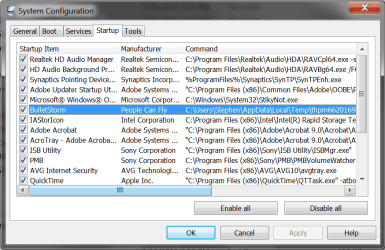
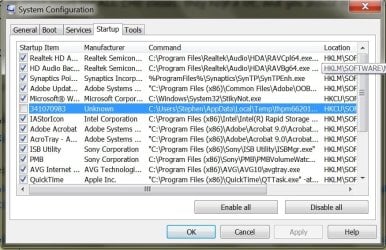
Ok, some good news.......I checked the startup tab of msconfig and found a strange thing called Bulletstorm from People Can Fly....which as you can see in the picture had the strange file location in it........I went there and found it and deleted it, as well as a thing called jucheck from the same person created at the same time (People Can Fly)........Then I restarted my computer and the popup message did not appear. However, when I went to msconfig again I found that the thing was still selected, although it is now called something different by an unknown author. I then disabled it from startup by unchecking the box. I'm worried that there might still be some residual files on my computer. So how do I delete all of the files related to this. By scrolling right on the msconfig tab it says that its location is HKCU\SOFTWARE\Microsoft\Windows\CurrentVersion\Run. But I have no idea how to get to this place, or is this not where I should be looking. Any help is much appreciated. Thanks in advance.
 

Attachments

  • syscon.png
    syscon.png
    32.7 KB · Views: 27
  • infolder.jpg
    infolder.jpg
    20.9 KB · Views: 14
  • afterdeletingfiles.jpg
    afterdeletingfiles.jpg
    109.4 KB · Views: 24

My Computer My Computer

OS
Windows 7 Home Premium 64 bit
Hi Pan,

Those HKCU are registry references. Can you browse to "C:Users\Stephen....."as per the second image you attached, and see if those files are in that location?

BulletStorm is a first-person shooter game. Did you download this, or install it from a DVD/CD?

Regards,
Golden
 

My Computer My Computer

Computer type
PC/Desktop
Computer Manufacturer/Model Number
Golden Mk. I.4
OS
Windows 10 Pro x64 ; Xubuntu x64
CPU
Intel i7 860 @ 2.80 GHz O/C'ed to 4.0GHz
Motherboard
Gigabyte P55A-UD3R Rev.1. Award BIOS F13
Memory
16GB Corsair Vengance DDR3 @ 661 MHz Dual Channel (9-9-9-24)
Graphics Card(s)
EVGA NVidia GTX 560 1024MB
Sound Card
Realtek Integrated
Monitor(s) Displays
Dual Samsung SyncMaster 2494HS
Screen Resolution
1920*1080 and 1920*1080
Hard Drives
1*Samsung 840 EVO 120GB SSD;
1*OCZ Vertex 2 60GB SSD;
2*Samsung F3 SpinPoint 1TB in RAID0;
1*Samsung F1 SpinPoint 1TB;
2*Western Digital 1TB External USB 3.0
1*Western Digital 500GB External USB 3.0
1*Seagate 500GB External USB 2.0
PSU
Thermaltake ToughPower QFan 750W
Case
Thermaltake Element S VK60001W2Z
Cooling
Corsair H60 Water Cooling, 2*230mm and 2*80mm case fans
Keyboard
Logitech G110
Mouse
Logitech MX518
Deleting a registry key is ultra simple, but it can also cause severe problems if it isn't done right. Therefore, I would recommend backing up the registry before attempting to change anything in it:

http://www.sevenforums.com/tutorials/4230-registry-backup-restore.html?ltr=R

After doing that, open Regedit and in much the same manner that you would use a file manager, you use Regedit by expanding the left hand tree one step at a time, according to the path given in msconfig. Once there, find the key in the right window, right click it and select delete. Keep in mind that there are probably other keys in that location that are not from that program, so take care in your selection.

EDIT: Another precaution that would be good to take is to create a new System Restore point beforehand.
 

My Computer My Computer

Computer Manufacturer/Model Number
DIY
OS
W7x64 Pro, SuSe 12.1/** W7 x64 Pro, XP MCE
CPU
Phenom II 1090T w/Noctua NH-D14 /**4400+ X2 w/CM Hyper TX 3
Motherboard
ASRock 890FX Deluxe 4/**A8N-SLI
Memory
2 x 2GB Patriot PGS34g1600LLKA/**4x1GB Corsair VS
Graphics Card(s)
EVGA GTX460 SC/**EVGA 8800GTS
Sound Card
Asus Xonar D2X/**Xonar D1
Monitor(s) Displays
Acer X233H, Dell E152FPc /**LG M237-WD
Screen Resolution
1920x1080 & 1024x768/**1980x1080
Hard Drives
WDC 2TB, 1.5TB, 1TB, 500GB,Seagate 500GB , Maxtor 80GB /**500GB Seagate & WDC 1TB Black
PSU
CM RS600 w/ APC BX1000G/**Antec 500 TP w/ APC BX1000
Case
HAF922/**Antec 1040IIB
Cooling
3x200mm, 1x140 and 1x120mm/**5x80mm fans
Keyboard
Logitech Media USB/**Saitek Eclipse
Mouse
Cordless Trackman Wheel/**Ditto
Internet Speed
3.3Mbps
Other Info
SB 560 5.1 w/ Sennheiser RS140/**Creative T20 speakers, Dvico FusionHDTV7 Gold RT, Cisco E3000, HP 5510V AIO, Linksys E3000, Belkin F5U237 hub and **F5D8055 adapter
(** = 2nd rig)
Hi Pan,

Those HKCU are registry references. Can you browse to "C:Users\Stephen....."as per the second image you attached, and see if those files are in that location?

BulletStorm is a first-person shooter game. Did you download this, or install it from a DVD/CD?

Regards,
Golden

In "C:Users\Stephen....." is where I found the two files jucheck and and the .tmp. I already deleted those. And no I have never even heard of bulletstorm.

I will now try to do what seekermeister has recommended and post back the results in a bit. Thanks everybody for all your help.
 

My Computer My Computer

OS
Windows 7 Home Premium 64 bit
Back
Top