Troubleshoot and Diagnostic Policy not started

stonebear

New member
Member
VIP
Local time
8:35 AM
Messages
161
I am having some trouble with my wireless connection so I clicked on "troubleshoot" as one of the good things about Windows 7 is that the "troubleshoot" actually works!

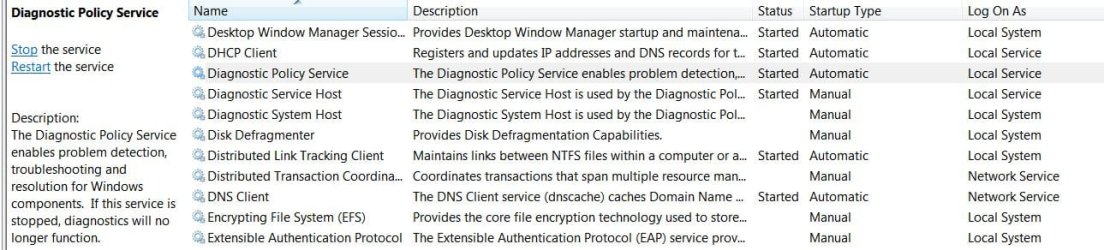
Not this time though because I get the message, "diagnostics policy not running", so I went to services and started it manually only to get the message, "the diagnostic policy service started and stopped", so it is a catch 22 situation.

Here is a pic showing the messages

k9xbmq.jpg


Any ideas?
 

My Computer My Computer

At a glance

Windows 7 Ultimate x64Phenom II x4 9654gbAsus GTX 460 768mb
Computer Manufacturer/Model Number
self-built
OS
Windows 7 Ultimate x64
CPU
Phenom II x4 965
Motherboard
GA-MA785GT-UD3H
Memory
4gb
Graphics Card(s)
Asus GTX 460 768mb
Sound Card
Asus Xonar DX
Monitor(s) Displays
BenQ G2222HDL
Hard Drives
OCZ Vertex 2E 60gb

WD 1TB Caviar Green
PSU
Antec True Power New 650w
Case
CM 690 II
Cooling
Hyper 212+
I also noticed Diagnostic service host and system host could not be started (option greyed out), they were set to manual start so I put them on automatic but the diagnostic policy will still not run, I still get the started and stopped message.

I changed these to auto as a guess for a fix but I will change them back now and not guess anymore in case I make things worse.
 

My Computer My Computer

At a glance

Windows 7 Ultimate x64Phenom II x4 9654gbAsus GTX 460 768mb
Computer Manufacturer/Model Number
self-built
OS
Windows 7 Ultimate x64
CPU
Phenom II x4 965
Motherboard
GA-MA785GT-UD3H
Memory
4gb
Graphics Card(s)
Asus GTX 460 768mb
Sound Card
Asus Xonar DX
Monitor(s) Displays
BenQ G2222HDL
Hard Drives
OCZ Vertex 2E 60gb

WD 1TB Caviar Green
PSU
Antec True Power New 650w
Case
CM 690 II
Cooling
Hyper 212+
There are several repairs to try:

1.)

  • System Restore To several days to whenever you feel the problem started.
2.)

3.)

  • Go to device manager.
  • Uninstall all the network devices including the network card.(Don't delete the driver)
  • Restart the computer and it should automatically find and install the network card and the driver for it.
4.)

  • Check to make sure your security programs are not blocking it.
5.)

  • Copy/paste msconfig into run box, make sure Normal startup is selected.

I changed these to auto as a guess for a fix but I will change them back now and not guess anymore in case I make things worse.
How did it work or did it not? I do not think you would have caused any harm, auto or auto(delayed start) would be the prefered setting.

Scroll down for Black Viper’s Windows 7 Service Pack 1 Service Configurations | Black Viper's Website | www.blackviper.com

He recommends, Automatic (Started)
 

My Computer My Computer

At a glance

Originally Win 7 Hm Prem x64 Ver 6.1.7600 Bui...Intel i3 530 2.93GHz, 2933MHz 2 Cores 4 Logic...6GB of 1,333MHz DDR3 SDRAM32MB Intel Graphics Media Accelerator HD IGChip
Computer type
PC/Desktop
Computer Manufacturer/Model Number
Gateway DX4831-01e (Mid-Tower Desktop)
OS
Originally Win 7 Hm Prem x64 Ver 6.1.7600 Build 7601-SP1 | Upgraded to Windows 10 December 14, 2019
CPU
Intel i3 530 2.93GHz, 2933MHz 2 Cores 4 Logical Processors
Motherboard
Gateway H57M01 133 megahertz
Memory
6GB of 1,333MHz DDR3 SDRAM
Graphics Card(s)
32MB Intel Graphics Media Accelerator HD IGChip
Sound Card
Realtek High Definition Audio
Monitor(s) Displays
Gateway HX2000 20inch TFT active matrix TN
Screen Resolution
1600 x 900 x 59 hertz
Hard Drives
WDC WD10EADS-00M2B0 [HDD] (1000.20 GB) -- drive 0,
HL-DT-ST DVDRAM GH41N [CD-ROM dr]
Four card readers, and Four USB 2.0
PSU
300watts.
Case
Mid-Tower Desktop
Cooling
Stock from Gateway
Keyboard
Natural Ergonomic Keyboard 4000, see Other Info
Mouse
Orig. Gateway wore out now using Insignia USB wired optical
Internet Speed
Vz FIOS 10ms png 57.64Mbps down 65.53Mbps up Speedtest.org
Antivirus
Zamana Anti-logger with Anti-malware, MSE, Windows Firewall,
Browser
IE11.0.9600.19399-Upd ver11.0.135, Firefox 68.0.1 x64
Other Info
System Specs by Belarc.

BIOS: American Megatrends Inc. P01-A0 11/17/2009

Replaced the MS 'Natural' Standard PS/2 Enhanced 101-102 Keyboard with a new Natural Ergonomic Keyboard 4000 on August 1st 2014.

Canon Pixma MG3222 Printer.

Updated to IE11 on 12102015 | Fios Quantum Router g1100

Additional AV: SpywareBlaster, manual Mbam, SAS
There are several repairs to try:

1.)

  • System Restore To several days to whenever you feel the problem started.
2.)

3.)

  • Go to device manager.
  • Uninstall all the network devices including the network card.(Don't delete the driver)
  • Restart the computer and it should automatically find and install the network card and the driver for it.
4.)

  • Check to make sure your security programs are not blocking it.
5.)

  • Copy/paste msconfig into run box, make sure Normal startup is selected.

I changed these to auto as a guess for a fix but I will change them back now and not guess anymore in case I make things worse.
How did it work or did it not? I do not think you would have caused any harm, auto or auto(delayed start) would be the prefered setting.

Scroll down for Black Viper’s Windows 7 Service Pack 1 Service Configurations | Black Viper's Website | www.blackviper.com

He recommends, Automatic (Started)


Thanks Anak! What a comprehensive answer. :)

1. about to try it, but I only have one system restore point and I don't know when the problem started...but yea about to try it.

2. ran it once so far, it did find something and repaired it but it was unrelated. Will try it a few more times.

3. did that, didn't work

4. how can I check? I bet it is bloody BitDefender causing problems, again!

5. done that, normal was already selected.

Changing Diagnostic service host and system host to auto start did not help, no.

Thanks again, I will report back after system restore etc.
 

My Computer My Computer

At a glance

Windows 7 Ultimate x64Phenom II x4 9654gbAsus GTX 460 768mb
Computer Manufacturer/Model Number
self-built
OS
Windows 7 Ultimate x64
CPU
Phenom II x4 965
Motherboard
GA-MA785GT-UD3H
Memory
4gb
Graphics Card(s)
Asus GTX 460 768mb
Sound Card
Asus Xonar DX
Monitor(s) Displays
BenQ G2222HDL
Hard Drives
OCZ Vertex 2E 60gb

WD 1TB Caviar Green
PSU
Antec True Power New 650w
Case
CM 690 II
Cooling
Hyper 212+
As I have suggested in #3 the underlying cause could be a corrupted driver. #1 and #2 might help with that.

Just noticed....Are you replying to solutions by number?
3. did that, didn't work
#3 Reinstalling the drivers did not work?
 

My Computer My Computer

At a glance

Originally Win 7 Hm Prem x64 Ver 6.1.7600 Bui...Intel i3 530 2.93GHz, 2933MHz 2 Cores 4 Logic...6GB of 1,333MHz DDR3 SDRAM32MB Intel Graphics Media Accelerator HD IGChip
Computer type
PC/Desktop
Computer Manufacturer/Model Number
Gateway DX4831-01e (Mid-Tower Desktop)
OS
Originally Win 7 Hm Prem x64 Ver 6.1.7600 Build 7601-SP1 | Upgraded to Windows 10 December 14, 2019
CPU
Intel i3 530 2.93GHz, 2933MHz 2 Cores 4 Logical Processors
Motherboard
Gateway H57M01 133 megahertz
Memory
6GB of 1,333MHz DDR3 SDRAM
Graphics Card(s)
32MB Intel Graphics Media Accelerator HD IGChip
Sound Card
Realtek High Definition Audio
Monitor(s) Displays
Gateway HX2000 20inch TFT active matrix TN
Screen Resolution
1600 x 900 x 59 hertz
Hard Drives
WDC WD10EADS-00M2B0 [HDD] (1000.20 GB) -- drive 0,
HL-DT-ST DVDRAM GH41N [CD-ROM dr]
Four card readers, and Four USB 2.0
PSU
300watts.
Case
Mid-Tower Desktop
Cooling
Stock from Gateway
Keyboard
Natural Ergonomic Keyboard 4000, see Other Info
Mouse
Orig. Gateway wore out now using Insignia USB wired optical
Internet Speed
Vz FIOS 10ms png 57.64Mbps down 65.53Mbps up Speedtest.org
Antivirus
Zamana Anti-logger with Anti-malware, MSE, Windows Firewall,
Browser
IE11.0.9600.19399-Upd ver11.0.135, Firefox 68.0.1 x64
Other Info
System Specs by Belarc.

BIOS: American Megatrends Inc. P01-A0 11/17/2009

Replaced the MS 'Natural' Standard PS/2 Enhanced 101-102 Keyboard with a new Natural Ergonomic Keyboard 4000 on August 1st 2014.

Canon Pixma MG3222 Printer.

Updated to IE11 on 12102015 | Fios Quantum Router g1100

Additional AV: SpywareBlaster, manual Mbam, SAS
As I have suggested in #3 the underlying cause could be a corrupted driver. #1 and #2 might help with that.

Just noticed....Are you replying to solutions by number?
3. did that, didn't work
#3 Reinstalling the drivers did not work?

Yes I was replying by the numbers you used. :)

Reinstalling the driver did not work.

I have ran scannow twice more - didn't work.

System restore did not work, the restore point was only 3 days old and who knows when the problem started.

That only leaves - 4. security program affecting it. Could be that, Bit Defender is newly installed and has already caused one (unrelated problem). I am only using it for antivirus and firewall. I don't know how to check if it could be causing this problem or not.
 

My Computer My Computer

At a glance

Windows 7 Ultimate x64Phenom II x4 9654gbAsus GTX 460 768mb
Computer Manufacturer/Model Number
self-built
OS
Windows 7 Ultimate x64
CPU
Phenom II x4 965
Motherboard
GA-MA785GT-UD3H
Memory
4gb
Graphics Card(s)
Asus GTX 460 768mb
Sound Card
Asus Xonar DX
Monitor(s) Displays
BenQ G2222HDL
Hard Drives
OCZ Vertex 2E 60gb

WD 1TB Caviar Green
PSU
Antec True Power New 650w
Case
CM 690 II
Cooling
Hyper 212+
I suppose a repair install might help or I might just re-install Windows as this a fairly new install and there are a few things that I would do differently this time anyway.
 

My Computer My Computer

At a glance

Windows 7 Ultimate x64Phenom II x4 9654gbAsus GTX 460 768mb
Computer Manufacturer/Model Number
self-built
OS
Windows 7 Ultimate x64
CPU
Phenom II x4 965
Motherboard
GA-MA785GT-UD3H
Memory
4gb
Graphics Card(s)
Asus GTX 460 768mb
Sound Card
Asus Xonar DX
Monitor(s) Displays
BenQ G2222HDL
Hard Drives
OCZ Vertex 2E 60gb

WD 1TB Caviar Green
PSU
Antec True Power New 650w
Case
CM 690 II
Cooling
Hyper 212+
I suppose a repair install might help or I might just re-install Windows as this a fairly new install and there are a few things that I would do differently this time anyway.
If you are still willing to try a few? more things before you do the Repair Install

Go into Safe Mode and restart with 'Last known good configuration'

Then if that does not help, go into BitDefender and look for any references to diagnostics policy not running, blocked or stopped. (DPS)

Nothing yet?
Then try different security to see if that helps.
I have been using Microsoft Security Essentials (MSE) It will automatically check to make sure your firewall is on.

Once your machine calms down, then you can change back to BD or Avast, If you want to.
Avast seems to be the second choice here for win7
 

My Computer My Computer

At a glance

Originally Win 7 Hm Prem x64 Ver 6.1.7600 Bui...Intel i3 530 2.93GHz, 2933MHz 2 Cores 4 Logic...6GB of 1,333MHz DDR3 SDRAM32MB Intel Graphics Media Accelerator HD IGChip
Computer type
PC/Desktop
Computer Manufacturer/Model Number
Gateway DX4831-01e (Mid-Tower Desktop)
OS
Originally Win 7 Hm Prem x64 Ver 6.1.7600 Build 7601-SP1 | Upgraded to Windows 10 December 14, 2019
CPU
Intel i3 530 2.93GHz, 2933MHz 2 Cores 4 Logical Processors
Motherboard
Gateway H57M01 133 megahertz
Memory
6GB of 1,333MHz DDR3 SDRAM
Graphics Card(s)
32MB Intel Graphics Media Accelerator HD IGChip
Sound Card
Realtek High Definition Audio
Monitor(s) Displays
Gateway HX2000 20inch TFT active matrix TN
Screen Resolution
1600 x 900 x 59 hertz
Hard Drives
WDC WD10EADS-00M2B0 [HDD] (1000.20 GB) -- drive 0,
HL-DT-ST DVDRAM GH41N [CD-ROM dr]
Four card readers, and Four USB 2.0
PSU
300watts.
Case
Mid-Tower Desktop
Cooling
Stock from Gateway
Keyboard
Natural Ergonomic Keyboard 4000, see Other Info
Mouse
Orig. Gateway wore out now using Insignia USB wired optical
Internet Speed
Vz FIOS 10ms png 57.64Mbps down 65.53Mbps up Speedtest.org
Antivirus
Zamana Anti-logger with Anti-malware, MSE, Windows Firewall,
Browser
IE11.0.9600.19399-Upd ver11.0.135, Firefox 68.0.1 x64
Other Info
System Specs by Belarc.

BIOS: American Megatrends Inc. P01-A0 11/17/2009

Replaced the MS 'Natural' Standard PS/2 Enhanced 101-102 Keyboard with a new Natural Ergonomic Keyboard 4000 on August 1st 2014.

Canon Pixma MG3222 Printer.

Updated to IE11 on 12102015 | Fios Quantum Router g1100

Additional AV: SpywareBlaster, manual Mbam, SAS
I have done last known configuration, didn't work.

I will have a look at BitDefender again, I have had a quick look and couldn't see anything but I will have a better look later on today.

If Avast is second choice here, what is first, MSE?

I won't be doing a repair install or fresh install anytime soon, I would still like to know what is causing this problem.


Thanks again Anak. :)
 

My Computer My Computer

At a glance

Windows 7 Ultimate x64Phenom II x4 9654gbAsus GTX 460 768mb
Computer Manufacturer/Model Number
self-built
OS
Windows 7 Ultimate x64
CPU
Phenom II x4 965
Motherboard
GA-MA785GT-UD3H
Memory
4gb
Graphics Card(s)
Asus GTX 460 768mb
Sound Card
Asus Xonar DX
Monitor(s) Displays
BenQ G2222HDL
Hard Drives
OCZ Vertex 2E 60gb

WD 1TB Caviar Green
PSU
Antec True Power New 650w
Case
CM 690 II
Cooling
Hyper 212+
I agree with Anak sometimes if windows firewall has been disabled by third party software or any other service for that matter it can cause these issue's your experiencing, a lot of services depend on other services to run even if the showing to start automatically.
 

My Computer My Computer

At a glance

Windows 7 Ultimate x64I76 x 1.5V DDR3 DIMM sockets supporting up to 2...GeForce GTX 580
Computer Manufacturer/Model Number
Alienware
OS
Windows 7 Ultimate x64
CPU
I7
Motherboard
GA-X58-USB3
Memory
6 x 1.5V DDR3 DIMM sockets supporting up to 24 GB of system
Graphics Card(s)
GeForce GTX 580
Sound Card
Realtek ALC892 codec 2/4/5.1/7.1-channel
Monitor(s) Displays
NEC Display Solutions E321 Black 32"
Screen Resolution
1366 x 768
Hard Drives
OCZ Colossus LT Series OCZSSD2-1CLSLT1T 3.5" 1TB SATA II MLC Internal Solid State Drive
PSU
XFX Black Edition XPS-850W-BES 850W ATX12V
Case
Antec
Cooling
Zalman
Keyboard
Microsoft
Mouse
Microsoft
That only leaves - 4. security program affecting it. Could be that, Bit Defender is newly installed and has already caused one (unrelated problem). I am only using it for antivirus and firewall. I don't know how to check if it could be causing this problem or not.
I took a look at Screenshots of BitDefender Scroll down on the left you will see the link for ScreenShots.

From there it is at least five clicks to get to the Advanced Exclusions list, they sure do not make it easy. Check in 'Tune up', 'Settings or Monitor'.

You Tube search for BitDefender

If Avast is second choice here, what is first, MSE?
From my observations, yes. it seems to work best with win7.

There can be many first, and second choices. You have to work with what suits you and your machine best.


Check your Event Logs for any DPS reference, and I am looking for 'Services dependent on DPS'.
Here is how mine are set.
1aser.JPG

Diagnostic Policy Service - Process and Service wiki - blackviper

Diagnostic Policy Service - dps.dll - Program Information - bleepingcomputer
 

My Computer My Computer

At a glance

Originally Win 7 Hm Prem x64 Ver 6.1.7600 Bui...Intel i3 530 2.93GHz, 2933MHz 2 Cores 4 Logic...6GB of 1,333MHz DDR3 SDRAM32MB Intel Graphics Media Accelerator HD IGChip
Computer type
PC/Desktop
Computer Manufacturer/Model Number
Gateway DX4831-01e (Mid-Tower Desktop)
OS
Originally Win 7 Hm Prem x64 Ver 6.1.7600 Build 7601-SP1 | Upgraded to Windows 10 December 14, 2019
CPU
Intel i3 530 2.93GHz, 2933MHz 2 Cores 4 Logical Processors
Motherboard
Gateway H57M01 133 megahertz
Memory
6GB of 1,333MHz DDR3 SDRAM
Graphics Card(s)
32MB Intel Graphics Media Accelerator HD IGChip
Sound Card
Realtek High Definition Audio
Monitor(s) Displays
Gateway HX2000 20inch TFT active matrix TN
Screen Resolution
1600 x 900 x 59 hertz
Hard Drives
WDC WD10EADS-00M2B0 [HDD] (1000.20 GB) -- drive 0,
HL-DT-ST DVDRAM GH41N [CD-ROM dr]
Four card readers, and Four USB 2.0
PSU
300watts.
Case
Mid-Tower Desktop
Cooling
Stock from Gateway
Keyboard
Natural Ergonomic Keyboard 4000, see Other Info
Mouse
Orig. Gateway wore out now using Insignia USB wired optical
Internet Speed
Vz FIOS 10ms png 57.64Mbps down 65.53Mbps up Speedtest.org
Antivirus
Zamana Anti-logger with Anti-malware, MSE, Windows Firewall,
Browser
IE11.0.9600.19399-Upd ver11.0.135, Firefox 68.0.1 x64
Other Info
System Specs by Belarc.

BIOS: American Megatrends Inc. P01-A0 11/17/2009

Replaced the MS 'Natural' Standard PS/2 Enhanced 101-102 Keyboard with a new Natural Ergonomic Keyboard 4000 on August 1st 2014.

Canon Pixma MG3222 Printer.

Updated to IE11 on 12102015 | Fios Quantum Router g1100

Additional AV: SpywareBlaster, manual Mbam, SAS
@ Seth, I have just disabled BD firewall and gone back to Windows firewall, didn't work.

Diagnostic Policy Services has no dependencies according to it's "properties".
 

My Computer My Computer

At a glance

Windows 7 Ultimate x64Phenom II x4 9654gbAsus GTX 460 768mb
Computer Manufacturer/Model Number
self-built
OS
Windows 7 Ultimate x64
CPU
Phenom II x4 965
Motherboard
GA-MA785GT-UD3H
Memory
4gb
Graphics Card(s)
Asus GTX 460 768mb
Sound Card
Asus Xonar DX
Monitor(s) Displays
BenQ G2222HDL
Hard Drives
OCZ Vertex 2E 60gb

WD 1TB Caviar Green
PSU
Antec True Power New 650w
Case
CM 690 II
Cooling
Hyper 212+
Anak, I am still not sure what I am supposed to be looking for in BD?

Here is how mine is set up atm, just AV and updates.

9jkd48.jpg


I will check Event Logs.
 

My Computer My Computer

At a glance

Windows 7 Ultimate x64Phenom II x4 9654gbAsus GTX 460 768mb
Computer Manufacturer/Model Number
self-built
OS
Windows 7 Ultimate x64
CPU
Phenom II x4 965
Motherboard
GA-MA785GT-UD3H
Memory
4gb
Graphics Card(s)
Asus GTX 460 768mb
Sound Card
Asus Xonar DX
Monitor(s) Displays
BenQ G2222HDL
Hard Drives
OCZ Vertex 2E 60gb

WD 1TB Caviar Green
PSU
Antec True Power New 650w
Case
CM 690 II
Cooling
Hyper 212+
I have searched for "Services dependent on DPS" and just "DPS" and no results.

I see by your services screenshot that Diagnostic Service Host is set to Manual and has started, I cannot start mine (greyed out) and setting it to automatic does not work either.

I think I was looking ion the wrong place in Event Logs I just looked in "services" and searching for DPS gets me, "The start type of the SSDP Discovery service was changed from disabled to demand start."


I seem to be having a lot of errors, some of today's are due to me trying to run troubleshooter and getting errors but even so....a lot.


2rqca5d.jpg
 

My Computer My Computer

At a glance

Windows 7 Ultimate x64Phenom II x4 9654gbAsus GTX 460 768mb
Computer Manufacturer/Model Number
self-built
OS
Windows 7 Ultimate x64
CPU
Phenom II x4 965
Motherboard
GA-MA785GT-UD3H
Memory
4gb
Graphics Card(s)
Asus GTX 460 768mb
Sound Card
Asus Xonar DX
Monitor(s) Displays
BenQ G2222HDL
Hard Drives
OCZ Vertex 2E 60gb

WD 1TB Caviar Green
PSU
Antec True Power New 650w
Case
CM 690 II
Cooling
Hyper 212+
Anak, I am still not sure what I am supposed to be looking for in BD?
As I do not have BitD installed it would be difficult to guide you.
You should look for any blacklist/exclusions for DPS in any of the eleven categories you show there.

I see by your services screenshot that Diagnostic Service Host is set to Manual and has started, I cannot start mine (greyed out) and setting it to automatic does not work either.
If you look, there are a lot of diagnostic service host grayed out

I think I was looking ion the wrong place in Event Logs I just looked in "services" and searching for DPS gets me, "The start type of the SSDP Discovery service was changed from disabled to demand start."
This is okay.

How many times have you ran SFC / Scannow? I would also run CHKDSK, and then another SFC Scan.

Check those first three categories in event viewer; Critical, Error, and Warning what stands out?
http://www.sevenforums.com/tutorials/1538-sfc-scannow-command-system-file-checker.html
 

My Computer My Computer

At a glance

Originally Win 7 Hm Prem x64 Ver 6.1.7600 Bui...Intel i3 530 2.93GHz, 2933MHz 2 Cores 4 Logic...6GB of 1,333MHz DDR3 SDRAM32MB Intel Graphics Media Accelerator HD IGChip
Computer type
PC/Desktop
Computer Manufacturer/Model Number
Gateway DX4831-01e (Mid-Tower Desktop)
OS
Originally Win 7 Hm Prem x64 Ver 6.1.7600 Build 7601-SP1 | Upgraded to Windows 10 December 14, 2019
CPU
Intel i3 530 2.93GHz, 2933MHz 2 Cores 4 Logical Processors
Motherboard
Gateway H57M01 133 megahertz
Memory
6GB of 1,333MHz DDR3 SDRAM
Graphics Card(s)
32MB Intel Graphics Media Accelerator HD IGChip
Sound Card
Realtek High Definition Audio
Monitor(s) Displays
Gateway HX2000 20inch TFT active matrix TN
Screen Resolution
1600 x 900 x 59 hertz
Hard Drives
WDC WD10EADS-00M2B0 [HDD] (1000.20 GB) -- drive 0,
HL-DT-ST DVDRAM GH41N [CD-ROM dr]
Four card readers, and Four USB 2.0
PSU
300watts.
Case
Mid-Tower Desktop
Cooling
Stock from Gateway
Keyboard
Natural Ergonomic Keyboard 4000, see Other Info
Mouse
Orig. Gateway wore out now using Insignia USB wired optical
Internet Speed
Vz FIOS 10ms png 57.64Mbps down 65.53Mbps up Speedtest.org
Antivirus
Zamana Anti-logger with Anti-malware, MSE, Windows Firewall,
Browser
IE11.0.9600.19399-Upd ver11.0.135, Firefox 68.0.1 x64
Other Info
System Specs by Belarc.

BIOS: American Megatrends Inc. P01-A0 11/17/2009

Replaced the MS 'Natural' Standard PS/2 Enhanced 101-102 Keyboard with a new Natural Ergonomic Keyboard 4000 on August 1st 2014.

Canon Pixma MG3222 Printer.

Updated to IE11 on 12102015 | Fios Quantum Router g1100

Additional AV: SpywareBlaster, manual Mbam, SAS
OK, will do those things soon. Thanks. :)


BTW, I have done scannow 3 times.
 

My Computer My Computer

At a glance

Windows 7 Ultimate x64Phenom II x4 9654gbAsus GTX 460 768mb
Computer Manufacturer/Model Number
self-built
OS
Windows 7 Ultimate x64
CPU
Phenom II x4 965
Motherboard
GA-MA785GT-UD3H
Memory
4gb
Graphics Card(s)
Asus GTX 460 768mb
Sound Card
Asus Xonar DX
Monitor(s) Displays
BenQ G2222HDL
Hard Drives
OCZ Vertex 2E 60gb

WD 1TB Caviar Green
PSU
Antec True Power New 650w
Case
CM 690 II
Cooling
Hyper 212+
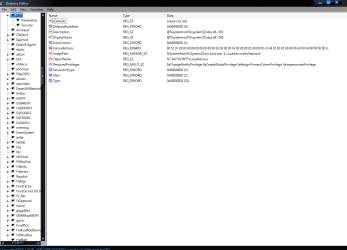
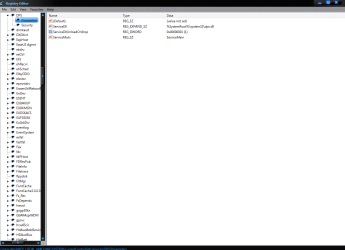
Navigate to this key in the registry by typing regedit in the start/search bar:

HKEY_LOCAL_MACHINE\SYSTEM\CurrentControlSet\services\DPS

Here are some screen shots of my current values I would send you an export of that key to merge with yours but I don't know if thats allowed. Anywho here are the various values of mine.
 

Attachments

  • 1.png
    1.png
    30.1 KB · Views: 100
  • 2.png
    2.png
    24.6 KB · Views: 73

My Computer My Computer

At a glance

Windows 7 Ultimate x64I76 x 1.5V DDR3 DIMM sockets supporting up to 2...GeForce GTX 580
Computer Manufacturer/Model Number
Alienware
OS
Windows 7 Ultimate x64
CPU
I7
Motherboard
GA-X58-USB3
Memory
6 x 1.5V DDR3 DIMM sockets supporting up to 24 GB of system
Graphics Card(s)
GeForce GTX 580
Sound Card
Realtek ALC892 codec 2/4/5.1/7.1-channel
Monitor(s) Displays
NEC Display Solutions E321 Black 32"
Screen Resolution
1366 x 768
Hard Drives
OCZ Colossus LT Series OCZSSD2-1CLSLT1T 3.5" 1TB SATA II MLC Internal Solid State Drive
PSU
XFX Black Edition XPS-850W-BES 850W ATX12V
Case
Antec
Cooling
Zalman
Keyboard
Microsoft
Mouse
Microsoft
Thanks Seth, mine looks the same apart from "display name", mine says "Diagnostic Policy Service" whereas yours repeats the description,"@%systemroot etc...."

I doubt if that is the problem but I am not an expert. :)
 

My Computer My Computer

At a glance

Windows 7 Ultimate x64Phenom II x4 9654gbAsus GTX 460 768mb
Computer Manufacturer/Model Number
self-built
OS
Windows 7 Ultimate x64
CPU
Phenom II x4 965
Motherboard
GA-MA785GT-UD3H
Memory
4gb
Graphics Card(s)
Asus GTX 460 768mb
Sound Card
Asus Xonar DX
Monitor(s) Displays
BenQ G2222HDL
Hard Drives
OCZ Vertex 2E 60gb

WD 1TB Caviar Green
PSU
Antec True Power New 650w
Case
CM 690 II
Cooling
Hyper 212+

My Computer My Computer

At a glance

Windows 7 Ultimate x64I76 x 1.5V DDR3 DIMM sockets supporting up to 2...GeForce GTX 580
Computer Manufacturer/Model Number
Alienware
OS
Windows 7 Ultimate x64
CPU
I7
Motherboard
GA-X58-USB3
Memory
6 x 1.5V DDR3 DIMM sockets supporting up to 24 GB of system
Graphics Card(s)
GeForce GTX 580
Sound Card
Realtek ALC892 codec 2/4/5.1/7.1-channel
Monitor(s) Displays
NEC Display Solutions E321 Black 32"
Screen Resolution
1366 x 768
Hard Drives
OCZ Colossus LT Series OCZSSD2-1CLSLT1T 3.5" 1TB SATA II MLC Internal Solid State Drive
PSU
XFX Black Edition XPS-850W-BES 850W ATX12V
Case
Antec
Cooling
Zalman
Keyboard
Microsoft
Mouse
Microsoft
Thanks Seth but all the responses to that are about getting him connected, they do not address the Diagnostic problem.
 

My Computer My Computer

At a glance

Windows 7 Ultimate x64Phenom II x4 9654gbAsus GTX 460 768mb
Computer Manufacturer/Model Number
self-built
OS
Windows 7 Ultimate x64
CPU
Phenom II x4 965
Motherboard
GA-MA785GT-UD3H
Memory
4gb
Graphics Card(s)
Asus GTX 460 768mb
Sound Card
Asus Xonar DX
Monitor(s) Displays
BenQ G2222HDL
Hard Drives
OCZ Vertex 2E 60gb

WD 1TB Caviar Green
PSU
Antec True Power New 650w
Case
CM 690 II
Cooling
Hyper 212+
Back
Top