Solved How to set date format in Word 2002

daniellouwrens

New member
Member
VIP
Local time
8:37 AM
Messages
173
Hi

When I open word and select "Contemporary Fax" the date automatically come up in the MM/DD/YYYY format and I need DD/MM/YYYY as I live in Australia.

How do I fix it so it is the format I need.

I have tried Insert Date, which is set on English US, selecting English Australia then default Default but it just reverts next time I open a Contemporary Fax.

Thanks

Daniel
 

My Computer My Computer

At a glance

Microsoft Windows 7 Professional 32-bit 7601 ...Intel(R) Core(TM)2 Quad CPU Q8300 @ 2.50GHz4.00 GBNVIDIA GeForce GT 220
Computer type
PC/Desktop
Computer Manufacturer/Model Number
Multimedia PC MEDION® Akoya® E7330 D
OS
Microsoft Windows 7 Professional 32-bit 7601 Multiprocessor Free Service Pack 1
CPU
Intel(R) Core(TM)2 Quad CPU Q8300 @ 2.50GHz
Motherboard
MEDIONPC MS-7366
Memory
4.00 GB
Graphics Card(s)
NVIDIA GeForce GT 220
Sound Card
(1) High Definition Audio Device (2) High Definition Audio
Screen Resolution
1920 x 1080 x 32 bits (4294967296 colors) @ 60 Hz
Hard Drives
(1) WDC WD10EZEX-00WN4A0 ATA Device (2) WDC WD6400AACS-00G8B1 ATA Device (3) Generic Flash HS-CF USB Device (4) Generic Flash HS-MS/SD USB Device (5) Generic Flash HS-SM USB Device (6) HP Officejet 5740 s USB Device (7) USB Flash Disk USB

My Computer My Computer

At a glance

Windows 7 Home Premium 64bitIntel(R) Core(TM) i3-2120 CPU @ 3.30GHz3.00 GB(1) Intel(R) HD Graphics (2) VNC Mirror Driver
Computer type
PC/Desktop
Computer Manufacturer/Model Number
Packard Bell
OS
Windows 7 Home Premium 64bit
CPU
Intel(R) Core(TM) i3-2120 CPU @ 3.30GHz
Motherboard
Packard Bell IPISB-AG
Memory
3.00 GB
Graphics Card(s)
(1) Intel(R) HD Graphics (2) VNC Mirror Driver
Sound Card
Realtek High Definition Audio
Monitor(s) Displays
AIO LCD
Screen Resolution
1920 x 1080
Hard Drives
WDC WD10EADX-22TDHB0 ATA Device
Fixed hard disk media
4 partitions
931.51 GB
Keyboard
Wireless
Mouse
Wireless
Antivirus
Microsoft Security Essentials
Browser
IE; Firefox
Other Info
Also:
Samsung N220 Plus Netbook - Windows 7 Home
HP laptop
iPad 5
Hello Daniel -

See if this works.

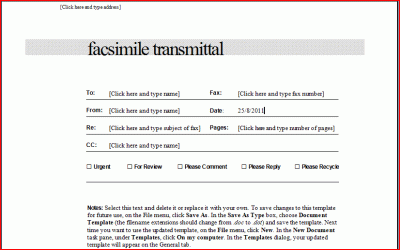
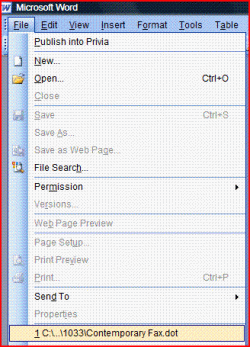
Open Windows Explorer and search for Contemporary Fax.dot (it is probably in C:\Program Files\Microsoft Office\Templates\1033).

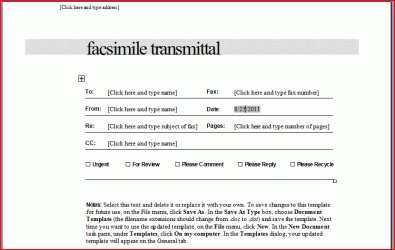
When you locate the file, double click on it; Word launches and opens the Contemporary Fax template.

FAX-1.GIF


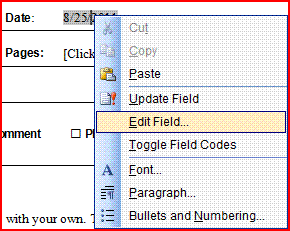
Right click on the Date field.

Scroll down the pop up list and click on Edit Field...

FAX-2.GIF


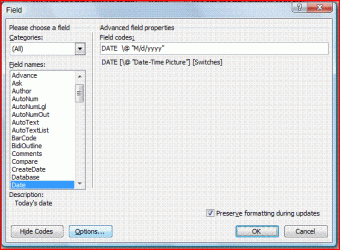
The Field window opens and displays the current Date formats: of the date field.

FAX-3.GIF


Click the Field Codes button; the Field window changes.

FAX-4.GIF


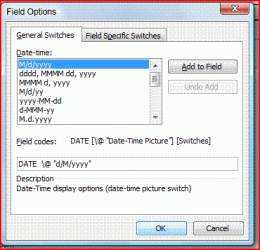
Click the Options... button; the Field Options window opens.

Change the Field codes: text box to read:
DATE \@ "d/M/yyyy"
FAX-5.GIF


Click the OK button; the Field Options window closes and you return to the Field window.

FAX-6.GIF


Click the OK button; the Field window closes and the template Date field is updated.

FAX-7.GIF


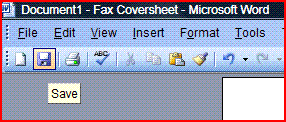
Save the template.

FAX-8.GIF


To verify, Close the Contemporary Fax.dot template then reopen it.

FAX-9.GIF


The Date field format should display as desired.

FAX-10.GIF


Regards,
GEWB
 

My Computer My Computer

At a glance

Linux Mint / XP / Win7 Home, Pro, Ultimate / ...
Computer type
PC/Desktop
Computer Manufacturer/Model Number
(7 different computers booting up to 10 systems)
OS
Linux Mint / XP / Win7 Home, Pro, Ultimate / Win8.1 / Win10
Other Info
Four desktops, two laptops, one notebook and one tablet
GEWB

thanks for your help, your advice was spot on.

Cheers

Daniel
 

My Computer My Computer

At a glance

Microsoft Windows 7 Professional 32-bit 7601 ...Intel(R) Core(TM)2 Quad CPU Q8300 @ 2.50GHz4.00 GBNVIDIA GeForce GT 220
Computer type
PC/Desktop
Computer Manufacturer/Model Number
Multimedia PC MEDION® Akoya® E7330 D
OS
Microsoft Windows 7 Professional 32-bit 7601 Multiprocessor Free Service Pack 1
CPU
Intel(R) Core(TM)2 Quad CPU Q8300 @ 2.50GHz
Motherboard
MEDIONPC MS-7366
Memory
4.00 GB
Graphics Card(s)
NVIDIA GeForce GT 220
Sound Card
(1) High Definition Audio Device (2) High Definition Audio
Screen Resolution
1920 x 1080 x 32 bits (4294967296 colors) @ 60 Hz
Hard Drives
(1) WDC WD10EZEX-00WN4A0 ATA Device (2) WDC WD6400AACS-00G8B1 ATA Device (3) Generic Flash HS-CF USB Device (4) Generic Flash HS-MS/SD USB Device (5) Generic Flash HS-SM USB Device (6) HP Officejet 5740 s USB Device (7) USB Flash Disk USB
GEWB

thanks for your help, your advice was spot on.

Cheers

Daniel

You're welcome - glad it worked out.

Can you can mark the thread "Solved" to help out others searching for a solution to the same problem?

Regards,
GEWB
 

My Computer My Computer

At a glance

Linux Mint / XP / Win7 Home, Pro, Ultimate / ...
Computer type
PC/Desktop
Computer Manufacturer/Model Number
(7 different computers booting up to 10 systems)
OS
Linux Mint / XP / Win7 Home, Pro, Ultimate / Win8.1 / Win10
Other Info
Four desktops, two laptops, one notebook and one tablet
You're welcome - glad it worked out.

Can you can mark the thread "Solved" to help out others searching for a solution to the same problem?

Regards,
GEWB

Hi

it seems the thread is already marked as solved.

Cheers

Daniel
 

My Computer My Computer

At a glance

Microsoft Windows 7 Professional 32-bit 7601 ...Intel(R) Core(TM)2 Quad CPU Q8300 @ 2.50GHz4.00 GBNVIDIA GeForce GT 220
Computer type
PC/Desktop
Computer Manufacturer/Model Number
Multimedia PC MEDION® Akoya® E7330 D
OS
Microsoft Windows 7 Professional 32-bit 7601 Multiprocessor Free Service Pack 1
CPU
Intel(R) Core(TM)2 Quad CPU Q8300 @ 2.50GHz
Motherboard
MEDIONPC MS-7366
Memory
4.00 GB
Graphics Card(s)
NVIDIA GeForce GT 220
Sound Card
(1) High Definition Audio Device (2) High Definition Audio
Screen Resolution
1920 x 1080 x 32 bits (4294967296 colors) @ 60 Hz
Hard Drives
(1) WDC WD10EZEX-00WN4A0 ATA Device (2) WDC WD6400AACS-00G8B1 ATA Device (3) Generic Flash HS-CF USB Device (4) Generic Flash HS-MS/SD USB Device (5) Generic Flash HS-SM USB Device (6) HP Officejet 5740 s USB Device (7) USB Flash Disk USB
My Computer My Computer

At a glance

Linux Mint / XP / Win7 Home, Pro, Ultimate / ...
Computer type
PC/Desktop
Computer Manufacturer/Model Number
(7 different computers booting up to 10 systems)
OS
Linux Mint / XP / Win7 Home, Pro, Ultimate / Win8.1 / Win10
Other Info
Four desktops, two laptops, one notebook and one tablet
Back
Top