Smartphone video no audio with shark codec

allend66

Brit on the lam...
Guru
Local time
11:35 PM
Messages
385
Location
The Mighty Maspujols, Spain
Just upgraded my brick to an LG Optimus ME smartphone, and the video it records is soundless on my x64 Home Premium box with shark007 codec pack (3.0.3).

I've tried "reset all" then "Shark007 suggested settings". I've also tried messing with various things in the audio tab, but still the .3gp video files playback soundless. Below is the result of the "analyse file" button:

General
Complete name : B:\MOV002.3gp
Format : MPEG-4
Format profile : 3GPP Media Release 4
Codec ID : 3gp4
File size : 2.07 MiB
Duration : 12s 277ms
Overall bit rate : 1 414 Kbps
Law rating : (empty)
Released date : 0
Encoded date : UTC 2011-08-22 20:31:13
Tagged date : UTC 2011-08-22 20:31:13
Classification : (empty)
Video
ID : 2
Format : MPEG-4 Visual
Format profile : Simple@L0
Format settings, BVOP : Yes
Format settings, QPel : No
Format settings, GMC : No warppoints
Format settings, Matrix : Default (H.263)
Codec ID : 20
Duration : 12s 277ms
Bit rate mode : Constant
Bit rate : 1 398 Kbps
Nominal bit rate : 1 500 Kbps
Width : 640 pixels
Height : 480 pixels
Display aspect ratio : 4:3
Frame rate mode : Variable
Frame rate : 24.110 fps
Minimum frame rate : 10.417 fps
Maximum frame rate : 34.483 fps
Color space : YUV
Bit depth : 8 bits
Scan type : Progressive
Compression mode : Lossy
Bits/(Pixel*Frame) : 0.189
Stream size : 2.05 MiB (99%)
Language : English
Encoded date : UTC 2011-08-22 20:31:13
Tagged date : UTC 2011-08-22 20:31:13
Audio
ID : 1
Format : AMR
Format/Info : Adaptive Multi-Rate
Format profile : Narrow band
Codec ID : samr
Duration : 12s 220ms
Bit rate mode : Variable
Bit rate : 12.3 Kbps
Channel(s) : 1 channel
Sampling rate : 8 000 Hz
Bit depth : 13 bits
Stream size : 18.3 KiB (1%)
Writing library : pvmm
Language : English
Encoded date : UTC 2011-08-22 20:31:13
Tagged date : UTC 2011-08-22 20:31:13

---------

If anyone could assist, I'd be grateful. My prefered media player is WMP12. (Media Centre doesn't even open the file)
Regards
D
 
Last edited:

My Computer My Computer

Computer Manufacturer/Model Number
Toshiba Satellite L500
OS
Windows 7 Home Premium x64 OEM --> RTM clean install
CPU
Intel T4400
Motherboard
? - laptop inbuilt ?
Memory
4Gb
Graphics Card(s)
? - Mobile Intel(R) 4 Series Express Chipset Family ?
Sound Card
Realtek
Monitor(s) Displays
? + extended to a 42" LG55PC plasma tele!
Screen Resolution
1366 * 768
Hard Drives
320Gb 5500rpm
PSU
?
Case
?
Cooling
?
Internet Speed
3Meg, when it works.
Other Info
A LOWLY LAPTOP!

My Computer My Computer

Computer Manufacturer/Model Number
Selfbuilt
OS
Windows 7 Ultimate 64bit
CPU
i7 2600k
Motherboard
asus P8Z68-V LE
Memory
16GB (4x4) corsair vengeance
Graphics Card(s)
Intel HD3000 iGPU / AMD HD6870 1024MB
Sound Card
bitstreamed to an Onkyo 609
Monitor(s) Displays
Asus VE278 27" LED / Bravia EX7 60" LED
Screen Resolution
native 1080p x2
Hard Drives
4x 2TB int. + 2x 2TB external and a SSD for the boot drive.
PSU
650w Antec
Case
NZXT tempest evo
Cooling
air/stock
Keyboard
Dell
Mouse
logitech m505
Internet Speed
dual: cable/blackberry tether for travel use
Other Info
BD re-writer //
asus notebook G73Jw
Thanks for that Shark, nearly there!
I installed from your link, then tried to play my video file. The same - video with no sound. I then ran as admin and reset all, giving me a video playback super slow (of approx 5 frames a second) but with sound.
Run as admin --> use shark recommended settings gives the original result of video playing at correct speed, without sound.

What am I doing wrong?
Thanks
D
 

My Computer My Computer

Computer Manufacturer/Model Number
Toshiba Satellite L500
OS
Windows 7 Home Premium x64 OEM --> RTM clean install
CPU
Intel T4400
Motherboard
? - laptop inbuilt ?
Memory
4Gb
Graphics Card(s)
? - Mobile Intel(R) 4 Series Express Chipset Family ?
Sound Card
Realtek
Monitor(s) Displays
? + extended to a 42" LG55PC plasma tele!
Screen Resolution
1366 * 768
Hard Drives
320Gb 5500rpm
PSU
?
Case
?
Cooling
?
Internet Speed
3Meg, when it works.
Other Info
A LOWLY LAPTOP!
On the Config TAB, open FFDshow audio config
with 'codecs' selected on the leftside, change 'Uncompressed', from 'disabled' to 'all supported'.
 

My Computer My Computer

Computer Manufacturer/Model Number
Selfbuilt
OS
Windows 7 Ultimate 64bit
CPU
i7 2600k
Motherboard
asus P8Z68-V LE
Memory
16GB (4x4) corsair vengeance
Graphics Card(s)
Intel HD3000 iGPU / AMD HD6870 1024MB
Sound Card
bitstreamed to an Onkyo 609
Monitor(s) Displays
Asus VE278 27" LED / Bravia EX7 60" LED
Screen Resolution
native 1080p x2
Hard Drives
4x 2TB int. + 2x 2TB external and a SSD for the boot drive.
PSU
650w Antec
Case
NZXT tempest evo
Cooling
air/stock
Keyboard
Dell
Mouse
logitech m505
Internet Speed
dual: cable/blackberry tether for travel use
Other Info
BD re-writer //
asus notebook G73Jw
Tried that, same thing = normal speed video without any audio. (as admin)

Do you have another suggestion, please?!
 

My Computer My Computer

Computer Manufacturer/Model Number
Toshiba Satellite L500
OS
Windows 7 Home Premium x64 OEM --> RTM clean install
CPU
Intel T4400
Motherboard
? - laptop inbuilt ?
Memory
4Gb
Graphics Card(s)
? - Mobile Intel(R) 4 Series Express Chipset Family ?
Sound Card
Realtek
Monitor(s) Displays
? + extended to a 42" LG55PC plasma tele!
Screen Resolution
1366 * 768
Hard Drives
320Gb 5500rpm
PSU
?
Case
?
Cooling
?
Internet Speed
3Meg, when it works.
Other Info
A LOWLY LAPTOP!
Do you have another suggestion, please?!

uhhuh.
On the Audio TAB, click the button, setup LAV audio, close the popup window
test
 

My Computer My Computer

Computer Manufacturer/Model Number
Selfbuilt
OS
Windows 7 Ultimate 64bit
CPU
i7 2600k
Motherboard
asus P8Z68-V LE
Memory
16GB (4x4) corsair vengeance
Graphics Card(s)
Intel HD3000 iGPU / AMD HD6870 1024MB
Sound Card
bitstreamed to an Onkyo 609
Monitor(s) Displays
Asus VE278 27" LED / Bravia EX7 60" LED
Screen Resolution
native 1080p x2
Hard Drives
4x 2TB int. + 2x 2TB external and a SSD for the boot drive.
PSU
650w Antec
Case
NZXT tempest evo
Cooling
air/stock
Keyboard
Dell
Mouse
logitech m505
Internet Speed
dual: cable/blackberry tether for travel use
Other Info
BD re-writer //
asus notebook G73Jw
On the Audio TAB, click the button, setup LAV audio, close the popup window
test

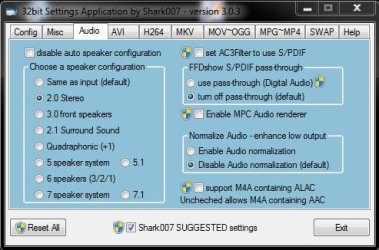
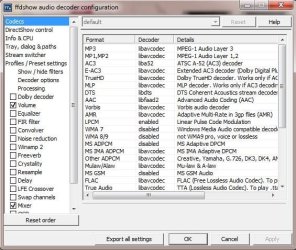
Sorry if I seem to be thick but I'm a bit lost: You say on the audio tab click the button - there aren't any buttons, only radio buttons - which I'll assume you mean. Then setup LAV audio, but clicking on any and all of the radio buttons doesn't bring forth anything about LAV audio.

If however you mean on the Config tab and audio button (I suspect not but gotta try posibilities) again there is no button to setup LAV audio, and as a check I've searched all the program for LAV audio - can't find it anywhere.

Are we on the same page - I upgraded to version 3.0.3?
Thanks for your patience.
 

Attachments

  • Capture.JPG
    Capture.JPG
    42.6 KB · Views: 3
  • Capture2.JPG
    Capture2.JPG
    71.7 KB · Views: 3

My Computer My Computer

Computer Manufacturer/Model Number
Toshiba Satellite L500
OS
Windows 7 Home Premium x64 OEM --> RTM clean install
CPU
Intel T4400
Motherboard
? - laptop inbuilt ?
Memory
4Gb
Graphics Card(s)
? - Mobile Intel(R) 4 Series Express Chipset Family ?
Sound Card
Realtek
Monitor(s) Displays
? + extended to a 42" LG55PC plasma tele!
Screen Resolution
1366 * 768
Hard Drives
320Gb 5500rpm
PSU
?
Case
?
Cooling
?
Internet Speed
3Meg, when it works.
Other Info
A LOWLY LAPTOP!
UNINSTALL and re-install version 303.

you need to do a clean install of the software, not an upgrade
 

My Computer My Computer

Computer Manufacturer/Model Number
Selfbuilt
OS
Windows 7 Ultimate 64bit
CPU
i7 2600k
Motherboard
asus P8Z68-V LE
Memory
16GB (4x4) corsair vengeance
Graphics Card(s)
Intel HD3000 iGPU / AMD HD6870 1024MB
Sound Card
bitstreamed to an Onkyo 609
Monitor(s) Displays
Asus VE278 27" LED / Bravia EX7 60" LED
Screen Resolution
native 1080p x2
Hard Drives
4x 2TB int. + 2x 2TB external and a SSD for the boot drive.
PSU
650w Antec
Case
NZXT tempest evo
Cooling
air/stock
Keyboard
Dell
Mouse
logitech m505
Internet Speed
dual: cable/blackberry tether for travel use
Other Info
BD re-writer //
asus notebook G73Jw
Thanks Shark, I`ll try it when I`m back from holidays.
As a workaround I`d installed MPCStar media player, but later found on my mobile`s sd card a pc suite app that converts video from 3gpp to mp4.

Either way I`ll fresh instal your codec pack , thanks for the replies
regards
D
 

My Computer My Computer

Computer Manufacturer/Model Number
Toshiba Satellite L500
OS
Windows 7 Home Premium x64 OEM --> RTM clean install
CPU
Intel T4400
Motherboard
? - laptop inbuilt ?
Memory
4Gb
Graphics Card(s)
? - Mobile Intel(R) 4 Series Express Chipset Family ?
Sound Card
Realtek
Monitor(s) Displays
? + extended to a 42" LG55PC plasma tele!
Screen Resolution
1366 * 768
Hard Drives
320Gb 5500rpm
PSU
?
Case
?
Cooling
?
Internet Speed
3Meg, when it works.
Other Info
A LOWLY LAPTOP!
Back
Top