Unable to Get WEI Rating

master007

New member
Local time
6:06 PM
Messages
12
Location
Delhi
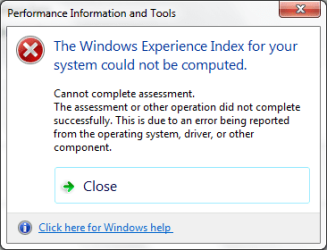
I have tried it before on windows 7 beta Build 6xxx x64 and now again when i installed windows 7 RC build 7100 x64 I'm unable to get the WEI rating.

Both time, I got an error when the progress bar for the procedure completes.

I have installed latest nvidia drivers which support windows 7

I ran that also via cmd(as admin) using command winsat formal -v
 

Attachments
  • 02.png
    02.png
    8.7 KB · Views: 22
  • 01.png
    01.png
    11.2 KB · Views: 78

My Computer My Computer

OS
XP SP3 x86, Seven Professional MSDN
CPU
Intel C2D E7300 2.66GHz
Motherboard
Gigabyte GA-G31M-S2L
Memory
Kingston 2x2GB 800MHz DDR2
Graphics Card(s)
Palit 9600GT 512MB DDR3
Sound Card
Onboard
Monitor(s) Displays
AOC 917w
Screen Resolution
1440*900
Hard Drives
Western Digital 500GB AAKS
PSU
Coolermaster 460w
Cooling
Stock
Keyboard
Microsoft
Mouse
Logitech
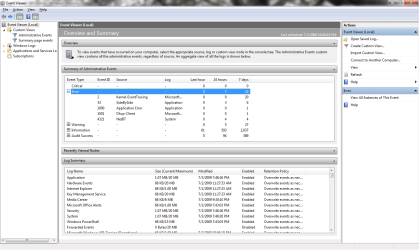
open Windows event viewer see that if any error is Listed there. posting the screen shot would be nice.
 

My Computer My Computer

Computer Manufacturer/Model Number
Custom made
OS
Window 7 build 7600, Xp pro(VM)
CPU
Amd Athlon 2000 xp+
Motherboard
Asus x series
Memory
kingstone(1gb+256MB)
Graphics Card(s)
Nvdia 6200(256 mb+255mb(shared))
Sound Card
soundmax
Monitor(s) Displays
Lg Flatron w1943
Screen Resolution
1360x768
Hard Drives
segate 80GB
Case
i-ball
Keyboard
i-ball
Mouse
i-ball
Internet Speed
256kbps up and 256 kbps down
open Windows event viewer see that if any error is Listed there. posting the screen shot would be nice.

i guess no error there. i ran it within last hour only
 

Attachments

  • 001.png
    001.png
    43.1 KB · Views: 84

My Computer My Computer

OS
XP SP3 x86, Seven Professional MSDN
CPU
Intel C2D E7300 2.66GHz
Motherboard
Gigabyte GA-G31M-S2L
Memory
Kingston 2x2GB 800MHz DDR2
Graphics Card(s)
Palit 9600GT 512MB DDR3
Sound Card
Onboard
Monitor(s) Displays
AOC 917w
Screen Resolution
1440*900
Hard Drives
Western Digital 500GB AAKS
PSU
Coolermaster 460w
Cooling
Stock
Keyboard
Microsoft
Mouse
Logitech
you are using vista right??
 

My Computer My Computer

Computer Manufacturer/Model Number
Custom made
OS
Window 7 build 7600, Xp pro(VM)
CPU
Amd Athlon 2000 xp+
Motherboard
Asus x series
Memory
kingstone(1gb+256MB)
Graphics Card(s)
Nvdia 6200(256 mb+255mb(shared))
Sound Card
soundmax
Monitor(s) Displays
Lg Flatron w1943
Screen Resolution
1360x768
Hard Drives
segate 80GB
Case
i-ball
Keyboard
i-ball
Mouse
i-ball
Internet Speed
256kbps up and 256 kbps down

My Computer My Computer

OS
XP SP3 x86, Seven Professional MSDN
CPU
Intel C2D E7300 2.66GHz
Motherboard
Gigabyte GA-G31M-S2L
Memory
Kingston 2x2GB 800MHz DDR2
Graphics Card(s)
Palit 9600GT 512MB DDR3
Sound Card
Onboard
Monitor(s) Displays
AOC 917w
Screen Resolution
1440*900
Hard Drives
Western Digital 500GB AAKS
PSU
Coolermaster 460w
Cooling
Stock
Keyboard
Microsoft
Mouse
Logitech
What display driver are you using?
Is it a WDDM driver?
 

My Computer My Computer

Computer Manufacturer/Model Number
Custom made
OS
Window 7 build 7600, Xp pro(VM)
CPU
Amd Athlon 2000 xp+
Motherboard
Asus x series
Memory
kingstone(1gb+256MB)
Graphics Card(s)
Nvdia 6200(256 mb+255mb(shared))
Sound Card
soundmax
Monitor(s) Displays
Lg Flatron w1943
Screen Resolution
1360x768
Hard Drives
segate 80GB
Case
i-ball
Keyboard
i-ball
Mouse
i-ball
Internet Speed
256kbps up and 256 kbps down
What display driver are you using?
Is it a WDDM driver?

i dont know, i downloaded driver version 186.18 from nvidia.com. i selected the option for windows seven 64-bit.
 

My Computer My Computer

OS
XP SP3 x86, Seven Professional MSDN
CPU
Intel C2D E7300 2.66GHz
Motherboard
Gigabyte GA-G31M-S2L
Memory
Kingston 2x2GB 800MHz DDR2
Graphics Card(s)
Palit 9600GT 512MB DDR3
Sound Card
Onboard
Monitor(s) Displays
AOC 917w
Screen Resolution
1440*900
Hard Drives
Western Digital 500GB AAKS
PSU
Coolermaster 460w
Cooling
Stock
Keyboard
Microsoft
Mouse
Logitech
use windows update to update the driver and try.
 

My Computer My Computer

Computer Manufacturer/Model Number
Custom made
OS
Window 7 build 7600, Xp pro(VM)
CPU
Amd Athlon 2000 xp+
Motherboard
Asus x series
Memory
kingstone(1gb+256MB)
Graphics Card(s)
Nvdia 6200(256 mb+255mb(shared))
Sound Card
soundmax
Monitor(s) Displays
Lg Flatron w1943
Screen Resolution
1360x768
Hard Drives
segate 80GB
Case
i-ball
Keyboard
i-ball
Mouse
i-ball
Internet Speed
256kbps up and 256 kbps down
WEI problems: possible solution

I have tried it before on windows 7 beta Build 6xxx x64 and now again when i installed windows 7 RC build 7100 x64 I'm unable to get the WEI rating.

Both time, I got an error when the progress bar for the procedure completes.

I have installed latest nvidia drivers which support windows 7

I ran that also via cmd(as admin) using command winsat formal -v


Have you PINNACLE STUDIO or something like that installed?
That was my problem too for many tries to get WEI running til the end.
I uninstalled the pinnacle software and that was the deal.
 

My Computer My Computer

OS
w7 ultimate x64
CPU
i7 920
Motherboard
gigabyte x58a-ud3r
Memory
24 gb
Graphics Card(s)
2x ati firepro 4800
Sound Card
onboard realtek
Monitor(s) Displays
4 x hannsg hh281 (27,5")
Screen Resolution
1920x1200
Hard Drives
2 x 500 gb seagate barracuda = raid0
1 x intel x25 ssd
1 x crucial realssd c300
1 x revodrive3 x2
Hello Master007, welcome.

Can you open Device Manager? Look around there and see if anything is not recognized etc.

~Lordbob
 

My Computer My Computer

Computer Manufacturer/Model Number
Hera
OS
Windows 7 Ultimate x64, Mint 9
CPU
Intel i5-2500k
Motherboard
ASUS P8P67 Pro
Memory
2x 4Gb Corsair VENGEANCE DDR3-1600
Graphics Card(s)
NVidia GeForce N260GTX Twin Frozr
Sound Card
Realtek HD OnBoard Audio
Monitor(s) Displays
ASUS 24" Monitor
Screen Resolution
1920x1080
Hard Drives
G.SKILL Phoenix Series 60GB SATA II MLC Internal Solid State Drive (SSD)
SAMSUNG Spinpoint F3R 1TB 7200 RPM 32MB Cache SATA II
PSU
Cooler Master Real Power Pro 750W
Case
Cooler Master Haf 932
Cooling
Fans
Keyboard
Razer Tarantula
Mouse
Razer Lachesis
Internet Speed
not fast enough
use windows update to update the driver and try.
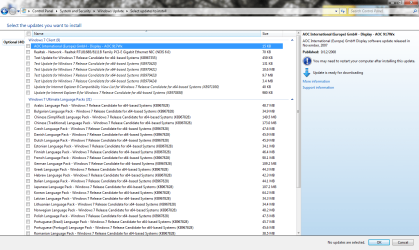
There is no option for any display drivers update in windows update. Should I install the test updates. (Attached the screenshot)

Have you PINNACLE STUDIO or something like that installed?
That was my problem too for many tries to get WEI running til the end.
I uninstalled the pinnacle software and that was the deal.
No, never installed that. The only softwares I installed are
NVIDIA Drivers
Ares
GOM Player
KMPlayer
ESET NOD32
WinRAR
Flashget
PowerISO
uTorrent
Office 2010 Technical Preview
Nitro PDF x64
Opera, Firefox

Btw, i tried updating WEI after installing NVIDIA drivers only.

Hello Master007, welcome.

Can you open Device Manager? Look around there and see if anything is not recognized etc.

~Lordbob
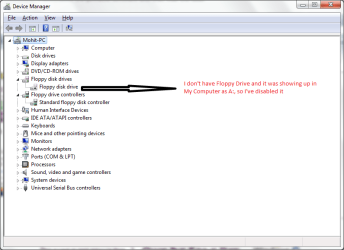
Thanks buddy. There is nothing unrecognized in there except for the floppy drive showing up which I don't have. Attached the screenshot
 

Attachments

  • Untitled.png
    Untitled.png
    67.3 KB · Views: 22
  • Untitled2.png
    Untitled2.png
    22.9 KB · Views: 38
Last edited:

My Computer My Computer

OS
XP SP3 x86, Seven Professional MSDN
CPU
Intel C2D E7300 2.66GHz
Motherboard
Gigabyte GA-G31M-S2L
Memory
Kingston 2x2GB 800MHz DDR2
Graphics Card(s)
Palit 9600GT 512MB DDR3
Sound Card
Onboard
Monitor(s) Displays
AOC 917w
Screen Resolution
1440*900
Hard Drives
Western Digital 500GB AAKS
PSU
Coolermaster 460w
Cooling
Stock
Keyboard
Microsoft
Mouse
Logitech
Install all the updates that you have on there.

After that, go into DM and update drivers from there.

~Lordbob
 

My Computer My Computer

Computer Manufacturer/Model Number
Hera
OS
Windows 7 Ultimate x64, Mint 9
CPU
Intel i5-2500k
Motherboard
ASUS P8P67 Pro
Memory
2x 4Gb Corsair VENGEANCE DDR3-1600
Graphics Card(s)
NVidia GeForce N260GTX Twin Frozr
Sound Card
Realtek HD OnBoard Audio
Monitor(s) Displays
ASUS 24" Monitor
Screen Resolution
1920x1080
Hard Drives
G.SKILL Phoenix Series 60GB SATA II MLC Internal Solid State Drive (SSD)
SAMSUNG Spinpoint F3R 1TB 7200 RPM 32MB Cache SATA II
PSU
Cooler Master Real Power Pro 750W
Case
Cooler Master Haf 932
Cooling
Fans
Keyboard
Razer Tarantula
Mouse
Razer Lachesis
Internet Speed
not fast enough
Install all the updates that you have on there.

After that, go into DM and update drivers from there.

~Lordbob

Installed all the updates & all the device drivers are up-to-date. Still the problem persists.
Has it anything to do with that Floppy Disk Drive being disabled
 

My Computer My Computer

OS
XP SP3 x86, Seven Professional MSDN
CPU
Intel C2D E7300 2.66GHz
Motherboard
Gigabyte GA-G31M-S2L
Memory
Kingston 2x2GB 800MHz DDR2
Graphics Card(s)
Palit 9600GT 512MB DDR3
Sound Card
Onboard
Monitor(s) Displays
AOC 917w
Screen Resolution
1440*900
Hard Drives
Western Digital 500GB AAKS
PSU
Coolermaster 460w
Cooling
Stock
Keyboard
Microsoft
Mouse
Logitech
Installed all the updates & all the device drivers are up-to-date. Still the problem persists.
Has it anything to do with that Floppy Disk Drive being disabled
Interesting. I doubt the floppy is causing it though.

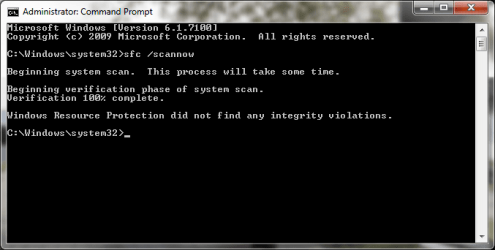
Strange......... Try this: Open cmd as an admin, and type "sfc /scannow"

~Lordbob
 

My Computer My Computer

Computer Manufacturer/Model Number
Hera
OS
Windows 7 Ultimate x64, Mint 9
CPU
Intel i5-2500k
Motherboard
ASUS P8P67 Pro
Memory
2x 4Gb Corsair VENGEANCE DDR3-1600
Graphics Card(s)
NVidia GeForce N260GTX Twin Frozr
Sound Card
Realtek HD OnBoard Audio
Monitor(s) Displays
ASUS 24" Monitor
Screen Resolution
1920x1080
Hard Drives
G.SKILL Phoenix Series 60GB SATA II MLC Internal Solid State Drive (SSD)
SAMSUNG Spinpoint F3R 1TB 7200 RPM 32MB Cache SATA II
PSU
Cooler Master Real Power Pro 750W
Case
Cooler Master Haf 932
Cooling
Fans
Keyboard
Razer Tarantula
Mouse
Razer Lachesis
Internet Speed
not fast enough
Interesting. I doubt the floppy is causing it though.

Strange......... Try this: Open cmd as an admin, and type "sfc /scannow"

~Lordbob
Result:
Windows Resource Protection did not find any integrity violations.
 

Attachments

  • Untitled45.png
    Untitled45.png
    15.2 KB · Views: 29

My Computer My Computer

OS
XP SP3 x86, Seven Professional MSDN
CPU
Intel C2D E7300 2.66GHz
Motherboard
Gigabyte GA-G31M-S2L
Memory
Kingston 2x2GB 800MHz DDR2
Graphics Card(s)
Palit 9600GT 512MB DDR3
Sound Card
Onboard
Monitor(s) Displays
AOC 917w
Screen Resolution
1440*900
Hard Drives
Western Digital 500GB AAKS
PSU
Coolermaster 460w
Cooling
Stock
Keyboard
Microsoft
Mouse
Logitech
Alright. Pop in your install (seven) disk, and select Setup. Choose Repair Install, and let it work.

~Lordbob
 

My Computer My Computer

Computer Manufacturer/Model Number
Hera
OS
Windows 7 Ultimate x64, Mint 9
CPU
Intel i5-2500k
Motherboard
ASUS P8P67 Pro
Memory
2x 4Gb Corsair VENGEANCE DDR3-1600
Graphics Card(s)
NVidia GeForce N260GTX Twin Frozr
Sound Card
Realtek HD OnBoard Audio
Monitor(s) Displays
ASUS 24" Monitor
Screen Resolution
1920x1080
Hard Drives
G.SKILL Phoenix Series 60GB SATA II MLC Internal Solid State Drive (SSD)
SAMSUNG Spinpoint F3R 1TB 7200 RPM 32MB Cache SATA II
PSU
Cooler Master Real Power Pro 750W
Case
Cooler Master Haf 932
Cooling
Fans
Keyboard
Razer Tarantula
Mouse
Razer Lachesis
Internet Speed
not fast enough
Alright. Pop in your install (seven) disk, and select Setup. Choose Repair Install, and let it work.

~Lordbob

could not find repair install option, not after booting the dvd nor after running it from my computer.
so did a complete reinstall after formatting. still the problem persists
 

My Computer My Computer

OS
XP SP3 x86, Seven Professional MSDN
CPU
Intel C2D E7300 2.66GHz
Motherboard
Gigabyte GA-G31M-S2L
Memory
Kingston 2x2GB 800MHz DDR2
Graphics Card(s)
Palit 9600GT 512MB DDR3
Sound Card
Onboard
Monitor(s) Displays
AOC 917w
Screen Resolution
1440*900
Hard Drives
Western Digital 500GB AAKS
PSU
Coolermaster 460w
Cooling
Stock
Keyboard
Microsoft
Mouse
Logitech
I had this problem before and all I could find to fix it was change the RC Key. I don't know why that would affect anything, as it was activated, but changing the Key solved my problem. :shock:
 

My Computer My Computer

OS
Windows 7 Build 7201 x 64
I had this problem before and all I could find to fix it was change the RC Key. I don't know why that would affect anything, as it was activated, but changing the Key solved my problem. :shock:
Interesting solution, but worth trying.

~Lordbob
 

My Computer My Computer

Computer Manufacturer/Model Number
Hera
OS
Windows 7 Ultimate x64, Mint 9
CPU
Intel i5-2500k
Motherboard
ASUS P8P67 Pro
Memory
2x 4Gb Corsair VENGEANCE DDR3-1600
Graphics Card(s)
NVidia GeForce N260GTX Twin Frozr
Sound Card
Realtek HD OnBoard Audio
Monitor(s) Displays
ASUS 24" Monitor
Screen Resolution
1920x1080
Hard Drives
G.SKILL Phoenix Series 60GB SATA II MLC Internal Solid State Drive (SSD)
SAMSUNG Spinpoint F3R 1TB 7200 RPM 32MB Cache SATA II
PSU
Cooler Master Real Power Pro 750W
Case
Cooler Master Haf 932
Cooling
Fans
Keyboard
Razer Tarantula
Mouse
Razer Lachesis
Internet Speed
not fast enough
I had this problem before and all I could find to fix it was change the RC Key. I don't know why that would affect anything, as it was activated, but changing the Key solved my problem. :shock:

Interesting solution, but worth trying.

~Lordbob

Tried it. Changed the key twice. Still the problem is there.
I said error appears at last and the last task of the procedure is Assessing Disk Performance, can the problem be at this part? btw i've installed it in a 50GB partition & free disk space on it is about 31GB
 

My Computer My Computer

OS
XP SP3 x86, Seven Professional MSDN
CPU
Intel C2D E7300 2.66GHz
Motherboard
Gigabyte GA-G31M-S2L
Memory
Kingston 2x2GB 800MHz DDR2
Graphics Card(s)
Palit 9600GT 512MB DDR3
Sound Card
Onboard
Monitor(s) Displays
AOC 917w
Screen Resolution
1440*900
Hard Drives
Western Digital 500GB AAKS
PSU
Coolermaster 460w
Cooling
Stock
Keyboard
Microsoft
Mouse
Logitech
Back
Top