
Solved Virtual PC and Ubuntu 11.04

Firewall, Chromium and Stellarium installed.

Busy with some administration and preference fine tuning.

Now installing Ubuntu 11.04 vm.....
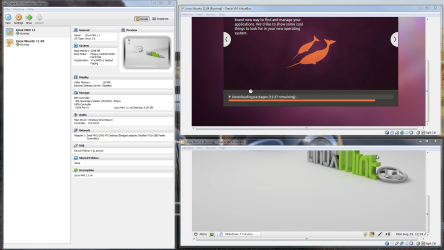
Capture.PNG
 
Last edited:

My Computer My Computer

Computer type
PC/Desktop
Computer Manufacturer/Model Number
Golden Mk. I.4
OS
Windows 10 Pro x64 ; Xubuntu x64
CPU
Intel i7 860 @ 2.80 GHz O/C'ed to 4.0GHz
Motherboard
Gigabyte P55A-UD3R Rev.1. Award BIOS F13
Memory
16GB Corsair Vengance DDR3 @ 661 MHz Dual Channel (9-9-9-24)
Graphics Card(s)
EVGA NVidia GTX 560 1024MB
Sound Card
Realtek Integrated
Monitor(s) Displays
Dual Samsung SyncMaster 2494HS
Screen Resolution
1920*1080 and 1920*1080
Hard Drives
1*Samsung 840 EVO 120GB SSD;
1*OCZ Vertex 2 60GB SSD;
2*Samsung F3 SpinPoint 1TB in RAID0;
1*Samsung F1 SpinPoint 1TB;
2*Western Digital 1TB External USB 3.0
1*Western Digital 500GB External USB 3.0
1*Seagate 500GB External USB 2.0
PSU
Thermaltake ToughPower QFan 750W
Case
Thermaltake Element S VK60001W2Z
Cooling
Corsair H60 Water Cooling, 2*230mm and 2*80mm case fans
Keyboard
Logitech G110
Mouse
Logitech MX518
Haven't messed with virtual PC in a very long time. Quick question. Already have dual boot win7 64/ubuntu 10.10 64. Can I install virtual PC then point this where ubuntu is already installed? It's on it's own disk. Tnks
 

My Computer My Computer

Computer type
PC/Desktop
Computer Manufacturer/Model Number
Home built
OS
Win7 Pro 64
CPU
2 X5670 2.93 Westmere processors
Motherboard
SuperMicro X8DTI-F
Memory
48GB
Graphics Card(s)
Ati 6950
Monitor(s) Displays
Dell 2408wfp
Hard Drives
256 SSD,1tb & 2tb spinner drives
Hi,

If I understand correctly, VirtualPC cannot run a Linux Distro (not Ubuntu anyway). For this, you require something like VirtualBox.

Its pretty straightforward - follow Kari's tutorial : its dead easy.

Regards,
Golden
 

My Computer My Computer

Computer type
PC/Desktop
Computer Manufacturer/Model Number
Golden Mk. I.4
OS
Windows 10 Pro x64 ; Xubuntu x64
CPU
Intel i7 860 @ 2.80 GHz O/C'ed to 4.0GHz
Motherboard
Gigabyte P55A-UD3R Rev.1. Award BIOS F13
Memory
16GB Corsair Vengance DDR3 @ 661 MHz Dual Channel (9-9-9-24)
Graphics Card(s)
EVGA NVidia GTX 560 1024MB
Sound Card
Realtek Integrated
Monitor(s) Displays
Dual Samsung SyncMaster 2494HS
Screen Resolution
1920*1080 and 1920*1080
Hard Drives
1*Samsung 840 EVO 120GB SSD;
1*OCZ Vertex 2 60GB SSD;
2*Samsung F3 SpinPoint 1TB in RAID0;
1*Samsung F1 SpinPoint 1TB;
2*Western Digital 1TB External USB 3.0
1*Western Digital 500GB External USB 3.0
1*Seagate 500GB External USB 2.0
PSU
Thermaltake ToughPower QFan 750W
Case
Thermaltake Element S VK60001W2Z
Cooling
Corsair H60 Water Cooling, 2*230mm and 2*80mm case fans
Keyboard
Logitech G110
Mouse
Logitech MX518
Thanks for the info. Will have to read up on it to see if it's worth installing it. Thanks.
 

My Computer My Computer

Computer type
PC/Desktop
Computer Manufacturer/Model Number
Home built
OS
Win7 Pro 64
CPU
2 X5670 2.93 Westmere processors
Motherboard
SuperMicro X8DTI-F
Memory
48GB
Graphics Card(s)
Ati 6950
Monitor(s) Displays
Dell 2408wfp
Hard Drives
256 SSD,1tb & 2tb spinner drives
Haven't messed with virtual PC in a very long time. Quick question. Already have dual boot win7 64/ubuntu 10.10 64. Can I install virtual PC then point this where ubuntu is already installed? It's on it's own disk. Tnks
As Golden already told you, Virtual PC is not the right tool for running Linux guest systems. Use Virtualbox or VMware.

To make a vhd (virtual hard disk) of your existing system like your Ubuntu, you need a tool that do the conversion. Here's one I've been using, works like a charm with Windows installations: Disk2vhd

I do not know nor have I used any disk to vhd converters on Linux.

Kari
 

My Computer My Computer

Computer type
Laptop
Computer Manufacturer/Model Number
HP ENVY 17-1150eg
OS
Windows 10 Pro x64 EN-GB
CPU
1.6 GHz Intel Core i7-720QM Processor
Memory
6 GB
Graphics Card(s)
ATI Mobility Radeon HD 5850 Graphics
Sound Card
Beats sound system with integrated subwoofer
Monitor(s) Displays
17" laptop display, 22" LED and 32" Full HD TV through HDMI
Screen Resolution
1600*900 (1), 1920*1080 (2&3)
Hard Drives
Internal: 2 x 500 GB SATA Hard Disk Drive 7200 rpm
External: 2TB for backups, 3TB USB3 network drive for media
Cooling
As Envy runs a bit warm, I have it on a Cooler Master pad
Keyboard
Logitech diNovo Media Desktop Laser (bluetooth)
Mouse
Logitech Performance Mouse MX
Internet Speed
50/10 Mbps VDSL
Antivirus
Windows Defender 4.3.9431.0
Browser
Maxthon 3.5.2., IE11
Thanks for the info. Been reading the manual on virtual box. Nothing pointing towards what I want to do. Have used vmware fusion on my previous Mac and was able to do something similar with bootcamp. Might look at vmware to see what they charge. Interesting to see ability to install Mac OS X in virtual box. Didn't think apple allowed vm OS X on anything but apple hardware.
 

My Computer My Computer

Computer type
PC/Desktop
Computer Manufacturer/Model Number
Home built
OS
Win7 Pro 64
CPU
2 X5670 2.93 Westmere processors
Motherboard
SuperMicro X8DTI-F
Memory
48GB
Graphics Card(s)
Ati 6950
Monitor(s) Displays
Dell 2408wfp
Hard Drives
256 SSD,1tb & 2tb spinner drives
Interesting to see ability to install Mac OS X in virtual box. Didn't think apple allowed vm OS X on anything but apple hardware.
They don't. Simply, installing Mac OSX on any other device, physical or virtual, than a Mac is strictly against EULA.

Kari
 

My Computer My Computer

Computer type
Laptop
Computer Manufacturer/Model Number
HP ENVY 17-1150eg
OS
Windows 10 Pro x64 EN-GB
CPU
1.6 GHz Intel Core i7-720QM Processor
Memory
6 GB
Graphics Card(s)
ATI Mobility Radeon HD 5850 Graphics
Sound Card
Beats sound system with integrated subwoofer
Monitor(s) Displays
17" laptop display, 22" LED and 32" Full HD TV through HDMI
Screen Resolution
1600*900 (1), 1920*1080 (2&3)
Hard Drives
Internal: 2 x 500 GB SATA Hard Disk Drive 7200 rpm
External: 2TB for backups, 3TB USB3 network drive for media
Cooling
As Envy runs a bit warm, I have it on a Cooler Master pad
Keyboard
Logitech diNovo Media Desktop Laser (bluetooth)
Mouse
Logitech Performance Mouse MX
Internet Speed
50/10 Mbps VDSL
Antivirus
Windows Defender 4.3.9431.0
Browser
Maxthon 3.5.2., IE11
Back
Top