how to use DirectX 9 and 10

berabbit

New member
Local time
1:36 AM
Messages
8
hi... i am playing crysis 2 and i dont get enough fps....
gamers tell me to make the game run with Directx 10 as the game is compatible with it...
I would like to know the steps required to make any supported game run with Directx 9 or 10 mode.
thanking you in anticipation
 

My Computer My Computer

At a glance

windows 7 Home Premium 64bitintel dual core P6200 2.1 Ghz4gb ddr3HD6570M 2gb ddr3
Computer Manufacturer/Model Number
ASUS a42jp vx029v
OS
windows 7 Home Premium 64bit
CPU
intel dual core P6200 2.1 Ghz
Memory
4gb ddr3
Graphics Card(s)
HD6570M 2gb ddr3
Screen Resolution
1366x768
Hard Drives
500 gb
Internet Speed
512 Kbps
hi... i am playing crysis 2 and i dont get enough fps....
gamers tell me to make the game run with Directx 10 as the game is compatible with it...
I would like to know the steps required to make any supported game run with Directx 9 or 10 mode.
thanking you in anticipation


help!
 

My Computer My Computer

At a glance

windows 7 Home Premium 64bitintel dual core P6200 2.1 Ghz4gb ddr3HD6570M 2gb ddr3
Computer Manufacturer/Model Number
ASUS a42jp vx029v
OS
windows 7 Home Premium 64bit
CPU
intel dual core P6200 2.1 Ghz
Memory
4gb ddr3
Graphics Card(s)
HD6570M 2gb ddr3
Screen Resolution
1366x768
Hard Drives
500 gb
Internet Speed
512 Kbps
Please read this to gain a better understaning of the relationship between DX11 games and hardware....

6 - Speaking of DirectX 11 – Just because Windows 7 (and now Vista) is DX11 capable doesn’t mean your games automatically run in DX11 mode!!! In order to run in DX11 (or 10 for that matter) 3 things must happen:

1- The Windows must support the modes – Window 7 and Vista (DX10 & 11)
2- The game must support the Mode(s) - Games with DX11 Support, Games with DX10 Support
3- The video card must support the Mode(s) ATI 5000 series cards, Nvidia GTX 470, 480 (more?) See Windows 7 Compatibility Center for compatible cards.

Tips on Troubleshooting Game Issues - tip# 6

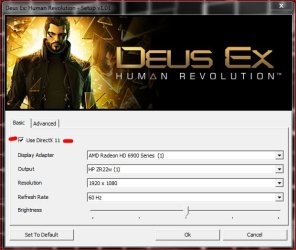
Now I don't have Crysis 2 myself but I do know the game had to be patched to get it to run with DX11 textures. So if you haven't installed the DX11 patch/texture pack, you aren't running in DX11 mode. Also, (again, I don't have the game) there may be an in-game setting to turn DX11 on or off.

Capture.JPG

If not, you'll probably need a hack. Bear in mind this of course assumes you meet the above pre-requisites allowing you to run the game in DX11 mode in the first place.

Also seeing that you have a mobile graphics card not sure what kind of frames you're looking for but you're no going to get that much out of that card. And it would help if you listed your processor.

Saying you're not getting good frames is like saying your car isn't going to fast with out saying what motor you have.
 

My Computer My Computer

At a glance

Windows 10 ProIntel Core i7-4770K (3.5Ghz)32 gig Corsair Dominator Platinum (4x8Gig)Sapphire Tri-X R9 Fury
Computer type
PC/Desktop
Computer Manufacturer/Model Number
Custom built by me.
OS
Windows 10 Pro
CPU
Intel Core i7-4770K (3.5Ghz)
Motherboard
Gigabyte G1 Sniper 5 (F10 Bios)
Memory
32 gig Corsair Dominator Platinum (4x8Gig)
Graphics Card(s)
Sapphire Tri-X R9 Fury
Sound Card
Soundblaster ZXR
Monitor(s) Displays
NEC PA242W 24" LCD Monitor
Screen Resolution
1920 x 1200
Hard Drives
Primary - Samsung 850 Pro (512gig), Samsung 840 Pro (256gig), 2TB WD Caviar Black.
PSU
EVGA Supernova 1000 G2
Case
Cooler Master HAF X
Cooling
Corsair H100i with Corsair Air Series SP120 Quiet Fans
Keyboard
Logitech Wireless Wave
Mouse
Logitech Performance MX
Internet Speed
High Speed Cable
Antivirus
Norton Security
Browser
IE11
Other Info
Memory Timings - 1866MHz @ 9-9-9-27-1T @ 1.5 volts
actually i am running it with DX 11... my hardware supports it (ati HD 6570)..... i was wondering to make it work with
DX 10.......
and 1 more thing i would like to ask is that ARE the there any general methods to make the game run with previous versions of (DX 9 and DX 10)....if the game supports?
 

My Computer My Computer

At a glance

windows 7 Home Premium 64bitintel dual core P6200 2.1 Ghz4gb ddr3HD6570M 2gb ddr3
Computer Manufacturer/Model Number
ASUS a42jp vx029v
OS
windows 7 Home Premium 64bit
CPU
intel dual core P6200 2.1 Ghz
Memory
4gb ddr3
Graphics Card(s)
HD6570M 2gb ddr3
Screen Resolution
1366x768
Hard Drives
500 gb
Internet Speed
512 Kbps
You can't change it thru Windows.
The game may have the option under its settings.

The game selects what DX version it needs to use automatically unless there is a manual selection in the Crysis game settings.
 

My Computer My Computer

At a glance

Windows7 Pro 64bit SP-1; Windows XP Pro 32bitIntel Core i7-870 Lynnfield 2.93GHz LGA 1156 ...8GB@1400MHz Crucial Ballistix DDR3-1600 4x2GBASUS ENGTX460 DirectCU/2DI/1GD5 1GB 256-bit G...
Computer Manufacturer/Model Number
Hopalong/ Godzilla
OS
Windows7 Pro 64bit SP-1; Windows XP Pro 32bit
CPU
Intel Core i7-870 Lynnfield 2.93GHz LGA 1156 95W Quad-Core
Motherboard
ASUS P7P55D-E PRO
Memory
8GB@1400MHz Crucial Ballistix DDR3-1600 4x2GB
Graphics Card(s)
ASUS ENGTX460 DirectCU/2DI/1GD5 1GB 256-bit GDDR5
Sound Card
VIA Onboard
Monitor(s) Displays
Asus VS248H-P 24"; Samsung SyncMaster 941BW 19"ws
Screen Resolution
1920x1080; 1440x900
Hard Drives
Samsung 830 120GB SSD
Intel 320 120GB SSD
Western Digital Caviar Black WD7501AALS 750GB 7200 RPM SATA 3.0Gb/s
Western Digital Caviar Black WD6401AALS 640GB 7200 RPM SATA 3.0Gb/s
PSU
COOLER MASTER Silent Pro RS850-AMBAJ3-US 850W Modular
Case
COOLER MASTER HAF 932 RC-932-KKN5-GP Black
Cooling
Scythe "Mugen-2 Rev.B" (2 ScytheKaze-Jyuni PWM fans)
Keyboard
Logitech K-320
Mouse
Kensington
Antivirus
Avast Inernet Suite
Browser
IE 9 ; Chrome
There is no DirectX 10 in Crysis 2, it is either DirectX 9 only or DirectX 11 with the patch.

You're also asking a lot out of what is essentially a low end GPU. Try running the game at lower settings if you haven't.
 

My Computer My Computer

At a glance

Win 7 Ultimate x64FX-8350 @ 4.6 GHz so farADATA XPG V1 Series Black 8GB DDR3 1600Sapphire R9 270x Dual-X
Computer type
PC/Desktop
Computer Manufacturer/Model Number
Me
OS
Win 7 Ultimate x64
CPU
FX-8350 @ 4.6 GHz so far
Motherboard
Asus M5A97 EVO
Memory
ADATA XPG V1 Series Black 8GB DDR3 1600
Graphics Card(s)
Sapphire R9 270x Dual-X
Sound Card
Xonar DGX w/ Corsair Vengence 1300
Monitor(s) Displays
Acer S232HL Abid
Screen Resolution
1920x1080
Hard Drives
120 GB OCZ Vertex 3
500 GB Seagate 7200.12
PSU
Antec Earthwatts 650W Green
Case
Antec Three Hundred
Cooling
Cooler Master 212 EVO
Keyboard
Logitech G510
Mouse
Logitech G500s
Internet Speed
35000/3000
actually i am running it with DX 11... my hardware supports it (ati HD 6570)..... i was wondering to make it work with
DX 10.......
and 1 more thing i would like to ask is that ARE the there any general methods to make the game run with previous versions of (DX 9 and DX 10)....if the game supports?

As I stated earlier, 3 things must happen in order to run in DX11 under Windows 7.....

1- The Windows must support the modes – Window 7 and Vista (DX10 & 11)
2- The game must support the Mode(s) - Games with DX11 Support, Games with DX10 Support
3- The video card must support the Mode(s) ATI 5000 series cards

If not, the game/app defaults to the lowest DX mode available out of the 3.

Now Windows 7 is DX11, your card (6570) supports DX11, but does the game support DX11??? Did you install the DX11 patch I and stormy mentioned?

If so, is there not a game option to disable DX11? Thus forcing the game back to DX9 as stormy mentioned? Also, if you didn't want DX11 why install the patch?

Again, I don't have the game so I can't answer the game part of the question.
 

My Computer My Computer

At a glance

Windows 10 ProIntel Core i7-4770K (3.5Ghz)32 gig Corsair Dominator Platinum (4x8Gig)Sapphire Tri-X R9 Fury
Computer type
PC/Desktop
Computer Manufacturer/Model Number
Custom built by me.
OS
Windows 10 Pro
CPU
Intel Core i7-4770K (3.5Ghz)
Motherboard
Gigabyte G1 Sniper 5 (F10 Bios)
Memory
32 gig Corsair Dominator Platinum (4x8Gig)
Graphics Card(s)
Sapphire Tri-X R9 Fury
Sound Card
Soundblaster ZXR
Monitor(s) Displays
NEC PA242W 24" LCD Monitor
Screen Resolution
1920 x 1200
Hard Drives
Primary - Samsung 850 Pro (512gig), Samsung 840 Pro (256gig), 2TB WD Caviar Black.
PSU
EVGA Supernova 1000 G2
Case
Cooler Master HAF X
Cooling
Corsair H100i with Corsair Air Series SP120 Quiet Fans
Keyboard
Logitech Wireless Wave
Mouse
Logitech Performance MX
Internet Speed
High Speed Cable
Antivirus
Norton Security
Browser
IE11
Other Info
Memory Timings - 1866MHz @ 9-9-9-27-1T @ 1.5 volts
Back
Top