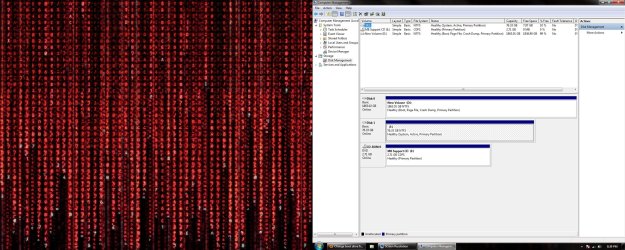
Hey, I recently bought a new 2 terabyte hard drive to replace my old 80gb, slow, 7 year old, hard drive that i was booting from and formatted it while i was in windows 7 booted from the 80gb hdd. After formatting, it naturally assigned the D letter to it. I loaded up a downloaded windows 7 by virtually mounting it and installed it to the new drive labeled 'New volume (D ' and after installing windows 7 on it i booted it up. I saw that it was labelled D still after booting into it and my old drive is still labelled C even though i havent booted its OS. Changing the 2tb to first hdd via bios makes my computer unbootable. Removing the cable to the 80gb hdd also does the same. The windows 7 I have installed on the 2tb hdd is 64bit windows ultiamte and i do not have it on a cd. I have it on both hdd's though and burning this to a disc would b my least preferred option as i do not have any 5gb empty discs laying around. The windows 7 I have on the 80gb hdd is windows 7 ultimate 32-bit. I have that on a disk but do not want to use it on my new hard drive. Any idea on how I can change the 2000tb hdd's drive letter to c from d? I have already freed up c by changing the 80gb drive to f instead of c.
' and after installing windows 7 on it i booted it up. I saw that it was labelled D still after booting into it and my old drive is still labelled C even though i havent booted its OS. Changing the 2tb to first hdd via bios makes my computer unbootable. Removing the cable to the 80gb hdd also does the same. The windows 7 I have installed on the 2tb hdd is 64bit windows ultiamte and i do not have it on a cd. I have it on both hdd's though and burning this to a disc would b my least preferred option as i do not have any 5gb empty discs laying around. The windows 7 I have on the 80gb hdd is windows 7 ultimate 32-bit. I have that on a disk but do not want to use it on my new hard drive. Any idea on how I can change the 2000tb hdd's drive letter to c from d? I have already freed up c by changing the 80gb drive to f instead of c.My Computer
- Computer Manufacturer/Model Number
- Custom
- OS
- Windows 7 Ultimate 64 bit
- CPU
- AMD Phenom II X6 1055T
- Motherboard
- ASUS M4A89GTD PRO / USB3
- Memory
- 4gb
- Graphics Card(s)
- Amd Radeon Gigabyte 6850
- Monitor(s) Displays
- Sanyo 22XR9DA TV
- Screen Resolution
- 1920x1080
- Hard Drives
- 80gb Maxtor,
WD Green 2TB 7200 rpm
- PSU
- 420w PSU
- Case
- Thermaltake Element T
- Cooling
- Stock
- Keyboard
- Microsoft Sidewinder X6
- Mouse
- Logitech M-U0007