Hey, I recently bought a new 2 terabyte hard drive to replace my old 80gb, slow, 7 year old, hard drive that i was booting from and formatted it while i was in windows 7 booted from the 80gb hdd. After formatting, it naturally assigned the D letter to it. I loaded up a downloaded windows 7 by virtually mounting it and installed it to the new drive labeled 'New volume (D' and after installing windows 7 on it i booted it up. I saw that it was labelled D still after booting into it and my old drive is still labelled C even though i havent booted its OS. Changing the 2tb to first hdd via bios makes my computer unbootable. Removing the cable to the 80gb hdd also does the same. The windows 7 I have installed on the 2tb hdd is 64bit windows ultiamte and i do not have it on a cd. I have it on both hdd's though and burning this to a disc would b my least preferred option as i do not have any 5gb empty discs laying around. The windows 7 I have on the 80gb hdd is windows 7 ultimate 32-bit. I have that on a disk but do not want to use it on my new hard drive. Any idea on how I can change the 2000tb hdd's drive letter to c from d? I have already freed up c by changing the 80gb drive to f instead of c.
The boot problem isn't because the drive letter is D, its because of the way you installed the second version of windows 7. Installing it while the first instance of windows 7 is running likely setup a dual boot situation. Your boot loader is on the 80 gig drive so if its not there windows on the new drive won't boot up. If you post a screen shoot of your disk management screen I should be able to confirm my suspicions. I would make a bootable thumb drive from the ISO and install from that with the 80 gig drive disconnected. http://www.sevenforums.com/tutorials/2432-usb-windows-7-installation-key-drive-create.html?filter[2]=General Tips
My Computer
Computer type
PC/Desktop
Computer Manufacturer/Model Number
Home Built
OS
Windows 10 Education 64 bit
CPU
AMD Phenom II X4 980 Black Edition Deneb 3.7GHz
Motherboard
Asus M4N68T-M V2 µATX Motherboard
Memory
8GB 4GBx2 Kingston PC10600 DDR3 1333 Memory
Graphics Card(s)
Zotac NVIDIA Geforce GT640 2 Gig DDR3 PCIe
Sound Card
VIA VT1708s High Definition Audio 8-channel Onboard
The boot problem isn't because the drive letter is D, its because of the way you installed the second version of windows 7. Installing it while the first instance of windows 7 is running likely setup a dual boot situation. Your boot loader is on the 80 gig drive so if its not there windows on the new drive won't boot up. If you post a screen shoot of your disk management screen I should be able to confirm my suspicions. I would make a bootable thumb drive from the ISO and install from that with the 80 gig drive disconnected. http://www.sevenforums.com/tutorials/2432-usb-windows-7-installation-key-drive-create.html?filter[2]=General Tips
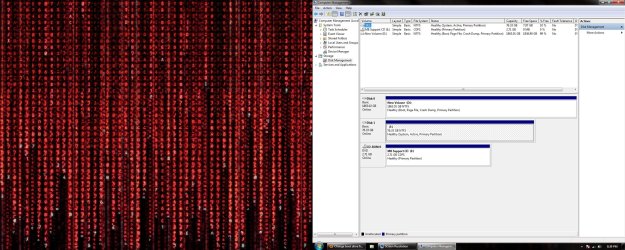
Here, I took this screenshot while booted into my new windows 7 drive. If I was booted from my old drive then the 80gb would be C and this new drive would be D or F i dont remember. And sorry for the huge picture, I don't have any photo editing software on this computer yet but paint so cant crop the second monitor out.
The boot problem isn't because the drive letter is D, its because of the way you installed the second version of windows 7. Installing it while the first instance of windows 7 is running likely setup a dual boot situation. Your boot loader is on the 80 gig drive so if its not there windows on the new drive won't boot up. If you post a screen shoot of your disk management screen I should be able to confirm my suspicions. I would make a bootable thumb drive from the ISO and install from that with the 80 gig drive disconnected. http://www.sevenforums.com/tutorials/2432-usb-windows-7-installation-key-drive-create.html?filter[2]=General Tips
I am fairly certain you are in a dual boot situation. How are you selecting which version of windows 7 is booted up? If you are selecting from an on screen boot menu during start up that would confirm it. In a dual boot situation the boot loader is only on one drive/partition. Windows won't boot up without the boot loader so if you remove your 80 gig drive, no boot loader and no windows. If you do a clean install with just the new 2 t drive connected windows will do the standard install to that drive and its drive letter will be C. Then you can plug the 80 gig drive back in and copy over any files you need before erasing it. http://www.sevenforums.com/tutorials/1649-clean-install-windows-7-a.html?ltr=C
My Computer
Computer type
PC/Desktop
Computer Manufacturer/Model Number
Home Built
OS
Windows 10 Education 64 bit
CPU
AMD Phenom II X4 980 Black Edition Deneb 3.7GHz
Motherboard
Asus M4N68T-M V2 µATX Motherboard
Memory
8GB 4GBx2 Kingston PC10600 DDR3 1333 Memory
Graphics Card(s)
Zotac NVIDIA Geforce GT640 2 Gig DDR3 PCIe
Sound Card
VIA VT1708s High Definition Audio 8-channel Onboard

 ' and after installing windows 7 on it i booted it up. I saw that it was labelled D still after booting into it and my old drive is still labelled C even though i havent booted its OS. Changing the 2tb to first hdd via bios makes my computer unbootable. Removing the cable to the 80gb hdd also does the same. The windows 7 I have installed on the 2tb hdd is 64bit windows ultiamte and i do not have it on a cd. I have it on both hdd's though and burning this to a disc would b my least preferred option as i do not have any 5gb empty discs laying around. The windows 7 I have on the 80gb hdd is windows 7 ultimate 32-bit. I have that on a disk but do not want to use it on my new hard drive. Any idea on how I can change the 2000tb hdd's drive letter to c from d? I have already freed up c by changing the 80gb drive to f instead of c.