CPU to TV/Surround Sound Receiver Issue

Indecl

New member
Local time
4:59 PM
Messages
14
After spending an hour or so trying to read through the 1,000's of HDMI sound issues, I decided to just register and post my problem because every "solution" I found is something i've already tried.

I have a HDMI cable going from my Desktop tower to my receiver, with HDMI output already as my default for sound. I get nothing, no music, no test sounds, nada. I tried to update my sound/video drivers and all of them said they were up to date. The receiver is on the correct input setting.

I also tried to back-feed it through my TV, with the HDMI going to the TV first, with my Digital Optical Audio cable running from my TV to my receiver. Again, no luck still dead as a doornail.

My Media Player is already set to playback through HDMI, and I cannot get sound from anything on my computer period.

Does anyone have a clue what to do? I'm out of ideas and honestly out of patience. Any help would be appreciated.
 

My Computer My Computer

At a glance

64 Bit Windows 7 Home PremiumAMD Phenom II X4 945(3.0GHz)4GB (2x2GB) DDR3 1333NVIDIA GeForce GT 220 1GB PCI Express Video Card
Computer Manufacturer/Model Number
CyberPowerPC Gamer Ultra 2040
OS
64 Bit Windows 7 Home Premium
CPU
AMD Phenom II X4 945(3.0GHz)
Motherboard
AMD 780L
Memory
4GB (2x2GB) DDR3 1333
Graphics Card(s)
NVIDIA GeForce GT 220 1GB PCI Express Video Card
Sound Card
Sound card - Integrated
Hard Drives
500GB SATA-II 3.0Gb/s 7200RPM HDD
PSU
850watt Thermal Lake
Case
Apevia X-Dreamer 3 Gaming Case
What video card do you have? Does it generate it's own HDMI audio or does it use an S/PDIF connection to the PC? (and if it does use the S/PDIF connection, do you have it connected).

Filling out the full "My System Specs" would really help.

If you are using certain Dell desktops, they have an HDMI port on the rear but that is only HDMI Video and not Audio. On these models you must use a separate Video card that does have HDMI audio.
 

My Computer My Computer

At a glance

Windows 10 64 bitIntel i7 6700K16GB Corsair DominatorIntel CPU Graphics
Computer type
PC/Desktop
Computer Manufacturer/Model Number
My Own Build
OS
Windows 10 64 bit
CPU
Intel i7 6700K
Motherboard
ASUS ROG Maximus VIII Hero
Memory
16GB Corsair Dominator
Graphics Card(s)
Intel CPU Graphics
Sound Card
RealTek
Monitor(s) Displays
27" Dell S2719dgf
Screen Resolution
2560X1440
Hard Drives
1 TB Samsung 850 EVO SSD for Win 10 Pro
500GB Samsung 850 EVO SSD for Win 10 Insider
2 TB drive for backup
PSU
EVGA Supernova 750G2
Case
BeQuiet Silent Base 600
Cooling
Deepcool Captain 120EX
Keyboard
Microsoft Wireless 2000
Mouse
Microsoft wireless
Internet Speed
100 MB/sec (Cable)
Antivirus
Microsoft Defender and Malwarebytes
Browser
Edge/Firefox
Other Info
Cakewalk (Sonar) by BandLab and Studio One 4.1 Pro recording studio software. MOTU 896Mk3 Hybrid recording interface, Frontier Tranzport wireless control unit, Behringer X-Touch Control Surface.
Five USB connected optical drives for CD Audio production using Nero BurningROM
I have a Nvidia GeForce GT 220, and it has an HDMI output. I only see VGA/DVI/1 HDMI on the outside of the card. The Desktop is something I bought off Newegg awhile ago, it's not really any brand.

Asus Board, Phenom II, GT 220, 4 GB RAM, etc.

The option to select HDMI appears when I plug the cable in, but it doesn't appear to do anything. I've gotten it to do video to the TV, sound is my issue.
 

My Computer My Computer

At a glance

64 Bit Windows 7 Home PremiumAMD Phenom II X4 945(3.0GHz)4GB (2x2GB) DDR3 1333NVIDIA GeForce GT 220 1GB PCI Express Video Card
Computer Manufacturer/Model Number
CyberPowerPC Gamer Ultra 2040
OS
64 Bit Windows 7 Home Premium
CPU
AMD Phenom II X4 945(3.0GHz)
Motherboard
AMD 780L
Memory
4GB (2x2GB) DDR3 1333
Graphics Card(s)
NVIDIA GeForce GT 220 1GB PCI Express Video Card
Sound Card
Sound card - Integrated
Hard Drives
500GB SATA-II 3.0Gb/s 7200RPM HDD
PSU
850watt Thermal Lake
Case
Apevia X-Dreamer 3 Gaming Case
You might want to sign in to Newegg and look at your purchase history (yes, they keep it) and see if your card does use the S/PDIF connection. :) Even with an HDMI port, if your card was intended to use S/PDIF pass-through and you don't have it connected, you won't get sound through HDMI as Fireberd mentioned.
Here's an example of a card that use S/PDIF pass-through......
ASUS EN9400GT-1GB Geforce 9400GT Half-Height Videocard Review - PCSTATS.com
 

My Computer My Computer

At a glance

Windows 7 Home Premium 64 bitIntel Core i7-4790G.SKILL 8GB (2 x 4GB) DDR3 F3-10666CL9D-8GBNTAMD Radeon R7 250
Computer type
PC/Desktop
Computer Manufacturer/Model Number
Custom Build
OS
Windows 7 Home Premium 64 bit
CPU
Intel Core i7-4790
Motherboard
GA-Z87X-D3H
Memory
G.SKILL 8GB (2 x 4GB) DDR3 F3-10666CL9D-8GBNT
Graphics Card(s)
AMD Radeon R7 250
Sound Card
Realtek ALC892
Monitor(s) Displays
Samsung UN32EH5000, Dell 1703FPT
Screen Resolution
1920 x 1080, 1280 x 1024
Hard Drives
WD5003AZEX
WD10EZEX
Samsung HD103SJ
Samsung 128 GB 840 PRO
PSU
SeaSonic M12II SS-500GM
Case
Fractal Design Define R4
Cooling
Zalman CNPS9900ALED
Keyboard
Logitech K800
Mouse
Logitech M705
Internet Speed
16 Mbps
Antivirus
Avast
Browser
Firefox
Other Info
Bose Companion 2 Multimedia Speakers
NVIDIA GeForce GT 220 PCI Express 2.0 x16 is exactly what NewEgg says, trying to find the other parts out. Used the purchase history to fill in more of the computer specs Fire said would be nice to have on my profile. Doubt that'll help much, and i've tried simply google'ing my video card to see if it does have this S/PDIF connection, and the only thing i've found thus far is people getting sound from 2 speakers instead of 5. That's not my problem, my problem is I haven't gotten any sound from any speaker.

Edit: Ok, Nvidia's website says my card is HDA, SPDIF as Audio Input for HDMI
 

My Computer My Computer

At a glance

64 Bit Windows 7 Home PremiumAMD Phenom II X4 945(3.0GHz)4GB (2x2GB) DDR3 1333NVIDIA GeForce GT 220 1GB PCI Express Video Card
Computer Manufacturer/Model Number
CyberPowerPC Gamer Ultra 2040
OS
64 Bit Windows 7 Home Premium
CPU
AMD Phenom II X4 945(3.0GHz)
Motherboard
AMD 780L
Memory
4GB (2x2GB) DDR3 1333
Graphics Card(s)
NVIDIA GeForce GT 220 1GB PCI Express Video Card
Sound Card
Sound card - Integrated
Hard Drives
500GB SATA-II 3.0Gb/s 7200RPM HDD
PSU
850watt Thermal Lake
Case
Apevia X-Dreamer 3 Gaming Case
You'll need the S/PDIF cable to get sound, then.
 

My Computer My Computer

At a glance

Windows 7 Home Premium 64 bitIntel Core i7-4790G.SKILL 8GB (2 x 4GB) DDR3 F3-10666CL9D-8GBNTAMD Radeon R7 250
Computer type
PC/Desktop
Computer Manufacturer/Model Number
Custom Build
OS
Windows 7 Home Premium 64 bit
CPU
Intel Core i7-4790
Motherboard
GA-Z87X-D3H
Memory
G.SKILL 8GB (2 x 4GB) DDR3 F3-10666CL9D-8GBNT
Graphics Card(s)
AMD Radeon R7 250
Sound Card
Realtek ALC892
Monitor(s) Displays
Samsung UN32EH5000, Dell 1703FPT
Screen Resolution
1920 x 1080, 1280 x 1024
Hard Drives
WD5003AZEX
WD10EZEX
Samsung HD103SJ
Samsung 128 GB 840 PRO
PSU
SeaSonic M12II SS-500GM
Case
Fractal Design Define R4
Cooling
Zalman CNPS9900ALED
Keyboard
Logitech K800
Mouse
Logitech M705
Internet Speed
16 Mbps
Antivirus
Avast
Browser
Firefox
Other Info
Bose Companion 2 Multimedia Speakers
You'll need the S/PDIF cable to get sound, then.

I was looking inside my case for a SPDIF out on my motherboard, I found the label for it but the closest connector to the label is a "COM1" plug. On my video card I can see a plug that looks similar to the SPDIF connections i've found looking around on the net, but I cannot see where the wire goes. Guess i'll have to open the tower up when I get home. Any tips/hints/whatever for figuring all this out so I can use this SPDIF mumbo-jumbo?
 

My Computer My Computer

At a glance

64 Bit Windows 7 Home PremiumAMD Phenom II X4 945(3.0GHz)4GB (2x2GB) DDR3 1333NVIDIA GeForce GT 220 1GB PCI Express Video Card
Computer Manufacturer/Model Number
CyberPowerPC Gamer Ultra 2040
OS
64 Bit Windows 7 Home Premium
CPU
AMD Phenom II X4 945(3.0GHz)
Motherboard
AMD 780L
Memory
4GB (2x2GB) DDR3 1333
Graphics Card(s)
NVIDIA GeForce GT 220 1GB PCI Express Video Card
Sound Card
Sound card - Integrated
Hard Drives
500GB SATA-II 3.0Gb/s 7200RPM HDD
PSU
850watt Thermal Lake
Case
Apevia X-Dreamer 3 Gaming Case

My Computer My Computer

At a glance

Windows 7 Home Premium 64 bitIntel Core i7-4790G.SKILL 8GB (2 x 4GB) DDR3 F3-10666CL9D-8GBNTAMD Radeon R7 250
Computer type
PC/Desktop
Computer Manufacturer/Model Number
Custom Build
OS
Windows 7 Home Premium 64 bit
CPU
Intel Core i7-4790
Motherboard
GA-Z87X-D3H
Memory
G.SKILL 8GB (2 x 4GB) DDR3 F3-10666CL9D-8GBNT
Graphics Card(s)
AMD Radeon R7 250
Sound Card
Realtek ALC892
Monitor(s) Displays
Samsung UN32EH5000, Dell 1703FPT
Screen Resolution
1920 x 1080, 1280 x 1024
Hard Drives
WD5003AZEX
WD10EZEX
Samsung HD103SJ
Samsung 128 GB 840 PRO
PSU
SeaSonic M12II SS-500GM
Case
Fractal Design Define R4
Cooling
Zalman CNPS9900ALED
Keyboard
Logitech K800
Mouse
Logitech M705
Internet Speed
16 Mbps
Antivirus
Avast
Browser
Firefox
Other Info
Bose Companion 2 Multimedia Speakers
HWiNFO32 Download
ASUSTeK Computer Inc. - Motherboards

Get your exact mobo info, download the manual and you'll see exactly where the pins are. :)

Came home, found the plug on my motherboard. Found out the connector I saw on the video card was for something else, couldn't find a SPDIF output on the video card. Nvidia's website says my card has SPDIF, so naturally i'm confused. I did some more research and apparently no one knows if my card can or can't do it. Some things say the card doesn't have SPDIF, others say it's integrated into the card and you don't need an adapter. Any other ideas?
 

My Computer My Computer

At a glance

64 Bit Windows 7 Home PremiumAMD Phenom II X4 945(3.0GHz)4GB (2x2GB) DDR3 1333NVIDIA GeForce GT 220 1GB PCI Express Video Card
Computer Manufacturer/Model Number
CyberPowerPC Gamer Ultra 2040
OS
64 Bit Windows 7 Home Premium
CPU
AMD Phenom II X4 945(3.0GHz)
Motherboard
AMD 780L
Memory
4GB (2x2GB) DDR3 1333
Graphics Card(s)
NVIDIA GeForce GT 220 1GB PCI Express Video Card
Sound Card
Sound card - Integrated
Hard Drives
500GB SATA-II 3.0Gb/s 7200RPM HDD
PSU
850watt Thermal Lake
Case
Apevia X-Dreamer 3 Gaming Case
Who is the actual manufacturer of the Video Card? There are several different vendors that make that card and you need to go to that vendor's web site and look at their spec's for that card to determine if it has built in audio or does require the external S/PDIF connection.
 

My Computer My Computer

At a glance

Windows 10 64 bitIntel i7 6700K16GB Corsair DominatorIntel CPU Graphics
Computer type
PC/Desktop
Computer Manufacturer/Model Number
My Own Build
OS
Windows 10 64 bit
CPU
Intel i7 6700K
Motherboard
ASUS ROG Maximus VIII Hero
Memory
16GB Corsair Dominator
Graphics Card(s)
Intel CPU Graphics
Sound Card
RealTek
Monitor(s) Displays
27" Dell S2719dgf
Screen Resolution
2560X1440
Hard Drives
1 TB Samsung 850 EVO SSD for Win 10 Pro
500GB Samsung 850 EVO SSD for Win 10 Insider
2 TB drive for backup
PSU
EVGA Supernova 750G2
Case
BeQuiet Silent Base 600
Cooling
Deepcool Captain 120EX
Keyboard
Microsoft Wireless 2000
Mouse
Microsoft wireless
Internet Speed
100 MB/sec (Cable)
Antivirus
Microsoft Defender and Malwarebytes
Browser
Edge/Firefox
Other Info
Cakewalk (Sonar) by BandLab and Studio One 4.1 Pro recording studio software. MOTU 896Mk3 Hybrid recording interface, Frontier Tranzport wireless control unit, Behringer X-Touch Control Surface.
Five USB connected optical drives for CD Audio production using Nero BurningROM
If you can get the info from Newegg, since they keep the pictures and full model number stored in your purchase history.
 

My Computer My Computer

At a glance

Windows 7 Home Premium 64 bitIntel Core i7-4790G.SKILL 8GB (2 x 4GB) DDR3 F3-10666CL9D-8GBNTAMD Radeon R7 250
Computer type
PC/Desktop
Computer Manufacturer/Model Number
Custom Build
OS
Windows 7 Home Premium 64 bit
CPU
Intel Core i7-4790
Motherboard
GA-Z87X-D3H
Memory
G.SKILL 8GB (2 x 4GB) DDR3 F3-10666CL9D-8GBNT
Graphics Card(s)
AMD Radeon R7 250
Sound Card
Realtek ALC892
Monitor(s) Displays
Samsung UN32EH5000, Dell 1703FPT
Screen Resolution
1920 x 1080, 1280 x 1024
Hard Drives
WD5003AZEX
WD10EZEX
Samsung HD103SJ
Samsung 128 GB 840 PRO
PSU
SeaSonic M12II SS-500GM
Case
Fractal Design Define R4
Cooling
Zalman CNPS9900ALED
Keyboard
Logitech K800
Mouse
Logitech M705
Internet Speed
16 Mbps
Antivirus
Avast
Browser
Firefox
Other Info
Bose Companion 2 Multimedia Speakers
Who is the actual manufacturer of the Video Card? There are several different vendors that make that card and you need to go to that vendor's web site and look at their spec's for that card to determine if it has built in audio or does require the external S/PDIF connection.

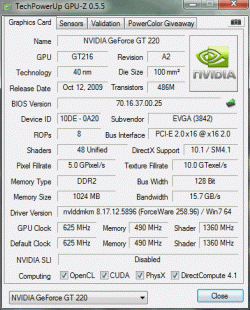
Did some looking around, saw someone say to download this quick thing to figure out who made it. Took a screenshot. Based off this, what's the actual verdict on my card?

*Edit* EVGA's website doesn't say anything about SPDIF, and says it (should) run high-def audio through the DVI and HDMI ports on the card in it's description.

Maybe you know or can find out more than I saw but there is one thing that came to mind; me connecting my monitor to the DVI port on the graphics card instead of the DVI port further up the tower wouldn't have anything to do with it would it?
 

Attachments

  • GCard.gif
    GCard.gif
    24.6 KB · Views: 6

My Computer My Computer

At a glance

64 Bit Windows 7 Home PremiumAMD Phenom II X4 945(3.0GHz)4GB (2x2GB) DDR3 1333NVIDIA GeForce GT 220 1GB PCI Express Video Card
Computer Manufacturer/Model Number
CyberPowerPC Gamer Ultra 2040
OS
64 Bit Windows 7 Home Premium
CPU
AMD Phenom II X4 945(3.0GHz)
Motherboard
AMD 780L
Memory
4GB (2x2GB) DDR3 1333
Graphics Card(s)
NVIDIA GeForce GT 220 1GB PCI Express Video Card
Sound Card
Sound card - Integrated
Hard Drives
500GB SATA-II 3.0Gb/s 7200RPM HDD
PSU
850watt Thermal Lake
Case
Apevia X-Dreamer 3 Gaming Case
I can connect a 3.5mm to Yellow/White cable to my Aux port on the system, get sound, and actually have it play through all speakers. Every other attempt i've made to get any sort of sound from the computer to the surround sound has been a bust.
 
Last edited:

My Computer My Computer

At a glance

64 Bit Windows 7 Home PremiumAMD Phenom II X4 945(3.0GHz)4GB (2x2GB) DDR3 1333NVIDIA GeForce GT 220 1GB PCI Express Video Card
Computer Manufacturer/Model Number
CyberPowerPC Gamer Ultra 2040
OS
64 Bit Windows 7 Home Premium
CPU
AMD Phenom II X4 945(3.0GHz)
Motherboard
AMD 780L
Memory
4GB (2x2GB) DDR3 1333
Graphics Card(s)
NVIDIA GeForce GT 220 1GB PCI Express Video Card
Sound Card
Sound card - Integrated
Hard Drives
500GB SATA-II 3.0Gb/s 7200RPM HDD
PSU
850watt Thermal Lake
Case
Apevia X-Dreamer 3 Gaming Case
Have you tried updating the video driver as the one you have is quite a few version old,

NVIDIA DRIVERS 280.26 WHQL

That and it also contains the necessary audio driver for the card, which has also gone through a few updates; you have version 1.0.15.0, while the latest driver updates it to version 1.2.23.3.

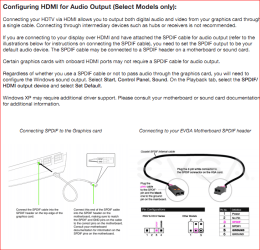
As for the cards that don't have a native audio chip on them this is what was being referred too,

spdifhdmi.PNG

which as far as I know all GT 220's have the audio built into the card. unless the manufacturer made a model of not following the Nvidia reference design.
 

My Computer My Computer

At a glance

Win 7 Ultimate x64FX-8350 @ 4.6 GHz so farADATA XPG V1 Series Black 8GB DDR3 1600Sapphire R9 270x Dual-X
Computer type
PC/Desktop
Computer Manufacturer/Model Number
Me
OS
Win 7 Ultimate x64
CPU
FX-8350 @ 4.6 GHz so far
Motherboard
Asus M5A97 EVO
Memory
ADATA XPG V1 Series Black 8GB DDR3 1600
Graphics Card(s)
Sapphire R9 270x Dual-X
Sound Card
Xonar DGX w/ Corsair Vengence 1300
Monitor(s) Displays
Acer S232HL Abid
Screen Resolution
1920x1080
Hard Drives
120 GB OCZ Vertex 3
500 GB Seagate 7200.12
PSU
Antec Earthwatts 650W Green
Case
Antec Three Hundred
Cooling
Cooler Master 212 EVO
Keyboard
Logitech G510
Mouse
Logitech G500s
Internet Speed
35000/3000
I went ahead and updated all the drivers, rebooted the computer, and still no dice. The HDMI test for sound won't work, nor will anything else. I set the HDMI as the default output and everything else like I did prior to the update.

Any steps I may have skipped or any other ideas?

EDIT* Actually, when I look at my sound options... should I be using "Digital Output Device (HDMI TX0)" or "NS-AV511-1 Nvidia High Definiton Audio"? I just now noticed the Nvidia one says not plugged in and i've been attempting to get it to work by setting the first one as default.
 

My Computer My Computer

At a glance

64 Bit Windows 7 Home PremiumAMD Phenom II X4 945(3.0GHz)4GB (2x2GB) DDR3 1333NVIDIA GeForce GT 220 1GB PCI Express Video Card
Computer Manufacturer/Model Number
CyberPowerPC Gamer Ultra 2040
OS
64 Bit Windows 7 Home Premium
CPU
AMD Phenom II X4 945(3.0GHz)
Motherboard
AMD 780L
Memory
4GB (2x2GB) DDR3 1333
Graphics Card(s)
NVIDIA GeForce GT 220 1GB PCI Express Video Card
Sound Card
Sound card - Integrated
Hard Drives
500GB SATA-II 3.0Gb/s 7200RPM HDD
PSU
850watt Thermal Lake
Case
Apevia X-Dreamer 3 Gaming Case
The Nvidia one, that is the HDMI port on the card.
 

My Computer My Computer

At a glance

Win 7 Ultimate x64FX-8350 @ 4.6 GHz so farADATA XPG V1 Series Black 8GB DDR3 1600Sapphire R9 270x Dual-X
Computer type
PC/Desktop
Computer Manufacturer/Model Number
Me
OS
Win 7 Ultimate x64
CPU
FX-8350 @ 4.6 GHz so far
Motherboard
Asus M5A97 EVO
Memory
ADATA XPG V1 Series Black 8GB DDR3 1600
Graphics Card(s)
Sapphire R9 270x Dual-X
Sound Card
Xonar DGX w/ Corsair Vengence 1300
Monitor(s) Displays
Acer S232HL Abid
Screen Resolution
1920x1080
Hard Drives
120 GB OCZ Vertex 3
500 GB Seagate 7200.12
PSU
Antec Earthwatts 650W Green
Case
Antec Three Hundred
Cooling
Cooler Master 212 EVO
Keyboard
Logitech G510
Mouse
Logitech G500s
Internet Speed
35000/3000
The Nvidia one, that is the HDMI port on the card.

Progress! It now plays through the system via HDMI, and I was just about to post a big thanks to you guys and mark it as solved but when I went to lay down on my bed I noticed the music is only playing through 2 speakers. Is that another setting I have to work with?

The 3.5mm Stereo to Yellow/White plays off all 5, don't get why the HDMI doesn't.

*EDIT* Don't get me wrong, I still do appreciate the help.
 

My Computer My Computer

At a glance

64 Bit Windows 7 Home PremiumAMD Phenom II X4 945(3.0GHz)4GB (2x2GB) DDR3 1333NVIDIA GeForce GT 220 1GB PCI Express Video Card
Computer Manufacturer/Model Number
CyberPowerPC Gamer Ultra 2040
OS
64 Bit Windows 7 Home Premium
CPU
AMD Phenom II X4 945(3.0GHz)
Motherboard
AMD 780L
Memory
4GB (2x2GB) DDR3 1333
Graphics Card(s)
NVIDIA GeForce GT 220 1GB PCI Express Video Card
Sound Card
Sound card - Integrated
Hard Drives
500GB SATA-II 3.0Gb/s 7200RPM HDD
PSU
850watt Thermal Lake
Case
Apevia X-Dreamer 3 Gaming Case
Seeing as most if not all music is stereo only (unless playing DVD-A), it is working as it should. You want it to play through all speakers you have to enable whatever your receiver uses to upmix a stereo signal to surround (Dolby ProLogic II, etc).
 

My Computer My Computer

At a glance

Win 7 Ultimate x64FX-8350 @ 4.6 GHz so farADATA XPG V1 Series Black 8GB DDR3 1600Sapphire R9 270x Dual-X
Computer type
PC/Desktop
Computer Manufacturer/Model Number
Me
OS
Win 7 Ultimate x64
CPU
FX-8350 @ 4.6 GHz so far
Motherboard
Asus M5A97 EVO
Memory
ADATA XPG V1 Series Black 8GB DDR3 1600
Graphics Card(s)
Sapphire R9 270x Dual-X
Sound Card
Xonar DGX w/ Corsair Vengence 1300
Monitor(s) Displays
Acer S232HL Abid
Screen Resolution
1920x1080
Hard Drives
120 GB OCZ Vertex 3
500 GB Seagate 7200.12
PSU
Antec Earthwatts 650W Green
Case
Antec Three Hundred
Cooling
Cooler Master 212 EVO
Keyboard
Logitech G510
Mouse
Logitech G500s
Internet Speed
35000/3000
Any idea how I can do that?

I still don't quite understand why my MP3 player goes through all speakers, and my Desktop connected via 3.5 to white/yellow goes through all but my HDMI doesn't... but then again I didn't know jack crap about any of this until I started this so it's not really a surprise.

In another idea, I tried to back-feed through the TV to the receiver and resulted in no sound at all. Next to none of this seems to make sense, at least not to me. Thank you again for all the help figuring out what has been figured out. I think i'll just stick with video going through the HDMI and just use my aux port for sound.
 

My Computer My Computer

At a glance

64 Bit Windows 7 Home PremiumAMD Phenom II X4 945(3.0GHz)4GB (2x2GB) DDR3 1333NVIDIA GeForce GT 220 1GB PCI Express Video Card
Computer Manufacturer/Model Number
CyberPowerPC Gamer Ultra 2040
OS
64 Bit Windows 7 Home Premium
CPU
AMD Phenom II X4 945(3.0GHz)
Motherboard
AMD 780L
Memory
4GB (2x2GB) DDR3 1333
Graphics Card(s)
NVIDIA GeForce GT 220 1GB PCI Express Video Card
Sound Card
Sound card - Integrated
Hard Drives
500GB SATA-II 3.0Gb/s 7200RPM HDD
PSU
850watt Thermal Lake
Case
Apevia X-Dreamer 3 Gaming Case
Back
Top