Solved Installed SSD, WEI didn't budge and can't open in 'computer'.

dancinbear

New member
Local time
10:36 AM
Messages
24
I just installed a Kingston Hyperx 120gb and I am disappointed. I installed it with Paragon Migrate and all went well. I went into the bios and changed the boot order and assigned it a drive letter with Macrium Reflect. I ran the WEI and it is the same as before..5.9. All I migrated was the os, Adobe PhotoElements 8, and Totalmedia theater 3. I didn't do the achi change as I thought I'd screw something up.
Any ideas? Thanks.
 

My Computer My Computer

At a glance

Windows 7x64 Home Premium service pack 1AMD Phenom II X6 1090TCorsair CMV4GX3M1A1333C9 4x4GBSapphire HD5570
Computer type
PC/Desktop
Computer Manufacturer/Model Number
custom
OS
Windows 7x64 Home Premium service pack 1
CPU
AMD Phenom II X6 1090T
Motherboard
Asus M4A89GTD Pro/USB3
Memory
Corsair CMV4GX3M1A1333C9 4x4GB
Graphics Card(s)
Sapphire HD5570
Monitor(s) Displays
LG W2252TQ
Screen Resolution
1920 x 1080
Hard Drives
Samsung 840 EVO 500mb (ACHI)
WD WD50 500mb
PSU
Corsair TX650W
Case
Antec
Keyboard
i-rocks KR-6820E
Mouse
Gearhead MPT3300BLK
Antivirus
AVG
Browser
Chrome
Yes. After backing up, Do the AHCI change.

Also make sure the partition on the SSD is properly aligned. It would help if you downloaded the ASSD benchmark and posted the result here.
 

My Computer My Computer

At a glance

Windows 10 Pro. EFI boot partition, full EFI ...i7 4770k 4.4GHz (44-44-43-43 turbo) @ 1.248V16GB (8GBx2) @2200 MHz G.skill Sniper 10-11-1...MSI GTX 970 Gaming 4G
Computer type
PC/Desktop
Computer Manufacturer/Model Number
Home built (GeneO industries)/Model 4
OS
Windows 10 Pro. EFI boot partition, full EFI boot
CPU
i7 4770k 4.4GHz (44-44-43-43 turbo) @ 1.248V
Motherboard
ASUS Maximus VI Hero
Memory
16GB (8GBx2) @2200 MHz G.skill Sniper 10-11-10-30-1, 1.6V
Graphics Card(s)
MSI GTX 970 Gaming 4G
Sound Card
Onboard SupremeFX Audio
Monitor(s) Displays
NEC Spectraview 2490WUXi-SV
Screen Resolution
1920 x 1200
Hard Drives
Samsung 850 Pro 256GB (OS), Samsung 2x 128GB 840 Pro SSD in RAID0, 3x WD Blue 6Gb/s 1TB RAID0, WD 2TB Black external USB 3.0, 2TB WD20EARS Green external USB 3.0, 2x 500GB Seagate and 1 750 GB external USB, 1x 350GB external USB3
PSU
Seasonic X-850 (2012 KM3 model)
Case
Fractal Design Define R4
Cooling
NH-D14, NF-F12, NF-A15; NF-P14, NF-P12,NF-A14, S12A PWM
Keyboard
Cooler Master Storm Quickfire Rapid - Brown
Mouse
Logitech G602
Internet Speed
126.4 Mb/s down, 24.3 Mb/s up
Other Info
USB 3.0 x8 , SATA III x8, eSATA, USB 2.0 x6. Samsung DVD R/W drive.

WEI: CPU 7.8, Memory 7.9, Graphics 7.9, Disk 7.9
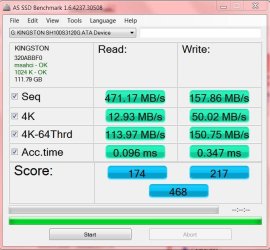
Here is the benchmark.

Thanks for the response, GeneO. I'm not sure what you mean about the partition alignment. I assumed Paragon Migrate would take care of that. Anyway here is the result of the benchmark you asked me to obtain.


SSD.JPG
 

My Computer My Computer

At a glance

Windows 7x64 Home Premium service pack 1AMD Phenom II X6 1090TCorsair CMV4GX3M1A1333C9 4x4GBSapphire HD5570
Computer type
PC/Desktop
Computer Manufacturer/Model Number
custom
OS
Windows 7x64 Home Premium service pack 1
CPU
AMD Phenom II X6 1090T
Motherboard
Asus M4A89GTD Pro/USB3
Memory
Corsair CMV4GX3M1A1333C9 4x4GB
Graphics Card(s)
Sapphire HD5570
Monitor(s) Displays
LG W2252TQ
Screen Resolution
1920 x 1080
Hard Drives
Samsung 840 EVO 500mb (ACHI)
WD WD50 500mb
PSU
Corsair TX650W
Case
Antec
Keyboard
i-rocks KR-6820E
Mouse
Gearhead MPT3300BLK
Antivirus
AVG
Browser
Chrome
I'm not sure what you mean about the partition alignment.


View attachment 174641

To check the alignment of your SSD's partition, it is quite simple.
In windows 7, run msinfo32 by typing it into the search box on your start menu and hitting enter.
click on: components => storage => disks
Look for your SSD and check the partition starting offset.
It needs to be divisible by 4096 (ie return a whole number when you divide by this) otherwise the alignment is not correct.
 

My Computer My Computer

At a glance

Windows 7 Ultimate x64 sp1Intel i5 4590 Haswell refresh 3.30GHz(3.7GHz ...G.Skill Ripjaws F3-12800CL9D-8GBRL 16GB (4x4G...Gigabyte GeForce GT 740 4GB
Computer type
PC/Desktop
Computer Manufacturer/Model Number
Custom 2014 Upgrade.
OS
Windows 7 Ultimate x64 sp1
CPU
Intel i5 4590 Haswell refresh 3.30GHz(3.7GHz Turbo) Quad.
Motherboard
Gigabyte GA-H97-HD3 LGA 1150
Memory
G.Skill Ripjaws F3-12800CL9D-8GBRL 16GB (4x4GB) (1600MHz)
Graphics Card(s)
Gigabyte GeForce GT 740 4GB
Sound Card
Onboard. Realtek High Definition Audio
Monitor(s) Displays
Asus VW266H x 2
Screen Resolution
1920x1200 @ 60Hz
Hard Drives
Samsung 840 EVO 120GB SSD /
Samsung 850 Pro Series 1TB SSD x 2 /
Western Digital WD Black 1TB /
Western Digital VelociRaptor 150 GB.
PSU
Corsair 650 hx modular
Case
Cooler Master
Cooling
3x fans
Keyboard
Logitech Media Keyboard 600
Mouse
Logitech Performance Mouse MX
Internet Speed
Cable Broadband 100mbs/D, 2mbs/U
Antivirus
MSE, Malwarebytes, AdwCleaner, SUPERAntiSpyware
Browser
Mozilla Firefox, Google Chrome
Other Info
1GB DataRam
Got it.

Thanks to you as well, Rustberger. My offset was 1,048,576 which indeed is divisible by 4096. Is that offset ok as high as it is? Also, i went into computer management and my SSD is active and online. All looks ok, at least to a novice, but why can't I get any results when I try to view the contents of the SSD? Anyway, thanks for your help.
 

My Computer My Computer

At a glance

Windows 7x64 Home Premium service pack 1AMD Phenom II X6 1090TCorsair CMV4GX3M1A1333C9 4x4GBSapphire HD5570
Computer type
PC/Desktop
Computer Manufacturer/Model Number
custom
OS
Windows 7x64 Home Premium service pack 1
CPU
AMD Phenom II X6 1090T
Motherboard
Asus M4A89GTD Pro/USB3
Memory
Corsair CMV4GX3M1A1333C9 4x4GB
Graphics Card(s)
Sapphire HD5570
Monitor(s) Displays
LG W2252TQ
Screen Resolution
1920 x 1080
Hard Drives
Samsung 840 EVO 500mb (ACHI)
WD WD50 500mb
PSU
Corsair TX650W
Case
Antec
Keyboard
i-rocks KR-6820E
Mouse
Gearhead MPT3300BLK
Antivirus
AVG
Browser
Chrome
Thanks for the response, GeneO. I'm not sure what you mean about the partition alignment. I assumed Paragon Migrate would take care of that. Anyway here is the result of the benchmark you asked me to obtain.


View attachment 174641

THe AS-SSD shows your partition is aligned (the green 1024K - OK it displayed).

So with those numbers the SSd is performing well and should boot pretty fast (around 15 seconds after windows itself starts booting).

Oh, I see this isn't your C: boot drive. You won't see any improvement in WEI or boot time unless Windows is installed on the SSD. Are you accidentally booted to your old system drive?
 

My Computer My Computer

At a glance

Windows 10 Pro. EFI boot partition, full EFI ...i7 4770k 4.4GHz (44-44-43-43 turbo) @ 1.248V16GB (8GBx2) @2200 MHz G.skill Sniper 10-11-1...MSI GTX 970 Gaming 4G
Computer type
PC/Desktop
Computer Manufacturer/Model Number
Home built (GeneO industries)/Model 4
OS
Windows 10 Pro. EFI boot partition, full EFI boot
CPU
i7 4770k 4.4GHz (44-44-43-43 turbo) @ 1.248V
Motherboard
ASUS Maximus VI Hero
Memory
16GB (8GBx2) @2200 MHz G.skill Sniper 10-11-10-30-1, 1.6V
Graphics Card(s)
MSI GTX 970 Gaming 4G
Sound Card
Onboard SupremeFX Audio
Monitor(s) Displays
NEC Spectraview 2490WUXi-SV
Screen Resolution
1920 x 1200
Hard Drives
Samsung 850 Pro 256GB (OS), Samsung 2x 128GB 840 Pro SSD in RAID0, 3x WD Blue 6Gb/s 1TB RAID0, WD 2TB Black external USB 3.0, 2TB WD20EARS Green external USB 3.0, 2x 500GB Seagate and 1 750 GB external USB, 1x 350GB external USB3
PSU
Seasonic X-850 (2012 KM3 model)
Case
Fractal Design Define R4
Cooling
NH-D14, NF-F12, NF-A15; NF-P14, NF-P12,NF-A14, S12A PWM
Keyboard
Cooler Master Storm Quickfire Rapid - Brown
Mouse
Logitech G602
Internet Speed
126.4 Mb/s down, 24.3 Mb/s up
Other Info
USB 3.0 x8 , SATA III x8, eSATA, USB 2.0 x6. Samsung DVD R/W drive.

WEI: CPU 7.8, Memory 7.9, Graphics 7.9, Disk 7.9
This is starting to make sense.

I didn't see any changes in speed and I was beginning to think the old drive was continuing to boot. What can I do to make the ssd my c drive? Thanks for your continuing help.
 

My Computer My Computer

At a glance

Windows 7x64 Home Premium service pack 1AMD Phenom II X6 1090TCorsair CMV4GX3M1A1333C9 4x4GBSapphire HD5570
Computer type
PC/Desktop
Computer Manufacturer/Model Number
custom
OS
Windows 7x64 Home Premium service pack 1
CPU
AMD Phenom II X6 1090T
Motherboard
Asus M4A89GTD Pro/USB3
Memory
Corsair CMV4GX3M1A1333C9 4x4GB
Graphics Card(s)
Sapphire HD5570
Monitor(s) Displays
LG W2252TQ
Screen Resolution
1920 x 1080
Hard Drives
Samsung 840 EVO 500mb (ACHI)
WD WD50 500mb
PSU
Corsair TX650W
Case
Antec
Keyboard
i-rocks KR-6820E
Mouse
Gearhead MPT3300BLK
Antivirus
AVG
Browser
Chrome
Just in case you need to know how how to open Disk Management.
1. Open the Start Menu, then right click on the Computer button (dark right side) and click on Manage.
A) Go to step 3.
OR

2. Open the Start Menu, then type compmgmt.msc OR diskmgmt.msc in the search box and press enter.

3. If prompted by UAC, then click on Yes.

4. In the left pane of Computer Management, click on Disk Management under Storage. (see screenshots below)
Open disk management and make a Snip and post it. That will help everyone see what your set up is showing.

It will look similar to below Snip.
 

My Computer My Computer

At a glance

Windows7 Pro 64bit SP-1; Windows XP Pro 32bitIntel Core i7-870 Lynnfield 2.93GHz LGA 1156 ...8GB@1400MHz Crucial Ballistix DDR3-1600 4x2GBASUS ENGTX460 DirectCU/2DI/1GD5 1GB 256-bit G...
Computer Manufacturer/Model Number
Hopalong/ Godzilla
OS
Windows7 Pro 64bit SP-1; Windows XP Pro 32bit
CPU
Intel Core i7-870 Lynnfield 2.93GHz LGA 1156 95W Quad-Core
Motherboard
ASUS P7P55D-E PRO
Memory
8GB@1400MHz Crucial Ballistix DDR3-1600 4x2GB
Graphics Card(s)
ASUS ENGTX460 DirectCU/2DI/1GD5 1GB 256-bit GDDR5
Sound Card
VIA Onboard
Monitor(s) Displays
Asus VS248H-P 24"; Samsung SyncMaster 941BW 19"ws
Screen Resolution
1920x1080; 1440x900
Hard Drives
Samsung 830 120GB SSD
Intel 320 120GB SSD
Western Digital Caviar Black WD7501AALS 750GB 7200 RPM SATA 3.0Gb/s
Western Digital Caviar Black WD6401AALS 640GB 7200 RPM SATA 3.0Gb/s
PSU
COOLER MASTER Silent Pro RS850-AMBAJ3-US 850W Modular
Case
COOLER MASTER HAF 932 RC-932-KKN5-GP Black
Cooling
Scythe "Mugen-2 Rev.B" (2 ScytheKaze-Jyuni PWM fans)
Keyboard
Logitech K-320
Mouse
Kensington
Antivirus
Avast Inernet Suite
Browser
IE 9 ; Chrome
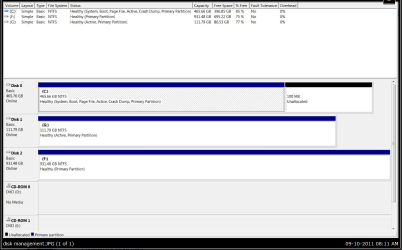
Disk management snip

Here go HopalongX. G: is my SSD and F: is my external hd. Thanks.
 

Attachments

  • disk management.JPG
    disk management.JPG
    115.7 KB · Views: 28

My Computer My Computer

At a glance

Windows 7x64 Home Premium service pack 1AMD Phenom II X6 1090TCorsair CMV4GX3M1A1333C9 4x4GBSapphire HD5570
Computer type
PC/Desktop
Computer Manufacturer/Model Number
custom
OS
Windows 7x64 Home Premium service pack 1
CPU
AMD Phenom II X6 1090T
Motherboard
Asus M4A89GTD Pro/USB3
Memory
Corsair CMV4GX3M1A1333C9 4x4GB
Graphics Card(s)
Sapphire HD5570
Monitor(s) Displays
LG W2252TQ
Screen Resolution
1920 x 1080
Hard Drives
Samsung 840 EVO 500mb (ACHI)
WD WD50 500mb
PSU
Corsair TX650W
Case
Antec
Keyboard
i-rocks KR-6820E
Mouse
Gearhead MPT3300BLK
Antivirus
AVG
Browser
Chrome

My Computer My Computer

At a glance

Windows7 Pro 64bit SP-1; Windows XP Pro 32bitIntel Core i7-870 Lynnfield 2.93GHz LGA 1156 ...8GB@1400MHz Crucial Ballistix DDR3-1600 4x2GBASUS ENGTX460 DirectCU/2DI/1GD5 1GB 256-bit G...
Computer Manufacturer/Model Number
Hopalong/ Godzilla
OS
Windows7 Pro 64bit SP-1; Windows XP Pro 32bit
CPU
Intel Core i7-870 Lynnfield 2.93GHz LGA 1156 95W Quad-Core
Motherboard
ASUS P7P55D-E PRO
Memory
8GB@1400MHz Crucial Ballistix DDR3-1600 4x2GB
Graphics Card(s)
ASUS ENGTX460 DirectCU/2DI/1GD5 1GB 256-bit GDDR5
Sound Card
VIA Onboard
Monitor(s) Displays
Asus VS248H-P 24"; Samsung SyncMaster 941BW 19"ws
Screen Resolution
1920x1080; 1440x900
Hard Drives
Samsung 830 120GB SSD
Intel 320 120GB SSD
Western Digital Caviar Black WD7501AALS 750GB 7200 RPM SATA 3.0Gb/s
Western Digital Caviar Black WD6401AALS 640GB 7200 RPM SATA 3.0Gb/s
PSU
COOLER MASTER Silent Pro RS850-AMBAJ3-US 850W Modular
Case
COOLER MASTER HAF 932 RC-932-KKN5-GP Black
Cooling
Scythe "Mugen-2 Rev.B" (2 ScytheKaze-Jyuni PWM fans)
Keyboard
Logitech K-320
Mouse
Kensington
Antivirus
Avast Inernet Suite
Browser
IE 9 ; Chrome
What was the HD Drive score only before.
What is the SSD Drive score only now.

Not the overall score.
 

My Computer My Computer

At a glance

ME/XP/Vista/Win7
OS
ME/XP/Vista/Win7
It looks like you didn't actually install the OS onto the SSD (though you said you migrated it), or something got messed up.

My recommendation would be to backup everything you need to save, unplug everything but the SSD, and format it before doing a clean install onto the SSD. This will for sure give you that performance boost, but you will have to reinstall EVERYTHING (which is a pain, but it's worth it).

~Lordbob
 

My Computer My Computer

At a glance

Windows 7 Ultimate x64, Mint 9Intel i5-2500k2x 4Gb Corsair VENGEANCE DDR3-1600NVidia GeForce N260GTX Twin Frozr
Computer Manufacturer/Model Number
Hera
OS
Windows 7 Ultimate x64, Mint 9
CPU
Intel i5-2500k
Motherboard
ASUS P8P67 Pro
Memory
2x 4Gb Corsair VENGEANCE DDR3-1600
Graphics Card(s)
NVidia GeForce N260GTX Twin Frozr
Sound Card
Realtek HD OnBoard Audio
Monitor(s) Displays
ASUS 24" Monitor
Screen Resolution
1920x1080
Hard Drives
G.SKILL Phoenix Series 60GB SATA II MLC Internal Solid State Drive (SSD)
SAMSUNG Spinpoint F3R 1TB 7200 RPM 32MB Cache SATA II
PSU
Cooler Master Real Power Pro 750W
Case
Cooler Master Haf 932
Cooling
Fans
Keyboard
Razer Tarantula
Mouse
Razer Lachesis
Internet Speed
not fast enough
I hope you're ok.

I check out the link you posted and I hope all is well with you.
 

My Computer My Computer

At a glance

Windows 7x64 Home Premium service pack 1AMD Phenom II X6 1090TCorsair CMV4GX3M1A1333C9 4x4GBSapphire HD5570
Computer type
PC/Desktop
Computer Manufacturer/Model Number
custom
OS
Windows 7x64 Home Premium service pack 1
CPU
AMD Phenom II X6 1090T
Motherboard
Asus M4A89GTD Pro/USB3
Memory
Corsair CMV4GX3M1A1333C9 4x4GB
Graphics Card(s)
Sapphire HD5570
Monitor(s) Displays
LG W2252TQ
Screen Resolution
1920 x 1080
Hard Drives
Samsung 840 EVO 500mb (ACHI)
WD WD50 500mb
PSU
Corsair TX650W
Case
Antec
Keyboard
i-rocks KR-6820E
Mouse
Gearhead MPT3300BLK
Antivirus
AVG
Browser
Chrome
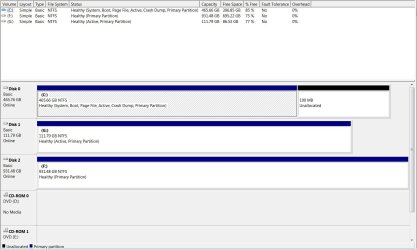
In that picture of disk management appears your SSD is G, and it does have something installed on it.
1.PNG

The top part is showing G as 77% free.
 

My Computers My Computers

  • At a glance

    Windows 11 ProRyzen 9 5900X32GB G Skill DDR4-3600EVGA RTX 3080 FTW 3 Ultra
    Computer type
    PC/Desktop
    Computer Manufacturer/Model Number
    ALWAYS UNDER CONSTRUCTION
    OS
    Windows 11 Pro
    CPU
    Ryzen 9 5900X
    Motherboard
    Asus X570 Crosshair Viii Hero
    Memory
    32GB G Skill DDR4-3600
    Graphics Card(s)
    EVGA RTX 3080 FTW 3 Ultra
    Sound Card
    On Board/Sennheiser PC37X Headset
    Monitor(s) Displays
    3 X Asus 27"
    Screen Resolution
    2560x1440
    Hard Drives
    2 X 1 TB NVME drives
    PSU
    EVGA 850
    Case
    Phanteks Eclipse P400A
    Cooling
    EVGA 280 AIO
    Keyboard
    Logitech G510s/ Logitech G13
    Mouse
    Logitech G502
    Internet Speed
    24/1
    Antivirus
    ESET/MBAM Pro/SAS Pro
    Browser
    Chrome/ Firefox/ Edge
  • At a glance

    Windows 11 ProIntel Ultra 9 288V32 GB LPDDR5X 8533
    Computer type
    Laptop
    System Manufacturer/Model Number
    Dell 16 Plus
    OS
    Windows 11 Pro
    CPU
    Intel Ultra 9 288V
    Memory
    32 GB LPDDR5X 8533
    Monitor(s) Displays
    16" Mini-LED HDR600 Touch 90 Hz
    Screen Resolution
    2560X1600
    Hard Drives
    1 TB NVME
Go to BIOS and select the SSD as first to boot in the system boot order.

Best to have your main OS drive connected to Port 0, now your SSD is on Port 1.
Swap the old OS HDD and the SSD cables.

By assigning a drive letter to the SSD will also cause issues, the system needs to be able to assign "C" to the OS drive.
Which drive letter did your assign to it?
 

My Computer My Computer

At a glance

Windows 7 Ult x64 - SP1/ Windows 8 Pro x64Intel Core i5-3570K 4.6GHz8GB (2X4GB) DDR3 1600 Corsair Vengeance CL8 1.5vSapphire HD 7770 Vapor-X OC 1GB DDR5
Computer type
PC/Desktop
Computer Manufacturer/Model Number
76~2.0
OS
Windows 7 Ult x64 - SP1/ Windows 8 Pro x64
CPU
Intel Core i5-3570K 4.6GHz
Motherboard
Gigabyte GA-Z77X UD3H, f18
Memory
8GB (2X4GB) DDR3 1600 Corsair Vengeance CL8 1.5v
Graphics Card(s)
Sapphire HD 7770 Vapor-X OC 1GB DDR5
Sound Card
Onboard VIA VT2021
Monitor(s) Displays
22" LCD Dell
Screen Resolution
1680x1050
Hard Drives
Samsung 840Pro 128GB SSD,
Seagate Barracuda 500GB SATA2 7200rpm 32MB cache, Seagate Barracuda 1TB SATA2 7200rpm 32MB cache,
PSU
Corsair HX650W
Case
Cooler Master Storm Scout
Cooling
Corsair H80 2x12cm Noctua NF P12 , 2x14cm case fans
Keyboard
Logitech Wave
Mouse
CM Sentinel
Internet Speed
Dismal
Antivirus
Avast
Browser
Opera Next
Other Info
Haswell laptop: HP Envy 17t-j, i7-4700MQ, GeForce 740M 2GB DDR3, 17.3" Full HD 1920x1080, 16GB RAM, Samsung 840 Pro 128GB, 1TB Hitachi 7200 HDD,
Desktop: eSATA ports,
External eSATA Seagate 500GB SATA2 7200rpm,
External WD USB 500GB
...I see this isn't your C: boot drive. You won't see any improvement in WEI or boot time unless Windows is installed on the SSD. Are you accidentally booted to your old system drive?
Good call. The WEI numbers take into account only the system (Windows) drive. Your WEI score is still based on the old one.
 

My Computer My Computer

At a glance

Main - Windows 7 Pro SP1 64-Bit; 2nd - Window...Main - Core i7 2600K; 2nd - Core i7 920Main - 16GB Corsair Vengeance; 2nd - 12GB Cor...Main - XFX Radeon 6870 1GB; 2nd - XFX Radeon ...
Computer Manufacturer/Model Number
Self
OS
Main - Windows 7 Pro SP1 64-Bit; 2nd - Windows Server 2008 R2
CPU
Main - Core i7 2600K; 2nd - Core i7 920
Motherboard
Main - Asus P8Z68-V Pro/Gen3; 2nd - Gigabyte GA-EX58-UDR3
Memory
Main - 16GB Corsair Vengeance; 2nd - 12GB Corsair Vengeance
Graphics Card(s)
Main - XFX Radeon 6870 1GB; 2nd - XFX Radeon 4870 1GB
Sound Card
Both: Onboard Realtek Azalia
Monitor(s) Displays
Main - Hann 25" + I-INC 25" + Acer 23"; 2nd - Upgrading Soon
Screen Resolution
Main - 1920x1080 (All Three Monitors); 2nd - Upgrading Soon
Hard Drives
Main - (1) Crucial M4 128GB (Boot)
Main - (1) Seagate 2TB 64MB Cache (Data)
Main - (1) Seagate 2TB 64MB Cache (Data Backup)
2nd - (1) Intel X25-M SSD 80GB (Boot)
2nd - (3) Seagate 1TB 32MB Cache (Data Backup)
2nd - (1) Seagate 320GB (Because)
PSU
Main - OCZ 600W Modular; 2nd - OCZ 600W
Case
Main - Thermaltake Element G; 2nd - NZXT something or other
Cooling
Main - Corsair H80; 2nd - Prolimatech Megahalems
Keyboard
Main - Razer Reclusa; 2nd - Old MS Keyboard
Mouse
Main - Logitech MX Revolution; 2nd - Old MS Mouse
Internet Speed
20Mbps Time-Warner Cable
The AS SSD test he ran had pretty good numbers, but if you look at the top it was drive G. He neeeds to go into bios and change the boot order to the SSD as 1st hard drive. He said he used Paragon Migrate. It does an excellent job. I have used it several times and it has never failed. He should be able to change the boot order in bios and the SSD should boot.
 

My Computers My Computers

  • At a glance

    Windows 11 ProRyzen 9 5900X32GB G Skill DDR4-3600EVGA RTX 3080 FTW 3 Ultra
    Computer type
    PC/Desktop
    Computer Manufacturer/Model Number
    ALWAYS UNDER CONSTRUCTION
    OS
    Windows 11 Pro
    CPU
    Ryzen 9 5900X
    Motherboard
    Asus X570 Crosshair Viii Hero
    Memory
    32GB G Skill DDR4-3600
    Graphics Card(s)
    EVGA RTX 3080 FTW 3 Ultra
    Sound Card
    On Board/Sennheiser PC37X Headset
    Monitor(s) Displays
    3 X Asus 27"
    Screen Resolution
    2560x1440
    Hard Drives
    2 X 1 TB NVME drives
    PSU
    EVGA 850
    Case
    Phanteks Eclipse P400A
    Cooling
    EVGA 280 AIO
    Keyboard
    Logitech G510s/ Logitech G13
    Mouse
    Logitech G502
    Internet Speed
    24/1
    Antivirus
    ESET/MBAM Pro/SAS Pro
    Browser
    Chrome/ Firefox/ Edge
  • At a glance

    Windows 11 ProIntel Ultra 9 288V32 GB LPDDR5X 8533
    Computer type
    Laptop
    System Manufacturer/Model Number
    Dell 16 Plus
    OS
    Windows 11 Pro
    CPU
    Intel Ultra 9 288V
    Memory
    32 GB LPDDR5X 8533
    Monitor(s) Displays
    16" Mini-LED HDR600 Touch 90 Hz
    Screen Resolution
    2560X1600
    Hard Drives
    1 TB NVME
The AS SSD test he ran had pretty good numbers, but if you look at the top it was drive G. He neeeds to go into bios and change the boot order to the SSD as 1st hard drive. He said he used Paragon Migrate. It does an excellent job. I have used it several times and it has never failed. He should be able to change the boot order in bios and the SSD should boot.
This is probably going to fix it. If it doesn't unplug the other HDDs and see if it boots.

~Lordbob
 

My Computer My Computer

At a glance

Windows 7 Ultimate x64, Mint 9Intel i5-2500k2x 4Gb Corsair VENGEANCE DDR3-1600NVidia GeForce N260GTX Twin Frozr
Computer Manufacturer/Model Number
Hera
OS
Windows 7 Ultimate x64, Mint 9
CPU
Intel i5-2500k
Motherboard
ASUS P8P67 Pro
Memory
2x 4Gb Corsair VENGEANCE DDR3-1600
Graphics Card(s)
NVidia GeForce N260GTX Twin Frozr
Sound Card
Realtek HD OnBoard Audio
Monitor(s) Displays
ASUS 24" Monitor
Screen Resolution
1920x1080
Hard Drives
G.SKILL Phoenix Series 60GB SATA II MLC Internal Solid State Drive (SSD)
SAMSUNG Spinpoint F3R 1TB 7200 RPM 32MB Cache SATA II
PSU
Cooler Master Real Power Pro 750W
Case
Cooler Master Haf 932
Cooling
Fans
Keyboard
Razer Tarantula
Mouse
Razer Lachesis
Internet Speed
not fast enough
I'll give all of this try.

I changed the SSD to G. I will try all that was suggested and I really appreciate the collaborative efforts to save me from myself! I will get back when I get the chance to make changes. Thanks again.
 

My Computer My Computer

At a glance

Windows 7x64 Home Premium service pack 1AMD Phenom II X6 1090TCorsair CMV4GX3M1A1333C9 4x4GBSapphire HD5570
Computer type
PC/Desktop
Computer Manufacturer/Model Number
custom
OS
Windows 7x64 Home Premium service pack 1
CPU
AMD Phenom II X6 1090T
Motherboard
Asus M4A89GTD Pro/USB3
Memory
Corsair CMV4GX3M1A1333C9 4x4GB
Graphics Card(s)
Sapphire HD5570
Monitor(s) Displays
LG W2252TQ
Screen Resolution
1920 x 1080
Hard Drives
Samsung 840 EVO 500mb (ACHI)
WD WD50 500mb
PSU
Corsair TX650W
Case
Antec
Keyboard
i-rocks KR-6820E
Mouse
Gearhead MPT3300BLK
Antivirus
AVG
Browser
Chrome
Let us know the progress and/or any questions.
 

My Computer My Computer

At a glance

Windows 7 Ult x64 - SP1/ Windows 8 Pro x64Intel Core i5-3570K 4.6GHz8GB (2X4GB) DDR3 1600 Corsair Vengeance CL8 1.5vSapphire HD 7770 Vapor-X OC 1GB DDR5
Computer type
PC/Desktop
Computer Manufacturer/Model Number
76~2.0
OS
Windows 7 Ult x64 - SP1/ Windows 8 Pro x64
CPU
Intel Core i5-3570K 4.6GHz
Motherboard
Gigabyte GA-Z77X UD3H, f18
Memory
8GB (2X4GB) DDR3 1600 Corsair Vengeance CL8 1.5v
Graphics Card(s)
Sapphire HD 7770 Vapor-X OC 1GB DDR5
Sound Card
Onboard VIA VT2021
Monitor(s) Displays
22" LCD Dell
Screen Resolution
1680x1050
Hard Drives
Samsung 840Pro 128GB SSD,
Seagate Barracuda 500GB SATA2 7200rpm 32MB cache, Seagate Barracuda 1TB SATA2 7200rpm 32MB cache,
PSU
Corsair HX650W
Case
Cooler Master Storm Scout
Cooling
Corsair H80 2x12cm Noctua NF P12 , 2x14cm case fans
Keyboard
Logitech Wave
Mouse
CM Sentinel
Internet Speed
Dismal
Antivirus
Avast
Browser
Opera Next
Other Info
Haswell laptop: HP Envy 17t-j, i7-4700MQ, GeForce 740M 2GB DDR3, 17.3" Full HD 1920x1080, 16GB RAM, Samsung 840 Pro 128GB, 1TB Hitachi 7200 HDD,
Desktop: eSATA ports,
External eSATA Seagate 500GB SATA2 7200rpm,
External WD USB 500GB
Back
Top