Solved Why does Outlook 2010 still leave e-mails on my e-mail server???

montecarlo1987

New member
Member
VIP
Local time
7:24 AM
Messages
145
Hello. I have a question regarding Microsoft Office 2010's Outlook program. I have been using Office 2007 for the past few years and now I have Office 2010. Both my Office 2007 and 2010 versions have Outlook 2007 and 2010 respectfully. I just installed Office 2010 and setup my e-mail accounts in Outlook 2010. While setting up e-mail accounts, I used the same process as I did when I setup e-mail accounts in Outlook 2007 -- they are essentially the same manner and method to setup in both Outlook versions -- nothing different. Now, after I setup my Outlook 2010 and downloaded my e-mails into Outlook 2010 from my e-mail server , I rechecked my webmail account online. I was surprised to find that the same e-mail messages were STILL ON my e-mail server AFTER I downloaded them to Outlook 2010. I then uninstalled my Office 2010 and consequently Outlook 2010 and reinstalled Office 2007 with Outlook 2007. After I setup my Outlook 2007's e-mail accounts, I downloaded the e-mails from my e-mail server as well AS I KNEW they were STILL ON their e-mail server. I went back into my online webmail account, and this time, there were NO messages left on it. I have known this to be the case with Outlook 2007 from the past.

My preference or desire? To leave NO messages on my e-mail server when they are downloaded to Outlook 2007 AND Outlook 2010. ...but I did NOT do ANYTHING DIFFERENT between Outlook 2007 and 2010?!?!? So what is going on???????
If anyone knows why Outlook 2010 leaves the messages on my e-mail server after downloading and Outlook 2007 does not, please share with my why... ...and what I need to do with Outlook 2010 to make the modifications or changes necessary NOT to leave messages on my e-mail companies server? The account type is POP3.

Please reply.

Thank you!
 

My Computer My Computer

Computer type
PC/Desktop
OS
Windows 7 Pro x64 SP1 & Windows 8 & 8.1 Pro x64
Hi,

There is a setting in Outlook 2010 to keep your mail on the server even after downloading it to a POP3 account - all you need to do is turn it off.

Unfortunately, Im on a different PC today, so if you can wait till I get home in about 4/5 hours I'll find that setting in my Outlook 2010 and post it here for you.

Regards,
Golden
 

My Computer My Computer

Computer type
PC/Desktop
Computer Manufacturer/Model Number
Golden Mk. I.4
OS
Windows 10 Pro x64 ; Xubuntu x64
CPU
Intel i7 860 @ 2.80 GHz O/C'ed to 4.0GHz
Motherboard
Gigabyte P55A-UD3R Rev.1. Award BIOS F13
Memory
16GB Corsair Vengance DDR3 @ 661 MHz Dual Channel (9-9-9-24)
Graphics Card(s)
EVGA NVidia GTX 560 1024MB
Sound Card
Realtek Integrated
Monitor(s) Displays
Dual Samsung SyncMaster 2494HS
Screen Resolution
1920*1080 and 1920*1080
Hard Drives
1*Samsung 840 EVO 120GB SSD;
1*OCZ Vertex 2 60GB SSD;
2*Samsung F3 SpinPoint 1TB in RAID0;
1*Samsung F1 SpinPoint 1TB;
2*Western Digital 1TB External USB 3.0
1*Western Digital 500GB External USB 3.0
1*Seagate 500GB External USB 2.0
PSU
Thermaltake ToughPower QFan 750W
Case
Thermaltake Element S VK60001W2Z
Cooling
Corsair H60 Water Cooling, 2*230mm and 2*80mm case fans
Keyboard
Logitech G110
Mouse
Logitech MX518
Hi,

There is a setting in Outlook 2010 to keep your mail on the server even after downloading it to a POP3 account - all you need to do is turn it off.

Unfortunately, Im on a different PC today, so if you can wait till I get home in about 4/5 hours I'll find that setting in my Outlook 2010 and post it here for you.

Regards,
Golden
Hope Golden doesn't mind me helping out... :)

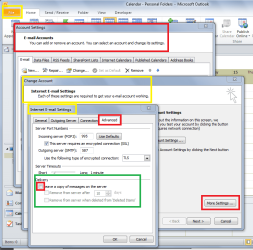
  1. Click the File tab > Account Settings
  2. Click on account settings again
  3. Highlight existing email account
  4. Click change > More settings >Click Advanced tab
  5. In Delivery section uncheck box "Leave a copy of message on the server."
  6. Click OK > Next and Finish.
 

Attachments

  • Remove emails.PNG
    Remove emails.PNG
    37.4 KB · Views: 351

My Computer My Computer

Computer type
PC/Desktop
Computer Manufacturer/Model Number
Packard Bell
OS
Windows 7 Home Premium 64bit
CPU
Intel(R) Core(TM) i3-2120 CPU @ 3.30GHz
Motherboard
Packard Bell IPISB-AG
Memory
3.00 GB
Graphics Card(s)
(1) Intel(R) HD Graphics (2) VNC Mirror Driver
Sound Card
Realtek High Definition Audio
Monitor(s) Displays
AIO LCD
Screen Resolution
1920 x 1080
Hard Drives
WDC WD10EADX-22TDHB0 ATA Device
Fixed hard disk media
4 partitions
931.51 GB
Keyboard
Wireless
Mouse
Wireless
Antivirus
Microsoft Security Essentials
Browser
IE; Firefox
Other Info
Also:
Samsung N220 Plus Netbook - Windows 7 Home
HP laptop
iPad 5
That's it - see Irene's post. Nice one Irene.
 

My Computer My Computer

Computer type
PC/Desktop
Computer Manufacturer/Model Number
Golden Mk. I.4
OS
Windows 10 Pro x64 ; Xubuntu x64
CPU
Intel i7 860 @ 2.80 GHz O/C'ed to 4.0GHz
Motherboard
Gigabyte P55A-UD3R Rev.1. Award BIOS F13
Memory
16GB Corsair Vengance DDR3 @ 661 MHz Dual Channel (9-9-9-24)
Graphics Card(s)
EVGA NVidia GTX 560 1024MB
Sound Card
Realtek Integrated
Monitor(s) Displays
Dual Samsung SyncMaster 2494HS
Screen Resolution
1920*1080 and 1920*1080
Hard Drives
1*Samsung 840 EVO 120GB SSD;
1*OCZ Vertex 2 60GB SSD;
2*Samsung F3 SpinPoint 1TB in RAID0;
1*Samsung F1 SpinPoint 1TB;
2*Western Digital 1TB External USB 3.0
1*Western Digital 500GB External USB 3.0
1*Seagate 500GB External USB 2.0
PSU
Thermaltake ToughPower QFan 750W
Case
Thermaltake Element S VK60001W2Z
Cooling
Corsair H60 Water Cooling, 2*230mm and 2*80mm case fans
Keyboard
Logitech G110
Mouse
Logitech MX518
Hello. Thank you both (Golden & Irene) for the replies!! So that is what I need to do to make the changes. I am just so curious why one allows them to stay on the server and the other removes them. Maybe the default settings are set to the opposite settings on each version of Outlook???

If anyone could find out the default setting for Outlook 2010 (or I could just reinstall it again -- a total pain), I could find out myself.

I have checked my Outlook 2007 I have installed and found that the box for "Leave a copy of messages on the server" is NOT checked by DEFAULT. Irene in step 5 above states, "In Delivery section uncheck box "Leave a copy of message on the server." I am wondering if MY DEFAULT it IS checked for Outlook 2010?

Please reply.
 

My Computer My Computer

Computer type
PC/Desktop
OS
Windows 7 Pro x64 SP1 & Windows 8 & 8.1 Pro x64
Hello. Thank you both (Golden & Irene) for the replies!! So that is what I need to do to make the changes. I am just so curious why one allows them to stay on the server and the other removes them. Maybe the default settings are set to the opposite settings on each version of Outlook???

If anyone could find out the default setting for Outlook 2010 (or I could just reinstall it again -- a total pain), I could find out myself.

I have checked my Outlook 2007 I have installed and found that the box for "Leave a copy of messages on the server" is NOT checked by DEFAULT. Irene in step 5 above states, "In Delivery section uncheck box "Leave a copy of message on the server." I am wondering if MY DEFAULT it IS checked for Outlook 2010?

Please reply.

montecarlo, you just need to follow the procedure described below on your own system in order to see how your system is set:


  1. Click the File tab > Account Settings
  2. Click on account settings again
  3. Highlight existing email account
  4. Click change > More settings >Click Advanced tab
  5. In Delivery section uncheck box "Leave a copy of message on the server."
  6. Click OK > Next and Finish.
 

My Computer My Computer

Computer type
PC/Desktop
Computer Manufacturer/Model Number
Packard Bell
OS
Windows 7 Home Premium 64bit
CPU
Intel(R) Core(TM) i3-2120 CPU @ 3.30GHz
Motherboard
Packard Bell IPISB-AG
Memory
3.00 GB
Graphics Card(s)
(1) Intel(R) HD Graphics (2) VNC Mirror Driver
Sound Card
Realtek High Definition Audio
Monitor(s) Displays
AIO LCD
Screen Resolution
1920 x 1080
Hard Drives
WDC WD10EADX-22TDHB0 ATA Device
Fixed hard disk media
4 partitions
931.51 GB
Keyboard
Wireless
Mouse
Wireless
Antivirus
Microsoft Security Essentials
Browser
IE; Firefox
Other Info
Also:
Samsung N220 Plus Netbook - Windows 7 Home
HP laptop
iPad 5
Yes, I just found out from a friend that the default option was changed in Microsoft Outlook 2010. I guess it was based on user feedback and the desire for e-mail servers to KEEP the e-mails instead.
 

My Computer My Computer

Computer type
PC/Desktop
OS
Windows 7 Pro x64 SP1 & Windows 8 & 8.1 Pro x64
Yes, I just found out from a friend that the default option was changed in Microsoft Outlook 2010. I guess it was based on user feedback and the desire for e-mail servers to KEEP the e-mails instead.

So you now have the correct setting to prevent emails being left on your email server? :D
 

My Computer My Computer

Computer type
PC/Desktop
Computer Manufacturer/Model Number
Packard Bell
OS
Windows 7 Home Premium 64bit
CPU
Intel(R) Core(TM) i3-2120 CPU @ 3.30GHz
Motherboard
Packard Bell IPISB-AG
Memory
3.00 GB
Graphics Card(s)
(1) Intel(R) HD Graphics (2) VNC Mirror Driver
Sound Card
Realtek High Definition Audio
Monitor(s) Displays
AIO LCD
Screen Resolution
1920 x 1080
Hard Drives
WDC WD10EADX-22TDHB0 ATA Device
Fixed hard disk media
4 partitions
931.51 GB
Keyboard
Wireless
Mouse
Wireless
Antivirus
Microsoft Security Essentials
Browser
IE; Firefox
Other Info
Also:
Samsung N220 Plus Netbook - Windows 7 Home
HP laptop
iPad 5
In a corporate environment with an Exchange Server, you typically want Outlook to leave the emails on the server. The reason being that the admins at work backup the Exchange Server regularly (or should) and thus in the event of a local hard drive failure...you wouldn't lose your email (as you might if you put all of your email into a PST. Also, by keeping the mail directly on the Exchange Server, you can access that email via utilities such as Outlook Web Access and such.

That's why the default is to leave mail on a server.
 

My Computer My Computer

Computer Manufacturer/Model Number
Self-Built in July 2009
OS
Windows 7 Ultimate x64
CPU
Intel Q9550 2.83Ghz OC'd to 3.40Ghz
Motherboard
Gigabyte GA-EP45-UD3R rev. 1.1, F12 BIOS
Memory
8GB G.Skill PI DDR2-800, 4-4-4-12 timings
Graphics Card(s)
EVGA 1280MB Nvidia GeForce GTX570
Sound Card
Realtek ALC899A 8 channel onboard audio
Monitor(s) Displays
23" Acer x233H
Screen Resolution
1920x1080
Hard Drives
Intel X25-M 80GB Gen 2 SSD
Western Digital 1TB Caviar Black, 32MB cache. WD1001FALS
PSU
Corsair 620HX modular
Case
Antec P182
Cooling
stock
Keyboard
ABS M1 Mechanical
Mouse
Logitech G9 Laser Mouse
Internet Speed
15/2 cable modem
Other Info
Windows and Linux enthusiast. Logitech G35 Headset.
@ Irene:

Hello again. When I get back to Office 2011 in the near future, I will make my desired settings to delete them on the e-mail server. In the meantime I setup Office 2007 and I'll stick with it. It is a real project for me to setup any Office product. I have many settings and configurations to do.

I want thank you for your help! :)

@ pparks1:

Hello. Yes, corporate environments would make sense to leave e-mails on the server -- for immediate and easy access. Yah, Outlook is designed for businesses more than for home use. For home use, taking them off the server is more practical since most e-mail servers have limits.

Thanks!
 

My Computer My Computer

Computer type
PC/Desktop
OS
Windows 7 Pro x64 SP1 & Windows 8 & 8.1 Pro x64
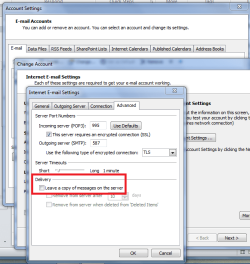
no such option

Dear all,

I don't know what the deal is, but my Outlook Pro Plus 2010 does not have that option in the advanced settings window as Golden and Irene mentioned. The last item on the advanced settings window is a setting to choose "Folders"?

Anyone know why?
 

My Computer My Computer

OS
win 7 ult 32
Hello Phil79, welcome to the forum. :D

Your path to the setting, using Outlook Professional Plus, would be:

  1. With Outlook open, Click the File tab.
  2. Click Account Settings, and then click Account Settings.
  3. Select the account for which you want to change settings.
  4. Click More Settings.
  5. Use the Connection tab to configure how Outlook connects to the mail server. You can then change the setting for leaving/not leaving messages on the server, and for how long.
.
.
 

Attachments

  • Leave a copy on server.PNG
    Leave a copy on server.PNG
    52 KB · Views: 42

My Computer My Computer

Computer type
PC/Desktop
Computer Manufacturer/Model Number
Packard Bell
OS
Windows 7 Home Premium 64bit
CPU
Intel(R) Core(TM) i3-2120 CPU @ 3.30GHz
Motherboard
Packard Bell IPISB-AG
Memory
3.00 GB
Graphics Card(s)
(1) Intel(R) HD Graphics (2) VNC Mirror Driver
Sound Card
Realtek High Definition Audio
Monitor(s) Displays
AIO LCD
Screen Resolution
1920 x 1080
Hard Drives
WDC WD10EADX-22TDHB0 ATA Device
Fixed hard disk media
4 partitions
931.51 GB
Keyboard
Wireless
Mouse
Wireless
Antivirus
Microsoft Security Essentials
Browser
IE; Firefox
Other Info
Also:
Samsung N220 Plus Netbook - Windows 7 Home
HP laptop
iPad 5
download problem finally solved

Dear Irene,

Thank you for the fast response. However, I was up late last night (again :confused:) and I believe I solved the problem. You see, I had been using the same email software for about 10 years until recently. With this recent upgrade in software, I have learned the real differences in configuring POP3 and IMAP accounts. Now I know that most IP providers have recently (or at least within the last year or two) made IMAP a default setting for the new email software's "wise(z) installers". So, my account was set at IMAP and in IMAP there is no "Delivery" option to be unchecked under the "Advanced" tab. So, I had to reconfigure a new account "Manually" in order to be able to choose a "POP3" setting (which does let you choose whether to leave your mail on the server or not), then delete the first one which was automatically configured as an IMAP. :D

Would you confirm for me that my conclusions are correct? By the way, what does the seemingly useless IMAP stand for and what is its main purpose or difference that mail servers wanted to make it a default? :sarc:

Cheers
Phil
 

My Computer My Computer

OS
win 7 ult 32

My Computer My Computer

Computer type
PC/Desktop
Computer Manufacturer/Model Number
Packard Bell
OS
Windows 7 Home Premium 64bit
CPU
Intel(R) Core(TM) i3-2120 CPU @ 3.30GHz
Motherboard
Packard Bell IPISB-AG
Memory
3.00 GB
Graphics Card(s)
(1) Intel(R) HD Graphics (2) VNC Mirror Driver
Sound Card
Realtek High Definition Audio
Monitor(s) Displays
AIO LCD
Screen Resolution
1920 x 1080
Hard Drives
WDC WD10EADX-22TDHB0 ATA Device
Fixed hard disk media
4 partitions
931.51 GB
Keyboard
Wireless
Mouse
Wireless
Antivirus
Microsoft Security Essentials
Browser
IE; Firefox
Other Info
Also:
Samsung N220 Plus Netbook - Windows 7 Home
HP laptop
iPad 5
Main reasons for Choosing IMAP, (Internet Mail Access protocol), over POP3

If you use web access to check your mail the changes that you make at home, to your mailbox, are available from anywhere
Automatically synchronises mail between multiple systems, (desktop, laptop, Mobile Device, Etc)
If you lose your home system, (major failure, fire or theft), all your mail is backed up

Disadvantage is one of speed as the synchronisation can take time on a busy system
 

My Computers My Computers

System One System Two

  • Computer type
    PC/Desktop
    Computer Manufacturer/Model Number
    ChillBlast - Custom to my design
    OS
    Windows 11 Pro x64 [Latest Release and Release Preview]
    CPU
    Ryzen 9 5950X, 3.8 - 5.2 MHz
    Motherboard
    Asus Prime X570-Pro
    Memory
    64GB [2 x 32GB] DDR4 3200MHz
    Graphics Card(s)
    4GB NVIDIA GEFORCE GTX 1650 Ti
    Sound Card
    On-board SPDIF to 5.1 System + HDMI [5.1 system]
    Monitor(s) Displays
    32" UHD 32 Bit HDR Monitor + 43" UHD 4K 32Bit HDR TV
    Screen Resolution
    2 x 3840 x 2160 @60Hz
    Hard Drives
    1TB M2 SSD OS, 500GB Fast Access SSD, 2 x 8TB Data + Various Externals from 1TB to 4TB, 10TB NAS
    PSU
    NZXT C750 80 PLUS Gold 750W Modular PSU
    Case
    Workstation Case [Matt Black]
    Cooling
    NZXT Kraken X63 280mm CPU Cooler +2x Quiet Case fans
    Keyboard
    Logitech Wireless MX Keys & K400 + others
    Mouse
    Logitech Wireless MX Master 3S
    Internet Speed
    920 MB Down 50 MB Up
    Antivirus
    BitDefender Total Security Pro
    Browser
    Chrome (always run latest Non-Beta)
    Other Info
    Also run ...
    Laptop - Quad 8GB - Windows 10 Pro x64
    Nexus 7 Android tablet x2
    Samsung 10.2" tablet
    Blackview TAB 8 4G Android Tablet c/w Keyboard
    Wacom Intuos Pro Medium Pen Pad
    Wacom Intuos Pro Small Pen Pad
    Wacom Expresskeys Remote
    Loopdeck+ Graphics Controller
    Shuttle Pro v2 Control
  • Computer type
    Laptop
    System Manufacturer/Model Number
    Dell XPS 17 10750H
    OS
    Windows 11 Pro x64 Latest RP
    CPU
    Intel I7 10750H 5.0GHz
    Motherboard
    Dell XPS
    Memory
    32GB [2x16GB] DDR4 2933 MHz
    Graphics Card(s)
    nVidia GTX1650Ti 4 GB GDDR6
    Sound Card
    Stock [Realtek] 4 Speaker
    Monitor(s) Displays
    17" IPS UHD+ Infinity Edge Touchscreen
    Screen Resolution
    3840 x 2400
    Hard Drives
    2TB M2 NVMe, 4TB External + various 500GB & 1TB External NVMe (also have access to spinner HDD from
    PSU
    Stock
    Case
    Stock XPS Aluminium & Carbon Fibre
    Cooling
    Stock - Active Fan Control
    Keyboard
    Backlit + Various Logitech
    Mouse
    Stock Track Pad + Logitech MX Trackball
    Internet Speed
    72 MB Down 18MB Up
    Browser
    Chrome
    Other Info
    Also run ...
    Laptop - Quad 8GB - Windows 10 Pro x64
    Nexus 7 Android tablet x2
    10.2" tablet
    Sony Z3 Android Smartphone
    Wacom Intuos Pro Medium Pen Pad
    Wacom Intuos Pro Small Pen Pad
    Wacom Expresskeys Remote
    Loopdeck+ Graphics Controller
    Shuttle Pro v2 Control Pad
    10TB NAS
Links

Thank you Irene for the links. You sure have incredible knowledge of where to find information resources!

After reading the articles, I have concluded (in my opinion) that IMAP is only good if you are using multiple computers. However, when I travel on business around the world, I always take my computer (with external backup). If I am forced to use another computer (which I prefer not to) I will check my mail via a web mail link (then download when my computer has access). To me, IMAP my only have been promoted by other corporate agendas (such as monitoring employees) which I am glad I do not have to deal with.

In any case, thank you for all the assistance and inspiration.

Cheers
Phil
 

My Computer My Computer

OS
win 7 ult 32
In any case, thank you for all the assistance and inspiration.
You're very welcome, Phil.

Please come back and visit us again. :D
 

My Computer My Computer

Computer type
PC/Desktop
Computer Manufacturer/Model Number
Packard Bell
OS
Windows 7 Home Premium 64bit
CPU
Intel(R) Core(TM) i3-2120 CPU @ 3.30GHz
Motherboard
Packard Bell IPISB-AG
Memory
3.00 GB
Graphics Card(s)
(1) Intel(R) HD Graphics (2) VNC Mirror Driver
Sound Card
Realtek High Definition Audio
Monitor(s) Displays
AIO LCD
Screen Resolution
1920 x 1080
Hard Drives
WDC WD10EADX-22TDHB0 ATA Device
Fixed hard disk media
4 partitions
931.51 GB
Keyboard
Wireless
Mouse
Wireless
Antivirus
Microsoft Security Essentials
Browser
IE; Firefox
Other Info
Also:
Samsung N220 Plus Netbook - Windows 7 Home
HP laptop
iPad 5
Solved Why does Outlook 2010 still leave e-mails on my e-mail server??

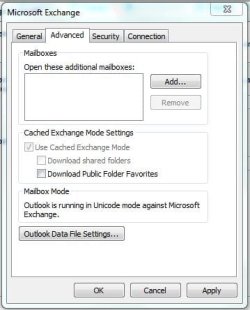
I'm using Micorosft Exchange, is there any other way to download all my emails and leave nothing on my server? I need that because my server has allotted capacity.

There's no check/uncheck option in advance tab. (see below)

Thank You in advance :D
 

Attachments

  • Capture.JPG
    Capture.JPG
    30.7 KB · Views: 1

My Computer My Computer

OS
windows 7 pro 64bit
Exchange is designed to work as a remote storage system for emails, which is why there is not an option to do as you wish.

If you discuss this with your system administrator it may be possible for you to manually archive older mails to your local machine and then get these purged from the server.

You would of course have to arrange for backup of these older archived messages as they would be outside the remit of the server backup
 

My Computers My Computers

System One System Two

  • Computer type
    PC/Desktop
    Computer Manufacturer/Model Number
    ChillBlast - Custom to my design
    OS
    Windows 11 Pro x64 [Latest Release and Release Preview]
    CPU
    Ryzen 9 5950X, 3.8 - 5.2 MHz
    Motherboard
    Asus Prime X570-Pro
    Memory
    64GB [2 x 32GB] DDR4 3200MHz
    Graphics Card(s)
    4GB NVIDIA GEFORCE GTX 1650 Ti
    Sound Card
    On-board SPDIF to 5.1 System + HDMI [5.1 system]
    Monitor(s) Displays
    32" UHD 32 Bit HDR Monitor + 43" UHD 4K 32Bit HDR TV
    Screen Resolution
    2 x 3840 x 2160 @60Hz
    Hard Drives
    1TB M2 SSD OS, 500GB Fast Access SSD, 2 x 8TB Data + Various Externals from 1TB to 4TB, 10TB NAS
    PSU
    NZXT C750 80 PLUS Gold 750W Modular PSU
    Case
    Workstation Case [Matt Black]
    Cooling
    NZXT Kraken X63 280mm CPU Cooler +2x Quiet Case fans
    Keyboard
    Logitech Wireless MX Keys & K400 + others
    Mouse
    Logitech Wireless MX Master 3S
    Internet Speed
    920 MB Down 50 MB Up
    Antivirus
    BitDefender Total Security Pro
    Browser
    Chrome (always run latest Non-Beta)
    Other Info
    Also run ...
    Laptop - Quad 8GB - Windows 10 Pro x64
    Nexus 7 Android tablet x2
    Samsung 10.2" tablet
    Blackview TAB 8 4G Android Tablet c/w Keyboard
    Wacom Intuos Pro Medium Pen Pad
    Wacom Intuos Pro Small Pen Pad
    Wacom Expresskeys Remote
    Loopdeck+ Graphics Controller
    Shuttle Pro v2 Control
  • Computer type
    Laptop
    System Manufacturer/Model Number
    Dell XPS 17 10750H
    OS
    Windows 11 Pro x64 Latest RP
    CPU
    Intel I7 10750H 5.0GHz
    Motherboard
    Dell XPS
    Memory
    32GB [2x16GB] DDR4 2933 MHz
    Graphics Card(s)
    nVidia GTX1650Ti 4 GB GDDR6
    Sound Card
    Stock [Realtek] 4 Speaker
    Monitor(s) Displays
    17" IPS UHD+ Infinity Edge Touchscreen
    Screen Resolution
    3840 x 2400
    Hard Drives
    2TB M2 NVMe, 4TB External + various 500GB & 1TB External NVMe (also have access to spinner HDD from
    PSU
    Stock
    Case
    Stock XPS Aluminium & Carbon Fibre
    Cooling
    Stock - Active Fan Control
    Keyboard
    Backlit + Various Logitech
    Mouse
    Stock Track Pad + Logitech MX Trackball
    Internet Speed
    72 MB Down 18MB Up
    Browser
    Chrome
    Other Info
    Also run ...
    Laptop - Quad 8GB - Windows 10 Pro x64
    Nexus 7 Android tablet x2
    10.2" tablet
    Sony Z3 Android Smartphone
    Wacom Intuos Pro Medium Pen Pad
    Wacom Intuos Pro Small Pen Pad
    Wacom Expresskeys Remote
    Loopdeck+ Graphics Controller
    Shuttle Pro v2 Control Pad
    10TB NAS
Back
Top