Adding Videos to "Movies"?

mSeliga

Member
Power User
VIP
Local time
5:11 PM
Messages
130
Location
Battlestar Galactica
I like the fact that Media Center has an option to have a special Movies category, becuas eI rip alot of my DVDs. However, I haven't been able to find a way to manually add these files in. IS there a special thing the file needs to have to show up there?
 

My Computer My Computer

Computer Manufacturer/Model Number
Self
OS
Windows 7 Build 7100 (x64)
CPU
Intel Q6600 2.4GHz
Motherboard
P5Ne-SLI
Memory
5 GB
Graphics Card(s)
GeForce GTX 260 - 896 MB
Sound Card
PCI Express X-Fi Titanium Fatal1ty Pro Series
Monitor(s) Displays
Westinghouse - 22" (L2210NW)
Screen Resolution
1680x1050
Hard Drives
500gb SATA Internal
250gb IDE External
PSU
500w
Case
Xion III Gaming Mid-Tower w/Side Windows
Cooling
5 Fans
Keyboard
Razer Tarantula
Mouse
Microsoft/Razer Habu
Internet Speed
Cable
Most annoying

I like the fact that Media Center has an option to have a special Movies category, becuas eI rip alot of my DVDs. However, I haven't been able to find a way to manually add these files in. IS there a special thing the file needs to have to show up there?

Sorry don't have a solution, but most annoying and a little short-sighted of M$ if you ask me.

:sarc: After all this is the digital age and I like you have my movies on HDD as I suspect many movie lovers will. Mine just sit in videos, the movies seems a bit redundant.
 

Attachments

  • software_engineering_explained-1.gif
    software_engineering_explained-1.gif
    60.1 KB · Views: 88

My Computer My Computer

OS
Windows Se7en Ultimate x64
CPU
AMD Athlon Phenom II 550 (Dual Core at the moment)
Motherboard
DFI LPJR790GX-M2RS
Memory
4GB OCZ reaper DDR2 PC8500 1066
Graphics Card(s)
CrosssFire 2 x Sapphire RADEON HD3650 (512 MB GDDR3)
Sound Card
Built-in
Monitor(s) Displays
Samsung LE-40B551 40 in. HDTV, HP w2007v, Elo Touchscreen
Screen Resolution
1920 x 1080 pixels
Hard Drives
OCZ Agility Series 30GB SATA II 2.5" Solid State Drive
Samsung Spinpoint F3 1TB SATA II
Samsung Spinpoint F1 500GB SATA II
Western Digital Caviar 500GB SATA II
PSU
OCZ 600W StealthXStream
Case
Antec P180 Mini
Cooling
Scythe Ninja Copper Cooler 5th Anniversary Limited Edition
Keyboard
Cordless Desktop® EX 90
Mouse
Cordless Desktop® EX 90
Internet Speed
Hamster-in-a-wheel
Other Info
WinTV-NOVA-T PCI
Altec Lansing ACS56
Sorry don't have a solution, but most annoying and a little short-sighted of M$ if you ask me.

:sarc: After all this is the digital age and I like you have my movies on HDD as I suspect many movie lovers will. Mine just sit in videos, the movies seems a bit redundant.

Odd. Granted the only things that have shown up in that Movies area are dvds I have in the drive, I wonder if you download/recorded something it shows there...
 

My Computer My Computer

Computer Manufacturer/Model Number
Self
OS
Windows 7 Build 7100 (x64)
CPU
Intel Q6600 2.4GHz
Motherboard
P5Ne-SLI
Memory
5 GB
Graphics Card(s)
GeForce GTX 260 - 896 MB
Sound Card
PCI Express X-Fi Titanium Fatal1ty Pro Series
Monitor(s) Displays
Westinghouse - 22" (L2210NW)
Screen Resolution
1680x1050
Hard Drives
500gb SATA Internal
250gb IDE External
PSU
500w
Case
Xion III Gaming Mid-Tower w/Side Windows
Cooling
5 Fans
Keyboard
Razer Tarantula
Mouse
Microsoft/Razer Habu
Internet Speed
Cable
Movies

Recorded items, at least recorded TV, appears in the TV section. Yep inserted DVD's show up in movies but not really useful. I believe you can import to them to HDD but I bet that it won't be quick and DVD format is so bulky compared to divx

A really excellent extension that I would highly recommend for MCE is My Movies. It is free software and automatically catalogues your HDD movies with actors, trailers, plots etc etc. I have around 400 films and it catalogued them in 10 mins!

Here's the link if you want to take a look. If you want more add-ons for MCE their are few sites, The Green Button is quite good just google it.
 

My Computer My Computer

OS
Windows Se7en Ultimate x64
CPU
AMD Athlon Phenom II 550 (Dual Core at the moment)
Motherboard
DFI LPJR790GX-M2RS
Memory
4GB OCZ reaper DDR2 PC8500 1066
Graphics Card(s)
CrosssFire 2 x Sapphire RADEON HD3650 (512 MB GDDR3)
Sound Card
Built-in
Monitor(s) Displays
Samsung LE-40B551 40 in. HDTV, HP w2007v, Elo Touchscreen
Screen Resolution
1920 x 1080 pixels
Hard Drives
OCZ Agility Series 30GB SATA II 2.5" Solid State Drive
Samsung Spinpoint F3 1TB SATA II
Samsung Spinpoint F1 500GB SATA II
Western Digital Caviar 500GB SATA II
PSU
OCZ 600W StealthXStream
Case
Antec P180 Mini
Cooling
Scythe Ninja Copper Cooler 5th Anniversary Limited Edition
Keyboard
Cordless Desktop® EX 90
Mouse
Cordless Desktop® EX 90
Internet Speed
Hamster-in-a-wheel
Other Info
WinTV-NOVA-T PCI
Altec Lansing ACS56
Recorded items, at least recorded TV, appears in the TV section. Yep inserted DVD's show up in movies but not really useful. I believe you can import to them to HDD but I bet that it won't be quick and DVD format is so bulky compared to divx

A really excellent extension that I would highly recommend for MCE is My Movies. It is free software and automatically catalogues your HDD movies with actors, trailers, plots etc etc. I have around 400 films and it catalogued them in 10 mins!

Here's the link if you want to take a look. If you want more add-ons for MCE their are few sites, The Green Button is quite good just google it.

Thanks, I'll try that.
 

My Computer My Computer

Computer Manufacturer/Model Number
Self
OS
Windows 7 Build 7100 (x64)
CPU
Intel Q6600 2.4GHz
Motherboard
P5Ne-SLI
Memory
5 GB
Graphics Card(s)
GeForce GTX 260 - 896 MB
Sound Card
PCI Express X-Fi Titanium Fatal1ty Pro Series
Monitor(s) Displays
Westinghouse - 22" (L2210NW)
Screen Resolution
1680x1050
Hard Drives
500gb SATA Internal
250gb IDE External
PSU
500w
Case
Xion III Gaming Mid-Tower w/Side Windows
Cooling
5 Fans
Keyboard
Razer Tarantula
Mouse
Microsoft/Razer Habu
Internet Speed
Cable
There is a way to add xvid movies to the native 7MC Movie Library.

What you probably should do is place each movie in its own folder. So "Matrix.avi" "Matrix Reloaded.avi" and "Matrix Revolutions.avi" are all in their own folder. Then add the parent folder of those folders to DVD Library with Manage Library.

Now cover art and metadata. any picture labeled folder.jpg will be used as the coverart for that movie, so you can custom set the cover art for the matrix movies.

If you want metadata, a good site is dvdxml.com. Search for the right data file, download it to the movie folder and save as *.dvdid.xml, and media center should use that data for plot syonpis, actors, etc.
 

My Computer My Computer

Computer Manufacturer/Model Number
Dell XPS 420
OS
Windows 7 Beta Build 7100 x86
CPU
Intel Core 2 Quad Q6600
Motherboard
Intel G35
Memory
3GB DDR2-800
Graphics Card(s)
nVidia GeForce 9600 GT
Sound Card
Onboard SPDIF
Monitor(s) Displays
Panasonic TH-50PZ800U
Screen Resolution
1920x1080
Hard Drives
Hitachi 320GB
WD 500GB
Internet Speed
FiOS 20/20
Other Info
3 x ATi External DCT CableCard Tuners
There is a way to add xvid movies to the native 7MC Movie Library.

What you probably should do is place each movie in its own folder. So "Matrix.avi" "Matrix Reloaded.avi" and "Matrix Revolutions.avi" are all in their own folder. Then add the parent folder of those folders to DVD Library with Manage Library.

Now cover art and metadata. any picture labeled folder.jpg will be used as the coverart for that movie, so you can custom set the cover art for the matrix movies.

If you want metadata, a good site is dvdxml.com. Search for the right data file, download it to the movie folder and save as *.dvdid.xml, and media center should use that data for plot syonpis, actors, etc.

I'll have to try this. Thanks for the help! EDIT The cover shows up, but what should the name of the xml file be? Nothing is showing up.
 

My Computer My Computer

Computer Manufacturer/Model Number
Self
OS
Windows 7 Build 7100 (x64)
CPU
Intel Q6600 2.4GHz
Motherboard
P5Ne-SLI
Memory
5 GB
Graphics Card(s)
GeForce GTX 260 - 896 MB
Sound Card
PCI Express X-Fi Titanium Fatal1ty Pro Series
Monitor(s) Displays
Westinghouse - 22" (L2210NW)
Screen Resolution
1680x1050
Hard Drives
500gb SATA Internal
250gb IDE External
PSU
500w
Case
Xion III Gaming Mid-Tower w/Side Windows
Cooling
5 Fans
Keyboard
Razer Tarantula
Mouse
Microsoft/Razer Habu
Internet Speed
Cable
Check out the FAQ and dvdxml.com . The Name of the file should match the movie, but honestly I don't think it matters. What's key is that you have 1 xml file per subfolder. So the Ideal setup would be... C:\My Movies\Movie Name\moviename.dvdid.xml C:\My Movies\Movie Name\moviename.avi C:\My Movies\Movie Name\folder.jpg
 

My Computer My Computer

Computer Manufacturer/Model Number
Dell XPS 420
OS
Windows 7 Beta Build 7100 x86
CPU
Intel Core 2 Quad Q6600
Motherboard
Intel G35
Memory
3GB DDR2-800
Graphics Card(s)
nVidia GeForce 9600 GT
Sound Card
Onboard SPDIF
Monitor(s) Displays
Panasonic TH-50PZ800U
Screen Resolution
1920x1080
Hard Drives
Hitachi 320GB
WD 500GB
Internet Speed
FiOS 20/20
Other Info
3 x ATi External DCT CableCard Tuners
Check out the FAQ and dvdxml.com . The Name of the file should match the movie, but honestly I don't think it matters. What's key is that you have 1 xml file per subfolder. So the Ideal setup would be... C:\My Movies\Movie Name\moviename.dvdid.xml C:\My Movies\Movie Name\moviename.avi C:\My Movies\Movie Name\folder.jpg
So far, it's all working great. The pictures on that website are LQ so I'm grabbing them off Amazon, but it works like a charm. Thanks. +rep.
 

My Computer My Computer

Computer Manufacturer/Model Number
Self
OS
Windows 7 Build 7100 (x64)
CPU
Intel Q6600 2.4GHz
Motherboard
P5Ne-SLI
Memory
5 GB
Graphics Card(s)
GeForce GTX 260 - 896 MB
Sound Card
PCI Express X-Fi Titanium Fatal1ty Pro Series
Monitor(s) Displays
Westinghouse - 22" (L2210NW)
Screen Resolution
1680x1050
Hard Drives
500gb SATA Internal
250gb IDE External
PSU
500w
Case
Xion III Gaming Mid-Tower w/Side Windows
Cooling
5 Fans
Keyboard
Razer Tarantula
Mouse
Microsoft/Razer Habu
Internet Speed
Cable
Guys stupd question alert... So if i want to add movies to my HDD so i can view them later with out the disk. What do i need to do? can i just insert the DVD into my drive then copy the files to the folder of my choice?
 

My Computer My Computer

OS
XP,Vista, Windows 7
Guys stupd question alert... So if i want to add movies to my HDD so i can view them later with out the disk. What do i need to do? can i just insert the DVD into my drive then copy the files to the folder of my choice?
You need DVD ripping software. I use Xilisoft DVD Ripper. It costs money though. I think HandBrake will work if you have a third party dvd player installed.
 

My Computer My Computer

Computer Manufacturer/Model Number
Self
OS
Windows 7 Build 7100 (x64)
CPU
Intel Q6600 2.4GHz
Motherboard
P5Ne-SLI
Memory
5 GB
Graphics Card(s)
GeForce GTX 260 - 896 MB
Sound Card
PCI Express X-Fi Titanium Fatal1ty Pro Series
Monitor(s) Displays
Westinghouse - 22" (L2210NW)
Screen Resolution
1680x1050
Hard Drives
500gb SATA Internal
250gb IDE External
PSU
500w
Case
Xion III Gaming Mid-Tower w/Side Windows
Cooling
5 Fans
Keyboard
Razer Tarantula
Mouse
Microsoft/Razer Habu
Internet Speed
Cable
what about that my movies program that the other poster mentioned? Does that have a built in ripper?
 

My Computer My Computer

OS
XP,Vista, Windows 7
No, that is a Movie *cataloging* software, IIRC.
 

My Computers My Computers

System One System Two

  • Computer type
    PC/Desktop
    Computer Manufacturer/Model Number
    The Beast Model A (homebrew)
    OS
    Windows 11 21H2 Current build
    CPU
    AMD Ryzen 9 3950X
    Motherboard
    MSI MEG X570 GODLIKE
    Memory
    4 * 32 GB - Corsair Vengeance 3600 MHz
    Graphics Card(s)
    EVGA GeForce RTX 3080 Ti XC3 ULTRA GAMING (12G-P5-3955-KR)
    Sound Card
    Realtek® ALC1220 Codec
    Monitor(s) Displays
    2x Eve Spectrum ES07D03 4K Gaming Monitor (Matte) | Eve Spec
    Screen Resolution
    3x 3840 x 2160
    Hard Drives
    3x Samsung 980 Pro NVMe PCIe 4 M.2 2 TB SSD (MZ-V8P2T0B/AM) } 3x Sabrent Rocket NVMe 4.0 1 TB SSD
    PSU
    PC Power & Cooling’s Silencer Series 1050 Watt, 80 Plus Plat
    Case
    Fractal Design Define 7 XL Dark ATX Full Tower Case
    Cooling
    SteelSeries Apex Pro Wired Gaming Keyboard
    Keyboard
    SteelSeries Apex Pro
    Mouse
    Logitech MX Master 3S | MX Master 3 for business
    Internet Speed
    AT&T LightSpeed Gigabit Duplex Ftth
    Antivirus
    Windows Defender + MB 3
    Browser
    Nightly (default) + Firefox (stable),Chrome, Edge
  • Computer type
    PC/Desktop
    System Manufacturer/Model Number
    Dell Latitude E5470
    OS
    ChromeOS Flex Dev Channel (current)
    CPU
    Intel(R) Core(TM) i5-6300U CPU @ 2.40GHz, 2501 Mhz, 2 Core(s), 4 Logical Processor(s)
    Motherboard
    Dell
    Memory
    16 GB
    Graphics Card(s)
    Intel(R) HD Graphics 520
    Sound Card
    Intel(R) HD Graphics 520 + RealTek Audio
    Monitor(s) Displays
    Dell laptop display 15"
    Screen Resolution
    1920 * 1080
    Hard Drives
    Toshiba 128GB M.2 22300 drive
    INTEL Cherryville 520 Series SSDSC2CW180A 180 GB SATA III SSD
    PSU
    Dell
    Case
    Dell
    Cooling
    Dell
    Keyboard
    Dell
    Mouse
    Logitech MX Master 3S (shared w. Sys 1) | Dell TouchPad
    Internet Speed
    AT&T LightSpeed Gigabit Duplex Ftth
I do think MyMovies does have a built in ripper.

My issue with My Movies is that it looks so awful. While the backend is extremely impressive, the author hasn't been able to update the GUI to a Vista or Win 7 UI theme. I'm sure the next version would rock, but many people stay away from MyMovies for that reason.

Beyond the standard Disc rippers like DVD Decrypter, or an unregistered copy of DVDFab, you can also use Handbrake and convert the files to mp4.

Handbrake can encode the file to an mp4 or an avi so it's playable on an extender as well. From what I've read, to make it work with an extender, you can encode a mp4 with h264 video & stereo aac (Set Handbrake to Dolby Pro Logic II) or an avi with xvid video & stereo mp3 or AC3 passthru.
 

My Computer My Computer

Computer Manufacturer/Model Number
Dell XPS 420
OS
Windows 7 Beta Build 7100 x86
CPU
Intel Core 2 Quad Q6600
Motherboard
Intel G35
Memory
3GB DDR2-800
Graphics Card(s)
nVidia GeForce 9600 GT
Sound Card
Onboard SPDIF
Monitor(s) Displays
Panasonic TH-50PZ800U
Screen Resolution
1920x1080
Hard Drives
Hitachi 320GB
WD 500GB
Internet Speed
FiOS 20/20
Other Info
3 x ATi External DCT CableCard Tuners
I do think MyMovies does have a built in ripper.
All My Movies does is copy the entire dvd to a folder, not just the video file. Not to mention I haven't been able to get My Movies to work in WMC.
 

My Computer My Computer

Computer Manufacturer/Model Number
Self
OS
Windows 7 Build 7100 (x64)
CPU
Intel Q6600 2.4GHz
Motherboard
P5Ne-SLI
Memory
5 GB
Graphics Card(s)
GeForce GTX 260 - 896 MB
Sound Card
PCI Express X-Fi Titanium Fatal1ty Pro Series
Monitor(s) Displays
Westinghouse - 22" (L2210NW)
Screen Resolution
1680x1050
Hard Drives
500gb SATA Internal
250gb IDE External
PSU
500w
Case
Xion III Gaming Mid-Tower w/Side Windows
Cooling
5 Fans
Keyboard
Razer Tarantula
Mouse
Microsoft/Razer Habu
Internet Speed
Cable
If you want a single file, probably handbrake is the application for you. You might need to use DVD DeCrypter to copy the vob files to your hard drive (and remove CSS while it copies) then Handbrake will recompile those files to a single mp4.
 

My Computer My Computer

Computer Manufacturer/Model Number
Dell XPS 420
OS
Windows 7 Beta Build 7100 x86
CPU
Intel Core 2 Quad Q6600
Motherboard
Intel G35
Memory
3GB DDR2-800
Graphics Card(s)
nVidia GeForce 9600 GT
Sound Card
Onboard SPDIF
Monitor(s) Displays
Panasonic TH-50PZ800U
Screen Resolution
1920x1080
Hard Drives
Hitachi 320GB
WD 500GB
Internet Speed
FiOS 20/20
Other Info
3 x ATi External DCT CableCard Tuners
ive got handbrake running right now.. im trying to just pull the files straight off the DVD. If that doesnt work i will use DVD Decrypter.
 

My Computer My Computer

OS
XP,Vista, Windows 7

My Computers My Computers

System One System Two

  • Computer type
    PC/Desktop
    OS
    7 X64
    CPU
    i5 8400
    Motherboard
    gigabyte b365m ds3h
    Memory
    2x8gb 3200mhz
    Hard Drives
    various
    PSU
    pure power 11 400w cm
    Case
    Coolermaster
    Cooling
    cryorig m9i
  • Computer type
    PC/Desktop
    OS
    7x64
    CPU
    g5400
    Motherboard
    ga b365m ds3h
    Memory
    8gb ddr4 2400
    PSU
    xfx pro 450w
Guys im having some trouble getting Media center to add my DVD cover to my movie.

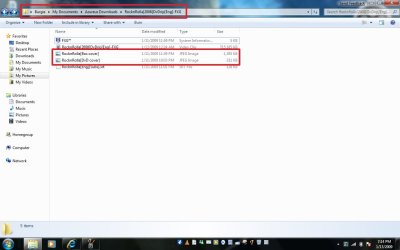
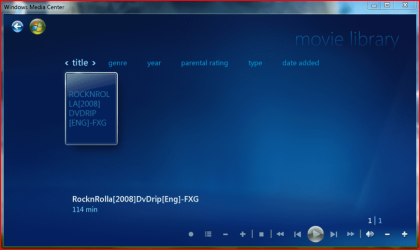
I manually added the movie Rock N Rolla using the steps that delhectar mentioned... I added the folder Rock N Rolla to my movies library. Inside that folder is my jpeg of the DVD cover. Media center sees the movie but not the album art... Im so close yet so far away!!! :D
 

Attachments

  • Movie Folder.jpg
    Movie Folder.jpg
    61.1 KB · Views: 123
  • Windows Media Center.PNG
    Windows Media Center.PNG
    104.6 KB · Views: 46

My Computer My Computer

OS
XP,Vista, Windows 7
Guys im having some trouble getting Media center to add my DVD cover to my movie.

I manually added the movie Rock N Rolla using the steps that delhectar mentioned... I added the folder Rock N Rolla to my movies library. Inside that folder is my jpeg of the DVD cover. Media center sees the movie but not the album art... Im so close yet so far away!!! :D
The image needs to be named "folder.jpg".
 

My Computer My Computer

Computer Manufacturer/Model Number
Self
OS
Windows 7 Build 7100 (x64)
CPU
Intel Q6600 2.4GHz
Motherboard
P5Ne-SLI
Memory
5 GB
Graphics Card(s)
GeForce GTX 260 - 896 MB
Sound Card
PCI Express X-Fi Titanium Fatal1ty Pro Series
Monitor(s) Displays
Westinghouse - 22" (L2210NW)
Screen Resolution
1680x1050
Hard Drives
500gb SATA Internal
250gb IDE External
PSU
500w
Case
Xion III Gaming Mid-Tower w/Side Windows
Cooling
5 Fans
Keyboard
Razer Tarantula
Mouse
Microsoft/Razer Habu
Internet Speed
Cable
Back
Top