
How to stop MS Updates loading me with Office Updates

nithig

New member
Member
VIP
Local time
10:28 PM
Messages
281
Recently installed MS Office 2007 onto my Win 7 Pro OS.
The only 2 programs selected are Word and PowerPoint - for all others 'Not Available' was selected.

My problem is that MS keeps sending me update notices. I don't want these updates and they are blocking normal Win7 updates (ie have no regular updates since Office was installed and they used to be regular).

Does anyone know of a way I can get around this problem?

(currently there are updates totalling 106MB - all for Office)
 

My Computer My Computer

Computer type
PC/Desktop
Computer Manufacturer/Model Number
Toshiba Satellite L500
OS
Windows 7 Pro 64bit SP1
CPU
Intel Core Duo CPU 2.20 GHz
Motherboard
Model KSWAA (U2E1) Version PSLS3A-01301D
Memory
4 GB RAM
Sound Card
AMD High Definition Audio Device Realtek High Definition Aud
Monitor(s) Displays
Generic PnP Monitor on ATI Mobility Radeon HD 4600 Series
Click or right click on an update to hide it.
 

My Computer My Computer

Computer type
PC/Desktop
Computer Manufacturer/Model Number
Custom Build
OS
Windows 7 Home Premium 64 bit
CPU
Intel Core i7-4790
Motherboard
GA-Z87X-D3H
Memory
G.SKILL 8GB (2 x 4GB) DDR3 F3-10666CL9D-8GBNT
Graphics Card(s)
AMD Radeon R7 250
Sound Card
Realtek ALC892
Monitor(s) Displays
Samsung UN32EH5000, Dell 1703FPT
Screen Resolution
1920 x 1080, 1280 x 1024
Hard Drives
WD5003AZEX
WD10EZEX
Samsung HD103SJ
Samsung 128 GB 840 PRO
PSU
SeaSonic M12II SS-500GM
Case
Fractal Design Define R4
Cooling
Zalman CNPS9900ALED
Keyboard
Logitech K800
Mouse
Logitech M705
Internet Speed
16 Mbps
Antivirus
Avast
Browser
Firefox
Other Info
Bose Companion 2 Multimedia Speakers
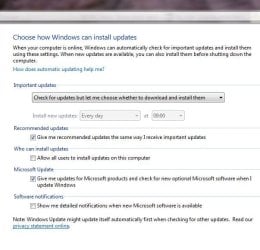
Just reconfigure updates to let you know when they are available, and as stated above, right-click and hide any you don't want.

UpdateSet.JPG
 

My Computer My Computer

Computer Manufacturer/Model Number
HP Pavilion Elite 495UK
OS
Windows 7 Ultimate SP1 64-Bit
CPU
Intel Core i7 870 @ 2.93GHz
Motherboard
MSI 2A9C (CPU1)
Memory
8Gb Dual-Channel DDR3 @ 664MHz
Graphics Card(s)
nVidia GeForce GTX 460 1024MB dedicated RAM
Sound Card
Realtek HD Audio
Monitor(s) Displays
HP2310i
Screen Resolution
1920 x 1080
Hard Drives
1x1954GB Hitachi HDS22020ALA 330 (RAID), 1x1954GB Hitachi External for backup and storage
PSU
460W
Case
HP Elite
Cooling
Air cooled
Keyboard
Logitech K750 solar-powered keyboard
Mouse
Logitech Wireless M180 mouse
Internet Speed
2Mb
Other Info
Pure Avanti Flow Internet Radio with iPod Dock, 64Gb iPod, HP USB Speakers, Sony MDR-V500 Headphones, Sony Vaio F-Series Laptop
Thanks p5bdkw
i thought that that was what I was doing by removing the ticks (which is what r.click and hide also achieves)
but I just need that little extra info.

Thanks also seavixen32 - yes that's how I had my update configured.
 

My Computer My Computer

Computer type
PC/Desktop
Computer Manufacturer/Model Number
Toshiba Satellite L500
OS
Windows 7 Pro 64bit SP1
CPU
Intel Core Duo CPU 2.20 GHz
Motherboard
Model KSWAA (U2E1) Version PSLS3A-01301D
Memory
4 GB RAM
Sound Card
AMD High Definition Audio Device Realtek High Definition Aud
Monitor(s) Displays
Generic PnP Monitor on ATI Mobility Radeon HD 4600 Series
Some have said that most if not all Office updates need to be installed even if you don't have or don't use a particular application (Excel or Outlook for instance). Something about how they can have an effect on other parts of Office too.

I have hidden many updates for parts of Office I don't use (but do have installed) but wonder if I should just install them. I imagine it can't hurt.
 

My Computer My Computer

Computer Manufacturer/Model Number
HP p6608f
OS
Win 7 Home Premium x64
CPU
Intel Core i3-540 3.07 GHz
Motherboard
MS-7613 (Iona-GL8E)
Memory
4 GB (2 X 2) Dual-Channel PC-10600 DDR3 @ 665MHz (9-9-9-24)
Graphics Card(s)
Integrated Intel H57
Sound Card
Integrated Realtek ALC888S Audio
Monitor(s) Displays
17" SDM-HS73 (a vestige from my old computer)
Screen Resolution
1280 X 1024
Hard Drives
750GB SATA 7200 RPM
PSU
250W
Keyboard
HP USB keyboard
Mouse
HP USB optical mouse
Internet Speed
15Mbps/1Mbps
Some have said that most if not all Office updates need to be installed even if you don't have or don't use a particular application (Excel or Outlook for instance). Something about how they can have an effect on other parts of Office too.

I have hidden many updates for parts of Office I don't use (but do have installed) but wonder if I should just install them. I imagine it can't hurt.

I would go ahead and install them even though you do not use Office it IS installed on the computer
 

My Computer My Computer

Computer Manufacturer/Model Number
HP
OS
Windows 7 Home Premium 64bit
Other Info
Norton Internet Security 2011, SuperAntiSpyware, Malwarebytes
Click Start button, type "Windows Update" in the search box, press ENTER. Click "Change Settings" in the left pane. Under "Microsoft Update", uncheck the "Give me updates for Microsoft products and check for new optional Microsoft software when I update Windows" option.
 

My Computer My Computer

Computer Manufacturer/Model Number
Too many to describe...
OS
Windows 7 x64 pro/ Windows 7 x86 Pro/ XP SP3 x86
Bru wrote
I have hidden many updates for parts of Office I don't use (but do have installed) but wonder if I should just install them. I imagine it can't hurt.
Bru I'm happy to be corrected as I am not a computer technician however my view so far is:
MS deliveres to the lowest common denominator, so lots of dummies who don't care about installing a quality
anti virus etc. So MS has to keep a high level of security to cover those who don't protect their computers.
Most updates appear to relate to security.
As I use only Word and P/Point (and frankly only use Word to fit in with others as I prefer Open Office) I am not going to fill up my machine with updates which appear irrelevant. I have a quality fire wall, anti virus and malware and regularly use Lavasoft's Adaware (tried Malwarebytes for a while but found it inferior to Adaware) to scan my system.

As I said I'm happy to be corrected technically if I'm mistaken but sofar I've had 12 years of operation (mostly on XP Pro, now Win 7 Pro) and no great crashes or bugs which couldn't be removed easily.

One point I'm waiting to clarify: with selective install can I avoid installing component programs of Office 07? Or can I only mark them 'Not Available' and still carry them on my system. Am prepared to uninstall and start again if I can avoid loading them all. Can anyone clarify this?
 

My Computer My Computer

Computer type
PC/Desktop
Computer Manufacturer/Model Number
Toshiba Satellite L500
OS
Windows 7 Pro 64bit SP1
CPU
Intel Core Duo CPU 2.20 GHz
Motherboard
Model KSWAA (U2E1) Version PSLS3A-01301D
Memory
4 GB RAM
Sound Card
AMD High Definition Audio Device Realtek High Definition Aud
Monitor(s) Displays
Generic PnP Monitor on ATI Mobility Radeon HD 4600 Series
Even tough you do not use office for the most part the security updates should be installed (in my opinion). Some people do not use IE but they still install updates since it is installed on their system. Unless you have a small hard drive you will not even notice the space they take. Yes you use anti-virus/anti-spyware so your "front" and "back" door are locked BUT without installing updates I can still get in through your "upstairs window" :p Just my opinion and I ain't all that bright lol.
 

My Computer My Computer

Computer Manufacturer/Model Number
HP
OS
Windows 7 Home Premium 64bit
Other Info
Norton Internet Security 2011, SuperAntiSpyware, Malwarebytes
Thanks Tortuga. Also for being clear that it's only yr opinion.
It would be helpful to have some solid technical response to these 2 questions:-

1. can individual program from Office be installed and other not installed
or must all be installed and then some marked 'not available' afterwards?

2. how important are Office updates for those who do use all the Office programs?
 

My Computer My Computer

Computer type
PC/Desktop
Computer Manufacturer/Model Number
Toshiba Satellite L500
OS
Windows 7 Pro 64bit SP1
CPU
Intel Core Duo CPU 2.20 GHz
Motherboard
Model KSWAA (U2E1) Version PSLS3A-01301D
Memory
4 GB RAM
Sound Card
AMD High Definition Audio Device Realtek High Definition Aud
Monitor(s) Displays
Generic PnP Monitor on ATI Mobility Radeon HD 4600 Series
Back
Top