Solved not showing office updates thru windows update for office 2010 win7

ron7000

New member
Power User
Local time
4:43 AM
Messages
90
i remember with windows xp and office, you could go to a different part of the microsoft windows update website in Internet Explorer, and it would prompt you with ActiveX to allow updates for Office, and after you did that then when you went to the normal windows (xp) update site there would be a whole other section of updates for microsoft office available. That was with office 2007 anyway.

i use a dell restore cd for windows 7 professional, on a dell pc obviously, to install win7 from scratch.
I can do windows updates no problem.
I have microsoft office 2010 professional plus with a valid license key, these are provided by my IT dept.
Office installs fine, during the install i can go through the options and install excel, powerpoint, all shared tools, and so on. Once installed, it works fine. There is no service pack installed at this point.

From here if I go windows update, I never see anything for office.
From within office, Microsoft Word file menu help for example, it shows office is activated and if i click on check for updates there it then opens an IE window which says updates can be done from start menu - programs - windows update. If i do that, it's a normal windows operating system update and I get nothing for office.

I have manually downloaded from microsoft, Office 2010 SP1 and SP2, and have installed either one.
When i go to the help menu it then shows office 2010 SP # so the service pack seems to have installed no problem. But I still never see any updates for office from windows update. what's the deal?
 

My Computer My Computer

At a glance

Windows 7 x64, ultimate/pro/home, SLES x86 & ...intel & amdyesgtx970
Computer type
PC/Desktop
Computer Manufacturer/Model Number
homebuilt & dell & sgi
OS
Windows 7 x64, ultimate/pro/home, SLES x86 & ia64
CPU
intel & amd
Motherboard
yes
Memory
yes
Graphics Card(s)
gtx970
Sound Card
same as memory
Monitor(s) Displays
benq 27"
Screen Resolution
2560*1440
Hard Drives
many
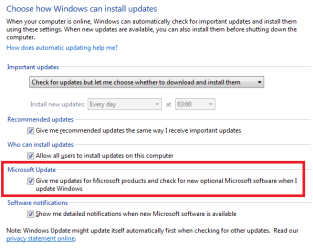
You mean what's called Microsoft Update. If you go in to the settings in Windows Update, do you have this checked:
winupd.png
I have Office 2013 Pro Plus, but the click-to-run version which updates itself and is not part of Windows Update. But I don't think there's a click-to-run version for 2010 Pro Plus so that is probably not the issue here.
 

My Computer My Computer

At a glance

Windows 7 Pro 32Intel(R) Core(TM) i5 CPU M 540 @ 2.53GHz4,00 GB (Usable 2,98)NVIDIA NVS 5100M
Computer type
Laptop
Computer Manufacturer/Model Number
HP Elitebook 8540p
OS
Windows 7 Pro 32
CPU
Intel(R) Core(TM) i5 CPU M 540 @ 2.53GHz
Motherboard
Hewlett-Packard 1521
Memory
4,00 GB (Usable 2,98)
Graphics Card(s)
NVIDIA NVS 5100M
Sound Card
NVIDIA High Definition Audio
Screen Resolution
1600x900
Hard Drives
INTEL SSDSA2CW120G3
Antivirus
F-Secure Internet Security
Browser
IE, Firefox, Opera
Other Info
Sandboxie,
SRP (Software Restriction Policy),
EMET (Enhanced Mitigation Experience Toolkit),
WFC (Windows Firewall Control by BiniSoft),
Malwarebytes Premium
As far as I know Office 2010 updates via the usual Windows Updates & Tookeri has shown how to make sure other MS programs are updated.

I am using Office 2013 Pro Click to Run & it updates automatically in the back ground & it does not update via the usual Window Updates, that 2010 does.
 

My Computer My Computer

At a glance

Windows 7 Home Premium 64 bit sp1Intel i5 3570 3.4Ghz Ivy Bridge SKT 1155 quad...G-Skill Rip Jaws 16Gb (8x2) DDR3 -1600 PC3 12...Gigabyte NVIDIA GT610 1Gb DDR3 810/1200 PCI-E...
Computer type
PC/Desktop
Computer Manufacturer/Model Number
Self built using existing case
OS
Windows 7 Home Premium 64 bit sp1
CPU
Intel i5 3570 3.4Ghz Ivy Bridge SKT 1155 quad core
Motherboard
Gigabyte Z77-HD3 SKT 1155 2xSata 3, 4x USB 3.0
Memory
G-Skill Rip Jaws 16Gb (8x2) DDR3 -1600 PC3 12800 CL 10 red
Graphics Card(s)
Gigabyte NVIDIA GT610 1Gb DDR3 810/1200 PCI-E 2.0 Silent
Sound Card
NVIDIA High Definition & Realtech High Definition Audio
Monitor(s) Displays
2 x Philips 226V4L 16:9 aspect ratio
Screen Resolution
1920 x 1080 HD
Hard Drives
Samsung 840 Pro 256gb SSD, SATA 3.
Hitachi Touro Portable 1tb, USB 3.0 HDD used for image b/ups.
PSU
Corsair VS450
Case
Codeng
Cooling
PSU fan & CPU fan
Keyboard
Logitech
Mouse
Logitech Wireless trackball M570
Internet Speed
Wireless 3G. 3mg down & 550kb up.
Antivirus
Bitdefender Internet Security 2020
Browser
Opera (Current Version) & Firefox
Other Info
MS Office 2013 Pro. Davis weather station software. MGE Nova 600 avr UPS.
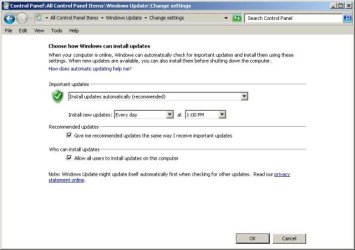
i attached a pic of what my windows update settings shows. it does not have anything for microsoft office :(
 

Attachments

  • yoyo.jpg
    yoyo.jpg
    28.7 KB · Views: 83

My Computer My Computer

At a glance

Windows 7 x64, ultimate/pro/home, SLES x86 & ...intel & amdyesgtx970
Computer type
PC/Desktop
Computer Manufacturer/Model Number
homebuilt & dell & sgi
OS
Windows 7 x64, ultimate/pro/home, SLES x86 & ia64
CPU
intel & amd
Motherboard
yes
Memory
yes
Graphics Card(s)
gtx970
Sound Card
same as memory
Monitor(s) Displays
benq 27"
Screen Resolution
2560*1440
Hard Drives
many
There is no specific mention for updating Office in the Windows Updates section. Office 2010 should just get updated as part of the normal Windows Updates, but should show up in the list of Updates when it occurs.
You could try running the Windows Update Troubleshooter from this MS website.

Open the Windows Update troubleshooter - Microsoft Windows Help
 

My Computer My Computer

At a glance

Windows 7 Home Premium 64 bit sp1Intel i5 3570 3.4Ghz Ivy Bridge SKT 1155 quad...G-Skill Rip Jaws 16Gb (8x2) DDR3 -1600 PC3 12...Gigabyte NVIDIA GT610 1Gb DDR3 810/1200 PCI-E...
Computer type
PC/Desktop
Computer Manufacturer/Model Number
Self built using existing case
OS
Windows 7 Home Premium 64 bit sp1
CPU
Intel i5 3570 3.4Ghz Ivy Bridge SKT 1155 quad core
Motherboard
Gigabyte Z77-HD3 SKT 1155 2xSata 3, 4x USB 3.0
Memory
G-Skill Rip Jaws 16Gb (8x2) DDR3 -1600 PC3 12800 CL 10 red
Graphics Card(s)
Gigabyte NVIDIA GT610 1Gb DDR3 810/1200 PCI-E 2.0 Silent
Sound Card
NVIDIA High Definition & Realtech High Definition Audio
Monitor(s) Displays
2 x Philips 226V4L 16:9 aspect ratio
Screen Resolution
1920 x 1080 HD
Hard Drives
Samsung 840 Pro 256gb SSD, SATA 3.
Hitachi Touro Portable 1tb, USB 3.0 HDD used for image b/ups.
PSU
Corsair VS450
Case
Codeng
Cooling
PSU fan & CPU fan
Keyboard
Logitech
Mouse
Logitech Wireless trackball M570
Internet Speed
Wireless 3G. 3mg down & 550kb up.
Antivirus
Bitdefender Internet Security 2020
Browser
Opera (Current Version) & Firefox
Other Info
MS Office 2013 Pro. Davis weather station software. MGE Nova 600 avr UPS.
i attached a pic of what my windows update settings shows. it does not have anything for microsoft office :(
I don't know if that has anything to do with your problem or not, but I was surprised that you didn't have an option for "Microsoft Update" in the Windows Update settings. I found an old thread about that including how they fixed it. After that one said "And now I see lots of updates"

http://www.sevenforums.com/windows-updates-activation/38008-missing-option-windows-update.html
 

My Computer My Computer

At a glance

Windows 7 Pro 32Intel(R) Core(TM) i5 CPU M 540 @ 2.53GHz4,00 GB (Usable 2,98)NVIDIA NVS 5100M
Computer type
Laptop
Computer Manufacturer/Model Number
HP Elitebook 8540p
OS
Windows 7 Pro 32
CPU
Intel(R) Core(TM) i5 CPU M 540 @ 2.53GHz
Motherboard
Hewlett-Packard 1521
Memory
4,00 GB (Usable 2,98)
Graphics Card(s)
NVIDIA NVS 5100M
Sound Card
NVIDIA High Definition Audio
Screen Resolution
1600x900
Hard Drives
INTEL SSDSA2CW120G3
Antivirus
F-Secure Internet Security
Browser
IE, Firefox, Opera
Other Info
Sandboxie,
SRP (Software Restriction Policy),
EMET (Enhanced Mitigation Experience Toolkit),
WFC (Windows Firewall Control by BiniSoft),
Malwarebytes Premium
this fixed it: http://www.sevenforums.com/windows-updates-activation/38008-missing-option-windows-update.html
specifically
1-Close all running Microsoft Office components.
2-Open Regedit
3-Go to: HKEY_CURRENT_USER\Software\Microsoft\Office\12.0\Common\General
4-Modify the "ShownOptIn" value from 1 to 0
5-Launch a Microsoft Office component, it will give you the option to download the updates, make sure you select it.
6-Done. If you go back to "Windows Update", then "Change Settings", you will see the "Microsoft Update" and "Software notifications" sections are available again (until the Microsoft Update check box is unchecked again).


for me, 12.0 was 14.0 and the key was shownfirstrunoptin. it was set to 1. i set it to zero, then got the 'how do you want to handle office updates window popup when i opened microsoft word. I chose the top green option, went back to control panel automatic updates check settings, and now i have the option in there to receive office updates.

thanks.
 

My Computer My Computer

At a glance

Windows 7 x64, ultimate/pro/home, SLES x86 & ...intel & amdyesgtx970
Computer type
PC/Desktop
Computer Manufacturer/Model Number
homebuilt & dell & sgi
OS
Windows 7 x64, ultimate/pro/home, SLES x86 & ia64
CPU
intel & amd
Motherboard
yes
Memory
yes
Graphics Card(s)
gtx970
Sound Card
same as memory
Monitor(s) Displays
benq 27"
Screen Resolution
2560*1440
Hard Drives
many
Great, glad I could help. And thanks for reporting back.
 

My Computer My Computer

At a glance

Windows 7 Pro 32Intel(R) Core(TM) i5 CPU M 540 @ 2.53GHz4,00 GB (Usable 2,98)NVIDIA NVS 5100M
Computer type
Laptop
Computer Manufacturer/Model Number
HP Elitebook 8540p
OS
Windows 7 Pro 32
CPU
Intel(R) Core(TM) i5 CPU M 540 @ 2.53GHz
Motherboard
Hewlett-Packard 1521
Memory
4,00 GB (Usable 2,98)
Graphics Card(s)
NVIDIA NVS 5100M
Sound Card
NVIDIA High Definition Audio
Screen Resolution
1600x900
Hard Drives
INTEL SSDSA2CW120G3
Antivirus
F-Secure Internet Security
Browser
IE, Firefox, Opera
Other Info
Sandboxie,
SRP (Software Restriction Policy),
EMET (Enhanced Mitigation Experience Toolkit),
WFC (Windows Firewall Control by BiniSoft),
Malwarebytes Premium
Good Fix!!

I have Windows 7 Pro, and had the same issue with MS Office 2007 Ultimate not getting updates. When I installed it originally, I opted out of automatic updates, thinking it would change my existing windows update download settings if I opted in. When I followed your steps, it reversed the update selection process, allowing me to "re-select" automatic updates upon opening word. Works as advertised! Also, it did not change how I receive updates!! All of the sudden, I had 48 ms office-related updates available!
THANKS!!!
 

My Computer My Computer

At a glance

W7 pro 32 bitIntel Core i5
Computer type
PC/Desktop
Computer Manufacturer/Model Number
Dell
OS
W7 pro 32 bit
CPU
Intel Core i5
Hard Drives
500 gb
Antivirus
norton corporate
Just used this fix myself with Office 2007.

Many thanks,
Clive
 

My Computer My Computer

At a glance

Windows 7 Professional 64 bitIntel Core I7 Q840 @ 1.87GHz8 Gb
Computer type
Laptop
Computer Manufacturer/Model Number
Dell M6500
OS
Windows 7 Professional 64 bit
CPU
Intel Core I7 Q840 @ 1.87GHz
Memory
8 Gb
Hard Drives
1 x 500 Gb + 1 x 1Tb
Browser
Google
Just rebuilt my computer, complete reinstall, then couldn't find how to update MS Office 2007.
The fix via the REGEDIT worked a treat, Thanks.
 

My Computer My Computer

At a glance

Windows 7 Home Premium 64 bit OSIntel(R) Core(TM) i5-2500 CPU @ 3.30GHz8 GBNVIDIA GeForceGTX 550 Ti
Computer type
PC/Desktop
Computer Manufacturer/Model Number
Custom
OS
Windows 7 Home Premium 64 bit OS
CPU
Intel(R) Core(TM) i5-2500 CPU @ 3.30GHz
Motherboard
ASUSTeK P8Z68-M PRO
Memory
8 GB
Graphics Card(s)
NVIDIA GeForceGTX 550 Ti
Hard Drives
SEAGATE ST31000 524AS 1.00 TB
Antivirus
Trend Micro
Just used this fix for Office 2010. Thanks.
 

My Computer My Computer

At a glance

Win7 pro 64
Computer type
Laptop
Computer Manufacturer/Model Number
dell
OS
Win7 pro 64
Still helpful

ron7000,

The gift keeps on giving. I just used your technique to force an Office program through the first-time routine, said I wanted the recommended update settings, and found the missing option for other Microsoft products back in the Windows Update Settings.

This has been a long time since the problem was noticed. I wonder what Microsoft is/was thinking.

Thanks,

Joe
 

My Computer My Computer

At a glance

Windows 7 Ultimate x64
Computer type
PC/Desktop
Computer Manufacturer/Model Number
Custom build
OS
Windows 7 Ultimate x64
Motherboard
ASUS
Is there the same switch for Windows itself?
 

My Computer My Computer

At a glance

W7-pro-64
Computer type
PC/Desktop
OS
W7-pro-64
Back
Top