
Mihael Keehl
New member
Basically, I followed this guide on uninstalling Linux 11.04 but here's a short version:
And now it always takes me to some MemoryTest program, something I noticed that was one of the options when I was using the Grub Boot Division (Purple) but I never paid any attention to it. Now that I deleted the Ubuntu partitions the grub no longer comes on and now I don't even see the error ever since I ran the "bootrec /fixmbr" command.
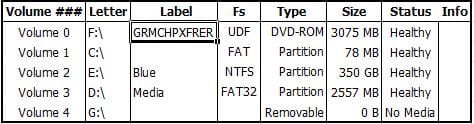
After a couple of hours of googling, I decided to use the command prompt via Windows 7 HPU Disc to figure out what was going on. I was able to jump into DISKPART and I've attached what I have at the moment, perhaps someone more knowledgeable than me can actually help me out. The 350GB Partition is the one that has Windows 7 installed onto it.
Also, I have the capability to use my HDD as an external and plugged it in and all my information is there, perhaps you guys can show me a method that will allow me to get it back up and running. Windows 7 doesn't boot at all, I get some Memory Diagnostic Utility.
The Windows 7 Home Premium I'm using was a fresh install via an Upgrade Disc, the key was used so I don't know if I can use it again, otherwise I would just take the information out and do a fresh install of it right now. Btw, I have a Dell Inspiron 1520 built in December of 2007 and it originally came with (32-Bit) Windows Vista, so I no longer have the option to go back to it either.
- Deleted Linux Partitions in Windows 7
- Popped in Windows 7 Upgrade Disk (Recovery Options)
- Went to the Command Prompt and typed the following things in:
- bootrec /fixmbr
- bootrec /fixboot (DID NOT WORK)
- It gave me an error stating "The volume does not contain a recognizable filesystem. etc.."
And now it always takes me to some MemoryTest program, something I noticed that was one of the options when I was using the Grub Boot Division (Purple) but I never paid any attention to it. Now that I deleted the Ubuntu partitions the grub no longer comes on and now I don't even see the error ever since I ran the "bootrec /fixmbr" command.
After a couple of hours of googling, I decided to use the command prompt via Windows 7 HPU Disc to figure out what was going on. I was able to jump into DISKPART and I've attached what I have at the moment, perhaps someone more knowledgeable than me can actually help me out. The 350GB Partition is the one that has Windows 7 installed onto it.
Also, I have the capability to use my HDD as an external and plugged it in and all my information is there, perhaps you guys can show me a method that will allow me to get it back up and running. Windows 7 doesn't boot at all, I get some Memory Diagnostic Utility.
The Windows 7 Home Premium I'm using was a fresh install via an Upgrade Disc, the key was used so I don't know if I can use it again, otherwise I would just take the information out and do a fresh install of it right now. Btw, I have a Dell Inspiron 1520 built in December of 2007 and it originally came with (32-Bit) Windows Vista, so I no longer have the option to go back to it either.
Attachments
My Computer
At a glance
Windows 7 Home Premium (64-Bit)Intel Core 2 Duo T9300 (2.5GHz/6MB Cache/800M...6GB DDR2 PC2-5300 RAMnVIDIA GeForce 8600M GT
- Computer Manufacturer/Model Number
- Dell Inspiron 1520
- OS
- Windows 7 Home Premium (64-Bit)
- CPU
- Intel Core 2 Duo T9300 (2.5GHz/6MB Cache/800MHz FSB)
- Motherboard
- Intel 965 Chipset
- Memory
- 6GB DDR2 PC2-5300 RAM
- Graphics Card(s)
- nVIDIA GeForce 8600M GT
- Sound Card
- Sigmatel High Definition Audio CODEC
- Monitor(s) Displays
- Samsung LTN154U1
- Screen Resolution
- 1920x1200 (WUXGA) Matte
- Hard Drives
- 500GB Seagate Momentus 7200RPM (not XT)
Panasonic UJ-110 BDR & DVDR/RW & CDR/RW
- Keyboard
- Standard PS/2 Keyboard
- Mouse
- Logitech V220
- Internet Speed
- Dell 1501 Wireless-N 802.1n