
Solved Booting Error, MBR and Bootrec Related, Uninstalled Ubuntu Linux 11.04

Mihael Keehl

New member
Local time
3:11 AM
Messages
4
Location
New York
Basically, I followed this guide on uninstalling Linux 11.04 but here's a short version:

  1. Deleted Linux Partitions in Windows 7
  2. Popped in Windows 7 Upgrade Disk (Recovery Options)
  3. Went to the Command Prompt and typed the following things in:
    1. bootrec /fixmbr
    2. bootrec /fixboot (DID NOT WORK)
    3. It gave me an error stating "The volume does not contain a recognizable filesystem. etc.."

And now it always takes me to some MemoryTest program, something I noticed that was one of the options when I was using the Grub Boot Division (Purple) but I never paid any attention to it. Now that I deleted the Ubuntu partitions the grub no longer comes on and now I don't even see the error ever since I ran the "bootrec /fixmbr" command.

After a couple of hours of googling, I decided to use the command prompt via Windows 7 HPU Disc to figure out what was going on. I was able to jump into DISKPART and I've attached what I have at the moment, perhaps someone more knowledgeable than me can actually help me out. The 350GB Partition is the one that has Windows 7 installed onto it.

Also, I have the capability to use my HDD as an external and plugged it in and all my information is there, perhaps you guys can show me a method that will allow me to get it back up and running. Windows 7 doesn't boot at all, I get some Memory Diagnostic Utility.

The Windows 7 Home Premium I'm using was a fresh install via an Upgrade Disc, the key was used so I don't know if I can use it again, otherwise I would just take the information out and do a fresh install of it right now. Btw, I have a Dell Inspiron 1520 built in December of 2007 and it originally came with (32-Bit) Windows Vista, so I no longer have the option to go back to it either.
 

Attachments
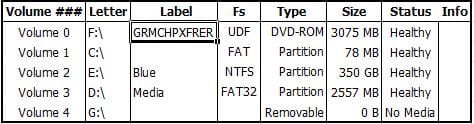
  • drive.jpg
    drive.jpg
    15.7 KB · Views: 20

My Computer My Computer

At a glance

Windows 7 Home Premium (64-Bit)Intel Core 2 Duo T9300 (2.5GHz/6MB Cache/800M...6GB DDR2 PC2-5300 RAMnVIDIA GeForce 8600M GT
Computer Manufacturer/Model Number
Dell Inspiron 1520
OS
Windows 7 Home Premium (64-Bit)
CPU
Intel Core 2 Duo T9300 (2.5GHz/6MB Cache/800MHz FSB)
Motherboard
Intel 965 Chipset
Memory
6GB DDR2 PC2-5300 RAM
Graphics Card(s)
nVIDIA GeForce 8600M GT
Sound Card
Sigmatel High Definition Audio CODEC
Monitor(s) Displays
Samsung LTN154U1
Screen Resolution
1920x1200 (WUXGA) Matte
Hard Drives
500GB Seagate Momentus 7200RPM (not XT)
Panasonic UJ-110 BDR & DVDR/RW & CDR/RW
Keyboard
Standard PS/2 Keyboard
Mouse
Logitech V220
Internet Speed
Dell 1501 Wireless-N 802.1n
With diskpart make NTFS 350 GB partition active.

Run DVD - 'Automatic Repair'.
The first run should do. If errors do a second run.

Manually you have only to write a Windows 7 MBR and a Partition Boot Record
on your E: drive (NTFS). 'bootsect.exe' can do the manual step.
(check exact syntax for command - system drive is default, specify windows folder as e:\windows)
 

My Computer My Computer

At a glance

Win 8 RP, Win 7, XPIntel
Computer Manufacturer/Model Number
Acer Notebook
OS
Win 8 RP, Win 7, XP
CPU
Intel
Re: Automatic Repair

With diskpart make NTFS 350 GB partition active.

Run DVD - 'Automatic Repair'.
The first run should do. If errors do a second run.

Manually you have only to write a Windows 7 MBR and a Partition Boot Record
on your E: drive (NTFS). 'bootsect.exe' can do the manual step.
(check exact syntax for command - system drive is default, specify windows folder as e:\windows)

Well, I tried the automatic repair and it seemed like it work during the first time around but then it just sent me to the Memory Diagnostic Utility. I tried it a second time and it sent me there again.

I was wondering, is there a simple way to swap the letters of the two partitions? Active? Perhaps, you can link me to something of a glossary/guide that can help me do that. I'm not really sure exactly how to do that.

Thanks for all your help though, at least we are getting somewhere!
 

My Computer My Computer

At a glance

Windows 7 Home Premium (64-Bit)Intel Core 2 Duo T9300 (2.5GHz/6MB Cache/800M...6GB DDR2 PC2-5300 RAMnVIDIA GeForce 8600M GT
Computer Manufacturer/Model Number
Dell Inspiron 1520
OS
Windows 7 Home Premium (64-Bit)
CPU
Intel Core 2 Duo T9300 (2.5GHz/6MB Cache/800MHz FSB)
Motherboard
Intel 965 Chipset
Memory
6GB DDR2 PC2-5300 RAM
Graphics Card(s)
nVIDIA GeForce 8600M GT
Sound Card
Sigmatel High Definition Audio CODEC
Monitor(s) Displays
Samsung LTN154U1
Screen Resolution
1920x1200 (WUXGA) Matte
Hard Drives
500GB Seagate Momentus 7200RPM (not XT)
Panasonic UJ-110 BDR & DVDR/RW & CDR/RW
Keyboard
Standard PS/2 Keyboard
Mouse
Logitech V220
Internet Speed
Dell 1501 Wireless-N 802.1n
Using diskpart type help - this will list available commands and how to get help for a selected command.
You have to type:
1. select disk 0 - (first disk)
2. select partition 2 - (list partitions to be sure that number 2 is the 350 GB NTFS part.)
3. active - (this marks the selected part. as active)

That's all for diskpart.

The same for bootsect.exe - type bootsect /help to see syntax.

bootsect /nt60 SYS /mbr
 
Last edited:

My Computer My Computer

At a glance

Win 8 RP, Win 7, XPIntel
Computer Manufacturer/Model Number
Acer Notebook
OS
Win 8 RP, Win 7, XP
CPU
Intel
Using diskpart type help - this will list available commands and how to get help for a selected command.
You have to type:
1. select disk 0 - (first disk)
2. select partition 2 - (list partitions to be sure that number 2 is the 350 GB NTFS part.)
3. active - (this marks the selected part. as active)

That's all for diskpart.

The same for bootsect.exe - type bootsect /help to see syntax.

bootsect /nt60 SYS /mbr
Thanks a lot, is the very last part important? I was able to get mine running without it? This old laptop cut out just above it.
 

My Computer My Computer

At a glance

Windows 7 Home Premium (64-Bit)Intel Core 2 Duo T9300 (2.5GHz/6MB Cache/800M...6GB DDR2 PC2-5300 RAMnVIDIA GeForce 8600M GT
Computer Manufacturer/Model Number
Dell Inspiron 1520
OS
Windows 7 Home Premium (64-Bit)
CPU
Intel Core 2 Duo T9300 (2.5GHz/6MB Cache/800MHz FSB)
Motherboard
Intel 965 Chipset
Memory
6GB DDR2 PC2-5300 RAM
Graphics Card(s)
nVIDIA GeForce 8600M GT
Sound Card
Sigmatel High Definition Audio CODEC
Monitor(s) Displays
Samsung LTN154U1
Screen Resolution
1920x1200 (WUXGA) Matte
Hard Drives
500GB Seagate Momentus 7200RPM (not XT)
Panasonic UJ-110 BDR & DVDR/RW & CDR/RW
Keyboard
Standard PS/2 Keyboard
Mouse
Logitech V220
Internet Speed
Dell 1501 Wireless-N 802.1n
The last part writes a Partition Boot Record and a Master Boot Record.

Happy booting !
 

My Computer My Computer

At a glance

Win 8 RP, Win 7, XPIntel
Computer Manufacturer/Model Number
Acer Notebook
OS
Win 8 RP, Win 7, XP
CPU
Intel
Thanks a bunch pal, really helped out. I was just about to research how to make a partition active in DOS when you posted that! Saved me much needed time!
 

My Computer My Computer

At a glance

Windows 7 Home Premium (64-Bit)Intel Core 2 Duo T9300 (2.5GHz/6MB Cache/800M...6GB DDR2 PC2-5300 RAMnVIDIA GeForce 8600M GT
Computer Manufacturer/Model Number
Dell Inspiron 1520
OS
Windows 7 Home Premium (64-Bit)
CPU
Intel Core 2 Duo T9300 (2.5GHz/6MB Cache/800MHz FSB)
Motherboard
Intel 965 Chipset
Memory
6GB DDR2 PC2-5300 RAM
Graphics Card(s)
nVIDIA GeForce 8600M GT
Sound Card
Sigmatel High Definition Audio CODEC
Monitor(s) Displays
Samsung LTN154U1
Screen Resolution
1920x1200 (WUXGA) Matte
Hard Drives
500GB Seagate Momentus 7200RPM (not XT)
Panasonic UJ-110 BDR & DVDR/RW & CDR/RW
Keyboard
Standard PS/2 Keyboard
Mouse
Logitech V220
Internet Speed
Dell 1501 Wireless-N 802.1n
Glad to help.
 

My Computer My Computer

At a glance

Win 8 RP, Win 7, XPIntel
Computer Manufacturer/Model Number
Acer Notebook
OS
Win 8 RP, Win 7, XP
CPU
Intel
Back
Top