I can't choose folder for background slide show

Yautja Hunter

New member
Local time
10:06 AM
Messages
5
Location
Moscow, Russia
Hello!

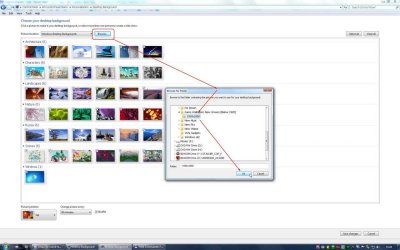
I don't know when and why it happened, but now I can't choose my own folder with wallpapers for background slideshow. I am talking about Control Panel -> Personalization -> Desktop Background -> Picture Location -> Browse. When choosing my folder in Browse I click OK and... NOTHING HAPPENS. The Browse window just closes and I DO NOT see thumbnails from the selected folder. I just see previous selection of thumbnails.

Attached please find a screenshot to better understand what I mean.

Any ideas?
Thanks!
 

Attachments
  • post.jpg
    post.jpg
    104.5 KB · Views: 362

My Computer My Computer

OS
Windows 7 RTM
CPU
i7 920
Motherboard
Asus Rampage II Extreme
Memory
3Gb
Graphics Card(s)
EVGA GTX295
Sound Card
Creative X-Fi Titanium
Monitor(s) Displays
NEC 2690WUXi
Welcome to SevenForums Yautja Hunter :D

Do you have permission to use the folder?
Maybe try and select the parent folder instead (Game Wallpaper New unseen)?
Failing those, try and copy the images to the Public Images folder and then select them through "Pictures Library"
 

My Computer My Computer

Computer Manufacturer/Model Number
HP Touchsmart IQ771.uk
OS
Windows 7 Ultimate x64
CPU
AMD Turion(tm) 64 X2 Mobile Technology TL-56
Motherboard
ASUS Pheonix
Memory
3GB Nanya PC2-6400 DDR2-SDRAM SO-DIM (400MHz)
Graphics Card(s)
NVIDIA GeForce Go 7600 256MB GDDR3 SDRAM
Sound Card
High Definition Intergrated NVIDIA MCP51
Monitor(s) Displays
46" Sony Bravia HDTV
Screen Resolution
1600x1200
Hard Drives
1.5TB Samsug
320GB Seagate ST3320820AS - SATA 3Gb/s 8MB
500GB Maxtor Basics STM305003EHD301-RK
Internet Speed
↓6.32 Mb/s ↑0.35 Mb/s ↔26ms
Other Info
BIOS - American Megatrends Inc. 5.07
Ethernet Port - NVIDIA nForce 10/100/1000 Mbps
DVD Drive - TSSTcorp DVDR/RW TS-T632L
Thanks for quick response!
First of all, let me tell you that earlier everything worked fine, and I really don't know know what caused it to stop working proprely.

I do have permission to that folder, and Public Images folder is not opening either. Moreover, I've tried different folders with pictures on different drives. It's all the same story: I chose the folder, click OK, and the browsing window simply closes without any effect (no errors whatsoever).

Certainly, I can copy my wallpapers to a folder in C:\Windows\Web\Wallpapers, then I can select them in "Windows Desktop Backgrounds" under Picture Location. But this means duplicating all my wallpapers. I really would like to be able to actually choose certain exisiting folder with pictures and have Windows show pictures from there, the way this feature was designed to work and USED to work.

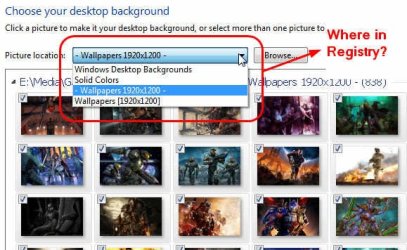
Also, do you know where in the registry I can find the location of folder listed under "Picture Location" (see screenshot)?
 

My Computer My Computer

OS
Windows 7 RTM
CPU
i7 920
Motherboard
Asus Rampage II Extreme
Memory
3Gb
Graphics Card(s)
EVGA GTX295
Sound Card
Creative X-Fi Titanium
Monitor(s) Displays
NEC 2690WUXi
It's a strange one!
I'm out of suggestions really, maybe a system restore if it has only started happening earlier?????
 

My Computer My Computer

Computer Manufacturer/Model Number
HP Touchsmart IQ771.uk
OS
Windows 7 Ultimate x64
CPU
AMD Turion(tm) 64 X2 Mobile Technology TL-56
Motherboard
ASUS Pheonix
Memory
3GB Nanya PC2-6400 DDR2-SDRAM SO-DIM (400MHz)
Graphics Card(s)
NVIDIA GeForce Go 7600 256MB GDDR3 SDRAM
Sound Card
High Definition Intergrated NVIDIA MCP51
Monitor(s) Displays
46" Sony Bravia HDTV
Screen Resolution
1600x1200
Hard Drives
1.5TB Samsug
320GB Seagate ST3320820AS - SATA 3Gb/s 8MB
500GB Maxtor Basics STM305003EHD301-RK
Internet Speed
↓6.32 Mb/s ↑0.35 Mb/s ↔26ms
Other Info
BIOS - American Megatrends Inc. 5.07
Ethernet Port - NVIDIA nForce 10/100/1000 Mbps
DVD Drive - TSSTcorp DVDR/RW TS-T632L
Screenshot
 

Attachments

  • Snap2.jpg
    Snap2.jpg
    46.4 KB · Views: 1,079

My Computer My Computer

OS
Windows 7 RTM
CPU
i7 920
Motherboard
Asus Rampage II Extreme
Memory
3Gb
Graphics Card(s)
EVGA GTX295
Sound Card
Creative X-Fi Titanium
Monitor(s) Displays
NEC 2690WUXi
Yeah, system restore might be an option, but I have installed a lot for programs since then. If a apply system restore, is there an option to undo it and to return to my current config?
 

My Computer My Computer

OS
Windows 7 RTM
CPU
i7 920
Motherboard
Asus Rampage II Extreme
Memory
3Gb
Graphics Card(s)
EVGA GTX295
Sound Card
Creative X-Fi Titanium
Monitor(s) Displays
NEC 2690WUXi
No, unfortunately not, System Restore cannot be undone. I'm gonna have to hand this one over to someone a bit more knowledgeable......sorry i couldn't help on this occasion Yautja :(
 

My Computer My Computer

Computer Manufacturer/Model Number
HP Touchsmart IQ771.uk
OS
Windows 7 Ultimate x64
CPU
AMD Turion(tm) 64 X2 Mobile Technology TL-56
Motherboard
ASUS Pheonix
Memory
3GB Nanya PC2-6400 DDR2-SDRAM SO-DIM (400MHz)
Graphics Card(s)
NVIDIA GeForce Go 7600 256MB GDDR3 SDRAM
Sound Card
High Definition Intergrated NVIDIA MCP51
Monitor(s) Displays
46" Sony Bravia HDTV
Screen Resolution
1600x1200
Hard Drives
1.5TB Samsug
320GB Seagate ST3320820AS - SATA 3Gb/s 8MB
500GB Maxtor Basics STM305003EHD301-RK
Internet Speed
↓6.32 Mb/s ↑0.35 Mb/s ↔26ms
Other Info
BIOS - American Megatrends Inc. 5.07
Ethernet Port - NVIDIA nForce 10/100/1000 Mbps
DVD Drive - TSSTcorp DVDR/RW TS-T632L
SOLVED!!!

Researching the internet for solution, I came across the registry file below which openes wallpapers for all regions. Somehow importing these registry settings fixed my problem.

Windows Registry Editor Version 5.00
[HKEY_CURRENT_USER\Software\Microsoft\Windows\CurrentVersion\Themes\InstalledThemes\MCT]
"C:\\windows\\Globalization\\MCT\\MCT-AU\\Theme\\AU.theme"=""
"C:\\windows\\Globalization\\MCT\\MCT-CA\\Theme\\CA.theme"=""
"C:\\windows\\Globalization\\MCT\\MCT-DE\\Theme\\DE.theme"=""
"C:\\windows\\Globalization\\MCT\\MCT-GB\\Theme\\GB.theme"=""
"C:\\windows\\Globalization\\MCT\\MCT-JP\\Theme\\JP.theme"=""
"C:\\windows\\Globalization\\MCT\\MCT-US\\Theme\\US.theme"=""
"C:\\windows\\Globalization\\MCT\\MCT-ZA\\Theme\\ZA.theme"=""

[HKEY_CURRENT_USER\Software\Microsoft\Windows\CurrentVersion\Explorer\Wallpapers\KnownFolders\0\Windows Wallpapers\MergeFolders]
"C:\\windows\\Globalization\\MCT\\MCT-AU\\Wallpaper"=""
"C:\\windows\\Globalization\\MCT\\MCT-CA\\Wallpaper"=""
"C:\\windows\\Globalization\\MCT\\MCT-DE\\Wallpaper"=""
"C:\\windows\\Globalization\\MCT\\MCT-GB\\Wallpaper"=""
"C:\\windows\\Globalization\\MCT\\MCT-JP\\Wallpaper"=""
"C:\\windows\\Globalization\\MCT\\MCT-US\\Wallpaper"=""
"C:\\windows\\Globalization\\MCT\\MCT-ZA\\Wallpaper"=""
 

My Computer My Computer

OS
Windows 7 RTM
CPU
i7 920
Motherboard
Asus Rampage II Extreme
Memory
3Gb
Graphics Card(s)
EVGA GTX295
Sound Card
Creative X-Fi Titanium
Monitor(s) Displays
NEC 2690WUXi
Nice job!!
Thanks for sharing the solution ;)
 

My Computer My Computer

Computer Manufacturer/Model Number
HP Touchsmart IQ771.uk
OS
Windows 7 Ultimate x64
CPU
AMD Turion(tm) 64 X2 Mobile Technology TL-56
Motherboard
ASUS Pheonix
Memory
3GB Nanya PC2-6400 DDR2-SDRAM SO-DIM (400MHz)
Graphics Card(s)
NVIDIA GeForce Go 7600 256MB GDDR3 SDRAM
Sound Card
High Definition Intergrated NVIDIA MCP51
Monitor(s) Displays
46" Sony Bravia HDTV
Screen Resolution
1600x1200
Hard Drives
1.5TB Samsug
320GB Seagate ST3320820AS - SATA 3Gb/s 8MB
500GB Maxtor Basics STM305003EHD301-RK
Internet Speed
↓6.32 Mb/s ↑0.35 Mb/s ↔26ms
Other Info
BIOS - American Megatrends Inc. 5.07
Ethernet Port - NVIDIA nForce 10/100/1000 Mbps
DVD Drive - TSSTcorp DVDR/RW TS-T632L
Awseome!!!! This fixed it perfectly!:D
 

My Computer My Computer

OS
Windows 7 64bit
I'm currently having the same problem as the OP, however the registry values did not fix it. I've restarted countless times, used a different reg hack to reset the paths in the drop down menu, and tried system restoring. NOTHING. What caused the problem (I think) was that while my desktop was displaying backgrounds from a folder, I moved that folder to a different location. Thats when I tried to select the folders new location and it stopped working. Not just for that folder either, for every folder. I've searched everywhere for a solution but so far nothing. Any ideas guys?
 

My Computer My Computer

Computer Manufacturer/Model Number
Dell Studio 1737
OS
Windows 7 x64
CPU
Intel Core 2 Duo
Motherboard
NA
Memory
4GB
Graphics Card(s)
Integrated Graphics
Sound Card
Integrated
Monitor(s) Displays
2
Hard Drives
320GB
PSU
NA
Case
NA
Cooling
Air
I have the same problem as the first poster in this thread.

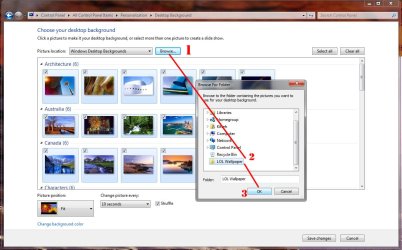
1. I click "browse..." to find the folder with images for the background slideshow.
2. Select the folder i want to use.
3. Click "Ok".
(see the steps screenshot)

It then closes the 'Browse For Folder' window but nothing else happens. (see the result screenshot)

I have tried adding the registry entries but this does not help.
A system restore isn't an option because it has been a while since i first noticed it.
I have tried sfc /scannow but this reported that there were no problems.

Thanks in advance for any help
 

Attachments

  • steps.jpg
    steps.jpg
    103.6 KB · Views: 10
  • result.jpg
    result.jpg
    90.8 KB · Views: 6

My Computer My Computer

OS
Windows 7 professional 64bit
I have found the fix to my problem.

On another forum i found one sentence which i tried and it worked.

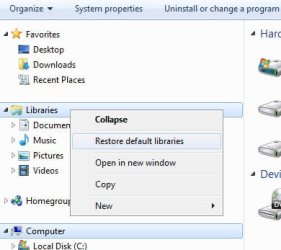
Simply "Restore Default Libraries" in windows explorer. (see the attachment)
 

Attachments

  • Wallpaper-slideshow-fix.jpg
    Wallpaper-slideshow-fix.jpg
    19.6 KB · Views: 1

My Computer My Computer

OS
Windows 7 professional 64bit
I'm also having this problem. I don't understand what is meant in the post about the registry. Do I copy paste all of those into the registry? What type of key/value do I add? Do I delete something?
 
Last edited:

My Computer My Computer

Computer Manufacturer/Model Number
Asus G73SW
OS
Windows 7 Ultimate 64bit
Further assistance requested, Please!

I'm also having this problem. I don't understand what is meant in the post about the registry. Do I copy paste all of those into the registry? What type of key/value do I add? Do I delete something?

I second this sentiment exactly, I have no experience in Registry editing, and I am wary to do so, but this issue is vexing me enough to want to look into it. If perhaps a tutorial or crash-course of some kind were made available, or even better an alternative solution to the Slideshow-Library issue were presented, there would be much rejoicing.
 

My Computer My Computer

OS
Win 7 x64
Back
Top