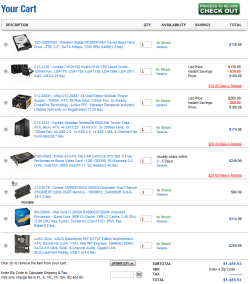
Need advice on new 2012 PC Build

nickyoung

New member
Local time
6:21 PM
Messages
31
Location
Cayman Islands
Hi Guys & Gals,

Your advice or comments on the hardware choices would be appreciated. Below are the build parts for an Entertainment/Gaming machine. Output is to a 32" 1080p LED/LCD via HDMI. Mouse Keyboard Spk/Headphones are already covered. No huge desire to go with a water cooled setup but the corsair H100 seems like a good piece. So any advice on the tower parts below are welcome... :D


What do you think?
2012-pc-build.PNG
 

My Computer My Computer

OS
Windows 7 Ultimate x32
You seem to be overpaying on a few of those items honestly I would check newegg and tigerdirect both before ordering from that place.
You might save 75 to 100 dollars.

and don't pay attention to rebates only about 30% of them ever come back.
 

My Computer My Computer

Computer Manufacturer/Model Number
Insane hobo technologies. ;-)
OS
Windows 7 x64
CPU
Intel i7 2600k
Motherboard
Asrock z68 extreme 4 gen 3
Memory
G.skill Ripjaw 16gigs @ 1866
Graphics Card(s)
Nvidia gtx580 (evga)
Sound Card
Integrated HD audio + hdmi
Monitor(s) Displays
24" ASUS widescreen + 42" insignia
Screen Resolution
1080p (1920x1080)
Hard Drives
128 Samsung 830
256 Samsung 840
3 x 1tb storage drive (various)
1 western digital 1tb (eSATA)
1 Seagate 1tb (eSATA)
PSU
1 kilowatt SLI/Crossfire rated Silverstone modular
Case
NZXT Phantom + additional 220 fan
Cooling
Zalmann
Keyboard
Microsoft wireless 3000 (v2)
Mouse
MS - wireless 5000 (bluetrack)
Internet Speed
depends on if you ask me or my provider.
Other Info
The above information is provided as is, and the author assumes no responsibility for issues it may cause with your sanity or fanboyism.
Thanks mag. I agree the mail in rebates I cannot count on at all. I'll be checking out newegg.

Can anyone advise on having the GTX 560 hooked up via HDMI to perhaps a 32" samsung D6000? Any thuoghts on how well that will work out as a monitor/tv? Never really played with PC HDMI to tv connections before. I've seen a few 50" setups for living rooms work well, have a 22" myself, and seen a 27" LCD, but want to go bigger than 27, which leads to me thinking a 32 might be just right, 40 being too big for sitting distance. I need the multiple HDMI and video connections...
 

My Computer My Computer

OS
Windows 7 Ultimate x32
Nice selection of components nickyoung. I just have a couple of minor observations the first being that if you can afford to add an SSD drive as your main OS drive the speed and response will work in tandem with the newer powerful i2600k processor, ram and GFX card.

The second minor point is I too purchased a sabertooth P67 board and 2 minor issues that I have come to realize is 1) the CMOS battery is concealed behind the TUFarmor and requires mobo removal and removal of the TUFarmor shield should it ever need to be replaced, however most batteries last between 5 to 10 years nowadays and you will probably have upgraded to a newer system by then.

Another issue I have come across that supposedly affects all asus P67 mobos but not always is a wake from sleep issue which has so far has not been addressed but several workarounds have been posted on the asus mobo forums.

Overall I am satisfied with the sabertooth P67 for the quality and warranty and ability to find a solution for the sleep issue on the asus mobo forums.

PS: I also invested $10 on Artic Silver thermal paste instead of using the paste supplied with the Intel processor and stock cooler as the Artic Silver comes highly recommended by members of this and many other enthusiast forums, has better thermal properties, longer lifespan/adhesion and good quality. There are also other excellent comparable brands of thermal paste available on the market.
 

My Computer My Computer

Computer type
PC/Desktop
Computer Manufacturer/Model Number
My own abomination, I call it the Money Pit
OS
Windows 10 Pro x 2/Windows 11 Home
CPU
Intel i7 2600K @ 3.40 GHz
Motherboard
ASUS Sabertooth P67
Memory
Corsair Vengeance 16GB DDR3 1600MHz CL8 Dual Channel Kit
Graphics Card(s)
EVGA GeForce RTX 3080 XC3 ULTRA GAMING 10GB GDDR6X
Sound Card
Onboard Realtek or Nvidia High Definition Audio (HDMI)
Monitor(s) Displays
Samsung JS7000 50" SUHD TV or Samsung 27" FHD 60Hz 8ms GTG V
Screen Resolution
1920 x 1080
Hard Drives
1 x Samsung 870 EVO 250 GB SSD (Windows 10 Pro), 1 x Samsung 850 EVO 250 GB SSD (Windows 10 Pro)
PSU
Corsair AX860 - 860W Modular Power Supply
Case
Phanteks Enthoo Luxe Full Tower Case - Black
Cooling
CORSAIR Hydro Series H150i PRO RGB 360mm Liquid CPU Cooler
Keyboard
Logitech K830 Illuminated Living-Room Keyboard
Mouse
Logitech MX Anywhere 2S Wireless Mouse
Internet Speed
100 Mbps
Antivirus
ESET Internet Security
Browser
Latest Version Of Firefox & Microsoft Edge Chromium Stable
Other Info
LG Super Multi Blue Internal Blu-ray Disk Rewriter - BH10LS30
6x2 HDMI Switcher (6 inputs, 2 outputs) so I can send the output of my Cable Box, Roku, or any my 4 computers to either my TV or Monitor separately or simultaneously.
Wow. Thanks for that money! This is exactly what I was hoping to hear.

1. The question is will SSD work? I've read about controller compatibility issues in past but pretty clueless about the market today. Would this work? OCZ Solid 3 - 120GB - 450-500MB/s read write it says..

2. I'm going to dig up the mobo reviews to see what this is about. I use the wake from sleep feature exclusively - and would hate for that to be the pitfall. Especially if pairing it with a solid state drive... :huh: Has the wake from sleep issue affected you personally?

3. Not too concerned about the CMOS access upfront. I can put up with a full tear down if needed. I do want to give the "thermal-armor" a try because it covers up and protects a lot of motherboard components. And with a 50mm fan it has good cooling I've read. I see there is still access to the CMOS reset button at least - whew! :)
 

My Computer My Computer

OS
Windows 7 Ultimate x32
I'd perhaps swap the 560 for an ati xfx 2gb 6950, as they are similarly priced but the ati beats the latter. As I had that debate.

Also newer Z68 mobos are dropping in price, I bought an asus p8Z68 for about £130.

As for SSD I've the corsair force 3 120gb and its superb! For the money I wouldn't even consider another drive!

Sent from my BlackBerry 9900 using Tapatalk
 

My Computer My Computer

Computer type
PC/Desktop
Computer Manufacturer/Model Number
Built by badgers!!!
OS
Windows 7 Ultimate x64, & Mac OS X 10.9.2
CPU
Intel Core i5 2500k
Motherboard
Asus P8z68 LE
Memory
Corsair Vengence 8gb 1866mhz
Graphics Card(s)
Nvidia GTX 770 OC
Monitor(s) Displays
2x ASUS LED 22" IPS
Screen Resolution
3840x1080
Hard Drives
240GB Crucial M500 SSD
120gb Corsair Force 3 SSD
1TB Western Digital
PSU
Corsair HX650w Modular
Case
Corsair Air 540
Cooling
Corsair H60 Push/Pull
Keyboard
Corsair K70/ Logitech G27 wheel
Mouse
Saitek R.A.T 9
Internet Speed
Too slow!
Other Info
AMD fusion E350N Home server-Windows Home Server 2011 (also made by badgers!)
2011 Macbook 2.4ghz Core2Duo, 4gb ddr3, 120gb Ocz Vertex SSD
I'd perhaps swap the 560 for an ati xfx 2gb 6950, as they are similarly priced but the ati beats the latter. As I had that debate.

Also newer Z68 mobos are dropping in price, I bought an asus p8Z68 for about £130.

As for SSD I've the corsair force 3 120gb and its superb! For the money I wouldn't even consider another drive!

Sent from my BlackBerry 9900 using Tapatalk

:sarc: Stripped of my thermal armor plans. Oh no! Thanks checking out the z68s. :)
 

My Computer My Computer

OS
Windows 7 Ultimate x32
This may be a complete sideline question but - Is there anyway to take a mobo with built in HDMI / DVI, and while keeping the video card still installed - shut off the video card lane so that it doesn't consume power, and turn it back on to use it for gaming? (bit of a power savings/heat generation question...)
 

My Computer My Computer

OS
Windows 7 Ultimate x32
It would involve bios settings so a reboot would be the minimum required, and jumping back and forth between devices like that is bound to cause problems with windows in the long run. Video cards and their drivers aren't really designed to be 'hotswapped' like that.
Today's cards are actually using less power, the most power hungry card I ever owned (I still actually have it) is an 8800gtx my new 5850 ati that performs better than 2 8800gtx's did in sli consumes far less power.

You are getting a very nice power supply from what I see there and a modern card. Both of these will limit the power consumption when the card is not in use for 3d rendering. (windows 7 isn't too shabby with power management either)
 

My Computer My Computer

Computer Manufacturer/Model Number
Insane hobo technologies. ;-)
OS
Windows 7 x64
CPU
Intel i7 2600k
Motherboard
Asrock z68 extreme 4 gen 3
Memory
G.skill Ripjaw 16gigs @ 1866
Graphics Card(s)
Nvidia gtx580 (evga)
Sound Card
Integrated HD audio + hdmi
Monitor(s) Displays
24" ASUS widescreen + 42" insignia
Screen Resolution
1080p (1920x1080)
Hard Drives
128 Samsung 830
256 Samsung 840
3 x 1tb storage drive (various)
1 western digital 1tb (eSATA)
1 Seagate 1tb (eSATA)
PSU
1 kilowatt SLI/Crossfire rated Silverstone modular
Case
NZXT Phantom + additional 220 fan
Cooling
Zalmann
Keyboard
Microsoft wireless 3000 (v2)
Mouse
MS - wireless 5000 (bluetrack)
Internet Speed
depends on if you ask me or my provider.
Other Info
The above information is provided as is, and the author assumes no responsibility for issues it may cause with your sanity or fanboyism.
It would involve bios settings so a reboot would be the minimum required, and jumping back and forth between devices like that is bound to cause problems with windows in the long run. Video cards and their drivers aren't really designed to be 'hotswapped' like that.
Today's cards are actually using less power, the most power hungry card I ever owned (I still actually have it) is an 8800gtx my new 5850 ati that performs better than 2 8800gtx's did in sli consumes far less power.

You are getting a very nice power supply from what I see there and a modern card. Both of these will limit the power consumption when the card is not in use for 3d rendering. (windows 7 isn't too shabby with power management either)

Ah I see. This is good news. I am coming from a 8800 GTX myself (first custom build). I guess things have changed since then... :)
 

My Computer My Computer

OS
Windows 7 Ultimate x32
Z68 motherboards have that feature!
They use the cpu's built in gpu for lower end tasks, and saves the discreate gpu for gaming. But unsure how it works, as I've only got one cable going to my main gpu and not one from the mobo. But its one of the main advantages of newer z68 chipset.

Sent from my BlackBerry 9900 using Tapatalk
 

My Computer My Computer

Computer type
PC/Desktop
Computer Manufacturer/Model Number
Built by badgers!!!
OS
Windows 7 Ultimate x64, & Mac OS X 10.9.2
CPU
Intel Core i5 2500k
Motherboard
Asus P8z68 LE
Memory
Corsair Vengence 8gb 1866mhz
Graphics Card(s)
Nvidia GTX 770 OC
Monitor(s) Displays
2x ASUS LED 22" IPS
Screen Resolution
3840x1080
Hard Drives
240GB Crucial M500 SSD
120gb Corsair Force 3 SSD
1TB Western Digital
PSU
Corsair HX650w Modular
Case
Corsair Air 540
Cooling
Corsair H60 Push/Pull
Keyboard
Corsair K70/ Logitech G27 wheel
Mouse
Saitek R.A.T 9
Internet Speed
Too slow!
Other Info
AMD fusion E350N Home server-Windows Home Server 2011 (also made by badgers!)
2011 Macbook 2.4ghz Core2Duo, 4gb ddr3, 120gb Ocz Vertex SSD
Z68 motherboards have that feature!
They use the cpu's built in gpu for lower end tasks, and saves the discreate gpu for gaming. But unsure how it works, as I've only got one cable going to my main gpu and not one from the mobo. But its one of the main advantages of newer z68 chipset.

Sent from my BlackBerry 9900 using Tapatalk

Thanks so far guys. Amazing how technology is improving. Z68 here we come...z68 deluxe vs v-pro...digging the on-board dvi/hdmi...z68 v-pro edition it is... :D
 

My Computer My Computer

OS
Windows 7 Ultimate x32
I've the asus LE version. Well worth every penny.

This was my first non pro/deluxe asus mobo, as I felt I never used the added features that their title brought! The LE is a great overclocker as well! Had my i5 2500k running at 4.4ghz just by clicking the oc button in the bios! Love to see how far I can push it when I get my new cooler/water cooling. I also love mouse control in the bios lol
 

My Computer My Computer

Computer type
PC/Desktop
Computer Manufacturer/Model Number
Built by badgers!!!
OS
Windows 7 Ultimate x64, & Mac OS X 10.9.2
CPU
Intel Core i5 2500k
Motherboard
Asus P8z68 LE
Memory
Corsair Vengence 8gb 1866mhz
Graphics Card(s)
Nvidia GTX 770 OC
Monitor(s) Displays
2x ASUS LED 22" IPS
Screen Resolution
3840x1080
Hard Drives
240GB Crucial M500 SSD
120gb Corsair Force 3 SSD
1TB Western Digital
PSU
Corsair HX650w Modular
Case
Corsair Air 540
Cooling
Corsair H60 Push/Pull
Keyboard
Corsair K70/ Logitech G27 wheel
Mouse
Saitek R.A.T 9
Internet Speed
Too slow!
Other Info
AMD fusion E350N Home server-Windows Home Server 2011 (also made by badgers!)
2011 Macbook 2.4ghz Core2Duo, 4gb ddr3, 120gb Ocz Vertex SSD
I've the asus LE version. Well worth every penny.

This was my first non pro/deluxe asus mobo, as I felt I never used the added features that their title brought! The LE is a great overclocker as well! Had my i5 2500k running at 4.4ghz just by clicking the oc button in the bios! Love to see how far I can push it when I get my new cooler/water cooling. I also love mouse control in the bios lol

Good call. Didn't realise the LE edition had the hdmi dvi vga output as well. And plus I don't need the extra PCI 16x lane since I'm not going SLI. Don't need the bluetooth. The LE is practically $50 less.

The pro edition has the DIGI+ VRM...hmm..which I am reading about here...
 

My Computer My Computer

OS
Windows 7 Ultimate x32
ASUS is great for overclocking even on my first gen republic of gamers board I can easily achieve a 20% overclock just by telling the bios I want a 20% overclock.

..and they've only gotten better as they've started putting better components on the boards.
 

My Computer My Computer

Computer Manufacturer/Model Number
Insane hobo technologies. ;-)
OS
Windows 7 x64
CPU
Intel i7 2600k
Motherboard
Asrock z68 extreme 4 gen 3
Memory
G.skill Ripjaw 16gigs @ 1866
Graphics Card(s)
Nvidia gtx580 (evga)
Sound Card
Integrated HD audio + hdmi
Monitor(s) Displays
24" ASUS widescreen + 42" insignia
Screen Resolution
1080p (1920x1080)
Hard Drives
128 Samsung 830
256 Samsung 840
3 x 1tb storage drive (various)
1 western digital 1tb (eSATA)
1 Seagate 1tb (eSATA)
PSU
1 kilowatt SLI/Crossfire rated Silverstone modular
Case
NZXT Phantom + additional 220 fan
Cooling
Zalmann
Keyboard
Microsoft wireless 3000 (v2)
Mouse
MS - wireless 5000 (bluetrack)
Internet Speed
depends on if you ask me or my provider.
Other Info
The above information is provided as is, and the author assumes no responsibility for issues it may cause with your sanity or fanboyism.
Sounds like I can easily get away with the LE edition, but ASUS did take the time to write up 10 vertical inches on the DIGI+ VRM feature and cooling/power efficiency benefits. Throw it in the cart. :)
 

My Computer My Computer

OS
Windows 7 Ultimate x32
ASUS is great for overclocking even on my first gen republic of gamers board I can easily achieve a 20% overclock just by telling the bios I want a 20% overclock.

..and they've only gotten better as they've started putting better components on the boards.

So it's that's easy to OC huh? I'm going to have to try it. Never OC'd before. The bios makes it fairly safe right? Don't want to blow it to bits right away. :eek:

I see it has a turbo/auto mode so maybe I'll play with that first.
 

My Computer My Computer

OS
Windows 7 Ultimate x32
Depends on if they included the overclock ai with the bios on your particular board
I would start at 5% and slowly ease up though.
Make sure you know where the bios reset button is located before starting as well.
Also save your current bios profile to one of the save slots so you can quickly restore settings to pre-overclock if you do hit a limit.

Overclocking is somewhat dependent on the RAM and CPU you have as well.
Very often ram is the first thing to start failing in an overclock.
I'm using OCZ reaper ram that's actually made for a faster bus than I am using making overclocking a little easier for me than it might be for some.
 

My Computer My Computer

Computer Manufacturer/Model Number
Insane hobo technologies. ;-)
OS
Windows 7 x64
CPU
Intel i7 2600k
Motherboard
Asrock z68 extreme 4 gen 3
Memory
G.skill Ripjaw 16gigs @ 1866
Graphics Card(s)
Nvidia gtx580 (evga)
Sound Card
Integrated HD audio + hdmi
Monitor(s) Displays
24" ASUS widescreen + 42" insignia
Screen Resolution
1080p (1920x1080)
Hard Drives
128 Samsung 830
256 Samsung 840
3 x 1tb storage drive (various)
1 western digital 1tb (eSATA)
1 Seagate 1tb (eSATA)
PSU
1 kilowatt SLI/Crossfire rated Silverstone modular
Case
NZXT Phantom + additional 220 fan
Cooling
Zalmann
Keyboard
Microsoft wireless 3000 (v2)
Mouse
MS - wireless 5000 (bluetrack)
Internet Speed
depends on if you ask me or my provider.
Other Info
The above information is provided as is, and the author assumes no responsibility for issues it may cause with your sanity or fanboyism.
You say 2012 build.

The 2700K is on the horizon, you might wait for it.

I'd get a Seasonic or Corsair PSU in the 600 to 750 watt range and save some money.
 

My Computer My Computer

Computer type
PC/Desktop
Computer Manufacturer/Model Number
Ignatz Special; 4 speed manual gearbox; factory air conditioning; one of one
OS
Windows 7 Home Premium SP1, 64-bit
CPU
Intel Skylake i5-6600K, not overclocked
Motherboard
AsRock Z170M Extreme 4, micro ATX
Memory
8 GB HyperX DDR4-2666 (2 x 4 GB)
Graphics Card(s)
none; graphics are integrated on CPU
Sound Card
onboard: Realtek ALC1150; external: USB Behringer UF0-202
Monitor(s) Displays
Dell S2340M 23 inch IPS
Screen Resolution
1600 x 900
Hard Drives
System: Crucial MX100 series SSD, 128 GB;
Data: Samsung Spinpoint 103SJ, 1 TB;
Backup: WD Caviar Green WD30EZRX-00D8PB0, 3 TB
PSU
Rosewill SilentNight 500 watt fanless, semi-modular
Case
Antec Solo II
Cooling
Noctua NH-U12S; Noctua F12 intake, Noctua S12A exhaust
Keyboard
Microsoft 200 6JH-00001 USB
Mouse
Dell or Microsoft optical wired; USB
Antivirus
Microsoft Security Essentials and Malwarebytes Premium
Browser
Pale Moon
Other Info
All fans PWM; speeds at idle: CPU circa 500 rpm; intake circa 600 rpm; exhaust circa 600 rpm; CPU temps 27 idle and 47 C load in a warm room (27 C/81 F) when running Intel Extreme Tuning Utility stress test.
You say 2012 build.

The 2700K is on the horizon, you might wait for it.

I'd get a Seasonic or Corsair PSU in the 600 to 750 watt range and save some money.

While it makes sense to save a few bucks where you can, I was actually happy to see someone piecing together a system with a good power supply for once. It's usually the primary thing people skimp on.
 

My Computer My Computer

Computer Manufacturer/Model Number
Insane hobo technologies. ;-)
OS
Windows 7 x64
CPU
Intel i7 2600k
Motherboard
Asrock z68 extreme 4 gen 3
Memory
G.skill Ripjaw 16gigs @ 1866
Graphics Card(s)
Nvidia gtx580 (evga)
Sound Card
Integrated HD audio + hdmi
Monitor(s) Displays
24" ASUS widescreen + 42" insignia
Screen Resolution
1080p (1920x1080)
Hard Drives
128 Samsung 830
256 Samsung 840
3 x 1tb storage drive (various)
1 western digital 1tb (eSATA)
1 Seagate 1tb (eSATA)
PSU
1 kilowatt SLI/Crossfire rated Silverstone modular
Case
NZXT Phantom + additional 220 fan
Cooling
Zalmann
Keyboard
Microsoft wireless 3000 (v2)
Mouse
MS - wireless 5000 (bluetrack)
Internet Speed
depends on if you ask me or my provider.
Other Info
The above information is provided as is, and the author assumes no responsibility for issues it may cause with your sanity or fanboyism.
Back
Top