
Fan arrangement in My Case. Got 3 fans.

tsram90

New member
Member
Local time
4:10 AM
Messages
46
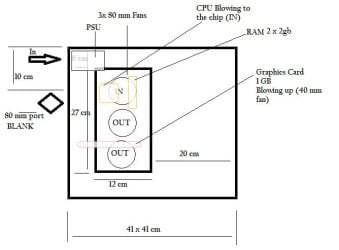
My PC have got 3 external fans ( + 1 CPU, 1 PSU, I GPU)
3 Fans are on the side door. Top one is blowing in, others two blowing out.
The cpu is below the top one and is blowing in.( on to the chip)

The 3 fans are 80mm in a line. I have space for 120 mm so can move the 80 mm left or right.
There is a blank space behind the PC for a 80 mm. I don't have fan space in front or top.

The PSU fan is blowing in.

I have 2 problems.

1) My case door makes heavy noise sometimes. If I slap it it just goes away. Is there somekind of damper I can get in India to set it right. If I put rubber bushes bw fan and case will it go away? Is there some other solution?

2) Is my fan arrangement correct?
What is the good position for fans? in/out Should I move one from side to back?

ROUGH drawing of case attached.
 

Attachments
  • Cabinet.jpg
    Cabinet.jpg
    25.3 KB · Views: 42

My Computer My Computer

At a glance

Windows 7 64 bitIntel core 2 duo E7500Zion DDR2 4 GbNVIDA GForce 9400 GT 1Gb
Computer Manufacturer/Model Number
Assembeled
OS
Windows 7 64 bit
CPU
Intel core 2 duo E7500
Motherboard
Asus P5KPL AM/PS
Memory
Zion DDR2 4 Gb
Graphics Card(s)
NVIDA GForce 9400 GT 1Gb
Sound Card
Built in
Monitor(s) Displays
Samsung 19.5 " Flat
Hard Drives
320 Gb Seagate 7000rpm
PSU
Intex 450 W
Case
Zebronics
Cooling
3 External Fans, CPU,PSU,GPU
Keyboard
Logitech Wireless
Mouse
Logitech Wireless
Internet Speed
2 mbps broadband connection
The PSU fan is blowing in.

Only if the manufacturer installed the fan backwards. Never seen a PSU that draws air in, as the fans on a PSU are to help cool it as well as draw warmer air from the top (when top mounted) of the case.

As for the rest the general rule of thumb is front and side fans blowing in, with rear and top blowing out. If you mount those side panel fans both blowing in and out all you're accomplish is a vortex inside that can and will likely affect any cooling benefit. It will also cause them to basically circulate whatever warm the out fans are blowing right back into the intake fan.

For the noise with the fans on the side panel, rubber or foam washers should help with that. Another option would be to take a cheap rubber backed mouse pad and cut it to fit the outside dimensions of the fan, with a hole cut in the middle the same diameter as the fan blades.
 

My Computer My Computer

At a glance

Win 7 Ultimate x64FX-8350 @ 4.6 GHz so farADATA XPG V1 Series Black 8GB DDR3 1600Sapphire R9 270x Dual-X
Computer type
PC/Desktop
Computer Manufacturer/Model Number
Me
OS
Win 7 Ultimate x64
CPU
FX-8350 @ 4.6 GHz so far
Motherboard
Asus M5A97 EVO
Memory
ADATA XPG V1 Series Black 8GB DDR3 1600
Graphics Card(s)
Sapphire R9 270x Dual-X
Sound Card
Xonar DGX w/ Corsair Vengence 1300
Monitor(s) Displays
Acer S232HL Abid
Screen Resolution
1920x1080
Hard Drives
120 GB OCZ Vertex 3
500 GB Seagate 7200.12
PSU
Antec Earthwatts 650W Green
Case
Antec Three Hundred
Cooling
Cooler Master 212 EVO
Keyboard
Logitech G510
Mouse
Logitech G500s
Internet Speed
35000/3000
As for the rest the general rule of thumb is front and side fans blowing in, with rear and top blowing out. If you mount those side panel fans both blowing in and out all you're accomplish is a vortex inside that can and will likely affect any cooling benefit. It will also cause them to basically circulate whatever warm the out fans are blowing right back into the intake fan.

Where ever I search I can only get this general rule. Also most lower/ Middle end cabinets don't have Front air vents. And only few cabinets put up top air vents.

So what do I do with side and back only?
 

My Computer My Computer

At a glance

Windows 7 64 bitIntel core 2 duo E7500Zion DDR2 4 GbNVIDA GForce 9400 GT 1Gb
Computer Manufacturer/Model Number
Assembeled
OS
Windows 7 64 bit
CPU
Intel core 2 duo E7500
Motherboard
Asus P5KPL AM/PS
Memory
Zion DDR2 4 Gb
Graphics Card(s)
NVIDA GForce 9400 GT 1Gb
Sound Card
Built in
Monitor(s) Displays
Samsung 19.5 " Flat
Hard Drives
320 Gb Seagate 7000rpm
PSU
Intex 450 W
Case
Zebronics
Cooling
3 External Fans, CPU,PSU,GPU
Keyboard
Logitech Wireless
Mouse
Logitech Wireless
Internet Speed
2 mbps broadband connection
tsram90,

If it was my setup I would get that 80mm fan installed as exhaust then run the upper and lower side case fans as intake and the center side case fan as exhaust. If you can speed control them then try different speed to achieve a clean airflow with the best temps to noise.

Install one of these then if needed look to a spot fan for your hard drives.
http://biz.tigerdirect.com/applications/SearchTools/item-details.asp?EdpNo=2559758&CatId=501
Antec spot cool
http://www.amazon.com/Antec-Spot-Co...KSNQ/ref=sr_1_1?ie=UTF8&qid=1319296249&sr=8-1
 

My Computer My Computer

At a glance

Windows 7 Ultimate 64i7 3770k OC'd 4.6 @ 1.17v, also FX 8120 & i5 ...32 gb G.Skill Sniper DDR3 10-12-12-31 @ 2133XFX Radeon 7870 2GB DDR5
Computer type
PC/Desktop
Computer Manufacturer/Model Number
A blend of brains, brawn and dumb luck.
OS
Windows 7 Ultimate 64
CPU
i7 3770k OC'd 4.6 @ 1.17v, also FX 8120 & i5 miniITX
Motherboard
MSI P67A-GD80 b3
Memory
32 gb G.Skill Sniper DDR3 10-12-12-31 @ 2133
Graphics Card(s)
XFX Radeon 7870 2GB DDR5
Sound Card
Sound Blaster Z Series Card
Monitor(s) Displays
(2) LG LED 23" 1920 x 1080 2ms Monitors via mini d-port
Screen Resolution
1680 X 1050 p
Hard Drives
Samsung 256 gb 830 SSD sata III
(1) 1 tb WD Black
(2) 1 tb Hitachi deskmates/sata II
(2) 1 tb WD green/sata II
(2) 3 tb Seagate Barracuda
(1) 120 gb OCZ Vertex SS
(1) Drobo 5N w/5 Seagate 3tb
PSU
EVGA modular 1000G2 80% gold rating & APC 1200 RS
Case
CoolerMaster Storm Styker
Cooling
7 case fans 140mm & 120mm, NZXT Kraken X60
Keyboard
(2) Logitech Illuminated Keyboards (1) usb (1) wireless
Mouse
Logitech G700 & T-BC21 - nano nx for the laptop
Internet Speed
Basic 120mbps down
Antivirus
Trend Micro Titanium Max Security & Malwarebytes Premium
Browser
Chrome and IE 10
Other Info
5 Noctua case fans + 3 Noctua in p/p on NZXT cooler
Integrated hot swap drive bays for 2.5" Drives
(2) Lite-on dvd/cd/Blu Ray optical 22X
Integrated fan controller and led on/off
HP Officejet Pro 8630 all-n-one
Hot-swappable 3.5" hard drive bay
Netgear Nighthawk router
Asus USB 3 & sata 6 PCIe card
Vantec IDE to sata adptr./Ultra sata adptr
Lenovo L420 i5 lappy with m sata
Drobo 5N advanced NAS
tsram90,

If it was my setup I would get that 80mm fan installed as exhaust then run the upper and lower side case fans as intake and the center side case fan as exhaust. If you can speed control them then try different speed to achieve a clean airflow with the best temps to noise.

Install one of these then if needed look to a spot fan for your hard drives.
Ultra 4 Channel Fan Controller ULT40061 at TigerDirect
Antec spot cool
Amazon.com: Antec SpotCool System Cooler: Electronics


TQ..
If I put side top as intake and back as exhaust, air is not reaching CPU fan. TEMP just hiked..
I finally put it as "removed centre side.. Put the 'back' and 'side up' as exhaust.. 'Side down' as intake.. Better have a negative pressure that positive pressure inside cabinet."


NB: Really liked teh Antec spot cool ;)
 

My Computer My Computer

At a glance

Windows 7 64 bitIntel core 2 duo E7500Zion DDR2 4 GbNVIDA GForce 9400 GT 1Gb
Computer Manufacturer/Model Number
Assembeled
OS
Windows 7 64 bit
CPU
Intel core 2 duo E7500
Motherboard
Asus P5KPL AM/PS
Memory
Zion DDR2 4 Gb
Graphics Card(s)
NVIDA GForce 9400 GT 1Gb
Sound Card
Built in
Monitor(s) Displays
Samsung 19.5 " Flat
Hard Drives
320 Gb Seagate 7000rpm
PSU
Intex 450 W
Case
Zebronics
Cooling
3 External Fans, CPU,PSU,GPU
Keyboard
Logitech Wireless
Mouse
Logitech Wireless
Internet Speed
2 mbps broadband connection
Yeah it's an odd design and only experimentation will prove what's best.
 

My Computer My Computer

At a glance

Windows 7 Ultimate 64i7 3770k OC'd 4.6 @ 1.17v, also FX 8120 & i5 ...32 gb G.Skill Sniper DDR3 10-12-12-31 @ 2133XFX Radeon 7870 2GB DDR5
Computer type
PC/Desktop
Computer Manufacturer/Model Number
A blend of brains, brawn and dumb luck.
OS
Windows 7 Ultimate 64
CPU
i7 3770k OC'd 4.6 @ 1.17v, also FX 8120 & i5 miniITX
Motherboard
MSI P67A-GD80 b3
Memory
32 gb G.Skill Sniper DDR3 10-12-12-31 @ 2133
Graphics Card(s)
XFX Radeon 7870 2GB DDR5
Sound Card
Sound Blaster Z Series Card
Monitor(s) Displays
(2) LG LED 23" 1920 x 1080 2ms Monitors via mini d-port
Screen Resolution
1680 X 1050 p
Hard Drives
Samsung 256 gb 830 SSD sata III
(1) 1 tb WD Black
(2) 1 tb Hitachi deskmates/sata II
(2) 1 tb WD green/sata II
(2) 3 tb Seagate Barracuda
(1) 120 gb OCZ Vertex SS
(1) Drobo 5N w/5 Seagate 3tb
PSU
EVGA modular 1000G2 80% gold rating & APC 1200 RS
Case
CoolerMaster Storm Styker
Cooling
7 case fans 140mm & 120mm, NZXT Kraken X60
Keyboard
(2) Logitech Illuminated Keyboards (1) usb (1) wireless
Mouse
Logitech G700 & T-BC21 - nano nx for the laptop
Internet Speed
Basic 120mbps down
Antivirus
Trend Micro Titanium Max Security & Malwarebytes Premium
Browser
Chrome and IE 10
Other Info
5 Noctua case fans + 3 Noctua in p/p on NZXT cooler
Integrated hot swap drive bays for 2.5" Drives
(2) Lite-on dvd/cd/Blu Ray optical 22X
Integrated fan controller and led on/off
HP Officejet Pro 8630 all-n-one
Hot-swappable 3.5" hard drive bay
Netgear Nighthawk router
Asus USB 3 & sata 6 PCIe card
Vantec IDE to sata adptr./Ultra sata adptr
Lenovo L420 i5 lappy with m sata
Drobo 5N advanced NAS
Got a link to the case? Would help to see what you're working with. Only one I can find on the Zebronics site is this one (which really is fugly, but to each their own),

Zebronics - Cabinets - Xcilo-777

and it has 3 180 mm fans on the side.
 

My Computer My Computer

At a glance

Win 7 Ultimate x64FX-8350 @ 4.6 GHz so farADATA XPG V1 Series Black 8GB DDR3 1600Sapphire R9 270x Dual-X
Computer type
PC/Desktop
Computer Manufacturer/Model Number
Me
OS
Win 7 Ultimate x64
CPU
FX-8350 @ 4.6 GHz so far
Motherboard
Asus M5A97 EVO
Memory
ADATA XPG V1 Series Black 8GB DDR3 1600
Graphics Card(s)
Sapphire R9 270x Dual-X
Sound Card
Xonar DGX w/ Corsair Vengence 1300
Monitor(s) Displays
Acer S232HL Abid
Screen Resolution
1920x1080
Hard Drives
120 GB OCZ Vertex 3
500 GB Seagate 7200.12
PSU
Antec Earthwatts 650W Green
Case
Antec Three Hundred
Cooling
Cooler Master 212 EVO
Keyboard
Logitech G510
Mouse
Logitech G500s
Internet Speed
35000/3000
Got a link to the case? Would help to see what you're working with. Only one I can find on the Zebronics site is this one (which really is fugly, but to each their own),

Zebronics - Cabinets - Xcilo-777

and it has 3 180 mm fans on the side.


I can't see my cabinet on the site. Might be a old model. The PC is 3-4 years old.
 

My Computer My Computer

At a glance

Windows 7 64 bitIntel core 2 duo E7500Zion DDR2 4 GbNVIDA GForce 9400 GT 1Gb
Computer Manufacturer/Model Number
Assembeled
OS
Windows 7 64 bit
CPU
Intel core 2 duo E7500
Motherboard
Asus P5KPL AM/PS
Memory
Zion DDR2 4 Gb
Graphics Card(s)
NVIDA GForce 9400 GT 1Gb
Sound Card
Built in
Monitor(s) Displays
Samsung 19.5 " Flat
Hard Drives
320 Gb Seagate 7000rpm
PSU
Intex 450 W
Case
Zebronics
Cooling
3 External Fans, CPU,PSU,GPU
Keyboard
Logitech Wireless
Mouse
Logitech Wireless
Internet Speed
2 mbps broadband connection
Back
Top