Cropped and resized images keep original content

Paultx

New member
Member
Local time
4:51 PM
Messages
74
Location
Brazil
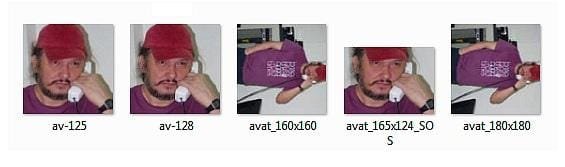
As you can see in the image below, Windows kept the original image content altough I have cropped and resized it. And what is more strange is that it doesn't happen all the time.
Avatars_imgs.jpg

Any ideas on why this happens? Maybe Windows cache stuff? Or maybe info inside the image itself?

TIA for your attention and help.
 

My Computer My Computer

At a glance

Windows 7
OS
Windows 7
Can you restate the problem and clarify it.

What application are you using?

If you crop av-125 and resave it as av-125cropped and then look at av-125 again, I would expect av-125 to look as it originally did before the crop.

But I'm sure I don't understand you correctly.
 

My Computer My Computer

At a glance

Windows 7 Home Premium SP1, 64-bitIntel Skylake i5-6600K, not overclocked8 GB HyperX DDR4-2666 (2 x 4 GB)none; graphics are integrated on CPU
Computer type
PC/Desktop
Computer Manufacturer/Model Number
Ignatz Special; 4 speed manual gearbox; factory air conditioning; one of one
OS
Windows 7 Home Premium SP1, 64-bit
CPU
Intel Skylake i5-6600K, not overclocked
Motherboard
AsRock Z170M Extreme 4, micro ATX
Memory
8 GB HyperX DDR4-2666 (2 x 4 GB)
Graphics Card(s)
none; graphics are integrated on CPU
Sound Card
onboard: Realtek ALC1150; external: USB Behringer UF0-202
Monitor(s) Displays
Dell S2340M 23 inch IPS
Screen Resolution
1600 x 900
Hard Drives
System: Crucial MX100 series SSD, 128 GB;
Data: Samsung Spinpoint 103SJ, 1 TB;
Backup: WD Caviar Green WD30EZRX-00D8PB0, 3 TB
PSU
Rosewill SilentNight 500 watt fanless, semi-modular
Case
Antec Solo II
Cooling
Noctua NH-U12S; Noctua F12 intake, Noctua S12A exhaust
Keyboard
Microsoft 200 6JH-00001 USB
Mouse
Dell or Microsoft optical wired; USB
Antivirus
Microsoft Security Essentials and Malwarebytes Premium
Browser
Pale Moon
Other Info
All fans PWM; speeds at idle: CPU circa 500 rpm; intake circa 600 rpm; exhaust circa 600 rpm; CPU temps 27 idle and 47 C load in a warm room (27 C/81 F) when running Intel Extreme Tuning Utility stress test.
ignatzatsonic, sorry for my bad English. Let me try again.

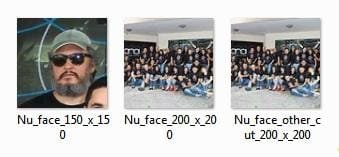
The original image was a hi-res portrait of me standing at the phone. I used IrfanView to crop the area with my face then resized it to make avatars. As you can see, two of them – in spite of the crop/resize – still show the whole original image content when viewed as thumbnails in Windows (the attached image is a screenshot from Windows Explorer and the numbers in the files names are the images size in pixels).

So if I open avat_160x160 or avat_180x180 with IrfanView or Windows Photo Viewer, it will show only the area with my face (like on the other images), but if I view them as thumbs in Explorer they appear as thumbs of that original hi-res image.

See another example from my avatar here at the forum: the original image was a portrait of people from my workplace. I cropped and resized to get a square with my face. But two of the new images thumbs show the original portrait content...

Avatars_imgs2.jpg

Get it?
 

My Computer My Computer

At a glance

Windows 7
OS
Windows 7
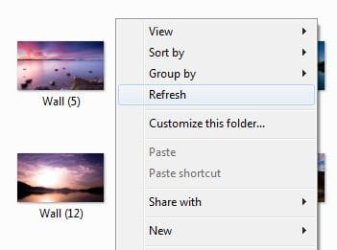
Have you tried "refresh" the thumbnails in the folder.
 

Attachments

  • Clipboard01.jpg
    Clipboard01.jpg
    10.4 KB · Views: 3

My Computer My Computer

At a glance

Windows 7 Home Premium (64 bit)Intel I5 2500K 3.3Ghz Stock8Gig Kingston DDRIII HyperX Blue 1333 MhzAMD Sapphire 7870 2GB
Computer type
PC/Desktop
Computer Manufacturer/Model Number
Self Built
OS
Windows 7 Home Premium (64 bit)
CPU
Intel I5 2500K 3.3Ghz Stock
Motherboard
Asus P8H 61-M LE USB 3
Memory
8Gig Kingston DDRIII HyperX Blue 1333 Mhz
Graphics Card(s)
AMD Sapphire 7870 2GB
Sound Card
Creative Fatality Pro
Monitor(s) Displays
27" BENQ LED
Screen Resolution
1920X1080
Hard Drives
1 x OCZ Agility 3 120GB SSD
1 x Seagate 250GB
1 x Western Digital 1000GB
1 x HP 500GB
PSU
700W Coolermaster Stealth Pro etc
Case
Coolermaster Scout
Cooling
Some fans
Keyboard
Some Logitech type.
Mouse
Logitech MX518
Internet Speed
Wireless 8mb
Other Info
Canon Scanner
Epson Printer
Nikon DSLR 3000
Wacom Tablet
Have you tried "refresh" the thumbnails in the folder.
Yes. But it's been a long time since I noticed that. My guess is that Windows keeps a cached version of the original images somewhere, but it's weird that it happens only to some and not to all resized/cropped versions.

You know, Windows does this kind of thing. For example, it keeps a cached album art image that it applies to most if not all songs...
 

My Computer My Computer

At a glance

Windows 7
OS
Windows 7

My Computer My Computer

At a glance

Win 7 Pro x64 / Win 10 ProIntel(R) Core(TM) i7-3630QM CPU @ 2.40GHz12 GB(1) Intel(R) HD Graphics 4000 (2) NVIDIA GeFo...
Computer type
Laptop
Computer Manufacturer/Model Number
Sager NP9170
OS
Win 7 Pro x64 / Win 10 Pro
CPU
Intel(R) Core(TM) i7-3630QM CPU @ 2.40GHz
Motherboard
CLEVO P170EM
Memory
12 GB
Graphics Card(s)
(1) Intel(R) HD Graphics 4000 (2) NVIDIA GeForce GTX 675M
Sound Card
(1) Realtek High Definition Audio (2) Intel(R) Display Aud
Monitor(s) Displays
17.3
Screen Resolution
1920x1080
Hard Drives
(1) Samsung 860 EVO 500GB(OS) (1) Samsung 860 EVO 500GB(Data)
Keyboard
Backlite
Antivirus
MSE, Malwarebytes Pro
Browser
Firefox
Other Info
DESKTOP: Custom-built.
OS: Win 10 Pro x64.
CASE: Rosewill R5.
CPU: Intel I5 4670K CPU @ 3.40GHz.
CPU COOLER: Cool Master Hyper 212 EVO.
MOTHERBOARD: Asus Z87-A.
MEMORY: Kingston HyperX 2x4 GB.
GPU: Nvidia Geforce 650 TI.
PSU: Corsair TX750.
DRIVES: (1) Samsung 840 120 GB SSD (2) Western Digital blue 500 GB 7200 RPM.
Back
Top