No wireless printing with new HP LaserJet Professional M1217nfw MFP

angelfj

New member
Local time
10:35 AM
Messages
6
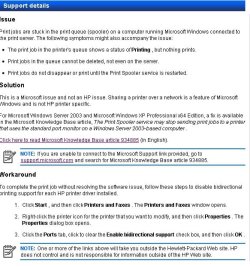
Just bought this printer because I needed a MFP with fax, copy and scan. It will not print wireless, but works fine with a usb connection. I have tried all of the recommended diagnostics offered by HP, latest firmware, drives, etc. but still have this problem: when printing wireless, the document appears in the queue, but never prints. HP has suggested a problem with windows, and actually has a fix, but not for win 7. See below for their recommendation. Please, can someone help?

Many thanks
 

Attachments

  • hpstatement.jpg
    hpstatement.jpg
    73.6 KB · Views: 312

My Computer My Computer

At a glance

windows 7 professional
Computer Manufacturer/Model Number
Sony VAIO VGN NS305D
OS
windows 7 professional
When you setup the Wireless for the printer, did you pick a static IP address or is it DHCP assigned?

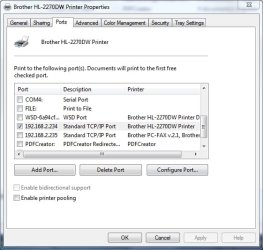
I have two Brother wireless printers that I print to from my Win 7 Pro X64 system and I have assigned static IP addresses to them and never have a problem. In Devices and Printers they look likt this:

Printers.jpg
 

My Computer My Computer

At a glance

Windows 10 Pro X64Intel Quad Core i7-4770 @ 3.4Ghz16.0GB PC3-12800 DDR3 SDRAM 1600 MHzIntel Integrated HD Graphics
Computer type
PC/Desktop
Computer Manufacturer/Model Number
Lenovo IdeaCenter 450
OS
Windows 10 Pro X64
CPU
Intel Quad Core i7-4770 @ 3.4Ghz
Memory
16.0GB PC3-12800 DDR3 SDRAM 1600 MHz
Graphics Card(s)
Intel Integrated HD Graphics
Sound Card
Realtek HD Audio
Monitor(s) Displays
HP 22" LCD
Screen Resolution
1680 x 1050
Hard Drives
250GB Samsung EVO SATA-3 SSD
2TB Seagate ST2000DM001 SATA-2
1.5TB Seagate ST3150041AS SATA
Keyboard
Dell USB
Mouse
Lenovo USB
Internet Speed
Cable via Road Runner 3MB Upload, 30MB Download
Antivirus
Windows Defender, MBAM Pro, MBAE
Browser
Seamonkey
Other Info
UEFI/GPT
PLDS DVD-RW DH16AERSH
first of all make sure your printer is not set "offline"
you can check this in the printing documents window.
go to the start button and then to "devices and printers"
right click on your printer, then click "see what's printing" then click on "printer" then make sure there is no check next to "use printer offline"


next thing is setting a static ip like stated above. I had to do the same thing with my hp officejet pro printer. without a static ip the printer would never show up as "online" or "connected" in the HP solution center.
and often my router will assign another computer it's IP address when the printer is off and the computer is turned on.
so I have to basically turn off the connection on the computer, turn on the printer allow it a sec to get it's ip registered in the network then turn the connection back on in the computer. sometimes I get a error popup when my computer connects to the network about a IP conflict. I click ok but it works anyway.
it's a pain in the butt but that's the only way I know to get it to work if I forget to turn the printer on first.

HP's printers have a hell of a time connecting. I've been farting around with this subject for 3 years with this printer on their forums. you're not alone in this mess. I wish my router had settings where I can assign a static ip to the printer so it doesn't give it to anything else. that would solve my issue I'm sure of it.
 

My Computer My Computer

At a glance

windows 7 ultimate 64 bitamd athlon 64 X2 5000+4 gigs pc2 5300Nvidia GeForce 8600 GTS
OS
windows 7 ultimate 64 bit
CPU
amd athlon 64 X2 5000+
Motherboard
asus A8M2N-LA
Memory
4 gigs pc2 5300
Graphics Card(s)
Nvidia GeForce 8600 GTS
Sound Card
Realtek alc888 high def 8 channel
Monitor(s) Displays
17"samsung syncMaster and 32" LCD panasonic viera tv
Hard Drives
300 gb Hitachi sata 7200rpm
1T seagate Barracuda sata 7200rpm
150 gb WD PATA
250gb WD my passport USB 2.0
PSU
Antec
Other Info
Altec lansing ATP3 3 pc speaker system(these things rock!)
I found out my router will let me reserve ip addresses for stuff...I hope this solves my issues.
you could try looking at yours too.


edited...next day.


YES! this did resolve all my conflict issues and now my printer is detected by all my computers as soon as I turn it on. too bad hp doesn't include this type of info in the owners manual.
 
Last edited:

My Computer My Computer

At a glance

windows 7 ultimate 64 bitamd athlon 64 X2 5000+4 gigs pc2 5300Nvidia GeForce 8600 GTS
OS
windows 7 ultimate 64 bit
CPU
amd athlon 64 X2 5000+
Motherboard
asus A8M2N-LA
Memory
4 gigs pc2 5300
Graphics Card(s)
Nvidia GeForce 8600 GTS
Sound Card
Realtek alc888 high def 8 channel
Monitor(s) Displays
17"samsung syncMaster and 32" LCD panasonic viera tv
Hard Drives
300 gb Hitachi sata 7200rpm
1T seagate Barracuda sata 7200rpm
150 gb WD PATA
250gb WD my passport USB 2.0
PSU
Antec
Other Info
Altec lansing ATP3 3 pc speaker system(these things rock!)
The printer needs a static ip or reserved address. If you can't reserve the address, change the range of ip's the routers dhcp server gives out and keep the printer out of that range.
That document is talking about shared printers, but you want to print directly to the printer don't you.
(make sure the wireless on the printer is actually enabled and address and wireless security setting set properly also)
Don't bother trying to install the driver if you can't even ping the printer.
 
Last edited:

My Computer My Computer

At a glance

Windows 7 Home Premium 64 OEM
Computer Manufacturer/Model Number
Acer Ferrari One/HP Proliant Microserver/Random Monstrosities
OS
Windows 7 Home Premium 64 OEM
Thank you (all of you). Something has changed which has really made this more difficult to understand. This morning, I loaded the HP printer software onto my wife's laptop (E Machine), running the same version of windows. The printer works perfectly or this laptop, both wireless and USB. Except that this other laptop has fewer programs installed and used primarily for email and internet, they are very similar. I did the obvious and compared the printer properties on both laptops and they are the same. So I am now at my limit of understanding of the problem. Time to dump the Sony???:cry:
 

My Computer My Computer

At a glance

windows 7 professional
Computer Manufacturer/Model Number
Sony VAIO VGN NS305D
OS
windows 7 professional
Thank you (all of you). Something has changed which has really made this more difficult to understand. This morning, I loaded the HP printer software onto my wife's laptop (E Machine), running the same version of windows. The printer works perfectly or this laptop, both wireless and USB. Except that this other laptop has fewer programs installed and used primarily for email and internet, they are very similar. I did the obvious and compared the printer properties on both laptops and they are the same. So I am now at my limit of understanding of the problem. Time to dump the Sony???:cry:
 

My Computer My Computer

At a glance

windows 7 professional
Computer Manufacturer/Model Number
Sony VAIO VGN NS305D
OS
windows 7 professional
no it's not your computer's fault by any means. it's got to do with your router and all the assigned Ip addresses it's giving out. your computer is probably using the one the printer is set to use or was using the last time you turned it off.
which your router gave to the computer. so now the printer is basically invisible to your computer.
you basically need to get your connection reset without using the same IP.
what I do I posted above to reset mine. but now with my router having the option to let me set a ip for every device I don't have to worry about this any more.

first if you have not already done so, download and install the newest software suite (the full feature suite) from hp for your printer. http://h10025.www1.hp.com/ewfrf/wc/...en&cc=us&dlc=en&sw_lang=&product=4075472#N166

they fixed a lot of these bugs with mine. (make sure you are using the correct bit version your computer is 32bit or 64 bit.)
windows will show you this in the control panel under the system properties. control panel - system and security- system. it will say system type 32 bit or 64 bit.


next, look at your printer's manual it should show you how to set it's ip address to a static address. (this means it never changes).
then go into your router's properties via it's control panel. should have come with a cd to access this. look at it's attached devies. if it shows your printer go to the settings (mine is labled "Lan IP setup")
and it lets me set that address to static so it never gives it to anything else other than the printer.

this should resolve your issue.
you might want to go ahead and uninstall the printer then let the hp install re install it. it should now be able to see the printer during install.

what router do you have? maybe someone will have the same one and can walk you through this.

the last time the printer couldn't be seen on install was with XP and the disk that came with the printer. I installed it on a vista computer and windows 7 both worked the first time without issue.
but I was still getting the occasional issue you are having where nothing would print due to the printer not being seen on the network. and every time one of the other computers had the IP address the printer uses. it's supposed to work without needing to set static addresses but it seemed to create a bigger problem because the HP solution center could never see the printer. so it was basically "offline" no matter what. even if I could see it in the network and windows said it's "online" it still wouldn't print until the HP solution center could see it.

 
Last edited:

My Computer My Computer

At a glance

windows 7 ultimate 64 bitamd athlon 64 X2 5000+4 gigs pc2 5300Nvidia GeForce 8600 GTS
OS
windows 7 ultimate 64 bit
CPU
amd athlon 64 X2 5000+
Motherboard
asus A8M2N-LA
Memory
4 gigs pc2 5300
Graphics Card(s)
Nvidia GeForce 8600 GTS
Sound Card
Realtek alc888 high def 8 channel
Monitor(s) Displays
17"samsung syncMaster and 32" LCD panasonic viera tv
Hard Drives
300 gb Hitachi sata 7200rpm
1T seagate Barracuda sata 7200rpm
150 gb WD PATA
250gb WD my passport USB 2.0
PSU
Antec
Other Info
Altec lansing ATP3 3 pc speaker system(these things rock!)
Serpentracer:

Thank you very much for your comments. Yesterday, I was able to do another "experiment" with a third laptop. This was a brand new HP belonging to my son who happened to be visiting. We popped in the HP printer disc, installed the software and he was printing wireless from his laptop in minutes. So, I am confused, Out of three laptop computers, mine is the only one that will not allow wireless printing. The other two are perfect.

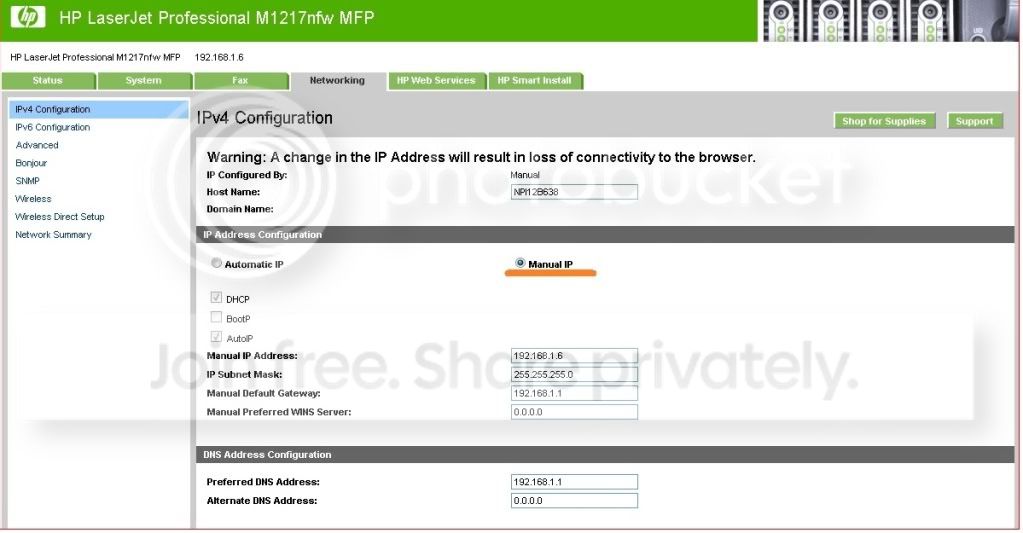
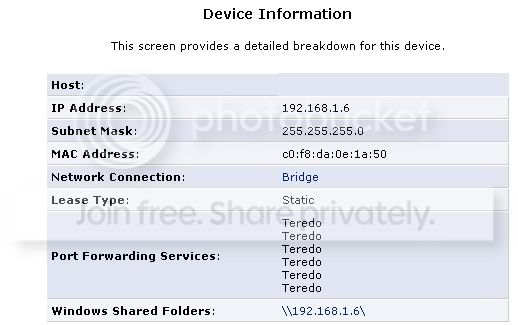
Just noticed this:

Looks like a static IP all along. What now?

printerconfig.jpg


printerconfig2.jpg
 
Last edited:

My Computer My Computer

At a glance

windows 7 professional
Computer Manufacturer/Model Number
Sony VAIO VGN NS305D
OS
windows 7 professional
:D

Hooray! Problem solved. Actually, I stumbled across a possible solution. I read on another computer related forum that certain security software can cause problems with wireless functions. Just for an experiment, I disabled my AVG firewall. Then I instructed the printer to print a test page AND IT DID!!! When I opened the detailed firewall settings, for some reason the default setting had spooler.exe turned OFF. I changed this to ON and now I can print wireless. I went back to the HP troubleshooting site and could find no reference regarding the firewall setting as being a possible source of trouble. This really surprised me. But, now it's fixed.

Thanks for all of the great suggestions!
 

My Computer My Computer

At a glance

windows 7 professional
Computer Manufacturer/Model Number
Sony VAIO VGN NS305D
OS
windows 7 professional
Good job! Glad you got it fixed.
 

My Computer My Computer

At a glance

Windows 10 Pro X64Intel Quad Core i7-4770 @ 3.4Ghz16.0GB PC3-12800 DDR3 SDRAM 1600 MHzIntel Integrated HD Graphics
Computer type
PC/Desktop
Computer Manufacturer/Model Number
Lenovo IdeaCenter 450
OS
Windows 10 Pro X64
CPU
Intel Quad Core i7-4770 @ 3.4Ghz
Memory
16.0GB PC3-12800 DDR3 SDRAM 1600 MHz
Graphics Card(s)
Intel Integrated HD Graphics
Sound Card
Realtek HD Audio
Monitor(s) Displays
HP 22" LCD
Screen Resolution
1680 x 1050
Hard Drives
250GB Samsung EVO SATA-3 SSD
2TB Seagate ST2000DM001 SATA-2
1.5TB Seagate ST3150041AS SATA
Keyboard
Dell USB
Mouse
Lenovo USB
Internet Speed
Cable via Road Runner 3MB Upload, 30MB Download
Antivirus
Windows Defender, MBAM Pro, MBAE
Browser
Seamonkey
Other Info
UEFI/GPT
PLDS DVD-RW DH16AERSH
Problem killed as well

This was precisely the problem in my case, spent 2 freaking days re-installing and fighting the printer only to realize DHCP server has given out printer's address to another device on the network. Solution was as simple as:

1. Reconfigure DHCP on the router/server to exclude a pool of addresses from the automatic DHCP giveaway, in my case I left out the first 50 for printers and other static IP devices:

Router/gateway IP: 192.168.1.254
DHCP pool: 192.168.1.51-192.168.1.253
Mask: 255.255.255.0

This way I was able to set up static IP on the HP M1217 MFP printer to 192.168.1.11

After resetting the router everything works perfectly.

Hope this helps.
 

My Computer My Computer

At a glance

Windows 8 64bit
Computer type
Laptop
Computer Manufacturer/Model Number
Dell Vostro
OS
Windows 8 64bit
Wouldn't the optimal solution, vs reserving IP address, be to configure setup with the printer hostname? Since the hostname will never change this seems easier than fiddling with the router config.
 

My Computer My Computer

At a glance

Windows 7 Professional 64bitAMD Athlon II X3 44012.0 GB Dual-Channel DDR3 @ 669MHzAMD Radeon HD 6850
OS
Windows 7 Professional 64bit
CPU
AMD Athlon II X3 440
Motherboard
ASUS M4A77TD
Memory
12.0 GB Dual-Channel DDR3 @ 669MHz
Graphics Card(s)
AMD Radeon HD 6850
Sound Card
AMD High Definition Audio Device
Monitor(s) Displays
Dell 317FP, Generic PnP Monitor
Screen Resolution
1920x1080
Hard Drives
112GB OCZ OCZ-AGIL ITY3 SATA Disk Device (SSD)
932GB Western Digital WDC WD10 01FALS-00E3A0 SATA Disk Device (SATA)
466GB Western Digital WDC WD50 01AALS-00L3B2 SATA Disk Device (SATA)
Case
ANTEC 300 ILLUSION
Cooling
CoolerMaster Hyper 212 plus
Other Info
I have two 4GB Corsair XMS3 modules and two 2GB Corsair XMS3 modules.
No idea how you wold do that. Can you elaborate please.
 

My Computer My Computer

At a glance

Windows 10 Pro X64Intel Quad Core i7-4770 @ 3.4Ghz16.0GB PC3-12800 DDR3 SDRAM 1600 MHzIntel Integrated HD Graphics
Computer type
PC/Desktop
Computer Manufacturer/Model Number
Lenovo IdeaCenter 450
OS
Windows 10 Pro X64
CPU
Intel Quad Core i7-4770 @ 3.4Ghz
Memory
16.0GB PC3-12800 DDR3 SDRAM 1600 MHz
Graphics Card(s)
Intel Integrated HD Graphics
Sound Card
Realtek HD Audio
Monitor(s) Displays
HP 22" LCD
Screen Resolution
1680 x 1050
Hard Drives
250GB Samsung EVO SATA-3 SSD
2TB Seagate ST2000DM001 SATA-2
1.5TB Seagate ST3150041AS SATA
Keyboard
Dell USB
Mouse
Lenovo USB
Internet Speed
Cable via Road Runner 3MB Upload, 30MB Download
Antivirus
Windows Defender, MBAM Pro, MBAE
Browser
Seamonkey
Other Info
UEFI/GPT
PLDS DVD-RW DH16AERSH
No idea how you wold do that. Can you elaborate please.

Serpentracer:

Thank you very much for your comments. Yesterday, I was able to do another "experiment" with a third laptop. This was a brand new HP belonging to my son who happened to be visiting. We popped in the HP printer disc, installed the software and he was printing wireless from his laptop in minutes. So, I am confused, Out of three laptop computers, mine is the only one that will not allow wireless printing. The other two are perfect.

Just noticed this:

Looks like a static IP all along. What now?

printerconfig.jpg


printerconfig2.jpg

See where it says Host Name in the first screenshot? That's what you would use to map the printer instead of the IP.
 

My Computer My Computer

At a glance

Windows 7 Professional 64bitAMD Athlon II X3 44012.0 GB Dual-Channel DDR3 @ 669MHzAMD Radeon HD 6850
OS
Windows 7 Professional 64bit
CPU
AMD Athlon II X3 440
Motherboard
ASUS M4A77TD
Memory
12.0 GB Dual-Channel DDR3 @ 669MHz
Graphics Card(s)
AMD Radeon HD 6850
Sound Card
AMD High Definition Audio Device
Monitor(s) Displays
Dell 317FP, Generic PnP Monitor
Screen Resolution
1920x1080
Hard Drives
112GB OCZ OCZ-AGIL ITY3 SATA Disk Device (SSD)
932GB Western Digital WDC WD10 01FALS-00E3A0 SATA Disk Device (SATA)
466GB Western Digital WDC WD50 01AALS-00L3B2 SATA Disk Device (SATA)
Case
ANTEC 300 ILLUSION
Cooling
CoolerMaster Hyper 212 plus
Other Info
I have two 4GB Corsair XMS3 modules and two 2GB Corsair XMS3 modules.
I'll have to try that with my Brother laser which is wireless. Thanks

I think I prefer assigning a fixed IP address though.
 

My Computer My Computer

At a glance

Windows 10 Pro X64Intel Quad Core i7-4770 @ 3.4Ghz16.0GB PC3-12800 DDR3 SDRAM 1600 MHzIntel Integrated HD Graphics
Computer type
PC/Desktop
Computer Manufacturer/Model Number
Lenovo IdeaCenter 450
OS
Windows 10 Pro X64
CPU
Intel Quad Core i7-4770 @ 3.4Ghz
Memory
16.0GB PC3-12800 DDR3 SDRAM 1600 MHz
Graphics Card(s)
Intel Integrated HD Graphics
Sound Card
Realtek HD Audio
Monitor(s) Displays
HP 22" LCD
Screen Resolution
1680 x 1050
Hard Drives
250GB Samsung EVO SATA-3 SSD
2TB Seagate ST2000DM001 SATA-2
1.5TB Seagate ST3150041AS SATA
Keyboard
Dell USB
Mouse
Lenovo USB
Internet Speed
Cable via Road Runner 3MB Upload, 30MB Download
Antivirus
Windows Defender, MBAM Pro, MBAE
Browser
Seamonkey
Other Info
UEFI/GPT
PLDS DVD-RW DH16AERSH
Back
Top