Need Help With Adobe Flash Player wanting to download

davidms

New member
Local time
6:52 AM
Messages
12
I have a Dell Inspiron 1440 Laptop, That has Windows 7, 64-Bit Operating System. 3 Days ago, I had a popup come on that asked me If I wanted to Install a Adobe Flash Player 11, I went to Adobe's Website, and downloaded it. Shortly after that, I started getting popups on my computer saying: Host process for windows services has stopped working"

This would come on about every 30-45min. I would click send info, and it would go away and come back about 30-45 minutes later, and the same thing would happen over and over. I tried some things online that said it might help, including virus scans, and what this website said How to fix “Host Process for Windows Services Has Stopped Working” | Web Talk

Neither of these worked. I realized that this started happening when I downloaded Adobe Flash player 11. So I uninstalled it, and it went away. I had too install the adobe flash player plugin that youtube said I needed it to watch youtube video's. I tried and I couldn't watch any youtube video without it. I installed the plugin, and I don't have the Host Process for Windows has Stopped Working anymore. I have had this computer on for about 3 hours, this evening, and about 30-60 mins in the morning, and the Host process problem hasn't come one once.

Now I keep getting a pop up saying Do you want to install Adobe Flash player 11? I refuse to install it, Because I believe based on what I just told you, that this is causing the problem. What do I do to get rid of this pop up? It keeps coming on around every 20 or so minutes. I am using Firefox, and I can watch youtube video's fine, play some online games from websites. When I go to Internet Explorer Version 9, It won't let me play the same game from the same website, or watch any youtube video, like I can on Firefox version 7.0.1.

Can anyone tell me what to do to get rid of this Adobe Flash Player pop up? When I do a search, on My Computer, for Adobe, all that comes up is Adobe Reader 9.

What can I do to stop this Adobe Flash Player pop up? Will I have too uninstall Internet Explorer 9? I don't use Internet Explorer, I use Firefox, or Google Chrome.

Any Help is greatly appreciated.
 

My Computer My Computer

At a glance

Windows 7 Home Premium 64 Bit
Computer Manufacturer/Model Number
Dell Inspiron 1440
OS
Windows 7 Home Premium 64 Bit
1. you can try to install all important windows updates and then attempt to install the most recent adobe package from its website, or you can
2. click any pdf or on adobe itself and wait for it to load up. click on edit, then updater at the bottom of the categories, and under check for updates, click do not download or install updates automatically. If you get another pop-up, look for a place to uncheck auto-update.

that should solve it. kinda like the red or blue pill. the choice is yours.
 

My Computer My Computer

At a glance

Microsoft Windows 8.1 Pro 64-bitIntel(R) Core(TM) i3-4130 CPU @ 3.40GHz8.00 GBNone
Computer type
PC/Desktop
Computer Manufacturer/Model Number
Custom Asus Build
OS
Microsoft Windows 8.1 Pro 64-bit
CPU
Intel(R) Core(TM) i3-4130 CPU @ 3.40GHz
Motherboard
B85M-E
Memory
8.00 GB
Graphics Card(s)
None
Sound Card
Realtek High Definition Audio
Monitor(s) Displays
Asus 23.6" Monitor
Screen Resolution
1920 x 1080 x 32 bits (4294967296 colors) @ 60 Hz
Hard Drives
INTEL SSDSC2BW180A4
Samsung SSD 840 PRO Series
PSU
Seasonic S12II-380Bronze
Case
Lian Li
Cooling
Fan, Passive
Keyboard
Logitech K120
Mouse
Microsoft Touch Mouse
Internet Speed
4ms Ping, 19.0 Mbps Download, 19.0 Mbps Upload
Antivirus
Eset Endpoint
Browser
Internet Explorer, Chrome
Dusty, I have installed all the updates for my computer, and installed Adobe Flash Player, the newest version.

It's not like the auto updater, like you mentioned. It's as if I went to the site and started downloading it again.

What happens is I'm in the middle of doing something and this box pops up in the middle of the screen saying.

Program Name: Adobe Flash Player

Verified Publisher: Adobe Systems Incorporated

File Origin: Downloaded from the internet

Then when I click on more details it says the website is

http://fpdownload2.macromedia.com/ get/shockwave/ cabs/flash/swflash.cab

This comes right in the middle of the screen, when I'm not downloading anything, I could be looking at my email, searching for something online, etc.. and It will come up. I click save and a little while after I install it a window comes up saying Host Process For Windows Services Has Stopped Working. As soon as I uninstall it, it goes away. If I click cancel, sometimes it goes away for about 30 mins, sometimes it comes back 3 times within 1 minute.

This all started when a little pop up on the task bar by the time and date asked to update adobe. This started on the 10/25/11/.

If you or anyone could help me I would really appreciate it.

Thanks for the help,

David
 

My Computer My Computer

At a glance

Windows 7 Home Premium 64 Bit
Computer Manufacturer/Model Number
Dell Inspiron 1440
OS
Windows 7 Home Premium 64 Bit
* David there is a difference between Adobe Flash Player and Adobe / Macromedia Shockwave Player.


Then when I click on more details it says the website is

http://fpdownload2.macromedia.com/ get/shockwave/ cabs/flash/swflash.cab

Flash Player | Adobe Flash Player 11 | Overview


Adobe - Products : Adobe Shockwave Player


* Are both listed in Start > Control Panel > Programs & Features?


*Also please indicate all the Security Software you are using on your computer.


* Did another Anti Virus come preinstalled on your computer when new?

If so how did you " get rid "of it?
 

My Computer My Computer

At a glance

Win 7 Ultimate 64-bit. SP1.Intel i7 -720QM.[1.6GHz Turbo Boost 2.8GHz. 6...8 DDR 3 RAM. 1066MHZATI 1024 MB. DDR3. Radeon HD5650
Computer Manufacturer/Model Number
LAPTOP. HP Pavilion dv7-4010TX .
OS
Win 7 Ultimate 64-bit. SP1.
CPU
Intel i7 -720QM.[1.6GHz Turbo Boost 2.8GHz. 6MB Cache.]
Memory
8 DDR 3 RAM. 1066MHZ
Graphics Card(s)
ATI 1024 MB. DDR3. Radeon HD5650
Monitor(s) Displays
17.3" High Definition Brightview LCD. LED Backlit.
Screen Resolution
1600 x 900.
Hard Drives
640GB
Case
Laptop / notebook.
Mouse
Logitech Anywhere mouse. MX.
Internet Speed
ADSL [ but too slow ]

My Computer My Computer

At a glance

Windows 7 HP / Ultimate x64Core i5 / X4 955 BE4GB DDR3 1333Mhz / 8GB DDR3 1600MhzHD5470 / HD5670
Computer Manufacturer/Model Number
Dell / Custom
OS
Windows 7 HP / Ultimate x64
CPU
Core i5 / X4 955 BE
Motherboard
OEM / Gigabyte 880GM-USB3
Memory
4GB DDR3 1333Mhz / 8GB DDR3 1600Mhz
Graphics Card(s)
HD5470 / HD5670
Sound Card
Onboard
Monitor(s) Displays
FullHD 15" / Dell 22" WS
Screen Resolution
1920x1080 / 1680x1050
Hard Drives
320GB / 1.5TB
PSU
CM
Case
CM
Cooling
CM, Antec
Keyboard
Logitech
Mouse
Logitech
  • Like
Reactions: JMH
* David there is a difference between Adobe Flash Player and Adobe / Macromedia Shockwave Player.


Then when I click on more details it says the website is

http://fpdownload2.macromedia.com/ get/shockwave/ cabs/flash/swflash.cab
Flash Player | Adobe Flash Player 11 | Overview

Adobe - Products : Adobe Shockwave Player


* Are both listed in Start > Control Panel > Programs & Features?

*Also please indicate all the Security Software you are using on your computer.

* Did another Anti Virus come preinstalled on your computer when new?
If so how did you " get rid "of it?
There are viruses that use the adobe name to install on your computer. just in case, could you tell me what anti-virus software you are using? I recommend installing malewarebytes and updating it/doing a run with it, and if you don't have another antivirus or want to chage it, install this one that works really well.
Don't forget to remove your old antivirus through this method (if that is something you want to do). 2 antiviruses cannot run at the same time (malewarebytes will run just fine as it isn't an antivirus, but helps all the same)
 

My Computer My Computer

At a glance

Microsoft Windows 8.1 Pro 64-bitIntel(R) Core(TM) i3-4130 CPU @ 3.40GHz8.00 GBNone
Computer type
PC/Desktop
Computer Manufacturer/Model Number
Custom Asus Build
OS
Microsoft Windows 8.1 Pro 64-bit
CPU
Intel(R) Core(TM) i3-4130 CPU @ 3.40GHz
Motherboard
B85M-E
Memory
8.00 GB
Graphics Card(s)
None
Sound Card
Realtek High Definition Audio
Monitor(s) Displays
Asus 23.6" Monitor
Screen Resolution
1920 x 1080 x 32 bits (4294967296 colors) @ 60 Hz
Hard Drives
INTEL SSDSC2BW180A4
Samsung SSD 840 PRO Series
PSU
Seasonic S12II-380Bronze
Case
Lian Li
Cooling
Fan, Passive
Keyboard
Logitech K120
Mouse
Microsoft Touch Mouse
Internet Speed
4ms Ping, 19.0 Mbps Download, 19.0 Mbps Upload
Antivirus
Eset Endpoint
Browser
Internet Explorer, Chrome
JMH:


I had both listed in Control Panel. I am currently using Microsoft Security Essentials.


I went to Uninstall a program and uninstalled it, and I also uninstalled it from the Adobe website. When I uninstall the Shockwave player, that pop up about Wanting to Install adobe does not come up anymore.


River Soft,
I did everything that you said, and I still had the pop up, about adobe wanting to install. I uninstalled Adobe shockwave, and the adobe popup went away. and I had a pop up that said In One Window it says Host process for windows Services has stopped working


Then below in the same box it says Windows is collecting more information about the problem. This might take several minutes.


In a Separate Box it says


Do you want to send more information about the problem?
Additional Details about what went wrong can help Microsoft Create a solution.


Then I click in that box View Details and this is what it shows.


Files that help describe the problem:
C:\Users\King David\AppData\Local\Temp\WER3284.tmp.WERInternalMetadata.xml
C:\Users\King David\AppData\Local\Temp\WER4682.tmp.appcompat.txt


Read our privacy statement online:
Windows 7 Privacy Statement - Microsoft Windows


If the online privacy statement is not available, please read our privacy statement offline:
C:\Windows\system32\en-US\erofflps.txt


[FONT=Times New Roman, serif]Dust Sailor, [/FONT]


[FONT=Times New Roman, serif]I am Using Microsoft Security Essentials. I will uninstall Microsoft Security Essentials, and try malwarebytes. [/FONT]


[FONT=Times New Roman, serif]I will try this and let you guys know.[/FONT]


[FONT=Times New Roman, serif]Does anyone have any other idea's? This started when I had a little window on the task bar by the date and time popped up asking if I wanted to upadate adobe, and I did, and that's when all lthis started. [/FONT]
 

My Computer My Computer

At a glance

Windows 7 Home Premium 64 Bit
Computer Manufacturer/Model Number
Dell Inspiron 1440
OS
Windows 7 Home Premium 64 Bit
This time when it came up, these 3 were in the details, instead of those 2.

Files that help describe the problem:
C:\Users\King David\AppData\Local\Temp\WER6CB7.tmp.WERInternalMetadata.xml
C:\Users\King David\AppData\Local\Temp\WER83A1.tmp.appcompat.txt
C:\Users\King David\AppData\Local\Temp\WER8400.tmp.mdmp

For malware bytes, it says to buy it, do you have to buy it, or does the download get rid of the virus if there is one, or?

Please let me know, as I really need to fix this.
 

My Computer My Computer

At a glance

Windows 7 Home Premium 64 Bit
Computer Manufacturer/Model Number
Dell Inspiron 1440
OS
Windows 7 Home Premium 64 Bit
Just thought that I would mention that, I just did a full scan a few minutes ago on Microsoft Security Essentials, and no viruses were found.

Thanks,

David
 

My Computer My Computer

At a glance

Windows 7 Home Premium 64 Bit
Computer Manufacturer/Model Number
Dell Inspiron 1440
OS
Windows 7 Home Premium 64 Bit
I am currently using Microsoft Security Essentials.


FYI.

There is a FREE version of Malwarebytes.


* Is MSE the ONLY security software you have currently on your computer?
There is a chance that your problems may be virus / malware related.


* These are 'free' scanners. Choose either to run a full scan.. just in case.

Free ESET Online Antivirus Scanner

HouseCall - Free Online Virus Scan - Trend Micro USA
Trend Micro HouseCall - Free Online Virus and Spyware Scan - Trend Micro Australia

*Malwarebytes Free.
Suggest you update it & do a FULL scan.
Malwarebytes : Malwarebytes Anti-Malware is a free download that removes viruses and malware from your computer


My Computer My Computer

At a glance

Win 7 Ultimate 64-bit. SP1.Intel i7 -720QM.[1.6GHz Turbo Boost 2.8GHz. 6...8 DDR 3 RAM. 1066MHZATI 1024 MB. DDR3. Radeon HD5650
Computer Manufacturer/Model Number
LAPTOP. HP Pavilion dv7-4010TX .
OS
Win 7 Ultimate 64-bit. SP1.
CPU
Intel i7 -720QM.[1.6GHz Turbo Boost 2.8GHz. 6MB Cache.]
Memory
8 DDR 3 RAM. 1066MHZ
Graphics Card(s)
ATI 1024 MB. DDR3. Radeon HD5650
Monitor(s) Displays
17.3" High Definition Brightview LCD. LED Backlit.
Screen Resolution
1600 x 900.
Hard Drives
640GB
Case
Laptop / notebook.
Mouse
Logitech Anywhere mouse. MX.
Internet Speed
ADSL [ but too slow ]
Hi, JMH, I uninstalled Microsoft Security Essentials, and installed Malwarebytes. I did a full scan 3 times, and all 3 times it scanned only until 34349 it was 2minutes 55 seconds into it when it froze, ( said not responding at the top ) the whole computer completely froze. The only way I could get out of it was to hold the power button to turn it off. This happened 3 times.

Since I can only have 1 anti virus installed at once, I will uninstall malwarebytes, and try Housecell.

Is there anything else I can try, or do?

Thanks,

David
 

My Computer My Computer

At a glance

Windows 7 Home Premium 64 Bit
Computer Manufacturer/Model Number
Dell Inspiron 1440
OS
Windows 7 Home Premium 64 Bit
I just installed, and scanned using House call, and it found nothing. This is driving me crazy. Any suggestions, or anything else I can do?

Thanks,

David
 

My Computer My Computer

At a glance

Windows 7 Home Premium 64 Bit
Computer Manufacturer/Model Number
Dell Inspiron 1440
OS
Windows 7 Home Premium 64 Bit
Not trying to step on any toes. Just offering some additional info. :)

Malwarebytes, Trend Micro Housecall, etc. are not traditional antivirus programs. They are designed to work along side Microsoft Security Essential, Avast, and most other traditional antivirus programs. So, it's OK to leave MSE and Malwarebytes on your machine at the same time.

You might want to try running the Malwarebytes scan in Safe Mode.

http://www.sevenforums.com/tutorials/69585-safe-mode.html

There are two other free products you might consider as well. (No need to uninstall MSE.) They are Hitman Pro and Norton Power Eraser. NPE is a powerful utility and warns: "You should use Norton Power Eraser only when nothing else will remove the threat and you are willing to accept the risk that the scanner may quarantine a legitimate program." As with any malware removal tool, if in doubt about permanently removing something, ask first.

Hitman Pro 3 - SurfRight

Norton Rescue Tools

And Microsoft offers this:

http://www.sevenforums.com/tutorials/166445-microsoft-standalone-system-sweeper.html
 

My Computer My Computer

At a glance

Win 7 Pro 64-bitIntel i5 2.4 Ghz8GB DDR3Intel HD 3000
Computer type
Laptop
Computer Manufacturer/Model Number
Sony Vaio VPCEB47GM Laptop
OS
Win 7 Pro 64-bit
CPU
Intel i5 2.4 Ghz
Memory
8GB DDR3
Graphics Card(s)
Intel HD 3000
Sound Card
IDT High Definition
Monitor(s) Displays
15.6 WGXA Anti-Glare LED
Screen Resolution
1280x800
Hard Drives
640Gb 7200rpm
Antivirus
MSE
Browser
Opera (primary) with IE9 backup
Just back online.
Thanks Lee for stepping in. :)
We are moving right away from the original Adobe problem.{s}
However it appears David needs quite a bit of advice re Security as well.

David.
Lee has given you good advice.
I would however caution you re Norton Power Eraser unless you are VERY familiar with it.
 

My Computer My Computer

At a glance

Win 7 Ultimate 64-bit. SP1.Intel i7 -720QM.[1.6GHz Turbo Boost 2.8GHz. 6...8 DDR 3 RAM. 1066MHZATI 1024 MB. DDR3. Radeon HD5650
Computer Manufacturer/Model Number
LAPTOP. HP Pavilion dv7-4010TX .
OS
Win 7 Ultimate 64-bit. SP1.
CPU
Intel i7 -720QM.[1.6GHz Turbo Boost 2.8GHz. 6MB Cache.]
Memory
8 DDR 3 RAM. 1066MHZ
Graphics Card(s)
ATI 1024 MB. DDR3. Radeon HD5650
Monitor(s) Displays
17.3" High Definition Brightview LCD. LED Backlit.
Screen Resolution
1600 x 900.
Hard Drives
640GB
Case
Laptop / notebook.
Mouse
Logitech Anywhere mouse. MX.
Internet Speed
ADSL [ but too slow ]
David.
Lee has given you good advice.
I would however caution you re Norton Power Eraser unless you are VERY familiar with it.
Very true, Malwarebytes works with MSE very well. And I would caution you with using norton power eraser as it is quite strong (in taking out too much sometimes)

You might check in control panel for anything else that you have installed that may just be crapware and bloatware. check it and make sure everything you want installed is installed. also check all your browsers' add-ons for stuff you don't want. uninstall.

If I haven't already, I urge you to update windows through its updater. There is also a windows software removal tool you could use
 

My Computer My Computer

At a glance

Microsoft Windows 8.1 Pro 64-bitIntel(R) Core(TM) i3-4130 CPU @ 3.40GHz8.00 GBNone
Computer type
PC/Desktop
Computer Manufacturer/Model Number
Custom Asus Build
OS
Microsoft Windows 8.1 Pro 64-bit
CPU
Intel(R) Core(TM) i3-4130 CPU @ 3.40GHz
Motherboard
B85M-E
Memory
8.00 GB
Graphics Card(s)
None
Sound Card
Realtek High Definition Audio
Monitor(s) Displays
Asus 23.6" Monitor
Screen Resolution
1920 x 1080 x 32 bits (4294967296 colors) @ 60 Hz
Hard Drives
INTEL SSDSC2BW180A4
Samsung SSD 840 PRO Series
PSU
Seasonic S12II-380Bronze
Case
Lian Li
Cooling
Fan, Passive
Keyboard
Logitech K120
Mouse
Microsoft Touch Mouse
Internet Speed
4ms Ping, 19.0 Mbps Download, 19.0 Mbps Upload
Antivirus
Eset Endpoint
Browser
Internet Explorer, Chrome
Marsmimar and JMH,
I haven’t used Norton, since I’m not familiar with it, so I won’t use it unless it’s a last resort.

I re-installed Microsoft Security Essentials.

I tried Microsoft standalone sweeper, and it didn’t find anything.

I’m going to try installing Hitman Pro 3 - Surfright.

I will also try using malwarebytes in safe mode.

So chances are this Adobe Problem, is a virus, or malware?


Dustsailor,

How Do I check my browser, for the add on’s that I have? How do I know which one's I need and which one's I don't?

I checked in control panel, and a lot of the stuff installed are updates ( atleast I think these are updates. Microsoft Visual C++ Redistributale ( x 64) and other things along those lines. One of those not the same title, was installed on 10/25/2011 right around when I started having this problem, I'm afraid to uninstall anything microsoft or Windows. I don't want to mess up my computer even more.

There are some things in the control panel that I don’t know what they are, they are:
None of these were installed recently, they came on the computer when I bought it from best buy in July 2010.

Windows Live Essentials 2011
Windows Live Sync
Microsoft Silverlight

The only adobe thing that I have on my computer now is
Adobe Flash Player 11 Plugin 64 Without this I can’t see anything on you tube. Should I uninstall this?

So, Is this pop up from adobe, causing Windows Host Process to stop working, a virus?

Thanks for the help, and advice everyone,

David
 

My Computer My Computer

At a glance

Windows 7 Home Premium 64 Bit
Computer Manufacturer/Model Number
Dell Inspiron 1440
OS
Windows 7 Home Premium 64 Bit
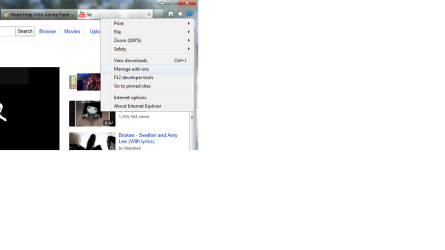
depending on what browser you have, mine is IE9, so it is under settings and manage add-ons:
Untitled.png
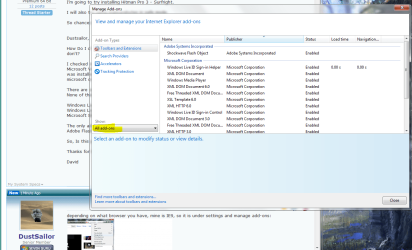
Here is the actual manager:
Capture.PNG
I'd say anything not from adobe, microsoft, or sun microsystems is just extra stuff. Now depending on wether or not you want that stuff is up to you, but the more you take off, the more speed you save, generally

So chances are this Adobe Problem, is a virus, or malware?

I checked in control panel, and a lot of the stuff installed are updates ( atleast I think these are updates. Microsoft Visual C++ Redistributale ( x 64) and other things along those lines. One of those not the same title, was installed on 10/25/2011 right around when I started having this problem, I'm afraid to uninstall anything microsoft or Windows. I don't want to mess up my computer even more.

There are some things in the control panel that I don’t know what they are, they are:
None of these were installed recently, they came on the computer when I bought it from best buy in July 2010.

Windows Live Essentials 2011
Windows Live Sync
Microsoft Silverlight

The only adobe thing that I have on my computer now is
Adobe Flash Player 11 Plugin 64 Without this I can’t see anything on you tube. Should I uninstall this?
David
It COULD be a virus, but if you've updated all the virus protections and then ran them, perhaps not. Those microsoft items in your control panel are fine. I strongly suggest removing the 64bit adobe software from your browser, and if you are using IE9x64, switch to the 32 bit one instead and download the 32bit flash.

64bit browsers are still under developement (IE9x64 was a good test subject, wasn't it?). 32bit has more functionality and is actually faster, as has been reported. AS WELL, adobe is still testing its 64 bit flash players, and they are not completely ready to be released yet. You only have a beta version if you have 64bit. see if this clears anything up.

And in case you have this question, yes 32bit software(browser and adobe) works seamlessly with 64bit software (windows 7 operating system). It will be fine

If all of this doesn't work, then perhaps we can go a little deeper into control panel items and add-ons. I just noticed you have 3 web browsers. this could get fun.
 

My Computer My Computer

At a glance

Microsoft Windows 8.1 Pro 64-bitIntel(R) Core(TM) i3-4130 CPU @ 3.40GHz8.00 GBNone
Computer type
PC/Desktop
Computer Manufacturer/Model Number
Custom Asus Build
OS
Microsoft Windows 8.1 Pro 64-bit
CPU
Intel(R) Core(TM) i3-4130 CPU @ 3.40GHz
Motherboard
B85M-E
Memory
8.00 GB
Graphics Card(s)
None
Sound Card
Realtek High Definition Audio
Monitor(s) Displays
Asus 23.6" Monitor
Screen Resolution
1920 x 1080 x 32 bits (4294967296 colors) @ 60 Hz
Hard Drives
INTEL SSDSC2BW180A4
Samsung SSD 840 PRO Series
PSU
Seasonic S12II-380Bronze
Case
Lian Li
Cooling
Fan, Passive
Keyboard
Logitech K120
Mouse
Microsoft Touch Mouse
Internet Speed
4ms Ping, 19.0 Mbps Download, 19.0 Mbps Upload
Antivirus
Eset Endpoint
Browser
Internet Explorer, Chrome
This probably won't help at this late stage but do you have a restore point going back to a date/time prior to receiving that very first popup about 5-6 days ago? The one asking if you wanted to install Adobe 11? If you do, try using system restore and maybe your machine will fix itself. (Big maybe.) But if it does we can guide you along as to what to install/uninstall in the way of programs, updates, etc as well as explain all those mysterious control panel items.

http://www.sevenforums.com/tutorials/700-system-restore.html

If you can do a system restore I'd still recommend doing a Malwarebytes scan in safe mode.
 

My Computer My Computer

At a glance

Win 7 Pro 64-bitIntel i5 2.4 Ghz8GB DDR3Intel HD 3000
Computer type
Laptop
Computer Manufacturer/Model Number
Sony Vaio VPCEB47GM Laptop
OS
Win 7 Pro 64-bit
CPU
Intel i5 2.4 Ghz
Memory
8GB DDR3
Graphics Card(s)
Intel HD 3000
Sound Card
IDT High Definition
Monitor(s) Displays
15.6 WGXA Anti-Glare LED
Screen Resolution
1280x800
Hard Drives
640Gb 7200rpm
Antivirus
MSE
Browser
Opera (primary) with IE9 backup
shoot I've had my fair share of trouble from chrome. despite some objection, I personally would recommend nuking that thing unless you consider yourself more an intermediate computer person who likes updating his computer and web browsers whenever needed. Firefox hasn't really given me much problem in the past, but check ALL browsers for adobe add-ons and remove them. I don't know if you have some kind of 64 bit browsers from chrome or firefix (haven't looked at them recently), but switch to 32 bit and see if this problem persists.
 

My Computer My Computer

At a glance

Microsoft Windows 8.1 Pro 64-bitIntel(R) Core(TM) i3-4130 CPU @ 3.40GHz8.00 GBNone
Computer type
PC/Desktop
Computer Manufacturer/Model Number
Custom Asus Build
OS
Microsoft Windows 8.1 Pro 64-bit
CPU
Intel(R) Core(TM) i3-4130 CPU @ 3.40GHz
Motherboard
B85M-E
Memory
8.00 GB
Graphics Card(s)
None
Sound Card
Realtek High Definition Audio
Monitor(s) Displays
Asus 23.6" Monitor
Screen Resolution
1920 x 1080 x 32 bits (4294967296 colors) @ 60 Hz
Hard Drives
INTEL SSDSC2BW180A4
Samsung SSD 840 PRO Series
PSU
Seasonic S12II-380Bronze
Case
Lian Li
Cooling
Fan, Passive
Keyboard
Logitech K120
Mouse
Microsoft Touch Mouse
Internet Speed
4ms Ping, 19.0 Mbps Download, 19.0 Mbps Upload
Antivirus
Eset Endpoint
Browser
Internet Explorer, Chrome
Back
Top