XP to Win 7 - Partitions Not Being Recognised!

NickW

New member
Local time
10:40 AM
Messages
15
Location
Kent, UK
Guys, forgive me as i'm new to all this but have read a 1,000 online help guides and got no where!

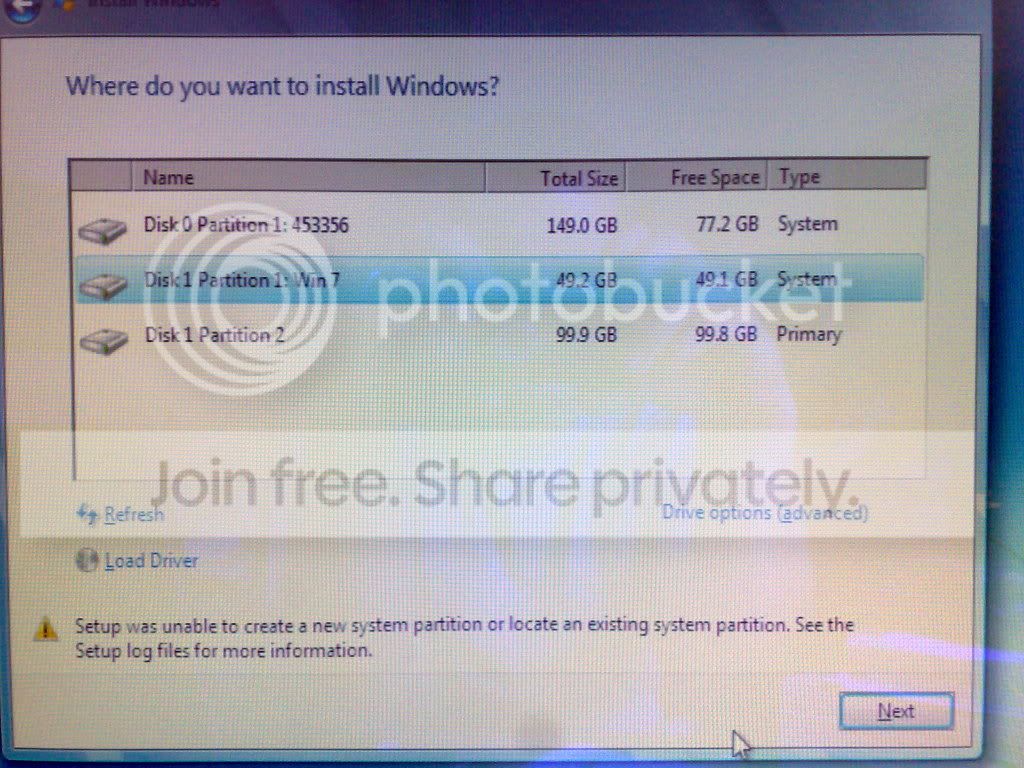
I'm currently running Windows XP SP2 and wanting to upgrade to Windows 7. I have set aside a 20GB partition and i'm wanting to make a fresh instal, not fussed about keep XP. I have 2 internal hard drives @ 149GB each. But, Win 7 fails to recognise them even when i have set a partition on the empty HD! It says something like 'setup was unable to create a new system partition or locate existing system partition ' What does this mean? I have a partition CD, cant remember the name now and followed instructions and still got no where! WIN 7 hates me! LOL

Please help guys! :)
 

My Computer My Computer

OS
Windows XP SP2
partition question

Guys, forgive me as i'm new to all this but have read a 1,000 online help guides and got no where!

I'm currently running Windows XP SP2 and wanting to upgrade to Windows 7. I have set aside a 20GB partition and i'm wanting to make a fresh instal, not fussed about keep XP. I have 2 internal hard drives @ 149GB each. But, Win 7 fails to recognise them even when i have set a partition on the empty HD! It says something like ' ' What does this mean? I have a partition CD, cant remember the name now and followed instructions and still got no where! WIN 7 hates me! LOL

Please help guys! :)

in xp can you look at the HD partitons and tell us if they are logical or primary, and if they are set to active, etc

Ken
 

My Computer My Computer

Computer Manufacturer/Model Number
HP Pavillion dv-7 1005 Tx
OS
Win 8 Release candidate 8400
CPU
[email protected]
Memory
4 gigs
Graphics Card(s)
Nvidia 9600M
Sound Card
HD built-in
Monitor(s) Displays
17" Wxga
Screen Resolution
1440x900
Cooling
none
Internet Speed
45Mb down 5Mb up
bare with me, still on the win 7 install screen, just shutting down the PC to re-boot :)
 

My Computer My Computer

OS
Windows XP SP2
Right,

My main HD with XP and crap on is BASIC, in fact, both HD's are basic and so is my Partition of 20GB for Win 7 but that one is now Active! But thats not your question is it! LOL, cant see LOGICAL or PRIMARY on the screen!

Now getting ''Error: 0x80300001''
 

My Computer My Computer

OS
Windows XP SP2
Bsod

Right,

My main HD with XP and crap on is BASIC, in fact, both HD's are basic and so is my Partition of 20GB for Win 7 but that one is now Active! But thats not your question is it! LOL, cant see LOGICAL or PRIMARY on the screen!

Now getting ''Error: 0x80300001''

If you ever get into win 7 try uploading the BSOD dump file (in c:\windows\minidump) and Im subscribed to this thread so anytime someone posts I get an email. Let me know how its going so I can jump back

Ken
 

My Computer My Computer

Computer Manufacturer/Model Number
HP Pavillion dv-7 1005 Tx
OS
Win 8 Release candidate 8400
CPU
[email protected]
Memory
4 gigs
Graphics Card(s)
Nvidia 9600M
Sound Card
HD built-in
Monitor(s) Displays
17" Wxga
Screen Resolution
1440x900
Cooling
none
Internet Speed
45Mb down 5Mb up
Right,

My main HD with XP and crap on is BASIC, in fact, both HD's are basic and so is my Partition of 20GB for Win 7 but that one is now Active! But thats not your question is it! LOL, cant see LOGICAL or PRIMARY on the screen!

Now getting ''Error: 0x80300001''

Look at the color code for the drive partitions, there is a color key at the bottom of the Disk Mgmt screen that shows whether they are Primary, Extended, or Logical. To install W7 it must be a Primary partition.

BTW, 20G is a very small partition if you plan on using 7 very much...
My install is 1 week old and already it's down 35G's
 

My Computer My Computer

Computer Manufacturer/Model Number
Personal Build
OS
Vista Ult 64bit - Windows 7 Ult 7264 64bit
CPU
Intel Core 2 Duo E6750
Motherboard
Asus Commando
Memory
4 G's Crucial Ballistix Tracer
Graphics Card(s)
BFG Nvidia 8800 GTS 340
Sound Card
Creative Sound Blaster X-FI Platinum FATAL1TY
Monitor(s) Displays
2-22" HP W2207 LCD
Screen Resolution
1920 x 1080
Hard Drives
3 x 500G WD Caviar SATA II
PSU
Enermax Noise Taker II 600W
Case
NZXT Lexa Classic (dual doored & windowed)
Cooling
Zalman 9700 CPU cooler - 4 x 120mm, 1 x 90mm fans
Keyboard
Logitech MX 5500
Mouse
Logitech MX Revolution
Internet Speed
Blazing...
Right, i have made my Win 7 Partition 50GB. Should be more than enough, ps I'm using GParted to do this and saving it as an NTFS format. I have set it to Primary now. Currently waiting 2 hors for the HD to format and move around and create the partition!
 

My Computer My Computer

OS
Windows XP SP2
hd format

Right, i have made my Win 7 Partition 50GB. Should be more than enough, ps I'm using GParted to do this and saving it as an NTFS format. I have set it to Primary now. Currently waiting 2 hors for the HD to format and move around and create the partition!

why does it take 2 hours to format? did you check the quick format box?

Ken
 

My Computer My Computer

Computer Manufacturer/Model Number
HP Pavillion dv-7 1005 Tx
OS
Win 8 Release candidate 8400
CPU
[email protected]
Memory
4 gigs
Graphics Card(s)
Nvidia 9600M
Sound Card
HD built-in
Monitor(s) Displays
17" Wxga
Screen Resolution
1440x900
Cooling
none
Internet Speed
45Mb down 5Mb up
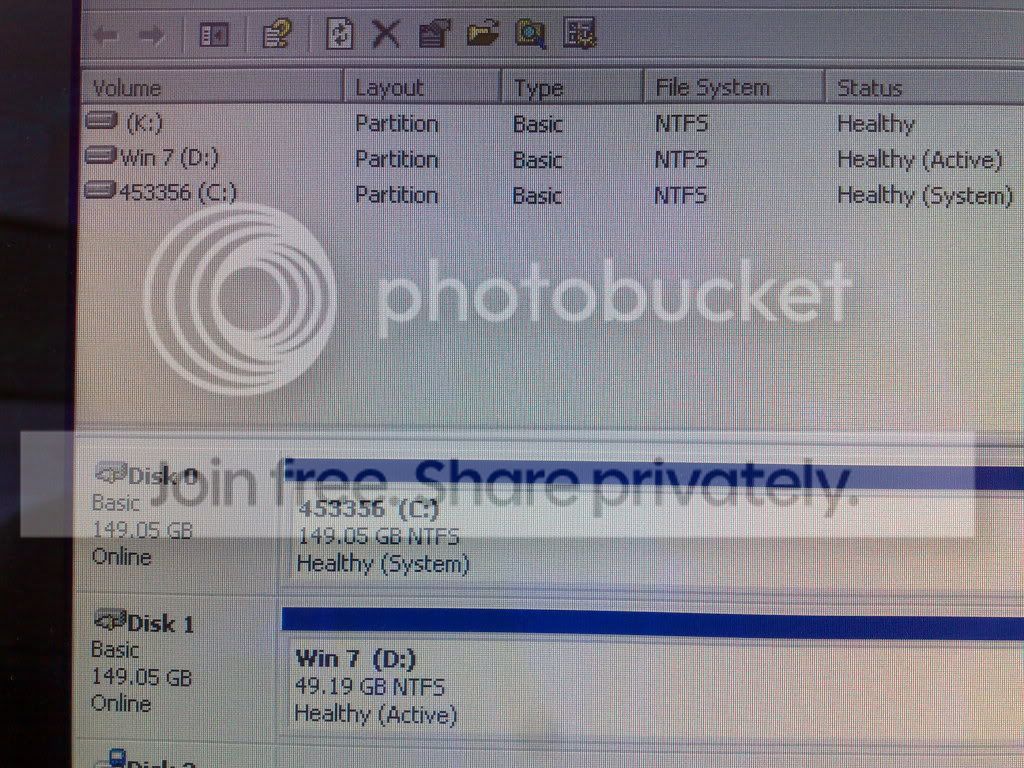
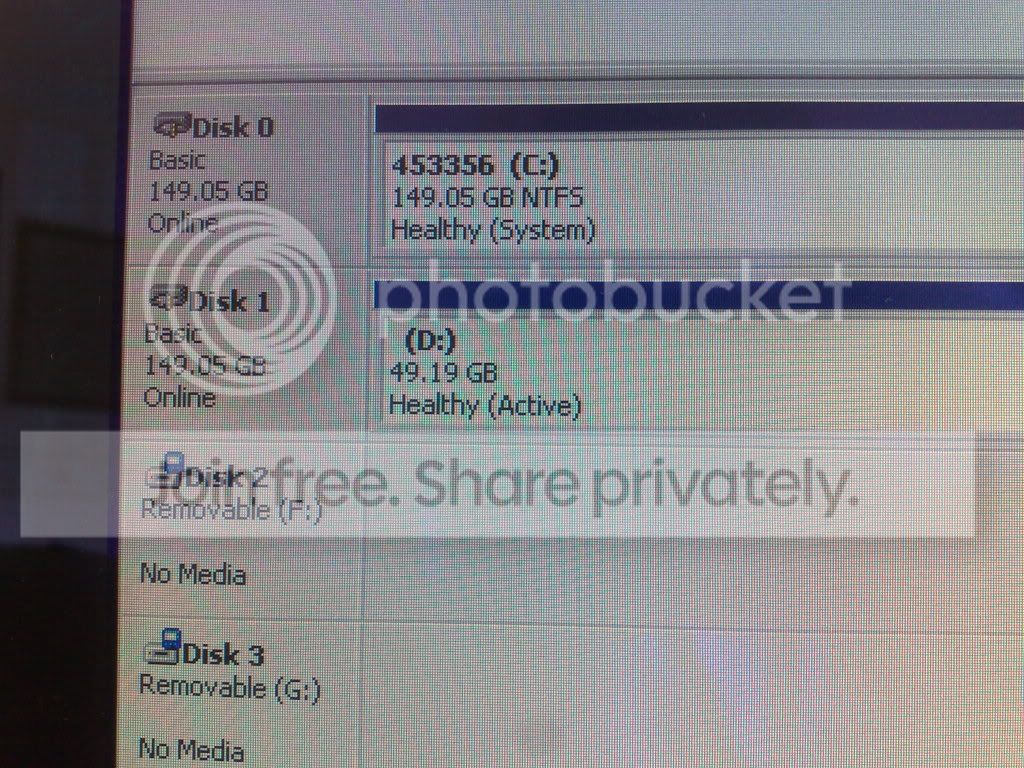
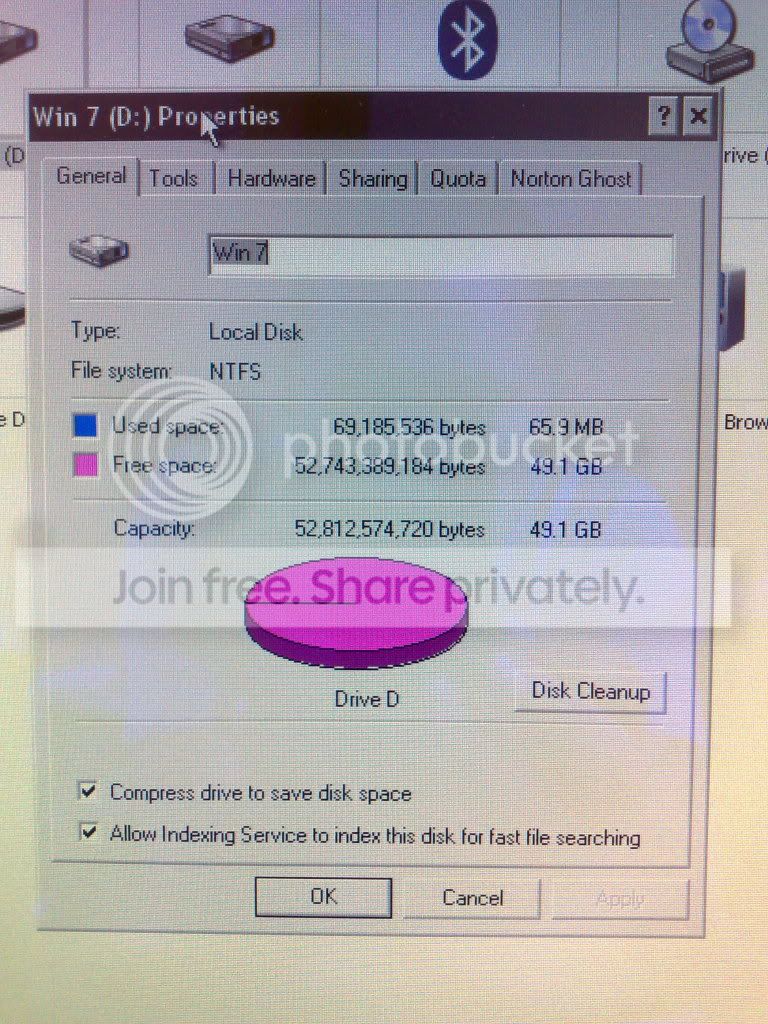
Guys, sorry to keep going on but i'm none the wiser. Been up since 8am and its now 1pm! LOL. I have attached pictures of what i have done. Maybe you can tell me where i'm going wrong!

110720091283.jpg


110720091281.jpg


110720091284.jpg


110720091285.jpg


I'm sooooooooo confused! I have also been searching the forum and knowone else seems to have the problem!

Even the Disc 1 Partition 2 thats Primary does not work!

Also, i was adiment that the x64 ( i think ) would work on the PC, is it worth me trying the 32?

ANY HELP APPRECIATED. Awaiting your responce
 

My Computer My Computer

OS
Windows XP SP2
patition problem

Guys, sorry to keep going on but i'm none the wiser. Been up since 8am and its now 1pm! LOL. I have attached pictures of what i have done. Maybe you can tell me where i'm going wrong!

110720091283.jpg


110720091281.jpg


110720091284.jpg


110720091285.jpg


I'm sooooooooo confused! I have also been searching the forum and knowone else seems to have the problem!

Even the Disc 1 Partition 2 thats Primary does not work!

ANY HELP APPRECIATED. Awaiting your responce

OK what are you using to try and use the partitions are you trying to install to that partition? everything looks ok on the disks so it must be something else. tell us what you are trying to do and tell us abt your system.

Ken
 

My Computer My Computer

Computer Manufacturer/Model Number
HP Pavillion dv-7 1005 Tx
OS
Win 8 Release candidate 8400
CPU
[email protected]
Memory
4 gigs
Graphics Card(s)
Nvidia 9600M
Sound Card
HD built-in
Monitor(s) Displays
17" Wxga
Screen Resolution
1440x900
Cooling
none
Internet Speed
45Mb down 5Mb up
well, as per 1st post, i am a novice! Im running win xp and have been for 3 years on the pc. I wanted a fresh look and modernise the pc so downloaded win 7. wanted to create a fresh instal and this is the probs i'm getting. I think i have 2gb Ram, but not sure on what other stats! Sorry Ken, not much use! LOL
 

My Computer My Computer

OS
Windows XP SP2
ram quwstion

well, as per 1st post, i am a novice! Im running win xp and have been for 3 years on the pc. I wanted a fresh look and modernise the pc so downloaded win 7. wanted to create a fresh instal and this is the probs i'm getting. I think i have 2gb Ram, but not sure on what other stats! Sorry Ken, not much use! LOL

first let me say welcome to sevenforums.

hey dont worry abt it we all start as new users sometime.

Ok am i right in saying you are trying to install a new win 7 image? where did you get the file and what version is it?

Ken
 

My Computer My Computer

Computer Manufacturer/Model Number
HP Pavillion dv-7 1005 Tx
OS
Win 8 Release candidate 8400
CPU
[email protected]
Memory
4 gigs
Graphics Card(s)
Nvidia 9600M
Sound Card
HD built-in
Monitor(s) Displays
17" Wxga
Screen Resolution
1440x900
Cooling
none
Internet Speed
45Mb down 5Mb up
I believe its a win 7 image! File came direct from Microsoft via there download page. It was a 64bit version. So I'm currently downloading the 32bit version now to see if anything is different. Shall report when iso file downloads and is burnt to DVD :)
 

My Computer My Computer

OS
Windows XP SP2
partiton problem

I believe its a win 7 image! File came direct from Microsoft via there download page. It was a 64bit version. So I'm currently downloading the 32bit version now to see if anything is different. Shall report when iso file downloads and is burnt to DVD :)
It shouldn't make any difference whether its 64, or 32 (if you hware can run 64) did you burn the image or did you copy the files to the dvd burner?

Ken
 

My Computer My Computer

Computer Manufacturer/Model Number
HP Pavillion dv-7 1005 Tx
OS
Win 8 Release candidate 8400
CPU
[email protected]
Memory
4 gigs
Graphics Card(s)
Nvidia 9600M
Sound Card
HD built-in
Monitor(s) Displays
17" Wxga
Screen Resolution
1440x900
Cooling
none
Internet Speed
45Mb down 5Mb up
Still no joy. Given up hope now! Even formatting and creating a nre patition within the Win 7 install, it still does not recognise and install. Oh well :(
 

My Computer My Computer

OS
Windows XP SP2
xppart

Still no joy. Given up hope now! Even formatting and creating a nre patition within the Win 7 install, it still does not recognise and install. Oh well :(

OK the file you downloaded was it a file that had an ISO extension. something like winmain7227.x86.xxxxxxxx.ISO?

you burned that iso to dvd right?

Ken
 

My Computer My Computer

Computer Manufacturer/Model Number
HP Pavillion dv-7 1005 Tx
OS
Win 8 Release candidate 8400
CPU
[email protected]
Memory
4 gigs
Graphics Card(s)
Nvidia 9600M
Sound Card
HD built-in
Monitor(s) Displays
17" Wxga
Screen Resolution
1440x900
Cooling
none
Internet Speed
45Mb down 5Mb up
Thats correct Ken, file name was something like that and burned to DVD
 

My Computer My Computer

OS
Windows XP SP2
install problem

Thats correct Ken, file name was something like that and burned to DVD

Im running out of ideas. win tries to install into disk 0 partition 0, now i can guess you dont want to install it there. there is obviously something wrong. it doesn't look like its the way its partitioned. I have gone thru all the snips and they look normal. If the ISO, are ok and they partitions are ok, and it does boot from the dvd. the only things that arer able to change the way something installs is the BIOS,, the dvd drive, the image, and the HD you are trying to install it to. this is a desktop right? so you coudl use a 3rd party disk management (like parigon disk utility suite 2009) and change the way the drives load so that the empty partitions is drive 0 part 0. that might make xp not able to boot.

The last option you have is to blow up the entire drive, and install win 7 first. I know thats a pain but it may come to that

Ken

Edit.. Im going to see if I can get a few ppl to look at this in case I forgot something.
K
 

My Computer My Computer

Computer Manufacturer/Model Number
HP Pavillion dv-7 1005 Tx
OS
Win 8 Release candidate 8400
CPU
[email protected]
Memory
4 gigs
Graphics Card(s)
Nvidia 9600M
Sound Card
HD built-in
Monitor(s) Displays
17" Wxga
Screen Resolution
1440x900
Cooling
none
Internet Speed
45Mb down 5Mb up
xp in win

Cheers Ken :)


Nick have you tried the tutorial section here at SF. Im lloking thru it now and there are a couple of suggestions I dident even think abt\

Ken
 

My Computer My Computer

Computer Manufacturer/Model Number
HP Pavillion dv-7 1005 Tx
OS
Win 8 Release candidate 8400
CPU
[email protected]
Memory
4 gigs
Graphics Card(s)
Nvidia 9600M
Sound Card
HD built-in
Monitor(s) Displays
17" Wxga
Screen Resolution
1440x900
Cooling
none
Internet Speed
45Mb down 5Mb up
Back
Top